
Xfce: the Third Man
In the famous 1949 movie The Third Man, much hinges on a traffic accident and two men—and, it seems, a third man also was involved. Investigation leads to all kinds of events, until eventually the truth surfaces, and the key third man is found. But, go watch the movie for the details—no spoilers here. In the Linux world, whenever you talk about desktop environments, everyone typically remembers only two (KDE and GNOME), but there's also an often-forgotten third one, Xfce. (There actually are multiple “third” desktops, but let's pretend there's only one for the sake of my catchy intro.)
In this article, I cover Xfce's main features and functions, and why you shouldn't merely dismiss it, because it's a worthy contender to the other more-famous counterparts. Oh, and while you're reading, you might want to listen to the “Third Man Theme”, with its distinctive zither sound (not that it has anything to do with Linux, but it's great music).
Xfce started out in 1996, as a Linux version of CDE (Common Desktop Environment), a commercial desktop still in use today. However, after a dozen years of development and several major versions (Xfce currently is at version 4.4, with version 4.6 in the works), Xfce has diverged from CDE and stands on its own. The first versions were based on the proprietary XForms library (see the What's in a Name? sidebar) and were not open source, but version 3.0 was rewritten from scratch, substituting GTK+ for XForms, and was licensed under the GPL. Version 4.0 saw yet another major upgrade, changing to the GTK+ 2 libraries, also used for GNOME.
As its creator Olivier Fourdan said, Xfce is “designed for productivity”, so “it loads and executes applications fast, while conserving system resources”. With modern hardware, that point may be moot, but Xfce can give new life to older, slower processors or RAM-challenged machines. However, even with the latest CPUs, you might appreciate the extra speed.
All the standard packages included with Xfce (more on this below) were designed with speed and responsiveness in mind, and the rest of the selections also follow suit. For example, instead of other more resource-intensive suites, you get Abiword and Gnumeric—less capable perhaps, but more appropriate given Xfce's goals, and for many users, they're more than sufficient.
Xfce sports no fixed release plan, employing instead the oft-used OSS method of “when it feels like it's ready to be released”. The focus is on quality rather than on fixed timelines. Xfce's maintainers also suggest, tongue in cheek, that they can be hired to produce new versions on demand, but it's going to cost you. At the time of this writing, Xfce stands at version 4.4.3, but version 4.6 is in beta and expected to be ready in early 2009.
What's in a Name?
When the project started in 1996, it was named XFce (with an uppercase F), and the letters stood for XForms Common Environment. When XForms' usage was dropped, the name didn't change, but the F became a lowercase f.
Due to its leanness, Xfce also has been called the Cholesterol Free Desktop Environment (but that doesn't quite fit the acronym). The Xfce Wiki site suggests another possibility, X Freakin' Cool Environment, which hasn't caught on yet. So, Xfce is now an acronym that doesn't stand for anything.
You can use Xfce with practically all modern distributions. Some, such as Xubuntu or the Fedora Xfce Spin, come with Xfce as the standard desktop environment. Many others, including OpenSUSE or Slackware, allow you to install Xfce instead of, or in addition to, KDE and GNOME. Generally, you can use a standard package manager to install Xfce. For example, in Ubuntu, you would do sudo apt-get install xubuntu-desktop, and in OpenSUSE, you would do sudo zypper in -t pattern xfce. As always with open source, you can download, compile and configure Xfce yourself; see Resources for more information.
Additionally, the os-cillation Software Center provides a graphic installation wizard to help with compilation and installation, but it can be a long process. You're better off getting a binary package if you can.
Requirements for Xfce are meager—and well below those of KDE and GNOME—meaning you could run it comfortably on a Pentium III at 133MHz, with 64MB of RAM. Of course, a more powerful processor and a larger amount of RAM will enhance the performance. Some users report running Xfce with even lower-end systems, including a Pentium I or just 32MB of memory, but that's probably the absolute bottom.
If you're running Xfce with Xorg 6.8 or above and an appropriate video card, you can enable several graphic effects. First, make sure you enable the Composite extension, by including the Composite option in the /etc/X11/xorg.conf file, as follows:
Section "Extensions"
        Option "Composite" "Enable"
EndSection
Then, log out and back in.
You will be able to specify some visual effects, such as transparency for window decorations, window shadows and so on (see below for details). Note that XFWM4, Xfce's own window manager, does the effects on its own, without requiring any further programs or modules.
If you are used to KDE or GNOME, you'll notice some differences, but nothing too dramatic. Right-clicking on the desktop produces a menu with all your applications. Note, however, that the menu is “shallow”—selecting an item in the menu directly produces a list of possible applications, and there are no more submenus. If you want a nicer, multilevel menu, right-click on the menu button on the panel, and select Edit Menu. You'll see a line that looks like this:
---include--- system
Right-click on it, and you can select the menu style you want: Simple (a single level) or Multilevel. Click File→Save, and then close the window. By clicking on the menu button and selecting Properties, you can manage other changes; feel free to experiment.
If you followed the steps in the above paragraph, you will have experienced Xfce's mouse-only style of configuration. Almost all available options can be selected with only the mouse, providing a consistent and easy interface.
Let's move on to more customizations. In the main menu, choose Settings (Figure 1), allowing you to change Xfce's look and feel. If you search the Net a bit, you'll even find people who have managed to make Xfce look like Windows.
Here are some of the items you might want to explore:
Appearance (or User Interface Preferences) lets you select or install window and icon themes; see Resources for more eye candy.
Autostarted Applications lists the applications that will be started automatically whenever you log in. Note that all applications you saved the last time you logged out also will be started; take a look at Sessions and Startup for some options. Also, Preferred Applications lets you specify your favorite Web browser, mail reader and similar programs.
Desktop Settings and Screensaver let you select the desktop background (solid colors or gradients, or an image) and screensaver, along with some behavior aspects, such as the meaning of a middle- or right-click (the defaults are showing the window list and showing the desktop menu, respectively) or what kinds of icons (if any) will be shown.
Mixer Settings (or Sound) and Monitor Settings (or Display Settings) deal with sound and screen and have relatively few options. For multimedia options, check Gstreamer Properties too.
Keyboard Properties lets you define shortcuts and accessibility features.
Panel Manager lets you specify how many panels there should be, at which positions (top- or bottom-centered) and of what size. You can right-click on a panel and select Add New Item in order to decide what should be shown. Here, you can change the menu, windows bar and system tray. Opting for a classic look, I configured just one bottom-centered panel with a menu, several program launchers (allowing access to a terminal, editor, file manager and such), a task list (showing open applications), a few applets, a clock and the lock and logout commands.
Window Manager Settings lets you select the default style for windows, keyboard shortcuts, several details on focusing windows, opaque moves, resizing and the meaning of a double-click on a window. You also should look at Window Manager Tweaks for similar items. In particular, go to the Compositor tab, which lets you specify transparency and shadow parameters.
Workspace Settings lets you choose how many desktops you want (the fewer the better, in terms of speed) and some other working details.
You might have noticed there is no Fonts configuration option, and apparently, there won't be one in Xfce 4.6 either. If you want to add or remove fonts, you have to do it manually.

Figure 1. Practically all configuration can be done with only the mouse.
Since version 4.4, the default Xfce file manager is Thunar (the old Saxon name for Thor, the Nordic god of thunder), which replaced the previous file manager XFFM (Figure 2).
Thunar is fast and easy to use, and it's similar to Nautilus, Dolphin or Rox-Filer. In terms of working with files and directories, usage is quite similar to other file managers, and you'll likely feel at home quickly.
Thunar is a lightweight program by design, but you can add functionality through plugins. Download plugins using your package manager or directly from the Thunar Web site. Among the possible extra functions are the following:
Advanced Properties adds extra pages to the File Properties dialog. For image files, it displays only the image properties, and for .desktop files, it provides launching information, allowing you to specify which program should be run.
Archive lets you create and extract files from .rar, .zip and similar archive files.
Renaming lets you rename several files at once and provides search-and-replace patterns, so you could, for example, change all *TXT files to *txt with a single command.
Media tags also lets you rename media files (such as .mp3) by providing access to their tags.
For archived files, the default still is Xarchiver, but Squeeze is set to be the next option (Figures 4 and 5). Xarchiver supports most types of archive files (bzip2, gzip, rar, rpm, tar, zip and so on), with password detection (for reading) and encryption (for writing). You can preview, cut, copy, paste, rename, and drag and drop files to or from archives. Squeeze still is in development and offers only add, extract and delete functions for now.
Finally, Ristretto (the name for a highly concentrated espresso) is an image viewer. You can open a whole directory at once and see all the images in a slideshow fashion (Figure 6). Ristretto lets you zoom and rotate images, and it also can be used via a Thunar plugin.
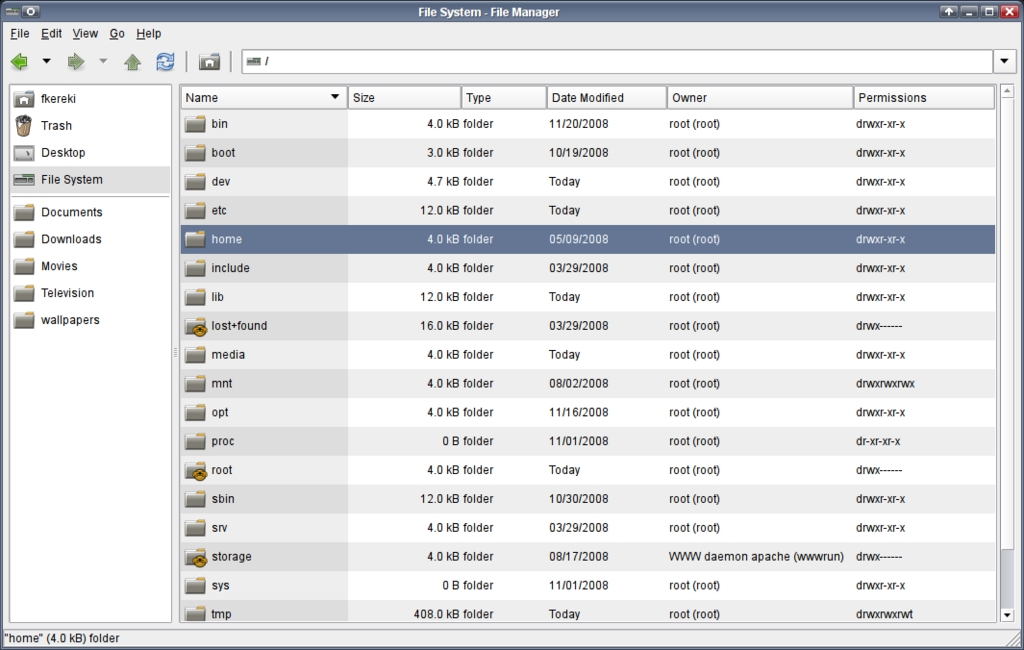
Figure 2. Thunar, Xfce's Standard File Manager
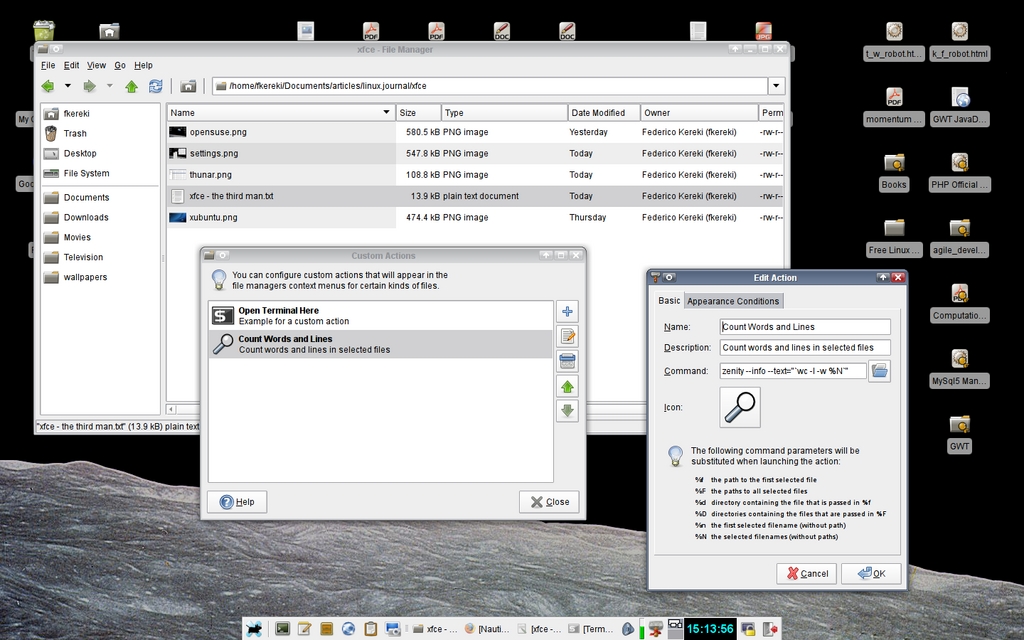
Figure 3. Custom Thunar Action
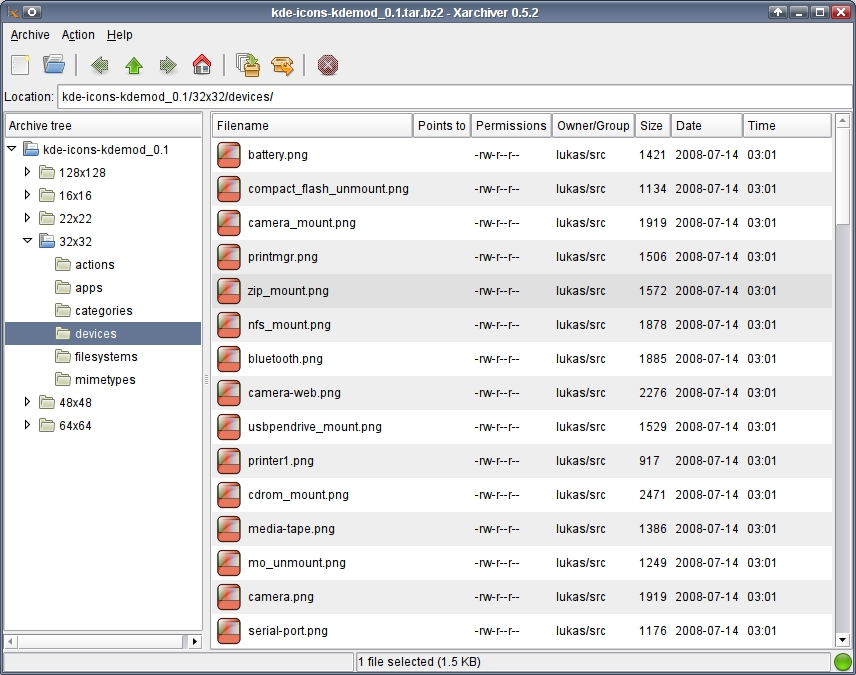
Figure 4. Xarchiver, the Current Xfce Archive Manager
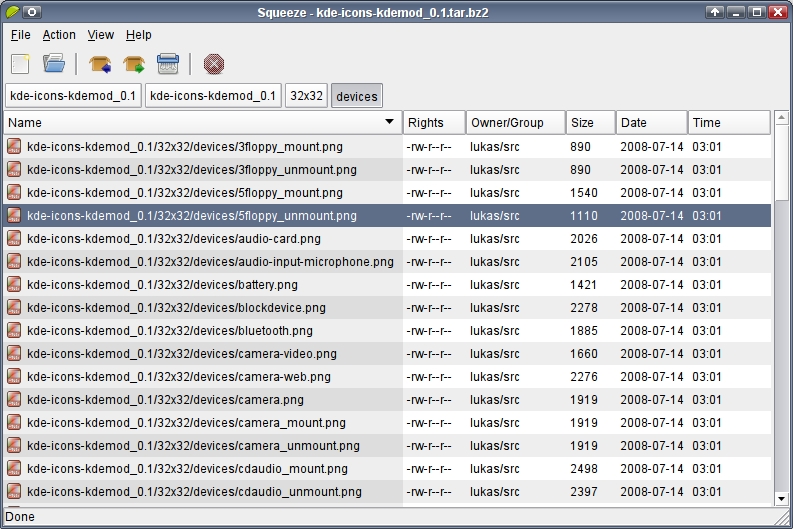
Figure 5. Squeeze, the Xfce Archive Manager

Figure 6. Ristretto Image Viewer
Thunar Customization
Thunar provides extra customization possibilities, allowing you to define personal commands. Click Edit→Configure custom actions, and you can create an action of your own. To test it, I added a “Count Words and Lines” feature (Figure 3). I set Name to Count words and lines, and Command to:
zenity --info --text="`wc -l -w %N`
And, in the second tab, Appearance, I checked that this command should be applied to Text Files. Zenity shows a dialog box. If you don't use zenity, the output of the wc command won't be shown. If you right-click on a text file and select the Count Words and Lines action, you will get a dialog box showing the result of the wc command.
If you want to play music, Xfce includes Xfmedia (Figure 7). It provides basic playlist functions and is easy to configure. You can randomize the playlist, set diverse “repeat” options as well as provide “visualizations” to accompany the music (not fully developed yet). Xfmedia also is touted as a video player, because of its Xine usage.
However, for DVD playback, it's seriously lacking in command options, such as menu navigation, choosing subtitles and the like, so you're better off sticking with Totem (Figure 8), which is the default application for DVDs.
Xfburn provides CD and DVD creation with a simple interface (Figure 9). Xfburn still is in the early stages of development, but you can burn ISO images or data to CDs or DVDs. The ability to create audio CDs is currently lacking, but it's promised for a future release.
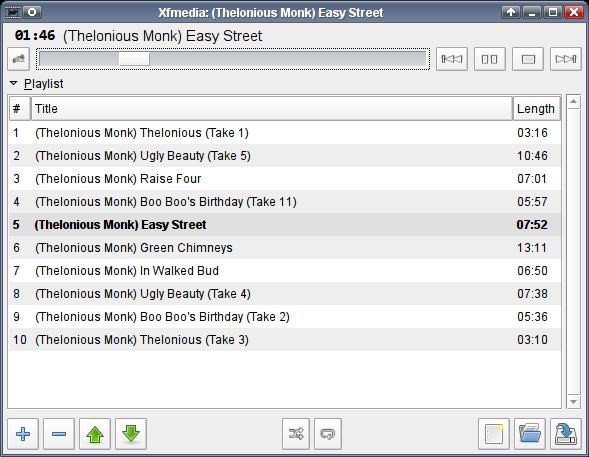
Figure 7. Xfmedia

Figure 8. Totem for Video

Figure 9. Xfburn provides CD and DVD burning, but it can't create audio CDs yet.
Instead of more resource-hungry office suites like OpenOffice.org or KOffice, Xfce provides GNOME's Abiword and Gnumeric. Of course, you can use the other suites if you prefer. For simpler text-editing tasks, Mousepad is the standard editor. It offers basic functionality, and in fact, I used it to write this article.
For messaging purposes, Pidgin also is provided. Pidgin is a good choice, because it can work with multiple protocols (AIM, Google Talk, ICQ, MSN, Yahoo and more), and it integrates well with the desktop.
Finally, as an agenda and calendar, Orage (previously known as Xfcalendar) provides a system-tray clock (right-click on the panel to make it appear) and a personal agenda. You can store events and get alarms. You can schedule repeating, periodic events and full-day events (like birthdays or holidays). Orage even can work across different time zones (Figure 10).
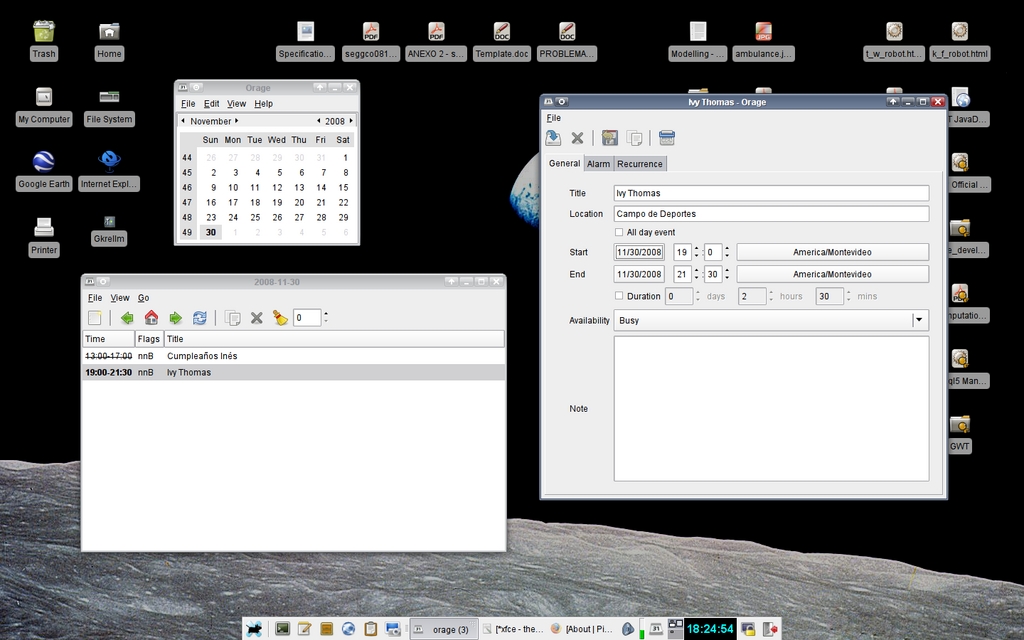
Figure 10. Orage provides clock and calendar functions with alarms and notifications.
In the movie, finding the third man proved to be a disappointment to the main character, but with Xfce, that won't be the case. With low requirements, high performance and an easy interface, you can be productive in little time. Although it's not quite as packed as KDE and not as simplified as GNOME, it's a balanced desktop environment in terms of power and ease of use. No matter what kind of machine you use, you'll find it worthwhile.
Resources
Xfce Official Web Site: www.xfce.org
Xfce Documentation Wiki: wiki.xfce.org
Installation Packages: www.xfce.org/download
Eye Candy for Xfce: www.xfce-look.org
Abiword: www.abisource.com
Gnumeric: projects.gnome.org/gnumeric
Orage: www.xfce.org/projects/orage
Pidgin: www.pidgin.im
Squeeze: squeeze.xfce.org
Thunar: thunar.xfce.org/index.html
Xarchiver: xarchiver.xfce.org
Xfburn: www.xfce.org/projects/xfburn
Xfmedia: spuriousinterrupt.org/projects/xfmedia
Dolphin: dolphin.kde.org
GTK+: www.gtk.org
Konqueror: konqueror.kde.org
Nautilus: projects.gnome.org/nautilus
os-cillation: www.os-cillation.com
Totem: projects.gnome.org/totem
Zenity: directory.fsf.org/project/zenity
Distributions with XFCE:
Debian Xfce Group: pkg-xfce.alioth.debian.org
Fedora Xfce Spin: www.redhat.com/archives/fedora-announce-list/2008-February/msg00005.html
Linux Mint Xfce Community Edition: www.linuxmint.com/edition.php?id=27
Mandriva Xfce Live: wiki.mandriva.com/en/XfceLive
OpenSUSE Xfce: en.opensuse.org/Xfce
Slackware: slackware.com
Xubuntu: www.xubuntu.org
Federico Kereki is an Uruguayan Systems Engineer, with more than 20 years' experience teaching at universities, doing development and consulting work, and writing articles and course material. He has been using Linux for many years now, having installed it at several different companies. He is particularly interested in the better security and performance of Linux boxes.


