
A Look at the Kindle
The Kindle has been out for a year now, and Amazon has had plenty of time to work out any kinks in the software and hardware. It should be a rock-solid device, right? I decided to find out. After spending some quality time with the Kindle, I now can say the answer is mixed. Some things work great on the Kindle, but other things just don't, and some of those things probably never will work right (until Kindle 2.0, that is).
The good news is that the Kindle is readily available. Early on, it was perpetually out of stock on Amazon's Web site. Some critics claimed the shortages were self-inflicted, and Amazon claimed demand was simply “overwhelming”. Whatever the reasons were, they have been overcome. You want one delivered tomorrow? Done.
The Kindle comes in a very attractive package that resembles a book. Inside the box, you get a USB cable, a power brick, a manual, a handsome carrying case and the Kindle itself.

Figure 1. The Kindle comes with everything you see here.
After performing my solemn duty as a man and a geek of throwing away the manual, it was time to get the Kindle up and running. The first order of business was to plug it in and charge it up, and then, get some content on it. Thankfully, charging takes only a couple hours, and you can use the Kindle while it's charging.
Connecting the Kindle to your computer is as easy as connecting any other modern electronic device via a standard USB cable. The Kindle shows up as a removable device, like most cameras and thumbdrives. If you have an SD card plugged in to the SD card slot, it also shows up.
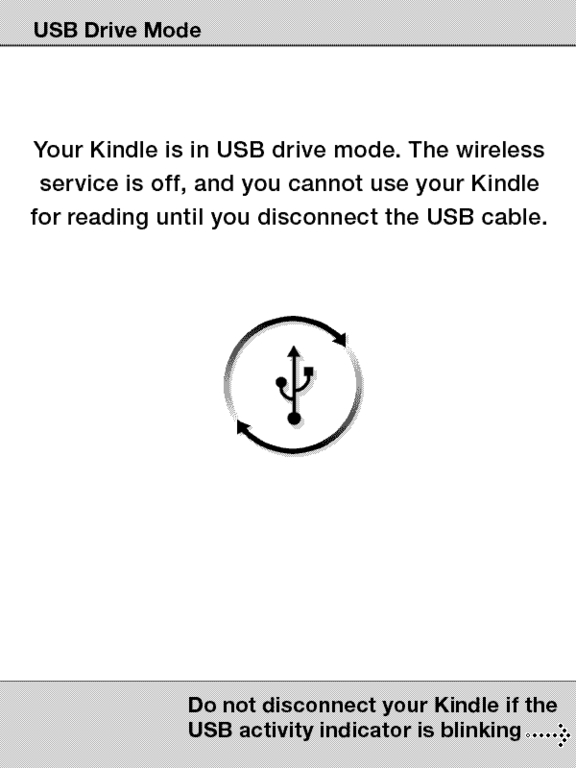
Figure 2. This screen appears on the Kindle while USB is plugged in.
First and foremost, the Kindle is defined by its screen. The E Ink display immediately sets it apart from LCD and CRT displays. The best word to describe it is steady. I can stare at it for hours without my eyes growing tired like they do with LCD displays. Yes, it is only black and white with a few levels of gray, but for something designed for reading, it is ideal, or nearly so. The current generation of electronic pager displays isn't perfect—the blacks aren't truly black, and the whites are more of a light gray—but it's pretty close.
The Kindle is powered by a PXA255 XScale processor and has 256MB of internal Flash memory (with 180MB available for books and other content). Under the back cover of the Kindle is an SD card slot, the reset hole and the battery.
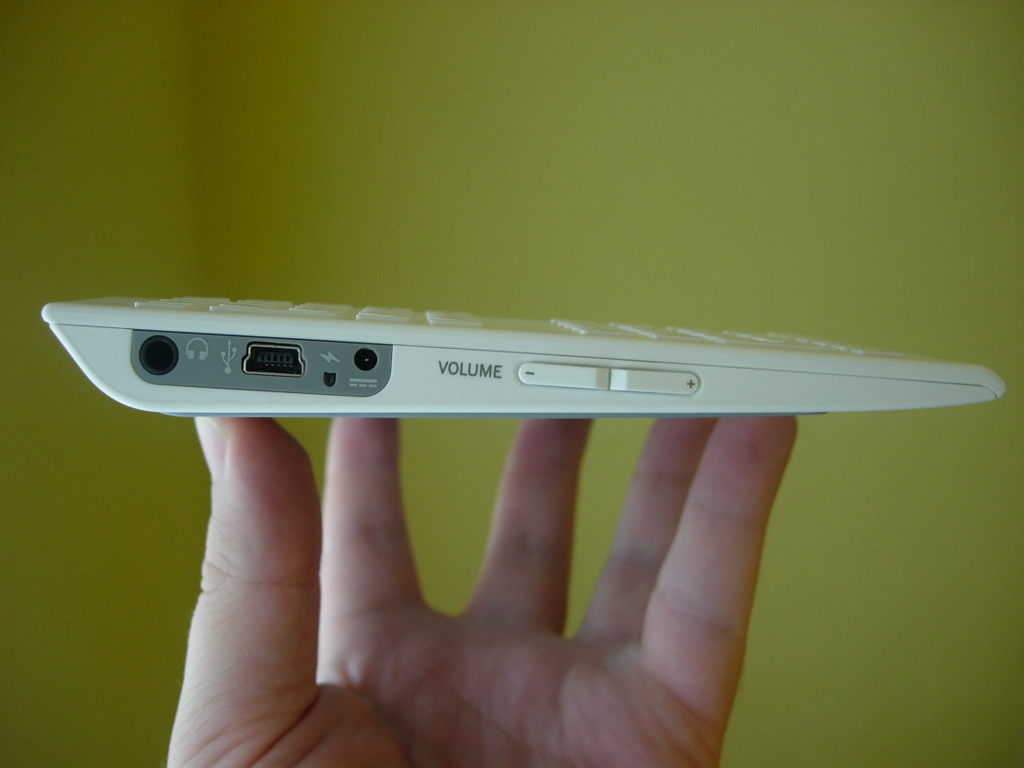
Figure 3. Ports on the Bottom of the Kindle
Navigation on the Kindle is handled by the Prev Page, Next Page and Back buttons along either side of the Kindle and by a clever scroll wheel, which functions as the Kindle's mouse replacement.
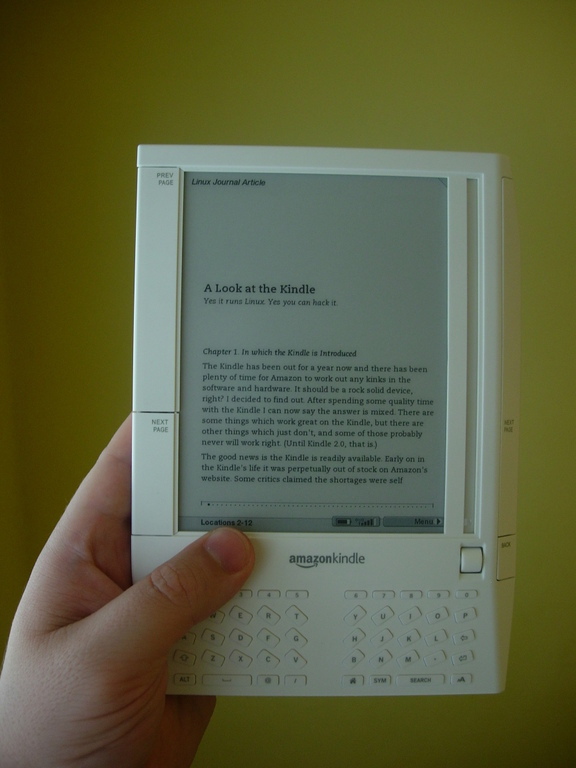
Figure 4. The Kindle is small and light.
The keyboard on the Kindle is cramped. The keys are too small, and they require too much force when pressing them. It works though, and the typing needed is minimal, so I can live with it.
All documents on the Kindle behave more or less the same. There's no scrolling; instead, you page through the text. You can change the font size and use the scroll wheel to look up words in the built-in dictionary or follow links to other places in the document. You can bookmark a page by moving the scroll cursor to the top of its track and virtually folding down the top-right corner of the page. You also can add notes to the text and highlight passages by drawing boxes around them.

Figure 5. You can change the font size to whatever you like.
One of the earliest complaints leveled against the Kindle was that it is tied to Amazon.com and its storefront. Along those lines, the two most common fears were “If my Kindle loses its memory, will I lose all my books and have to buy them again?” and “Is Amazon my only source for content?” The answer to both of those questions is no.
Amazon keeps a record of all of your purchases and lets you re-download them at any time. You also can back up your Kindle files on your computer. The Kindle is well integrated into Amazon's bookstore, but it is not tied to it. Several eBookstores have eBooks for free download or purchase, including ManyBooks.net, WebScription, Mobipocket.com and many others (see Resources).
Mobipocket is the originator of the Mobipocket eBook format. It was purchased by Amazon in 2005, so it's not surprising that the default format for Kindle eBooks is Mobipocket. Amazon adds DRM, unfortunately, to the otherwise Mobipocket-formatted eBooks it sells through Amazon.com and the built-in-to-the-Kindle bookstore. True to the real intent of DRM, this does little to stop piracy and everything to punish and annoy honest citizens. But, and this is a big one, the Kindle reads unencrypted Mobipocket files just fine. All of the sites listed above offer books in Mobipocket and other formats. My favorite of the bunch is ManyBooks.net, because it specializes in public domain books—meaning the books available for download on its site are not only free, they're also free (if you know what I mean).
One of the Kindle's neatest features is its wireless capabilities. The Kindle cannot connect to your Wi-Fi network, but it doesn't need to. Instead, it uses a built-in EVDO modem to connect to what Amazon calls its Whisper Net, but in reality, it's just Sprint's CDMA network. There is no charge for using this network, even for Web browsing. Instead, the costs are rolled in to the price of the Kindle itself, and the books, magazines and services you buy from Amazon.
Actually, I shouldn't include “services” in the above list, because right now, the only service Amazon charges for is its document-conversion service. You can e-mail Word, HTML or image documents to <yourname@kindle.com>, and they are converted and sent directly to your Kindle for $0.10 each. There's also a free version where you can e-mail documents to <yourname@free.kindle.com>, and you'll get a link to the converted document sent back to you (getting it onto your Kindle is your responsibility). The yourname part of the e-mail can be set and changed at Amazon.com in the Manage Your Kindle section.
I tested the conversion functionality with several documents, and I tried both the no-cost and regular services. There wasn't any difference in the time it took to convert the documents. The only difference was that one was sent to my Kindle automatically and the other arrived in my e-mail and had to be transferred manually to my Kindle.
My first test involved sending some .pdf files for conversion. The text converted fine, but I lost the graphics, some of the formatting, internal links and the .pdf's table of contents. I can't be too upset about what failed though, as .pdf isn't an officially supported file format. With all the PDF documents I have, it's nice that it works, even with some limitations.
I also tried sending over .gif, .jpg, .odt, .ods, .doc, .xls, .rtf and .html documents. The .html, .rtf, .gif, .jpg and .doc documents came through fine, but the translation service did not recognize the OpenDocument or Excel documents.
By default, this service converts and sends to your Kindle only documents sent from your primary e-mail address as configured at Amazon.com. You can add additional e-mail addresses.
The Kindle's main menu has an Experimental item on it. This submenu has three choices: Basic Web, Ask Kindle NowNow and Play Music.
Basic Web is what it claims to be—a basic Web browser. It has two viewing modes: Default and Advanced. Default strips out most formatting and just provides the content of the page you're viewing. Advanced mode tries to render some of the page's layout.
Ask Kindle NowNow is a human-powered search service from Amazon. You can ask a question and submit it, and then real people will research it on-line and send up to three responses to your Kindle. The service is free for now, but I can't imagine it will remain free indefinitely. To test it, I sent the question: “When will the successor to the Kindle be announced?” About 30 minutes later, I had three answers on my Kindle and in my e-mail inbox. They were all along the lines of “not this year”. The first one was the best; it was well researched and included statements from Amazon on the subject. The other two were short and not as informative, but still good. The responses also included links. Clicking on the links opens up the Kindle Web browser to the page in question—rather handy.
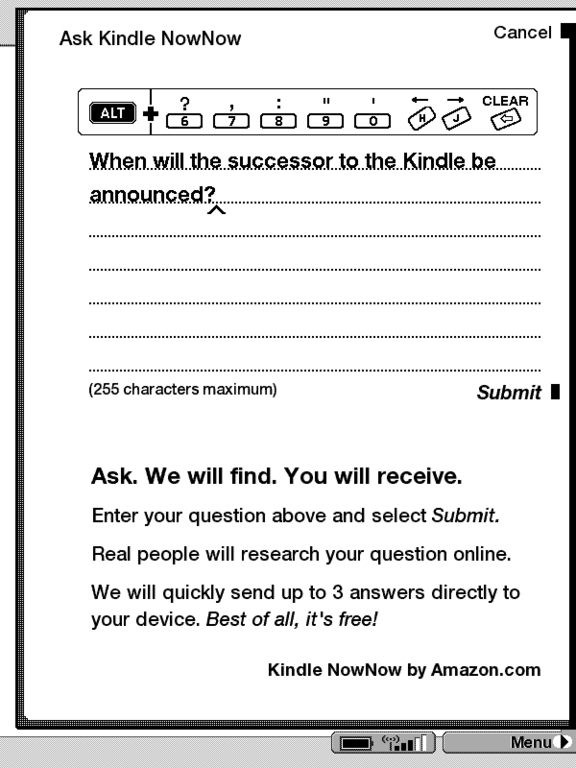
Figure 6. Ask Kindle NowNow any question, and people will try to answer it.
Playing music on the kindle works for MP3 files. No other formats work. There's also no playlist support and no user interface apart from the Play button on the Experimental page. There are two undocumented keyboard shortcuts you can use: Alt-F to skip to the next song and Alt-P to Play/Pause the music. It's not the most useful of music players, but it does play music.
Because the Kindle runs on Linux, you can download the source code to the Kindle from Amazon's Web site. Several bits of the code, like the GUI layer, are not available.
The source code tar file weighs in at 72.4MB. When untarred, you are left with a gplresults directory. Inside this directory are the following tar.bz2 files: alsa-lib-1.0.6.tar.bz2, alsa-utils-1.0.6.tar.bz2, binutils-2.16.1.tar.bz2, bsdiff-4.3.tar.bz2, busybox-1.01.tar.bz2, bzip2-1.0.3.tar.bz2, dosfstools-2.11.tar.bz2, e2fsprogs-1.38.tar.bz2, freetype-2.1.10.tar.bz2, gcc-3.4.2.tar.bz2, jpeg-6b.tar.bz2, libpng-1.2.8.tar.bz2, linux-2.6.10-lab126.tar.bz2, module-init-tools-3.1.tar.bz2, ncurses-5.4.tar.bz2, ppp-2.4.4b1.tar.bz2, procps-3.2.7.tar.bz2, taglib-1.4.tar.bz2, u-boot-1.1.2.tar.bz2, uClibc-0.9.27.tar.bz2, util-linux-2.12.tar.bz2 and zlib-1.2.3.tar.bz2.
We can deduce several things from this list: the Kindle boots with Das U-Boot, it uses FreeType for fonts, ALSA for audio, and it is using a Linux 2.6.10 kernel. I'm not a programmer, so I didn't delve into the code to see what was changed, reworked or added.
One of the more interesting pieces of code on the Kindle is BusyBox. Its presence suggests there is support for a command-line interface of some sort. It turns out there is, but it's not easy to access.
If you take the back cover off the Kindle, there is a little covered access port next to the battery. This access port can be removed with a small flat-head screwdriver. Under the cover is a small ribbon connector port, which functions as a console port. See Resources for links to the full details of the hack.

Figure 7. The console port on the back of the Kindle is small.
Thanks to the intrepid hacker who hacked into the Kindle through the console port, several hidden features of the Kindle have been brought to light.
First, there is a basic picture viewer built in to the Kindle. To enable it, you need to create a folder on the Kindle called pictures or dcim. In that folder, you can organize your photos into subfolders. Press Alt-Shift-Z while in the main menu of the Kindle, and each folder will appear as a separate “book” on the last page of the list of books.
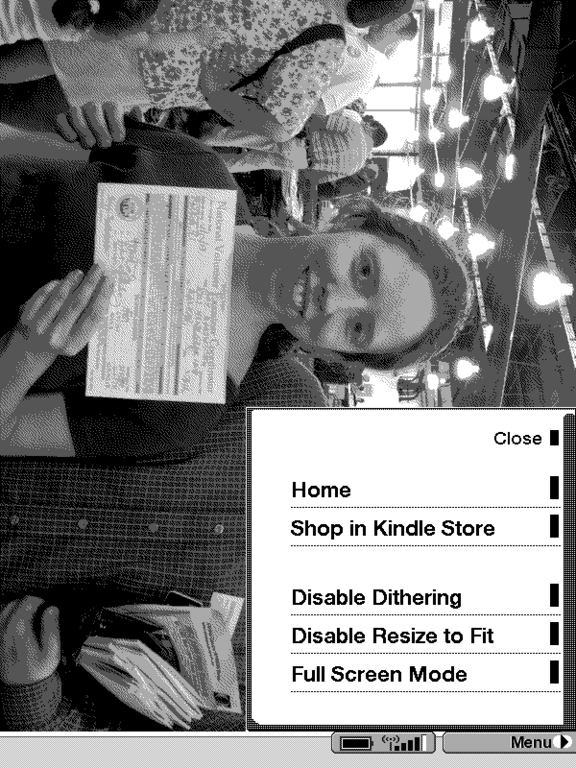
Figure 8. The options for the picture viewer app are few.
While viewing pictures, you can use the menu to enable and disable dithering and shrink to fit. You also can view photos in full-screen mode. While looking at your pictures, you can press Alt-Shift-0 to set the current picture as the picture for the Kindle screensaver. You also can press F to toggle full-screen mode.
A picture viewer isn't the only hidden application. There also is a Minesweeper game. You can launch it from the Kindle home screen by pressing Alt-Shift-M. From the menu, you can select different grid sizes from 4x5 to 8x10 to 14x14. Unfortunately, the novelty of having Minesweeper on the Kindle wears off as soon as you start playing. The Kindle's E Ink display just isn't suited to quick changes to the screen. Moving the cursor in Minesweeper is an exercise in patience: you press L, wait a few seconds, and with any luck, the cursor moves one space to the left. The slowness of the gameplay is probably why Amazon never provided a proper link to Minesweeper in the interface. I'm glad Amazon didn't take it out though, as it shows the Kindle is at least marginally capable of running a wide variety of software.
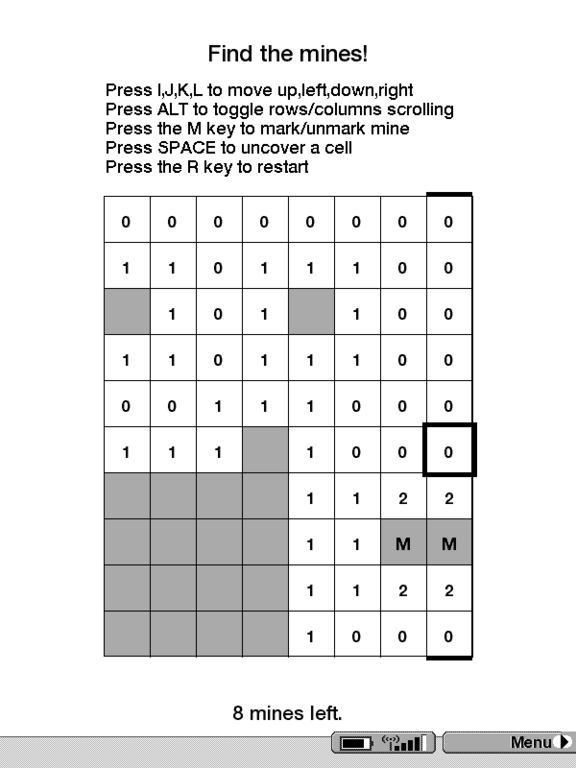
Figure 9. You can play Minesweeper, if you have the patience for it.
The Browser has a few neat keyboard shortcuts, including links to Google Maps to show your current location (Alt-1), nearby gas stations (Alt-2), nearby restaurants (Alt-3) and nearby hotels (Alt-4). When you press Alt-5, a little box pops up asking “Are you looking for something nearby?”, and you enter what you're looking for, and it searches for it. Well, it would, if any of these shortcuts worked. Instead of working, the Kindle just goes to Google Maps and puts “Not Avail,Not Avail” into the location box. Either it just doesn't work in my area, or there is some switch waiting to be thrown at Amazon or Sprint to enable it.
Finally, there are several global shortcuts that come in handy. The first is Alt-Shift-R, which reboots the Kindle. Next is Alt-Shift-., which restarts only the Kindle GUI. This last one is the most useful, for me anyway—Alt-Shift-G is a global screenshot shortcut.
The Kindle is underpowered, especially with larger books or when it's busy indexing or doing some other background task.
Next, the Kindle crashed a few times during my testing. Granted, I was running several apps that don't officially exist, but I don't feel I should have had to use the reset button as often as I did. Amazon still has some work to do there.
The Mobipocket format is another annoyance. It is an old binary format from the days when the Palm was known as the Pilot. It's not a very well documented format, and all of the tools for converting documents to it are proprietary and Windows-only.
The big question regarding the Kindle is whether it is actually worth $350. My thought is it is, if you read a lot.
And, I do. I carry around lots of books and printouts and miscellaneous scraps of paper—some for enjoyment and many for my job. I used to try reading things on my computer, but found my eyes quickly tired, so I switched to printing out longer articles and documentation I wanted to read. Apart from being environmentally wasteful, all that loose, printed material has to be organized or it grows into a big mess.
The Kindle has eliminated a lot of the mess. Now, when I head back to the server room, the only thing I need to carry is the Kindle—no stacks of notes and no reams of product documentation. It's all in the Kindle, along with a new novel to read while waiting for the server to finish its install. And, my desk is cleaner than any time in recent memory.
Is it worth $350? For me? Yes.
Resources
Kindle Source Code: www.amazon.com/gp/help/customer/display.html?ie=UTF8&nodeId=200203720&tag=particculturf-20
A Discussion of the .mobi File Format: www.mobileread.com/forums/showthread.php?t=16514
Hacking the Kindle, Parts 1–3: igorsk.blogspot.com/2007/12/hacking-kindle-part-1-getting-console.html, igorsk.blogspot.com/2007/12/hacking-kindle-part-2-bootloader-and.html and igorsk.blogspot.com/2007/12/hacking-kindle-part-3-root-shell-and.html
MobileRead—a Forum Devoted to eBooks: www.mobileread.com
Non-Amazon Places to Get Kindle-Ready Books: manybooks.net, www.baen.com/library, www.webscription.net and www.mobipocket.com
Daniel Bartholomew lives with his wife and children in North Carolina. His normal on-line presence is at daniel-bartholomew.com, but he also can be found on Twitter as daniel_bart and on identi.ca (and Jaiku and Pownce) as bartholomew.



