
The Java API to Android's Telephony Stack
As a Linux Journal reader, you've probably stumbled across Google Android here and there. You've probably read an introductory article or maybe you even downloaded an SDK and coded an application or two. If you haven't, I encourage you to do so, as this article is not an Android overview. I'm not going to talk about the Android architecture and application development; plenty of good articles already exist on those subjects. See this article's Resources for some links to Google video lectures about the Android architecture and Android application basics. However, if you have some basic knowledge of Android and would like to learn a bit about cellular telephony and how it is implemented in Android, this article is for you.
Android is all about applications. Almost every article and discussion on this subject revolves around the SDK, the Dalvik Java VM and the Android Market. In fact, it is quite difficult to find an Android article that doesn't mention applications. With all this hype, it's easy to forget that the Google phone is, after all, a phone, which (surprise, surprise) is supposed to make phone calls. So, this article takes a different route and instead of focusing on applications, it focuses on Android telephony—from the application API down to the cellular baseband hardware. This part of Android is not very well documented, but fortunately, Google has released most of the code under the Apache open-source license.
Before I start talking about APIs, dæmons and all the really interesting stuff, it's worth mentioning that although it seems like Android has all the hype, at least as far as Linux-based mobile phones are concerned, when you look at the facts, you will discover that actual Android adoption is far more modest than what Google would like you to believe. Currently, only one company (HTC) manufactures Android-based phones, and it has two variants sold by T-Mobile. A few other companies (Samsung, for instance) have announced that they are going to launch an Android-based phone some time during 2009. There are actually a few dozen other Linux-based mobile phone models on the market that are based on a competing platform, described in more detail below.
Before going into software, it is important to understand the underlying cellular telephony hardware architecture. Unfortunately, there are no standards in this area, and every model from every company may look completely different. Still, there are some common ideas and industry trends in cellular reference designs; a block diagram of cellular phone basics is shown in Figure 1.
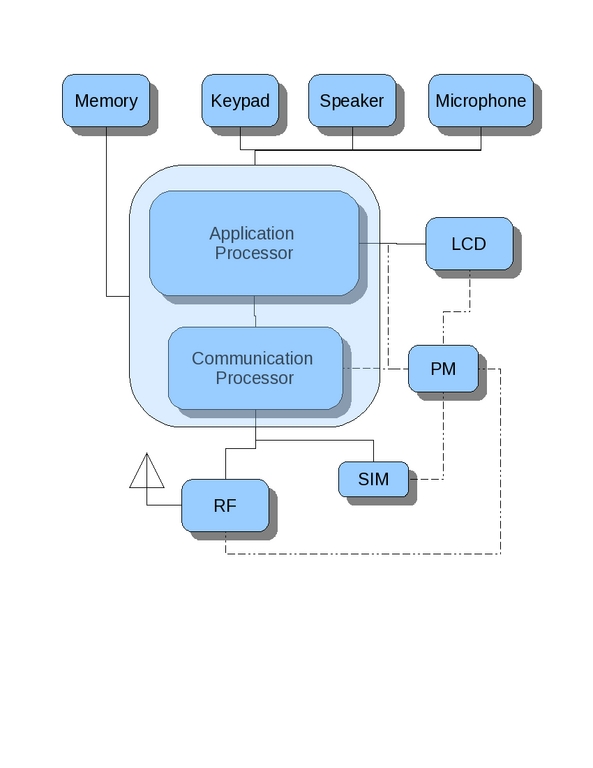
Figure 1. Simplified Cellular Phone Hardware Block Diagram
Figure 1 omits many crucial hardware components that have nothing to do with software architecture and, therefore, are not very relevant in the context of this article—after all, the goal here is to understand the telephony software stack.
Sometimes the application and communication (or baseband) processors are, indeed, different chips. However, more often than not, both CPUs reside on the same die or at least the same package. This is the case with the HTC/T-Mobile G1, which is based on a Qualcomm MSM7201A multicore CPU and includes an application processor (ARM11), a communication processor (ARM9) and some other cores, including a GPS. Sometimes a single CPU is used for both application and baseband tasks, usually in simple low-end phones. The distinction between application and communication processors is especially important in the context of software: when there is only one core used for both application and communication processing, the software stacks are quite different.
The application processor usually controls the screen and keyboard and runs the software stack that interacts with the user, including various applications. It usually runs some generic operating system, such as Linux, Windows Mobile or Symbian. The communication processor runs a cellular protocol stack on top of some RTOS, such as Nucleos or Thredx. Although the application software can be open source in some cases, the cellular protocol stack always is distributed as binary only. The PM chip is responsible for power management, and the RF for conversion of baseband to radio frequencies. Other peripherals, such as the LCD, keypad, speaker and microphone do not need further explanation.
It is important to note that the communication processor is responsible for cellular communications only (both voice and data). Wi-Fi, Bluetooth and other communication protocols are beyond the scope of this article, as they are conceptually different and often better documented.
Android is a software stack for mobile phones. It includes a modified version of the Linux OS, middleware (which is the topic of this article) and some applications. The SDK is available free of charge and can be downloaded from the Google Web site. The Android sources also are available and can be fetched from a GIT repository, although some important parts are missing.
As shown in Figure 2, Android consists of a runtime, libraries and application framework modules.
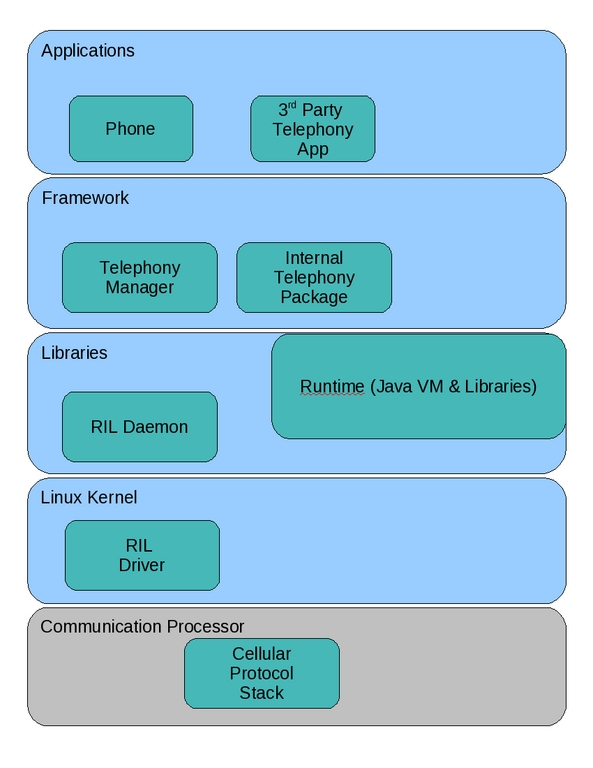
Figure 2. Android Architecture Block Diagram
Figure 2 shows only the modules that implement telephony functionality; for a more detailed diagram, refer to the Google Android overview page.
Telephony manager, which is part of the Android application framework, provides a telephony API to user applications. It consists of the android.telephony and android.telephony.gsm Java packages. This official telephony API is fully documented in the Android developer reference guide, so I don't describe it here in detail. It is far more interesting to check what important functionality is not included in this API, which turns out to be quite a lot. The current Telephony Manager API is mostly limited to providing phone and network status information, such as call state (idle, offhook or ringing), network operator name, roaming state and so on. The only parameters you can change are network operator name and selection mode, using the setOperatorName() and setIsManualSelection() calls, respectively. And, the only action you can perform is SMS, using sendDataMessage() and sendTextMessage(). This API is rather spartan to say the least, and it lacks many important functions. For instance, it is hard not to notice that all voice-call-related functionality is missing, yet some (platform) applications, such as Phone, manage to implement it.
Not only is this API not sufficient to create any useful telephony applications, it also is rather inconsistent. There is no clear architecture behind the class structure, and it is not obvious how support for other RATs (radio-access technologies) apart from GSM, such as CDMA200 and LTE, will work.
The first thing you discover when you look at the Android telephony API in detail is that it is not fully open. There is a lot of important functionality in the com.android.internal.telephony package. For instance, the Phone application uses this internal API to make/answer a call and access the SIM. This API is not documented. It can and probably will change in the future, and generally, it is not intended for use by applications that are not part of the Android platform—so much for the “All applications are created equal” motto. Fortunately, this API is documented pretty well in the source code of the Base framework module, which can be found under the frameworks/base/telephony/java/com/android/internal/telephony directory inside the Android sources.
The architecture block diagram shown in Figure 2 implies that privilege—that is, platform telephony applications use the com.android.internal.telephony package, although mortals are stuck with android.telephony.
This internal framework module communicates via UNIX domain sockets with the RIL (Radio Interface Layer) dæmon rild, which is written in C as one would expect (not Java). The majority of the telephony functionality of the RIL dæmon is implemented in the RIL library. Both the RIL dæmon and the library sources, along with a reference RIL driver, can be found under the hardware/ril directory. The RIL dæmon communicates using AT commands with either the RIL kernel driver (via the read/write interface when it is running on real hardware) or with the SDK emulator (via the socket interface). The RIL kernel driver is probably just a dumb pipe that forwards AT commands to the baseband processor via the appropriate hardware interface. Unfortunately, this part of Android telephony is neither documented nor open source. There is only a so-called reference RIL implementation in the hardware/ril/reference-ril directory. So, one has to guess what exactly goes on down there on real hardware. The reason this part is not open source is probably the same reason as the one that prevents some companies from releasing Wi-Fi firmware—regulations in many countries do not allow for manufacturers to provide direct access to radio hardware to end users.
GSM AT Commands
AT commands are the most common interface between cellular application and baseband processors, used by the majority of the cellular software stacks, including Android. They are defined in the 3GPP standard 27.007. They can be divided roughly into the following groups:
Call control commands, such as ATD to dial a number.
Network service commands, such as AT+CREG for network registration.
Mobile control, such as AT+CPBR to read a phone book.
SMS commands, such as AT+CMGS to send an SMS.
GPRS commands, such as AT+CGDCONT to define PDP context.
Many other commands exist, including some nonstandard vendor-specific commands. For a more detailed description, refer to the latest standards document.
Going back to the internal telephony API of the com.android.internal.telephony package that platform applications such as Phone use, you will find that the most important methods are in the Phone and SimCard interfaces as well as the Call and Connection abstract classes. The source code below shows some of the most important methods.
The Phone interface has methods that are used to place, accept or reject a call:
public interface Phone {
  Connection dial(String dialString) throws CallStateException;
  void acceptCall() throws CallStateException;
  void rejectCall() throws CallStateException;
  void setMute(boolean muted);
  void startDtmf(char c);
  void sendDtmf(char c);
  void stopDtmf();
  ...
}
A Call object is created when you answer a call, and the Call class methods implement call-related functionality allowing you to, among other things, hang up:
public abstract class Call {
  public abstract void hangup() throws CallStateException;
  public boolean isRinging()
  public abstract boolean isIncoming();
  ...
}
The Connection class is related to the Call class shown above. A Call can have a number of associated Connection classes accessible via the getConnections() method, while the Connection class has a reference to the corresponding Call, returned by the getCall() method). To be honest, I didn't manage to understand from the Android source code when and why there would be multiple connections in one call. Some telephony routines work with the Call class—for instance, those used to answer the call. Others work with the Connection class—for instance, it is returned by the dial() method of the Phone class. As you can see from the list of important Connection methods, their functionality is similar:
public abstract class Connection {
  public abstract void hangup() throws CallStateException;
  public boolean isRinging()
  public abstract boolean isIncoming();
  ...
}
Finally, the SimCard interface provides an access to a SIM card via methods that allow users to supply a PIN (Personal Identification Number) and a PUK (Personal Unblocking Key), which is used to unblock the PIN:
public interface SimCard {
  void supplyPin(String pin, Message onComplete);
  void supplyPuk(String puk, String newPin, Message onComplete);
  void supplyPin2(String pin2, Message onComplete);
  void supplyPuk2(String puk2, String newPin2, Message onComplete);
  State getState();
  ...
}
The SIM state, returned by the getState() method, can be either ready, PIN/PUK required or network locked.
If you are interested in the Phone interface implementation, you should check the PhoneBase class that implements some of its methods. The rest, which are RAT-dependent, can be found in GSMPhone, which extends the PhoneBase class and is part of the com.android.internal.telephony.gsm package. The SimCard interface and the GsmSimCard class, as well as Call and GSMCall, follow the same approach. GSM currently is the only RAT supported by the Android platform, but Qualcomm has announced that it is working on CDMA2000 support. More technologies, such as LTE (Long Term Evolution), may be supported in the future.
Another important class is TelephonyIntents, which defines intents—that is, events (in Android parlance) that the telephony framework can produce:
ACTION_SERVICE_STATE_CHANGED: the phone service state has changed.
ACTION_SIGNAL_STRENGTH_CHANGED: the phone's signal strength has changed.
ACTION_ANY_DATA_CONNECTION_STATE_CHANGED: the data connection state has changed for any one of the phone's mobile data connections.
ACTION_DATA_CONNECTION_FAILED: an attempt to establish a data connection has failed.
ACTION_SIM_STATE_CHANGED: the SIM card state has changed.
The Phone application (in the PhoneUtils class of the com.android.phone package) uses these methods to place or answer a call in the following way:
public class PhoneUtils {
  ...
  static boolean answerCall(Phone phone) {
    ...
    Call call = phone.getRingingCall();
    phone.acceptCall();
    ...
  }
  ...
}
static int placeCall(Phone phone, String number, Uri contactRef) {
  ...
  Connection cn = phone.dial(number);
  ...
}
The above code sample demonstrates only the most basic telephony functionality; however, along with the API outlined above, it should give you a good starting point for writing Android telephony applications. If you decide to do so, you probably won't be able to avoid having to dig in to the Android sources for more details. I hope having a bit more of an in-depth understanding of how cellular telephony works under the hood of the high-level Java API will help you in this endeavour.
Note that this article is based on the Android 1.1 SDK r1 and the Android main git branch snapshot taken on March 24, 2009. Because Android is being developed constantly, some of the APIs mentioned in this article may have changed since that date.
The LiMo Foundation is an industry consortium that defines an open, Linux-based software platform for mobile phones. So far, this sounds very much like Google Android, but when you look closer, you discover many important differences. First, LiMo is a consortium of many companies, while Android is a pure Google affair. Among LiMo's members are cellular operators, mobile phone manufacturers, semiconductor companies and software vendors—pretty much the whole mobile industry. Member companies include NEC, NTT DOCOMO, Samsung, Vodafone, Motorola and many other large telecom companies.
Google and the Android Open Handset Alliance (OHA), on the other hand, are newcomers in this market, and they will have to persuade handset manufacturers to adopt their platform, which, in some cases, means ditching their own platform in favor of another one. The LiMo Foundation was created long before OHA, which explains why there are dozens of LiMo-based phones on the market, compared with only two Android ones. Note, however, that the OHA members list is impressive as well, and it continues to grow; many companies are members of both LiMo and OHA.
Another important difference is that the LiMo Foundation does not provide an SDK. As a consortium, it is responsible for specifications only, and it defines a very clear and comprehensive specification of all the components of the LiMo platform, including a full telephony API both for applications and cellular modem vendors, which is once again something that Google Android lacks. The API was defined by companies having significant experience in this field, and it is not surprising that it includes all the telephony features one would expect, such as support for dialing/call answering, SMS, network selection, SIM access and more. It is up to LiMo's member software companies to produce LiMo-compliant SDKs. None are available at the time of this writing, but a few companies made announcements during MWC09 (Mobile World Congress), and we should expect the first versions some time during 2009.
The LiMo platform architecture shown in Figure 3 consists of an application manager and User Interface (UI) frameworks, and middleware running on top of the Linux kernel which provides access to all hardware peripherals, including cellular modem and device drivers.
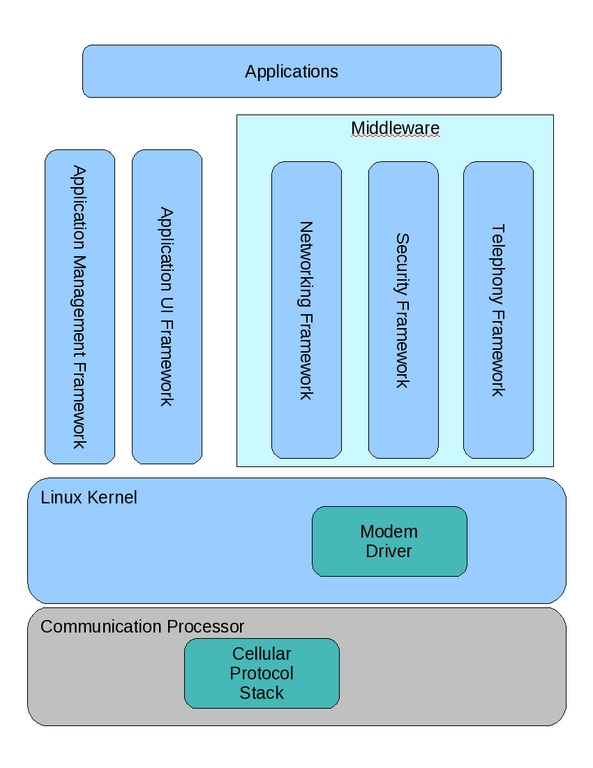
Figure 3. LiMo Architecture Block Diagram
Contrary to Android, applications are written in C/C++ instead of Java, and the UI is based on GTK+. The LiMo platform provides applications with all the services that one would expect from a mobile phone software stack, such as UI, application management, telephony, networking and messaging, IPC, multimedia, database, security and more.
For more details about the LiMo architecture and API, check the relevant whitepapers on the LiMo Web site.
Even though LiMo currently dominates the Linux-based phone market, Google Android has created a huge momentum that may change this situation. It also is possible that, in the end, each software stack will be used in its own niche: Android in the high-end smartphones and LiMo in more conventional devices.
Resources
Short Android Architecture Overview: developer.android.com/guide/basics/what-is-android.html
An Introduction to Android: sites.google.com/site/io/an-introduction-to-android
Anatomy and Physiology of an Android: sites.google.com/site/io/anatomy--physiology-of-an-android
Inside the Android Application Framework: sites.google.com/site/io/inside-the-android-application-framework
Android SDK: developer.android.com/sdk/1.1_r1/index.html
Android Source: source.android.com/download
Open Handset Alliance: www.openhandsetalliance.com
LiMo Foundation: www.limofoundation.org
LiMo API: www.limofoundation.org/en/technical-documents.html
3GPP Standards: www.3gpp.org
GSM AT Commands: www.3gpp.org/ftp/Specs/html-info/27007.htm
Alexander (Sasha) Sirotkin has more than ten years' experience in software, operating systems and networking. He currently works on the LTE (Long Term Evolution) Project at Comsys Mobile and lives with his wife and kid in Tel-Aviv, Israel. Alexander can be reached via e-mail at sasha.sirotkin [AT] gmail.com.



