
Cooking with Linux - Linux, Thunderbird and the BlackBerry—a Love Story
Excuse me, François, but what are you doing? Are you sending text messages while you should be getting ready for the restaurant to open? You aren't? Well, if you aren't texting, what are you doing hunched over that cell phone? Quoi? You are typing into three cell phones? My apologies, mon ami, but now I really have no idea what you are doing. Ah, I see, you're trying to update your contact list and calendars, and you can't think of a way to do that with your Linux system. But, three phones? One is your BlackBerry, and the other two phones belong to your aunt and your mother. Sigh...tech support for the family on restaurant time, François? What am I going to do with you? Put those phones down, and I'll show you a better way to synchronize all those contacts. Quickly! I can see our guests arriving even now.
Good evening, everyone, and welcome to Chez Marcel, where excellent Linux and open-source software finds its match with exquisite wines. Please, sit and make yourselves comfortable, mes amis. François was just getting ready to make his way to the cellar to get tonight's wine. Hurry, mon ami, and bring back the 2005 Vina Requingua Puerto Viejo Merlot from Chile that we were sampling, er, submitting to quality control earlier today. Vite, mon ami!
While we wait for his return, let me tell you about François' dilemma. He has multiple portable devices, including a BlackBerry, an Android phone and a Motorola RAZR, all of which he wants to synchronize with Evolution on his Linux notebook. On the store workstation, he uses Thunderbird instead, and at home, something else. Getting those contact lists, calendars and so on synchronized is easier than it sounds, and it all can be done with Linux and open-source software.
All this is possible, and easy, with a great little package from a company called Funambol. The software itself also is called Funambol, and it is freely distributed and open source. Essentially, it's a program that lets you perform over-the-air (also known as OTA) synchronization of your contacts, calendars and so on, using your cell phone or smartphone, desktop contact management software (Evolution, Thunderbird, Outlook and so forth) and other hardware. Part of the magic behind all of it is SyncML (Synchronization Markup Language), which also is known as Open Mobile Alliance Data Synchronization (OMA DS). SyncML is an open standard for synchronizing information, such as calendars and contacts, that is platform-independent. Several mobile phone manufacturers, such as Motorola, Nokia and Sony Ericsson, already include SyncML in their devices. SyncML also supports e-mail, which is handy for those needing (or just plain wanting) an alternative to proprietary products, like the BlackBerry.
Funambol consists of a server component and a client for your device or application. Start by getting your copy of Funambol server from funambol.org, and save it somewhere on your system. The package file, with a .bin extension, needs to be made executable before you execute it:
chmod +x funambol-7.1.bin
./funambol-7.1.bin
The whole thing takes only a few seconds. The steps that follow are extremely simple. Type yes at the “agree to the above terms” prompt (it's the GPL version 3). You'll be prompted for an installation directory which, by default, is /opt. It's best to accept the default unless you have a very good reason to do otherwise. The resulting folder will be /opt/Funambol. Once the product has been extracted, you'll be asked whether you want to start the server. Type yes and continue on. To make sure things are working properly, point your browser to http://localhost:8080/funambol/ds, and you should get status information back from the Funambol data synchronization server (Figure 1).
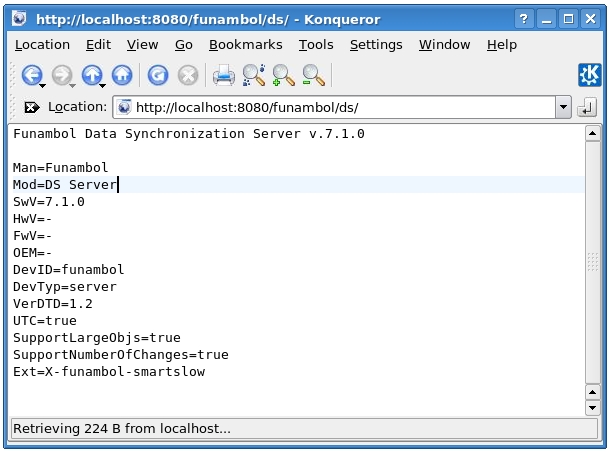
Figure 1. A Quick Test to Make Sure the Server Is Up and Running
Of course, if you aren't running this test directly on the server, you'll want to change localhost to the hostname or IP address of the server.
Funambol also comes with a simple Web app to test the contact as well as calendar creation and update before you turn it over to your mobile device. Point your browser to http://localhost:8080/funambol to bring up the demo page. You won't be able to do a great deal at this point, other than read the terms and conditions and test a very limited Web client. That demonstration will allow you to log in as guest with a password of guest and create contacts (Figure 2) or a calendar entry. Once you have done so, update a record or two, and make sure the changes are being saved.
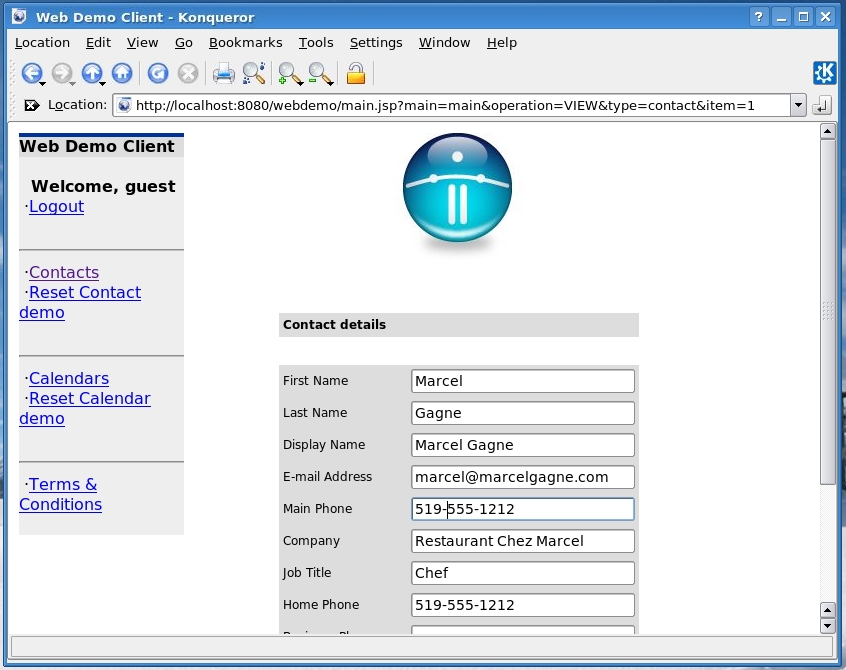
Figure 2. The Web client demo lets you create calendars and contacts, making it a better test.
Now that you know it works, you still can't do a great deal with Funambol in this form. In order to do more interesting things, you need to do a little system configuration. On the server side, there is a graphical administration tool. You can start it from the command line like this:
cd /opt/Funambol
admin/bin/funamboladmin
A couple seconds later, you'll see the Funambol administration tool appear (Figure 3). To use the administration tool, you first need to log in. If you don't see the login window up front, click File on the menu bar, and select Login. By default, the admin password, sa, already is set (you always can change it later), but for now, simply click Login.
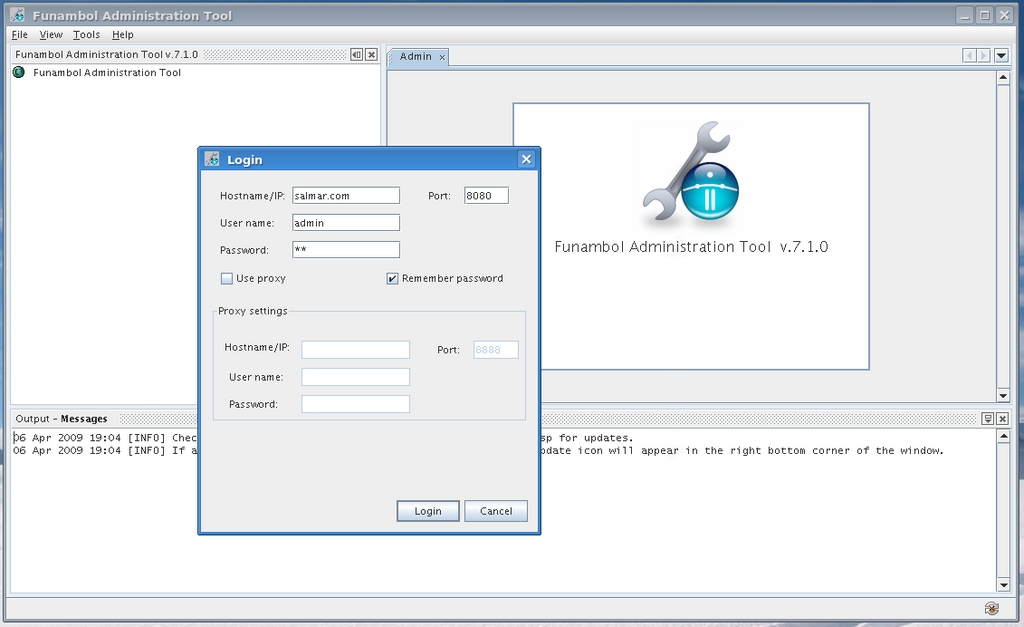
Figure 3. Funambol Administration Tool and Login Screen
The Funambol administration tool is divided into three panes: a navigator pane fills the top left half, an admin tool pane is at the top right, and a status pane is located along the bottom (Figure 4). Take a look at the navigator window, and you will see your system's domain name at the top. To expand the system tree, click the switch icon next to the domain name. You'll then see Server Settings (which expands into its own subtree), Users, Devices, Principals and Modules. That last one also expands into several other branches. To see how this all works and how you can configure and change things, let's deal with that admin password right now.
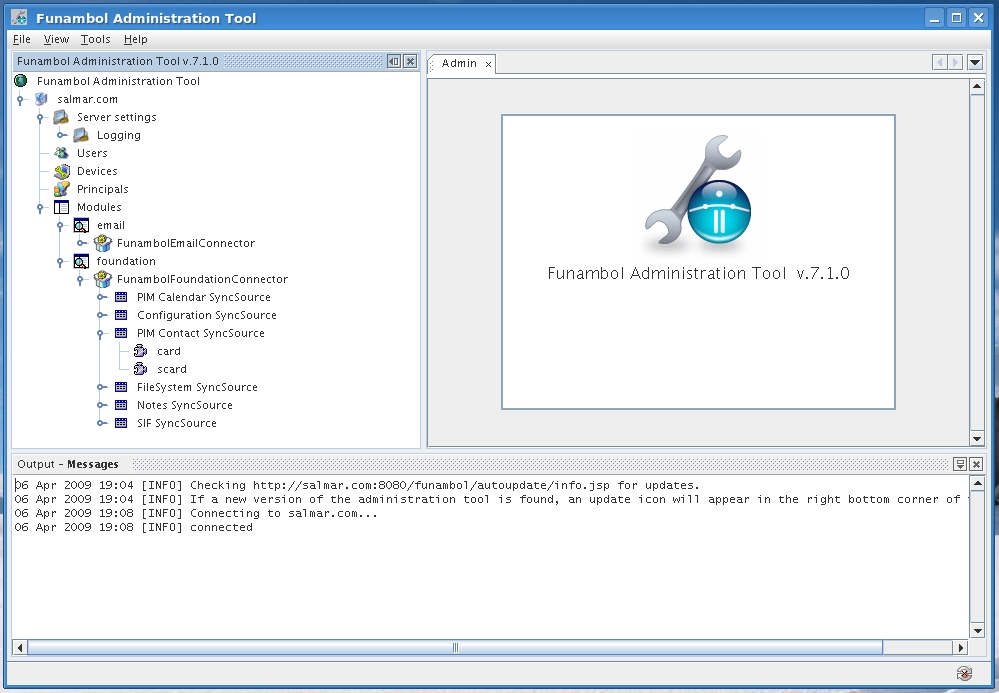
Figure 4. On the left, you can see the Funambol administration tool's system navigator with several expanded properties.
Double-click on Users and look at the admin tool window (Figure 5). The Search Users tool appears. You can search by user name, first name, last name and e-mail address. Enter admin in the search box beside Username, and click the Search button (notice that you can search by a part of the name as well as position of the text by clicking the drop-down box beside the label). Only one admin name should show up, so it naturally will be highlighted. If you did this by searching for part of a name, and you had multiple names, you would, of course, need to select the correct name.
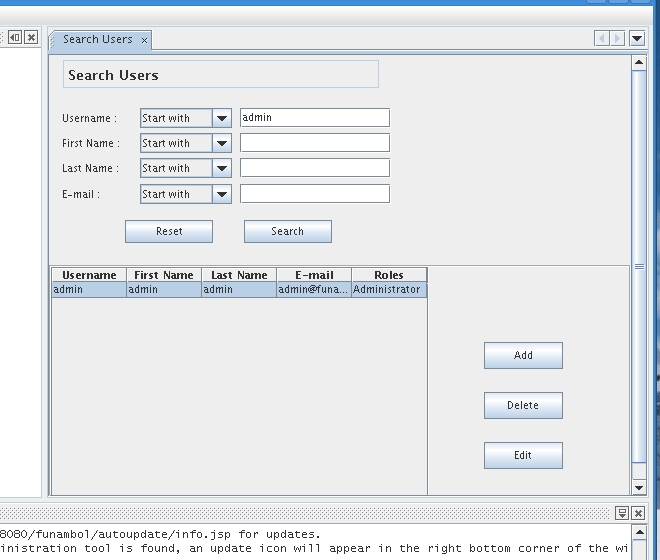
Figure 5. Using the Tool to Change the Admin Password
Click the Edit button, change the password, and then save your changes. That takes care of controlling access to the tool. Your next step is to define access to the system. As it stands, your Funambol implementation allows connections only from localhost and then only to a limited set of users. You need to change that. Double-click on Server Settings in the navigator window. Now, look to the left and locate the Server URI field in the settings window (Figure 6).
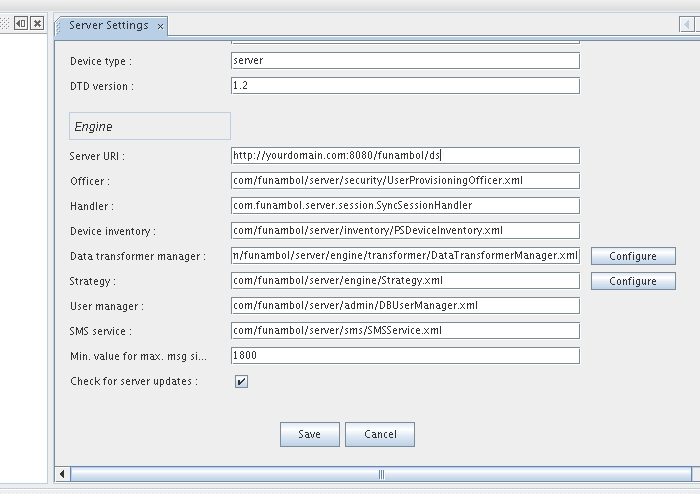
Figure 6. As a final first step, you need to configure the URI to the Funambol service on your server.
Enter the hostname (or the IP address) of your server, then click Save. You should see a confirmation message in the status window below. It should look something like this:
http://yourdomain.com:8080/funambol/ds
Believe it or not, that's pretty much it on the server end. Now, let's take a break, have François refill everyone's glass, and then let's see what we need to do on the BlackBerry end of things.
The first step is to install the BlackBerry client, which you can find at https://www.forge.funambol.org/download/downloads-bb.html. You will see an e-mail client in addition to the sync client, but, for the sake of this article, let's just concentrate on the sync client. Make sure you get the right client for your particular BlackBerry OS version.
Note:
In this article, I concentrate on BlackBerry synchronization with a Linux system, but remember that Funambol offers sync clients for many different mobile devices and smartphones. Simply point your browser to www.forge.funambol.org/download to find the right client for your mobile device. You even can sync your Android phone.
Once installed, you will see the Funambol BlackBerry sync icon in your list of applications on the BlackBerry screen (Figure 7).

Figure 7. The Funambol Client Icon as It Appears on My BlackBerry
Click the icon, and you should see a status screen showing Contacts, Calendar, Tasks and Notes, all with Not Synchronized below the labels. To perform a sync, you need to configure the client. Press the menu key on your BlackBerry, and select Settings (Figure 8).

Figure 8. Press the menu key to configure the client settings.
When the Funambol client configuration screen appears (Figure 9), enter the URI for your machine's Funambol server. This is the same address that you entered when you configured the server. You also must enter your user name and password—that's your Linux server user name and password. A little farther down that screen, there are check boxes beside labels to Sync Contacts, Sync Calendar, Sync Tasks and Sync Notes. These are all checked by default, but you may decide you don't want to sync all those resources, so change it here if you like. You also can configure a scheduled sync and have the client update your information every 30 minutes (the default) or whatever period makes sense to you. That feature is not turned on unless you specify otherwise.

Figure 9. Funambol BlackBerry Client's Configuration Screen
When you're done, save your settings (on my BlackBerry, I just press the trackball or the back arrow). You'll find yourself back at the status screen, and now you're ready to synchronize for the first time. Press the menu key, and select Sync All from the menu. The Funambol client will connect with your server and start transferring the information on your BlackBerry. Underneath the labels for Contacts (and Calendar and so on), the client will show how many records are being transferred. Once complete, the status screen lists the last successful sync for each resource (Figure 10).

Figure 10. During synchronization, the status screen shows you the number of records transferred. Once complete, you can see the latest sync at a glance.
This is all wonderful, because the Funambol server effectively is keeping an over-the-air backup of your data—handy if you ever need to reload it. But, what if you use another client on your Linux desktop for e-mail, contacts and appointments, such as Evolution or Thunderbird? Funambol provides download clients for these and others as well. Figure 11 shows a screenshot of a pretty desolate-looking address book in Thunderbird.
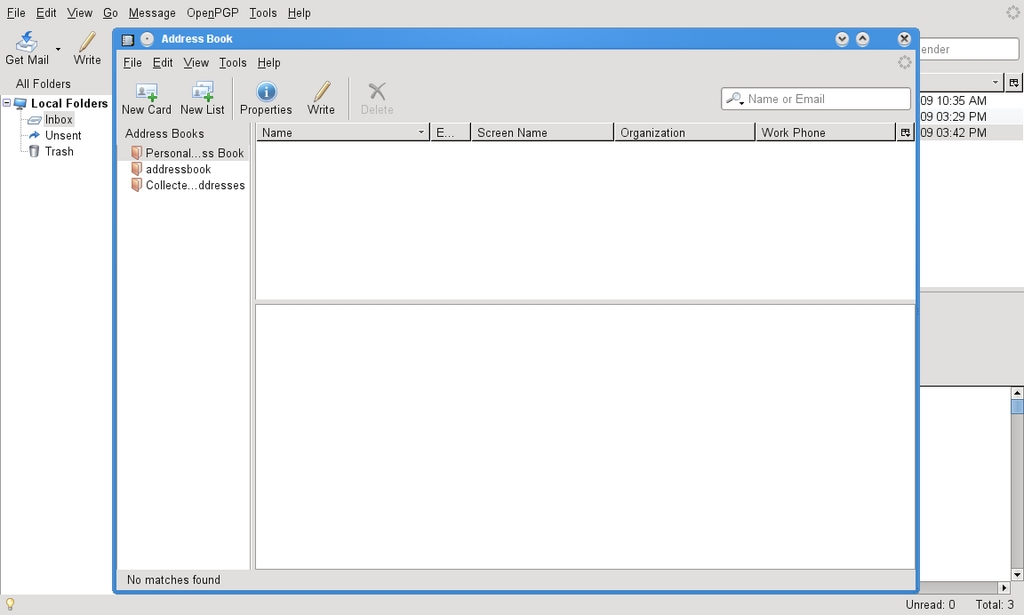
Figure 11. My Thunderbird Address Book, without Any Contacts
The plugin you need for Thunderbird is available from the Funambol community download page. Download it, and save it to a local directory. Once that's done, click Tools on the Thunderbird menu bar and select Add-ons. When the Add-ons window appears, click the Install button, and navigate to the folder where you stored the file, then click on it and install it. Once finished, Thunderbird needs to restart to load the new extension. After Thunderbird restarts, you must configure the Funambol client to connect to your server. Click Tools from the menu bar, and select Funambol plugin. When the Funambol PIM Plugin window appears, click the Options button, and you'll see a screen that, although shinier than the one on the BlackBerry, is similar as it asks for the same information, namely the server URL, user name and password (Figure 12). Enter the information, then click Close.
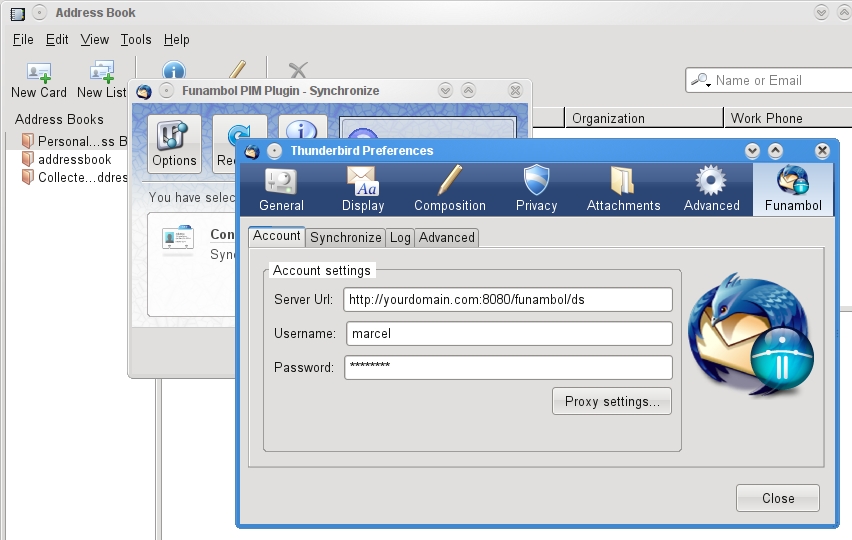
Figure 12. Configuring the Funambol Thunderbird Plugin
That's it. To synchronize Thunderbird with the contacts from my BlackBerry, all I do is click the Synchronize button and wait while my contacts are transferred (Figure 13). How long this takes depends, of course, on how much information is being synchronized and how fast your connection is.

Figure 13. The Thunderbird Sync Plugin Happily Doing What It Is Built to Do
In this way, I can keep my desktop client in sync with my BlackBerry and the server itself. As an added bonus, I get over-the-air backup with my own server without having to shell out the dollars for a BES server. Funambol, Linux and my BlackBerry—it's a match made in open-source heaven.
With the help of Funambol, a great open-source application, you (and François), can keep all that personal information in sync without having to resort to entering the information manually or paying huge sums of money for a special server running proprietary code. Well, mes amis, the time is finally upon us. That old clock on the wall says closing time has arrived yet again. François will be happy to refill your glasses a final time while we say our goodbyes to one another. Please, mes amis, raise your glasses, and let us all drink to one another's health. A votre santé! Bon appétit!
Resources
Funambol: funambol.org
Funambol Downloads Page: https://www.forge.funambol.org/download
Funambol Community Projects: https://www.forge.funambol.org/participate/projects.html
Mozilla Thunderbird: www.mozilla.com/thunderbird
Open Mobile Alliance (the Home of SyncML): www.openmobilealliance.org
Marcel's Web Site: marcelgagne.com
Cooking with Linux: cookingwithlinux.com
WFTL Bytes!: wftlbytes.com
Marcel Gagné is an award-winning writer living in Waterloo, Ontario. He is the author of the Moving to Linux series of books from Addison-Wesley. Marcel is also a pilot, a past Top-40 disc jockey, writes science fiction and fantasy, and folds a mean Origami T-Rex. He can be reached via e-mail at marcel@marcelgagne.com. You can discover lots of other things (including great Wine links) from his Web sites at marcelgagne.com and cookingwithlinux.com.



