
An Amateur Radio Survival Guide for Linux Users
Maintaining a Linux-only household is getting easier every day. The large number of people working to port or re-implement desktop and general-use software from other operating environments helps keep the progress going. Enjoying a hobby that is mostly dominated by Windows users is, unfortunately, not nearly as easy. The Amateur Radio culture is one of experimentation and going against the mainstream, but the relatively small number of people pushing innovation are doing so on their platform of choice or comfort, which usually means Windows. As a result, many applications are not available for Linux.
In this article, I cover some of the basic tasks that a Linux user venturing into the world of Amateur Radio might be interested in doing without undergoing a significant lifestyle change. First, here's a quick vocabulary lesson for those not familiar with some common radio terms.
The HF (High Frequency) bands are frequencies between about 1.8MHz and 30MHz, starting just above the US AM broadcast radio band. Signals on these frequencies are capable of traveling around the globe, thanks to the upper ionosphere. If you want to talk to another country, these are the bands for you.
The VHF (Very High Frequency) and UHF (Ultra High Frequency) bands are frequencies above 30MHz up to about 3GHz. Signals in this range propagate in an increasingly line-of-sight manner and, thus, are mostly useful for local area (VHF) and very short range (UHF) communication. However, these frequencies also provide an opportunity for increased bandwidths and data rates, which is why Wi-Fi sits at the upper range (2.4GHz).
One popular activity on HF is “contesting”, which involves making long-distance contacts to achieve some sort of goal. This usually involves making as many contacts to different places as possible in a certain period of time. Because it is a contest, some sort of log is needed to record the contacts you make for later submission. Because Amateur Radio operators use call signs to identify each other, most logging software helps identify people you've already “worked” to avoid duplication.
The Xlog program for Linux provides basic contest log functionality, including duplicate checking. It also can interface to your radio via a serial port to record other bits of information about a contact automatically, such as mode, signal strength and frequency. Each contest specifies a different piece (or pieces) of information that must be exchanged between operators, so Xlog has some configurable fields to help with that task (Figure 1).
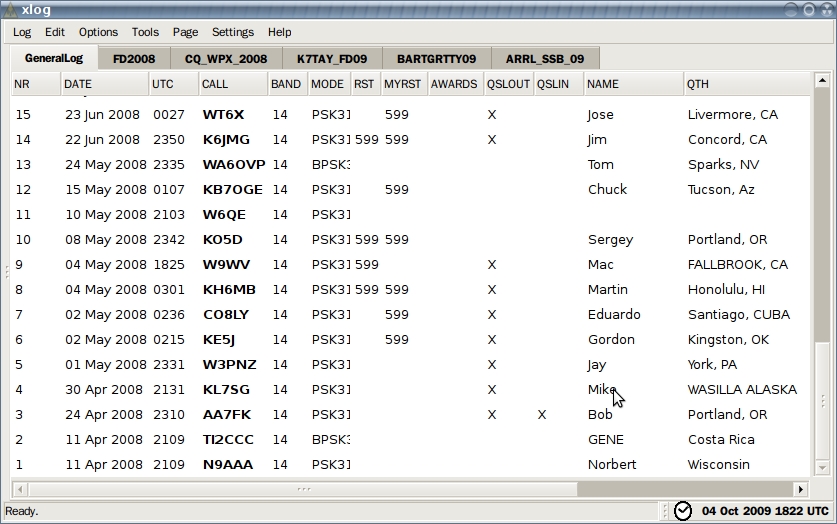
Figure 1. The Xlog program records contacts you make with other stations.
Another very popular activity on the HF bands is operating the slow-speed digital modes. Some of these modes, such as RTTY (radioteletype), predate modern digital computers. Others, like PSK31 (phase shift keying, 31 baud), are fairly recent inventions that use advanced signal processing to their advantage. Although external hardware (digital and analog) previously was used to operate these modes, it now is very common to use a modern soundcard to encode and decode the signal, much like a modem does for a telephone line.
The most common application for doing this sort of work on Linux today is called Fldigi. With a soundcard, serial port and some interfacing to your radio, you can transmit and receive these digital signals without any significant expense. The Fldigi software supports a large number of operating modes, allowing you to communicate via keyboard-to-keyboard text with other amateur operators around the world.
In addition to conversing directly in real time with other amateurs, you also can use Fldigi to record and report the signals it hears in an autonomous fashion. By leaving your radio on the standard PSK31 calling frequency, Fldigi will listen for and report the call signs and locations it hears to a public database. This is very valuable information when comparing the stations other locals are hearing, given the differences between your locations, antennas and so on. It also gives you an idea of what time of day signals from a particular part of the globe are reaching you, in case you want to contact someone in a specific place. If you're interested in this sort of operation, check out the live map (see Resources) to find out who is hearing whom right now.
Although it may seem quaint and obsolete, if you've never had a half-duplex text conversation at 31 baud with someone on the other side of the world, you don't know what you're missing—double that if you've ever done it with nothing more than a battery, a radio and a piece of wire hung in a tree!
When most people think about Amateur Radio, they picture a geek sitting by a big radio under an even bigger antenna clicking out letters and words in Morse code. If you still have this stereotype stuck in your head, perhaps the following discussion will clear things up. Although the HF bands are used for long-distance communications on low frequencies using large antennas, VHF is more about local communication using higher frequencies and smaller antennas. VHF and UHF are the bands used by everyone from taxi drivers to police radios for reliable local communication. Licensed amateur operators are allowed many more privileges on these bands, however, including the use of much higher power and automated stations, such as beacons, message-forwarding systems and data networks.
Wireless networking is a hot topic right now, especially when it involves the use of large transmitters to blanket a wide area with network service. Did you know that Amateur Radio operators have been doing this since the mid-1980s? Albeit at a much slower speed, amateur packet networks have been in place for a long time, providing very wide-area access to various types of networks, including the Internet.
Historically, amateur packet networks have operated using a protocol suite called AX.25, which provides both Layer 2 and Layer 3 functionality. More common today, however, is the use of AX.25 at Layer 2 with IP at Layer 3. Linux has had AX.25 (and obviously IP) support integrated into the kernel for quite a long time. With this support, a $150 radio and a $75 TNC (terminal node controller) interface, you can link your Linux box to a packet network using IP at about 1,200 baud. It's definitely slower than even the slowest Wi-Fi links on a bad day, but you can enjoy this link for tens of miles with only modest equipment and longer with a little effort. You won't want to do any serious Web surfing over this link, but it's actually not too bad for a Telnet or POP3 session. With a little more expensive hardware, you can move up to 9,600 or 19,200 baud, which is similar to the speed offered by many modern satellite phones.
Most distributions include AX.25 support in the kernel and require installation of only the userspace tools package(s) to get started. Extensive configuration is beyond the scope of this article, but the following steps are enough to get an IP link on the air.
First, configure the AX.25 port by putting something like the following in /etc/ax25/axports:
radio KK7DS 9600 255 2 MyRadio
Next, attach your serial TNC to the AX.25 interface and give it an IP address:
# kissattach /dev/ttyS0 radio 44.1.2.3
Configure the TNC parameters for transmit delay and so forth:
# kissparms -p radio -t 100 -s 100 -r 25
At this point, if the other end is set up similarly, you should be able to ping, Telnet or do whatever else you want over your IP-over-AX.25 interface. To bring the interface down, simply killall kissattach to disconnect.
One of the privileges we are not granted is encryption over the air. The reasons for this are well documented in Part 97 of the Federal Communications Commission's rules, so I won't go into them here. However, you might wonder how you can run any sort of a secure system without the use of modern encryption. Obviously, care must be taken, and privacy never can be achieved. However, clever use of a one-time-password scheme can provide some protection against casual password sniffing. I have effectively utilized the One Time Passwords in Everything (OPIE) tools by configuring the system to use pam_opie instead of pam_unix for authentication.
Most of the technologies I have discussed so far originated in the previous century and, thus, are quite old. One newcomer to the scene is the D-STAR system. Describing both a new on-air mode as well as a system for interconnecting nodes over the Internet, D-STAR has brought some 21st-century functionality to the hobby.
The ever-growing D-STAR network consists of repeater systems that provide RF access for radios in a local area, and which are connected to each other via the Internet. Much like early cell-phone systems, calls can be routed between users on the system without needing to know which “cell” the other is in at any given moment. With the exception of the infrastructure (which runs exclusively on Linux, by the way), D-STAR is mostly a voice mode, so it doesn't present much of a problem for Linux users.
There are, however, three things that D-STAR provides that may prompt you to want to plug your Linux computer in to your radio. The first is slow-speed data transmission, which involves transmitting data alongside the voice traffic at slow speeds. This can be useful for position reporting (all D-STAR radios can be plugged in to a GPS directly) as well as transferring small files. For this, the D-RATS software (see Resources) can be used and is natively supported on Linux.
In addition to slow-speed data transfers, D-STAR has a high-speed transport that doesn't waste any space with voice traffic and provides 128kbps of throughput over coverage areas of tens of miles. Luckily, this system behaves just like an Ethernet bridge, which means Linux is an equal-opportunity player here as well.
Finally, the D-STAR network can be accessed without a radio at all, using a piece of hardware called a DVDongle. This dongle encapsulates the voice encoder used in D-STAR radios and, when coupled with software on a desktop computer, allows you to connect to the Internet-linked infrastructure and communicate by voice with radio users in another area. This is a marriage of VoIP-like functionality with radio that has become very popular among D-STAR enthusiasts. The good news is the software for this also runs natively on Linux!
I have covered only some of the more-common activities that Linux users looking to venture into the world of Amateur Radio are likely to be interested in. There are many other interesting areas of activity, and in almost all cases, there is a way to participate as a Linux user. For example:
APRS (Automatic Packet Reporting System): location-aware services are starting to emerge as our mobile telephones gain the hardware, connectivity and software required to support them. As with many things, Amateur Radio operators are ahead of the curve here as well. For more than two decades, operators have been pairing radios and modems with GPS receivers to transmit their positions to others. Initially used for local-area positional awareness during public events, the system now is interfaced to the Internet, providing a way to track people from a Web browser using Google Maps. APRS is easy and inexpensive to use, and it provides features and functionality above even some so-called modern services. On a recent trip, I was more than 100 miles away from cellular coverage, but my friends were able to track my position through the APRS system.
Satellite communications: did you know that Amateur Radio operators have satellites in space for the sole purpose of facilitating communications? With an inexpensive radio and some creative antenna work, you can communicate with an amateur satellite for the purposes of digital exchange or even analog voice calls. Linux users are not excluded from this activity. If your distribution provides the gpredict package, take a moment to install and run it. You might be surprised to see an amateur satellite passing overhead as you read this (Figure 2).
SDR (Software Defined Radio): historically, radios have been complex purpose-built analog devices that depend on a lot of filters, resonant circuits and other components. Increasing performance of these devices often means adding additional filter stages and, recently, embedding Digital Signal Processors (DSPs) to cut noise and block unwanted interference. A new generation of radio technology recently has emerged that uses very simple, wideband, general-purpose radio components and relies on the high performance of a modern PC to do all the hard work. The result is what is called a Software Defined Radio or SDR. These systems have incredible sensitivity and are extremely flexible. Several projects exist that are working to push the envelope of this new technology, but the most interesting to Linux users probably is the GNU Radio Project (see Resources).
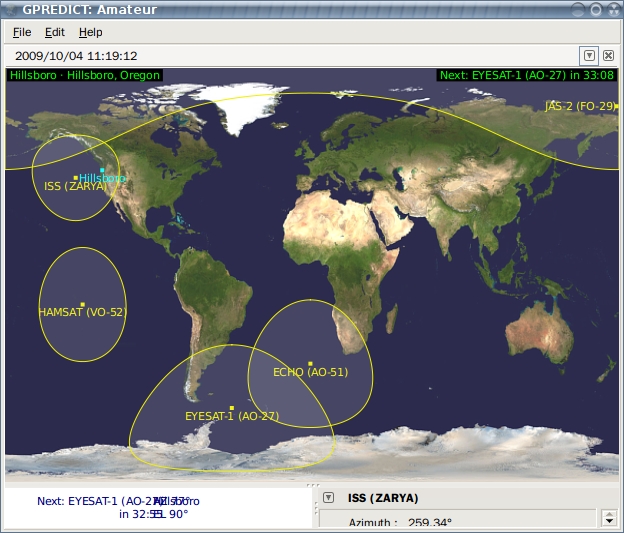
Figure 2. The GPredict program shows where amateur satellites are in real time.
Clearly, there are many natural interactions between the Open Source community and the Amateur Radio community, and you will be amazed and surprised at how many current projects have been inspired by Amateur Radio or adopted by it.
Resources
Fldigi: www.w1hkj.com/FldigiHelp/Modes/index.htm
Live Map: psk.gladstonefamily.net/pskmap.html
HAMSOFT: Linux Software for the Hamradio Community: radio.linux.org.au
GNU Radio: gnuradio.org
D-RATS: d-rats.com
Dan Smith, KK7DS, is a software engineer for IBM's Linux Technology Center in Beaverton, Oregon. He enjoys playing Amateur Radio on the weekends and is the author of the D-RATS software.



