
The Best of Both Worlds
I recently bought an IBM ThinkPad laptop with 1GB of RAM and Windows XP preinstalled. Because I have been using only Linux for many years, I immediately thought about making it a dual-boot system (actually a multiboot system, because I usually install several copies of Linux on my computer).
As I said, I mainly use only Linux, but I also keep a copy of Windows around, because other people may need to use my computer who are not able to use Linux. Also, being a computer specialist, I like knowing all the ways of using a computer, not only the best one, and as many people still use Windows, I want to understand their points of view.
So, I now can reboot and switch from Linux to Windows and from Windows to Linux. However, I thought it would be useful to run both systems in parallel, instead of switching from one to the other. One of the reasons for this is the Windows XP Home Edition that was installed on my laptop is customized by IBM specifically for this laptop, and there are some tools developed by IBM that make things more convenient. Another reason is that I wanted to test a client-server network with Windows as the client and Linux as the server. I'm sure you can think of other reasons for doing this as well.
After some research and testing, I decided to use QEMU. Now I can run any of the Linux distributions that are installed on the other partitions on Windows. I also can access Windows from the Linux system. I can access the Internet from the Linux system, and I can access any of the Linux services from Windows. Additionally, I can access certain Linux services from the network. It's like having two systems running on the same machine at the same time.
Running Linux inside Windows using QEMU is not difficult; however, doing it well requires some tricks that I didn't discover immediately.
Installing QEMU in Windows is easy. I downloaded qemu-0.9.0-windows.zip and extracted it in D:\QEMU. I didn't forget to read README-en.txt (always read READMEs). Then, I made a copy of the batch file (script) qemu-win.bat and renamed it start-linux.bat. To access it more easily, I created a shortcut (link) for it on the desktop by doing a right-click and selecting Send to→Desktop. Then, I modified the last line of start-linux.bat to look like this:
qemu.exe -L . -m 128 -hda \\.\PhysicalDrive0 -soundhw all -localtime
The modification consists of replacing the parameter -hda linux.img with the parameter -hda \\.\PhysicalDrive0. Now, when I start QEMU by running this script, instead of using the file linux.img as a virtual hard disk, it uses my real hard disk and boots from it. Then, I see the beautiful GRUB menu that is installed in the MBR of my hard disk, and I select and boot one of my Linux systems. Isn't it great?
Be careful not to boot Windows again inside Windows. According to the documentation, using the same disk image in more than one machine can corrupt it.
The system that I usually boot inside Windows is Fedora Core 6. The parameter -m 128 tells QEMU to use up to 128MB of RAM for the emulated system. With 128MB of RAM, Fedora isn't able to run in graphic mode and falls back to text mode. However, with 256MB of RAM, it works. If you have 1GB of RAM in your machine, like me, you could be generous and give 512MB to Linux.

Figure 1. Fedora Core 6 Running inside Windows XP through QEMU
The graphical interface is important to me, but I am quite happy with command-line Linux. In order to run Fedora in text mode, even though it has 256MB of RAM, I pass the 3 parameter to the kernel, which tells it to boot in run-level 3. Initially, I did this manually, with these steps:
Select Fedora in the GRUB menu.
Press E to edit it.
Select the kernel line.
Press E to edit it.
Append 3 at the end of the kernel line, and press Enter to return.
Press B to boot the modified Fedora entry.
Later, I added another entry to the menu, with the 3 parameter appended to the kernel line in order to boot it more quickly, which looks like this:
title Fedora Core TextMode (2.6.18-1.2798.fc6)
     root (hd0,7)
     kernel /boot/vmlinuz-2.6.18-1.2798.fc6 ro root=/dev/hda8 rhgb quiet 3
     initrd /boot/initrd-2.6.18-1.2798.fc6.img
Sometimes I see several error messages and failures while Linux is booting (for example, when I tried Scientific Linux), but I ignore them. The reason for this is the hardware of the emulated machine (which is being emulated by QEMU) is somewhat different from the hardware of the real machine. The same thing happens when the hard disk is taken from one machine and placed in another. Linux autodetects the machine's devices and reports that some devices are missing and new devices are added (for example, network cards). I simply keep the configurations of the “removed” devices and let Linux autoconfigure the new devices it finds.
To make the emulated system run faster, I installed kqemu. I downloaded kqemu-1.3.0pre11.tar.gz from the QEMU download page and extracted it inside D:\QEMU\. Then, I clicked kqemu.inf with the right-mouse button and selected Install. Next, I added, in start-linux.bat, the command net start kqemu and added the parameter -kernel-kqemu to qemu.exe. Now, the last two lines of start-linux.bat look like this:
net start kqemu
qemu.exe -L . -m 256 -kernel-kqemu -hda \\.\PhysicalDrive0
 ↪-soundhw all -localtime
Note: Scientific Linux 4.4 does not work at all with the parameter -kernel-kqemu, and the problem seems to be an incompatibility of the kernel with the BIOS file (which is named bios.bin, and I think that represents the BIOS configuration of the emulated system). When I replaced it with the BIOS of Puppy Linux, it worked. It is strange that the original BIOS is 128KB and Puppy's BIOS is 64KB, which is older as well.
The default QEMU parameters for the network are -net nic -net user. This means that it will emulate a virtual interface on the Windows side and create a network interface eth0 for the emulated Linux system. Both of these interfaces have a virtual connection between them, allowing them to communicate with each other. The IP of the Windows virtual interface is 10.0.2.2/24, and QEMU also creates a virtual DHCP server connected to it. To get an IP for Linux from the QEMU DHCPD, I log in as root and give the command dhclient. Then, the Linux interface gets IP 10.0.2.15/24, gateway 10.0.2.2 and DNS 10.0.2.3. Afterward, Windows and the Internet can be accessed from Linux without a problem.

Figure 2. Network Diagram
To check the network configuration, try the commands ip address ls, ip route ls and cat /etc/resolv.conf in Linux. Here's example output from those commands:
[root@fedora6 ~]# ip address ls
1: lo: <LOOPBACK,UP,LOWER_UP> mtu 16436 qdisc noqueue
    link/loopback 00:00:00:00:00:00 brd 00:00:00:00:00:00
    inet 127.0.0.1/8 scope host lo
    inet6 ::1/128 scope host
       valid_lft forever preferred_lft forever
2: eth0: <BROADCAST,MULTICAST,UP,LOWER_UP> mtu 1500 qdisc pfifo_fast qlen 1000
    link/ether 52:54:00:12:34:56 brd ff:ff:ff:ff:ff:ff
    inet 10.0.2.15/24 brd 10.0.2.255 scope global eth0
3: sit0: <NOARP> mtu 1480 qdisc noop
    link/sit 0.0.0.0 brd 0.0.0.0

[root@fedora6 ~]# ip route ls
10.0.2.0/24 dev eth0  proto kernel  scope link  src 10.0.2.15
default via 10.0.2.2 dev eth0

[root@fedora6 ~]# cat /etc/resolv.conf
; generated by /sbin/dhclient-script
nameserver 10.0.2.3
To test the network connection, try the commands ping 10.0.2.2 and wget http://www.google.com/.
If you try to ping www.google.com (or any other IP), it won't work. However, the network connection is okay and working, and you can verify it with other tools, such as wget or lftp. It simply means that ping is not working for some reason. This has been very misleading to me, because the usual way to check for network connectivity is to ping something out there.
Because I can ping Windows from Linux as 10.0.2.2, I also can access any service (dæmon) that runs on Windows. In particular, I can access any file-sharing services. Usually, I run Apache as a Web server on Windows. It can be installed easily with EasyPHP. Then, I use wget to retrieve any files that are accessible through the Web server.
Another service I use is FTP. I install and configure it using the FileZilla FTP server. From Linux, I can access the folders (directories) that are shared by the FTP service, using lftp (you can use any other ftp client as well). This is better than using a Web server, because I can transfer files both ways—from Windows to Linux and from Linux to Windows.
I've even used svnserve to run a Subversion service in Windows. From Linux, I could access the Subversion repositories in Windows. Think of it as a way to transfer files between Windows and Linux, as you can access the svn repositories from both Windows and Linux, although it is not a very straightforward way to transfer files.
I tried transferring files between Linux and Windows using a fat32 partition, which can be accessed from both systems. Theoretically, there is no reason why it should not work, and actually it does work; however, it does not work so well. The problem is that the modifications that are done to fat32 from Linux are not “seen” from Windows until it is restarted, and the modifications that are done from Windows are not “seen” from Linux until QEMU is restarted, which makes this solution impractical and unusable.
In order to access the Web server and Linux's secure shell, I added these parameters to the qemu.exe command:
-redir tcp:88:10.0.2.15:80 -redir tcp:22::22
The first -redir parameter makes QEMU answer any requests to port 88. Actually, it is not going to answer it itself but redirects it to server 10.0.2.15, port 80, which is the Linux Web server. I chose port 88 (different from 80) in case I need to run any other Web service (such as EasyPHP) in Windows, so they don't have conflicts with each other. To test that it's working, open http://127.0.0.1:88/ in a browser. Make sure that the Linux network interface has been configured (with dhclient) after the Linux server has been started.
The second -redir parameter makes QEMU redirect any connections to port 22 (secure shell) to Linux's port 22. If the server IP is missing, the default value is 10.0.2.15, which corresponds to the IP given by the emulated DHCPD to the emulated system (Linux). To access the shell of a Linux server from Windows, I use PuTTY by connecting to 127.0.0.1 port 22. Accessing the Linux shell through PuTTY is much more convenient than accessing it through the QEMU console, because I can open several terminals at the same time, and I can copy/paste between Linux and Windows. I also can enlarge PuTTY terminals and adjust fonts and colors. It also is possible to use pscp to copy files between Windows and Linux through SSH.
If you want to make these Linux services (httpd and sshd) accessible to the network as well (so they can be accessed from other computers on the local network), open the Windows firewall for them: Control Panel→Windows Firewall→Exceptions→Add Program. Then browse, select D:\QEMU\qemu.exe, and press OK. Next, open Control Panel→Windows Firewall→Exceptions→Add Port, and add ports 88 and 22. Also check the box Change scope... when you add or edit a program or port.

Figure 3. Opening Port 22 in the Windows Firewall
I also want to access other Linux services, such as Samba and FTP. Adding another -redir parameter for each port that I want to access is not convenient, and it's not an elegant solution anyway. I want to be able to access Linux from Windows without any restrictions. It does not seem to be so easy, because all that Windows can see is the qemu.exe process, and it has no idea what goes on inside it. So, how can Windows communicate directly with the Linux that runs inside QEMU? It is possible by creating a tap virtual Ethernet adapter using OpenVPN.
I downloaded openvpn-2.0.9-install.exe and installed it. During the installation, I checked only the components TAP-Win32 Virtual Ethernet Adapter, Add OpenVPN to Path and Add Shortcuts to Start Menu, because I didn't need the others. I changed the destination folder to D:\QEMU\OpenVPN, because I prefer to group the related tools together. I received some warnings that this software has not passed Windows testing, but I continued anyway, trusting that open-source testing is stronger than Windows testing.
After installation, I selected the menu Start→OpenVPN→Add a new TAP-Win32 virtual Ethernet adapter to create a new tap interface. Again, I received the same warnings, but continued anyway. Now, in Network Connections, I find a new network connection named Local Area Connection 1. I right-click on it and rename it tap1.
Then, I modified start-linux.bat by adding these parameters to QEMU:
-net nic,vlan=0
-net tap,vlan=0,ifname=tap1
-net nic,vlan=1
-net user,vlan=1
The parameter -net nic tells QEMU to create a new network interface for the emulated system. Because this parameter has been used twice, Linux is going to run in a machine that has two network interfaces, eth0 and eth1. The parameter -net user creates a virtual interface on the other side (the Windows side). It is the network interface that was created previously by default (the one that has a built-in DHCP server associated with it), even though we didn't specify any -net parameters. The parameter -net tap tells QEMU to use the virtual Ethernet adapter tap1, which we created previously, and to connect it to the virtual network. The vlan options that are used with the -net parameters tell QEMU how to connect these virtual interfaces to each other. All the interfaces that have the same vlan number are connected to the same virtual hub/switch. So, we have two switches in our virtual network that is emulated by QEMU.
The last two lines of linux-start.bat now look like this:
net start kqemu
qemu.exe -L . -m 256 -kernel-kqemu -hda \\.\PhysicalDrive0
 ↪-localtime -redir tcp:88:10.0.2.15:80 -redir tcp:22::22
 ↪-net nic,vlan=0 -net tap,vlan=0,ifname=tap1
 ↪-net nic,vlan=1 -net user,vlan=1
Note that the QEMU parameter -soundhw all is now missing. I removed it because one of the sound devices was creating conflicts with the network devices, so they were not recognized properly as eth0 and eth1. If you can't do without a sound device, at least append it at the very end of the line; the parameters' order does matter.
The order of the -net parameter declarations matters as well. I have noticed that if -net user is declared before -net tap, eth0 and eth1 are switched with each other, and there is also a failure to initialize eth0 during the Fedora initialization scripts. Keep this in mind, in case you have any similar problems.
After starting QEMU, we have a (virtual) physical network (Figure 4).

Figure 4. Physical Network
To check the “physical” connections of the network, press Ctrl-Alt-2 to switch to the QEMU monitor. Then, in the (qemu) prompt, give the command info network. Finally, press Ctrl-Alt-1 to get back to the Linux console. Here's the output from the command:
VLAN 0 devices:
  tap: ifname=tap1
  ne2000 pci macaddr=52:54:00:12:34:56
VLAN 1 devices:
  user redirector
  ne2000 pci macaddr=52:54:00:12:34:57
Now, we need just to configure the network settings properly, such as IPs, gateway and DNS.
The user redirector interface on the Windows side is configured automatically by QEMU, with IP 10.0.2.2/24, and we don't have access to it, so we cannot modify it. If you check in Network Connections, you will find that the virtual interface tap1 now appears to be connected. To configure it, right-click on it and select Properties, then select Internet Protocol (TCP/IP) and Properties again. In the configuration window, set a fixed-IP address of 192.168.10.10 and netmask 255.255.255.0. It's just like a usual network interface configuration.
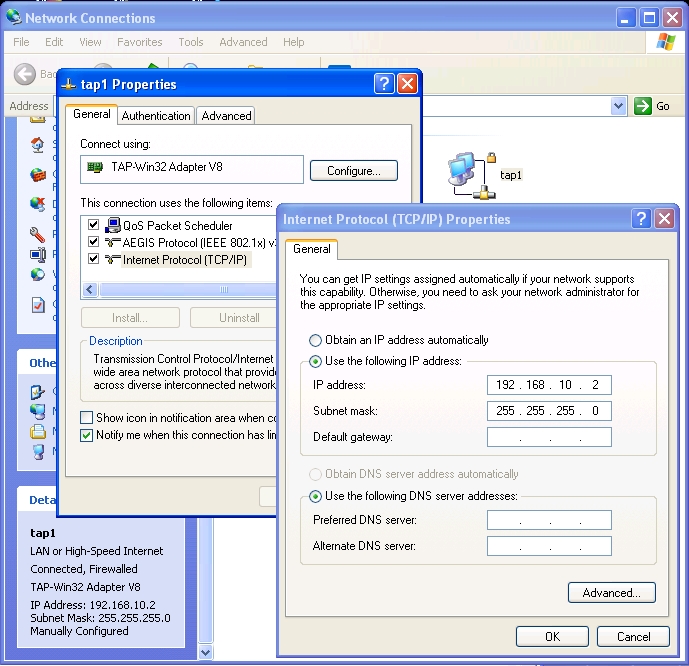
Figure 5. Configuration of the Network Interface tap1
To check that the network configuration is okay, run ipconfig at the command prompt, and you'll see this output for tap1:
Ethernet adapter tap1:

        Connection-specific DNS Suffix  . :
        IP Address. . . . . . . . . . . . : 192.168.10.2
        Subnet Mask . . . . . . . . . . . : 255.255.255.0
        Default Gateway . . . . . . . . . :
This output is displayed when QEMU is running; otherwise, the information for tap1 will be something like: Media disconnected.
Now, we're done with network configuration on the Windows side. This has to be done only once. All that is left is configuring the network interfaces on the Linux side.
First, log in as root. To check that you already have two network interfaces, run ip addr, and it should list eth0 and eth1. You can configure eth0 automatically, like this: dhclient eth0, as we did previously, and it will get an IP from QEMU's built-in DHCP server. Then, you can continue with eth1's manual configuration.
However, I prefer to use scripts whenever possible, and I want to make sure that eth0 always gets the IP 10.0.2.15/24, no matter what, because this is important for the -redir parameters shown previously. So, I do the network configuration on the Linux side by running this script (which has to be rerun whenever the system is rebooted):
bash# cat /usr/local/config/net-config-qemu.sh
#!/bin/bash
### configure the network when Linux is being
### emulated from Windows by QEMU

### network settings
IP0=10.0.2.15/24       ## eth0
IP1=192.168.10.10/24   ## eth1
GW=10.0.2.2            ## gateway
DNS=10.0.2.3

### configure eth0
ip link set dev eth0 up
ip address flush dev eth0
ip address add $IP0 dev eth0

### configure eth1
ip link set dev eth1 up
ip address flush dev eth1
ip address add $IP1 dev eth1

### set the gateway
ip route add to default via $GW

### set the DNS server
echo "nameserver $DNS" > /etc/resolv.conf
To check that the network configuration is okay, run ip addr, ip route and cat /etc/resolv.conf. Here's output from these commands:
[root@fedora6 ~]# ip addr
1: lo: <LOOPBACK,UP,LOWER_UP> mtu 16436 qdisc noqueue
    link/loopback 00:00:00:00:00:00 brd 00:00:00:00:00:00
    inet 127.0.0.1/8 scope host lo
    inet6 ::1/128 scope host
       valid_lft forever preferred_lft forever
2: eth1: <BROADCAST,MULTICAST,UP,LOWER_UP> mtu 1500 qdisc pfifo_fast qlen 1000
    link/ether 52:54:00:12:34:56 brd ff:ff:ff:ff:ff:ff
    inet 192.168.10.10/24 scope global eth1
3: eth0: <BROADCAST,MULTICAST,UP,LOWER_UP> mtu 1500 qdisc pfifo_fast qlen 1000
    link/ether 52:54:00:12:34:57 brd ff:ff:ff:ff:ff:ff
    inet 10.0.2.15/24 scope global eth0
4: sit0: <NOARP> mtu 1480 qdisc noop
    link/sit 0.0.0.0 brd 0.0.0.0
[root@fedora6 ~]#
[root@fedora6 ~]# ip route
10.0.2.0/24 dev eth0  proto kernel  scope link  src 10.0.2.15
192.168.10.0/24 dev eth1  proto kernel  scope link  src 192.168.10.10
default via 10.0.2.2 dev eth0
[root@fedora6 ~]#
[root@fedora6 ~]# cat /etc/resolv.conf
nameserver 10.0.2.3
[root@fedora6 ~]#
Now, all that remains is making sure the network is working as expected. The first check is to ping from Linux 10.0.2.2. If it is not working, it's possible that you need to switch eth0 and eth1. Sometimes, the network interface with MAC 52:54:00:12:34:56 is recognized by Linux as eth0, and the other as eth1, and sometimes it is recognized as eth1 and the other as eth0. This depends on the Linux distribution (Fedora, Slackware or whatever else). So, it is possible that eth0 and eth1 have gotten the wrong IP addresses from the configuration script, and in that case, the ping won't work. To solve this problem, modify the IP addresses that are assigned to eth0 and eth1 in the script /usr/local/config/net-config-qemu.sh, and run it again.
Now that the ping with 10.0.2.2 is working, try to ping 192.168.10.2 (tap1) from Linux. In general, it doesn't work. This is strange, because the ping to 192.168.10.10 from the command prompt in Windows does work. The problem is with the Windows firewall. To fix this, open the Control Panel, double-click Windows Firewall, select Advanced tab, select tap1 and click on Settings, then choose the ICMP tab, and here, check Allow incoming echo request. After this, the ping to 192.168.10.2 should work.
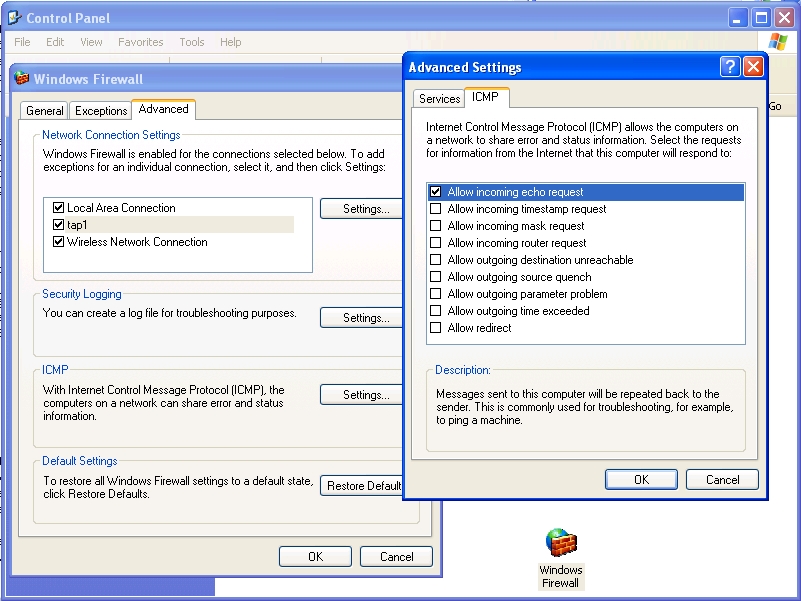
Figure 6. Allowing the tap1 Interface to Be Pinged
Don't try to ping to 10.0.2.15 from the command prompt in Windows, because it can't possibly work. Do you wonder why? Me too.
The next thing to try is accessing some Linux services from Windows using the IP 192.168.10.10. Try to open http://192.168.10.10 in a browser, and you will see the pages that are served by the Linux Web server. Try also to log in through PuTTY to 192.168.10.10, port 22, and you will access the Linux shell.
Finally, we have a first-class bidirectional network connection between Windows and Linux, which can be used to access any Linux services from Windows.
Resources
QEMU Open-Source Processor Emulator: fabrice.bellard.free.fr/qemu
QEMU on Windows: www.h7.dion.ne.jp/~qemu-win
OpenVPN Download: openvpn.net/download.html
Using Tap: www.h7.dion.ne.jp/~qemu-win/TapWin32-en.html
How to Use Network: www.h7.dion.ne.jp/~qemu-win/HowToNetwork-en.html
qemu-0.9.0-windows.zip: www.h6.dion.ne.jp/~kazuw/qemu-win/qemu-0.9.0-windows.zip
QEMU Download: fabrice.bellard.free.fr/qemu/download.html
EasyPHP Download: www.easyphp.org/telechargements.php3
FileZilla Download: sourceforge.net/project/showfiles.php?group_id=21558
Subversion Download: subversion.tigris.org/servlets/ProjectDocumentList?folderID=260&expandFolder=74
PuTTY Download: www.chiark.greenend.org.uk/~sgtatham/putty/download.html
Dashamir Hoxha has been a Linux specialist for many years, but occasionally, he has to use Windows as well. He has experience with server administration and network configuration.


