
Taming the TODO
In this article, I offer some ways to manage your tasks. From simple text files to full-blown personal information managers (PIM), there's bound to be one method that fits your way of working. I also share some tips on managing your tasks and tell you about how I fit a task manager to my way of working.
If you're accustomed to the advanced task management features of Microsoft Outlook and other proprietary PIMs, then Ximian Evolution and the KDE PIM suite are great fits for you. Ximian Evolution was developed for the GNOME user environment, and the KDE PIM suite is part of KDE, but each is usable with other desktop environments.
Offering a polished interface for creating and managing tasks, attaching files and even synchronizing with personal digital assistants (PDAs), these full-fledged personal information managers can help you tame your to-do lists (TODOs) in style.
Sometimes the simplest method is the best. Keep tasks in a plain text file, and you're already well on your way to taming your TODOs. Text files win in terms of flexibility. You can keep your list in any format you want and edit them using your favorite editor. You also can share them with others through e-mail or the World Wide Web. You even can keep them backed up and synchronized with other computers using tools such as rsync and CVS.
Memorize keyboard shortcuts for copy and paste. Incremental search is a great way to jump to tasks if you remember a small part of the description. Your text editor then can display matches as you type in characters. Check out your text editor's features for more help.
Beyond the basics, a little bit of programming makes TODOs easier to keep. Write a small program or shell script to add items from the command-line or a keyboard shortcut. The less effort it takes to write down a task, the more you'll remember, so automate as much as you can. You can sort tasks manually by copying and pasting lines in your TODO list or even writing programs to put everything together.
For more software support, check out Freshmeat.net for hundreds of simple TODO managers. If you know how to program, pick a TODO manager in a language you know or would like to learn. Extending a manager's capabilities not only helps you grow as a programmer but also lets you tailor it to your particular quirks.
E-mail is a popular way to keep track of tasks. If you practically live in your e-mail client, why not use it to keep track of the things you need to do? You can forward messages or write yourself reminders. Use meaningful subjects to make it easier to get a bird's eye view of your messages.
Watch out for information overload, however. You may need to find that urgent TODO in an archive of thousands of messages. Check out your mail client's features for options of how to tag messages. Use folders or labels to flag messages for follow-up action. Tag or file messages as TODO, and remove the label or change it to “done” after you finish the task. Keeping track of tasks is easier with full-fledged PIMs, such as Evolution and KDE PIM, which allow you to mark a message for follow-up or convert it to a task.
What about small tasks? It might seem silly to e-mail yourself a reminder to buy milk, but unless all of these TODOs are written down somewhere, you're going to spend mental energy thinking about them. You therefore may need to supplement your Inbox with a way to keep track of smaller tasks.
If most of your tasks can be accomplished quickly and you can keep your inbox manageable, e-mail is a convenient way to keep track of your tasks.
Many software projects use request trackers to make sure that bug reports and feature requests don't slip through the cracks. You can use one to keep track of your personal TODOs too. Although a request tracker requires a lot of set up time and effort, you reap the benefits of a solid project management system.
Request trackers, also known as bug tracking systems (BTSs) or issue trackers, archive all of the messages related to a TODO, making them great for tasks occurring over long periods of time and tasks where you need to collaborate with other people. You can send the e-mail address or URL for a task to other people so they can confirm your work or add comments.
Request trackers can produce task-related graphs. For example, you can track the increase or decrease in open, resolved and closed tasks over time to get a rough estimate of when you're most productive or overloaded.
If most of your tasks require input from others, check out programs such as RequestTracker and Bugzilla. With a good bug tracking system in place, you easily can keep track of what you're waiting for and from whom.
Web-based TODO lists are a fun and easy way to create task lists you can share with other people. If you always have a Web browser open or you need to keep non-techies updated, a Web-based TODO list might be a handy way to keep track of your tasks. New services such as Ta-da and Backpackit use Javascript and XHTML tricks to provide a great user interface.
Look for a bookmarklet or extension that lets you easily create TODOs. Make your task overview the default page in your browser so that you're sure to review them daily.
If you spend a lot of time on the move, you've probably thought about getting yourself a PDA. Both Evolution and KDE PIM can synchronize your tasks with Palm-based PDAs, making them ideal for the mobile warrior. Libraries such as coldsync can help you support synchronization for your custom hacks.
My productivity tool of choice is a pack of 3"x5" index cards held together with a fold-back clip or rubber band. Affectionately called the “Hipster PDA” by productivity geeks, this surprisingly effective low-tech tool is a great way to keep track of tasks.
Write down your tasks, one per index card. You can write down subtasks and notes as well. Shuffle through your tasks while waiting or sort it by the context you can perform the tasks in. Rip the card up after completing your TODO for an extremely satisfying end.
Print useful data onto cards. Around 50 names and contact numbers can fit on an index card if you use a really small font. Month and year calendars also are handy. No hardware worries, no productivity-sapping games and no hassles makes the Hipster PDA great for people on the go.
Got an idea about what to use to manage your tasks? Well, now here are some tips for keeping on top of everything.
“Hmm, that looks interesting”, you think. “Let's try it out.” You switch to your task manager to write down that TODO. Oops, you still need to open the application. Now you have to arrange your windows so you can see the article. Wait, you need to copy the URL. By the time you have it all set up, you might've forgotten what you wanted to write down in the first place!
If a task manager is too cumbersome to use, you won't bother with it. Make it as easy as possible to get a task out of your head and into the system. Make your task manager a keystroke or click away, and you'll find yourself using it more often.
Keep your TODO list short so that you don't get overwhelmed by all the things you need to do. Ruthlessly prune TODO items you no longer have to do or are no longer interested in doing. Delete or archive completed tasks so that they don't clutter your main task list.
TODO items can be intimidating. “Write a novel” is an example of a task that can be difficult to start. Make sure your TODO items are small enough to work on. I usually break my tasks down into subtasks I can do in one sitting. Breaking these tasks down also makes it easier to stop procrastinating, because there's always something small to work on.
Make a system you can trust. Ensure none of the tasks fall through the cracks. Make your reminder system the first thing that shows up after you log on or start your browser. Set aside time to review all of your tasks regularly.
If your task manager is easy to use, you'll trust it with more tasks. Writing down all of your tasks in a reliable system means you don't have to worry about forgetting anything—as long as you don't forget to check!
The way you keep track of tasks probably will change as you come up with new ideas or read about other people's experiences. Don't be afraid to improve your system. Instead of making a giant step to a brand new methodology, however, break changes down into incremental improvements. That way, you give yourself time to make it a habit.
Don't spend too much time tweaking your system, though! One way to manage this impulse is to find a community of like-minded people. That way, you can use their hacks and customizations without having to spend a lot of time coming up with your own. The trick is to find a personal information manager that fits the way you work and can be extended as you experiment with new ways of working.
I went through the whole spectrum of personal information managers before I found something that works for me. I'm absolutely crazy about Planner.el, a personal information manager that's extremely customizable. I'd like to share some of the things I love about it with you so that you can see how personal work style affects how you plan.
I spend most of my time working with text files in the Emacs text editing environment. Because Emacs is so extensible, it has accumulated a lot of useful modules along the way, including several e-mail clients, Web browsers, Internet relay chat (IRC) clients and even instant messengers. I can program, surf, chat and check mail within Emacs. Emacs itself runs on GNU/Linux, Microsoft Windows and Mac OS X and is surprisingly easy to learn.
Planner.el is built into my main working environment, making it only a keystroke away. Because most of my tasks are based on what I'm looking at, I really appreciate how Planner.el stays out of my way. When I create a task, a small text prompt shows up at the bottom of my screen (Figure 1). I don't get distracted by pop-ups or switching to another application. I simply type the task description in, tag it with a project or two and get back to work.
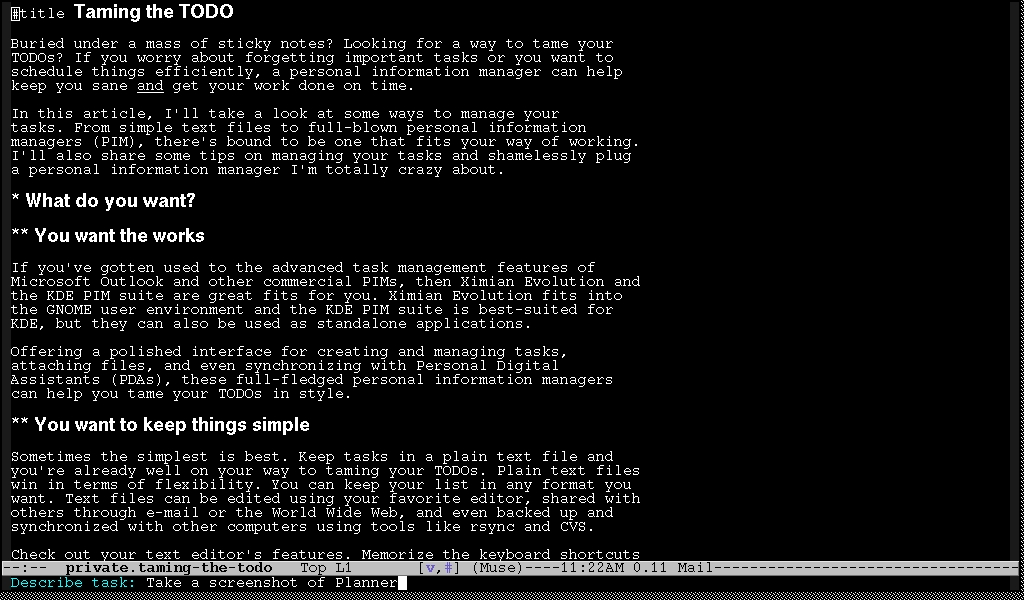
Figure 1. You can create a task using a small text prompt in your regular editing window.
Not only that, it also intelligently picks up information from whatever I'm looking at, automatically creating a hyperlink back to the file, e-mail, Web page or even IRC session (Figure 2). Even newbies can add support for new tools, thanks to extensive examples. Planner's ability to hyperlink to my mail messages is the only way I can impose order on the thousands of messages in my mail archive!
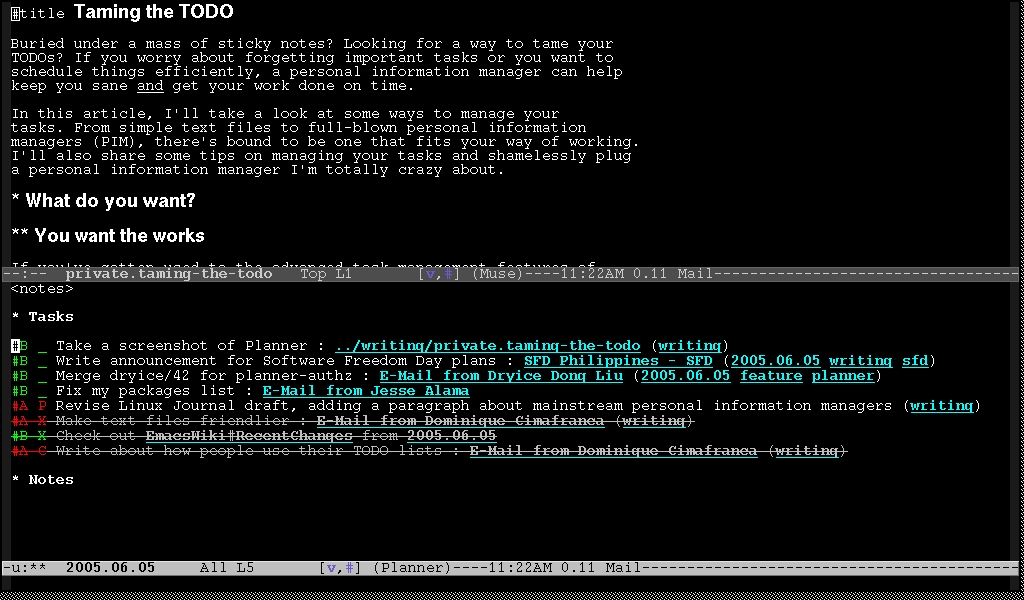
Figure 2. Hyperlinked tasks give you an easy way to refer back to information related to a task, whether in the form of a file, mail message, Web page or IRC session.
I like reviewing my week to see what I have accomplished. Because it's easy to view completed tasks, I can write accomplishment reports without struggling to remember what I did the other day. Seeing a lot of crossed-out tasks for today also is a great morale booster. As a nifty bonus, I can keep detailed logs of how much time I spend on each task or project—great for billing time, improving my time estimates or simply finding out how (un)productive I am each day.
I like keeping my task list short. I typically have fewer than ten tasks on my task list for any given day. I like scheduling tasks for particular days and organizing them according to projects, keeping my daily task list small and manageable. When I feel particularly productive, it's easy to reschedule more tasks onto today's page.
I break tasks down into bite-size bits to simplify keeping track of my progress and to motivate me to work. When tasks are of a manageable size, they're much easier to work on. Instead of goofing off, I find myself picking the next small task from my list and working on it.
I need a system that can keep track of small tasks as well as large projects. Because Planner.el is only a keystroke away and I use it for all of my tasks, I trust that it holds all the things I need to remember. I made Planner.el the first thing that shows up when I turn on my computer, and I check it at least once a day. Knowing that all of my reminders are safe and can be checked easily from one place definitely takes a load off my mind.
It's also easy for me to back up my files. Because Planner.el uses plain text files, I don't have to worry about corrupted data. If some experimental code makes Planner.el unusable for me, I still can use any text editor to manage my plans. In addition, it's easy to publish my task list and notes as HTML (Figure 3), so if something happens to my laptop, I can check my TODOs using any computer with Net access.
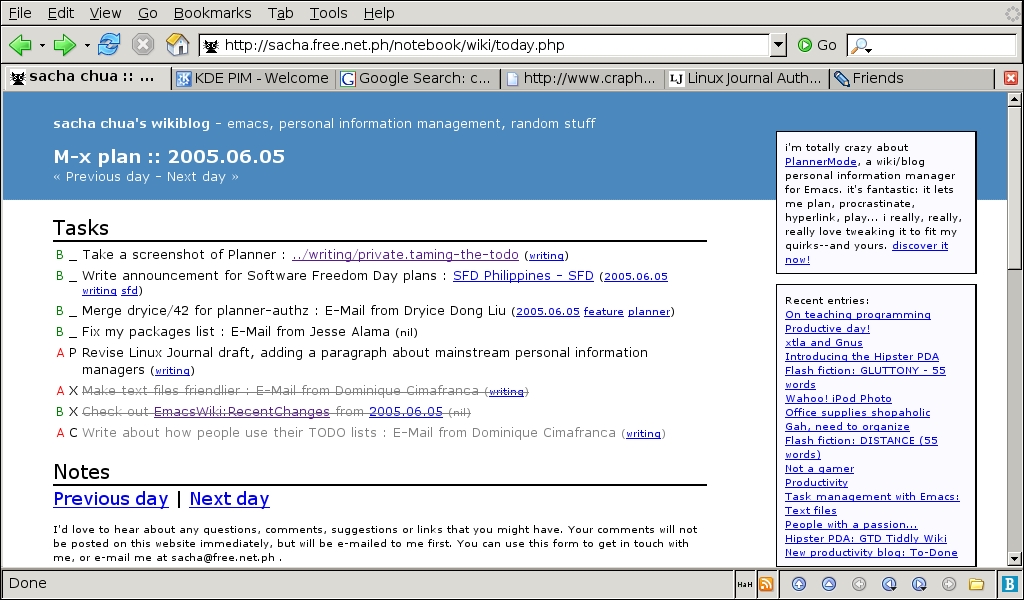
Figure 3. Publishing to the Net lets you check your tasks from any platform, anywhere.
My method of planning has really changed over the years. I went from micromanaging my schedule by assigning specific times to tasks to keeping an unsorted list on my day page. I tried both keeping one big list of tasks and using projects to group together related tasks. Sometimes I think up weird things, too, such as having my computer automatically display a fortune cookie whenever I finish a task.
This is where Planner.el really shines. Because it's built on top of Emacs, I can change anything I want through a simple, easy-to-learn programming language. I've tweaked it to fit not only my planning style but also my little quirks. Although my planning style has changed much in the past three years, being able to replace bits of Planner.el and add new features has made it possible for Planner.el to grow along with me.
There are many ways to manage your tasks, so spend some time finding one that fits you. Here are some things to remember:
Make it as easy as possible. Use keyboard shortcuts and scripts to simplify task creation and review.
Don't get overwhelmed. Keep your task list short and simple. Don't drown in hundreds of TODOs or choke on intimidating tasks.
Fill in the cracks. Put all of your important tasks in there. If you can, put minor tasks in as well. Check your list regularly.
Hack your system. Keep an eye out for ways to improve your way of planning. Don't spend too much time hacking your system and not enough time actually accomplishing your TODOs, however.
Have fun!
Resources for this article: /article/8461.
Sandra Jean Chua—or Sacha, as she commonly is known—maintains Planner.el and is absolutely crazy about it. Her blog and TODO list is at sacha.free.net.ph. Write her at sacha@free.net.ph with your productivity tips and way of working!

