
Developing GNOME Applications with Java
The original announcement of the GNOME Desktop Project in 1997 stated the following intention, “to use GTK/Scheme bindings for coding small utilities and applications”. Since then, the GNOME development platform has provided tools to develop using several alternatives to C. C++, Java, Perl and Python all are supported by the official GNOME distribution. In addition, the Mono Project provides tools necessary for developing GNOME applications using the C# programming language. All of these options are becoming quite popular. The GNOME interfaces for many of the system configuration tools for the Fedora Project, for example, are written in Python, and many new applications are being written in C#. This article describes how to create GNOME applications using the free Java compiler from the GNU Compiler Collection. Although this article focuses on Java, the techniques described revolve around the GLADE User Interface Builder and may be used with any of the bindings supported by the GNOME Project.
The GNU Compiler for the Java Programming Language (gcc-java) is a Java development environment distributed under the GNU General Public License. Because gcc-java is free software, it is developed independently of Sun Microsystems' Java efforts. As a result of this, gcc-java does not yet implement 100% of the Java standard. For example, support for the Abstract Window Toolkit (AWT) is not yet complete. Despite its current shortcomings, gcc-java shows great promise as the foundation of a completely free Java stack, and it already can be used to build many real-world applications; see the on-line Resources for examples.
Unlike many Java compilers, gcc-java can produce both Java bytecode and a native, platform-specific executable. In the latter case, the executable is linked against gcc-java's libgcj. libgcj is a library containing the core Java class libraries and a garbage collector. In addition, libgcj contains a bytecode interpreter so natively compiled Java applications can interact with Java bytecode libraries.
Listing 1. HelloWorld.java
public class HelloWorld {
	public static void main(String[] args) {
		System.out.println("Hello, World!");
	}
}
The simple Java source code in Listing 1 can be compiled into Java bytecode with gcj -C HelloWorld.java and interpreted using gij HelloWorld. The same source code can be compiled into a native executable using gcj --main=HelloWorld -o HelloWorld HelloWorld.java and executed using ./HelloWorld. This article avoids including import and other trivial statements in Java code listings; see Resources for the full source files.
Listing 2. ExampleAWT.java Fragment
public class ExampleAWT extends Frame {
 ExampleAWT() {
  super("AWT");

  Label msgLabel = new Label("Quit?");
  Button yesButton = new Button("Yes");
  Button noButton = new Button("No");

  Panel buttonbox = new Panel();
  buttonbox.setLayout(new FlowLayout());
  buttonbox.add(yesButton);
  buttonbox.add(noButton);

  Panel msgbox = new Panel();
  msgbox.setLayout(new FlowLayout());
  msgbox.add(msgLabel);

  add(msgbox, BorderLayout.NORTH);
  add(buttonbox, BorderLayout.SOUTH);

  yesButton.addActionListener(new ActionListener() {
   public void actionPerformed(ActionEvent e) {
    System.exit(0);
  }
  });

  noButton.addActionListener(new ActionListener() {
   public void actionPerformed(ActionEvent e) {
    System.exit(1);
   }
  });

  addWindowListener(new WindowAdapter() {
   public void windowClosing(WindowEvent e) {
     System.exit(0);
   }
  });
 }

 public static void main(String[] args) {
  ExampleAWT frame = new ExampleAWT();
  frame.pack();
  frame.setVisible(true);
 }
}
Sun provides two class hierarchies for developing Java applications with graphical user interfaces. The first, the Abstract Window Toolkit, has been distributed with Java since version 1.0. A picture of a gcc-java-compiled AWT application is shown in Figure 1. The corresponding source code is provided in Listing 2 and can be compiled with:
gcj --main=ExampleAWT -o ExampleAWT ExampleAWT.java

Figure 1. An AWT Application
Listing 3. ExampleSwing.java Fragment
public class ExampleSwing {
 public static void main(String[] args) {
  JFrame win = new JFrame("Swing");

  JLabel msgLabel = new JLabel("Quit?");
  JButton yesButton = new JButton("Yes");
  JButton noButton = new JButton("No");

  win.getContentPane().setLayout (new BorderLayout());

  JPanel buttonbox = new JPanel();
  buttonbox.setLayout(new FlowLayout());
  buttonbox.add(yesButton);
  buttonbox.add(noButton);

  win.getContentPane().add(msgLabel, "Center");
  win.getContentPane().add(buttonbox, "South");

  yesButton.addActionListener(new ActionListener() {
   public void actionPerformed(ActionEvent e) {
    System.exit(0);
   }
  });

  noButton.addActionListener(new ActionListener() {
   public void actionPerformed(ActionEvent e) {
    System.exit(1);
   }
  });

  win.pack();
  win.show();
 }
}
The second system, Swing, made its debut in Java 1.2. Figure 2 is a picture of the gcc-java-compiled Swing application shown in Listing 3. Listing 3 can be compiled with gcj --main=ExampleSwing -o ExampleSwing ExampleSwing.java. AWT uses the native GUI components in the host operating system to draw itself. Swing gives the user finer control over the look and feel of components, and most of the work is performed by Java.

Figure 2. A Swing application—both AWT and Swing were written so that one application would behave in a similar manner on any platform.
Listing 4. ExampleSWT.java Fragment
public class ExampleSWT {
 public static void main(String[] args) {
  Display display = new Display();
  Shell shell = new Shell(display);
  shell.setLayout(new FillLayout(SWT.VERTICAL));

  Composite msgbox = new Composite(shell,
                                   SWT.NO_TRIM);
  RowLayout msglayout = new RowLayout();
  msglayout.justify = true;
  msgbox.setLayout(msglayout);

  Label label = new Label(msgbox, SWT.NO_TRIM);
  label.setText("Quit?");

  Composite buttonbox = new Composite(shell,
                                      SWT.NO_TRIM);
  RowLayout buttonlayout = new RowLayout();
  buttonlayout.justify = true;
  buttonlayout.pack = true;
  buttonbox.setLayout(buttonlayout);

  Button yesButton = new Button(buttonbox,
                                SWT.PUSH);
  yesButton.setText("Yes");
  Button noButton = new Button(buttonbox,
                               SWT.PUSH);
  noButton.setText("No");

  yesButton.addSelectionListener(
                            new SelectionAdapter() {
   public void widgetSelected(
                             SelectionEvent event) {
    System.exit(0);
   }
  });

  noButton.addSelectionListener(
                            new SelectionAdapter() {
   public void widgetSelected(
                             SelectionEvent event) {
    System.exit(1);
   }
  });

  shell.pack();
  shell.open();

  while (! shell.isDisposed()) {
   if (! display.readAndDispatch()) display.sleep();
  }
 }
}
IBM sponsors the Eclipse Project, an effort to produce an open-source development environment. One of the fruits of this project is the Standard Widget Toolkit, an alternative to AWT and Swing. SWT is a peer-based, operating system-independent interface that uses the host operating system's interface for rendering common components. Components not supported by an operating system are implemented in Java. On Linux, the libswt-gtk2 package provides a GTK peer for SWT. Peers also exist for other platforms, including Solaris and Windows. SWT code can run on any platform that has an SWT peer. An example SWT application is shown in Listing 4, which can be compiled against the GTK SWT peer with a variation of the following:
gcj --CLASSPATH=/usr/lib/libswt-gtk2.jar -lswt-gtk2
-o ExampleSWT --main=ExampleSWT ExampleSWT.java
See Resources for more information about the Standard Widget Toolkit.
With three existing Java GUI toolkits, one might ask why another alternative is necessary. GNOME's Java bindings are unique because they are tied directly to GNOME. An application written with GNOME's Java offerings looks and behaves exactly as if it had been written using GNOME's C libraries. It integrates seamlessly into the GNOME desktop and provides the same capabilities as any other GNOME application. The reason for this is GNOME's Java bindings use the Java Native Interface to delegate work directly to GNOME's C libraries.
Currently, GNOME's Java bindings consist of four libraries—libgconf-java, libglade-java, libgnome-java and libgtk-java. libgtk-java and libgnome-java provide the GUI components of the bindings. libglade-java allows Java applications to read graphical user interface descriptions created by GLADE. Investigating libgconf-java, the Java interface to the GConf configuration system, is left as an exercise for the reader.
libgtk-java and libgnome-java are similar to SWT and AWT because host code implements their graphical components. However, the GNOME libraries are quite different from AWT, Swing and SWT—GNOME libraries make no claim of platform-independence. GNOME applications written in Java run only in a GNOME environment. Any platform independence is a result of the entire GNOME environment itself being platform-independent.
Listing 5. ExampleGNOME.java Fragment
public class ExampleGNOME {
 private LibGlade libglade;
 private static final String GLADE_FILE =
                               "ExampleGNOME.glade";

 public ExampleGNOME () throws IOException {
  libglade = new LibGlade(GLADE_FILE, this);
 }

 public void on_noButton_released(GtkEvent event) {
  Gtk.mainQuit();
  System.exit(1);
 }

 public void on_yesButton_released(GtkEvent event) {
  Gtk.mainQuit();
  System.exit(0);
 }

 public static void main(String args[]) {
  ExampleGNOME gui;

  Gtk.init(args);
  try {
   gui = new ExampleGNOME();
  } catch (IOException e) {
   System.err.println(e);
   System.exit(1);
  }
 Gtk.main();
 }
}
A gcc-java-compiled GNOME application is captured in Figure 3. Listing 5 shows the GNOME application's source code and can be compiled with:
gcj --CLASSPATH=/usr/share/java/gtk2.4.jar:\
/usr/share/java/gnome2.8.jar:\
/usr/share/java/glade2.8.jar \
-lgtkjar2.4 -lgnomejar2.8 -lgladejar2.8 \
-o ExampleGNOME --main=ExampleGNOME \
ExampleGNOME.java

Figure 3. A Java GNOME Application
At first glance, Listing 5 may look a little sparse compared to the others. ExampleGNOME's user interface is defined in ExampleGNOME.glade; as a result, there is not much GUI code in the application itself. Instead, libglade-java reads ExampleGNOME.glade and creates the application's GUI components automatically. The GUI code is tied back to our code by event callback methods. Two of these callbacks, whose names and corresponding signals are defined in ExampleGNOME.glade, are on_noButton_released and on_yesButton_released. Listing 6 contains the contents of a portion of ExampleGNOME.glade.
Listing 6. ExampleGNOME.glade Fragment
<?xml version="1.0" standalone="no"?>
<!DOCTYPE glade-interface SYSTEM
 "http://glade.gnome.org/glade-2.0.dtd">

<glade-interface>
<requires lib="gnome"/>

<widget class="GtkWindow" id="ExampleGNOME">
 <property name="visible">True</property>
 <property name="title" translatable="yes">
  GNOME</property>
 <property name="type">
  GTK_WINDOW_TOPLEVEL</property>
 <property name="window_position">
  GTK_WIN_POS_NONE</property>
 <property name="modal">False</property>
 <property name="resizable">True</property>
 <property name="destroy_with_parent">
  False</property>
 <property name="decorated">True</property>
 <property name="skip_taskbar_hint">
  False</property>
 <property name="skip_pager_hint">False</property>
 <property name="type_hint">
  GDK_WINDOW_TYPE_HINT_NORMAL</property>
 <property name="gravity">
  GDK_GRAVITY_NORTH_WEST</property>

 <child>
  <widget class="GtkVBox" id="vbox1">
   <property name="visible">True</property>
   <property name="homogeneous">False</property>
   <property name="spacing">0</property>

...

   <child>
    <widget class="GtkHBox" id="hbox1">
     <property name="visible">True</property>
     <property name="homogeneous">False</property>
     <property name="spacing">0</property>

     <child>
      <widget class="GtkButton" id="yesButton">
       <property name="visible"> True</property>
       <property name="can_focus">True</property>
       <property name="label">gtk-yes</property>
       <property name="use_stock">True</property>
       <property name="relief">
        GTK_RELIEF_NORMAL</property>
       <property name="focus_on_click">
        True</property>
       <signal name="released"
        handler="on_yesButton_released"
        last_modification_time=
        "Sun, 21 Nov 2004 19:10:01 GMT"/>
      </widget>
      <packing>
       <property name="padding">0</property>
       <property name="expand">True</property>
       <property name="fill">False</property>
      </packing>
     </child>

...

    </child>
   </widget>
 </child>
</widget>

</glade-interface>
The GLADE system provides a User Interface Builder that makes creating definitions such as ExampleGNOME.glade simple. Figure 4 shows an example GLADE User Interface Builder session. Listing 8 contains some of the interface description being edited. Essentially, GLADE allows you to create a user interface component, name the component so it can be referenced by the corresponding program, provide method names for component signal handlers and define various properties for the component.
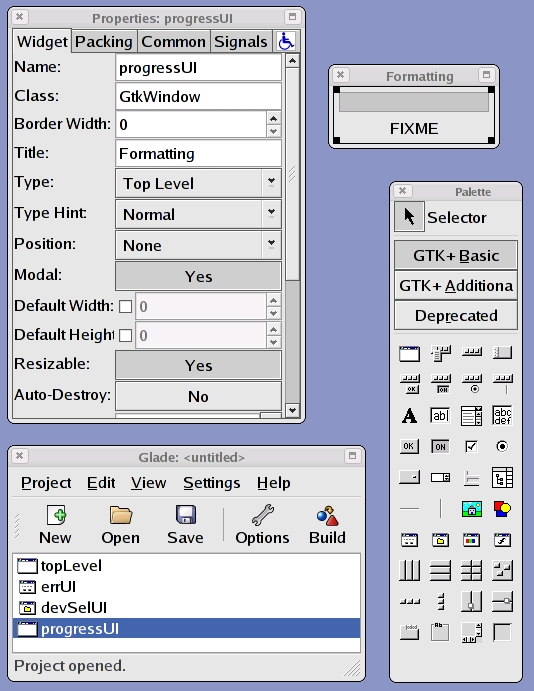
Figure 4. Designing a user interface in GLADE keeps code and layout separate.
Designing the GUI using GLADE and allowing libglade-java to do the heavy lifting significantly reduces the work of an application developer.
Listing 7. GnomeSesameFormat.java Fragment
public class GnomeSesameFormat {

...

private void init() throws IOException {
 glade = new LibGlade(System.getProperty("GLADE_FILE"), this);

 // Default values.
 isDryRun = false;
 cipher = new
 AES256();
 fs = new Ext3();
 passphrase = null;
 volName = null;

 // References to various windows used by
 // application.
 topLevel = (Window) glade.getWidget("topLevel");
 devSelUI = (FileSelection) glade.getWidget("devSelUI");
 errUI = (Window) glade.getWidget("errUI");
 progressUI = (Window) glade.getWidget("progressUI");
}

...

public GnomeSesameFormat() throws IOException {
 init();
 device = null;

 Label l = (Label)
                 glade.getWidget("displayedDevice");
 l.setText("none selected");
}

...

public void onFormatButtonClicked(GtkEvent event) {
 Entry entry;

 entry = (Entry)
 glade.getWidget("entryPassphrase");
 passphrase = entry.getText();

 entry = (Entry) glade.getWidget("entryVolumeName");
 volName = entry.getText();

 if (topLevelInputOk ()) {
  ProgressBar p = (ProgressBar) glade.getWidget
                              ("progressBarFormat");
  Label l = (Label) glade.getWidget("labelFormat");
  ProgressBarUpdater pU = new ProgressBarUpdater(p);
  topLevel.setSensitive(false);
  progressUI.show();

  if (! isDryRun) {
   l.setText("Formatting " + device);
   pU.start();
   execSesameFormat();
   pU.stopReq();
   try {
    pU.join();
   }
   catch (java.lang.InterruptedException e) {}
  } else {
   l.setText("[Simulated] Formatting " + device);
   pU.start();
   try {
    Thread.sleep(1000);
   } catch (java.lang.InterruptedException e) {}
  pU.stopReq();
  try {
   pU.join();
  } catch (java.lang.InterruptedException e) {}
 }

 progressUI.hide(); topLevel.setSensitive(true);
}

...

private void error(String msg) {
 Label l = (Label) glade.getWidget("labelErr");
 l.setText(msg);
 topLevel.setSensitive(false);
 errUI.show();
}

public void onErrOkButtonClicked(GtkEvent event) {
 errUI.hide();
 topLevel.setSensitive(true);
}

...


public static void main(String args[]) {
 GnomeSesameFormat gui = null;

 Gtk.init(args);

 LongOpt[] longOpt = new LongOpt[2];
 longOpt[0] = new LongOpt("help",
                    LongOpt.NO_ARGUMENT, null, 'h');
 longOpt[1] = new LongOpt("dry-run",
                    LongOpt.NO_ARGUMENT, null, 'd');

 Getopt g = new Getopt("gnome-sesame-format", args,
                       "hd", longOpt);

 int c;
 boolean optDryRun = false;
 while ((c = g.getopt()) != -1)
  switch (c) {
   case 'h':
    printUsage(0, null, null);
   case 'd':
    optDryRun = true;
    break;
   default:
    printUsage(1, null, null);
  }

 try {
  int i = g.getOptind();
  if (i == 1)
   gui = new GnomeSesameFormat(args[i]);
  else if (i > 1)
   printUsage(1, null, null);
  else
   gui = new GnomeSesameFormat();
   gui.setDryRun(optDryRun);

  Gtk.main();
 } catch (Exception e) {
  System.err.println(e);
  System.exit(1);
 }
}

...
Listing 8. GnomeSesameFormat.glade Fragment
...

<widget class="GtkButton" id="buttonFormat">

...

 <signal name="clicked"
  handler="onFormatButtonClicked"
  last_modification_time=
   "Wed, 02 Feb 2005 19:16:35 GMT"/>

...

<widget class="GtkDialog" id="errUI">
  <child internal-child="vbox">
    <widget class="GtkVBox" id="vboxErr">

...

      <child internal-child="action_area">
	<widget class="GtkHButtonBox"
	 id="hboxErrOk">

...

	  <child>
	    <widget class="GtkButton"
	     id="buttonErrOk">

...

             <signal name="clicked"
	      handler="onErrOkButtonClicked"
              last_modification_time=
	       "Wed, 02 Feb 2005 19:22:48 GMT"/>

...

	    </widget>
	  </child>
	</widget>
      </child>
      <child>
	<widget class="GtkHBox" id="hboxStop">

...

	  <child>
	    <widget class="GtkImage" id="imageStop">

...

	    </widget>
	  </child>
	  <child>
	    <widget class="GtkLabel" id="labelErr">

...

	    </widget>
	  </child>
	</widget>
      </child>
    </widget>
  </child>
</widget>
Listing 7 displays some of the corresponding Java source code for GnomeSesameFormat. Listing 8 contains a portion of GnomeSesameFormat's interface definition.
GnomeSesameFormat is a simple application I developed, and most of its work is done by executing an external program called sesame-format. sesame-format formats a disk to contain an encrypted filesystem. GnomeSesameFormat simply provides a GUI wrapper for this command-line tool. GnomeSesameFormat can be executed with its --dry-run option to facilitate testing and experimenting. As of this writing, it's probably a bad idea to format a disk using this tool. A screenshot of GnomeSesameFormat is shown in Figure 5.
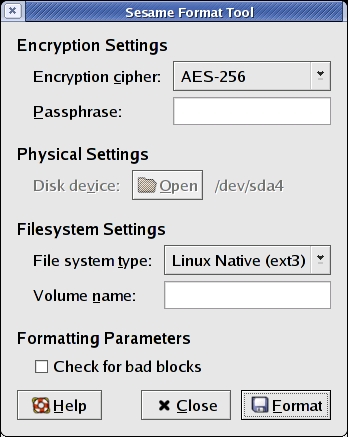
Figure 5. GnomeSesameFormat gives you an easy-to-use front end for setting up and using encrypted disk partitions.
The GnomeSesameFormat application is implemented in a single class, GnomeSesameFormat. The GnomeSesameFormat class' main function initializes the GTK libraries using the Gtk.init method, creates a new GnomeSesameFormat instance and releases control to the GTK event loop by calling Gtk.main.
The interesting work begins in the GnomeSesameFormat class' constructor. In the constructor, a LibGlade object is instantiated. It reads a GLADE user interface description and instantiates its corresponding objects. A reference to these objects can be retrieved by name using the LibGlade object's getWidget method. Once we have a reference to an interface component, we can use them as if we created them ourselves. The GnomeSesameFormat class also contains the signal handling methods referenced in GnomeSesameFormat.glade.
In developing GnomeSesameFormat, I used the four steps presented above. For example, a button was defined using GLADE as part of the application's GUI (step 1). The button was named buttonFormat (step 2). Again using GLADE, a method name of onButtonFormatClicked was designated to handle the button's clicked symbol (step 3). Finally, the onButtonFormatClicked method was implemented in GnomeSesameFormat's Java source code (step 4).
In order to manipulate components further, libglade can provide a reference to an individual component. A LibGlade object's getWidget method provides this capability. To illustrate this, we can investigate GnomeSesameFormat's errUI component. The errUI component is a Window that displays error messages for the user. The errUI window was defined in GLADE (step 1) and named (step 2). Because we know the name of errUI, we can get a reference to it by calling getWidget(errUI). Once we receive a reference to the component, any GTK method may be invoked. GnomeSesameFormat uses errUI's show and hide methods.
The GNOME Project provides the ability to develop applications in C, C++, Java, Python and Perl. In addition, external projects such as Mono provide even more diversity. When used with several of these alternatives, the GLADE User Interface Builder makes it possible to write applications quickly with a graphical user interface for the GNOME platform. Once the graphical components are defined, an application shell and signal handlers all are that remain to be implemented. This implementation can be done using any programming language.
Resources for this article: /article/8274.
Mike Petullo currently is working at WMS Gaming and pursuing a Master's degree at DePaul University. He has been tinkering with Linux since 1997 and welcomes your comments sent to lj@flyn.org. Thank you to Noah Alcantara for helping to review this article.
