
Linux MIDI: A Brief Survey, Part 2
Two months ago, I began what I thought would be a two-part summary of MIDI software for Linux. That plan has changed somewhat, and this installment actually is Part 2 of what will be at least a four-part series. This month, I'm your guide to the world of Linux MIDI sequencers. Next month, I'll introduce some helpful MIDI utilities. Then, in the final installment, I'll look at some of the interesting MIDI languages and experimental environments available to Linux MIDI musicians.
First, a brief review of what a sequencer is and does. Old-school MIDI musicians would define a sequencer as software or hardware that records MIDI data entered by way of a performance on a MIDI-enabled instrument--keyboard, guitar, wind controller--and provides some means for editing and arranging the recorded data. Remember, MIDI data is not audio data, and MIDI messages simply give commands to a connected device (hardware or software) that then should respond according to the particular message. For example, a MIDI note-on message tells an instrument to play a specified note, while a stream of pitch bend message tells the instrument to perform a pitch bend to the specified degree. The range of MIDI message commands is impressive, and a sequencer can be used to automate a variety of studio equipment, such as mixers, effects processors and multitrack recorders, whether tape or digital.
New-school MIDI musicians are more software-based, using softsynths and plugins in place of racks of external gear. Modern sequencers also are expected to support audio tracks that can be synchronized with MIDI tracks. The audio/MIDI sequencer is now the rule: MIDI-only sequencers still are available, but they have become the exception.
User interfaces for sequencers can take various forms, the most popular of which include the "piano-roll" coordinate grid system, the event list and standard music notation. Data may be entered directly from a MIDI-capable instrument or from the computer keyboard. Once the data is entered, it may be represented and edited by any or all of the available user interfaces. Track displays help the musician see the data in a familiar model adopted from the tape-recording paradigm.
Sequencers also are designed for synchronization with other equipment and software. MIDI clock and MIDI time code (MTC) messages provide a means for accurately synchronizing time-critical operations, and MIDI machine control (MMC) messages can operate the transports and other controls available on MMC-aware equipment.
Before we go further, I must remind readers that I am not providing tutorials in these articles. If you want to know more about the programs presented here, please visit their Web homes and give the software a spin yourself. Okay, with all that out of the way, let's now look at some of the available Linux MIDI sequencers.
Rosegarden is the most mature Linux sequencer, with a development history extending back to 1993. During the late 90s, Chris Cannam and Richard Bown decided to update Rosegarden drastically, replacing the aged Xaw/Motif-like toolkit with the more modern Qt graphics and substantially upgrading every aspect of the program. The current version of Rosegarden is a fully modern audio/MIDI sequencer with editor interfaces in all the expected modes (Figure 1). It offers full sets of the usual MIDI editing tools, such as various cut/copy/paste functions, data filtering and substitution routines, block operations and so forth. The program's audio editing capabilities necessarily are more limited, but you can configure Rosegarden to summon your favorite soundfile editor for detailed work on your audio data without leaving the garden.
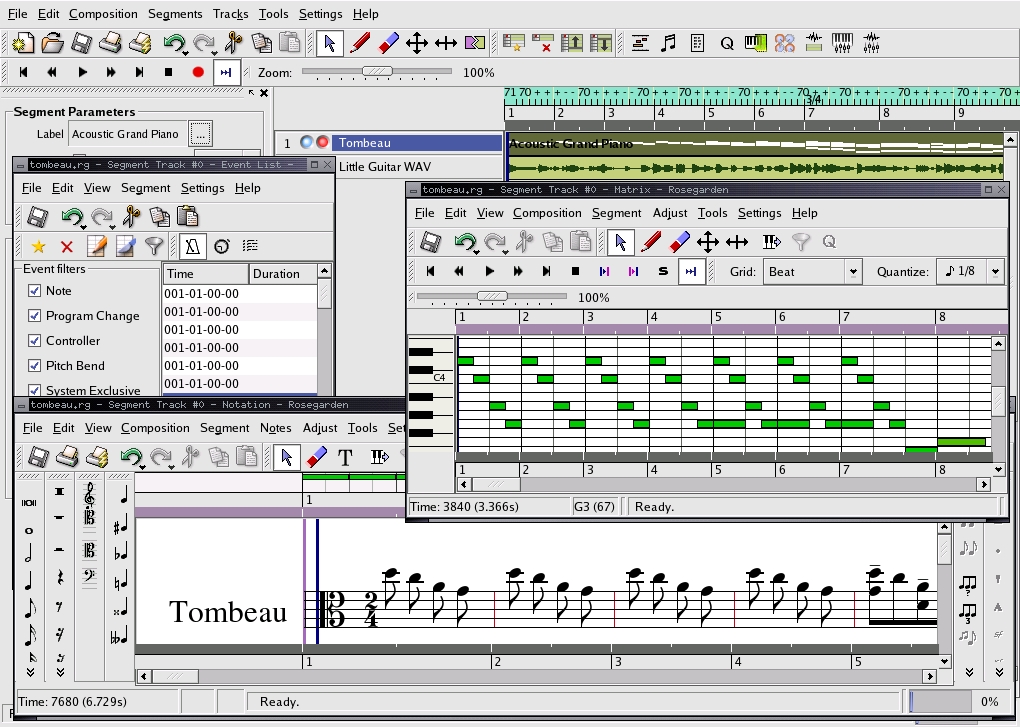
Figure 1. Rosegarden 0.9.9 in Glory
Rosegarden supports the LADSPA plugin API for its audio processing, and the most recent versions have incorporated support for the Disposable Soft Synth Interface (DSSI), an audio programming interface designed for instrument plugins. DSSI expands Rosegarden's support for software synthesizers, but its potential as a "LADSPA for instruments" plugin interface hopefully will appeal to other Linux audio application developers.
Under the Composition/Studio menu item, you can find Rosegarden's MIDI and audio device managers. Rosegarden polls your system for available devices, real and virtual, and maintains its own accounts of their activities (Figure 2). The program supports ALSA and JACK, but it prefers to set its connections internally. That is, the user is advised not to use an external utility such as qjackctl for managing those connections.
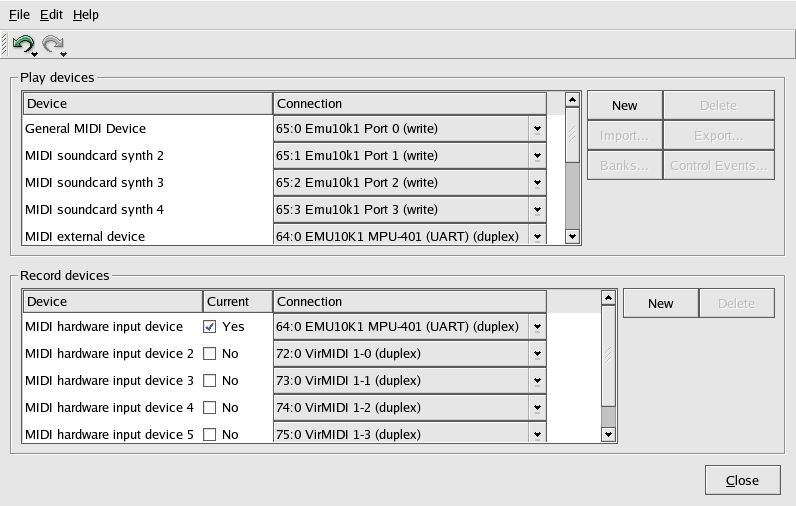
Figure 2. The Rosegarden MIDI Device Manager
Once your connections are made, you can proceed to arm a track for recording by clicking on the small button to the left of the track name. When you're ready to record, click on the big red record button, and Rosegarden starts recording whatever comes in through the selected MIDI input device. After recording, you can edit your performance to perfection in any of Rosegarden's editors.
Rosegarden has too many features to enumerate or show off here, so you'll have to visit the Rosegarden Web site to get the full low-down. One of my favorite aspects of Rosegarden is its ability to export data to the Csound score format, essentially functioning as a MIDI- or notation-based front end to that most awesome music and sound programming/processing environment. Other Linux music and sound applications that support output to the Csound score format include the Denemo notation-based interface, the Ceres/Ceres3 spectral domain editors and the Common Music music programming environment. All these programs are listed on the Linux soundapps pages.
By the way, Rosegarden's standard music notation capabilities are excellent, with particularly impressive methods for finessing notation created from imported MIDI files. Printed output is quite good, and for users who want the ultimate in printed music output, Rosegarden can export your work in the LilyPond music typesetter file format.
In its fundamental aspects, MusE resembles Rosegarden and many other audio/MIDI sequencers. However, Werner Schweer, MusE's chief designer, has decided to remove the program's music notation interface, branching those facilities off into his MuseScore music notation program. MusE will continue to improve its audio and MIDI support, but from at least version 0.7 on there is no music notation interface in MusE. Thus, if notation is unnecessary for your work, MusE should suit your needs perfectly.
Basic operations are similar to working with Rosegarden. However, MusE plays a little more nicely with ALSA and JACK, allowing external utilities to be used for managing device connections (Figure 3). MusE also is well designed for synchronization possibilities, supporting MMC and performance synchronization by MIDI clock, MTC and the JACK transport control interface. MusE can be configured as either the master transport controller or a slave to incoming control signals in any of its supported formats.
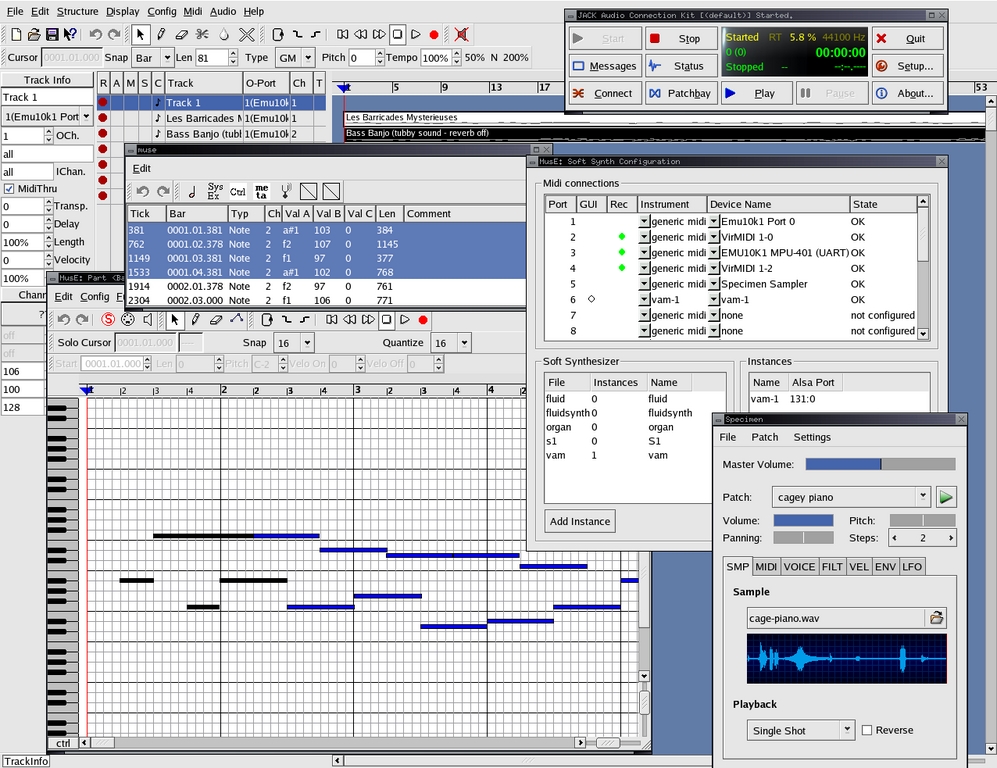
Figure 3. MusE 0.6.3 in Full Array
MusE's audio capabilities include support for LADSPA plugins as well as a native softsynth plugin interface--MESS, the MusE Experimental Soft Synth. Although the MESS API has not been used beyond MusE itself, it is a promising interface. You can see an example in Figure 4, a screenshot showing off Alin Weiller's DeicsOnze, a DX11/TX81Z emulator running as a native MusE softsynth.
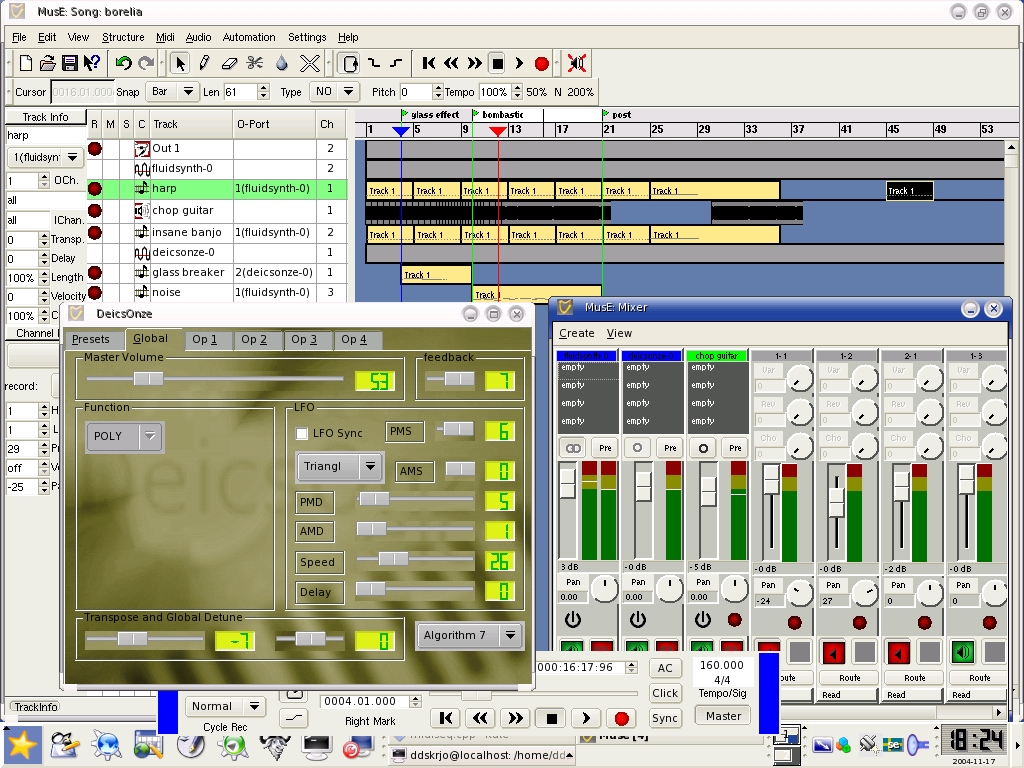
Figure 4. MusE 0.7 with DX/TX Softsynth Running on Linux/PPC (screenshot courtesy of Robert Jonsson)
Seq24 is unique. It is a MIDI-only sequencer with no audio support, and its design philosophy resembles that of popular hardware sequencers such as the Kawai Q80 and the Alesis MMT8. A key feature of seq24 is its intended aim as a performance-oriented composition tool, with special attention given to its loop recording and playback capabilities.
You can loop record in real time from a MIDI keyboard, a virtual keyboard (see Figure 5) or the mouse drawing tool. Autoquantization can be applied to start-time and duration, so your efforts can sound better than your technique. Many editing operations are usable in real time, such as cut/copy/paste and pattern relocation, and a variety of keyboard controls are available for combining patterns in interesting ways during playback.
In some ways, seq24 also reminds me of the venerable Dr. T's KCS, a keyboard-controlled sequencer for the Commodore C64 that packed an amazing amount of power into 64 kilobytes of memory space. The KCS performance controls made the most of the machine's limited resources by triggering sequences from the computer or MIDI keyboard as needed, rather than keeping them in memory as an arrangement of linear tracks. seq24's performance controls similarly are the key to using the program to its fullest, letting the user combine and recombine sequence loops in imaginative ways.
seq24 is lean software, focused on doing a few tasks and doing them well. Programmer Rob Buse refers to seq24 as a simple program, and it is, but you still need to take a few minutes to study the SEQ24 text in the source package to acquaint yourself with the program's keyboard controls. seq24's simplicity conceals an excellent pattern-based real-time MIDI sequencer that's powerful live performance software and just plain great fun.

Figure 5. seq24 0.5.3 at Play with vkbd, a Virtual Keyboard
Jazz++ has an interesting history. It originally was developed as cross-platform commercial software for Windows and Linux, with a GUI based on what then was known as wxWindows. At some point, its developers decided to open the Jazz++ source code and distribute the program under the GPL.
Jazz++ was the first Linux audio/MIDI sequencer. It also was designed with various experimental features, a consideration I find musically thoughtful in software design. The wxWindows graphics were used well in interfaces for randomizing pitches, velocities and controller curves, but alas, interest in Gtk and Qt proved to be powerful competition.
Nevertheless, wxWidgets (as wxWindows now is known) has evolved into an attractive and powerful graphics toolkit, and a new group of programmers has taken up the evolution of JazzPlusPlus, updating the program's interface to the more modern toolkit. Binaries are not available yet, and the source code currently is available only in CVS.
Paul Davis is well known for his Ardour and JACK projects, and he also has made significant contributions to ALSA development. Thus, it should be no surprise to learn that Paul also created one of the coolest Linux MIDI sequencers, called SoftWerk.
SoftWerk's design has been inspired by the Schaltwerk, a hardware analog sequencer built by the Doepfer company. The inspiration is evident if you compare this image with the screenshot in Figure 6. However, SoftWerk can do things quite beyond the capabilities of its hardware ancestor.
In its default configuration, SoftWerk opens with eight sequence tracks, each with 16 steps. Steps can be toggled on or off, the sequence length may be lengthened or shortened at will and additional tracks can be added. No provision for saving performances is supplied, but you can record your SoftWerk's output with the ALSA sequencer interface, or you can capture the audio output from your SoftWerk-driven synths.
Some interesting controls have been added to SoftWerk, including some handy randomization controls. MIDI note numbers may be entered into step positions manually, by way of a MIDI keyboard, or you can have SoftWerk enter random MIDI note values. Sequences can be played forward, backward, end to end or in random order.
Figure 6 demonstrates SoftWerk at work with the Crystal VSTi plugin running under the libfst system. This is another gift from Paul Davis and Torben Hohn that enables the use of VST/VSTi plugins under Linux.
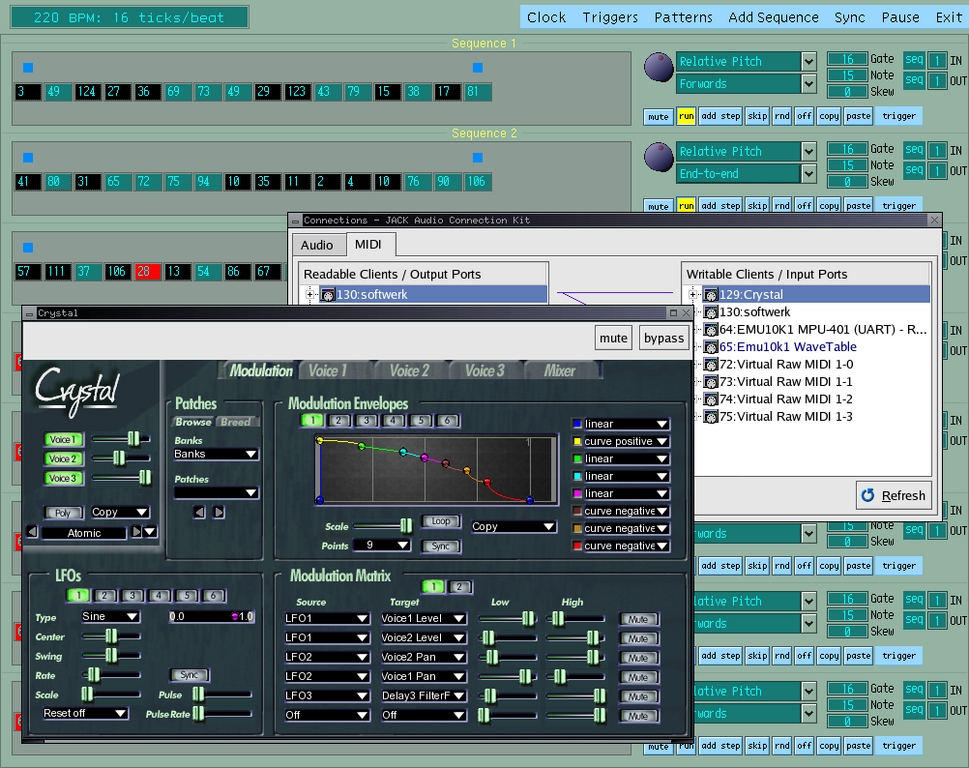
Figure 6. SoftWerk, qjackctl and the Crystal VSTi Synthesizer
SoftWerk essentially is a performance-oriented sequencer, and I must say that I whiled away many hours playing around with it. You can have incredible fun with it, but remember that SoftWerk also is a capable instrument and a welcome addition to any Linux MIDI-based studio.
TiSM is Samuel Dufour-Kowalski's Temporal Information Sequencing Machine, a real-time MIDI sequencing environment based on the Tcl programming language. TiSM differs greatly from the other sequencers presented here, requiring the user to learn how to compose scripts in Tcl (an easy language for beginners) that control the sound production of a MIDI system.
Figure 7 shows off TiSM's various GUI helper panels. Despite these nice graphic displays, program operation absolutely depends on user-supplied Tcl scripts. Fortunately, some example scripts are available from the TiSM Web site (see Resources), along with a PDF document describing the basic use of the program; this document also is readable on-line.
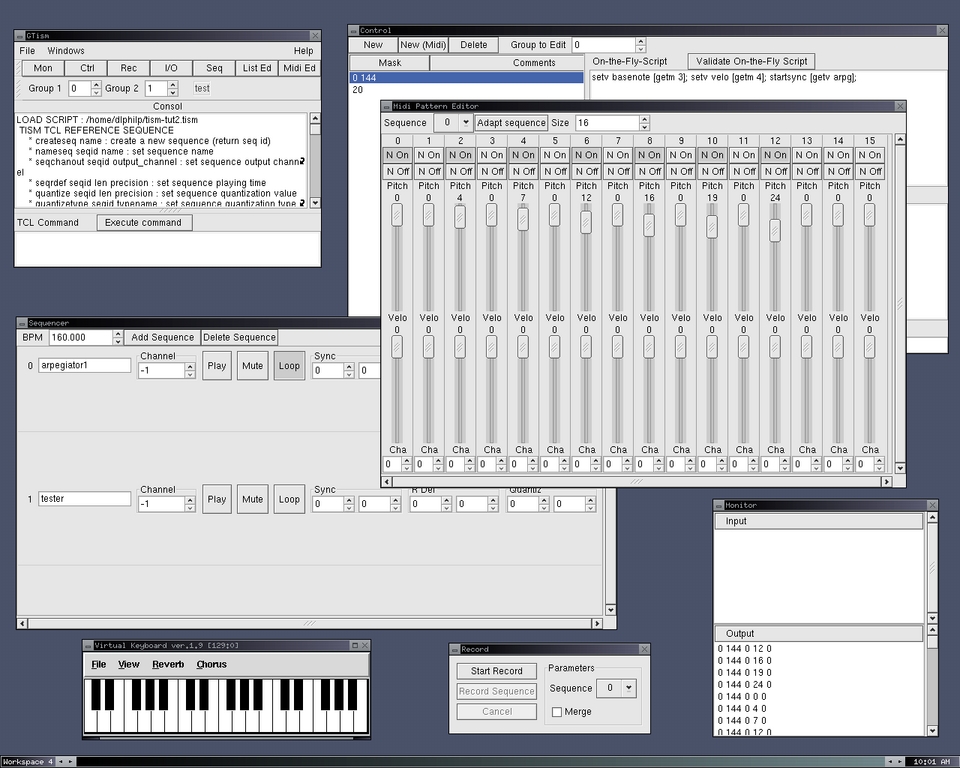
Figure 7. TiSM 0.2.4
TiSM has by far the highest geek appeal of the sequencers presented in this article. The user needs to comprehend TiSM's design structure and the Tcl language, as well as the composition and significance of MIDI data messages. Although these demands may not be amenable to the casual MIDI musician, for those of us who want total control over the MIDI stream, TiSM is a good way to get it.
Next time, I'll present some synthesizer editor/librarians and some other useful MIDI utilities. Until then, you can download and try out some of these sequencers. Let me know if you make any music with them, I'll be glad to point people to your efforts. And don't forget to let the developers of this software know what you like about their work and what you'd like to see in future versions. It all works better that way.
Many other MIDI applications for Linux are listed here.
Dave Phillips is a musician, teacher and writer living in Findlay, Ohio. He has been an active member of the Linux audio community since his first contact with Linux in 1995. He is the author of The Book of Linux Music & Sound, as well as numerous articles in Linux Journal.
