
LaTeX Equations and Graphics in PHP
It's safe to say that the world of Weblogs and wiki Web sites are here to stay. Although such systems are great for journals, general text posting and even photography, their limitations become apparent when working in environments that require the use of features more advanced than simple text entry and images. In particular, technical Weblogs need support for graphs, mathematical expressions, diagrams and more. Such functionality is difficult, if not impossible, to implement with HTML alone.
Using external applications such as dia, xfig and Microsoft Equation Editor is equally difficult, as the poster first must create the figure or mathematical equation and then upload an image representation to a Web site. Moreover, if other posters in a collaborative Weblog want to modify the figure, they also must possess the application as well as the original file that created the image. Obviously, this sort of system has its share of complications, and it fragments the overall quality of figures and equations for a site.
In this article, I demonstrate the use of LaTeX, a typesetting tool and language designed specifically for technical document preparation, from within PHP to address these demands. I call LaTeX from within PHP when HTML is not sufficient to address these complex needs and then render the result uniformly as a PNG image, a format all modern browsers support. Because the software is available entirely on the server, all posters and users have access to the same set of tools and packages for publication.
Why Not MathML?
According to the W3C, MathML is a low-level XML specification for describing mathematics. Although MathML is human-readable, in all but the simplest cases, authors need to use equation editors or other utilities to generate XML code for them. Moreover, modern browsers support only a limited subset of the MathML language, and even then, many of these browsers require external plugins to support MathML. Although the future is quite promising for this language, as of now, it essentially is unsupported and unusable.
To complicate matters further, Leslie Lamport's LaTeX typesetting system has become the de facto standard for the production of technical and scientific documentation. Based on Donald Knuth's TeX document layout system from the early 1970s, LaTeX has been around since 1994 and is a mature and well-understood technical documentation preparation platform with a committed user base. That's not to say that learning LaTeX is a walk in the park. It certainly isn't, but as of now, MathML does not provide compelling evidence to warrant a transition from this already-established system.
Following the UNIX philosophy to “write programs to work together”, I use a composition of common tools available for the Linux platform and chain them together to produce a PNG-equivalent rendering of the LaTeX source. Specifically, you need a recent version of LaTeX with dvips and the ImageMagick toolkit. You are going to use the convert utility from the ImageMagick tools to convert your result into a PNG image. Luckily, most hosting providers that provide shell access already have these utilities available.
The rendering system takes a string of text and extracts segments enclosed in [tex] and [/tex] pairs for future substitution. These extracted segments are called thunks. If a thunk previously has been processed, meaning an image representation of the thunk code already is available, the thunk is replaced with a URL to that image. If the thunk is new, it is passed to the LaTeX typesetter, which outputs its result as a DVI file. The DVI file then is converted to a PNG image with ImageMagick and placed into the cache directory. A URL of the newly created image is substituted for the thunk in the original text. When all thunks have been processed, the resulting text is returned to the caller. The process for converting a single thunk is illustrated in Figure 1.
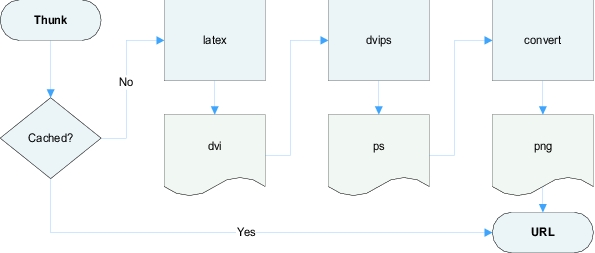
Figure 1. A Flowchart of the Rendering Process for a Single Thunk
I think it is best to start top-down and first look at how to invoke the rendering process, without discussing implementation specifications. The driver is simply an HTML front end that provides a mechanism for testing the LaTeX rendering system. It allows you to see how the render class should be invoked. To get you started, I've provided the basic template shown in Listing 1.
Listing 1. render_example.php
<!DOCTYPE html PUBLIC "-//W3C//DTD XHTML 1.1//EN"
    "http://www.w3.org/TR/xhtml11/DTD/xhtml11.dtd">

<html>
<head>
<title>LaTeX Equations and Graphics in PHP</title>
</head>

<body>

<!-- form to enter LaTeX code -->
<form action="render_example.php" method="post">
<textarea rows="20"
          cols="60"
          name="render_text"></textarea><br />
<input name="submit"
       type="submit"
       value="Render" />
</form>

<?php

if (isset($_POST['submit'])) {
   echo '<h1>Result</h1>';

   require('render.class.php');

   $text = $_POST['render_text'];

   if (get_magic_quotes_gpc())
      $text = stripslashes($text);

   $render = new render();
   echo $render->transform($text);

}
?>

</body>
</html>
This PHP page provides a form for entering LaTeX code and then replaces the thunks with URLs to rendered PNG images through the transform method. Everything else is done behind the scenes in the render class.
Listing 2. render.php
class render {

 var $LATEX_PATH = "/usr/local/bin/latex";
 var $DVIPS_PATH = "/usr/local/bin/dvips";
 var $CONVERT_PATH = "/usr/local/bin/convert";

 var $TMP_DIR =
   "/usr/home/barik/public_html/gehennom/lj/tmp";
 var $CACHE_DIR =
   "/usr/home/barik/public_html/gehennom/lj/cache";

 var $URL_PATH = "http://www.barik.net/lj/cache";

 function wrap($text) { ... }
 function transform($text) { ... }
 function render_latex($text) { ... }

}
You need to let PHP know where your tools are located and provide a directory where PHP can write temporary files and store its cache. For convenience, a URL_PATH also is needed. This URL_PATH is used when generating the image tags in HTML.
Don't be fooled by the simplicity. A vast array of options is available that you can pass to LaTeX and ImageMagick to modify the output PNG image, and you should explore them all. Here, I've merely provided the framework.
The wrap method takes your LaTeX thunk and surrounds it with a prologue and epilogue to create a valid LaTeX source file. You can consider this to be the equivalent of adding additional includes to a C file or importing packages in Java to extend the functionality of the language (Listing 3).
Listing 3. wrap.php7870l3.qrk
function wrap($thunk) {
  return <<<EOS
    \documentclass[10pt]{article}

    % add additional packages here
    \usepackage{amsmath}
    \usepackage{amsfonts}
    \usepackage{amssymb}
    \usepackage{pst-plot}
    \usepackage{color}

    \pagestyle{empty}
    \begin{document}
    $thunk
    \end{document}
EOS;
}
As you can see, I include the packages I routinely need in the LaTeX wrapper. Consequently, I've included the American Mathematical Society (AMS) package, which provides additional mathematical constructs, as well as the PSTricks package to render vector graphics. The pagestyle is set to empty so that page numbers do not appear on images. Also, the thunk is inserted between the document blocks.
Not all of these packages may be available on your system. If necessary, you can download additional packages from the Comprehensive TeX Archive Network (CTAN) Web site (see the on-line Resources) to extend the functionality of your base LaTeX system. For example, packages for bar charts, UML notation and even Karnaugh maps can be downloaded. Whatever your needs, the repository is worth a look.
The render_latex method (Listing 4) extracts all thunks and processes them individually until the thunk pool is exhausted.
Listing 4. render_latex.php
function render_latex($thunk, $hash) {

  $thunk = $this->wrap($thunk);

  $current_dir = getcwd();
  chdir($this->TMP_DIR);

  // create temporary LaTeX file
  $fp = fopen($this->TMP_DIR . "/$hash.tex", "w+");
  fputs($fp, $thunk);
  fclose($fp);

  // run LaTeX to create temporary DVI file
  $command = $this->LATEX_PATH .
             " --interaction=nonstopmode " .
             $hash . ".tex";
  exec($command);

  // run dvips to create temporary PS file
  $command = $this->DVIPS_PATH .
             " -E $hash" .
             ".dvi -o " . "$hash.ps";
  exec($command);

  // run PS file through ImageMagick to
  // create PNG file
  $command = $this->CONVERT_PATH .
             " -density 120 $hash.ps $hash.png";
  exec($command);

  // copy the file to the cache directory
  copy("$hash.png", $this->CACHE_DIR .
       "/$hash.png");

  chdir($current_dir);

}
The thunk parameter is obvious: it's the block of LaTeX code we're currently examining. The hash parameter is a unified version of the thunk, essentially, an md5 of the filename base.
I change to the temporary directory and write the thunk to a temporary LaTeX file. LaTeX then creates a DVI file. The command-line parameter tells LaTeX to run non-interactively. The resulting DVI file is converted to PostScript with the use of dvips, and the -E option specifies a bounding box. I then run the resulting PostScript file through convert—that's the program name—to convert the file to a PNG image. The convert tool has a slew of options, and the settings that will work best for you depend on your site.
Finally, be aware that the exec command returns a failure status code. For brevity, I've left out the error checking and always assume that all steps succeed. LaTeX also has a few dangerous commands that could be an issue for multiuser Web sites. It therefore might be prudent to return an error if certain keywords are found in the thunk.
When Things Go Awry
If something goes wrong at the rendering stage, you can try to process a LaTeX file manually by using the shell with the following commands for diagnostics:
latex --interaction=nonstopmode my.tex
dvips -E my.dvi -o my.ps
convert -density 120 my.ps my.png
This allows you to isolate the specific step at which the LaTeX renderer fails.
During the LaTeX rendering process, a large number of temporary files are created. This cleanup method deletes these extraneous files, and there's really not much to it, as shown in Listing 5.
Listing 5. cleanup.php
function cleanup($hash) {

  $current_dir = getcwd();
  chdir($this->TMP_DIR);

  unlink($this->TMP_DIR . "/$hash.tex");
  unlink($this->TMP_DIR . "/$hash.aux");
  unlink($this->TMP_DIR . "/$hash.log");
  unlink($this->TMP_DIR . "/$hash.dvi");
  unlink($this->TMP_DIR . "/$hash.ps");
  unlink($this->TMP_DIR . "/$hash.png");

  chdir($current_dir);
}
The transform method, shown in Listing 6, drives the rendering class and provides a public access point for the programmer.
Listing 6. transform.php
function transform($text) {

  preg_match_all("/\[tex\](.*?)\[\/tex\]/si", $text, $matches);

  for ($i = 0; $i < count($matches[0]); $i++) {

    $position = strpos($text, $matches[0][$i]);
    $thunk = $matches[1][$i];

    $hash = md5($thunk);
    $full_name = $this->CACHE_DIR . "/" .
                 $hash . ".png";
    $url = $this->URL_PATH . "/" .
           $hash . ".png";

    if (!is_file($full_name)) {
      $this->render_latex($thunk, $hash);
      $this->cleanup($hash);
    }

    $text = substr_replace($text,
      "<img src=\"$url\" alt=\"Formula: $i\" />",
      $position, strlen($matches[0][$i]));
  }

  return $text;
}
The preg_match_all function in PHP extracts the thunks as well as the positions of each thunk. Each thunk then is parsed individually through the loop. Next, a unique md5 of the thunk text is created. This tells us whether a thunk has been cached before. If the thunk has not been cached, I call the LaTeX renderer method and immediately clean up the resulting temporary files. In either case, the thunk is substituted with a URL. When all thunks are processed, the text is returned.
Now, let's look at a few examples that illustrate the kinds of equations you can render with the help of LaTeX. Most of these equations are taken from A Guide To LaTeX by Helmut Kopka and Patrick W. Daly, considered by many to be one of the essential books on the LaTeX system.

Figure 2. Example: Fractions
[tex]
\begin{displaymath}
\frac{a^2 - b^2}{a + b} = a - b
\end{displaymath}
[/tex]

Figure 3. Example: Correlation of Two Variables, X and Y
[tex]
\begin{displaymath}
\mathop{\mathrm{corr}}(X,Y)=
\frac{\displaystyle
\sum_{i=1}^n(x_i-\overline x)
(y_i-\overline y)}
{\displaystyle\biggl[
\sum_{i=1}^n(x_i-\overline x)^2
\sum_{i=1}^n(y_i-\overline y)^2
\biggr]^{1/2}}
\end{displaymath}
[/tex]

Figure 4. Example: A More Complex Equation
[tex]
\begin{displaymath}
I(z) = \sin( \frac{\pi}{2} z^2 ) \sum_{n=0}^\infty
    \frac{ (-1)^n \pi^{2n} }{1 \cdot 3
    \cdots (4n + 1) } z^{4n + 1}
    -\cos( \frac{\pi}{2} z^2 ) \sum_{n=0}^\infty
    \frac{ (-1)^n \pi^{2n + 1} }{1 \cdot 3
    \cdots (4n + 3) } z^{4n + 3}
\end{displaymath}
[/tex]
Though LaTeX is a mathematical typesetting powerhouse, it also is capable in other arenas with the help of packages such as PSTricks. These plots are provided courtesy of Herbert Voss. On his Web site (see Resources), you can find further examples of using PSTricks to test the LaTeX rendering system. Getting some of his more-advanced examples to display correctly, however, may require considerable effort.

Figure 5. Example: Plot of 10x ex, and 2x
[tex]
\psset{unit=0.5cm}
\begin{pspicture}(-4,-0.5)(4,8)
\psgrid[subgriddiv=0,griddots=5,
   gridlabels=7pt](-4,-0.5)(4,8)
\psline[linewidth=1pt]{->}(-4,0)(+4,0)
\psline[linewidth=1pt]{->}(0,-0.5)(0,8)
\psplot[plotstyle=curve,
   linewidth=0.5pt]{-4}{0.9}{10 x exp}
\rput[l](1,7.5){$10^x$}
\psplot[plotstyle=curve,linecolor=red,
   linewidth=0.5pt]{-4}{3}{2 x exp}
\rput[l](2.2,7.5){\color{blue}$e^x$}
\psplot[plotstyle=curve,linecolor=blue,
   linewidth=0.5pt]{-4}{2.05}{2.7183 x exp}
\rput[l](3.2,7.5){\color{red}$2^x$}
\rput(4,8.5){\color{white}change\normalcolor}
\rput(-4,-1){\color{white}bounding box\normalcolor}
\end{pspicture}
[/tex]

Figure 6. Example: Ceil Function
[tex]
\SpecialCoor
\begin{pspicture}(-3,-3)(3,3)
   \multido{\i=-2+1}{6}{%
     \psline[linewidth=3pt,linecolor=red]
     (\i,\i)(! \i\space 1 sub \i)}%
     \psaxes[linewidth=0.2mm]{->}(0,0)(-3,-3)(3,3)
\end{pspicture}
[/tex]
Several implementations of LaTeX renderers are available on the Web today, some of which work better than others. Steve Mayer, for example, now maintains Benjamin Zeiss' original LaTeX renderer for PHP. Mayer also has written several plugins for common Weblog systems, including WordPress. If you want a pluggable solution for your site, this is the one I recommend.
Additionally, John Walker provides textogif, a Perl program that uses the LaTeX2HTML tools to render images in either GIF or PNG format by way of CGI. Finally, John Forkosh provides mimeTeX, written using C through CGI. Its advantage is that it does not require LaTeX or ImageMagick but does so at the expense of rendering quality.
Integrating LaTeX with your wiki or Weblog at first may seem like a daunting task. Once you get the hang of it, however, you'll wonder how you ever lived without it. Using this model, you also can see how other languages might be embedded within PHP in addition to LaTeX. Other ideas to consider include using Gnuplot to generate plots, Octave to evaluate complex expressions or POV-Ray to render 3-D scenes.
Today, the topics represented by the Weblog community largely are disproportionate. Indeed, many technical writers outside the field of programming have stayed away from Weblogs simply because the means to convey their ideas easily do not exist. I hope that the use of LaTeX rendering systems for the Web will bridge this critical gap.
Resources for this article: www.linuxjournal.com/article/8011.
Titus Barik is an IT consultant for small businesses. He's also an active Weblogger and technical bookworm. You can visit his Weblog at barik.net.
