
Kernel Korner - Unionfs: Bringing Filesystems Together
For ease of management, it can be useful to keep related but different sets of files in separate locations. Users, however, often prefer to see these related files together. In this situation, unioning allows administrators to keep such files separate physically, but to merge them logically into a single view. A collection of merged directories is called a union, and each physical directory is called a branch. As shown in Figure 1, Unionfs simultaneously layers on top of several filesystems or on different directories within the same filesystem. This layering technique is known as stacking (see the on-line Resources for more on stacking). Unionfs presents a filesystem interface to the kernel, and in turn Unionfs presents itself as the kernel's VFS to the filesystems on which it stacks. Because Unionfs presents a filesystem view to the kernel, it can be employed by any user-level application or from the kernel by the NFS server. Because Unionfs intercepts operations bound for lower-level filesystems, it can modify operations to present the unified view. Unlike earlier stackable filesystems, Unionfs is a true fan-out filesystem; it can access many underlying branches directly.
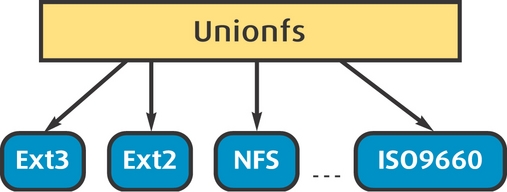
Figure 1. A union consists of several underlying branches, which can be of any filesystem type.
In Unionfs, each branch is assigned a precedence. A branch with a higher precedence overrides a branch with a lower precedence. Unionfs operates on directories. If a directory exists in two underlying branches, the contents and attributes of the Unionfs directory are the combination of the two lower directories. Unionfs automatically removes any duplicate directory entries, so users are not confused by duplicated filenames or directories. If a file exists in two branches, the contents and attributes of the Unionfs file are the same as the file in the higher-priority branch, and the file in the lower-priority branch is ignored.
As a concrete example, assume that we unify two directories, /Fruits and /Vegetables:
$ ls /Fruits
Apple Tomato
$ ls /Vegetables
Carrots Tomato
$ cat /Fruits/Tomato
I am botanically a fruit.
$ cat /Vegetables/Tomato
I am horticulturally a vegetable.
To use Unionfs, you first need to compile the Unionfs module and load it into the kernel. Next, like any other filesystem, Unionfs is mounted. Unlike other filesystems, Unionfs does not mount on top of a device; it mounts on top of directories that are specified as a mount-time option. To create a union, we mount Unionfs as follows:
# mount -t unionfs -o dirs=/Fruits:/Vegetables \
> none /mnt/healthy
In this example, the mount option dirs tells Unionfs which directories make up the union. Unionfs does not mount any device, so we use none as a placeholder. Finally, /mnt/healthy is the location of the merged view. Now /mnt/healthy contains three files: Apple, Carrots and Tomato. Because we specified /Fruits before /Vegetables, /mnt/healthy/Tomato contains “I am botanically a fruit.” If we were to reverse the dirs= option, /mnt/healthy/Tomato would contain “I am horticulturally a vegetable.” (which agrees with the 1893 U.S. Supreme Court ruling on the matter).
This process is recursive. If there were a subdirectory of Fruits named Green that contained a file named Lime and a subdirectory of Vegetables also named Green that contained a file named Lettuce, the result would be:
$ ls /mnt/healthy
Apple Carrots Green/ Tomato
$ ls /mnt/healthy/Green
Lime Lettuce
Unionfs can be applied in several ways. Simple examples include unifying home directories from multiple servers or merging split ISO images to create a unified view of a distribution. In a similar vein, Unionfs, with copy-on-write semantics, can be used to patch CD-ROMs, for source code management or for snapshotting.
Often a single client machine mounts home directories from several different NFS servers. Unfortunately, each server has a distinct mountpoint, which is inconvenient for users. It would be ideal if all home directories were available from the same place (/home for example). Some automounters use symbolic links to create the illusion of a union. With Unionfs, these links are not necessary. The separate exported directories simply can be unified into a single view. Assume we have two filesystems, one mounted on /alcid and the other mounted on /penguin. We can unify them into /home as follows:
# mount -t unionfs -o dirs=/alcid,/penguin \
> none /home
Now home directories from both /alcid and /penguin are available from /home.
Unionfs supports multiple read-write branches, so the user's files will not migrate from one directory to another. This contrasts with previous unioning systems, such as BSD-4.4's Union Mounts, which generally supported only a single read-write branch.
Most Linux distributions are available as both ISO images and also as individual packages. ISO images are convenient because they can be burnt directly to CD-ROMs, and you need to download and store only a few files. To install to a machine over a network, however, you often need to have the individual packages in a single directory. Using the loopback device, the ISO images can be mounted on separate directories, but this layout is not suitable for a network install because all files need to be located in a single tree. For this reason, many sites maintain copies of both the ISO images and also the individual package files, wasting both disk space and bandwidth and increasing management efforts. Unionfs can alleviate this problem by virtually combining the individual package directories from the ISO images.
In this example, we are mounting over two directories, /mnt/disc1 and /mnt/disc2. The mount command is as follows:
# mount -t unionfs -o dirs=/mnt/disc1,/mnt/disc2 \
> none /mnt/merged-distribution
In the previous example of the ISO images, all of the branches in the union were read-only; hence, the union itself was read-only. Unionfs also can mix read-only and read-write branches. In this case, the union as a whole is read-write, and Unionfs uses copy-on-write semantics to give the illusion that you can modify files and directories on read-only branches. This could be used to patch a CD-ROM. If the CD-ROM is mounted on /mnt/cdrom, and an empty directory is created in /tmp/cdpatch, then Unionfs can be mounted as follows:
# mount -t unionfs -o dirs=/tmp/cdpatch,/mnt/cdrom \
> none /mnt/patched-cdrom
When viewed through /mnt/patched-cdrom, it appears as though you can write to the CD-ROM, but all writes actually will take place in /tmp/cdpatch. Writing to read-only branches results in an operation called a copyup. When a read-only file is opened for writing, the file is copied over to a higher-priority branch. If required, Unionfs automatically creates any needed parent directory hierarchy.
In this CD-ROM example, the lower-level filesystem enforces the read-only permissions, and Unionfs respects them. In other situations, the lower-level filesystem may indeed be read-write, but Unionfs should not modify the branch. For example, you may have one branch that contains pristine kernel sources and then use a separate branch for your local changes. Through Unionfs, the pristine sources should be read-only, as the CD-ROM was in the previous example. This can be accomplished by adding =ro to a directory in the dirs mount option. Assume that /home/cpw/linux is empty, and /usr/src/linux contains a Linux kernel source tree. The following mount command makes Unionfs behave as a source code versioning system:
# mount -t unionfs -o \
> dirs=/home/cpw/linux:/usr/src/linux=ro \
> none /home/cpw/linux-src
This example makes it appear as if an entire Linux source tree exists in /home/cpw/linux-src, but any changes to that source tree, such as changed source files or new object files, actually go to /home/cpw/linux.
With a simple modification, we also can use an overlay mount. That is, we can replace /home/cpw/ linux with the unified view:
# mount -t unionfs -o
> dirs=/home/cpw/linux:/usr/src/linux=ro
> none /home/cpw/linux
Most filesystem operations in Unionfs move from higher-priority branches to lower-priority branches. For example, LOOKUP begins in the highest-priority branch in which the parent exists and then moves to lower-priority branches. During the lookup operation, Unionfs caches information for use in later operations.
CREATE attempts to create files in the highest-priority branch where the parent directory exists. The CREATE operation uses the cached lookup information to operate directly on the appropriate branch, so in effect, it moves from higher-priority branches to lower-priority branches.
Unionfs uses several techniques to provide the illusion of modifying read-only branches, and at the same time, maintains normal UNIX semantics. If there is an error while creating a file, error handling must be performed. Error handling proceeds from lower-priority branches to higher-priority branches. Starting in the highest-priority branch in which the parent exists, Unionfs attempts to create the file in each higher-priority branch. Finally, if the operation fails in the highest-priority branch for the whole union, then Unionfs returns an error to the user.
In contrast to CREATE, the UNLINK operation always proceeds from lower-priority branches to higher-priority branches. Because the last underlying object to be UNLINKed is the highest-priority object, the user-visible state is not modified until the very end of Unionfs's UNLINK operation. The most complex situations to handle are partial errors. If removing an intermediate file fails and Unionfs simply removes the highest-priority file, a lower-priority file becomes visible to the user. To handle these error conditions, Unionfs uses a special high-priority file called a whiteout. If Unionfs encounters a whiteout, it behaves as if the file does not exist in any lower-priority branch. Internally, to create a whiteout for a file named F, Unionfs creates a zero-length file named .wh.F. Getting back to UNLINK—if an intermediate UNLINK has failed, instead of deleting the highest-priority file, Unionfs renames the file to the corresponding whiteout name.
This careful ordering of operations has two effects. The first is that UNIX semantics are maintained even in the face of errors or read-only branches. The user-visible state isn't modified until the operation is attempted on the highest-priority branch. The success or failure of the operation is determined by the success or failure of this branch. Through the use of whiteouts, a file can be deleted even if it exists on a read-only branch. The second effect is that when no errors occur, files and directories tend to stay in the branches where they were originally. This is important because one of the goals of Unionfs is to keep the files in separate places.
By default, Unionfs attempts to delete all instances of a file (or directory) in all branches; this mode is called DELETE_ALL. Aside from DELETE_ALL, Unionfs also supports two more deletion modes, DELETE_WHITEOUT and DELETE_FIRST. DELETE_WHITEOUT behaves like the default mode externally, but instead of removing all files in the Union, a whiteout is created. This has the advantage that the lower-priority files still are available through the underlying filesystem. DELETE_FIRST departs from classical UNIX semantics. It only removes the highest-priority entry in the union and, thus, allows the lower-priority entries to show through. These modes also are used for the RENAME operation, as it is a combination of a create followed by a delete.
DELETE_FIRST requires some user knowledge of the union's components. This is useful when Unionfs is used for source code versioning, as in our previous example of a kernel source tree. If we change a file in /home/cpw/linux, the file is copied up to the higher-priority branch. If the file is deleted with standard DELETE_ALL semantics, Unionfs creates a whiteout in the highest-priority branch (because it cannot modify the read-only lower-priority branch). The original source file in the lower-priority branch is now inaccessible, so it must be copied into the union from the source, which hardly makes for a convenient versioning system. This situation is precisely where DELETE_FIRST comes in handy. The delete mode is specified as a mount option, as in the following example:
# mount -t unionfs -o \
> dirs=/home/cpw/linux:/usr/src/linux=ro,\
> delete=first none /home/cpw/linux
Now, as before, if we change a file in /home/cpw/linux, the changes don't affect /usr/src/ linux. If we decide we don't like the changes, we simply can remove the file and the original version will show through.
With the unionctl utility, Unionfs's branch configuration can change on the fly. New branches can be added anywhere in the union, branches can be removed and read-write branches can be marked read-only (or vice versa). This flexibility allows Unionfs to create filesystem snapshots. In this example, we use Unionfs to create a snapshot of /usr while installing a new package:
# mount -t unionfs -o dirs=/usr none /usr
At this point, Unionfs has a single branch that is read-write, /usr. All operations are passed to the lower-level filesystem, and it is as if Unionfs didn't exist.
Creating a snapshot involves two steps. The first is to specify the location of the snapshot files by adding a branch (say, /snaps/0), as follows:
# unionctl /usr --add /snaps/0
At this point, Unionfs creates new files for /usr in /snaps/0, but files in subdirectories of /usr are created in the underlying /usr. The reason for this seeming contradiction is the rule that files are created in the highest-priority branch where the parent exists. For files in the root directory of the union, /usr, the parent exists in both branches. Because /snaps/0 is the higher-priority branch, new files and directories are created physically in /snaps/0. However, /snaps/0 is empty, so if a file were created in /usr/local, the highest-priority parent actually would be in the underlying /usr branch.
To complete the migration, the original /usr branch needs to be read-only. Again, we use unionctl to modify the branch configuration:
# unionctl /usr --mode /usr ro
Now, because Unionfs thinks the underlying /usr is read-only, all write operations really take place in /snaps/0. Multiple snapshots can be taken simply by adding another branch, say, /snaps/1, and marking /snaps/0 as read-only.
The first snapshot can be viewed through the underlying directory, /usr. Each snapshot consists of a base directory and several directories that have incremental differences. To view a specific snapshot, all we need is to unify the first snapshot and the incremental changes. For example, to view the snapshot that consists of /usr and /snaps/0, mount Unionfs as follows:
# mount -t unionfs -o ro,dirs=/snaps/0:/usr \
> none /mnt/snap
In this example, Unionfs itself is mounted read-only, so the underlying directories are not modified.
After determining that the changes made in a snapshot are good, the next step often is to merge the snapshot back into the base. The Unionfs distribution includes a snapmerge script that applies incremental Unionfs snapshots to a base directory. This is done by recursively copying the files in the snapshot directory to the base. After the copy procedure is done, new files and changed files are completed. The last step is to handle file deletions, which is done by creating the list of whiteouts and deleting the corresponding files. The whiteouts themselves also are removed so as not to clutter the tree.
Unionfs recursively merges several underlying directories or branches into a single virtual view. The efficient fan-out structure of Unionfs makes it suitable for many applications. Unionfs can be used to provide merged distribution ISOs, a single /home namespace and more. Unionfs's copy-on-write semantics make it useful for source code versioning, snapshotting and patching CD-ROMs. We benchmarked Unionfs's performance under Linux 2.4. For a compile benchmark with one to four branches, Unionfs overhead is only 12%. For an I/O intensive workload, the overhead ranges from 10% for a single branch to 12% for four branches.
Thanks to Puja Gupta, Harikesavan Krishnan, Mohammad Zubair and Jay Dave, who also were on the Unionfs development team. Special thanks go to Mohammad for helping to get the software for this article prepared for release.
Resources for this article: www.linuxjournal.com/article/7812.
Charles P. Wright (cwright@cs.stonybrook.edu) is a Computer Science PhD student at Stony Brook University. Charles conducts operating systems research with a focus on filesystems, security and extensibility. He also is active in the Linux Users Group at Stony Brook (LUGSB).
Erez Zadok (ezk@cs.stonybrook.edu) is on the Computer Science faculty at Stony Brook University, the author of Linux NFS and Automounter Administration (Sybex, 2001), the creator and maintainer of the FiST stackable templates system and the primary maintainer of the Am-utils (aka Amd) automounter. Erez conducts operating systems research with a focus on filesystems, security, versatility and portability.
