
Open-Source Learning Management with Moodle
Currently, an explosion is occurring in the demand for distance education in the US. Large numbers of high school graduates are going on to college, and more adults are pursuing a college education. The demographics of college students also are changing, with more students juggling work and family responsibilities than ever before, which necessitates easier access to education. Furthermore, the changes in knowledge and skills catalyze the need for ongoing professional development of the existing work force. In response, corporations increasingly are turning to distance education options for their employees.
A learning management system (LMS) is a software system used to deliver on-line education. Alternate terms often used are managed learning environment, virtual learning environment, course management system or learning support system. Today, most LMSes make extensive use of the Web and include features such as discussion forums, chats, journals, automated testing and grading tools and student tracking. LMSes also are used to supplement regular face-to-face courses. They are used in universities, schools and by businesses to deliver corporate training.
Start up and maintenance costs for on-line education typically have been high, with proprietary software solutions such as Blackboard and WebCT being the dominant choice amongst academic institutions and corporations. But cost is not the only or even the prime reason to look beyond available proprietary LMS solutions. The ability to modify software is an important consideration for many institutions that need to address specific teaching and learning requirements. Others need to integrate a new LMS with existing systems.
Several open-source projects have emerged to meet the growing interest in open-source LMSes (see the on-line Resources). In this article, we look at one popular open-source LMS, Moodle.
In classic open-source fashion, Moodle was born out of a need to scratch an itch. Frustrated by proprietary alternatives, Martin Dougaimas, then a PhD candidate in Education with a background in computer science, started Moodle in 1999. Version 1.0 was released in August 2002. Since then, Moodle has continued to evolve at a rapid rate, managed by Martin in Australia and propelled by an active world-wide community of users and developers.
A single Moodle Web site can host a large number of courses. Each course is managed by one or more teachers. Courses can contain activities such as discussion forums, student journals, quizzes, surveys, assignments, chats and workshops. Moodle includes support for grading, file uploads, user logging and tracking, multimedia, e-mail integration and many other features, all comparable to those available in proprietary LMSes.
Moodle is developed on the popular LAMP platform—GNU/Linux, Apache, MySQL and PHP. Part of Moodle's attraction is it can run on almost any server that can run PHP. In addition, PostgreSQL can be used instead of MySQL. The flexible technical requirements make it possible to install and evaluate Moodle on almost any computer and even run it on shared Web servers managed by Web hosting providers. Moodle is offered under the GNU General Public License. The GPL, well-documented PHP code, an active developer community and a modular design make it possible to customize Moodle and integrate it with other open-source software. For users, all Moodle requires is a Web browser and an Internet connection.
Most LMSes are instructor-oriented and largely concerned with how course content is delivered. Moodle is based on a learner-oriented philosophy called social constructionist pedagogy, in which students are involved in constructing their own knowledge. The concepts behind this philosophy of learning are that learners actively construct new knowledge by tinkering, and they learn more by explaining what they have learned to others and by adopting a more subjective stance to the knowledge being created. These ideas run parallel to the way open-source development works, in which the developers also often are users, everyone is free to tinker with the software and code is constructed, peer-reviewed and refined by the means of an open discussion. This philosophy is the basis for the unusual name of this project. The Moodle Web site explains the origin of the name:
The word Moodle was originally an acronym for Modular Object-Oriented Dynamic Learning Environment....It's also a verb that describes the process of lazily meandering through something, doing things as it occurs to you to do them, an enjoyable tinkering that often leads to insight and creativity.
The social construction pedagogy is reflected in the design and choice of Moodle features. For example, one of Moodle's features is every course can have a glossary of terms. The glossary can be set up to allow course participants to add their own terms and definitions. Taking it a step further, Moodle allows comments to be attached to each term, enabling participants to refine and clarify these definitions.
At the time of this writing, the latest stable release of Moodle is version 1.3.1, which was released on June 5, 2004. If you are interested in experimenting with the newest features, you also can download the nightly development packages. Both the stable release and the development versions are available from anonymous CVS. In our experience, we have been able to upgrade Moodle installations by way of CVS without problems. The stable CVS branch is new in v.1.3 and promises a convenient way to maintain a Moodle installation.
Installing Moodle on a LAMP system is straightforward and well-documented. After unpacking the downloaded package, place all files and folders into your Web server's documents directory. Create a MySQL database and account. Moodle needs a separate data directory to store some files, such as user-uploaded images. This directory should not be accessible directly over the Web. You can protect it either by using an .htaccess file or by placing the directory outside the Web server's documents directory.
The default Apache and PHP settings on most Web servers should be adequate. PHP sessions support and file uploading need to be enabled. Also, PHP safe mode needs to be disabled. Some Web hosting providers do not allow disabling PHP safe mode while others do, so check in advance.
A single file, config.php, stores the basic configuration settings, such as database information, Web site URL, directory paths and permissions. Make a copy of the config-dist.php file provided by Moodle, name it config.php and edit it using your favorite text editor. This thoughtful arrangement is useful when you upgrade Moodle. Moodle's config-dist.php is upgraded, but your config.php, which contains settings specific to your installation, is left untouched. The config.php contains detailed instructions and examples.
Next, visit the main page of your Moodle Web site with a Web browser. From this point on, Moodle handles its own installation over the Web, setting up the database and creating tables. The defaults should work to get you started, and you always can customize them later. Finally, you are asked to create an administrator user account. Successful creation of the user account completes the Moodle installation, and you are returned to the home page of your new Moodle site.
Once Moodle is installed, almost all regular administrative activities can be carried out by using a Web browser. When logged in as the administrator, a block containing administration links appears in the left column of the main page after installation (Figure 1). The Configuration link in this block opens up a control panel that allows the administrator to control all aspects of the Moodle site using a Web browser. Again, every setting is meticulously documented and examples are provided.
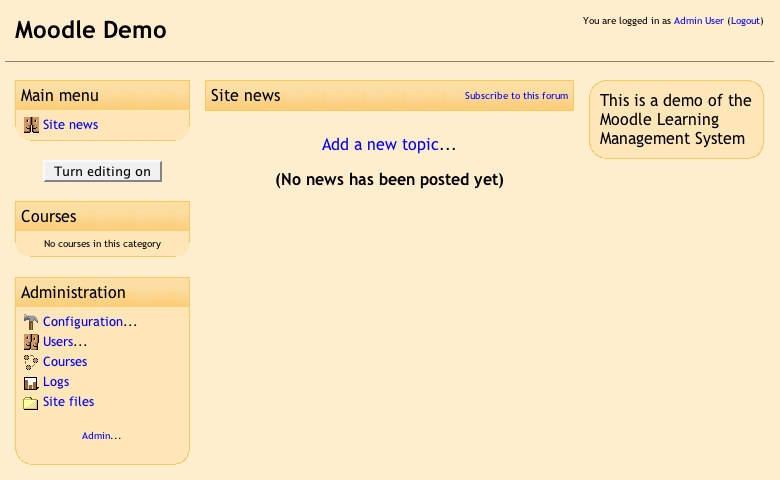
Figure 1. Moodle Main Page after Installation
The Variables panel controls the basic operation of the Moodle site. In most cases, the defaults should work fine. The Site Settings panel is where you set the name of the Web site. This also is where you can change the words used to refer to teachers and students—another example of Moodle's flexibility. For example, you can specify that teachers should be referred to as moderators or facilitators and students should be referred to as participants. At this point, the Moodle site is ready. You can start creating courses and adding users.
To add a new course, while logged in as the administrator, follow the Courses link in the Administrator block on the main page of the Moodle site and choose the button to add a new course. Courses are classified into categories and each course has to belong to a category. Miscellaneous is the default category. You can add, delete or hide categories as needed.
Moodle provides three course formats: weekly, topics and social. The weekly format is suitable for courses organized into weekly activities. The topics format is suitable for courses organized into topics instead of weeks. The social format is organized around a single discussion forum. Choose a format and create the course (Figure 2). Once a course has been created, the assigned teacher for that course can modify course settings at any time.
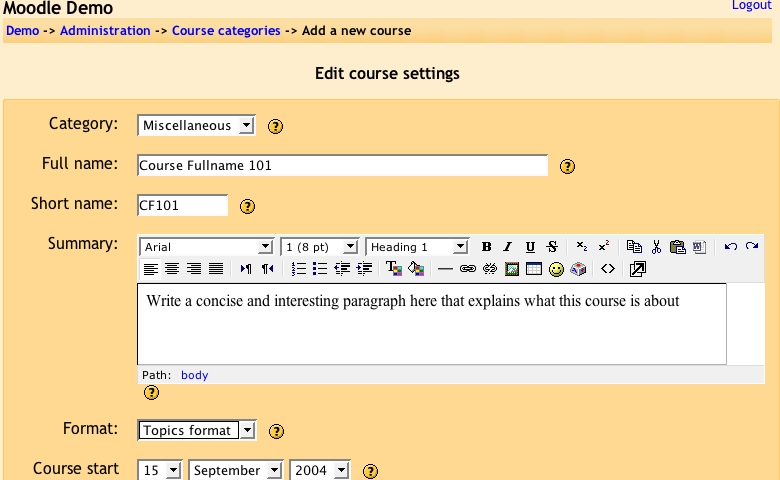
Figure 2. Creating a New Course
After you create the course, you are taken to the main page of the newly created course. Choose the Turn editing on button at the top right corner of the page. With the editing turned on, tiny icons appear all over the page. These icons allow you to reposition blocks of content on the page as well as add, edit or delete resources and activities in the course (See Figure 3).
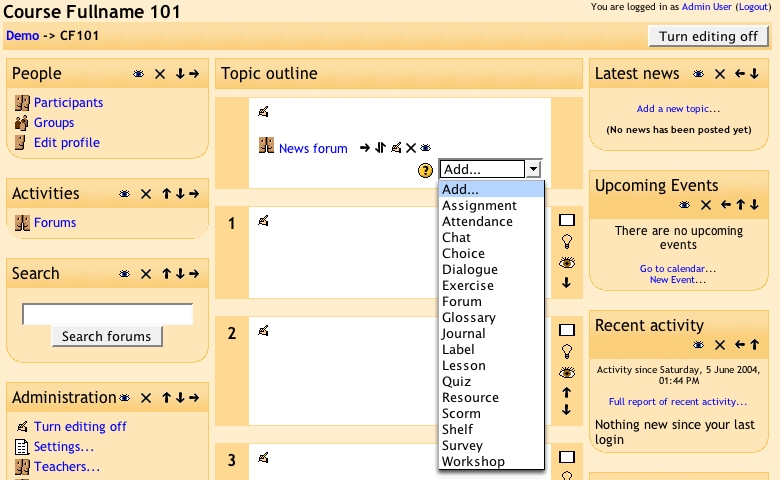
Figure 3. Adding Course Materials
The Users link in the administrator block allows the administrator to add users to the Moodle site. Moodle has convenient user management features. New users can create user accounts themselves by providing an e-mail address. Moodle handles the signup process by confirming the e-mail address, creating the account and generating a password. A user that has forgotten the password can request to have it sent to his or her e-mail address. The administrator also can import multiple users from an external comma-delimited file. The administrator can assign teachers for a course and enroll students to that course.
Moodle comes with 15 themes that change the look of a Moodle Web site, and you can switch themes directly from the Configuration panel. It's easy to create new themes, too. Each theme is contained in a subdirectory of the main theme directory. To create a custom theme, copy one of the existing theme folders and give it a new name. The folder for each theme contains certain standard files, such as config.php and styles.php. The easiest way to change the look of the theme is to tweak the file styles.php, which modifies the Cascading Style Sheet (CSS) used for that theme. Want to add a logo at the top of the page? Customize header.html. Any new subdirectory in the main theme folder automatically appears in the Configuration panel for themes. No special installation step is required.
Moodle's world-wide popularity—1,900 registered sites from 90 countries at last count—could be attributed to the fact that it is available in 40 different languages, from Afrikaans to Turkish. Similar to the plugin arrangement for themes, each language pack is a subdirectory in the lang directory. Switching languages is done easily through the Web control panel for languages. But, Moodle takes flexibility a step further by making it possible for an administrator to change all the phrases used in a language pack. For example, if you want to change the word “courses” to “classes” throughout the Moodle site, it can be changed once in the language pack. The terms in the language pack can be edited directly from the Web-based configuration panel.
The standard package of Moodle comes with over 15 modules for various activities, such as discussion forums, chats, assignments, journals, quizzes and surveys. Additional optional modules are available on the Moodle Web site. Installing a module usually involves copying the module's files into a subdirectory under the mod directory. Some modules come with related language files that need to be copied over to the appropriate subdirectory under the lang directory, depending on which language pack you are using. Using the configuration panel, it is possible to delete a module or change its default settings.
The Web control panel also allows the administrator to set up automated backups. Options control what is archived in the backup file and when. For example, you can omit large log files from being included in the backup. Teachers can make backups of courses, too. A backup without user data can be used to set up a course for the next semester. The backup file is in XML format, meaning your data is never locked in a proprietary format and you maintain control over your own data.
The Moodle Developers Manual lays out the development goals of the project:
Moodle should run on the widest variety of platforms.
Moodle should be easy to install, learn and modify.
It should be easy to upgrade from one version to the next.
It should be modular to allow for growth.
It should be able to be used in conjunction with other systems.
In our experience, the Moodle project has managed to stay true to these objectives even as it evolves rapidly. The quick pace of development is apparent in the frequent releases. For example, Moodle users had expressed interest in an integrated calendar, a feature that Moodle lacked. In January 2004, Moodle users and developers started discussing what calendaring features were needed and how they should be implemented. A few months later, the May 2004 release included an integrated calendar.
An often-repeated criticism of open-source software is it is only for IT experts and is too difficult for basic users to install and use. Yet, over 66% of Moodle users who responded to a Moodle survey identified themselves as teachers, on-line learning researchers or educational administrators.
Managing an LMS can be a complex task. What we like about Moodle is it does not hide this complexity. Its detailed on-line help, examples and sensible defaults assist the user in installing, administering and using the LMS. The greatest strength of Moodle is the community that has grown around the project. Both developers and users participate in Moodle's active discussion forums, sharing tips, posting code snippets, helping new users, sharing resources and debating new ideas. Moodle's low cost, flexibility and ease of use helps bring LMS technology within the reach of those with limited technical and financial resources. Moodle is a fine example of how and why open source works.
Resources for this article: www.linuxjournal.com/article/7817.
Abhijeet Chavan is the Chief Technology Officer of Urban Insight, Inc. He also is the co-founder and co-editor of Planetizen (www.planetizen.com).
Dr Shireen Pavri is an Associate Professor in the College of Education at California State University, Long Beach.

