Building a Diskless 2.6 Firewall
August 25th, 2004 by Christian Herzog in
Want to build a custom router/firewall for your home network? You can obtain the necessary hardware virtually for free from garage sales or on-line auctions. You even might have some old hardware lying around. A Pentium-class system is more than sufficient and can handle the stress well. Typically, we don't need much memory, but I recommend at least 16MB of RAM. In place of a hard disk, we can use a compact Flash, or CF, card. CF has some nifty features, such as on-board error detection and correction to minimize Flash wear. Due to a full-fledged IDE interface, it also can be used as a normal IDE device. You do need an adapter to connect the card, though. We are going to use only two to three megabytes, so the size of the card doesn't really matter.
For now, we are going to build a machine with the following features: iptables firewall, SSH dæmon, DHCP server and DNS server. Because we're going to build a Linux system completely from scratch, we need a fair amount of software. The usual Linux tools aren't built for embedded systems, they're loaded with features we don't need. This is where BusyBox, the Swiss Army knife of embedded Linux, comes into play. We can exchange most of our needed tools with BusyBox, for instance a shell, ifconfig, ip tools and so on. We then need a bootloader, a C library, iptables, an SSH server and a DNS server. We are going to use the new 2.6.1 kernel release, which introduces some issues we'll deal with later.
I use GRUB as the bootloader, but any recent loader should do. iptables, the 1.2.9 version, is the choice for our firewalling software, and Dropbear serves as our SSH dæmon. Finally, we use the handy dnsmasq program, basically a stripped down yet fully functional DNS server to forward our requests to your ISP's DNS servers.
The biggest problem I faced was the C library, libc. I opted for the lightweight library uClibc. It's a C library for embedded systems that comes with a whole toolchain. The development environment can be installed easily by getting the installer tar file from uclibc.org/cgi-bin/cvsweb/toolchain/gcc-3.3.x.tar.gz?view=tar. Unpack it and edit the Makefile in the toolchain directory, then type make. This downloads, compiles and installs a toolchain for your platform. It takes some time to install it, mostly depending on your Internet connection. After it's finished you are presented with a directory named toolchain_ARCHITECTURE (for example, toolchain_i386) containing all libraries, header files and a cross-compiler needed later.
One of the biggest questions is “What filesystem should I use?” Compact Flash cards are shipped formatted with VFAT, which probably isn't the best choice for Linux. The obvious choice would be ext3, but you should be concerned about the Flash wear that affects all Flash-based devices sooner or later. All Flash-based media fails after a certain amount of write cycles; compact Flash usually fails at around a million. That might sound like a lot, but the journaling function of the filesystem would kill the Flash eventually. For simplicity, we use the ext2 filesystem, which we mount read-only. To configure the router, you have to remount the disk writeable.
Hook up the card to a USB reader or use an IDE adapter, and use your favourite fdisk program to create a new partition. One partition the size of your Flash should suffice. Then issue the command /sbin/mkfs.ext2 -m0 /dev/[flash] to create a new ext2 filesystem.
Issue the command tune2fs -c0 -i0 /dev/[flash] to turn off the automatic filesystem checking and the warning that the filesystem should be checked for errors. Because we use it read-only, we don't need to worry about errors too much. Mount the disk and proceed.
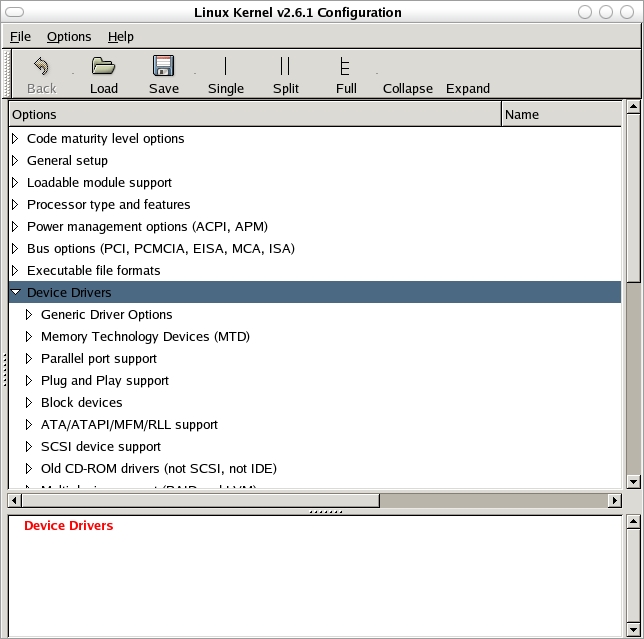
The new kernel has seen some major improvements, the first and most obvious being the new graphical configuration menu. It is invoked by either make gconfig or make xconfig for the GTK+ or Qt-based application, respectively (Figure 1). Using these new GUIs, configuring the kernel is a snap, easier than ever before.
One thing you might want to consider when compiling the kernel for the router is that BusyBox's module support appears to be somewhat flaky with the new 2.6 modules. We can dodge that problem easily by compiling a non-modular kernel that offers the nice side-effect that we can forget about the module-related utilities.
Feature-wise I advise you to check all iptables-related options and the driver for your network cards. We can leave most other options unchecked unless you need them. Remember, the less we choose to add, the less space the kernel needs. Be sure to compile all options statically, though, because we aren't using the modules.
When finished, enter make and watch the new, tidied compilation process. Create a directory boot on your compact Flash and cp the kernel from arch/i386/boot/ to /mnt/cf/boot/.
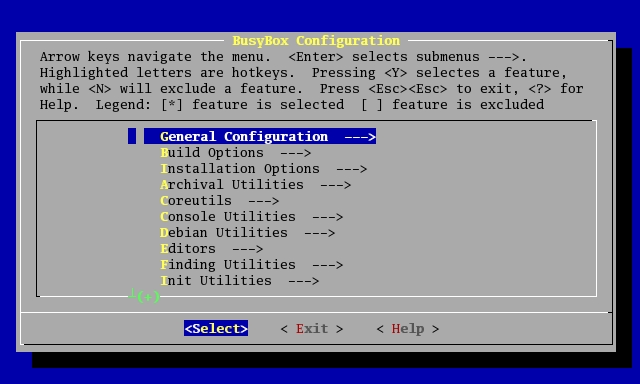
Compiling the applications is quite easy; we start with BusyBox. Unpack it, change to the new directory and type make menuconfig. You are presented with a simple and clean ncurses-based configuration menu (Figure 2). Press B for the Build Options and enter the prefix of the uClibc toolchains GCC program. I copied my toolchain_i386 directory to /usr, so the full path I have to enter is /usr/toolchain_i386/bin/i386-linux-. Next, go to Installation Options and change your installation directory to the mount point of your Flash card. Activate the ifconfig, inetd, ip and udhcpd options and all sub-options. You should find a well-commented configuration file for udhcpd in BusyBox's examples directory. Finally, go to the Init Utilities section and confirm that all options are checked. You might want to add vi as well as other tools to increase functionality.
BusyBox can provide you with tools for login and user management. Nevertheless, I somehow wasn't able to get them to work properly. I therefore had to use the TinyLogin package from tinylogin.busybox.net. Configuration and installation is quite simple; simply edit the Makefile to use the cross compiler and install as user root, so TinyLogin can have the SUID bit set.
IPv6 isn't supported in this configuration. For sure, it is a feature to add in the future, but IPv6 is rather uncommon for typical SOHO environments. The lack of IPv6 support leaves us with the need to disable it in our applications.
Although it's quite easy to disable this feature on iptables (make DO_IPV6=0 KERNEL_DIR=[path your Linux kernel] CC=[path to your cross compiler]), dnsmasq wouldn't be convinced to drop this functionality. After some hours of serious head scratching, I tried the latest unstable version of the little DNS dæmon, namely 2.0rc1. The command make CC=[path to cross compiler] worked instantly and produced a perfectly working dnsmasq binary. The 2.0 versions also have an embedded DHCP dæmon, which one might favour over the one that ships with BusyBox.
You should use the strip command on all binaries to get rid of debugging information and make them smaller.
The dropbear SSH dæmon works quite nicely and compiles without modifications using uClibc. If you run into problems, consult the INSTALL file, which also explains how to configure it. Copy the resulting binaries (dropbear, dropbearkey) to /sbin.
Apart from that, you need to add the line:
none /dev/pts devpts gid=5,mode=620 0 0
to the file /etc/fstab, so the openpty() function of dropbear works and you actually can log in. Apart from that, you need the directory /dev/pts and the device file /dev/ptmx. /dev/urandom is needed to generate the RSA and DSS keys by way of the dropbearkey program.
Change to /mnt/cf. After the installation of BusyBox and TinyLogin, we're already welcomed with a somewhat familiar environment. You now have to add the following directories: /dev, /etc, /lib and /proc.
Go to the directory /lib and copy the following libraries and symbolic links from your toolchain_i386/lib directory. It should look like Listing 1.
Copy the iptables and dnsmasq binaries to /sbin, and switch to the /dev directory. Copy the devices shown in Listing 2 from your /dev directory. Use the command cp -dpr to copy the device files, otherwise they might not work. Of course, you also can use the mknod command to create the devices from scratch.
Now, we're going to add the user root. Issue the command /usr/sbin/chroot ./ /bin/ash, and you are presented with BusyBox's ash shell. Go to the directory /etc and create the empty files passwd, shadow and group.
With the command adduser -h /root root you can add the user root. You have to edit the file /etc/passwd and change the line root:x:500:500:Linux User,,,:/root:/bin/sh to root:x:0:0:Linux User,,,:/root:/bin/sh in order to make the user root the superuser. Now type su root and create a password with the command passwd.
After that we need to add the usual configuration and system files: hosts, securetty, fstab, inittab and resolv.conf. I didn't go for the full-blown init scripts, my inittab consists of only two lines:
tty1::respawn:/sbin/getty 38400 tty1 ::sysinit:/etc/rc
All applications are launched with the rc script (Listing 3). The network interfaces also are configured directly with this script.
I created the firewall.sh script with Fwbuilder, which is by far the easiest and most comfortable solution for getting a firewall up and running. For more information on Fwbuilder, read Mick Bauer's articles from the May and June 2003 issues of Linux Journal. If you have to change the script, you need to log in using SSH and use the command mount -o rw,remount /dev/hda1 / to make the Flash card writeable. Then, transfer the script from your machine to the firewall and move it to /etc/firewall.sh. Finally, make the script executable and use the command mount -o ro,remount /dev/hda1 / to make the filesystem read-only again. You might want to automate this process by writing a little shell script.
One good solution for system logging would be to send the log messages to another machine over the network. This option works well but requires another computer; nevertheless, it is my choice. A different approach would require another partition, mounted read-write, to log to, which strains the Flash quite a bit.
The 2.6 series kernels require a proper bootloader. Simply writing the kernel directly onto the disk is deprecated and is quite messy after all. Create a directory called grub in /mnt/cf/boot and copy stage1, stage2 and e2fs_stage_1_5 from your /boot/grub directory. Apart from that, you need a configuration file for GRUB called menu.lst. As a side note, I had to create a symlink named grub.conf, otherwise GRUB wouldn't boot—this appears to be a Red Hat-specific glitch. menu.lst needs to be dropped in /boot/grub.
Next, you need a boot floppy created with the command cat stage1 stage2 > /dev/fd0. Boot from the floppy, and you are dropped to the GRUB shell. Type root (hd0,0) and setup (hd0). GRUB spills out some debug messages that should indicate whether the procedure was successful. Eject the floppy and type reboot. The Firewall should boot now, and after a few seconds you should be presented with the login prompt.
We now have a very basic Linux system geared toward firewalling and routing. You easily can add the PPP dæmon for dial-up style broadband Internet access. You also could add a printing dæmon and spool print jobs to memory. The 2.6 kernel also has a native ipsec implementation, compile it into the kernel and add the user-space tools for full VPN ability. As you can see, the possibilities are virtually endless.
The Linux Journal FTP site has a tarball of the example filesystem from this article (see Resources), which might help if you run into trouble.
Special Magazine Offer -- Free Gift with Subscription
Receive a free digital copy of Linux Journal's System Administration Special Edition as well as instant online access to current and past issues. CLICK HERE for offer
Linux Journal: delivering readers the advice and inspiration they need to get the most out of their Linux systems since 1994.
Subscribe now!
The Latest
Newsletter
Tech Tip Videos
- Nov-19-09
- Nov-04-09
Recently Popular
From the Magazine
December 2009, #188
If last month's Infrastrucuture issue was too "big" for you then try on this month's Embedded issue. Find out how to use Player for programming mobile robots, build a humidity controller for your root cellar, find out how to reduce the boot time of your embedded system, and if you're new to embedded systems find out the basics that go into one. You can also read about the Beagle Board, the Mesh Potato and a spate of other interestingly named items. And along with our regular columns don't miss our new monthly column: Economy Size Geek.


Delicious
Digg
StumbleUpon
Reddit
Facebook


m0n0wall
On March 16th, 2007 plamalice (not verified) says:
A firewall/router/etc distro that gained a lot of attention lately is m0n0wall.
It's a stripped down FreeBSD with tons of features. Fits on an 8MB CF Card, there's also a CD version and customized version for the WRAP and Soekris Net4xxx line of embedded systems.
m0n0wall website
there's also pfSense, a m0n0wall fork with more features and a bigger footprint.
oops
On May 24th, 2006 sechinsic (not verified) says:
.. there was a lot of comments .. sorry for not seeing that .
Anyways, it's still upstream .
And thank You for a great article .
marvellous
On May 24th, 2006 sechinsic (not verified) says:
Has this post really been uncommented for two years?
I deduce - from this and all other things - that conceptual thinking
related to computer hardware and GNU Linux is an upstream experience .
Still working, on and off for 4 years, on a 'simple' toolchain script,
my sincere hope is that someday I can extend the generated software
beyond my standard desktop .
REF. http://lfs.pagefault.net/index.html
Re: Building a Diskless 2.6 Firewall
On October 1st, 2004 Anonymous says:
Thanks, great article.
I don't think saving money is the real point. Yes, you can get cheaper dedicated hardware to perform the task... but implementations spur on the community and help generate ideas.
I'm hoping to build embedded system on a ($29) PII-400 that, after boot up, begins recording [wave audio] to an usb mounted hard drive with no user interaction.
Re: Building a Diskless 2.6 Firewall - Using JFFS2
On September 6th, 2004 Anonymous says:
Hi,
Would it make sense to use JFFS2 file system instead of ext2? So that you can save files on the flash instead of having it read-only?
-jf simon
Re: Building a Diskless 2.6 Firewall - Using JFFS2
On October 15th, 2004 Anonymous says:
jffs2 allow compression and wear leveling
Re: Building a Diskless 2.6 Firewall - Using JFFS2
On September 30th, 2004 Anonymous says:
Flashes are only rated at about 1000 writes. If you read/write to a flash card often with a typical distro (log/temp/pid files and such), you will likely hit that limit, essentially freezing your CF in time. It will contain all the data on it, but not be able to delete or write any more data to it. Nasty eh? We did this on one of our compact NAS devices we developed for a client. =P Really sucked! RAMdisk is the key really, once you get your distro solid on a CF, make it read only! =)
- I
Consumer flash is not 1000
On November 24th, 2005 Simon Mikkelsen (not verified) says:
Consumer flash is not 1000 but usually 100.000 writes. You can buy industrial grade that can handle 1-2.000.000 writes. But when talking no writes, it is the wear leveling that is important:
Industrial Compact Flash cards usually have it - consumer don't (the write pattern of a digital camera is usually enough). Because wear leveling is done by the card, adding a second layer of wear leveling, e.g. jffs2, gives in the best case nothing, but will usually cause more writes causing the CF card to ware faster.
Also consider "power down". The CF cards internal "file system" may be damaged if the power is cut in a write, causing you to loose some or all of your data - in many cases making the card unuseable. Industrial cards have a capasitor that ensures that current write and the abillity not to start a new write when running on the capacitor. Many consumer cards don't.
For readonly use at a non critical place where you can get to the card, don't worry about all this. The card is not written to (mount read only) so why bother?
Re: Building a Diskless 2.6 Firewall
On September 3rd, 2004 brianlane (not verified) says:
One source for CF pty II card to IDE adapters is the ham group TAPR's adapter for $50. But compare that to the price of a WRT54G from NewEgg at $60 after rebate and its a no-brianer to me. The whole point of using Linux is the flexibility, and with the 54G you get everything you need.
Brian
Re: Building a Diskless 2.6 Firewall
On September 2nd, 2004 Anonymous says:
A very good and useful article. It unleashed new and improved ways to rejuvenate old hardware. Thanks a bunch to the author.
check out devil-linux
On August 31st, 2004 Anonymous says:
www.devil-linux.org
tight. useful.
Lingate from Russia the best
On September 1st, 2004 Anonymous says:
http://lingate.ru/eng
Re: Building a Diskless 2.6 Firewall
On August 27th, 2004 Anonymous says:
Excellent article! Unfortunately some folks, who are talking about $20 commercial alternatives, just don't get the point of the community effort especially of people like the author of this article, who are prepared to share with us what they've learned.
Thank you Christian! :)
Very Cool Article.
On August 27th, 2004 Anonymous says:
This has given me the idea of developing my own embedded file server with the OS being booted from the flash drive and the actual hard drive in the system used for swap space and file storage. The cool thing about using a read only filesystem for the OS is that it would be impossible to hack the binaries to perminantly root a box.
I can use a very low power mini ATX board to get a good mix of power and flexibility.
And with a read only file system used to load the OS you do not have to worry about burning out the memory card, since you will only be writing to it when you rev the OS. When you plug blank drives into the device it can give you the choice of formatting them.
I am going to use it as a file server, a web server, a print server, a scanner server and as a svn repository. It will also auto rsync data from my other computers to itself and to a backup box.
I do use a Linksys wireless router running Linux, but it cost me significantly more than $20... multiply that by 4. I like that my router runs Linux and I have downloaded the tool chain/sources for the time when Linksys no longer has interest in supporting my router, I will be able to support it myself.
Re: Building a Diskless 2.6 Firewall
On August 26th, 2004 Anonymous says:
Strange that the author decised to put all software pieces together from scratch, but I suppose that's the point. A far more convenient (and probably better security-tested) solution is to take one of the dedicated firewall distributions, with one of the best being IPCop (www.ipcop.org).
Vitaly
Re: Building
On August 27th, 2004 Anonymous says:
The point of putting "sw-pieces" together from scratch here is much more profound than meets the eye. It's almost a requirement in embeded systems, to replace standard binaries with the much smaller ones.
But then, some folks will just never get the whole picture, since they don't have time to read more than a few comments about an article they vaguely understand. ;)
Re: Building a Diskless 2.6 Firewall
On August 26th, 2004 undefined (not verified) says:
the great part of the article (and many lj articles) is not that it specifically details how to make a diskless firewall, but instead that it applies to any kind of diskless 2.6-based appliance. and it's a great learning experience.
why lfs (linux from scratch) when there are a plethora of distros available? and who knows, someone reading this may eventually create the next great firewall distro building on top of these instructions (ipcop had to start somewhere... actually it started with smoothwall, which started with red hat 6, etc).
Re: Building a Diskless 2.6 Firewall
On August 26th, 2004 Anonymous says:
Or you could try the cflinux project. True that it uses a 2.4 kernel but the development of a 2.6 branch is on it's way.
Re: Building a Diskless 2.6 Firewall
On August 26th, 2004 Anonymous says:
Oh by the way the URL is www.cflinux.hu
Re: Building a Diskless 2.6 Firewall
On August 26th, 2004 Anonymous says:
As is usually the case I find these "build it yourself" articles enlightening (relevant to what I do or not) and the user communities comments complementing the articles very well. This article maybe does not build you a better firewall but the posts have shed a lot of light on a whole bunch of different scenarios (some serious, some not so serious - do I really want to install PERL on a USB key??)Kudos to the author and user community!
grub pain in the ass
On August 25th, 2004 Anonymous says:
I've had a long and painful session of headbanging against the wall because of grub.
When installing it, the first command is indeed root (hd0,0) but then setup (hd0) will not do the right thing (even though the messages printed out seem ok).
The correct incantation is:
install /boot/grub/stage1 d (hd0) /boot/grub/stage2 p (hd0,0)/boot/grub/grub.conf
I've found it by installing Fedora Core 2 and watching the system messages printed out by the installer.
Re: grub pain in the ass
On August 26th, 2004 undefined (not verified) says:
grub's not a pain.
just run grub-install.
it's part of the debian...
oh, you run fedora?
nevermind. you have bigger pains than grub.
;-)
Re: Building a Diskless 2.6 Firewall
On August 25th, 2004 Anonymous says:
I hate to say it, but the uClibc folks have a nice package called buildroot (or download a tarball) that will automatically download and compile the toolchain, kernel, and userspace for any supported architecture (including x86) with a single `make`, thus avoiding all the manual steps described in this article. It will create an ext2 filesystem image suitable for loading as an initrd. buildroot is really quite nice to use, and many embedded systems vendors use it for cross-platform development for embedded Linux devices.
Re: Building a Diskless 2.6 Firewall
On August 25th, 2004 Anonymous says:
For about 60 bucks you can have all brand new hardware including a built in switch and wireless connectivity running a Linux 2.4 kernel, all of the other items mentioned here and Openswan IPSEC VPN:
http://openwrt.org/
http://voidmain.is-a-geek.net:82/
http://voidmain.is-a-geek.net:81/
Void
Re: Building a Diskless 2.6 Firewall
On August 25th, 2004 Anonymous says:
Note it's quite easy to install into a disk image on file,
that can subsequently written to the flash.
I've created a script that creates the disk image file
using dd, fdisk, mkfs.ext2, grub etc. with a simple
config file to define the partition and flash size.
pixelbeat
Re: Building a Diskless 2.6 Firewall
On September 26th, 2004 Anonymous says:
Any chance you would be willing to share that script with the rest of us? (url?)
-nv
Re: Building a Diskless 2.6 Firewall
On August 25th, 2004 Anonymous says:
I know this is "Linux Journal" after all, but your time has to be pretty cheap to deal with all this PLUS the cost of getting a CF/IDE adaptor, versus getting a hardware router/firewall for about $20 from Linksys, Netgear, DLink, or any number of other vendors. I've even seen them free after rebate lately, since the ones lacking wireless have fallen out of favor. If you're doing this for educational purposes (as the author obviously was since he doesn't seem to know what he was doing), then that's great. If you really think this article describes a better firewall solution, well, it doesn't. Just the power bill from running the old computer 24/7 makes this a non-starter.
I've just bought a $70 PLANET
On September 14th, 2005 steelman (not verified) says:
I've just bought a $70 PLANET VRT-311S and I could be the happiest man on Earth if it didn't break UDP encapsulated VPN connections. Even happier I could be if the web application that uses the VPN was more fault tolerant and didn't introduce database errors with every broken connection. Ghrrrrr...
Unfortunately most cheap hardware provide very, VERY simple TCP stack that (e.g. VRT-311S doesn't understand ECN at all) is next to usless if you need to run something more sophisticated than CounterStrike or Personal Web Server. That's why I decided to put some old parts and new Linux together and get a decent router.
Re: Building a Diskless 2.6 Firewall
On September 3rd, 2004 Anonymous says:
erm I think you need to sit down and think.
LFS - you can easily include IPv6 (both native and tunnels),IPSEC tunnels, routing protocols (using zebra), IPv4 firewall, IPv6 firewall.
I for one have never come across any $20 products that include IPv6 support - my cisco routers do but then they cost a lot more than $20.
Re: Building a Diskless 2.6 Firewall
On August 31st, 2004 Anonymous says:
What you said about price of firewalls by some venders isn't relative to the technics in this article. The content of the article tells how to make a joyful firewall from new linux kernel and nice tools, but not how to earn money or defeat products in market. The readers are happy in learning how to make their own firewall from scratch from dropped pcs. It's the process that is important. understand?
Re: Building a Diskless 2.6 Firewall
On August 25th, 2004 Anonymous says:
If all you want is a $20 router, I would recommend buying one of those. But what this article outlines is a foundation which can be modified to suit a special need which a $20 router can't fill.
I've been using Linux to build larger routers (with disks) for several years, and have found them to be much more flexible than a cisco router as far as what you can make it do for the money; most cisco routers don't come with PERL built in.
Re: Building a Diskless 2.6 Firewall
On August 25th, 2004 Anonymous says:
Since when is PERL installed on any kind of firewall????
I was told years ago that a firewall should be a minimized system.
Re: Building a Diskless 2.6 Firewall
On August 25th, 2004 Anonymous says:
"Years ago", the utility of "firewalls" was considered with much skepticism by those who were serious about security but there is a huge difference between a university with 10k+ users and a small home network.
The problem is not what software is installed for local use but what services are available. An ideal configuration for a screening router is a bridge (could be built from OpenBSD out-of-the-box 3 years ago - Linux seems to support this configuration now) which is invisible via IP.
Although the instructions for the OpenBSD set-up advocated using a serial console, there is nothing to stop you adding a third network card and using X
to manage such a box from an internal network. This is much more secure than using a web-server through the dmz:
...--internet--BRIDGE--dmz--BASTION-FW--lan--...
For a large organization you would have an internal firewall on the lan and run the connection back to the BRIDGE from there.
Re: Building a Diskless 2.6 Firewall
On August 25th, 2004 Anonymous says:
perl should be installed on everything. absolutely everything. mail gateways, firewalls, internet toasters and usb keys. if it has a cpu, put perl on it. period.
Re: Building a Diskless 2.6 Firewall
On August 26th, 2004 Anonymous says:
Quite obviously you have been sniffing glue again. Perl is like panties, if you ain't a woman, ya don't need 'em!
Re: Building a Diskless 2.6 Firewall
On August 25th, 2004 Anonymous says:
usb keys don't have cpus.
Re: Building a Diskless 2.6 Firewall
On August 25th, 2004 Anonymous says:
yes they do. you have been lied to by the man.
Re: Building a Diskless 2.6 Firewall
On August 27th, 2004 Anonymous says:
There are many idiots around, and you are one of them. How come you read the article? I guess, so you can sell these ideas as yours" somewhere behind the closed doors, and show off your shallow M$ smarts here!
Re: Building a Diskless 2.6 Firewall
On August 25th, 2004 Anonymous says:
If things like this interest you, you should consider the floppy based firewall "floppyfw" at http://www.zelow.no/floppyfw/
It uses syslinux, busybox, uClibc, etc. It doesn't yet have a 2.6 kernel
based version though. Latest version uses kernel 2.4.26.
I've been using floppyfw since 1999, and it's gotten regular
security and feature updates. It is quiet easy to configure and use.
Re: Building a Diskless 2.6 Firewall
On August 25th, 2004 Anonymous says:
Coyote Linux floppy firewall is also good.
http://www.coyotelinux.com/products.php?Product=coyote
I have been running this on an old Pentium for a while now. The Shields Up scan tests at http://www.grc.com show all my ports as fully stealthed.
But I probably will switch to a cheap router box, as another post suggested.
Coyote Linux & BrazilFW Addons site
On January 5th, 2006 dolly (not verified) says:
visit Coyote Linux Add-on's and bandwidth management site, where you can download support for QoS Layer7 filtering, graphical traffic statistics with RRDstats and many other addon packages.
Re: floppyfw
On August 25th, 2004 Anonymous says:
Absolutely. floppyfw is easy to set up and rock-solid.
(And no, it doesn't run off the floppy. It boots from floppy and loads everything into RAM).
Gentoo based router/firewall DIY project
On August 27th, 2004 Anonymous says:
http://www.gentoo.org/doc/en/home-router-howto.xml
Re: Building a Diskless 2.6 Firewall
On August 27th, 2004 i0scan (not verified) says:
Why use a compact flash or or a floppy? Use a "live" or custom distro which uses a ram drive. You could then add a tiny script to the distro to pull the settings accross the network upon bootup. (via scp, nfs, etc)... That way if you make changes to the settings file, you would only need to rerun the script. All you would need is a 386 or better, nic card(s), old cdrom, and a power supply. No CF, HD, Floppy, etc. You would still only need a tiny amount of memory as long as you do not use a "live" distro with a graphical gui.
Re: Building a Diskless 2.6 Firewall
On September 14th, 2004 Anonymous says:
A good reason for using the CF card, but which doesn't make much sense when you are using ancient hardware, is to try to build the system to be somewhat "solid state", or no moving mechanical parts to break. If I were to do this, I would probably be looking at fanless low heat cpu design, small form factor mother board, slim line case... pretty much embedded type componets. Otherwise, if I were using ancient hardware anyways, I'd probably use a Live-CD based distro, like Devil Linux and save myself the trouble.
Post new comment