
System Information Retrieval
In issue 39 of Linux Journal (“Is Linux Reliable Enough?”, July, 1997), Phil Hughes writes about down time due to the failure of a hard disk:
At some point we had a configuration disk for our firewall; but when we needed to replace the hard disk, the configuration disk had vanished. This loss cost hours of work time and probably a day of uptime. Having a complete backup of everything, boot disks for all machines, spare cables and disk drives and other assorted parts can make a big difference in the elapsed time to deal with a problem.
I've developed a script to simplify the kinds of Linux system administration difficulties which Mr. Hughes describes. I use the script on all my Linux systems and feel it would benefit other system administrators as well as Mr. Hughes.
I've installed Linux on four Intel Pentium-based systems and seven Intel 486-based systems. All of the 486-based systems had previously been abandoned because they had neither sufficient processing power nor sufficient memory for Windows for Workgroups, Windows 95 or Windows NT, my company's choices for a desktop operating system. All of these 486-based systems run Linux very capably.
I use these Linux systems for network troubleshooting, testing, research, evaluation, experimentation and program development. Installing and using Linux in a large corporate enterprise has helped me learn more about DNS, networking, network programming, HTML and HTTP, system administration and other aspects of the Unix environment.
Although these Linux systems have been extremely useful, the age and diversity of the equipment involved makes system-administration tasks difficult at times. Consider the mix of equipment shown in Table 1, “Linux Systems and Major Components”. (This table also provides a list of the names of the Linux systems I'll be referring to throughout this article). The permutations of five computer vendors, three disk types, seven types of networking cards (the five NE2000 clones are from three vendors), and four CD-ROM types create some interesting installation, configuration and administrative headaches.
I've encountered other significant, system-administration difficulties as well:
The various hardware components of these systems change from time to time as research and evaluation needs dictate.
Because I am trying to win acceptance of Linux within my organization, I perform most of the system-administration functions on my own time.
None of these systems have a working tape backup unit.
These systems are distributed among three locations within the Memphis area. All are interconnected via a metropolitan area network that forms the basis for a method of simplifying system-administration duties.
As if these issues weren't serious enough, soon after installing my sixth Linux system, its hard disk began failing. Since the disk was failing slowly, I had time to recover all the pertinent configuration information to enable me to reinstall and reconfigure Linux quickly after I replaced the failing disk.
Listing 1 shows a shell script I created to ease the chores of maintaining multiple, disparate Linux systems. The script, which I call collect, uses remote shell commands (rsh) and remote copy commands (rcp) to copy a number of files (which are described briefly in the “Collected Files” box) from a remote Linux system to “cuthroat”, my primary system-administration system.
If I lose any Linux file system (except for cuthroat's), I don't have to be concerned about losing important configuration information. As we'll see later, since I propagate all the collected information on cuthroat to several other systems, I don't have to worry about losing cuthroat's file system.
After writing and testing the collect script, I created the /admin directory on cuthroat and moved the script to this directory. When I wish to collect system-administration information from a Linux system (barb, for example) and store that information on cuthroat, I log on to cuthroat and type the following commands:
cd /admin
collect barb
If the /admin/barb directory doesn't exist, the collect script creates it, and then begins copying the remote system's files. In the spirit of UNIX brevity, the only screen output is a single line:
barb: copying /proc, .config, lilo.conf, partition infoThis line, built by several echo -n command lines and a final echo command line, indicates the progress of the remote operations. Once the collect script finishes, directory /admin/barb on cuthroat contains a copy of barb's system-administration files.
I could, of course, run collect for an arbitrary number of systems as follows:
cd /admin
for i in anthrax barb ducktape
do
collect $i
done
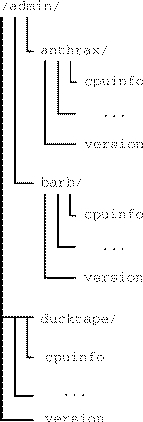
After collect executes in the example above, cuthroat's /admin directory is shown in Figure 1.
I can run collect on cuthroat to copy cuthroat's own files (rather than a remote system's files) as shown in the following example:
logon to cuthroat
cd /admin
collect cuthroat
If cuthroat's .rhost file names itself, the collect script will execute correctly and copy the collected files into cuthroat's /admin/cuthroat directory.
If a disk failure were to obliterate one of my machines, the collected system-administration information would help me reload Linux with a minimum of confusion and difficulty on the replacement disk.
If loyd's disk failed, for example, I would replace the disk and restore Linux with these steps:
Reconstruct the partitions from information in /admin/loyd/fdisk.
Reload Linux.
Rebuild the kernel from the information in the file /admin/loyd/kernel.config.
File /admin/loyd/lilo.conf contains the information that the line append="cdu31a=0x340,5" is necessary for the proper operation of loyd's ancient CD-ROM drive.
There are, of course, as many deviations from these steps as there are users of Linux, but the point of showing the steps is to demonstrate how the collected information is useful in restoring a Linux system.
Although the ability to recover from catastrophic errors was the initial impetus for creating the collect script, the collected data has a number of other uses as well.
Recently I needed to add an IBM Token Ring Network 16/4 Adapter to barb. This adapter only works with interrupt request (IRQ) 2, 3 or 7, so I examined the /admin/barb/interrupt file and determined that IRQ 3 was unused. Since I had collected this information remotely and stored it on cuthroat, I established that barb had an available IRQ without a trip to barb's location and without logging on to barb. In fact, since barb's information was stored on cuthroat, I could have located an unused interrupt for barb even if barb were off-line.
Suppose I need to inventory some software or hardware component in each of the various Linux systems. Let's use networking cards as an example:
cd /admin
egrep -i "ne2000|3c|ibm tr" \
        `find . -name interrupts -print`
The egrep command will search the interrupts file in each Linux system's directory for ne2000 (the NE2000 clones), 3c (3Com cards), or ibm tr (IBM Token Ring cards) and print all matching lines in each file.
Several months ago I configured the Enhanced Real Time Clock (RTC) support into loyd's kernel. Or was it speed's kernel? Could I have configured RTC support into both kernels? Here's how to tell which kernels have RTC support:
cd /admin
grep CONFIG_RTC=y \
   `find . -name kernel.config -print`
In a fraction of a second, grep confirms that only loyd has RTC support:
./loyd/kernel.config:CONFIG_RTC=y
The cuthroat machine has a PC DOS partition. Recently I booted DOS on cuthroat to configure the autoexec.bat and config.sys files so that I could use cuthroat's CD-ROM under DOS. The instructions told me to take one action, if the CD-ROM were controlled by IRQ 14, and to take a completely different action, if the CD-ROM were controlled by IRQ 15. Being efficient (or lazy) I didn't want to turn off cuthroat, rip it open, determine where the CD-ROM cable plugged into the IDE controller, reassemble it and turn it on again.
After pondering a bit, the answer occurred to me: look at a copy of cuthroat's /proc/interrupt file which was stored on loyd. I didn't even have to boot Linux on cuthroat. I used a DOS FTP client to transfer loyd's /admin/cuthroat/interrupts file to the DOS system on cuthroat. Here are the two relevant lines from that file:
14:  9663 + ide0
15:    32 + ide1
IRQ 14 is the first IDE device; at the time the collect script obtained cuthroat's system-administration information, there had been 9,663 interrupts on this device. During the same interval, the second IDE device, attached to IRQ 15, had generated only 32 interrupts. Since I knew cuthroat had only two IDE devices, it was obvious from the interrupt count that the hard drive was attached to IRQ 14 and the CD-ROM was attached to IRQ 15.
As a final example, let's find all the Pentium processors with Intel's infamous floating-point-division bug:
cd /admin
grep fdiv_bug `find . -name cpuinfo -print`\
         | grep yes
If the Pentium chip in “solo” had the floating-point-division bug, then grep would produce the following output:
./solo/cpuinfo:fdiv_bug : yes
Although cuthroat is my primary system-administration site, I keep the collected files on several systems for redundancy. After copying the system-administration information from all the Linux sites to cuthroat, I propagate the collected information from cuthroat to another system:
rsh loyd mkdir /admin
rcp -pr /admin/* loyd:/admin
I repeat the rcp for each machine on which I wish to have a copy of this information.
Several simple requirements must be satisfied for the collect script to work:
The first (and most obvious) requirement is that all systems must be interconnected.
Depending on how name resolution is configured, all system names must be in a Domain Name Server or in each system's /etc/hosts.
Each system needs a properly configured .rhost file to support remote shell and remote copy operations.
And finally, you must configure the /proc file system in each system's kernel. Note that the kernel build procedure includes the /proc file system by default.
The collect script can be easily extended if you find that /proc (or any other directory) contains system-administration information that is important to you. None of my systems use PPP; if yours does, modify the collect script to capture your PPP configuration information.
Most of my Linux systems run the Apache web server, but I don't bother to collect any Apache configuration information because only two lines distinguish one system's configuration from another. If you're running a web server and you've made a significant number of configuration changes, you may wish to collect your web server's configuration data.
If you are using Linux as a firewall, modify the collect script to save the firewall configuration. If Mr. Hughes had been using the collect script, the failure of his firewall's hard disk might not have cost him “hours of work time and probably a day of uptime”.
Running find on one Linux system located about a dozen files with names in the form *.conf. If you look at your systems closely, you may find additional configuration files to collect using the collect script.
All of the Linux systems named in Figure 1 are protected from the Internet by an industrial-strength firewall. None of these systems are mission critical. My security considerations are probably quite different from yours, so you will have to evaluate whether any information you collect could compromise your systems and act accordingly.
The collect script simplifies remote system administration of disparate systems by centralizing configuration information. It is easy to use and easy to extend. Since the collected file sizes sum to less than 10KB per system, very little disk storage space is required. Although I created the collect script to ease recovery from potential catastrophes, the information obtained by using the collect script has a number of other uses as well.


