
Megahedron—A 3D Graphics Environment

Manufacturer: Syndesis Corporation
E-mail: syndesis@threedee.com
URL: http://www.threedee.com/
Platforms: Intel Linux, Silicon Graphics, Windows NT
Price: $99US
Reviewer: Michael J. Hammel
The world of 3D graphics on Linux has come a long way in the past 2 years. When I first started investigating graphics tools for Linux, there were only a handful of 3D renderers publicly available and almost no 3D modelers. Since then the number of modelers has grown significantly (I can count 5 full-blown modelers currently working plus at least 2 others in development). 3D rendering tools have also seen a vast increase, with POV-Ray and BMRT (Blue Moon Rendering Tools) two of the best modelers available for any platform, heading the list.
Not long ago I came across a new product I had seen announced in the comp.os.linux.announce newsgroup: Megahedron. I hadn't actually used the product (it was, and still is, a commercial product) but I was intrigued by the announcement. I had Megahedron on my “list of things to purchase”, when Linux Journal beat me to it and provided me with a copy to review.
Megahedron is a modeler and 3D graphics engine that uses an interpreted language similar to POV-Ray's scene description language. It differs from POV-Ray in a numbers of areas, such as the ability to do wireframe animations on the fly and built-in network rendering. The package is supported on a number of platforms, including Windows NT (x86 and DEC Alpha), Silicon Graphics and Intel Linux. The $99 list price gets you a CD-ROM containing binaries and complete configurations for each of these platforms. Licensing covers any machine the purchaser uses with Megahedron, but if another user wishes to use it, he must purchase his own copy. It's a fairly unrestrictive license, as far as commercial products go.
The distributable package consists of a single CD in the customary plastic casing. All documentation is in HTML format on the CD. There is a single insert on the CD explaining where to begin in the documentation contained in an HTML file in the root directory named mhedron.htm. This page is a master Table of Contents for the complete documentation.
Installation of Megahedron is simple:
Choose a base directory in which to install the package, generally, /usr/local. If the directory does not exist, create it with mkdir.
Copy the tar file from the Linux directory on the CD to the chosen base directory.
Unpack the tar archive.
The only problem with installation is that the instructions are listed in the fourth part of the fourth section of the first chapter of the Manual. The Manual is the third heading in the Table of Contents. The second entry in mhedron.htm is a “Quick Tour”. This tour suggests making changes to source code, which can't be done directly from the CD, so you must first do the installation. The installation also says to “decompress [the package] from your hard drive or directly from the CD.” This is not quite correct since the package is not compressed—it's simply a tar archive. Despite these oversights, the installation is relatively straightforward.
Unlike many of the free packages available, Megahedron comes with oodles of documentation, all of it on-line on the CD and formatted in HTML. This is a nice bonus, since you can print the pages of interest from your browser. Most of the HTML documents print out as no more than 7 to 10 pages, which isn't too bad. Most impressive is the sheer amount of information provided.
The master Table of Contents contains links to five other areas: an introduction, a Quick Tour, an art gallery, the user's manual and sample source code. The Quick Tour provides a glance at some of the modeling, animation and procedural aspects of the interpreted language, called SMPL (Simulation and Modeling Programming Language). The tour is rather interesting. I found the train wireframe-animation particularly interesting, since most other tools I've seen don't offer such features (a notable exception is the rendribv program in the BMRT distribution).
The art gallery is not very impressive from an artistic point of view. The images present the modeling capabilities of Megahedron much better than the shading capabilities; future versions should explore the various shading capabilities provided by SMPL. This lack may be simply because the people who created the images are more technically than artistically oriented, but really useful 3D images should present a good blend of technical and artistic aspects. Some of the images from the art gallery are shown in Figures 1 and 2. Listings for the HTML code that goes with them are not printed in this article but are available by anonymous ftp in the file ftp.linuxjournal.com/pub/lj/listings/issue41/2282.tgz
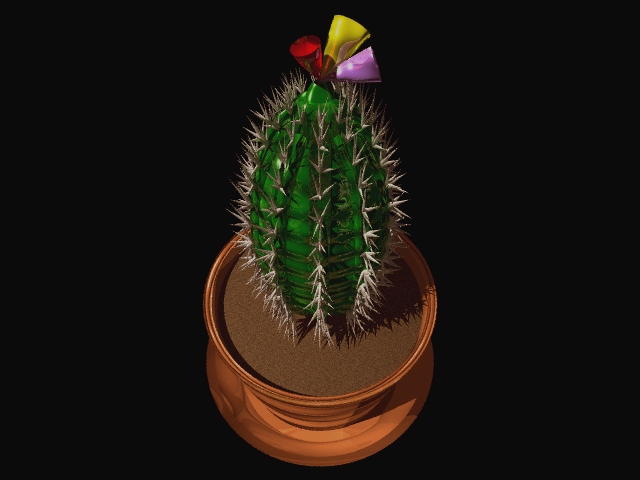
Figure 1. Megahedron Cactus
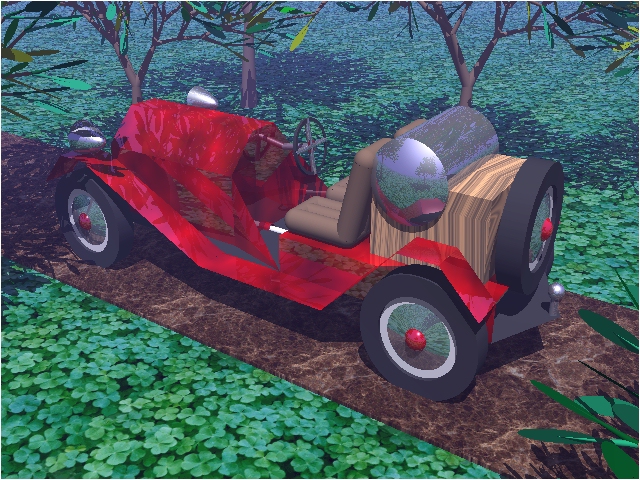
Figure 2. Megahedron Roadster
An attempt was made to color-code the sample SMPL source, but the result is somewhat limited. There is quite a bit of code for experimentation purposes, although I have to admit I didn't run much of it.
The meat of the documentation is in the manual, a seven chapter document plus an Index, Glossary of Terms and SMPL Grammar Appendices. The seven chapters cover modeling and rendering aspects in fair detail. I'd like to see these two areas broken out into separate areas; Megahedron has merged the modeler with the renderer just a bit too much for my taste. There is also a good deal of material covering the use of shaders.
Megahedron is feature-rich. The section of the documentation titled “What is Megahedron?” gives a detailed list of features, including:
The SMPL interpreted, procedural language
A programmable shading language (which uses SMPL)
Rendering modes from wireframe to full ray tracing
Various projections, including a fisheye projection
Simulation capabilities such as collision detection and ray intersection
Network rendering
This is not the complete list, of course, but it should give you an idea of the range of capabilities available.
SMPL is the programming language for Megahedron, and it looks a little like Basic. It's fairly intuitive if you are familiar with tools like POV-Ray or BMRT and with vectors, object primitives and transformations. If you are not, there are plenty of simple examples to get you started and the glossary and indices in the manual will help you find the way through the source code.
An SMPL program has the following general format:
do task2, task3;
<include files>
integer a;
procedure task1 is
        <declarations>
        <statements>
end;
procedure task2 is
        <declarations>
        <statements>
end;
procedure task3 is
        <declarations>
        <statements>
        task1;
end;
Declarations include data, type and subprogram declarations. Statements include object declarations and instances, transformations and so forth.
The data types supported by the language are fairly intuitive, but are slightly different in syntax from RenderMan and POV. In the RenderMan RIB file format, a string type is a String, whereas Megahedron uses char. As you can see, the data type is obvious. RenderMan uses point to specify a set of 3 points in space, each of which is a float value. Megahedron uses the type vector for the same thing. POV, on the other hand, doesn't really have data types. All variables have declared values that get preprocessed before the code is processed, substituting the declared value for the name of the variable. Which method is better depends on the user's preference. I like defined data types because type checking can be done up front. Megahedron's use of the const statement allows for enumerated values, a nice addition that doesn't appear possible in a RIB file. (Although if you use the RenderMan API, you're writing C code, so enumerated types are not a problem.)
Subroutines are supported with the use of the procedure statement. Scoping of variables is much like C scoping, with variables accessible locally or globally, but not across procedures. Procedures are delimited with the procedure and end statements. There is support for static variables in procedures as well as multidimensional arrays.
The language has one annoying aspect: it uses curly braces for comments. I've used quite a number of languages over the past 10 years and can't remember any that used curly braces for comments. The traditional C and C++ comment markers of #, /**/ and // would, in my opinion, have been better.
One weakness in the documentation is the description of the file I/O routines. Although file I/O is possible, it's not clear how to output model information to a file. A few examples for outputting model information would have been a nice addition. After all, since I prefer using BMRT's renderer over Megahedron's, I need a way to output RIB files in order to use SMPL for modeling. Rendered images can be saved in RAW or TGA (Targa) formats. I found this information in the section on “Display Controls”, not in the section on “File I/O” as I expected. While perusing one of the system files, smpl_prims, I found that support is implied for the JPEG format as well, but I didn't find confirmation of this elsewhere.
As with RenderMan's RIB and with POV-Ray, an SMPL file is a collection of sections describing a 3D scene. In SMPL you have sections for defining the camera and rendering options (similar to the sections outside the WorldBegin/WorldEnd statements in RenderMan), object declarations, still frames and animation. Still frames are really the guts of the scene, where objects are instanced, textured, transformed and so forth. The proceduralism of SMPL allows for declaring objects once and instancing them many times throughout a frame. For example, a single ball might be defined as a sphere with holes cut out of it that can be used to instance 100 spheres in various states of unrest for a single frame.
An important part of any 3D rendering system is its ability to do transformations. Transformations allow an object (a sphere, box or more complex figure) to be moved to its location in 3D space prior to the actual rendering of the image, or to be sized or modified in shape (stretched or skewed, for example). Megahedron allows objects to be transformed relative to their current size and position or absolutely. Absolute transformations specify the exact size or position without regard to the current size or position.
Transformations are specified using the with clause for objects, as follows:
<object name>
                with
                        <transformations>
        end;
Transformations can be nested, and the relative transformation is based on a transformation stack, much like RenderMan or POV-Ray. Instancing an object gives it the current transformation state, and new transformations are made within the instance that apply only to that particular instance or any instances created below it. In other words, it's a hierarchical model. If you're familiar with POV or BMRT, you should have no problems learning the syntax and use of transformations in Megahedron.
One difference between RenderMan and Megahedron is how camera transforms are done. In the latter, the camera is actually moved. This is similar to the way POV handles camera transforms, but different from the way RenderMan handles it. It's important to understand what is being moved when using transformations in any 3D package.
Lighting primitives supported include distant point lights, spot lights and ambient lighting. These are the same lighting types supported by POV and RenderMan. Each type has its own parameters, such as brightness (known as “intensity” in RenderMan) and color. Lighting in RenderMan is handled through the use of shaders, so it's possible to create all manner of lights for use with BMRT. Megahedron appears to offer similar functionality, although I didn't delve into this area much.
One of the nicest features is the live animation capability. Wireframe displays, which can include hidden surface removal, can be run interactively. Interactive displays can also make use of mouse and keyboard input to control the display. There are examples provided that show exactly how this is done.
As with any 3D environment, modeling is not enough. Wireframe displays provide a glimpse of what your scene (or animation) will look like, but without extensive shading the model appears rather uninteresting. Megahedron provides a rich set of shading features: ray tracing using reflections, refractions and shadows, and image, bump and procedural mappings to name just a few. A collection of stock shaders such as granite, ridged and cloudy is provided. Targa (TGA) formatted image maps are supported. It's interesting to note that Megahedron maps all image map coordinates from (0,0) to (1,1), with the former being the lower left corner of the map. RenderMan maps (0,0) at the upper left and (1,1) to the lower right. If you're used to using BMRT, it is important to keep this in mind when using Megahedron image maps.
The shading language is closer to the RenderMan shading language than POV-Ray's texturing commands. This can be seen in the examples used in the “Anatomy of a Shader” section of the manual. Here colors are defined through the addition of values computed earlier, such as:
diffuse = (illumination + ambient) * color * .3;
specular = reflect (color * .4);
highlight1 = highlight1 * color;
highlight2 = highlight2 * color;
metallic_color = diffuse + specular + highlight1
        + highlight2;
This method of layering textures is different from POV-Ray's. In POV, an object's final texture is based on a series of textures defined within multiple texture{} statements. In a sense, the two methods are the same computationally, but from a users perspective the blending of layers is more apparent and under greater control in the procedural languages (Megahedron and RenderMan). If you started with POV, as I did, you may find this a bit confusing at first. Once you've learned how layering textures works with Megahedron, however, you'll appreciate the control it provides.
There are a number of predefined shaders provided in the distribution. In the system directory there are some extensions to SMPL (written in SMPL), including some interesting shaders such as “vampires”, which don't show up in mirrors, and “ghosts”, which only show up in mirrors. These shaders look rather interesting, and I have to wonder why the sample images don't appear to make use of them.
One important difference between the BMRT, POV and Megahedron feature sets is that only BMRT supports displacement maps. These are like bump maps except the point on the surface is actually moved instead of just adjusting the normals of the point to make the surface appear bumpy.
I like this aspect of the documentation, but it has some usability problems. First, the tour points to sample directories as smpl/<directory>. This is incorrect—there is no smpl directory. The tour also (unless I missed it) fails to mention that the system specific directories are the top level directories on the CD. Under the system directories is the mhd directory where the examples, code and system files are located. It can be a little confusing to find your way if all you do is read through the Quick Tour—be sure to look through the CD directory structure first.
Another rather interesting omission is that the Quick Tour doesn't mention the name of the program you will be running. After a quick search under the Linux directory on the CD, I found the bin directory and the imhd program.
There were lots of problems running the examples. ideal_gas, sonic_boom and slicer.smpl are all examples that take input from the mouse. At first nothing I did seemed to affect the example; eventually, I found I had to move the mouse slightly for the button presses to be recognized. This might be an X-server issue, but I think the problem is really the hot spot area defined by the SMPL code. It appears that the area that recognizes the button press is smaller than the visible button area.
While writing this review, I often switched desktops (I use FVWM2) between the xterm running my editor and another running Netscape in order to read Megahedron's documentation with the browser. I also ran the sample programs on the same desktop as Netscape. Whenever I switched to my editor desktop and then back to the Netscape desktop, some of the windows for the sample programs didn't get updated. For example, sonic_boom.smpl creates two windows—one that shows an aircraft and “sound waves” moving past it and another that shows controls for setting the thrust of the aircraft along with current speed displays. This second window would not be redrawn when I switched desktops. The ideal_gas example had similar problems, but I found I could get the control window to update if I forced a change to the display by moving the piston up or down. This limits the usefulness of the interactive programs with window managers that support multiple desktops.
Another minor nit is that windows created by the examples are not grouped. As a result, my window manager's AutoRaise feature does not raise all the windows associated with the example. This can be a little annoying, but it's a minor point.
Overall I found the feature set of Megahedron to be quite extensive. The documentation blows away anything else I've seen for a tool of this nature. I'm constantly looking for tools which can easily be picked up by a novice user. Megahedron certainly falls into this category simply on the strength of the documentation and sample programs. It is, however, not perfect. See Sidebars 1 and 2 for lists of Megahedron' pros and cons.
At one point the “Introduction to 3D Coordinates” says it is not necessary to know algebra or trigonometry to use Megahedron. Possibly true, but without either what you can do with Megahedron will be severely limited. Face it, knowing how to place objects in 3D requires not just an understanding of geometry, but trigonometry as well.
One area I didn't cover in this review is the rendering engine. I didn' do many full renders due to time constraints on my system. (I had other renderings running and needed to keep a little system time for other work.) If you get a chance to try Megahedron and can compare it with BMRT and/or POV-Ray (or any other renderers that run on Linux) feel free to write it up and pass it on to me. Chances are good I'll include it in a future “Graphics Muse” column in Linux Gazette.
Despite the problems mentioned, I think Megahedron would be a good way for new users to get started with 3D images. Experienced users might find the animation capabilities quite useful as well, although the animations might not be as impressive with the builtin renderer. It's difficult to say without more detailed images that make full use of the shading language. The documentation is quite extensive and well written and the licensing is user friendly. I would recommend this package to anyone interested in learning more about 3D graphics.
Michael J. Hammel is an X Windows and applications software engineer for EMASS in Denver, CO. He is the author of the “Graphics Muse” column in the Linux Gazette, keeper of the Linux Graphics Mini-HOWTO and co-author of The Unix Web Server Book from Ventana. His interests outside of computers include 5K/10K races, Thai food and gardening. He suggests if you have any serious interest in finding out more about him, you visit his home pages at http://www.csn.net/~mjhammel. He can be reached via e-mail at mjhammel@csn.net.

