
Writing Man Pages in HTML
The Web invasion of the Internet continues at a breakneck pace. In the space of just a few years HTML has become one of the most widely supported document formats. Currently, there's gold-fever driven effort by a cast of thousands to reformat older sources of information for presentation on the Web. The required technology is relatively simple to understand, and is inexpensive to assemble. Linux is an ideal development and delivery environment: low cost, reliable, and necessary software is included in several competing Linux distributions.
In this article I'll discuss a solution I've written for serving up old documents in the new medium—automated translation. The documents to be converted are the Unix man pages. Man pages are highly structured documents in which major headings and references to other documents, are easily recognized. The files making up the man page system are already organized into a rigid set of hierarchies using a formalized naming system; thus, it is easy to deliver the entire existing man system and document format via the Web without reorganization of content or overall structure. I've assembled some pieces of software that translate the old Unix manual format into HTML while preserving the old style and organization. The technologies present in the Web allowed further enhancements: documents can be cross-linked; alternate forms of indices can be automatically generated; and full text searches are possible.
I've called the package I've assembled vh-man2html. It is designed to be activated as a set of CGI (Common Gateway Interface) scripts from a web server—the same technology that drives HTML forms. This means that vh-man2html can be used to serve man pages to other hosts on your LAN or on the Internet. The principle component of vh-man2html is Richard Verhoeven's man2html translator, augmented by several scripts to generate indexes and facilitate searches. vh-man2html also has some supporting scripts that allow you to drive Netscape from the Unix command line, so that vh-man2html can actually replace “man” on systems that include Netscape.
If you have access to the Web, you can see vh-man2html in action at:
http://www.caldera.com/cgi-bin/man2html
where the man pages for Caldera 1.0 are available on-line.
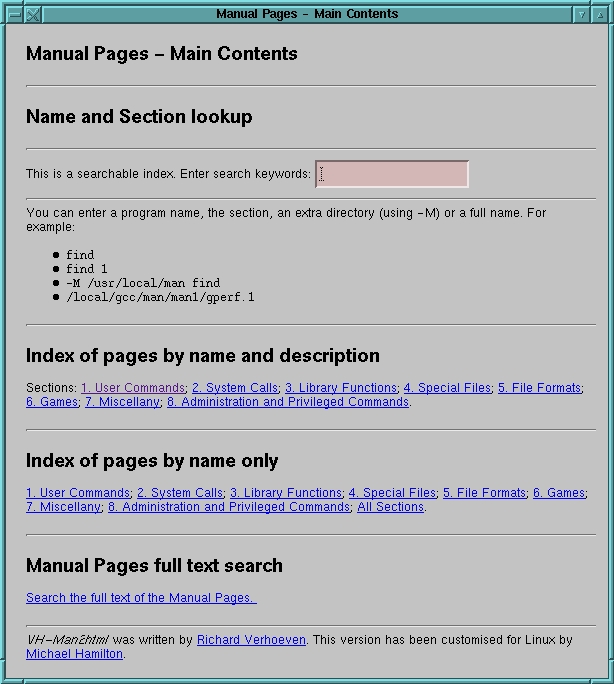
Figure 1: Main vh-man2html Web Page
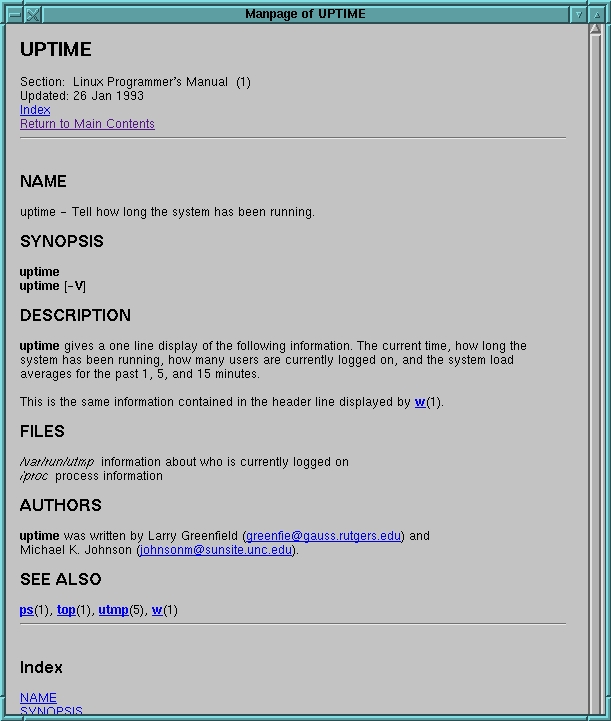
Figure 2: Man Page Generated by vh-man2html
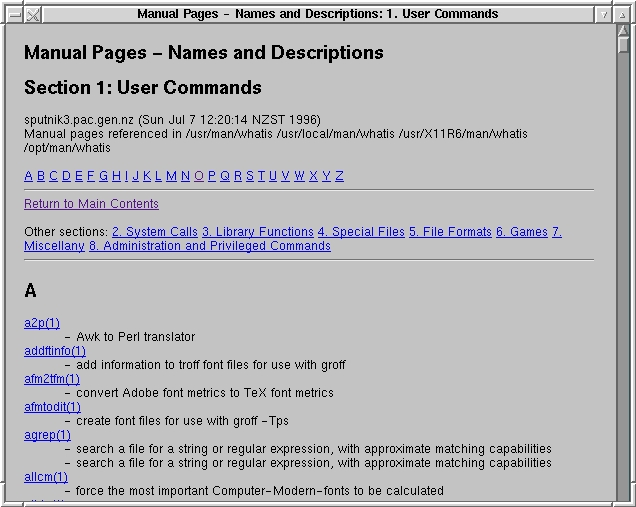
Figure 3: Portion of Name-Description Index
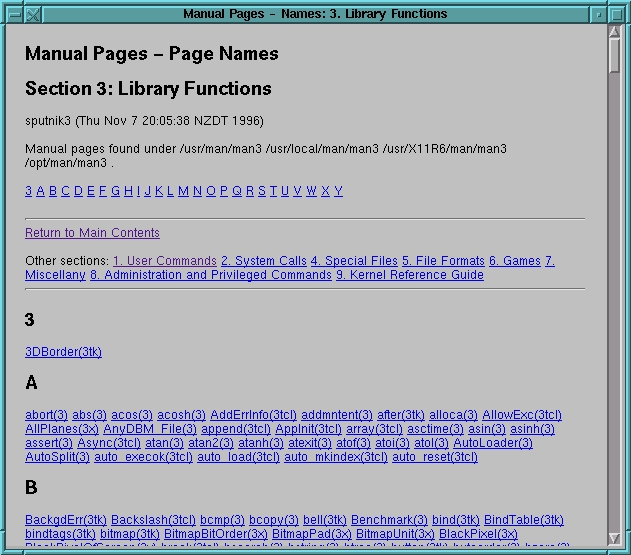
Figure 4: Portion of Name-Only Index
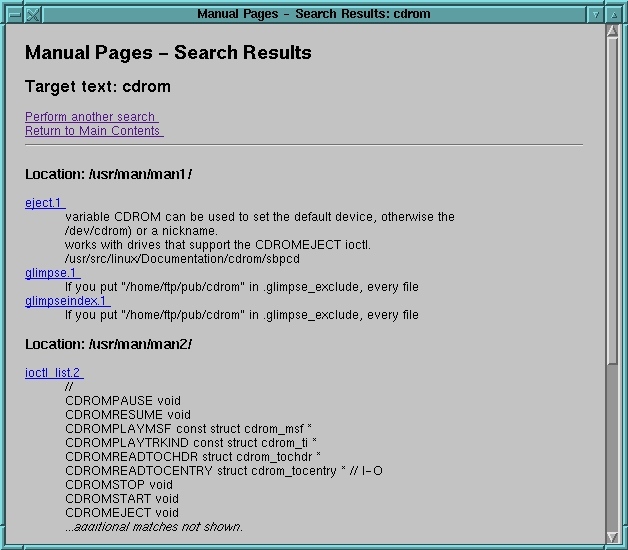
Figure 5: Full-Text Search Result
Figure 1 shows the main vh-man2html web page which provides direct access to individual man pages or to three different kinds of indices: name-description, name-only and full text search. In the main window you can enter the man page name, man page name and section number, or narrow things down even further by specifying the hierarchy or full path name.
Figure 2 shows a man page generated by the man2html converter. The converter has translated the man formatting tags to approximately equivalent HTML tags. It has also created an HTTP reference and links for any references to other man pages. The converter also generates a subject heading index, which is useful when reading larger man pages. Text highlighting and font changes are correctly translated, and if tables are present, they will be translated into HTML tables. At this time, man2html doesn't translate eqn described equations, but since very few man pages use eqn, this is not a major drawback.
Figure 3 shows part of a name-description index for section 1 of the man pages. The index includes an alphabetic sub-index and links into the other sections of the manual. The name-only index in Figure 4 is similar to the name-description index, except that it is more compact.
Figure 5 shows the result of a full text search for pages containing a reference to “cdrom”. Links are generated to each page matched.
These figures illustrate one of the key advantages of serving up the man pages via the Web: a variety of access paths can be presented in an integrated form—a one-stop-shop interface.
My development platform is Caldera 1.0, with a Red Hat 3.0.3 upgrade. If you don't have a Red Hat-based system, you can still successfully employ vh-man2html. If your system uses an unformatted man page source and you run an HTTP daemon, vh-man2html should still work; however, you may need to reconfigure it and rebuild the binaries to match your own setup.
Don't let having to run the HTTP daemon dissuade you. You can handle the security aspects of this process by restricting the HTTP daemon to serving your own host. I use the Apache HTTP daemon shipped with Caldera and Red Hat, so I just adjust the appropriate lines of my system's /etc/httpd/conf/access.conf file to prevent access from outside of my home network:
<Limit GET>
order allow,deny
allow from .pac.gen.nz
deny from all
</Limit>
(You can also specify that access should be restricted to a specific IP address.) Additionally, my system is configured with kernel firewalling, which provides an additional layer of protection.
The performance aspects of running an HTTP daemon are minimal. Most of the time it is idle—if other jobs need the memory the daemon is occupying, the kernel just migrates it to swap. To minimize the amount of startup activity and the total memory consumed, I reduced the number of spare daemons to one by editing /etc/httpd/conf/httpd.conf and changing the following:
MinSpareServers 1
MaxSpareServers 1
StartServers 1
This seems fine for my home network, where at most two users will be active at any one time.
vh-man2html is available in Red Hat package format in both source and i386 ELF-binary form from the following locations:
ftp://ftp.caldera.com/pub/contrib/RPMS\
        /vh-man2html-1.5-1.src.rpm
ftp://ftp.redhat.com/pub/contrib/SRPMS\
        /vh-man2html-1.5-1.src.rpm
ftp://ftp.caldera.com/pub/contrib/RPMS\
        /vh-man2html-1.5-2.i386.rpm
ftp://ftp.redhat.com/pub/contrib/RPMS\
        /vh-man2html-1.5-2.i386.rpm
Note that ftp.redhat.com is mirrored at ftp.caldera.com.
Also, a source tar file with ELF binaries is available from:
ftp://sunsite.unc.edu/pub/Linux/system\
        /Manual-pagers/vh-man2html-1.5.tar.gz
Addtionally, Christoph Lameter, clameter@waterf.org, has modified vh-man2html for the Linux Debian Distribution man pages. His version is available as the man2html package in the doc directory of any Debian archive.
The rpm version will install correctly in any post-2.0.1 Red Hat-based system (including Caldera). Running the following command when logged in as root will install the binary rpm:
rpm -i vh-man2html-1.5-2.i386.rpm
After installing it you can test it by firing up your web browser and using the following URL:
http://localhost/cgi-bin/man2htmlProvided you haven't disabled your HTTP daemon, this should bring up a starter screen, where you can enter the name of a man page or follow the links to various man index pages.
You can use you browser to save this page as a bookmark. If you feel comfortable editing HTML files, you can insert it in the master document for your own system. In my case I edited my system's top-level document:
/usr/doc/HTML/calderadoc/caldera.html
and added the following lines at an appropriate point in the document:
<H3>
<A HREF="http://localhost/cgi-bin/man2html">
<IMG SRC="book2.gif">
Linux Manual Pages
</A>
</H3>
Red Hat users would edit:
/usr/doc/HTML/index.htmland add the following to the list of available documents:
<LI><A HREF="http://localhost/cgi-bin/man2html">
Linux Manual Pages</A>
<P>
vh-man2html makes use of some of the files in your existing man installation. It uses the “whatis” files which are used by the Unix “man -k” command as the name-description listing. These files are built by the makewhatis command. Caldera and Red Hat systems normally build the whatis files early every morning. If these files have never been run (perhaps because you turn your machine off at night), you can build them by logging in as root user and entering:
/usr/sbin/makewhatis -wBe warned that the standard makewhatis in Caldera 1.0 takes about 30 minutes on my 486DX2-66. I have a modified version of makewhatis that does exactly the same job in only 1.5 minutes. My modified version is now available as part of man-1.4g in both rpm and tar format from:
ftp://ftp.redhat.com/redhat-3.0.3/i386\
        /updates/RPMS/man-1.4g-1.i386.rpm
ftp://sunsite.unc.edu/pub/Linux/system/\
        Manual-pagers/man-1.4g.tar.gz
Since the traditional Unix man program doesn't provide for
searching the full text of the manual pages, I wanted to add this
ability to vh-man2html. Enter Glimpse, a freely available program
created by Udi Manber and Burra Gopal, Department of Computer
Science, University of Arizona, and Sun Wu, the National
Chung-Cheng University, Taiwan. Glimpse is a text file indexing and
search system that achieves fast search speeds by using precomputed
indices. Indexing is typically scheduled for the wee small hours of
the morning, when it won't impact users.
To use the Glimpse full text searching, you must install the program Glimpse in /usr/bin. Red Hat rpm users can get Glimpse from:
ftp://ftp.redhat.com/pub/non-free\
        /Glimpse-3.0-1.i386.rpm
The Glimpse home ftp site is:
ftp://ftp.cs.arizona.edu/Glimpse/where the latest source and prebuilt binaries (including Linux) in tar format can be found. Note that Glimpse is not freely redistributable for commercial use. I'd be very interested in hearing about any less restrictive alternatives. Having installed Glimpse, you will need to build a Glimpse index. vh-man2html expects this index to be located in /var/man2html. Building the index doesn't take very long—about three minutes on my machine. As root enter:
/usr/bin/Glimpseindex -H /var/man2html \
        /usr/man/man* /usr/X11R6/man/man*\
        /usr/local/man/man* /opt/man/man*
chmod +r /var/man2html/.Glimpse*
On Red Hat this could be set up as a cron job in /etc/crontab,
e.g., (the following must be all on one line):
21 04 * * 1 root /usr/bin/Glimpseindex -H
   /var/man2html /usr/man/man* /usr/X11R6/man/man*
   /usr/local/man/man* /opt/man/man*i;
   chmod +r /var/man2html/.Glimpse*
If you don't wish to use Glimpse, you can edit the man.html file that the package installs in /home/http/html/man.html, and remove the references to full text searches and Glimpse. This file can also be edited to include any local instructions you wish.
If you're building vh-man2html from source, you will have to manually un-tar it and change the Makefile to point to your desired installation directories before issuing a make install. You can also use the rpm2cpio utility to extract a CPIO archive from the rpm, in which case you could read the package spec file to figure out where to put things.
If you don't want to use an HTTP daemon and you know a little C, you might consider using the scripts and C program to pre-translate and pre-index all your man pages. Then they can be referred to directly without an HTTP daemon to invoke conversions on demand.
This section will cover a few of the implementation details of vh-man2html. It's very brief and is really intended to point out that CGI scripting is something that anyone with a little programming knowledge can do with success.
Without getting into a tutorial on CGI scripting, a CGI script is a program executed by the remote HTTP daemon (i.e., web server). A web browser can cause a remote web server to run a CGI program when you follow an HTTP link that matches its name. For example, pointing a web browser at:
http://www.caldera.com/cgi-bin/man2html
executes cgi-bin/man2html on Caldera's web server. The CGI programs that a web server is prepared to run are usually restricted to those found in cgi-bin directories on the server.
The CGI script can return output to the remote caller by writing a document to its standard output. The start of the output document must contain a small text header describing its contents. In the case of man2html the content returned is an HTML page. Listing 1 shows the HTML output from the man page to HTML converter; the header line is:
content-type: text/html
and the rest of the document is normal HTML, which consists of text marked up with HTML tags. With some web browsers, you can use options like Netscape's “View Document Source” to inspect this HTML source.
A script may create an HTML page that contains further references to other CGI scripts. In Listing 1 the following reference returns the reader to the main vh-man2html contents page:
<A HREF="http:/cgi-bin/man2html">Return to Main
Contents</A>
A CGI script receives input that may have been embedded in the original reference or that have may have been added as a result of user input. For example, in Listing 1, the “SEE ALSO” section directs the cgi-bin/man2html program to return the HTML for a specific manual page:
<A HREF="http:/cgi-bin/man2html?man1/from.1l">
from</A>
In this case the HTTP reference is supplied with a single parameter “man1/from.1l”--the name of a man page. The start of the parameter list is delimited by a “?”. If there were more than one argument, they would be separated by “+” signs (and there are conventions for how to pass special characters such as “+” and “?” as parameters). The CGI program won't see any the of delimiting characters; it just receives the parameters as arguments in its normal argument list (or optionally via standard input). This means the CGI script doesn't have to concern itself with how its input got delivered over the network, it simply receives it in the form of command-line arguments, standard input, plus a variety of environment variables.
In addition to clicking on references, the user can also enter data into input fields. The simplest way for a CGI program to introduce an input field onto a form is to include the tag <ISINDEX> in the HTML it generates. This results in a single input field, such as in Figure 1. If the user enters anything in the input field and presses return, the server will re-run the CGI program, passing it the input via the parameter passing conventions we've just discussed. You can also create HTML forms, but I'm not going to discuss them here.
By generating the kinds of HTML references presented above, CGI programs can perform complex interactions with the remote user. The beauty of all this is that, to get started, the only skill you need is the ability to write fairly simple code in a language of your choosing. You need to know how to process command-line arguments and write to standard output. The rest of the knowledge you need can be gotten for free from Web documents or from any one of a number of books on HTML and CGI. CGI is a client-server that actually works. Heavy duty CGI programming languages such as Python and Perl have tools and libraries to assist you with the task.
I should also mention the issue of security. If your HTTP daemon is accessible by potentially hostile users, your CGI scripts could provide an avenue for them to attack you. Hostile users might try to supply malicious parameters to your CGI scripts. For example, by using special shell characters such as back quotes and semicolons, they might be able to get the script to execute arbitrary commands. The only way to prevent this is to carefully examine all input parameters for anything suspicious. For example, vh-man2html can be passed the full file name of a man page; however, it doesn't just accept and return any file name it is passed—it accepts only those filenames present within the man hierarchy. The program also makes sure the file name does not contain relative references such as “..” (the parent directory), and removes any suspect characters such as back quotes that might be used to embed commands in the parameter list. In languages like C, where memory bounds checking is lacking, the length of the input arguments should be constrained to fit within the space allocated for them. Otherwise the caller may be able to write beyond the allocated space into other data and change the behavior of the program to his/her advantage (e.g., change a command the program executes from gzip to rm). To help check that long input parameters wouldn't threaten vh-man2html's integrity, I borrowed some time on an SGI box and built vh-man2html with Parasoft's Insight bounds checker. Insight pre-processes a C or C++ program adding array bounds checking, memory leak detection and many other checks. One of the reasons I'm mentioning Insight is that Parasoft's Web site, http://www.parasoft.com/, lists Linux as a supported platform.
vh-man2html includes four CGI programs. They all generate interdependent HTTP references to each other.
Man page to HTML translation is handled by the man2html C program. The Unix man pages are marked with man or BSD mandoc tags which are nroff/troff macros. The bulk of the program is a series of large case statements and table lookups that attempt to cope with all the possible macros.
Listing 2 shows a typical nroff/troff marked up manual page that is using the man macro package. The macros use a full-stop, i.e. a period, as a lead-in to a one or two character macro name. troff/nroff uses two character macro names—apparently they fit nicely into the 16-bit word size of the old Unix platforms such as the PDP11 (at least that's what I was told)--a trick which man2html.c still utilizes. Some of the macros can be directly translated to appropriated HTML tags; for example, lines beginning with “.SH” Section Headings are directly translated to HTML <H1> headings.
Many troff tags limit their arguments and effects to just one line and have no corresponding end tag—where as many of the equivalent HTML constructs also require an end tag. For example, the text following a troff “.SH” section heading tag needs to be enclosed in a pair of HTML heading level 1 tags, e.g., “<H1>text</H1>”. Other troff tags with a larger scope, such as many kinds of lists, have both begin and end tags, which makes translation to HTML very easy.
One tricky issue is dealing with multiple troff tags on one line; for example, tags that imply bracketing of following text or font changes. In order to correctly place bracketing, the translator can work recursively within a line. For example, the BSD mandoc sequence for an command option called -b with an argument called bcc-addr is expressed in troff as:
.Op Fl b Ar bcc-addr
which indicates the reader should see:
[ -where b is in bold and bcc-addr is in italics. The corresponding HTML is:
[ -<B>b</B> <I>bcc-addr</I> ]By using recursion on hitting the Op tag, we can get the square brackets on the beginning and end of the entire line.
There are some troff tags whose effect is terminated by tags of equal and higher rank; in these cases, the translator must remember its context and generate any necessary terminating HTML. Nested lists are also possible. In these situations man2html has to maintain a stack of outstanding nestings that have to be completed when a new equal or higher element is encountered.
I admire Richard's dedication in methodically building up translations of all of the tags. Adding in the BSD mandoc tags proved to be a painful experience, and in the end, the only way to get it right was to convert every BSD mandoc page I could find and pipe the output to weblint (an excellent HTML checker). For example, in tcsh/csh:
foreach i ( `egrep -l '^\.Bl' /usr/man/man1/* \
        /usr/man/man8/*` )
/home/httpd/cgi-bin/man2html $i > tmp/`basename $i`
end
weblint tmp/*
If you want to sample the spectrum of mandoc translation, look at any of the pages the above egrep locates—telnet, lpc and mail are good examples.
man2html.c also has to do minor translation fix ups, such as translating quotation marks and other special punctuation into HTML special characters.
In the end, to test the sturdiness of the translator, I converted every man page I have:
find /usr/man/man* -name '*.[0-9]' \
  -printf "echo %p; /home/httpd/cgi-bin/man2html\
        %p | weblint -x netscape -\n" | sh \
        |& tee weblint.log
These tests proved quite useful in exposing bugs.
The program also has to navigate the man directory hierarchies and generate lists of references to pages that might be relevant (e.g. a page with the same name might be present in multiple man hierarchies). The list of man hierarchies to be consulted is read from /etc/man.config, which is the standard configuration file for the man-1.4 package that ships with Redhat and Caldera. This configuration file is also consulted for details on how to process man pages that have been compressed with gzip or other compression programs.
man2html could have easily been written in Python or Perl, but you can't beat C for speed. man2html is fast enough on my 486 that I didn't think caching its output was worthwhile—each page is just regenerated on demand. However, if I was going to provide man pages from a server for a large number of high frequency users, I would probably pre-generate all the man pages as a static document set.
Two awk scripts, manwhatis and mansec, generate name-title and name only indexes for man sections and cache them in /var/man2html. manwhatis locates and translates whatis files into the desired section index, which it caches in /var/man2html. It rebuilds the cache if any whatis file has been updated since the cached version was generated. The script divides the whatis file alphabetically and constructs an alphabetic index to the HTML document, so that the the user can quickly jump to the section of the alphabet they're interested in.
mansec traverses the man hierarchy to build up a list of names; it rebuilds its cache if any of the directories in the hierarchies have been updated. mansec has to use the sort command to get the names it finds into alphabetical order. It also builds an alphabetic quick index just like manwhatis.
Both manwhatis and mansec accept an argument that indicates which section to index. They have to check the argument for anything potentially malicious and return a document containing an error message if they find anything they weren't expecting:
section = ARGV[1];           # must be 0-9 or all.
if (section !~ /^[0-9]$/ && section != "all") {
 print "Content-type: text/html\n\n";
 print "<head>";
 print "<title>Manual - Illegal section</title>";
 print "<body>";
 print "Illegal section number '" section "'." ;
 print "Must be 0..9 or all";
 print "</body>";
 exit;
}
The mansearch script is an awk script front end to the Glimpse search utility. It accepts user input, which it passes onto Glimpse, so I had to be careful to include code to check the input for safety before invoking Glimpse. This basically means excluding any shell special characters or making sure they can't do anything by quoting them appropriately. For example, in awk we can silently ignore any characters that we aren't willing to accept:
# Substitute "" for any char not in A-Za-z0-9
# space.
string = gsub(/[^A-Za-z0-9 ]/, "", string);
I chose awk over Python and Perl mainly because it is small,
widely available and adequate for the task. Note that I'm using the post
1985 "new awk". For larger, more complex CGI scripts I'd probably use
Python (if I had to start again without Richard's work, I think
man2html would be a Python script).
In order to make vh-man2html usable remotely, I changed man2html and my
scripts to generate HTTP references that were relative to the current server.
For example, I used:
<A HREF="http:/cgi-bin/man2html">Return to Main
Contents</A>
rather than
<A HREF="http://localhost/cgi-bin/man2html">Return to Main
Contents</A>
which works fine except for “redirects”. A redirect is a small document output by a CGI script. This is an example redirect:
Location: http://sputnik3/cgi-bin\
        /man2html/usr/man/man1/message.1
A redirect has no context, so the host has to be specified.
man2html generates redirects when a user enters an approximate name
such as “message 1”. The redirect corrects
this to a full reference such as the one above. The server name is
obtained from one of the many environment variables that an HTTP
server normally sets before invoking a CGI script.
Recently I wanted to be able to issue man page requests from the command line to an already running Netscape browser—I wanted to replace the command-line man with Netscape. As you're probably aware, launching a large application such as Netscape (or emacs) is prohibitively expensive, so my preference is to communicate with an already running Netscape rather than start a new one for each request. Instructions for driving an already running Netscape from the command line can be found at:
http://www.mcom.com/newsref/std/x-remote.html
You can either use a new Netscape to pass commands to an existing one—it exits after passing them on without launching any screens—or you can use a smaller sample C program (see the HTTP reference) to do the same job. The following bash script fragment will use either (preferring the smaller utility if it's available):
function nsfunc () {
 # If this user is running netscape - talk to it
 if ( /bin/ps -xc | grep -q 'netscape$' ) ; then
  if [ -x netscape-remote ] ; then
   # Use utility to talk to netscape
   exec netscape-remote -remote "openURL($1,new_window)"
  else
   # Use netscape to talk to netscape
   exec netscape -remote "openURL($1,new_window)"
  fi
 else
  # Start a new netscape.
  netscape $1 &
 fi
}
A bash script can call this function as follows:
nsfunc "http:/cgi-bin/man2html?who+1"By using similar techniques, systems can base their help browsers on Netscape. Hopefully, similar capabilities will be built into some of the free browsers to provide alternatives (e.g., Lynx is a fast text-based browser).
Creating vh-man2html was a rewarding spare time effort. The Internet community provided the components and feedback necessary to get it built. It demonstrates one way in which old information can be repackaged for easier access. Linux provided an excellent development platform. All of the necessary components are available in Linux distributions and via ftp.
I'd like to thank Richard Verhoeven for creating his man2html translator and making it available to the Internet community. I'd also like to thank those people who took the time to send me the feedback that assisted with the development of vh-man2html.
Michael Hamilton has been working as a freelance Unix C/C++ developer since 1989. He tripped over one of Linus' postings back at the beginning of 1992, and has been hooked ever since. He can be reached at michael@actrix.gen.nz.

