
Developing Portable Mobile Web Applications
Mobile applications for iPhone and Android smartphones are where the excitement is today in application development. There are plenty of customers (Canalys says there were almost 8 million Android phones and more than 25 million iPhones sold in 2009), and those users regularly load applications on their phones (AdMob says Android and iPhone users average around nine downloads a month, and iTouch users average around 12). The demand for mobile applications is hot.
How can a Linux developer tackle this market? Native applications for the iPhone must be developed with the Apple iPhone SDK, which runs only on Mac OS X. Android development is supported on Linux with the Android SDK, but ideally, you'd like to develop apps on Linux that run on both iPhone and Android.
Mobile Web applications provide a solution. Web applications use the browser as a common runtime environment across different platforms. Applications are written in HTML, JavaScript and CSS, and run on the platform's native browser. This idea is not new, but historically, there have been a few issues with Web applications:
Browser security prevented the storage of local data.
Platform features like geolocation were not accessible from HTML/JavaScript.
Users had to start the browser to use a Web app, which then didn't match the native UI.
Browsers themselves were fragmented—different browsers interpreted JavaScript in different ways.
These problems are being addressed, and fortunately, Android and iPhone both selected WebKit as the layout engine for their respective browsers. HTML5 extends what a Web application can do, and creative people have devised JavaScript libraries that minimize the look-and-feel issues. The solution is an ongoing process, and it isn't complete.
HTML5 and related specifications add features like canvas, video, local storage, Web workers, off-line applications and geolocation to HTML, and WebKit is rapidly integrating these into the layout engine.
Specialized runtimes and libraries exist to allow JavaScript access to underlying phone functions, such as location, acceleration, sound, contacts, battery, camera, telephony and calendar. Some of these (for example JIL, BONDI and WAC) are industry-led, involve custom Web runtimes and aim to provide a universal widget environment across platforms. Others (such as PhoneGap, Titanium and Rhomobile) focus on iPhone and Android, with ties to the native SDKs that extend the capabilities of Web apps. As HTML5 implements similar features, these libraries generally conform their APIs to the HTML5 APIs.
JavaScript libraries have been developed to address the look-and-feel problem, including:
iUi: a small extensible library that mimics the iPhone user interface.
iWebKit: another framework for iPhone-style applications.
jQTouch: a plugin for the popular jQuery JavaScript library, which provides an iPhone style and a more general jQTouch style. jQTouch has the advantage of using jQuery to hide browser differences.
Android and iPhone both use WebKit as their layout engine, but there are still differences, partly due to the selection of different WebKit releases:
Android 1.6 (HTC G1) uses WebKit 525.20 and implements only Canvas, Canvas Text and Geolocation.
Android 2.1 (Motorola Droid) uses WebKit 530.17 and adds the rest of HTML5 (video, audio, local storage, Web Workers and off-line applications).
iPhone 3GS and iTouch use WebKit 528.16 and .18 and include all features except for Web Workers (multithreading).
iPad uses WebKit 531.21 and includes all features.
Developing Web applications for smartphones is pretty straightforward, but there are some things you need to know:
It's not like C: if you're used to developing Linux applications in C or C++ or Java or Perl, this is different. Web application development is a little closer to the Android development environment, where screen layouts are in XML files, and functionality is written in Java, but mostly, it's like Web development.
Native apps require native SDKs: if you want users to be able to load your application from iTunes and Android Market, you have to enable that with the appropriate SDKs. There are workarounds that I talk about later.
All you need to develop Web applications is a text editor to write JavaScript, CSS and HTML, and a browser to test the results. The job is a bit easier using a Web-oriented IDE, a JavaScript debugger and the Safari browser, along with an assortment of mobile devices for testing. Safari has a number of features that simplify development. You can select which User Agent the browser emulates (from the Developer menu), and the Web Inspector allows you to inspect and debug Web elements, including client-side databases. Safari isn't supported on Linux, but it runs just fine under VirtualBox. The code for this article was developed using the following:
Ubuntu 9.10 and the gedit editor.
Safari browser on Windows XP on VirtualBox.
Apache httpd Web server.
GIMP for icon graphics.
jQTouch and jQuery libraries.
iPhone, iTouch, iPad and Android devices.
Installation of the tools is well documented elsewhere. The Resources section for this article gives pointers to the download URLs. To install jQTouch, just put the JavaScript and CSS files in the directory tree of your Web application, and point to them from your HTML <head> element. jQTouch comes with minimized versions of the files and a minimized jQuery library.
As an example, let's look at a simple notes application that I'll call Webnotes. With it, a user could write notes, and view, edit or delete notes later. A note will consist of a title and an arbitrary-length string. The notes will be stored locally on the smartphone, using HTML5 client-side database APIs, and we'll test it running on a variety of Apple and Android devices. When we're done, we'll compare this to a similar Android sample application that ships with the Android SDK. Because we're using client-side database features that are part of HTML5, we'd expect it to work fine on the iPhone, the Droid and the iPad, and not to work on the HTC G1 (it does not support local storage).
Our app has three screens:
The opening screen will display a list of existing notes, listed by title, in order by the date they were last edited. Touching a title will select that note for edit. Touching a + button will add a new note (Figure 1).
An edit screen will allow viewing, editing or deletion of a note. (Figure 2).
An add screen will create a new note and store it in the database (Figure 3).
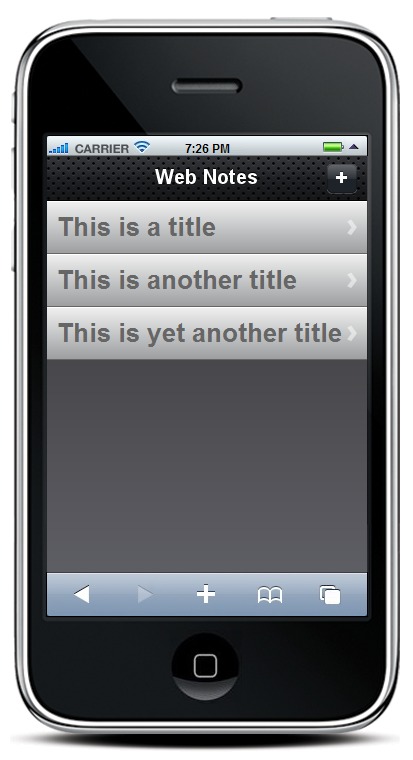
Figure 1. Home Screen
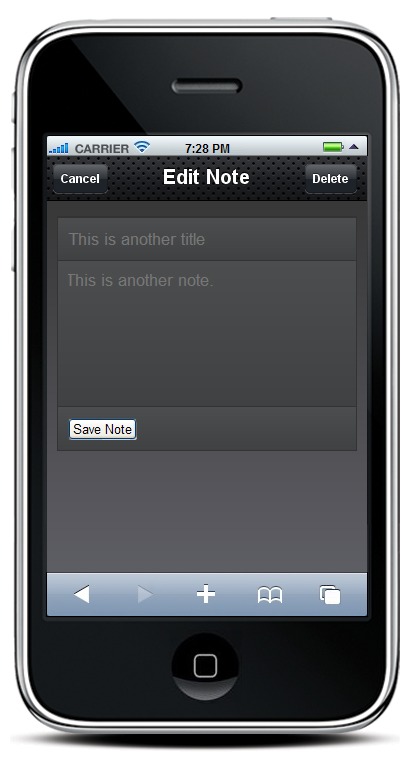
Figure 2. Edit Screen
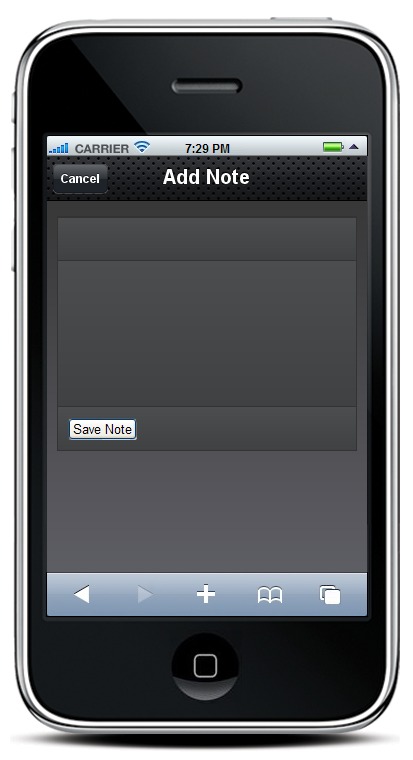
Figure 3. Add Screen
Listing 1 is the HTML file, index.html, primarily concerned with layout. Listing 2 is a JavaScript file, webnotes.js, that has the logic we need. Let's go through the HTML first.
Listing 1. index.html
<!DOCTYPE HTML PUBLIC>
 <head>
  <title>WebNotes</title>
  <link type="text/css" rel="stylesheet"
        media="screen" href="jqtouch/jqtouch.min.css">
  <link type="text/css" rel="stylesheet"
        media="screen" href="themes/jqt/theme.min.css">
  <script type="text/javascript"
          src="jqtouch/jquery.1.3.2.min.js"></script>
  <script type="text/javascript"
          src="jqtouch/jqtouch.min.js"></script>
  <script type="text/javascript"
           src="javascript/webnotes.js"></script>
 </head>
 <body>
  <div id="home">
   <div class="toolbar">
    <h1>Web Notes</h1>
    <a class="button add slideup"
       href="#addNote">+</a>
   </div>
   <ul class="metal">
    <li id="noteTemplate" class="arrow"
        style="display:none">
     <span class="title">Title</span>
    </li>
   </ul>
  </div>

  <div id="addNote">
   <div class="toolbar">
    <h1>Add Note</h1>
    <a class="button cancel" href="#">Cancel</a>
   </div>
   <form method="post">
    <ul>
     <li><input type="text" class="title" /></li>
     <li><textarea class="note" ></textarea></li>
     <li>
      <input type="submit" class="submit"
             name="action" value="Save Note" /></li>
    </ul>
   </form>
  </div>

  <div id="editNote">
   <div class="toolbar">
    <h1>Edit Note</h1>
    <a class="button cancel" href="#">Cancel</a>
    <a class="button"
       onclick="deleteNoteById()">Delete</a>
   </div>
   <form method="post">
    <ul>
     <li><input type="text" class="title" /></li>
     <li><textarea class="note" ></textarea></li>
     <li>
      <input type="submit" class="submit"
             name="action" value="Save Note" /></li>
    </ul>
   </form>
  </div>
 </body>
</html>
Listing 2. webnotes.js
var jQT = $.jQTouch({
   icon: 'icon.png',
});
var db;
var currId;
$(document).ready(function(){
 $('#addNote form').submit(addNote);
 $('#editNote form').submit(replaceNoteById);
 db = openDatabase('WebNotes', '1.0', 'WebNotes',
                   524288);
 db.transaction(
  function(transaction) {
   transaction.executeSql(
    'CREATE TABLE IF NOT EXISTS notes ' +
    ' (id INTEGER NOT NULL PRIMARY KEY ' +
    '     AUTOINCREMENT, ' +
    ' date DATE NOT NULL, title TEXT NOT NULL, ' +
    ' note TEXT NOT NULL);'
   );
  }
 );
 refreshNotes();
});

function addNote(){
 var now = new Date();
 var title = $('#addNote .title').val();
 var note = $('#addNote .note').val();
 db.transaction(
  function(transaction) {
   transaction.executeSql(
    'INSERT INTO notes (date, title, note) VALUES' +
    ' (?,?,?)', [now, title, note],
    function(){
     $('#addNote .title').attr('value', "");
     $('#addNote .note').text("");
     refreshNotes();
     jQT.goBack();
    },
    errorHandler);
  }
 );
 return false;
}

function errorHandler(transaction, err){
 alert('SQL err: '+err.message+' ('+err.code+')');
 return true;
}

function refreshNotes() {
 $('#home ul li:gt(0)').remove();
 db.transaction(
  function(transaction) {
   transaction.executeSql(
    'SELECT * from notes ORDER BY date;', null,
    function(transaction, result) {
     for (var i=0; i < result.rows.length; i++) {
      var row = result.rows.item(i);
      var newNote = $('#noteTemplate').clone();
      newNote.removeAttr('id');
      newNote.removeAttr('style');
      newNote.data('noteId', row.id);
      newNote.appendTo('#home ul');
      newNote.find('.title').text(row.title);
      newNote.click(function(){
       editNoteById($(this).data('noteId'));
       jQT.goTo('#editNote', 'swap');
      });
     }
    },
    errorHandler);
  }
 );
}

function replaceNoteById() {
 db.transaction(
  function(transaction) {
   transaction.executeSql(
    'UPDATE notes SET title=?, note=? WHERE id=?',
     [$('#editNote .title').val(),
      $('#editNote .note').val(),
      currId],
    function(transaction, result) {
     refreshNotes();
     jQT.goTo('#home', 'swap');
    },
    errorHandler);
  }
 );
}

function editNoteById(id) {
 db.transaction(
  function(transaction) {
   transaction.executeSql(
    'SELECT * from notes WHERE id=?;', [id],
    function(transaction, result) {
     var res = result.rows.item(0);
     currId = res.id;
     $('#editNote .title').attr('value', res.title);
     $('#editNote .note').text(res.note);
    });
  }, errorHandler);
}

function deleteNoteById() {
 db.transaction(
  function(transaction) {
   transaction.executeSql(
    'DELETE FROM notes WHERE id=?;', [currId],
    function(transaction, result) {
     alert('Note deleted');
     refreshNotes();
     jQT.goBack();
    }, errorHandler);
  }
 );
}
After the HTML declaration, there is the <head> section of the document. The <title> element is the HTML title for the page. The iPhone and Android browsers display it as the window title until we make the application full screen. The next two <link> elements tell the browser where to find CSS files referenced in the application. Two styles come with jQTouch: “/themes/apple” and “themes/jqt”. We've chosen the latter here, to be a little more device-independent. The next three elements are <script> references—the first two for jQuery and jQTouch, and the next for webnotes.js. The order is important—the <script> element for jQuery must precede the one for jQTouch, and they must both precede any scripts that use them.
After the header, the <body> element of Listing 1 contains three first-level <div> elements, one for each screen. The top levels of the three screens are very similar. Each has a unique id attribute that we use to refer to the screen from JavaScript. Each also includes an inner <div> with class="toolbar" that defines the bar at the top of the screen. The <h1> element in these <div>s is the screen title. The toolbars also each have an anchor element of class="button cancel". This jQTouch class defines the arrow-shaped cancel button, and the href says clicking on it takes us to the “home” screen. The anchor also defines text (“Cancel”) that appears in the button. On the “home” screen, we've included a + button to add a note. We've specified the “slideup” animation for that button's action, so the “addNote” screen will slide into view from the bottom of the screen.
The “home” screen also contains an inner <div> with a list containing one list item. That item is a template that defines the display of note titles. You'll see how we use it below.
In the “addNote” screen, after the “toolbar” <div> there is another <div> that contains a <form>. This <form> contains a list that has three list items:
Text input for the title of the note.
Text area for the contents of the note.
Button to submit the <form>.
We've given the list items class names to make them easy to find with jQTouch.
The “editNote” screen looks like “addNote”, with one addition. There's an <input> of class="button" in the toolbar to give the user a way to delete a note. The onclick attribute for this button tells the browser to call a JavaScript routine deleteNoteById(), which we define in webnotes.js.
WebKit uses SQLite to implement the client-side database APIs for HTML5. The implementation is remarkably complete, including support for transactions with rollback if the transaction does not succeed. Let's look at the JavaScript in Listing 2, webnotes.js.
The first four lines of the file initialize jQTouch and assign an instance to the variable jQT. The parameter “.icon” is one of many that can be defined for jQTouch. It points to a 57x57 pixel icon for the application (Figure 4).

Figure 4. Application Icon
On line five, we declare a variable “db” for the database instance. The block of code that starts $(document).ready is a jQuery function that executes when the browser has finished loading the DOM, even though the page contents may still be loading. The anonymous function first redirects the submit buttons from the “addNote” and “editNote” forms, pointing them at JavaScript functions. Then we use openDatabase() to do just that, passing it four parameters:
Short name for the database.
Database version number.
Display name for the database.
Maximum size of the database.
SQLite creates the database if it does not exist. The anonymous function executes an SQLite transaction that creates or opens a table called “notes”. Each row of that table represents a note with the following columns:
INTEGER id KEY: unique identifier auto-incremented by SQLite.
DATE lastedit: date the note was last edited.
TEXT title: title of the note.
TEXT note: contents of the note.
Once the table is opened, we call a function, refreshNotes(), described below, that will update the list displayed on the “home” screen.
We next define the “addNote()” function, which gets invoked when the user touches Save Note on the “addNote” screen. The user already has entered the text for title and note, so we now want to insert a suitable record into the “notes” table. We get the date from the Date() function, and use jQuery to locate the title and note input elements. If you're not familiar with jQuery, it uses a CSS-like syntax to identify DOM elements. In this case, it finds the elements with classes “title” and “note”, and the .val() function assigns their values to JavaScript variables “title” and “note”, respectively. Using the client-side database API to start a transaction, transaction.executeSql() takes four parameters:
SQL string: template for the SQL to be executed.
Array of parameters whose values replace the ? marks in the SQL template.
Function that executes if the operation was successful—in this case, an anonymous function.
Function that executes if there was an error—in this case, errorHandler().
If successful, we clear out the values in the input elements (ready for the next add), refresh the list of notes so the new one will show up and use a jQTouch function, jQT.goBack() to return to the “home” screen. Since we used “slideup” to show the “addNote” screen, jQTouch is smart enough to slide it down to return to “home”. We then return “false” to the browser, as we don't need it to continue.
We now define the errorHandler() function, which we reuse for all database transactions in the script. It displays an alert box with the error message and returns.
Next is the refreshNotes() function. We use jQuery to find all the <li> elements on the “home” screen and remove them. Then, we execute a database transaction to find all the note records, and use the “home” screen template to create a list item for each note and insert it into the “home” screen. We add a .click function to each list item that will take users to the “editNote” screen when they click on a note title.
The replaceNoteById(), editNoteById() and deleteNoteById() functions are all very similar to addNote(), with the SQL template changed appropriately.
The application can be run from the browser on an iPhone or Android device. As expected from looking at HTML5 features on different phones, Webnotes works fine on the iPhone, iTouch, iPad and Droid. It does not work on the G1, because that phone doesn't support client-side database transactions.
If you want to package a Web application for distribution on iTunes or Android Market, one way is to use the appropriate SDK and write a small wrapper application. The application creates a browser Intent (Android) or a UIWebView (iPhone) and gives it the location of index.html. We don't have room to go into the SDKs here, but the applications are literally a few lines of code.
Or, for iTunes, you can let a package like PhoneGap do the work for you. You still need the iPhone SDK, so you have to create the package on a Mac, but PhoneGap makes the process simpler. Once it's created, you can upload it to iTunes like any other iPhone app.
If you don't care about iTunes or Android Market, there's another way—package your application as an HTML5 Offline Application. Listing 3 is a manifest file, webnotes.manifest, that you put in the home directory of your application. You also need to add an attribute to the <html> element in index.html:
manifest="webnotes.manifest"
One more thing—if you're serving the files from an Apache Web server, the .htaccess file in your Web directory needs a line like:
AddType text/cache-manifest .manifest
This tells Apache to serve .manifest files with the correct MIME type. When a user first goes to the Web site, the server will download the files listed in the manifest and keep them on the device. On subsequent visits, the file will be reloaded if the manifest changes—even if the change is in a comment field.
Listing 3. webnotes.manifest
CACHE MANIFEST
index.html
icon.png
jqtouch/jqtouch.min.css
themes/jqt/theme.min.css
jqtouch/jquery.1.3.2.min.js
jqtouch/jqtouch.min.js
javascript/webnotes.js
On Apple devices, when users go to your Web site, they can touch + at the bottom of the browser to put an icon for that URL on their homescreen (remember that .icon attribute when we initialized jQTouch?). If you've created an off-line application, it loads and executes from local storage, much like a native application.
We defined Webnotes to be similar to an example application that comes with the Android SDK called NotePad. See Table 1 for a comparison of lines of code.
Table 1. Comparing Lines of Code
| NotePad | Webnotes | |
|---|---|---|
| Java | 672 | |
| XML | 50 | |
| HTML | 62 | |
| JavaScript | 121 | |
| Source Lines | 722 | 183 |
If the effort to write a line of code is about the same in any language, it would take about a fourth of the time to write the application as a Web application—and it runs on most mobile WebKit-based browsers. That's worth considering as you plan your next mobile application development.
Resources
Canalys 2009 Smartphone Market Analysis: www.canalys.com/pr/2010/r2010021.html
AdMob Mobile Metrics for January 2010: metrics.admob.com/wp-content/uploads/2010/02/AdMob-Mobile-Metrics-Jan-10.pdf
Comparison of Layout Engines (HTML5): en.wikipedia.org/wiki/Comparison_of_layout_engines_(HTML5)#cite_note-114
Dive into HTML5's Site to Check for HTML5 Features in Browsers: diveintohtml5.org/past.html
What's My User Agent?: whatsmyuseragent.com
jQTouch: www.jqtouch.com
PhoneGap: phonegap.com
iWebkit: iwebkit.net
Jon Stark's excellent book on Building iPhone Apps with HTML, CSS and JavaScript: building-iphone-apps.labs.oreilly.com
Rick Rogers has been a professional embedded software developer for more than 30 years (FORTRAN to JavaScript). He's currently a Mobile Solutions Architect at Wind River Systems. He welcomes feedback on this article at portmobileapps@gmail.com.



