
A Simple Approach to Character Drivers in User Space
Demand Peripherals, Inc., makes an FPGA-based robot controller that gives a robot or other industrial control systems the high I/O pin count and precise timing that a Linux laptop or single-board computer alone cannot offer. The company has built more than 25 different FPGA-defined peripherals for the controller, and it wanted to offer Linux device drivers for all of them.
Doing 25 drivers in the kernel, although possible, would have required time and effort far beyond what the company could afford. The process of building kernel device drivers would have been even more complicated because the FPGA card connects to the Linux host over a USB-serial link. The solution, illustrated in Figure 1, is to have a dæmon manage the USB-serial port and demultiplex the various FPGA-based peripherals out to their own device nodes. The device nodes are little more than shims that let the high-level application deal with separate device entries for each peripheral.
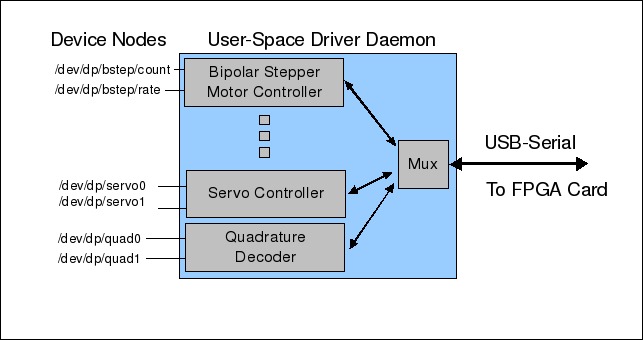
Figure 1. Example of a User-Space Device Driver
The customer selects the mix of peripherals to be loaded into the FPGA. Figure 2 shows a BaseBoard4 with some cards that demonstrate what might be a fairly common peripheral mix. The system pictured has eight peripherals, including a four-channel servo controller, a dual H-bridge controller, a quad interface for the Parallax Ping))) range sensor, a RAM-based pattern generator (driving the data and clock lines going to a 48-bit shift register that connects directly to the LCD), a unipolar stepper motor controller, a bipolar stepper motor controller, a quad event or frequency counter (connected to a single Parallax light-to-frequency sensor), and a dual quadrature decoder. Schematics for all of these demo cards are on the Demand Peripherals Web site.
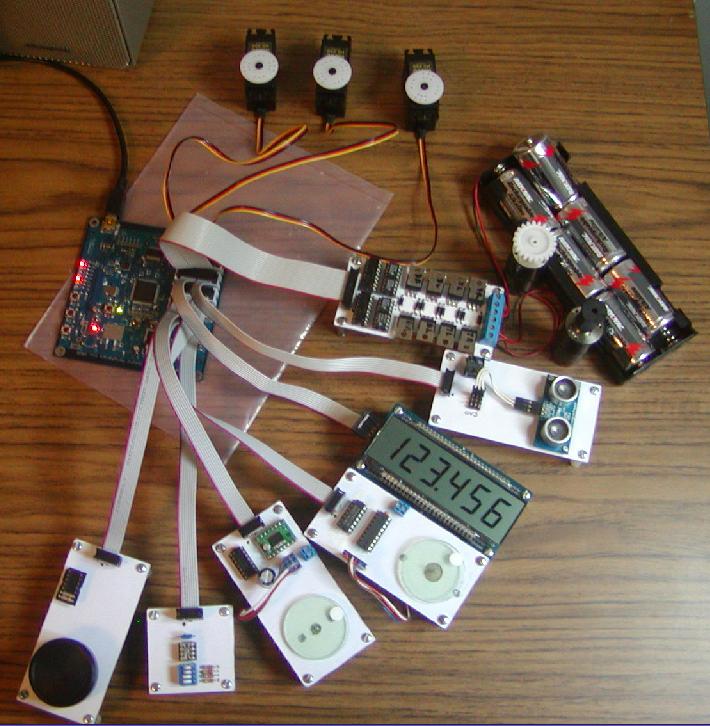
Figure 2. Robot Peripherals, All with Linux Drivers
All of the peripherals shown in Figure 2 can be configured and controlled using device nodes in the /dev directory. The following Bash commands, for example, might be part of the higher-level control software for the system pictured:
# Feed wheel quadrature counts to a motor control program
cat /dev/dp/quad0 | my_motor_pgm &
# Feed the same quadrature counts to a navigation program
cat /dev/dp/quad0 | my_navi_pgm &
# Set a stepper motor step rate to 1000
echo "1000" > /dev/dp/bstep1/rate
# Now step 300 steps
echo "300" > /dev/dp/bstep1/count
# Monitor distance reported by a Parallax Ping)))
cat /dev/dp/ping0/dist &
# Set a servo pulse width to 1.5 ms (1500000 ns)
echo "1500000" > /dev/servo/servo4
The above commands illustrate two of three important use cases for the user-space drivers: sensor broadcast and driver configuration. The third use case is bidirectional transfer.
The first use case is sensor broadcast, and in the example above, it's actually multicast of sensor data. Did you know that the /dev/input drivers implement a multicast mechanism? Multiple readers get identical copies of the events that come from the input devices. There is a simple experiment you can do to demonstrate this. Press Ctrl-Alt-F2 (to go to a different console), log in, and run the command sudo cat /dev/input/mice | od -b. Do the same for another console (for example, Ctrl-Alt-F3). Now, move the mouse a little and switch between the F2 and F3 consoles. They both display the same thing, don't they? What a shame that Linux does not have some generic way to do multicast like that of the /dev/input subsystem.
For robotics, the ability to fan a sensor reading out to several processes is particularly important. For example, a quadrature encoder attached to a wheel needs to be seen by both the motor controller software and by the navigation software. The motor controller might need to know if the wheel is turning to know whether the motor is stalled, and the navigation software might count the wheel revolutions to compute the robot's current location.
The second use case is peripheral or driver configuration. DC motor controllers need to know the frequency of the PWM pulses. Stepper motors need to know the step rate, and the SPI (Serial Peripheral Interface) ports need to be told the clock frequency and the mode of operation. Either an ioctl() call or a sysfs-style interface can be used for driver configuration.
Configuration interfaces can be a little tricky, in that the information is often not a simple stream of bytes—it may encompass several different pieces of information. An ioctl() interface typically passes a data structure for complex configurations, while a sysfs interface might use a space-separated list of ASCII-encoded values. Demand Peripherals uses the ASCII-encoded numbers approach, because the overhead of decoding and parsing a line of text is not too onerous given the relative infrequency of driver configuration. Also, being able to cat a sysfs type file to see the driver configuration is kind of handy.
The third use case, bidirectional transfer, is really the most common use case. You probably are already familiar with serial ports, the most common example of bidirectional I/O. Although none are included in the examples above, the FPGA-based robot controller needs bidirectional I/O for peripherals that transparently pass data from one end to the other. These include both FPGA-defined serial ports and SPI ports. You may prefer, as we did, to be able to do block reads and writes until both sides of the interface are open.
Our number one requirement for this project was to spend as little programmer time as possible on it. This meant minimizing the number of lines of code to be written and avoiding modifying someone else's poorly or completely undocumented code. This requirement also implied that we not try to hide our interfaces in an application library. Because a library is part of the higher-level control application, you still would need a dæmon, still need some common IPC mechanism, and still need to document the internal and the external interfaces. The other problem with a library approach is that it is usually not just one library; you may need to write a library, or binding, for every programming language you want to support. Using a real character device instead of a library means your customers can program in any language they want, not just the ones for which you've written a binding.
The second requirement was that the driver security model be based on file permissions. This implied that all of the device data and configuration interfaces should be visible in the filesystem. That is, you should to be able to do a chmod 644 on something like /dev/dp/bstep1/rate. Using named pipes and FUSE (Filesystem in USErspace) could have fulfilled this requirement. Doing this using pseudo-terminals would have been tricky.
Another requirement is that select() works both in the higher-level control application and in the user-space driver itself. This requirement comes about because select() is so much faster than threads in most applications. Embedded systems, such as robotic or other industrial control systems, often run on the cheapest, lowest cost hardware possible, and, in the case of robots, often on battery power. These constraints lead embedded Linux programmers to prefer select()-based systems.
FUSE often is suggested as a way to implement character drivers, but I was unable to get select() to work on both sides of a FUSE interface. I like FUSE; it can solve a lot of user-space driver problems, but it seems unfair to me to ask FUSE, a filesystem, to double as a character driver. After all, who would expect ext3 or other kernel filesystems to have built-in character drivers?
The last requirement was that writers block until a reader is present. Both named pipes and pseudo-ttys allow the writer to write 4KB before blocking. It was important to us that the driver not fill a buffer with stale data that a higher-level robotic application must discard to get to the current data.
In the end, we didn't find any existing Linux facilities that satisfied all of our requirements and use cases. However, we were able to find or create two relatively simple device drivers that could. Figure 3 illustrates the basic idea.

Figure 3. Two New Drivers Link Applications to Driver Dæmons
The idea is to have two very thin drivers that sit between the higher-level applications and the user-space driver. These are real drivers and appear as such to the higher-level software. The data exchanged between the application and the user-space driver passes as transparently as possible through the kernel. Even flow control passes transparently between the application and the user-space driver.
The first use case, that of multicasting sensor data, is solved by the “fanout” driver described in detail at www.linuxtoys.org. Demand Peripherals uses fanout devices for quadrature decoders, IR receivers, ultrasonic range sensors, PlayStation controller interfaces, event counters and all other continuously sampled sensors. Figure 4 shows the basic data flow in a fanout device.

Figure 4. A Simple Multicast Device
You can skip further down in this article to get and install fanout, or you can continue reading and come back to try the examples. Once you've installed fanout and created the device nodes for it, you can test it with a few simple commands:
cat /dev/fanout &
cat /dev/fanout &
cat /dev/fanout &
echo "Hello World" > /dev/fanout
The message appears three times, as you'd expect. Fanout is like /dev/input in that it protects the writer, not the reader. If a reader does not keep up, the reader gets the error, allowing the writer and other readers to continue unimpeded.
For data flowing in the opposite direction, you need something like a “fan-in” device—that is, something that protects the reader. A named pipe works reasonably well for this.
The low-speed nature of driver configuration, the second use case, makes possible several approaches. The approach we took was to write a driver, called proxy, that solved both the configuration use case as well as the bidirectional transfer use case. The two defining features of proxy are that one side cannot write until the other side is open for reading, and that a write of zero bytes is passed through the driver and seen as a read of zero bytes at the other end. The usefulness of the second feature is best shown by an example. Consider the case of a user reading the current value of a configuration parameter:
cat /dev/dp/bstep/rate
/dev/dp/bstep/rate is a proxy device, and the user-space driver dæmon on the other side of it would see that a write is possible when cat opens the device. The dæmon writes the current value and then does a write of zero bytes (both of which are read/seen by cat). It is the write of zero bytes that tells cat it is done and can exit.

Figure 5. A Device to Pass Data between Two Applications
One drawback to the proxy driver is that it required the customer to build and install a kernel module. Although Dynamic Kernel Module Support can help, a lot of customers are intimidated by this even if it's not that difficult [see “Exploring Dynamic Kernel Module Support (DKMS)”, LJ, September 2003: www.linuxjournal.com/article/6896]. FUSE is a good approach for customers who do not want to deal with building modules and who don't need select() support.
Another approach for driver configuration is to use a regular filesystem file and the inotify facility to alert the user-space driver that a new configuration is being requested. You get two nice features by keeping the configuration files on a volume with persistent storage. The first is that you don't need to provide any other configuration storage—the files themselves are the persistent storage. Another nice feature is that the driver starts immediately with the correct configuration and does not need to be initialized from an external source. Inotify works well with select() and is ideal in many situations, but be aware of a couple issues. You may have a race condition if your driver modifies a configuration parameter before making it available. Sound drivers often have this behavior—you can set the sample rate to 45KHz, but the driver probably will round it to closest standard value, 44.1KHz. If you do something like this with inotify, you may have a window where a reader would get the wrong value for the configuration parameter. Also, be aware that you may need to rebuild the kernel to include inotify support.
You also can use UNIX sockets for driver configuration if you split configurations reads from configurations writes. The problem is that when the user-space driver dæmon accepts a socket open request, the new socket is both readable and writable. The dæmon cannot tell if the user is trying to write a new configuration value or trying to read the existing one. One way around this problem is to have two sockets for every driver configuration parameter, one socket for reading the current value and another socket for setting the value.
There are a couple good ways to add bidirectional data streams to your user-space drivers. The proxy driver provides this immediately and was our choice for the robotics project. The other approach is to use UNIX sockets. Sockets work well with select(), and their permissions map into a filesystem, but they don't work easily with echo, cat and command-line pipes. Also, if you use UNIX sockets for bidirectional transfers, you really shouldn't call them “device drivers” when you describe your system.
The fanout and proxy modules are fairly straightforward to build and install. Be sure the kernel header files for your kernel are available. Both drivers are in the tarball at www.linuxtoys.org/usd/usd.tar.gz. Download the driver tarball, then untar, build and install the drivers:
tar -xzf proxy.tar.gz
cd proxy
make
sudo make install
How and where you install your modules and create device nodes is a matter of personal preference. You can, for example, add the following to your rc.local startup script or put the equivalent commands in a udev rules file:
modprobe fanout
FANOUTMAJOR=`grep fanout /proc/devices | awk '{print $1}'`
mknod /dev/fanout  c $FANOUTMAJOR 0
mknod /dev/fanout1 c $FANOUTMAJOR 1
mknod /dev/fanout2 c $FANOUTMAJOR 2
mknod /dev/fanout3 c $FANOUTMAJOR 3
mknod /dev/fanout4 c $FANOUTMAJOR 4
chmod 666 /dev/fanout*

modprobe proxy
PROXYMAJOR=`grep proxy /proc/devices | awk '{print $1}'`
mknod /dev/proxy  c $PROXYMAJOR 0
mknod /dev/proxy1 c $PROXYMAJOR 1
mknod /dev/proxy2 c $PROXYMAJOR 2
mknod /dev/proxy3 c $PROXYMAJOR 3
mknod /dev/proxy4 c $PROXYMAJOR 4
chmod 666 /dev/proxy*
The robot's bootup scripts are slightly different because we wanted the device node names to reflect the device it serves. For example, the dual quadrature decoder might create fanout device nodes with the following:
mknod /dev/dp/quad0 c $FANOUTMAJOR 0
mknod /dev/dp/quad1 c $FANOUTMAJOR 1
The source tarball contains some simple demonstration programs in the demo directory. The program pxtest2.c shows how to use the proxy device to configure a user-visible string, and pxtest2 works by accepting a short string and echoing it back on request. As mentioned above, drivers often have to limit or otherwise modify a configuration value set by the user. The pxtest2 program demonstrates this kind of processing by adding one to each (non-newline) character in the input. You can run pxtest2 with the following commands:
gcc -o pxtest2 pxtest2.c
./pxtest2 /dev/proxy &
echo 111aaa222 > /dev/proxy
cat /dev/proxy
# output of the cat command should be 222bbb333
Our ad hoc approach to building device drivers in user space has some nice features. It does not add a lot of kernel code and does not require any user-space libraries. It supports select() everywhere you might want it, and it has good flow control for streamed data.
Fanout and proxy have some shortcomings too. The data stream from a fanout device is byte-aligned, which makes it inappropriate for an application that needs to send blocks of binary data. Fanout could not, for example, be used to simulate a new /dev/input device. Demand Peripherals gets around this problem by sending lines of ASCII text that are terminated by a newline. If you need multibyte transfers, you could add an ioctl() to fanout that sets the byte count for atomic reads from the data source.
If you like the simplicity of /dev/proxy but really need ioctl() support, you can add it to the proxy driver by allocating two minor numbers for each proxy device. Use the even-numbered minor numbers for the data interface and the odd-numbered minor numbers for the ioctl() interface. Your configuration might look like this:
mknod /dev/proxy_data c $PROXYMAJOR 0
mknod /dev/proxy_ctrl c $PROXYMAJOR 1
Your additions to the proxy driver would have to serialize the data passed to and from the ioctl() request, and your user-space driver dæmon would have to open both devices to handle the ioctl() requests separately from the data stream requests.
We used fanout and proxy to add device drivers for an FPGA-based robotic controller, but they are actually fairly generic. What Linux problems can you solve using fanout and proxy?
Bob Smith is a consultant specializing in embedded Linux. You can reach him at bsmith@linuxtoys.org.



