
Battle of the Ajax Mail Packages

January 26th, 2006 by James Turner in

Scalix and Zimbra offer promising e-mail solutions that exploit Ajax to offer rich Web clients.
Your rating: None Average: 4.7 (3 votes)

Traditionally, there have been two paths to choose from when considering mail servers. The Redmond path was some variety of Microsoft Exchange Server with Outlook as the client, and possibly POP3/IMAP and Web mail as a backup when out of the office.

The other path, the path of the penguin, was Sendmail or Postfix, or possibly a more obscure mail transport agent (MTA) with POP3 and IMAP as the connection to the mail client of your choice. If you wanted Web mail, you'd use a package such as SquirrelMail running under Apache. There were, of course, other choices, such as Lotus Notes, but by and large, most e-mail installations used one of these two solutions.

Recently, the e-mail landscape has changed dramatically. For one thing, rich client tools such as Gmail and Yahoo Mail have shown the promise of Ajax (Asynchronous JavaScript And XML), taking Web mail from a standby of last resort for travelers to a fully usable replacement for an e-mail application such as Outlook or Evolution. More significantly, several companies either have reached or are very close to the Holy Grail of open-source e-mail, complete Exchange compatibility.

I'm sure there are many die-hard Linux folks out there who are silently saying, “who cares?” But the reality is that in most corporate-IT environments, Outlook and Exchange are a well-entrenched aspect of the company mentality. And, it's hard to blame companies for clinging to them. The terrible twosome are full of useful features, such as meeting and calendar integration, that make them highly useful. On the other hand, it would be difficult to find a Windows sysadmin willing to describe administering an Exchange server as a pleasurable experience.

At last, these beleaguered MCSEs have a choice that doesn't involve dumping Outlook and training their employees to use an entirely new mail system. Projects such as OpenExchange, Zimbra and Scalix promise the ability to phase out Windows-based Exchange servers without the end users noticing.

Two of these projects, Scalix and Zimbra, are particularly promising because they include highly functional Ajax clients as part of their offerings. In this article, we look at the two, head to head.

Zimbra is an open-source project with a proprietary network edition, which includes features such as product support, clustering and, in the future, Outlook connectivity via MAPI. If you can make do without these features, you're free to run the open-source edition and get support in the forums. The network edition isn't cheap though, running you $28 US/user with a 500-user minimum (or $1,500 US for a 50-user small-business license). Significantly, Zimbra is still in beta, although it's well along in the development cycle.

Scalix, in comparison, is fully closed source. It offers two different versions, a community edition and an enterprise edition. As with Zimbra, the enterprise edition will cost you money, and it comes with support. The difference is that the Scalix community edition provides all the functionality of the enterprise edition. However, the advanced features, such as MAPI compatibility (which lets you use Outlook directly with the mail server for calendar and contact management), are available only for 25 users. After that, you'll be paying $60/user.

Installation Quirks

We tested both products under Fedora Core 4. For Zimbra, that and Red Hat Enterprise Linux 4 are your only official Linux choices (at least for a supported, binary install). Scalix offers those distributions as well, but adds several flavors of SUSE to the supported list. Both products install without much hair pulling; you answer a few simple questions (at least, simple if you're familiar with setting up mail servers), and the installation scripts do the rest.

At this point, I need to mention one of the irritating quirks of Zimbra. It installs its SMTP, POP3, IMAP and HTTP/HTTPS servers in high-numbered ports, and then uses iptables to map to them. So, for example, port 80 gets mapped to port 7070, where Zimbra runs its Web-mail client. This can come as a nasty surprise if you install Zimbra on a host with an existing Web server.

By comparison, Scalix keeps all its network ports off existing Web services, although it does take over mail-related ports such as SMTP and IMAP, but that's what you'd expect a mail server to do.

Scalix has its own dangers for the unwary. You had better be familiar with LDAP and how it specifies distinguished names. Scalix is all about LDAP. To be fair, Scalix is trying to operate as a drop-in replacement for Exchange, and Exchange makes heavy use of LDAP in its Active Directory architecture. So this isn't an unexpected development. However, for a sysadmin familiar with Sendmail doing a first-time install of Scalix, a close reading of the documentation is in order.
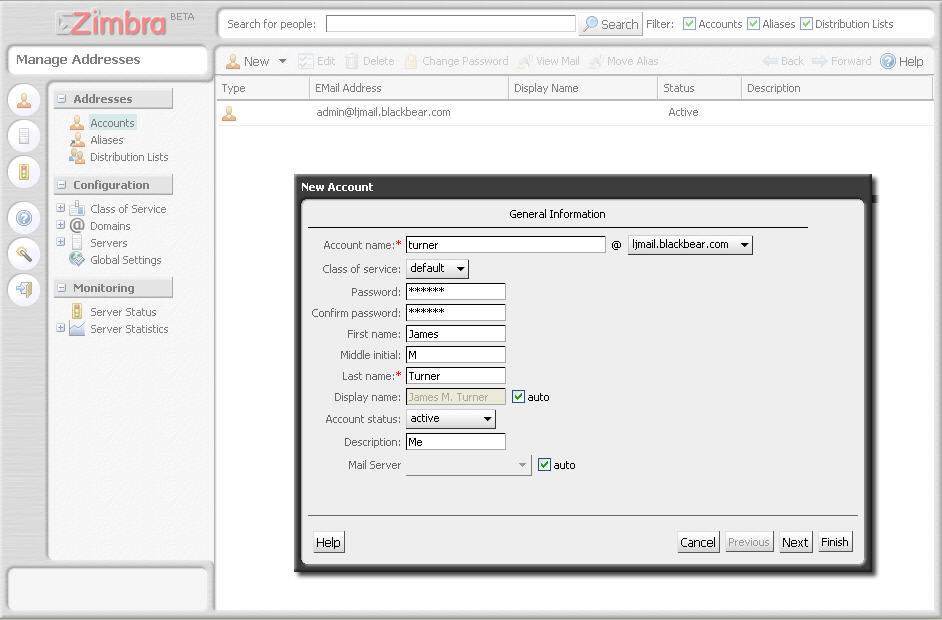
Figure 1. Both products come with a Web-based administration interface.

Configuring the Products

Both Scalix and Zimbra offer command-line and Web-based configuration tools. And in both cases, you can do much more from the command line than you can from the Web. The philosophy seems to be that the Web should be used for ordinary day-to-day operations, such as adding a new user, and the command line is for more complex or less frequently used ones.

One headache both products share is that they have a ton of these command-line programs. Zimbra has 74 programs you can use to control its operation, and Scalix has 341 (yep 341) programs in its bin directory, and they are so closely named that you may go mad trying to remember the differences. For example, try figuring out whether you should be using omdelapppdl or omdelapppdln. As I said, a close reading of the manual is in order before you try anything fancy.

Zimbra comes configured with SpamAssassin and ClamAV already installed. Scalix supports any Milter-based spam and antivirus tools. It wasn't that difficult (with a little help from the very responsive support board when I made a stupid mistake) to install them.

You've Got Mail

There's no question that the Zimbra Web-mail interface is both more featureful and colorful. For example, put your mouse over a date and you see the calendar for that date. Mouse over an e-mail address, and you see the contact information for that person. Mouse over a Web address, and you see a thumbnail of the site. Unfortunately, it's still a bit glitchy, especially under Firefox. This is not a good thing for a product that wears an open-source pedigree so proudly. Hopefully, these issues will be resolved before the final release.

What Zimbra is currently lacking, however, is any kind of direct Outlook support. Even though the Web site claims Zimbra will interface directly with Outlook, this is in fact a TBA feature. So at least for the time being, Zimbra is available only via its Web interface or by IMAP/POP3.
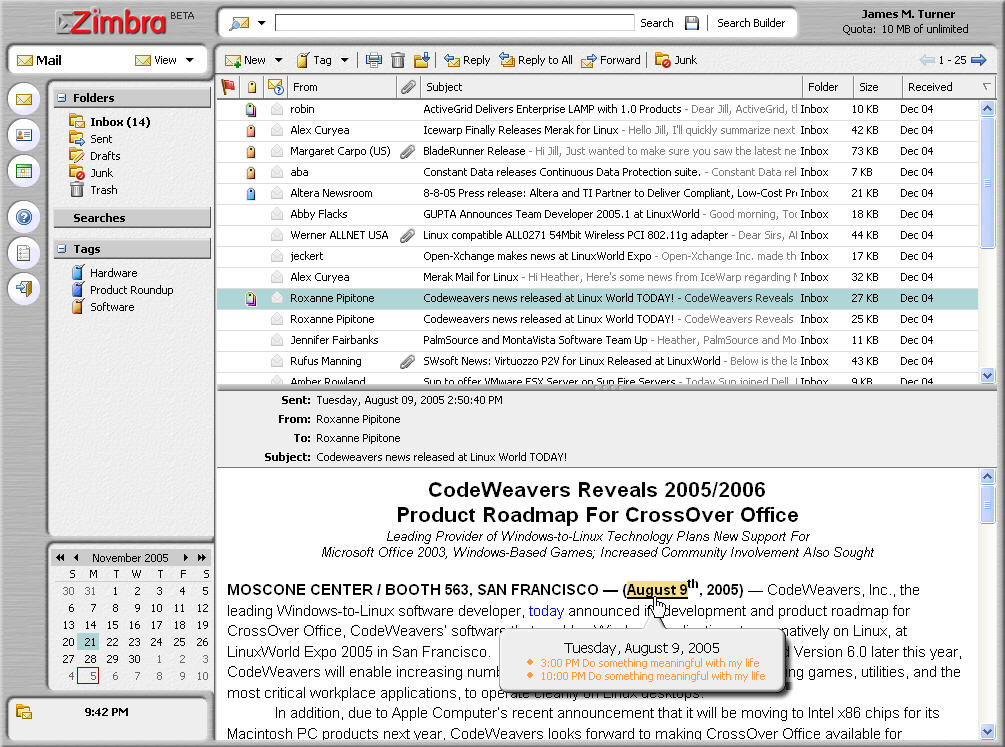
Figure 2. Zimbra offers mind-boggling feature-rich Web mail.

By comparison, Scalix is almost pedestrian in appearance on the Web. If you don't look carefully, you could swear that you're using Outlook. That is probably by design, as Scalix wants to replace Exchange seamlessly. You can do pretty much everything via the Web interface that you can do directly from Outlook, except for anything having to do with mail filtering.

It's when you add the Scalix plugin to Outlook that Scalix really shines, however. I use Exchange on a daily basis at my workplace, and I am now using Scalix for my personal e-mail outside of work. Honestly, there's no practical difference between the two if you use Outlook. The mail-filtering options are a little different, but you really have to look hard to see where the two diverge. Among the more useful features that it shares in common with Exchange is the ability to define filtering rules that run directly on the server. And, because ActiveSync talks to Outlook, you can sync your PDA to your calendar, mail and contacts.
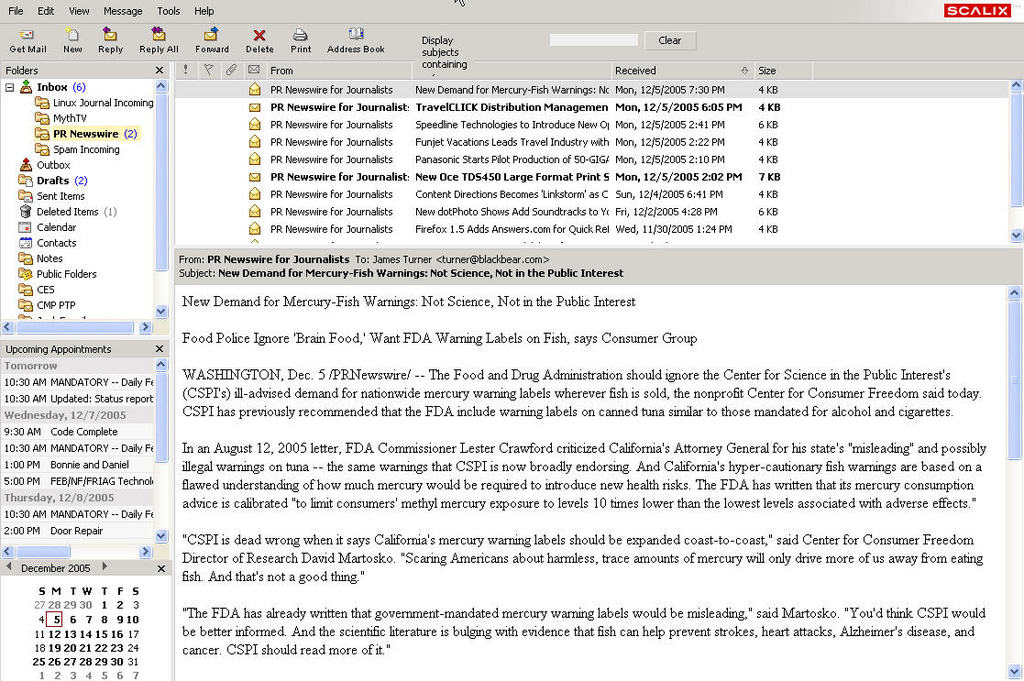
Figure 3. Scalix: any resemblance to Microsoft Outlook is purely coincidental.

Which to Choose?

If you're trying to pick one over the other, I'd have to recommend that you start by trying each of them out, because they both have free community editions. Zimbra is probably more of a one-click setup than Scalix, and it definitely involves less in-depth knowledge of things like LDAP. It also has a sweet Web interface that should only get better as it is further developed. On the other hand, it is still in beta as of this writing, and lacks Outlook connectivity.

Scalix shows all the signs of an Enterprise-facing solution. It's less intended for casual users setting up a personal server than for a departmental or corporate environment with many users and complex requirements. That being said, it wasn't that much of a strain to get it set up for my personal domains. But for me, the killer feature is the Outlook connectivity (and especially the free 25 licenses). Until clients such as Evolution become better integrated with PDAs and other groupware technologies, many of us are going to be stuck with Outlook as a mail client, and only Scalix is offering a free solution that everything can talk to.

See page 76 in the March 2006 issue of Linux Journal for more on Ajax in an interview with Ben Galbraith.

James Turner is Product Review Editor for Linux Journal. He has written two books on Open Source Java development and is a Senior Software Engineer with Axis Technology, LLC.

__________________________


Special Magazine Offer -- Free Gift with Subscription
Receive a free digital copy of Linux Journal's System Administration Special Edition as well as instant online access to current and past issues. CLICK HERE for offer

Linux Journal: delivering readers the advice and inspiration they need to get the most out of their Linux systems since 1994.

Comment viewing options

Select your preferred way to display the comments and click "Save settings" to activate your changes.
Links forever's picture

Zimbra / Atmail

On December 12th, 2006 Links forever (not verified) says:

Zibra and Atmail is beautifull and extra functionally emial clients but now i'm used Zibra because it's faster than Atmail.

Ajax in email clients is good idea.

Anonymous's picture

Scalix in Los Angeles

On February 1st, 2006 Anonymous (not verified) says:

Scalix will be exhibiting at the 2006 Southern California Linux Expo on Feb 11-12, 2006.

Alan's picture

What about true interoperability for Linux Clients

On January 30th, 2006 Alan (not verified) says:

Good review, it matched my findings when I evaluated the products, but infinitely better worded than I could ever put it.

The thing that I find is still missing is true interoperability with Linux PIM clients such as Kontact and Evolution while still offering Outlook compatibility.

My office is a mix of Windows and Linux machines running Outlook and Kontact respectively and there isn't a product that allows me to co-ordinate the various calendars, email and address books on both platforms simultaneously.

Regards
Alan

Mephisto's picture

Evolution support anounced

On February 2nd, 2006 Mephisto (not verified) says:

Hey Alan,

if you scroll down you will see that Evolution support is anounced for Scalix 10 to be released this month. Even better: The Evolution connector will be fully open source.

Regards,

Mephisto

Ben Duncan's picture

Not just Zimbra or Scalix

On January 29th, 2006 Ben Duncan (not verified) says:

Take a look at another alternative to Zimbra and Scalix called @Mail - http://atmail.com/

A product which offers a complete WebMail, Groupware & Mail-server package for Linux.

The WebMail interface includes an "Outlook" style look for IE and Firefox, including multi-language templates, Outlook Sync support for Calendar/Tasks, Shared address-book, LDAP support, SQL storage for accounts, complete Webadmin interface and more.

For a company evaluating Zimbra or Scalix, be sure to check @Mail since it provides a quality alternative.

Anonymous's picture

atmail/zimbra have limited calendaring/contacts functionality

On April 26th, 2006 Anonymous (not verified) says:

atmail, unfortunately, doesn't have:
-the ability to view others' calendars
-notification if scheduling others conflicts w/ their calendar items
-the ability to share one's calendar w/ others.

zimbra doesn't allow one to share one's contacts w/ anyone else. that's planned in the 3rd quarter.

no, i don't work for scalix. i'm just in the process of trying to replace exchange w/ a solution that will be better than what users currently have. i haven't tested scalix yet (i'm waiting for them to send me the link to download the trial enterprise edition), otherwise i'd list things you all might find helpful.

Chris Jenkins's picture

more alternatives

On May 11th, 2006 Chris Jenkins (not verified) says:

atmail works quite nice and is stable. Two other groupware solutions based on ajax webtech with calendar sharing and integrated outlook support are:
- kerio
- zarafa
Both have .com sites with free downloads.

Anonymous's picture

one more thing about atmail

On April 26th, 2006 Anonymous (not verified) says:

there's no reminder function in the calendar--even though it's running on the mail server.

Anonymous's picture

Poor support from Atmail

On January 13th, 2009 Anonymous (not verified) says:

This thread is old, but still relevant. I bought Atmail in part based on good reviews here. The product is okay overall, but some features simply don't work and the support is just terrible. Most requests are simply ignored, others they might get back to you in a few weeks telling you to check the permissions. Then they disappear again for weeks at a time. Save your money!

Anonymous's picture

I haven't been following the

On January 29th, 2006 Anonymous (not verified) says:

I haven't been following the development of Exchange compatible servers or webmail packages, and I was properly impressed by these two. It seems, between Firefox, OpenOffice 2.0 and these Exchange replacements, Microsoft really has something to look out for.

Art's picture

Why only these two?

On January 27th, 2006 Art (not verified) says:

These are not the only two ajax mail packages. An article of this type is not complete unless you also mention Citadel, a groupware/collaboration server of the same caliber as Zimbra and Scalix, which also contains AJAX functionality. Unlike these two, Citadel is community developed and is a true open source project. It contains AJAX webmail, a calendar and address book, and a slew of features that you won't find in any other package. Please have a look at it. http://www.citadel.org

Anonymous's picture

Citadel

On February 27th, 2008 Anonymous (not verified) says:

I used Citadel as a stand-in mail server for several months, just took it down a few weeks ago.

It's a Zimbra-like system (I say that only having seen Zimbra screenshots) that's designed to act like a BBS. (That is where Citadel's roots are...if you're too young you'll have no idea what I mean.)

It was on the buggy side, but functional. I can't, however, see someone replacing an Exchange server with it though unless they have only the lightest of requirements. There were only incremental improvements to the webmail interface vs. squirrelmail. (e.g. searching; however that was one of the least functional features.)

Their support forum (on the Uncensored! Citadel) is quite active and I had all good experiences when I went there for help.

Also, I'd imagine things have changed at least a little bit since I installed.

For the record, I ended up putting money into Apple's 10.5 Server for its (well-)integrated postfix-based mail solution (and everything else...impressive feature set).

For reference:
Home site of the Citadel author(s): http://uncensored.citadel.org/
Home site of the Citadel software: http://www.citadel.org/doku.php
To download the VMware appliance version: http://www.citadel.org/doku.php/installation:appliance

-Matt

P.S. If you're already an experienced Linux admin and are familiar with configuring Linux mail systems, you may have a much different (better) experience that I did. I'm fairly new at both. It was definitely easy to set up initially, but I didn't have much of a clue where to go when something wasn't working or (even worse) just wasn't working quite right.

Julie Hanna Farris's picture

More on Scalix

On January 27th, 2006 Julie Hanna Farris (not verified) says:

Great to see such a thorough review. Thanks for including our product in this roundup and for the feedback. Thought you might be interested in a preview of our latest release, Scalix 10, currently in beta and shipping in February.

- Open source connector for Novell Evolution that provides full email, calendar, contacts and public folder functionality
- Calendar interoperability between Outlook, Evolution and Scalix Web Access
- High availability solution
- Simplified installation
- Advanced web admin/mgt including mailbox size and global password management
- The ability to directly manage Scalix users and groups through Microsoft Management Console (MMC), for customers using Active Directory

A quick word about Scalix's open source strategy, which is based on a hybrid model. The Scalix Server license is not an open source license today, due to 3rd party restrictions. Specifically, Scalix's technology heritage hails from HP OpenMail. We are working to remove these restrictions so that we can open source our server. In new areas of development, like ScalixConnect for Evolution which is licensed under the GPL, we are pursuing open source licensing today.

Thanks again for the opportunity to participate in this discussion.

julie

John Robb's picture

Update from Zimbra

On January 26th, 2006 John Robb (not verified) says:

Thank you for the review on our August 2005 Beta 1 Release. We at Zimbra are continuing to move our product forward based on detailed and constructive feedback like what you have provided. I wanted to offer an update on our Beta 3 Update that was just released.

1) We have removed the dependency on iptables and we have made it easier for Zimbra to co-exist with other services running on a server.

2) We have complete support for Firefox and Thunderbird 1.5 and we continue to line up our testing with new versions of these products.

3) We have released the ZCS Connector for Microsoft Outlook and it is included in the 60 day trial version of our Network Edition.

Thank you again for the help in making Zimbra better and we hope to continue to respond to your reviews.

-john

ucntcme's picture

Missing the subject?

On January 31st, 2006 ucntcme says:

While I am glad to see the Citadel and atMail options, I think they were likely left out of the review because they don't appear to fit the theme. The review was not, as I understood it, about webmail clients that use AJAX, but ones *based* on it.

To me that means not using a preponderance of frames and such, but actual AJAX to update portions of the page.

Man WebCit could sure use a better interface ...

Post new comment

Please note that comments may not appear immediately, so there is no need to repost your comment.
The content of this field is kept private and will not be shown publicly.
  • Allowed HTML tags: <a> <em> <strong> <cite> <code> <pre> <ul> <ol> <li> <dl> <dt> <dd> <i> <b>
  • Lines and paragraphs break automatically.

More information about formatting options

Newsletter

Each week Linux Journal editors will tell you what's hot in the world of Linux. You will receive late breaking news, technical tips and tricks, and links to in-depth stories featured on www.linuxjournal.com.
Sign up for our Email Newsletter

Tech Tip Videos

From the Magazine

July 2009, #183

News Flash: Linux Kernel 3.0 to include an on-the-go Expresso machine interface! Ok, maybe not, but Linux is definitely going mobile, from phones to e-readers. Find out more inside about Android, the Kindle 2, the Western Digital MyBook II, The Bug, and Indamixx (a portable recording studio). And if you've gone mobile and you been wanting more Emacs in your life then check out Conkeror.


To compliment the mobile we've got the stationary: parsing command line options with getopt, checking your Ruby code with metric_fu, and building a secure Squid proxy. How is this stationary you ask? What can we say? It's not. We just wanted to see if anybody actually read this part of the page :) .


All this and more, and all you have to do is get your hot sweaty hands on the latest copy of Linux Journal.


Read this issue