
VMware Server 2.0 Beta
VMware Server 2.0 Beta is the next evolution in the free-as-in-beer virtualization line. It's able to run on both Linux and Windows and virtualize a wide range of guest operating systems. We tested out the beta on Ubuntu 7.10, running on an Intel Core 2 Duo 6600 at 2.4GHz with 2GB DDR2 memory.
The new features available in the beta include:
Web-based management interface.
New supported operating systems, including Vista Business and Ultimate (host only), Windows Server 2008, RHEL 5 and Ubuntu 7.10.
Up to 8GB of memory per VM (up from 3.6GB).
Up to two virtual SMP processors.
Up to 64 VMs per host.
VIX API 1.2—scripting API for automation.
Support for VMI, enabling transparent paravirtualization for supported guests.
The installation routine hasn't changed from that on almost every VMware product on Linux for the last five years. The console-based wizard is relatively easy to follow. So far, the beta doesn't have any real user authentication methods; it expects the root user name and password to log in to its Web interface. Ubuntu users need to enable the root account by setting a root password to use VMware Server.
The traditional-looking VMware console has been done away with entirely, and the FAQ and release notes seem to imply that a standalone VMware console cannot be used to access the virtual machines, although we were unable to confirm this. Instead, the Web interface is intended to be the entire interaction point between the user and the VMware processes.
The Web interface looks extremely professional and appears as though it has been designed specifically for Server, as it bears little resemblance to that found in VMware's flagship virtualization platform, ESX Server. The interface feels a little clunky to use and is slow to respond. Occasionally, buttons simply would refuse to react until the Web browser had been refreshed. The console to access virtual machines directly has been implemented as a browser plugin that the sever prompts you to install when you first attempt to navigate to the Console tab. The plugin seems to work only for Firefox running on Windows or Linux; Internet Explorer or Mac OS X users seem to be clear out of luck.
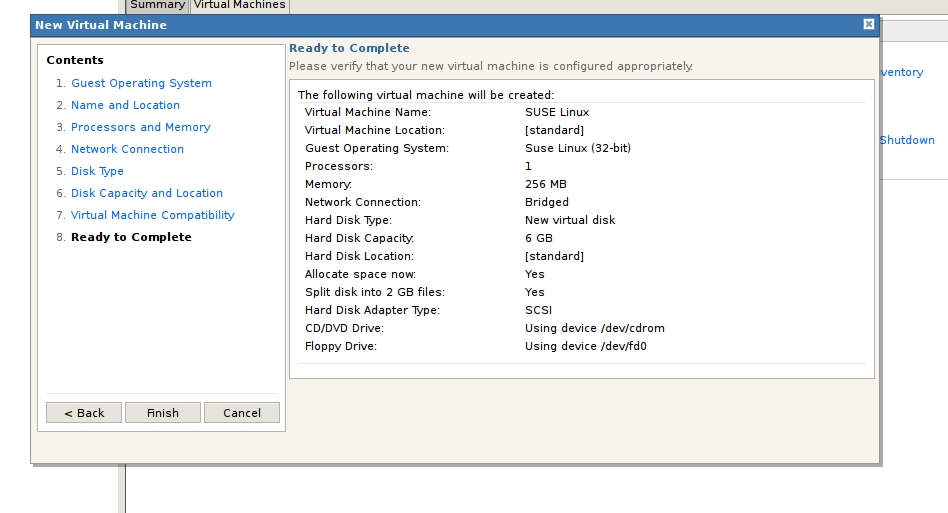
Figure 1. Defining a Virtual Machine Using the Web Interface
The plugin seems extremely buggy, often requiring a refresh of the browser window before it will work again. The console also often crashes the browser—quite a major irritation. However, when the plugin is working, it works exceptionally well with surprising performance—an impressive feat. If the stability issues can be straightened out, it's an exceptionally powerful tool. On the server side, the version of Tomcat bundled with VMware Server occasionally would malfunction until the process was restarted, sending TCP RST to the browser.
When it's up, the interface to define or add virtual machines is cumbersome. First, a data store has to be defined, and the dialog to open VMs, CD images and any other file type does not support browsing outside that data store. Given that anyone logging in to VMware Server runs as root, we imagine there might be some security implications of allowing VMware access to the entire filesystem, but because VMware Server runs as root, there definitely are some security implications, as it can do whatever the heck it likes anyway. Hopefully, this design choice makes more sense when user authentication is implemented into the product later on—particularly if data stores can be defined only by a root user and can't be modified later by an unprivileged user.
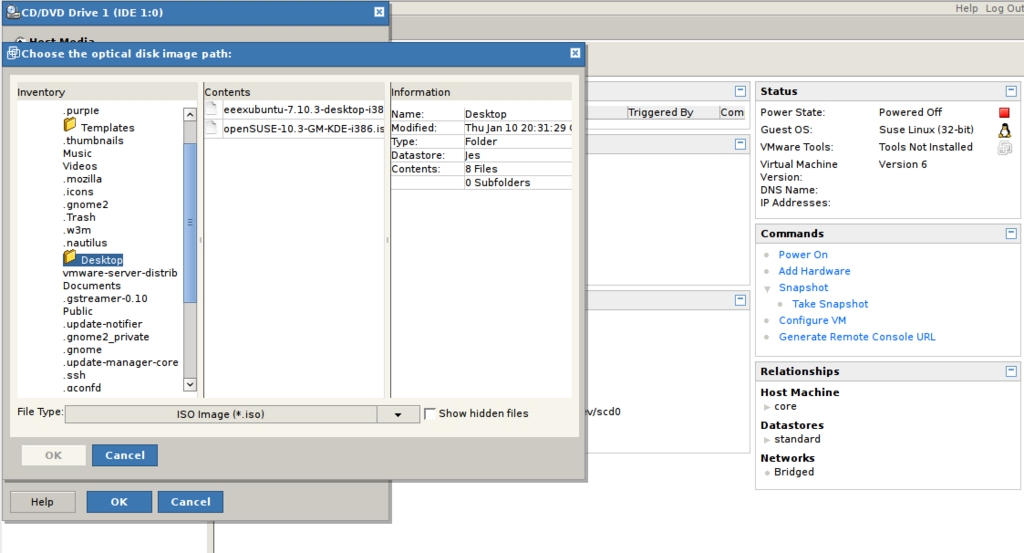
Figure 2. Browsing for a CD Image within a Defined Data Store
Every attempt to add any of our three already-configured Microsoft Windows virtual machines immediately crashed the browser. Unfortunately, for this reason, we were unable to test running Microsoft Windows under VMware Server 2.0 Beta, not having any free licenses to create another Windows VM. We were able to add pre-existing Debian virtual machines that had been created in Workstation 6 for Linux.
Server 2.0 Beta allows for the creation of two Virtual machine types: Server 2 and legacy. Server 2 VMs are Workstation 6-compatible and support ten virtual Ethernet devices instead of only three, as well as paravirtualization with a supported guest OS. Unfortunately, the compatibility of the new Server 2 VM format seems rather buggy. Using the Server 2 option seems to guarantee a VM that does not work on Workstation 6, VMware Player 2 or VMware Fusion 1.1, all of which should be able to open them.
We decided to install an OpenSUSE 10.3 virtual machine to test the performance of the console interface with a heavy graphical desktop environment. The performance was exceptional in every area—feeling almost as though we were sitting in front of a reasonably spec'd machine running the OS natively. The in-browser console rendered the desktop beautifully without a single glitch. The mouse performance was slightly subpar, but this is an issue we have found on almost every virtualization platform we've tried. It looks very much like VMware Server has caught up with Player, Workstation and Fusion in leveraging the extra hardware features of the newer Intel and AMD architectures that accelerate virtualization.
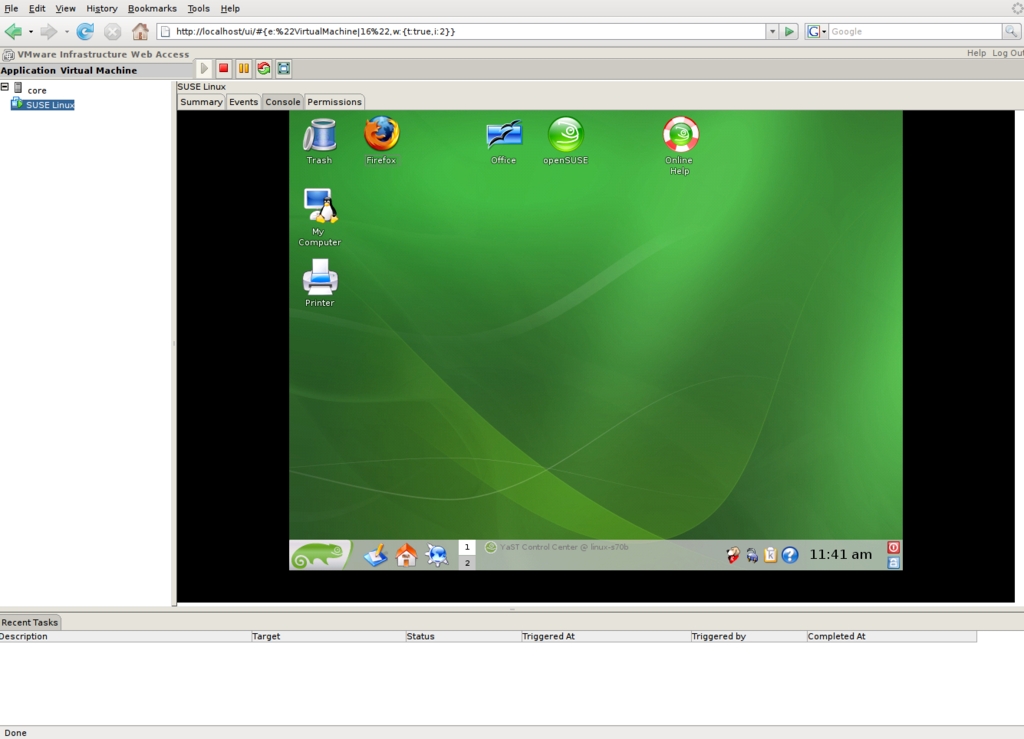
Figure 3. OpenSUSE 10.3 Running under VMware Server 2 Beta
One aspect of the new beta that is above reproach is the documentation. The user manual is exceptional for a product in this stage of development, covering all conceivable aspects of using VMware Server. All other available documentation is polished and looks very complete already.
VMware Server 2 looks like a very promising product. Unfortunately, it has massive showstopper bugs that make this seem more like a pre-alpha than a beta. The feature set, however, is relatively solid and particularly impressive given the price tag. If these issues can be worked through, the Web interface is a powerful enough tool that this could be a promising iteration in the VMware Server line.
Jes Hall is a Linux Technical Specialist and KDE developer from New Zealand. She's passionate about helping open-source software bring life-changing information and tools to those who would otherwise not have them.
