
Say Goodbye to Reboots with Ksplice
Everyone hates rebooting for updates. When system administrators reboot their servers, they have to manage an inconvenient outage window—quite possibly during the middle of the night—and they have to deal with the lost productivity and annoyed users that result from the disruption. Similarly, rebooting your desktop means losing all of your valuable state—your favorite editor with the 35 open files you were working on, your 14 terminals, and, of course, your paused game of Frozen Bubble.
But the alternative—not installing updates right away—is even more unpleasant. If your parents were anything like mine, they insisted that you do two things: eat your vegetables and install your software updates. Why? Well, first, vegetables provide your body with much-needed nutrients. Second, most exploits take advantage of well-known software vulnerabilities—vulnerabilities that do not exist on patched systems. So staying up to date goes a long way in keeping your systems secure and reliable.
So is this it? Will we forever be forced to choose between security and availability? Fortunately, the answer is no. Ksplice, a startup company founded by MIT alumni, has developed technology that can install software updates, without requiring a reboot.
Using this technology, they are offering Ksplice Uptrack, a service that keeps your Linux systems up to date and secure without any hassle. Additionally, experienced kernel developers also can use the Ksplice tools to create their own rebootless updates.
You can start using Ksplice Uptrack without any advance preparation. Follow the directions on the Ksplice Uptrack Web site, which allows you to install the software using your package manager.
Once you've done this, a K icon appears in your notification area. When you see the K, you know that you have the latest security fixes for your Linux kernel. When new updates are available, a warning sign appears over the K.

Figure 1. Ksplice Uptrack notifies you that new rebootless updates are available by displaying a K with a warning sign in the notification area.
When this happens, click on the K to view a list of the available updates. Install the updates by clicking the green Install all updates button. The listed updates will be installed on your running system in seconds, as your applications continue to run without interruption.
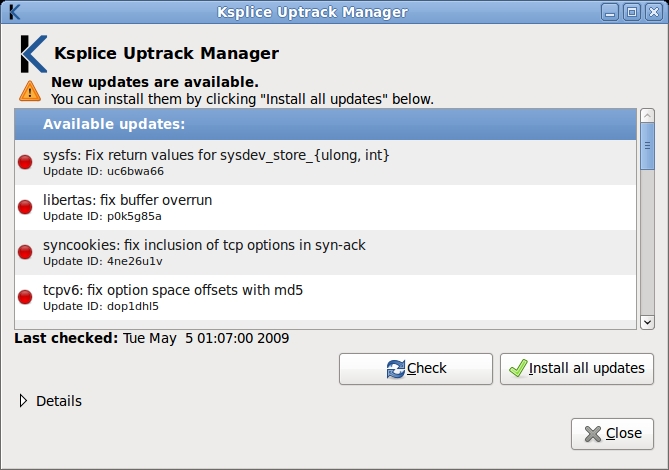
Figure 2. The Ksplice Uptrack manager shows you a list of the available kernel updates. These updates correct security and reliability problems in the kernel. You can install these updates, without disrupting your running applications, by clicking Install all updates.
Like any good Linux tool, Ksplice Uptrack also can be controlled from the command line, with four simple commands. Each update has an ID associated with it, which you use to name it. You can install or remove individual updates, just like with any package manager. Here are the Ksplice Uptrack Commands:
uptrack-upgrade: downloads and installs the latest kernel updates available for your system.
uptrack-install id: installs the update named id.
uptrack-remove id: removes the update named id.
uptrack-show id: shows more detail about the update named id.
What about when you actually do reboot? Well, you can boot in to your brand-new kernel that you've installed the traditional way, using your package manager. Everything will continue to work nicely, and when Ksplice Uptrack detects new updates for this kernel, it will notify you, just like before.
Alternatively, you can reboot into your old kernel. In this case, Ksplice Uptrack will re-apply the rebootless updates early in the boot process. This approach may be more desirable for some system administrators, because it ensures that the machine is in the exact same configuration both before and after the reboot.
New research originally conducted at MIT makes this rebootless update software possible. Three basic actions are related to rebootless updates: creating a rebootless update from a source code patch, applying a rebootless update to a running system and reversing an update. I describe each of these actions below.
To follow along with these examples on your own computer, you need to install the Ksplice utilities. Your distribution likely already includes these utilities, so you can install them using your package manager. If not, you can download them from the Ksplice Web site.
To prepare a Ksplice rebootless update, you need a few ingredients. First, you need the source code of the running kernel—your Linux distribution typically makes this available through your package manager. You also need the kernel configuration file and the System.map file. Finally, you need to point Ksplice at your kernel headers by creating a symbolic link.
Ideally, you also would like the versions of the compiler and assembler on your system to be the same as the ones that built the original kernel. If they are too different, the Ksplice tools will notice and complain before trying to install the update. (I explain why later in this article.)
With all of the materials mentioned above, you can build a replica of your running kernel.
In these examples, I assume that the directory /usr/src/linux already contains the running kernel's source. The following commands prepare your setup appropriately, as described above:
$ mkdir /usr/src/linux/ksplice
$ cp /boot/config-`uname -r` /usr/src/linux/ksplice/.config
$ cp /boot/System.map-`uname -r` /usr/src/linux/ksplice/System.map
$ ln -s /lib/modules/`uname -r`/build /usr/src/linux/ksplice/build
Next, you need the patch to the kernel that you want to apply. This can be an ordinary patch taken from Linus Torvalds' git tree or a patch of your own design. Let's use an example patch that modifies the behavior of printk, the Linux kernel function that is responsible for printing messages to the kernel log. I assume that you have placed this patch in ~/printk.patch:
--- linux-2.6/kernel/printk.c  ...
+++ linux-2.6-new/kernel/printk.c  ...
@@ -609,6 +609,7 @@
        va_list args;
        int r;

+       vprintk("Quoth the kernel:\n", NULL);
        va_start(args, fmt);
        r = vprintk(fmt, args);
        va_end(args);
Once this patch is applied, all messages that are printed using printk will be preceded by the message “Quoth the kernel:”.
To create the rebootless update, run the following command from the directory /usr/src/linux/kernel:
ksplice-create --patch=~/printk.patch /usr/src/linux
It should output something like Ksplice update tarball written to ksplice-8c4o6ucj.tar.gz. This is the rebootless update that corresponds to your source code patch.
Feeding your patch and the kernel's source code into ksplice-create will do the following: first, it compiles your kernel twice—once without the patch and once with the patch applied.
Second, it compares the output of the two compilations, looking for differences. In particular, it needs to find functions that have changed. For each changed function, it pulls out a copy of both the old and the new versions and puts them in the output file.
At this point, Ksplice has determined what functions have been changed by the source code patch, and it has saved old and new versions of the changed functions. Now, it must figure out how to install the new versions of the functions safely, while the system is running.
Applying the update from your perspective is quite simple. As root, run:
ksplice-apply ./ksplice-8c4o6ucj.tar.gz
from the directory /usr/src/linux/kernel; ksplice-8c4o6ucj.tar.gz is the name of the tarball created in the step above.
If the update has been applied successfully, kernel messages should appear with “Quoth the kernel” in front of them. Let's verify this by running dmesg, which allows us to look at the kernel's log.
If all has gone well, you will see something like:
# dmesg | tail -n2
Quoth the kernel:
ksplice: Update 8c4o6ucj applied successfully
What's happening under the hood to make this possible? Remember that Ksplice has a list of functions that need to change in the running kernel. In particular, it has the old versions (that is, the versions that should be in memory right now) and the new versions.
First, it has to locate the functions that it's trying to change. So if it's trying to change printk, as in this example, it first needs to find it in kernel memory.
Once it has found it, it compares it to the old copy of printk that it has in the tarball. Remember that this version of printk was compiled from the unmodified kernel source, with the same compiler and assembler. So the two versions should match exactly. If they do not match, we act conservatively and give up. This safety check is why Ksplice requires the same compiler and assembler in the ksplice-create step.
Now that it has found the old copy of the function and confirmed that it is the correct code, it needs to replace it. It accomplishes this by first loading the new version of the function elsewhere in memory, using the kernel's module loader. Next, at a safe time, it overwrites the first instruction of the old function with a jump instruction that goes to the new function. This is called a trampoline, because it “bounces” all of the callers of the old function immediately over to the new function.

Figure 3. To replace a function, first a new version is loaded into memory. Then, at a safe time, a trampoline is inserted at the start of the old version of the function, redirecting all callers to the new code.
When is it safe to do this replacement? At a high level, we want to replace the code when no one else is using it. If the code is being used while it is being replaced, we potentially could end up with a problem. For example, if the old version of a function locked a resource in one way, and the new version locks it in another, and both run at the same time, we could end up in a situation in which they step on each other's toes.
So how does Ksplice make sure that no one is using the code while it is being replaced? It examines the stack of every kernel thread to ensure that no one has a pointer into the code that is being replaced. Said another way, if no one can reference the old code, no one is using the old code, so it's safe to replace it. This whole process takes place while the machine is briefly paused using Linux's stop_machine mechanism, to make sure that no new references get added when we're not looking.
If this check concludes that it is not a safe time to update the code (that is, if someone is holding a reference to the old code), ksplice-apply aborts the update process. Trying again is harmless, however, and if the update does not apply right away, it will generally apply after a few tries. This is because essentially none of the code in the kernel is constantly in use.
Anything that can be applied also can be reversed, and the Ksplice tools let you do this easily. To undo an update, simply run ksplice-undo with the update's ID, like so:
# ksplice-undo 8c4o6ucj
If this process succeeds, a message will show up in the kernel's log:
# dmesg | tail -n1
ksplice: Update 8c4o6ucj reversed successfully
If you forget the update ID, fear not. ksplice-view will list the Ksplice updates currently installed on your system.
Under the hood, reversing an update is very similar to applying an update. Ksplice finds the old and new functions, and at a safe time, it removes the trampoline. Now, all callers of the old function will continue to get the old function. In the context of a removal, a safe time is determined as it was before, except now Ksplice makes sure that the new code is not in use. Because the tarball contains the old code, it's easy for Ksplice to determine with what code to replace the trampoline.
Determining which updates are installed is also easy. Remember that the new code gets into the kernel by being loaded as a module. As a result, it appears in the lsmod output, which ksplice-view can examine.
Can this technology really be used to keep production machines up to date for extended periods of time? Absolutely. In fact, a Ksplice evaluation of all of the serious Linux security vulnerabilities between May 2005 and May 2008 shows that all of them can be applied as rebootless updates.
However, there is a caveat: a programmer needs to write a small amount of additional code (about 17 lines per patch, on average) for about 12% of these patches. So what sorts of patches require this additional code, and why?
Let's say that we find a bug in a kernel function that gets called only when the machine is booting and never gets called again. Let's say that this function was supposed to set a flag, but doesn't.
We can create a Ksplice update that fixes the function, but that doesn't really accomplish anything, because the function never will be called again (so the bug never will be corrected).
Instead, a kernel programmer needs to write some additional code that transforms the state of the kernel to correct the bug. In this case, the update will need to set the flag when it is applied.
However, determining whether a patch is safe to apply without additional code is tricky, as is writing the additional code. In general, patches that change initialization values or add new fields to data structures require additional code, but this is not a hard-and-fast rule. As a result, you should not construct your own Ksplice updates for use on production systems unless you are an experienced kernel developer.
That said, you still can reap the benefits of this new technology by using the Ksplice Uptrack service without having to do any of the work, because the Ksplice Uptrack folks have done it for you.
Rebootless updates represent an exciting step forward—and, with Ksplice Uptrack, Linux is the first mainstream operating system that does not require reboots for security updates, ever.
So, say goodbye to reboots, and keep working on that high score of yours.
Resources
About the Ksplice Uptrack service, including instructions for installing and getting started with the service: www.ksplice.com/uptrack.
Sign up for the Ksplice mailing list if you're interested in hearing more: lists.ksplice.com.
A detailed technical paper on the internals of Ksplice's core technology: www.ksplice.com/paper.
Waseem Daher is a cofounder of Ksplice. He lives and works in Cambridge, Massachusetts, and can be reached at wdaher@ksplice.com.

