
Paranoid Penguin - Security Features in Ubuntu Server
Last month, I offered a survey of security features in Ubuntu Desktop 7.10, a single-CD Linux distribution that combines the flexibility of Debian with a very easy-to-use set of graphical setup/administration tools. Ubuntu also comes in a server version, which in some ways is just a re-configuration of Ubuntu Desktop, but nonetheless, it's a different distribution in its own right.
This month, I survey some of the major security features in Ubuntu Server 7.10. Unlike Ubuntu Desktop, Ubuntu Server is probably the wrong choice for complete Linux newcomers. It's extremely command-line-centric, and its documentation is not exactly encyclopedic. Accordingly, this month's column assumes you've got a basic understanding of how Linux works and some comfort with the command prompt.
There are several key differences between Ubuntu Server and Ubuntu Desktop. First, and most obvious, is the lack of any graphical tools. Ubuntu Server doesn't install the X Window System automatically. This has become an increasingly rare approach, even with server-oriented Linux distributions. But, as I explain shortly, omitting the X Window System improves system security and performance and decreases system complexity.
Second, Ubuntu Server installs a much smaller set of packages overall than Ubuntu Desktop. (In fact, there's ample room on the Ubuntu Server CD image to add things of your own—watch this column for a future series on customizing and building your own bootable CD images.) You might think this means that Ubuntu Server offers fewer choices in server applications, but as I show here, these aren't fewer choices than on other popular server-oriented distributions. And besides, you can install additional Ubuntu packages easily over the Internet.
The last major difference worth noting is that Ubuntu Server's default kernel is tuned for server performance, whereas Ubuntu Desktop's default kernel is tuned for maximum responsiveness. An article by Carla Schroder on these differences details some specifics as to how this is achieved (see Resources).
Yes, you read that right. By default, Ubuntu Server is a purely console-driven distribution. On Ubuntu Server, you do things the old-school way, with shell sessions, man page lookups and the vi editor.
Of course, there's nothing to stop you from installing the X Window System, complete with a fully packed KDE desktop environment, OpenOffice.org and Tux Racer. Ubuntu's download repositories don't distinguish between Server and Desktop, so you can install whatever you like. However, I very strongly suggest you resist the temptation to install the X Window System on your Ubuntu Server system.
When the first edition of my book Linux Server Security came out (which I try not to plug here, but this is after all an article on Linux server security), one reviewer complained bitterly about my advice to omit the X Window System from server installations. But, for years I've stood firm on this advice. The X Window System increases complexity. It has a history of “local privilege escalation” vulnerabilities (that can often be exploited remotely), and it always imposes a significant performance penalty.
“Keep it simple” is one of the most important tenets of good system security. If you don't need something, you should live without it. And, in most server scenarios, when a system's primary function is to provide various network services, and wherein what little “interactive” access necessary for administration can be done remotely, it's hard to justify the increased attack surface and overall complexity that come from running X.
Besides, even in Ubuntu Desktop, many if not most serious configuration and security tasks at some point require you to open a terminal and issue commands with sudo. If you want to be an Ubuntu system administrator (or more than a novice at Linux in general), there's no getting around needing to be able to cope with the command line. So I applaud the Ubuntu team's common sense (and courage) in keeping the X Window System out of the default installation of Ubuntu Server.
If you really need a GUI experience in administering your Ubuntu Server system, there are remote administration tools you can use (Webmin, for example—see Resources, and also see Federico Kereki's article “Graphic Administrationwiht Webmin” on page 64) that provide this without requiring X on the server itself.
As I've often said, security begins with operating system installation. This is where you decide your system's role, what set of applications will run on the machine, and what type and degree of user access it will support. So, to what degree does the Ubuntu Server installer help system security?
The Ubuntu Server installer is very similar to the Ubuntu Desktop installer, except that the Server installer is, if anything, even more minimalist. It guides you through partitioning your hard disk, asks what category of software packages to install, walks you through creating a login account (not root), installs the software, and then, depending on what you installed, it may or may not ask you a few very basic questions with which it begins (barely) configuring one or more of those applications.
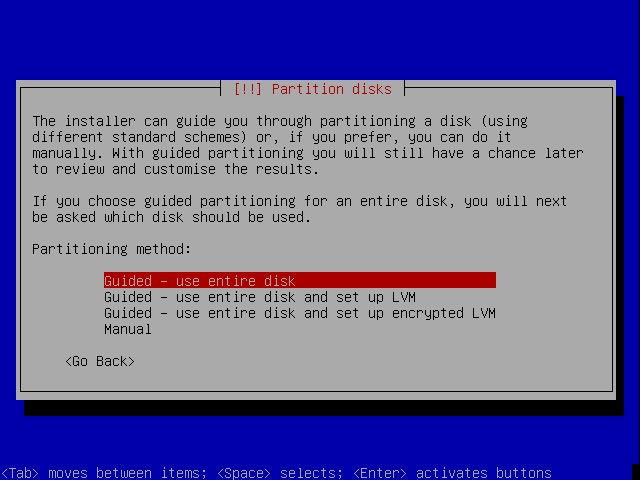
Figure 1. Ubuntu Server installer offers encrypted volumes.
The good news is that the Ubuntu Server installer:
Can create encrypted disk volumes.
Doesn't ask you for a root password, because you never log on as root in Ubuntu.
Is surprisingly fast, obviously thanks to its simplicity.
Generally installs things with conservative, fairly secure, default settings (which is actually a function of packages' individual installation scripts).
The bad news is that the Ubuntu Server installer:
Doesn't allow you to select specific/individual software packages; instead, it just asks you the general role the server will play (Figure 2).
Prompts you for the MySQL administrator's password, but doesn't prompt you a second time to make sure you didn't mistype it.
Doesn't check passwords for complexity (uppercase/lowercase, numerals and so forth).
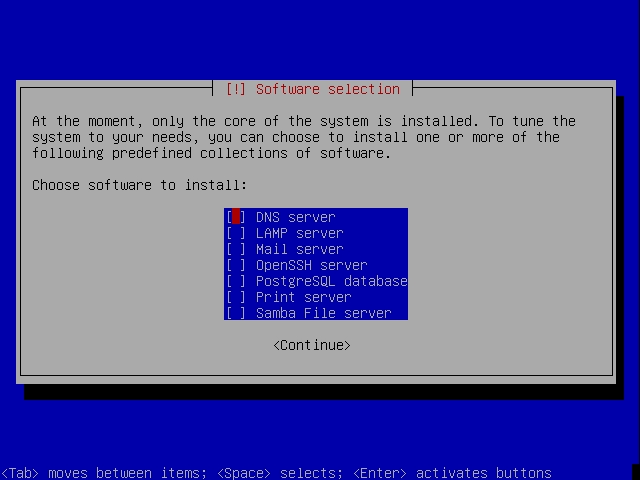
Figure 2. Selecting Server Software Bundles
After installation, you may notice that most if not all the server applications you installed (Apache, Postfix and so forth) are up and running, even though you haven't really configured them yet. You'll need to do that yourself by editing the appropriate configuration files in /etc.
On the one hand, my personal preference is that, by default, network services should be disabled initially, to make it harder for an attacker to exploit an application that has been overlooked altogether or that is still in the process of being configured. On the other hand, because Ubuntu's default application configurations tend to be fairly secure, this probably doesn't pose a huge risk.
For example, immediately after installation, Apache is started, displaying a simple “It works!” page, which announces to the world that you've just installed Apache but haven't gotten around to configuring it yet. (Ow!) But, there's no obvious way for an attacker to exploit this. You can't recurse out of the nearly empty default http root directory, default CGI scripts aren't present and so on.
If you're worried about this, you simply can shut down these newly installed services until you've configured them. Or, better still, stage your new server on a protected LAN before connecting it to the Internet.
As I explained in last month's column, Ubuntu is set up so that you never can actually log on as root. Instead, you create one or more nonprivileged login accounts that are authorized to execute root-privileged commands via sudo, the “superuser do” command. This makes it harder to damage your system accidentally, and it has the security benefit of removing the root account as a viable attack vector, because root has no password and can't log in.
So, for example, whereas on a standard Debian system you might install the package foo with this command:
aptitude install foo
On Ubuntu, you'd use:
sudo aptitude install foo
After issuing any command with sudo, you'll be prompted for your own password, not root's, which will be cached for a brief period of time during which subsequent sudo commands won't require re-authorization.
If you need to change sudo's configuration (which determines who is authorized to run which commands, under what circumstances), you must use the visudo command to edit the file /etc/sudoers. The Ubuntu RootSudo Page (see Resources) provides more information.
It's no coincidence that I used the aptitude command in the above examples. Chances are, one of the first things you'll do after installing Ubuntu Server is install some additional software, and aptitude is Ubuntu Server's best tool for this job.
Perhaps surprisingly, given that the Ubuntu Server distribution doesn't even fill a 650MB CD-ROM, there are many useful packages from which to choose on the CD in its /pool directory. When you install Ubuntu Server, the installer also automatically configures the Advanced Package Tool (apt) system, for which aptitude is a front end, with the locations of some download repositories.
In last month's column, I described the Ubuntu repository structure in detail. In case you missed that, here's a quick review:
Main contains Ubuntu's fully supported, fully patched, free software packages.
Restricted contains Ubuntu's fully supported, nonfree (copyrighted) software packages.
Universe contains Ubuntu's free but not fully supported/patched packages.
Multiverse contains packages that are neither fully free nor fully supported/patched.
You might think that on a server system, universe and multiverse packages should be avoided, as they lack any guarantee of timely security patches or bug fixes. And, as a general rule, I think you'd be right.
But, there are some notable packages in universe and multiverse that may be worth installing and sustaining whatever risk is entailed. One such package is Bastille (in universe), a comprehensive system-hardening tool you can uninstall after it does its thing. Another might be Tripwire (in multiverse), which is the classic file integrity checker, though the main repository's aide packages provide the same functionality and are fully supported by the Ubuntu security team.
All of these packages are part of the main repository. Unlike with Ubuntu Desktop, however, these can be installed from the Ubuntu Server CD.
Space does not permit me to include lengthy charts of security-related packages like those I provided in the Ubuntu Desktop column last month. If I did, they would be very similar except for two things.
First, I would omit security auditing tools, such as Nessus and tcpdump (though both are on the Ubuntu Server CD). You shouldn't install anything on any Internet server, or other multiuser system, that can be used by an attacker against the system itself or other systems on your network. Instead, you should run such tools from an administrative system, where they're less likely to be abused.
Second, you would see that many packages on Ubuntu Desktop must be downloaded from a main repository Web site. These are, in fact, provided on the Ubuntu Server CD under /pool. These include the following:
aide
auth-client-config
apparmor
chkrootkit
cryptsetup
dovecot-imapd
exim4-daemon-heavy
gnupg
ipsec-tools
libkrb53
sasl2-bin
libselinux1
libwrap0, tcpd
openssh-server
libpam-opie
shorewall
slapd, ldap-utils
squid
vlan
vsftpd
I'll leave it to you to explore the many other security-related packages available in the Ubuntu repositories. One of the best ways to do this is to look them up on packages.ubuntu.com.
Given the importance of patching to maintain system security, you might be surprised to learn that Ubuntu Server doesn't have any specific mechanism for automatically downloading and installing security updates. I can explain why in two words: change control.
On a production server that does real work, it's a bad idea to apply any patches, even security updates, until after you've tested them on a similar server in a lab to make sure they don't break anything. Sure, you can run the commands aptitude -y update, aptitude -y upgrade, aptitude -y dist-upgrade and aptitude -y autoclean from a cron job each night. But that -y option, which allows aptitude to run unattended, also might cause a package update to overwrite some custom configuration file with a default configuration.
On a server, you're better off running these commands manually as needed, without the -y option (after first doing so on a test system if you run in a change-controlled environment). That way, you'll be prompted before any configuration files are overwritten, and you'll be able to observe firsthand the changes aptitude makes to your system as they happen. Subscribe to the ubuntu-security-announce mailing list (via www.ubuntu.com/support/community/mailinglists) to receive e-mail notifications of security patches as they're made available.
As I discussed last month, the Ubuntu port of Novell AppArmor is installed by default in Ubuntu systems. This is true of both Server and Desktop. In Ubuntu Server, however, AppArmor is present but not configured; you'll need to activate any policies you want to enforce manually (AppArmor profiles reside in /etc/apparmor.d).
If you're unfamiliar with AppArmor, it's a powerful means of running applications in contained environments, such that applications' access to local resources is kept to a minimum. It's similar to SELinux, but less comprehensive and, therefore, easier to understand and administer.
However, on Ubuntu, no graphical tools are provided for this purpose, even in Ubuntu Desktop. What's more, the only Ubuntu documentation (besides man pages) is the AppArmor page on the Ubuntu User Community Wiki (see Resources), which is little more than a listing of commands and their command-line syntax; no HOWTOs or other introductory material are provided.
For the time being, it appears AppArmor on Ubuntu Server is for expert users only.
I've discussed Ubuntu's sensible omission of the X Window System in its default installations, enumerated security features in the Ubuntu Sever installer, pondered the merits of the disabled root account, listed some security-enhancing software packages available in Ubuntu Server and considered Ubuntu's fledgling AppArmor support.
My overall opinion? Ubuntu Server 7.10 is a remarkably compact, straightforward, command-line-oriented Linux distribution with a reasonably secure set of default configurations and an impressive array of fully supported, security-related software packages. (Fewer than Debian, but many more than CentOS or RHEL.) If you're an intermediate-to-advanced Linux system administrator, depending on what you need to do, Ubuntu Server may be worth checking out.
If you're a Linux newbie looking for a gentle introduction to the Linux experience, Ubuntu Desktop is a much better choice, even if you want practice setting up server applications.
That's it for now. Until next time, be safe!
Resources
The Official Ubuntu Home Page: www.ubuntu.com
Ubuntu Server Guide: https://help.ubuntu.com/7.10/server/C/index.html
Christer Edwards' blog, which consists almost entirely of handy Ubuntu HOWTOs: ubuntu-tutorials.com
“Ubuntu Server: Considering Kernel Configuration” by Carla Schroder: www.enterprisenetworkingplanet.com/netos/article.php/3710641
Home Page for Webmin, a Free Web-based GUI for Remote Server Management: www.webmin.com
The Ubuntu RootSudo Page, Describing Ubuntu's sudo Implementation in Detail: https://help.ubuntu.com/community/RootSudo
Security Pages on the Ubuntu User Community's Wiki: https://help.ubuntu.com/community/Security
AppArmor Page on the Ubuntu User Community's Wiki: https://help.ubuntu.com/community/AppArmor
The “Securing Debian Manual”, Indirectly Applicable to Ubuntu: www.debian.org/doc/manuals/securing-debian-howto/index.en.html
Bauer, Michael D. Linux Server Security, 2nd ed. Sebastopol, CA: O'Reilly Media, 2005. Provides detailed procedures for securing popular server applications.
Mick Bauer (darth.elmo@wiremonkeys.org) is Network Security Architect for one of the US's largest banks. He is the author of the O'Reilly book Linux Server Security, 2nd edition (formerly called Building Secure Servers With Linux), an occasional presenter at information security conferences and composer of the “Network Engineering Polka”.

