
Paranoid Penguin - Samba Security, Part I
It recently occurred to me that in the eight years or so I've been writing this column, I've never covered file servers. I've covered secure file transfer, for example, via scp, rsync and vsftpd, which certainly is important. But, I've not covered file serving, specifically, allowing users to mount persistent “network volumes” that let them use networked server disk space as though it were a local disk. This has all sorts of productivity- and operations-related benefits: it's (usually) easy for end users to use, and it makes data easier to access from multiple systems and locations and easier to back up and archive.
As it happens, there's a rich toolkit available to Linux users for building, securing and using file servers, mainly in the form of Jeremy Allison and Andrew Tridgell's Samba suite of dæmons and commands, plus various graphical tools that supplement them. For the next few columns, I'm going to show you how to build a secure Samba file server using both command-line and GUI tools.
Does that sound like a good Paranoid Penguin project? Good enough, I hope, to forgive me for ignoring file servers for so long. (So many things to secure, so little time!)
Obviously, no series of articles can cover everyone's file server needs or wants. So, before I begin, let's agree on some requirements of my choosing (hopefully, some or all of these coincide with yours). It seems reasonable to focus on the following: security, convenience and cross-platform compatibility.
It goes without saying that in a security project, security is foremost among my preoccupations. With a file server, I'm going to pay particular attention to protecting the data itself: the integrity, availability and confidentiality of my files, while at rest on the server and in transit over the network. I also want to protect the server itself, both to protect the data and to prevent the server from being misused in other ways.
The trio of goals I listed above (confidentiality, integrity and availability) is part of classic information security dogma. In just about any information security scenario you can think of, C, I and A are important one way or another.
The goal of simply preventing a system from being used in unexpected or unwanted ways by unauthorized persons though, is what I like to call exclusivity. If I go to the trouble of building and maintaining a file server, even if the data itself is 100% boring and useless (please do not insert a joke about Paranoid Penguin column archiving here), I want such a server to be used exclusively by me and the users I specifically designate.
Even if it's some sort of public file server (for which, by the way, asynchronous file transfer technologies, such as FTP, HTTP and rsync are much more securable than Samba), I still want that server to be used exclusively for that purpose. I don't want it being used as someone's pirate IRC server, warez repository or proxy for attacking other systems.
I just mentioned that the type of file server I'm talking about (the kind to which you can “map drives”) isn't suitable for public file serving. This is because the two dominant tools for this, Samba and NFS, historically have relied on RPC, a protocol that involves the dynamic assigning of TCP and UDP listening ports on a per-client, per-connection basis, which requires a large range of ports to be opened through any firewalls that might be in the way. Alas, opening UDP and TCP ports 1025 through 65,534 in both directions through a firewall is an awful lot like not using a firewall at all, even if you limit source or destination IP addresses.
On the one hand, more current versions of NFS (versions 3 and 4) allow the server/dæmon to use a single TCP port for all connections by concurrent users. However, much of the world seems to be stuck on NFS v2. Worse still for our purposes here, there never has been good support for NFS outside the world of UNIX and UNIX-like platforms.
And, this brings us to our other two requirements: convenience and cross-platform compatibility. I want to be able to map network drives/volumes, because this is much, much more convenient than manually copying files to and from the file server every time one changes, even automatically via some script. I want a file share that allows me to “work” on files that “reside” in a central location; I don't want working copies of my files being maintained on umpteen different systems.
I've alluded to the fact that NFS allows you to map network volumes in a very similar way as with Samba. However, I have to acknowledge the ugly reality that I am sometimes required to operate Windows systems. My job requires it and so does my video-gaming habit. So, I need a file server that supports both Linux and Windows clients. (As it happens, the one we're going to build also will support FreeBSD, NetBSD, Solaris, Mac OS X and practically the entire rest of the *nix world!)
To summarize, we're going to build our file server with Samba, because it's convenient and it supports different client platforms. And, we're going to build it as securely as possible.
Samba over the Internet?
If Samba is so very convenient, you may wonder, why not use IPsec or some other VPN/encryption tool to secure its use on the Internet? This is actually possible. As it's been a while since I covered IPsec in this space, and in the intervening years, IPsec support has been added to the Linux kernel, I just may end this series with a quick tutorial on doing Samba over IPsec.
However, Samba is a very “chatty” protocol—it generates a lot of packets even if you're using it only for small files or shares. This causes problems not so much for your Internet link as for Samba performance: Samba can be very sensitive to dropped or delayed packets, which is more likely in your modestly sized Internet uplink than over your exponentially bigger Local Area Network (LAN) fabric.
So, trying to get Samba working over IPsec may or may not be worth your time, and it may or may not warrant my covering it in this series of columns. Have no fear, one way or another, you can expect me to provide a tutorial on using the Linux kernel's IPsec functionality in a future Paranoid Penguin column.
I've explained in gory detail why Samba, firewalls and the Internet don't go well together. So, how do you secure Samba for LAN use?
Samba security is a surprisingly complex topic, which is why this is a multipart article. You've got many choices to make if you want to use Samba securely. Is your Samba server also going to be an NT domain controller, or will it participate in an existing domain or workgroup? Will you permit guest access, or will all users of every share need to be authenticated first? Or, will you allow both private and public shares?
Don't worry if the previous questions make little sense to you. That's why the Paranoid Penguin is here. For most of the rest of this article, I discuss these concepts in detail. Only then will you be ready to explore the mysteries of smb.conf and the NMB dæmon.
First, let's get some definitions out of the way:
SMB: the Server Message Block protocol, the heart of Samba. SMB is the set of messages that structure and use file and print shares.
CIFS: short for the Common Internet File System, which in practical terms is synonymous with SMB.
NetBIOS: the API used to pass SMB messages to lower-level network protocols, such as TCP/IP.
NBT: the specification for using NetBIOS over TCP/IP.
WINS: Microsoft's protocol for resolving NBT hostnames to IP addresses; it's the MS world's answer to DNS.
Workgroup: a peer-to-peer group of related systems offering SMB shares. User accounts are decentralized—that is, maintained on all member systems rather than on a single central server.
NT domain: a type of group consisting of computers, user accounts and other groups (but not other domains). It is more complex than a workgroup, but because all domain information is maintained on one or more domain controllers rather than being distributed across all domain members, domains scale much better than workgroups.
Active Directory: Microsoft's next-generation domain system. Samba can serve as an Active Directory client via Kerberos, but you can't control an Active Directory tree with a Samba server as you presently can do with NT Domains. Active Directory server support will be introduced in Samba v4.
User-mode security: when a Samba server's shares are authenticated by local workgroup user names and passwords.
Share-mode security: when each share on a Samba server is authenticated with a share-specific password that isn't explicitly associated with a user name.
Guest access: when a Samba server allows anonymous connections to a given share via a shared guest account with no password.
Here's what you need to take away from that list of definitions.
First, the protocols. SMB, aka CIFS, is the protocol that defines the network filesystem—its structure and its use. NetBIOS provides an API through which SMB messages may be transmitted over networks, and which may be used by servers to “advertise” services and by clients to “browse” those services. NetBIOS can use any of a number of lower-level network protocols as its transport, but the most important of these is TCP/P; NetBIOS over TCP/IP is called NBT. WINS provides centralized name services (mappings of hostnames to IP addresses), where needed.
Next, server roles. A Samba server can authenticate its transactions either on a per-share basis, using share-specific passwords and inferred/implicit user names, or on a per-user basis, using either a dedicated local user database (in user-mode security) or some networked authentication scheme, such as LDAP, NIS, NT Domains or Active Directory. The server can be in a workgroup, in which case it needs to maintain its own database of all the workgroup's user information, or it can be in an NT Domain or an Active Directory, in which all user information is managed centrally.
When you want to share data with maximum convenience and minimum security, for example, read-only files containing nonsensitive data, you can put it on a share with guest access. Users connecting to such a share will not be prompted for any user name or password.
The bad news is that this is only a fraction of what you need to know in order to understand SMB/Samba services. The good news is, NT Domains and Active Directory are out of scope for this series of articles. We're going to focus on using workgroups for our secure Samba file server.
Workgroups don't scale well, because each server in a workgroup needs to maintain all user information for the entire workgroup, and you must somehow keep this information (passwords and so forth) consistent across all workgroup members (except where only guest access or share-mode access is permitted).
However, for the usage scenario I've described—creating a file share or two I can reach from anywhere in my house—I'm not going to have very many users or even more than one server, necessarily, and the simplicity of setting up a standalone/workgroup server trumps the complexity-laden power that comes with NT Domains. If your needs differ, hopefully this series of articles nonetheless will make it easier for you to figure out Samba's NT Domain support on your own, if that's what you really need instead.
So, to express our project in the terms I've just defined, in subsequent articles, I'm going to walk through the process of configuring a standalone (workgroup) Samba server operating with user-mode security, using a dedicated local user database. Our example server will host a combination of guest shares, read-only shares restricted by user and shares that can be read by only some users, but that can be written to (changed) by others.
First though, we have to make sure you've got the software you need in order to pull that off.
On your Samba server, you're going to need your distribution's packages for Samba's libraries; the Samba dæmons smbd, nmbd and winbindd; the Samba client commands smbclient, smbmount and so forth (which are useful even on servers for testing Samba configurations); and also the Web-based configuration tool SWAT (Figure 1). Naturally, nearly all these things are contained in packages whose names don't correspond neatly with the names of their component dæmons, libraries and so forth, but I give some pointers on those shortly.
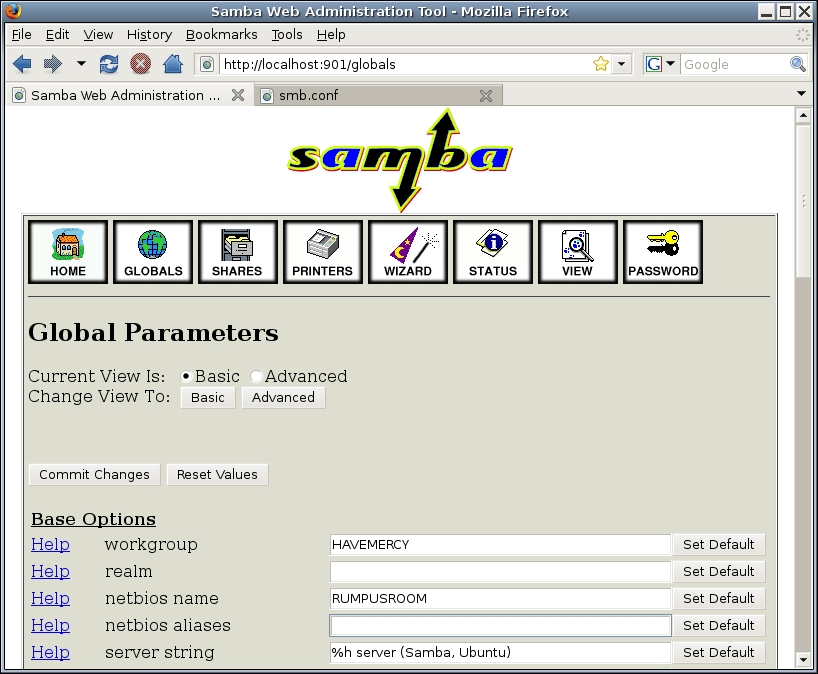
Figure 1. SWAT
First, a word about SWAT, which requires a modest security trade-off for Ubuntu users. Although normally in Ubuntu the user root can't log in directly, Samba requires this to be possible, so you need to set a root password on any Ubuntu box that runs SWAT.
Like so much else about Samba, this is not something I recommend doing on any Internet-facing Ubuntu box. However, SWAT is such a useful and educational tool, I feel pretty confident in stating that in non-Internet-facing environments, the mistakes SWAT will help you avoid probably constitute a bigger threat to system security than SWAT does.
As I mentioned, Samba packages are included in all major Linux distributions. In Debian and its derivatives, such as Ubuntu, you'll want to install the following deb packages: samba, samba-common, samba-doc, smbclient and swat (plus whatever packages you need to satisfy dependencies in any of these).
In SUSE, you'll want to install samba, samba-client, samba-winbind and samba-doc. (SWAT is included with one of these, probably samba.)
In Red Hat Enterprise Linux and its derivatives, you need samba, samba-client, samba-common and samba-swat.
Installing these binary packages should involve installation scripts that put startup scripts, symbolic links and so forth in the correct places for everything to work (at least, after you configure Samba to serve something). Using SWAT is the best way to get up and running quickly—not because it does very much work for you, but because its excellent help system makes it super-convenient to summon the pertinent parts of Samba's various man pages.
There are two SWAT quirks I should mention. First, SWAT must be run by an Internet super-server, such as the old Berkeley inetd or the newer xinetd. Ubuntu configures inetd automatically when you install the swat package, but if your distribution of choice does not, you need a line like this in /etc/inetd.conf:
swat stream tcp nowait.400 root /usr/sbin/tcpd /usr/sbin/swat
Second, to get SWAT's help links to work under SUSE 11.0, you may need to create the following symbolic links while logged in to a terminal window as root:
ln -s /usr/share/doc/packages/samba/htmldocs/manpages
 ↪/usr/share/samba/swat/help
ln -s /usr/share/doc/packages/samba/htmldocs/using_samba
 ↪/usr/share/samba/swat/help
ln -s /usr/share/doc/packages/samba/htmldocs/index.html
 ↪/usr/share/samba/swat/help
ln -s /usr/share/doc/packages/samba/htmldocs/manpages.html
 ↪/usr/share/samba/swat/help
And with that, we're ready to start configuring our Samba server! Or we would be, if we weren't out of time and space for this month. The links in the Resources section, not to mention SWAT's aforementioned excellent help links, should help you get started before we continue this series in my next column. Until then, be safe!
Resources
Christopher R. Hertel's On-Line Book Implementing CIFS, a Comprehensive Source of Information on All Things CIFS/SMB-Related: www.ubiqx.org/cifs
“The Official Samba 3.2.x HOWTO and Reference Guide”: us1.samba.org/samba/docs/man/Samba-HOWTO-Collection
Mick Bauer (darth.elmo@wiremonkeys.org) is Network Security Architect for one of the US's largest banks. He is the author of the O'Reilly book Linux Server Security, 2nd edition (formerly called Building Secure Servers With Linux), an occasional presenter at information security conferences and composer of the “Network Engineering Polka”.

