
Paranoid Penguin - Building a Secure Squid Web Proxy, Part I
Consider the venerable Web proxy—back when the Internet was new to most of us, setting up a Web proxy was a convenient way to grant users of an otherwise non-Internet-connected network access to the World Wide Web. The proxy also provided a convenient point to log outbound Web requests, to maintain whitelists of allowed sites or blacklists of forbidden sites and to enforce an extra layer of authentication in cases where some, but not all, of your users had Internet privileges.
Nowadays, of course, Internet access is ubiquitous. The eclipsing of proprietary LAN protocols by TCP/IP, combined with the technique of Network Address Translation (NAT), has made it easy to grant direct access from “internal” corporate and organizational networks to Internet sites. So the whole idea of a Web proxy is sort of obsolete, right?
Actually, no.
After last month's editorial, we return to technical matters—specifically, to the venerable but assuredly not obsolete Web proxy. This month, I describe, in depth, the security benefits of proxying your outbound Web traffic, and some architectural and design considerations involved with doing so. In subsequent columns, I'll show you how to build a secure Web proxy using Squid, the most popular open-source Web proxy package, plus a couple of adjunct programs that add key security functionality to Squid.
The last time I discussed proxies in this space was in my December 2002 article “Configuring and Using an FTP Proxy”. (Where does the time go?) A quick definition, therefore, is in order.
The concept of a Web proxy is simple. Rather than allowing client systems to interact directly with Web servers, a Web proxy impersonates the server to the client, while simultaneously opening a second connection to the Web server on the client's behalf and impersonating the client to that server. This is illustrated in Figure 1.
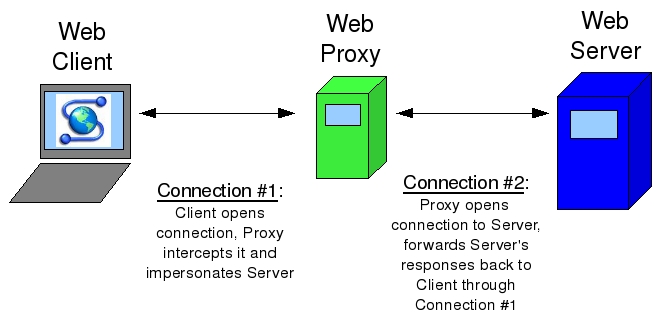
Figure 1. How Web Proxies Work
Because Web proxies have been so common for so long, all major Web browsers can be configured to communicate directly through Web proxies in a “proxy-aware” fashion. Alternatively, many Web proxies support “transparent” operation, in which Web clients are unaware of the proxy's presence, but their traffic is diverted to the proxy via firewall rules or router policies.
Just because nowadays it's easy to interconnect TCP/IP networks directly doesn't mean you always should. If a nasty worm infects systems on your internal network, do you want to deal with the ramifications of the infection spreading outward, for example, to some critical business partner with whom your users communicate over the Internet?
In many organizations, network engineers take it for granted that all connected systems will use a “default route” that provides a path out to the Internet. In other organizations, however, it's considered much less risky to direct all Web traffic out through a controlled Web proxy to which routes are internally published and to use no default route whatsoever at the LAN level.
This has the effect of allowing users to reach the Internet via the Web proxy—that is, to surf the Web—but not to use the Internet for non-Web applications, such as IRC, on-line gaming and so forth. It follows that what end users can't do, neither can whatever malware that manages to infect their systems.
Obviously, this technique works only if you've got other types of gateways for the non-Web traffic you need to route outward, or if the only outbound Internet traffic you need to deal with is Web traffic. My point is, a Web proxy can be a very useful tool in controlling outbound Internet traffic.
What if your organization is in a regulated industry, in which it's sometimes necessary to track some users' Web access? You can do that on your firewall, of course, but generally speaking, it's a bad idea to make a firewall log more than you have to for forensics purposes. This is because logging is I/O-intensive, and too much of it can impact negatively the firewall's ability to fulfill its primary function, assessing and dealing with network transactions. (Accordingly, it's common practice mainly to log “deny/reject” actions on firewalls and not to log “allowed” traffic except when troubleshooting.)
A Web proxy, therefore, provides a better place to capture and record logs of Web activity than on firewalls or network devices.
Another important security function of Web proxies is blacklisting. This is an unpleasant topic—if I didn't believe in personal choice and freedom, I wouldn't have been writing about open-source software since 2000—but the fact is that many organizations have legitimate, often critical, reasons for restricting their users' Web access.
A blacklist is a list of forbidden URLs and name domains. A good blacklist allows you to choose from different categories of URLs to block, such as social networking, sports, pornography, known spyware-propagators and so on. Note that not all blacklist categories necessarily involve restricting personal freedom per se; some blacklists provide categories of “known evil” sites that, regardless of whatever content they're actually advertising, are known to try to infect users with spyware or adware, or otherwise attack unsuspecting visitors.
And, I think a lot of Web site visitors do tend to be unsuspecting. The classic malware vector is the e-mail attachment—an image or executable binary that you trick the recipient into double-clicking on. But, what if you could execute code on users' systems without having to trick them into doing anything but visit a Web page?
In the post-Web 2.0 world, Web pages nearly always contain some sort of executable code (Java, JavaScript, ActiveX, .NET, PHP and so on), and even if your victim is running the best antivirus software with the latest signatures, it won't examine any of that code, let alone identify evil behavior in it. So, sure enough, the “hostile Web site” has become the cutting edge in malware propagation and identity theft.
Phishing Web sites typically depend on DNS redirection (usually through cache poisoning), which involves redirecting a legitimate URL to an attacker's IP address rather than that site's real IP, so they're difficult to protect against in URL or domain blacklists. (At any rate, none of the free blacklists I've looked at include a phishing category.) Spyware, however, is a common blacklist category, and a good blacklist contains thousands of sites known to propagate client-side code you almost certainly don't want executed on your users' systems.
Obviously, no URL blacklist ever can cover more than a tiny fraction of the actual number of hostile Web sites active at any given moment. The real solution to the problem of hostile Web sites is some combination of client/endpoint security controls, better Web browser and operating system design, and in advancing the antivirus software industry beyond its reliance on virus signatures (hashes of known evil files), which it's been stuck on for decades.
Nevertheless, at this very early stage in our awareness of and ability to mitigate this type of risk, blacklists add some measure of protection where presently there's very little else. So, regardless of whether you need to restrict user activity per se (blocking access to porn and so forth), a blacklist with a well-maintained spyware category may be all the justification you need to add blacklisting capabilities to your Web proxy. SquidGuard can be used to add blacklists to the Squid Web proxy.
Just How Intelligent Is a Web Proxy?
You should be aware of two important limitations in Web proxies. First, Web proxies generally aren't very smart about detecting evil Web content. Pretty much anything in the payloads of RFC-compliant HTTP and HTTP packets will be copied verbatim from client-proxy transactions to proxy-server transactions, and vice versa.
Blacklists can somewhat reduce the chance of your users visiting evil sites in the first place, and content filters can check for inappropriate content and perhaps for viruses. But, hostile-Web-content attacks, such as invisible iframes that tell an attacker's evil Web application which sites you've visited, typically will not be detected or blocked by Squid or other mainstream Web proxies.
Note that enforcing RFC compliance is nothing to sneeze at. It constitutes a type of input validation that could mitigate the risk of certain types of buffer-overflow (and other unexpected server response) attacks. But nonetheless, it's true that many, many types of server-side evil can be perpetrated well within the bounds of RFC-compliant HTTP messages.
Second, encrypted HTTPS (SSL or TLS) sessions aren't truly proxied. They're tunneled through the Web proxy. The contents of HTTPS sessions are, in practical terms, completely opaque to the Web proxy.
If you're serious about blocking access to sites that are inappropriate for your users, blacklisting is an admittedly primitive approach. Therefore, in addition to blacklists, it makes sense to do some sort of content filtering as well—that is, automated inspection of actual Web content (in practice, mainly text) to determine its nature and manage it accordingly. DansGuardian is an open-source Web content filter that even has antivirus capabilities.
What if you need to limit use of your Web proxy, but for some reason, can't use a simple source-IP-address-based Access Control List (ACL)? One way to do this is by having your Web proxy authenticate users. Squid supports authentication via a number of methods, including LDAP, SMB and PAM. However, I'm probably not going to cover Web proxy authentication here any time soon—802.1x is a better way to authenticate users and devices at the network level.
Route-limiting, logging, blacklisting and authenticating are all security functions of Web proxies. I'd be remiss, however, not to mention the main reason many organizations deploy Web proxies, even though it isn't directly security-related—performance. By caching commonly accessed files and Web sites, a Web proxy can reduce an organization's Internet bandwidth usage significantly, while simultaneously speeding up end-users' sessions.
Fast and effective caching is, in fact, the primary design goal for Squid, which is why some of the features I've discussed here require add-on utilities for Squid (for example, blacklisting requires SquidGuard).
Suppose you find all of this very convincing and want to use a Web proxy to enforce blacklists and conserve Internet bandwidth. Where in your network topology should the proxy go?
Unlike a firewall, a Web proxy doesn't need to be, nor should it be, placed “in-line” as a choke point between your LAN and your Internet's uplink, although it is a good idea to place it in a DMZ network. If you have no default route, you can force all Web traffic to exit via the proxy by a combination of firewall rules, router ACLs and end-user Web browser configuration settings. Consider the network shown in Figure 2.
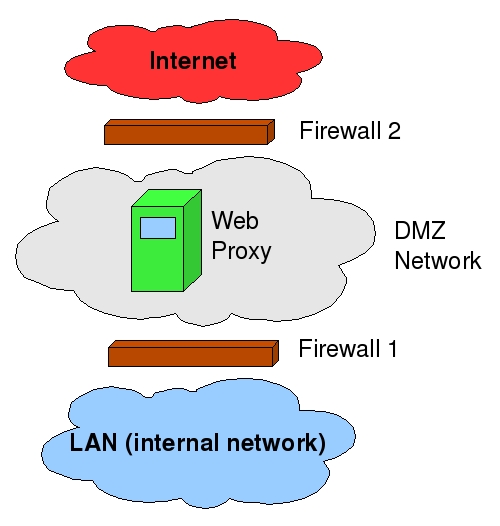
Figure 2. Web Proxy Architecture
In Figure 2, Firewall 1 allows all outbound traffic to reach TCP port 3128 on the proxy in the DMZ. It does not allow any outbound traffic directly from the LAN to the Internet. It passes only packets explicitly addressed to the proxy. Firewall 2 allows all outbound traffic on TCP 80 and 443 from the proxy (and only from the proxy) to the entire Internet.
Because the proxy is connected to a switch or router in the DMZ, if some emergency occurs in which the proxy malfunctions but outbound Web traffic must still be passed, a simple firewall rule change can accommodate this. The proxy is only a logical control point, not a physical one.
Note also that this architecture could work with transparent proxying as well, if Firewall 1 is configured to redirect all outbound Web transactions to the Web proxy, and Firewall 2 is configured to redirect all inbound replies to Web transactions to the proxy.
You may be wondering, why does the Web proxy need to reside in a DMZ? Technically, it doesn't. You could put it on your LAN and have essentially identical rules on Firewalls 1 and 2 that allow outbound Web transactions only if they originate from the proxy.
But, what if some server-side attacker somehow manages to get at your Web proxy via some sort of “reverse-channel” attack that, for example, uses an unusually large HTTP response to execute a buffer-overflow attack against Squid? If the Web proxy is in a DMZ, the attacker will be able to attack systems on your LAN only through additional reverse-channel attacks that somehow exploit user-initiated outbound connections, because Firewall 1 allows no DMZ-originated, inbound transactions. It allows only LAN-originated, outbound transactions.
In contrast, if the Web proxy resides on your LAN, the attacker needs to get lucky with a reverse-channel attack only once and can scan for and execute more conventional attacks against your internal systems. For this reason, I think Web proxies are ideally situated in DMZ networks, although I acknowledge that the probability of a well-configured, well-patched Squid server being compromised via firewall-restricted Web transactions is probably low.
I've explained (at a high level) how Web proxies work, described some of their security benefits and shown how they might fit into one's perimeter network architecture. What, exactly, will we be doing in subsequent articles?
First, we'll obtain and install Squid and create a basic configuration file. Next, we'll “harden” Squid so that only our intended users can proxy connections through it.
Once all that is working, we'll add SquidGuard for blacklisting, and DansGuardian for content filtering. I'll at least give pointers on using other add-on tools for Squid administration, log analysis and other useful functions.
Next month, therefore, we'll roll up our sleeves and plunge right in to the guts of Squid configuration and administration. Until then, be safe!
Resources
“Configuring and Using an FTP Proxy” by Mick Bauer, LJ, December 2002: www.linuxjournal.com/article/6333
The Squid home page, where you can obtain the latest source code and binaries for Squid: www.squid-cache.org
The Squid User's Guide: www.deckle.co.za/squid-users-guide/Main_Page
The SquidGuard home page—SquidGuard allows you to enforce blacklists with Squid: www.squidguard.org
The DansGuardian home page, a free content-filtering engine that can be used in conjunction with Squid: dansguardian.org
Mick Bauer (darth.elmo@wiremonkeys.org) is Network Security Architect for one of the US's largest banks. He is the author of the O'Reilly book Linux Server Security, 2nd edition (formerly called Building Secure Servers With Linux), an occasional presenter at information security conferences and composer of the “Network Engineering Polka”.

