
Paranoid Penguin - Brutally Practical Linux Desktop Security
As I write this month's column, I'm getting ready to attend DEFCON, my all-time favorite information security conference and hacker rave party. I'll catch up with treasured Known Associates, attend cutting-edge technical presentations and drink Sam Adams beer two-fisted at Hacker Jeopardy (it's a tough job, but I'm up to it).
And, at some point, I'll engage in two closely related activities: connecting my laptop to the DEFCON WLAN (wireless local-area network) to check e-mail, hoping fervently that I won't do anything dumb enough to expose my passwords or other personal information to the thousands of other mischievous punks connected to the DEFCON WLAN, and I'll have a nervous chuckle or two at the Wall of Sheep, a real-time list of WLAN users who have done something dumb enough to expose their passwords and other personal information to the thousands of mischievous punks on the DEFCON WLAN.
There isn't necessarily that much shame in ending up on the Wall of Sheep. Several years ago it happened to none other than world-renowned security expert Winn Schwartau. I should mention that Winn was a very good sport about it, too—no identity theft, no foul, as they say.
But, that doesn't mean I'm quite ready to put my own reputation on the line without a fight. You can bet that before I board the plane for Las Vegas, I'm going to lock my laptop down, and when I'm there, I'm going to take care of myself like I was back home in the hood, on the wrong side of the tracks, after dark, with a pork chop hung around my neck. Nobody's going to pwn Mick at DEFCON this year without busting out some supernatural kung fu. (I hope.)
So what, you may ask, does any of this have to do with those of you who never go to DEFCON and generally stick to your friendly local coffee shop wireless hotspots and neighborhood cable-modem LAN segment? Actually, I think that question pretty much answers itself, but I'll spell it out for you: the tips and techniques I use to navigate the DEFCON WLAN safely with my trusty Linux laptop should amply suffice to protect you on whatever public, semiprivate or spectacularly hostile networks to which you may find yourself having to connect.
This month's column is about ruthlessly practical Linux desktop security—what to do to harden your system proactively and, even more important, what to avoid doing in order to keep it out of harm's way.
Here's a summary of what I'm about to impart:
Keep fully patched.
Turn off all unnecessary network listeners or uninstall them altogether.
Harden your Web browser.
Never do anything important in clear text. Actually, do nothing in clear text.
Use VPN software for optimal imperviousness.
Pay attention to SSL certificate errors.
Be careful with Webmail and surf carefully in general.
Make backups before you travel.
Some of those things should be extremely familiar to my regular readers, or simple common sense, or both. Patching, for example, is both critically important and blazingly obviously so. Most network attacks begin with a vulnerable piece of software. Minimizing the number of known bugs running on your system is arguably the single-most important thing you can do to secure it.
I'll leave it to you to use the auto-update tools on your Linux distribution of choice, and the same goes for making backups, an equally obvious (though important) piece of advice.
At least equally important is minimizing the number of software applications that accept network connections. If a given application either is turned off or has been uninstalled, it generally doesn't matter whether it's vulnerable or not. (Unless, of course, an attacker can enable a vulnerable application for purposes of privilege escalation, which is one reason you should not only disable but also remove unnecessary applications.) I cover service disabling in depth later in this article.
So far, so obvious. But, what about antivirus software? As a matter of fact, and by the way I'm waiting for someone to convince me otherwise on this, viruses and worms are not a threat I take very seriously on Linux. In all my years using and experimenting with Linux, including in university lab settings and in my own Internet-facing DMZ networks, I never have had a single malware infection on any Linux system I ran or administered.
Is this because there are no Linux worms or viruses, or because Mick is so fabulously elite? No, on both counts. Rather, it's because I've never been lazy about keeping current with patches, and because I've always very stubbornly used plain text for all my e-mail.
Worms exploit vulnerable network applications—no vulnerability (or no app), no worm. E-mail viruses depend on users executing e-mail attachments or on their e-mail software's running scripts embedded in HTML-formatted e-mail—no attachment executing or script running, no infection.
I've also been lucky in this regard because there are few Linux worms and viruses in the wild to begin with. But, even if there were more, I would repeat, keeping current with patching and using e-mail carefully is more important than running antivirus software.
What about Targeted Malware?
I don't want you to come away from this with the notion that malware never figures into Linux security or that it never will. In settings where you can't control what software people run or install on their systems or can't fully enforce automated, timely patching, good antivirus software is essential.
And, I worry quite a bit about targeted malware—that is, hostile code that has been custom created to attack a specific organization or individual. That is becoming an increasingly common tool used by organized crime in stealing large quantities of sensitive data (most typically credit-card numbers and identity data) from specific organizations. Often, the worm or virus will be “planted” in the target network by someone with inside access.
Because a given worm, virus or trojan of this type has been “handcrafted” and never has been released against the general public, there's zero likelihood that any antivirus software vendor even will know about it, let alone provide antivirus signatures that can detect it. Mainstream, signature-based antivirus software is, therefore, generally useless against targeted malware. For this and other reasons, targeted malware is very, very difficult to defend against, even with good patching practices.
But, this article isn't about protecting large networks or even about defending yourself from targeted attacks by well-funded attackers. It's about protecting yourself from attacks by more or less random strangers you may encounter on the Internet, at your local coffee shop's wireless LAN and so forth. And in those contexts, I don't worry very much about Linux malware.
So, assuming you're fully patched already—and I assure you I am—let's get busy disabling network listeners. The first step in doing this is to find them. If I run the command netstat --inet -al on my Ubuntu laptop, I see what is shown in Listing 1.
Listing 1. Network Listeners (Pre-Hardening)
Proto Recv-Q Send-Q Local Address         Foreign Address    State
tcp        0      0 *:swat                *:*                LISTEN
tcp        0      0 *:ssh                 *:*                LISTEN
tcp        0      0 localhost:ipp         *:*                LISTEN
tcp        0      0 *:3128                *:*                LISTEN
udp        0      0 iwazaru:netbios-ns    *:*
udp        0      0 *:netbios-ns          *:*
udp        0      0 iwazaru:netbios-dgm   *:*
udp        0      0 *:netbios-dgm         *:*
udp        0      0 *:49176               *:*
udp        0      0 *:57500               *:*
udp        0      0 *:icpv2               *:*
udp        0      0 *:bootpc              *:*
udp        0      0 *:mdns                *:*
You can see I'm running the Swat front end for administering Samba services, the Secure Shell dæmon, the Internet Printing Protocol and Squid (whose default port is TCP 3128). Hmm, you'd never guess that I recently wrote articles on Samba and Squid, would you?
Well, those articles are long finished, so right now I don't have any compelling reason to keep any of these services running, especially when I travel. I not only need to shut them down, but also disable their startup scripts. I could simply uninstall them, but I might need them later. Still, as a general rule, if you can uninstall unnecessary software, you should. Doing so via your preferred package manager is simple enough for me to skip describing here.
At the application level, I can use Swat to shut down Samba cleanly. This clobbers the netbios nameservice (netbios-ns) and netbios datagram (netbios-dgm) udp listeners in Listing 1. But, I also need to disable the Samba startup scripts and Swat itself.
Distributions vary in how they handle startup scripts for system dæmons like these. On SUSE, you can use YaST2 or the command insserv. On Red Hat, Fedora and CentOS systems, use the command chkconfig.
Because my system runs Ubuntu, I can use either the Services Settings applet (Figure 1) in my X Window System's Applications menu or the update-rc.d command. Let's start with the Services Settings applet, which, by the way, is part of GNOME and, therefore, may very well be installed on your non-Ubuntu GNOME desktop too.
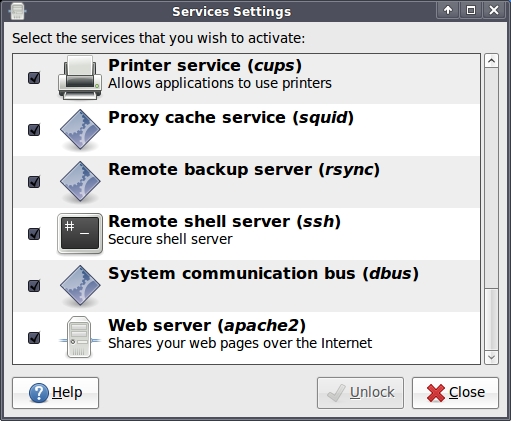
Figure 1. GNOME Services Applet
Figure 1 shows the Services Settings applet after I've already clicked the Unlock button and provided my root password. Figure 1 also shows the bottom of the list of services running on my system, but that's where some of the juicier items are. I definitely want to uncheck the boxes next to Proxy cache service (squid), Remote shell server (ssh) and Web server (apache2).
What about Printer service (cups)? I'll disable that too, because at DEFCON, it's highly unlikely I'll need to print anything (or even have the opportunity to). But, note that as Listing 1 shows, my system is listening only for incoming IPP connections on the loopback interface (localhost:ipp). It isn't listening for remote connections to this service.
Me being me, I'll disable it anyhow. A “local” attack vector is local only until some other process is hijacked by a remote attacker, at which point the hijacked process might be used to spawn some other process that can attach to the thing having the “local” vulnerability.
Along the same lines—that is, in the interests of generalized paranoia—I'll also disable the following in Services Settings (not shown in Figure 1):
Account information resolver (winbind).
Folder sharing service (samba).
Multicast DNS service discovery (avahi-daemon).
Network service (xinetd).
Those are all things I'm sure I can live without in an untrusted environment. File sharing in particular, in the form of Samba and its winbind service, is to be avoided in such settings. Now if I re-run my netstat --inet -al command, I see only what is shown in Listing 2.
Listing 2. Network Listeners (Post-Hardening)
Active Internet connections (servers and established)
Proto Recv-Q Send-Q Local Address       Foreign Address    State
tcp        0      0 *:swat              *:*                LISTEN
udp        0      0 *:bootpc            *:*
Not bad! Listing 2 shows that by clicking two buttons in the Swat interface and unchecking some boxes in the Services Setting applet, I've clobbered 11 out of the 13 network listeners that previously had been active on my system.
But, I'm not done with listeners yet. There still are two left. I can't do much about bootpc, which is part of the dhcp client dæmon that most of us use to configure low-level TCP/IP settings automatically when we connect to a LAN. Even at DEFCON, I'll need dhcpcd (bootpc) active in order to connect to the DEFCON WLAN.
Swat, on the other hand, is fair game to shut down, especially considering I've disabled all the rest of Samba. But hold on a second, I've forgotten how! There's neither a Swat entry anywhere in the Services Settings applet nor any applicable script in /etc/init.d. Maybe I can figure out the name of the actual process listening on the Swat port using the lsof (list open files) command, as shown in Listing 3.
Listing 3. Using lsof to Find Swat's Process
bash-$ sudo lsof -i :swat
COMMAND   PID USER   FD   TYPE DEVICE SIZE NODE NAME
inetd   29534 root    4u  IPv4 521556       TCP *:swat (LISTEN)
Oh, now I remember! Swat is run by inetd, which on Ubuntu systems is part of the package openbsd-inetd. You may remember my disabling xinetd in Services Settings, but openbsd-inetd's startup script has to be disabled manually, the old-school Debian way (Listing 4).
Listing 4. Manually Disabling a Startup Script
bash-$ sudo /etc/init.d/openbsd-inetd stop
bash-$ sudo update-rc.d -f openbsd-inetd remove
 Removing any system startup links for /etc/init.d/openbsd-inetd ...
   /etc/rc0.d/K20openbsd-inetd
   /etc/rc1.d/K20openbsd-inetd
   /etc/rc2.d/S20openbsd-inetd
   /etc/rc3.d/S20openbsd-inetd
   /etc/rc4.d/S20openbsd-inetd
   /etc/rc5.d/S20openbsd-inetd
   /etc/rc6.d/K20openbsd-inetd
In Listing 4, you can see that I first stopped openbsd-inetd via its startup script and then forcibly removed the various runlevel-links in /etc/rc0.d, etc/rc1.d and so forth, via the update-rc.d command. I can undo all this later, as shown in Listing 5.
Listing 5. Manually Re-enabling a Startup Script
bash-$ sudo update-rc.d openbsd-inetd start 20 2 3 4 5 . stop 20 0 1 6 .
 Adding system startup for /etc/init.d/openbsd-inetd ...
   /etc/rc0.d/K20openbsd-inetd -> ../init.d/openbsd-inetd
   /etc/rc1.d/K20openbsd-inetd -> ../init.d/openbsd-inetd
   /etc/rc6.d/K20openbsd-inetd -> ../init.d/openbsd-inetd
   /etc/rc2.d/S20openbsd-inetd -> ../init.d/openbsd-inetd
   /etc/rc3.d/S20openbsd-inetd -> ../init.d/openbsd-inetd
   /etc/rc4.d/S20openbsd-inetd -> ../init.d/openbsd-inetd
   /etc/rc5.d/S20openbsd-inetd -> ../init.d/openbsd-inetd

bash-$ sudo /etc/init.d/openbsd-inetd start
 * Starting internet superserver inetd
Obviously, I will need to make note of the sequence number (in this example, 20 for both the start and kill links) and the runlevels (2–5 for starting and 0, 1 and 6 for killing). As it happens, the settings for openbsd-inetd also are Ubuntu's defaults, so I could use the command sudo update-rc.d openbsd-inetd defaults when re-enabling that particular service.
I've spent the bulk of this column shutting down network services. Is that all there is to system hardening?
Ordinarily not. If we were talking about a server, we'd have a lot more work to do: configuring individual applications for maximum security, disabling unnecessary user accounts, tightening file permissions, configuring an integrity checker such as tripwire, maybe creating a local iptables firewall script and so forth.
But this is my personal laptop, a single-user system. Shutting down and disabling unnecessary network listeners really is 90% of what I need to do to “harden” it. Most of the rest of what I need to do concerns how I use this system. Before I get to that, however, I need to harden one killer application: my Web browser.
Firefox's default security settings are surprisingly okay. Personally, however, I prefer to disable third-party cookies (which admittedly breaks some sites), and sometimes I temporarily turn third-party cookies back on. I also like to turn off my browsing history completely. I don't need to know where I've been, and neither does anybody else. Figure 2 shows these privacy settings.
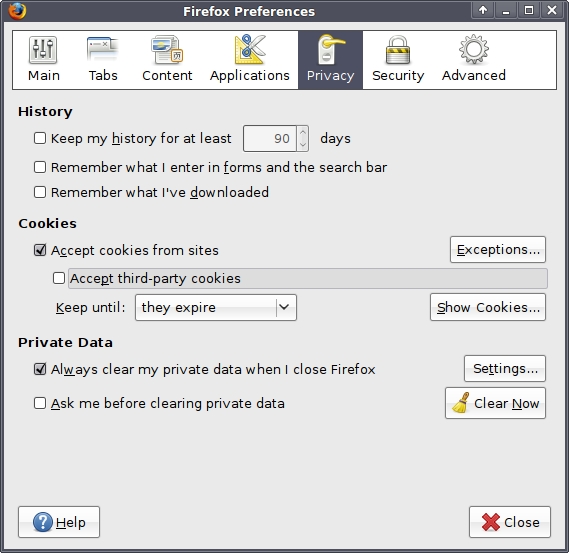
Figure 2. Firefox Privacy Settings
Under Firefox's Security settings, I certainly want to make sure Firefox's default warnings for add-on installations, suspected forgeries and other suspected hostile sites are intact. I also turn off all password caching—the very idea of allowing my browser to store passwords is, if you ask me, the way of tears. Figure 3 shows these settings.
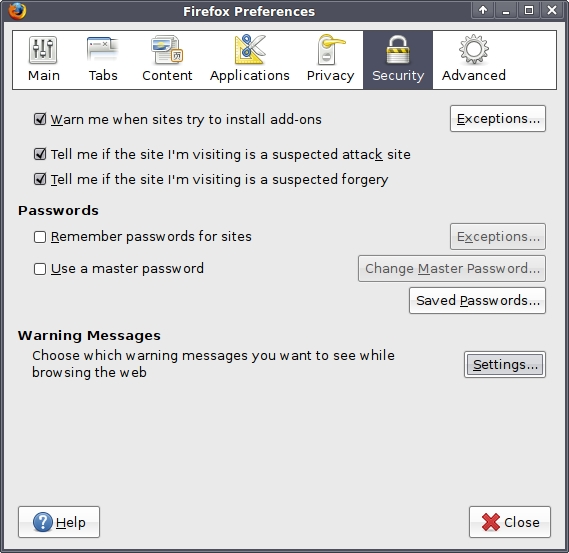
Figure 3. Firefox Security Settings
Finally, I should mention a couple useful Firefox add-ons. I swear by Adblock Plus, which enforces a blacklist of known Web advertisement sites whose content is frequently streamed to various other sites. Blocking those sites effectively blocks in-line ads. You can get Adblock Plus by searching for “adblock plus” in Firefox's Get add-ons tool, under Tools→Add-ons.
I realize this breaks various people's Internet revenue streams, but I use Adblock Plus less for aesthetic or performance reasons (ad-blocking certainly shortens Web site load times) than for security. Blocking ads reduces the attack surfaces of the sites you visit and, therefore, reduces your chances of being exposed to spyware or other hostile content.
It may be difficult for a given Web hacker to compromise nytimes.com directly, but it's considerably easier to compromise one or more advertisers whose content is loaded in tandem with http://www.nytimes.com. Personally, I'm less worried about destroying Internet ad revenue than I am about protecting my humble browser.
(Before I forget to mention it, you should minimize the number of unfamiliar sites you visit in the first place when using an untrusted network for the very same reason.)
Finally, the Firefox add-on Ghostery allows you to see what Web bugs (trackers), ad feeds and other hidden scripts are active on each Web site you visit. For most such scripts, Ghostery can tell you from whence it originates and why you should or shouldn't worry about it. You can get Ghostery at www.ghostery.com.
Now that Ubuntu and Firefox are hardened for DEFCON use, here are some things I'll do when actually connected to that wicked DEFCON WLAN to minimize my chances of ending up on the Wall of Sheep.
Always, always assume somebody can and will eavesdrop on all network traffic. Whether you personally can believe or imagine how they'll do this or not is unimportant—it's the attacker's imagination and skill that matter here, not yours. The only sensible assumption for you to make about the network's integrity is that there isn't any, and that someone can see all traffic going to and from your system. Accordingly, you must not log on to any remote system through any unencrypted protocol.
Telnet, non-anonymous FTP, IMAP, POP3 and any browser-based login involving an http:// URL rather than https://, therefore, are all off limits. In the modern era, all these applications (remote shell, file transfer, e-mail and most Web applications) can and should be used in encrypted implementations, such as SSH, FTPS or SFTP, IMAPS, POP3S and https, at least for logons and other sensitive transactions.
If your home or corporate network supports it, use a strong VPN protocol such as IPsec or SSL-VPN to connect back, and do all your Web surfing and other Internet business via the home network. Yes, this will degrade the performance and speed of your Web-surfing experience; however, it will all but obliterate risks associated with eavesdropping, DNS spoofing, evil twinning and similar attacks (although, of course, if your home or corporate network is targeted further downstream from the hostile LAN you're connected to locally, those downstream attacks will apply).
When using any public, hostile or otherwise untrusted network, you must pay careful attention to your browser's padlock icon. If there is any problem with any certificate being presented by an SSL-protected site you've had no issues connecting to in the past, you should assume that somebody is attempting a man-in-the-middle, proxy or imposter Web site attack.
Gmail, Yahoo, Windows Live (Hotmail) and on-line banking sites are all particularly likely for someone to attempt to proxy or spoof. If you must visit such a site from a hostile LAN, again, watch for any certificate weirdness.
If you have your own Webmail server or have access to Webmail from a smaller provider, such as a regional ISP, those may be less likely for someone to attempt to spoof or proxy than one of the “big guys”. For maximum paranoia though, using a strong VPN connection really is best.
And with that, we're out of space for this month, but we're done! If I say so myself, it wasn't a bad column's work. My laptop is now hardened for DEFCON WLAN use, and you've hopefully learned a thing or two about Mick's brutally pragmatic approach to desktop security. We'll see whether I end up on the Wall of Sheep this year (if so, maybe I'll admit it, and maybe I won't). Good luck with your own public LAN adventures!
Mick Bauer (darth.elmo@wiremonkeys.org) is Network Security Architect for one of the US's largest banks. He is the author of the O'Reilly book Linux Server Security, 2nd edition (formerly called Building Secure Servers With Linux), an occasional presenter at information security conferences and composer of the “Network Engineering Polka”.

