
New Projects - Fresh from the Labs
First off is a handy tool for all you fellow PSP owners out there. PSPVC allows you to convert a video file into the PSP's native format and take care of its mandatory file-naming scheme. According to PSPVC's Web site: “PSPVC is an FFmpeg front end for converting video files for the PSP. It allows you to queue several conversions with different parameters for each. It supports MPEG-4/SP (all firmware) and H264/AVC (firmware 2.0+).”
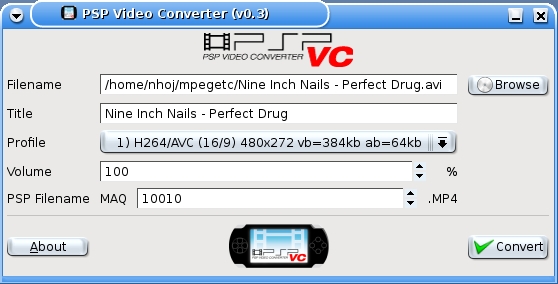
PSPVC—PSP owners now can convert their videos with ease with this nice little application.
Installation
PSPVC is available with certain distro repositories, but I'm running the bleeding-edge source version. In terms of requirements, PSPVC isn't too picky and uses fairly common libraries for most multimedia systems, including nasm, libfaac, liba52, libxvidcore and GTK+ 2.0. However, you also need the development packages for these multimedia libraries—named in the style of liba52-dev, libfaac-dev and so on—although this may not be the case if you are using a source-based distribution instead of a binary one.
Grab the installation tarball from the project's Web site, and extract it to a new directory. Enter the new pspvc-install directory, open a terminal there, and enter the following command (as root or with sudo):
# ./install.sh
If you're lucky, the install script should configure and compile itself in one long go. If it gets stuck partway through, it probably needs a library, and it will let you know in an error message. Once the script is finished, a menu entry usually appears under Multimedia→PSPVC - Video Converter, or you can start it by entering pspvc at the command line.
Usage
Once loaded, the first thing you need to do is choose a video file to convert. The first field has a Browse button next to it, so choose the file you want to convert from there, and click Open. The file is loaded into the main screen, and you are given a number of options from which to choose before conversion. The first is called Profile, where you can select the video's aspect ratio (16/9 for widescreen or 4/3 for the older full-screen format), bitrate and codec. If you choose MPEG-4/SP, it will work on any PSP. However, selecting H264/AVC gives you better quality, but works only on PSPs that have had a firmware upgrade since version 2.0.
If the video's volume is too loud or quiet, the Volume field allows you to adjust it before encoding starts. The PSP Filename field is the trickiest; it contains the MAQ number, which makes you choose a filename number that hasn't already been assigned in your PSP's video folder. This requires you to plug in your PSP, look under the video folder (my PSP uses mp_root/100mnv01, but yours may differ) and choose a number that doesn't appear on any filenames, if you already have some files in there. If there's nothing there to begin with, 10001 will do fine; otherwise, choose a new number.
Once all the options are out of the way, press Convert. A new window appears showing the conversion process, and a thumbnail generator lets you see a preview of the video you are converting. Once the conversion is finished, your new video will be sitting in the same folder as the video you chose to convert. Copy this new file to your PSP's video folder along with its corresponding videoname.thm file, and your new video is ready to play.
All in all, PSPVC is a simple and pain-free application that even has an easy compilation process. If you're a PSP owner, I'd put PlayStation Portable Video Converter in the must-have category. Hopefully, it will appear in most distro archives soon.
PCManFM is a lightweight file manager that is both quick to load and easy to use. It includes tabbed browsing and device viewing, and it may well scratch an itch for those who like things streamlined. Here's the feature list, according to the project's Web site:
Extremely fast and lightweight.
Can be started in one second on normal machines.
Tabbed browsing (similar to Firefox).
Built-in volume management (mount/umount/eject through HAL).
Drag-and-drop support.
Files can be dragged among tabs.
Loads large directories in a reasonable amount of time.
File association support (default application).
Thumbnails for image files.
Bookmark support.
Handles non-UTF-8-encoded filenames correctly.
Provides icon and detailed list views.
Standards-compliant (follows FreeDesktop.org).
Clean and user-friendly interface (GTK+ 2).
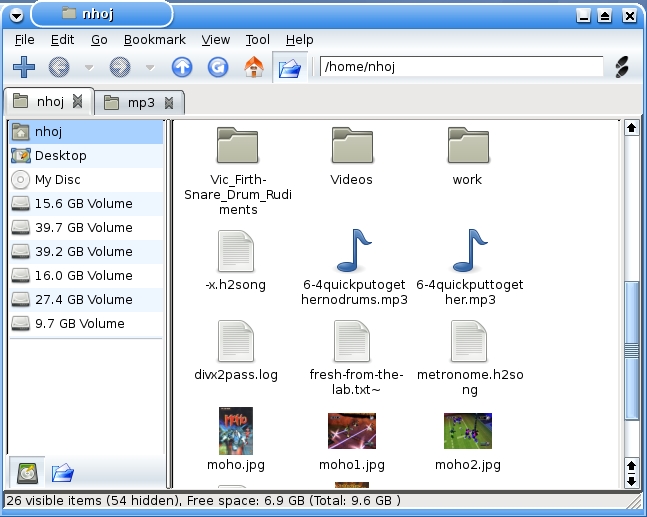
PCManFM—Fast and Light File Management, with Tabbed Browsing
Aside from the usual X11 libraries, here are the needed dependencies, as stated on the project's Web site:
automake >= 1.9.
libgtk2.0-dev >= 2.6.
libglib2.0-dev >= 2.6 (2.10+ is highly recommended).
libgamin-dev or libfam-dev (libgamin is preferred).
libstartup-notification0-dev.
libhal-dev (required when the --enable-hal configure option is used).
libdbus-1-dev (required when the --enable-hal configure option is used).
libhal-storage-dev (required when --enable-hal configure option is used).
Once you have the dependencies out of the way, head to the Web site, grab the latest tarball and extract it to a new folder. Open a terminal in the new folder, and do the usual:
$ ./configure
$ make
And, as root or with sudo:
# make install
It should work without any issues, and if it doesn't, the configure script should pick up any snags.
Usage
Once the installation finishes, PCManFM can be started either by entering pcmanfm at the command line or by going to Utilities→PCMan File Manager. Once inside the main screen, you'll notice two panes. The left contains links to your home folder, the desktop and your storage devices. The right contains all of your files and folders. For tabbed browsing, you can go to File→New Tab, or press Ctrl-T. You can open a new window by selecting File→New Window or pressing Ctrl-N.
For further usage exploits, I recommend tweaking the settings under Edit→Preferences. Here you can change things such as colors and icon and font sizes, but most important, you can define which terminal you want to load via a shortcut, such as xterm, eterm and so on. Once this is set, when you are browsing around any folders, pressing F4 or choosing Tool→Open Terminal opens a new terminal that already is pathed to the folder in which you're sitting.
Ultimately, PCManFM is the best lightweight file manager I've used so far. It has a feel reminiscent of a streamlined Konqueror, and I recommend it to anyone who needs a file manager that is light on resources. For any lightweight distro builders, I also recommend trying this as your default file manager—the interface is very intuitive and familiar.
Finally, we have a CD-burning application for fans of the Xfce desktop, or even for those wanting a nice but light application for slower machines. According to its Web site, “Xfburn is a simple CD/DVD-burning tool based on libburnia libraries. It can blank CD-RWs, burn and create ISO images, as well as burn personal compositions of data to either CD or DVD. It is currently under heavy development.”
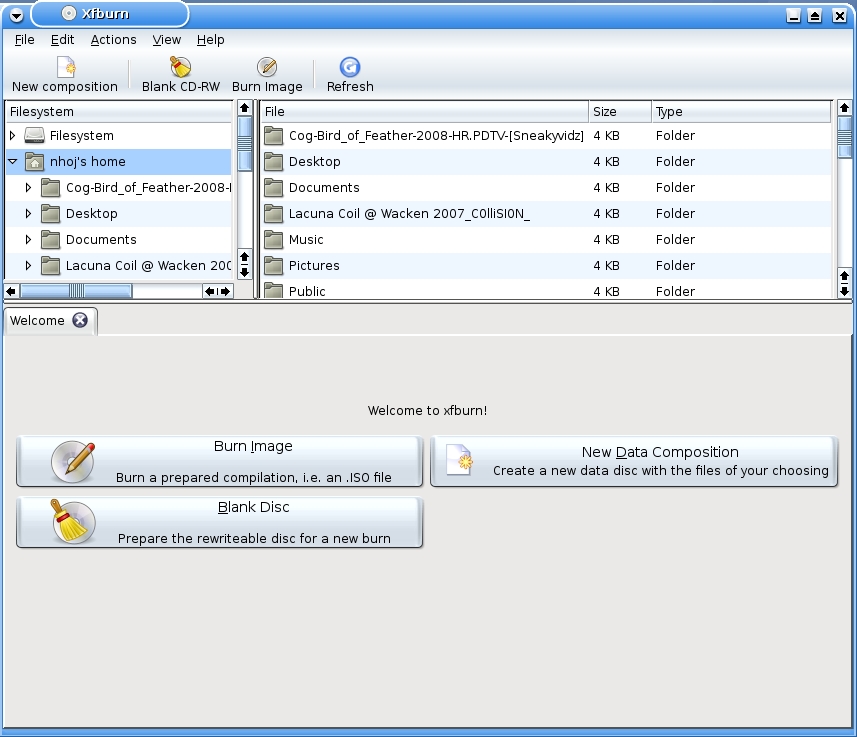
Xfburn—Very K3b-ish but without the Bulk
Installation
Xfburn is available in some repositories, but as usual, it's typically an older version (I'm compiling 0.3.0 at the moment; at the time of this writing, the Ubuntu servers have version 0.2.0). Running with the source version, there are a few picky requirements, but not too many. Like almost all Linux apps designed for a certain desktop, they can be run in any desktop you like, but you need to have some of the original desktop's libraries installed. So yes, install Xfce while you're there.
As for other dependencies, the configure script whined about libburn and libiosfs, which I installed from the Ubuntu archives, but that didn't work. The Web site mentions libburnia, which I couldn't find in the archives at all, so I actually grabbed the source for libisofs and compiled that, which did work (the libburnia/libisofs home page is at libburnia-project.org). The last thing the configure script niggled about was something called exo, which was fixed when I installed libexo and libexo-dev. After that was all sorted out, it was smooth sailing from there.
So, grab the latest tarball, extract it, open a terminal in the new folder and do the usual:
$ ./configure
$ make
And, as root or with sudo:
# make install
Usage
On what must be a record string of luck, Xfburn was the third app in a row to install itself in the menu. Check under Utilities→Xfburn. If it's not there, enter xfburn at the command line. For me, first impressions were of a slimmed-down K3b, and if you're finding this strangely reminiscent of that last PCManFM section, you're right. This is another one of those instant-loading programs that doesn't contain a zillion warning messages upon startup, and it has functional aesthetics without being ugly and GNOMEish (yes, I said it—send all hate mail to the address at the end of this article).
However, usage still is fairly restricted for the moment. As you can see from those three big buttons at the start, you currently are limited to “Burn Image, New Data Composition and Blank Disc”. Any new projects are opened in new tabs, K3b style, leaving the welcome screen at the first tab, allowing you to continue with more burning tasks. The Preferences section is clean and simple, and it lets you scan for devices without any of the manual trickery you may expect from a lightweight application. The nicest touch I found was the drop-down box toward the bottom right of the screen when composing a new disc that lets you choose whatever size disc you are using on the fly—very refreshing.
For the moment, this application is quite limited in that it's data-only for now (no audio CDs or video DVDs), but it still is in heavy development. The development team has made the wise choice of making the program very modular and scalable, allowing them to add bits later but keep the mechanics tight on what they have coded for now. Again, for any lightweight distro builders, this is a neat choice, and once development has added further functionality, Xfburn and PCManFM would make a formidable combination for everyday desktop usage.
Projects at a Glance
QBrew—Home Brewing Calculator (www.usermode.org/code.html)
For the lucrative free-as-in-beer Linux drinking market comes the home brewing calculator QBrew. Full of great technical stuff like mash content, something called the Morey color calculation, presets for all kinds of beers/ales across the globe, and the thoughtful ability to change between metric and imperial, this project is a must for any home brewers out there.
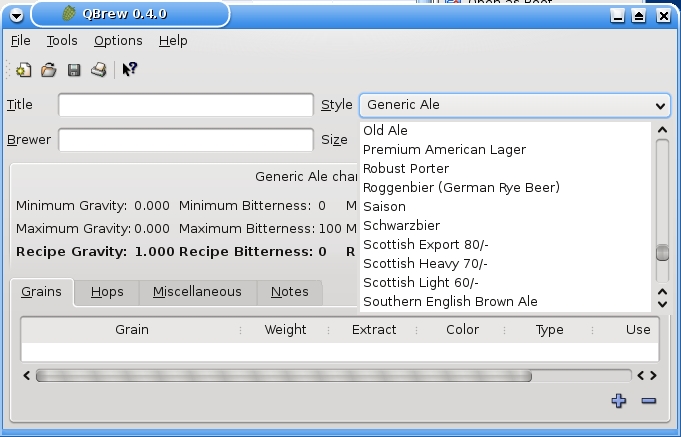
QBrew
Knitter—3-D Knitting Tool (knitter.sourceforge.net)
Are you bored with the usual patterns in supermarket magazines and looking for something more hard-core? Well for you knitting maniacs, Knitter is a 3-D knitting tool that runs on Linux, Windows and Mac OS. With Knitter, you can preview patterns in full wire frame 3-D and even account for factors such as gravity with a new physics engine. So for all you hard-edged, dangerous knitting mavericks, rock on!

Knitter
TkResolver++—Telekinesis Testing Software (pkl.net/~node/software/tkresolver)
Now for the most literal case of mind-bending software I've seen. This scientific experiment draws a line down the screen that's influenced directionally by a random number generator. Your job is to try to influence the line's behavior with your mind, and the program records the results, which can be compared to other operators' statistics around the globe—just don't bend your monitor's cathode ray.

TkResolver
Brewing something fresh, innovative or mind-bending? Send e-mail to knight.john.a@gmail.com.
John Knight is a 24-year-old, drumming- and climbing-obsessed maniac from the world's most isolated city—Perth, Western Australia. He can usually be found either buried in an Audacity screen or thrashing a kick-drum beyond recognition.

