
The Goggles, They Do Something
I'm a sucker for cyberpunk. It probably has to do with all those Shadowrun sessions when I was a kid, but even the worst cyberpunk movies and books can grab my interest. Although my friends shake their heads at the cheesy acting and special effects in movies like Johnny Mnemonic, I still love the concept of total immersion into your computer and virtual reality that you see in classic cyberpunk. With all of this in mind, it shouldn't surprise you that I've been keeping close watch on the current state of the art with consumer video goggles. Even though I'm not quite ready to become a Snow Crash-esque gargoyle just yet, I still jumped at the chance to review the Vuzix VR920 video goggles (vuzix.com, $399.95).
I've been following the Vuzix company's product line for a number of years—before they even were called Vuzix—and it's been interesting to watch the product line progress. At the moment, Vuzix has a few different consumer-grade video goggles: lower-res glasses aimed at portable video devices like the iPod, and the VR920 that it aims at the computer gaming market. All of the goggles include built-in headphones, and each model has different audio and video inputs. The AV920 and VR920 feature the higher-res 640x480 screens, but the AV920 still is designed to connect to video devices, such as portable DVD players, and includes a rechargeable battery and standard DVD player video inputs. If you want to connect goggles to a computer, you'll definitely want to go with the VR920, as it not only comes with a VGA connector, but it also can be powered from USB.
VR920 specifications (from the product page):
Twin high-resolution 640x480 (920,000 pixels) LCD displays.
Equivalent to a 62" screen viewed at nine feet.
24-bit true color (16 million colors).
Visor weighs 3.2 ounces.
60Hz progressive scan display update rates.
Fully iWear 3-D-compliant and supports NVIDIA stereo drivers.
Built-in noise-canceling microphone for Internet VoIP communications.
Built-in three-degree-of-freedom head-tracker.
USB connectivity for power, tracking and full duplex audio.
Analog VGA monitor input.
Support for up to 1024x768 VGA video formats.
The VR920 definitely is aimed at the gaming market and has some pretty interesting features, such as an accelerometer that under Windows can be used (along with compatible games) to track your head movement, so when you turn your head left, for instance, your character's head turns left. The VR920 is powered by your USB port, and the USB connection also is used, so sound can be sent to the included earbuds. You also can take advantage of the NVIDIA stereo drivers under Windows to display different images for each eye and get a 3-D-like experience. Unfortunately, even though you can find a few homegrown projects to get basic accelerometer support and stereo video working under Linux, as of yet, I wouldn't call it fully functional, so in this review, I focus on what it would be like for average users to use the VR920 with their Linux desktops.
Before I go into how to set up the hardware in Linux, I first should get something out of the way. You see, the primary thing that has made the video goggle market grow so slowly in my mind isn't so much the lower resolutions on the screens or the price, as much as the fact that you still look a little bit dorky wearing any of the major vendors' goggles. I mean, we are all geeks here, so we are used to looking a little bit dorky anyway. Plus, many people would think it's a bonus to look like a character from Star Trek: The Next Generation, but still, the look is not exactly for everyone. The next revision of goggles apparently is going to address this issue somewhat, as they appear to look more like large sunglasses. Figure 1 shows a picture of me wearing the goggles, so you can see what they look like. It's definitely a fashion statement. I know some people will have no qualms walking around their daily lives with these on, but others will use them only in the privacy of their own homes.
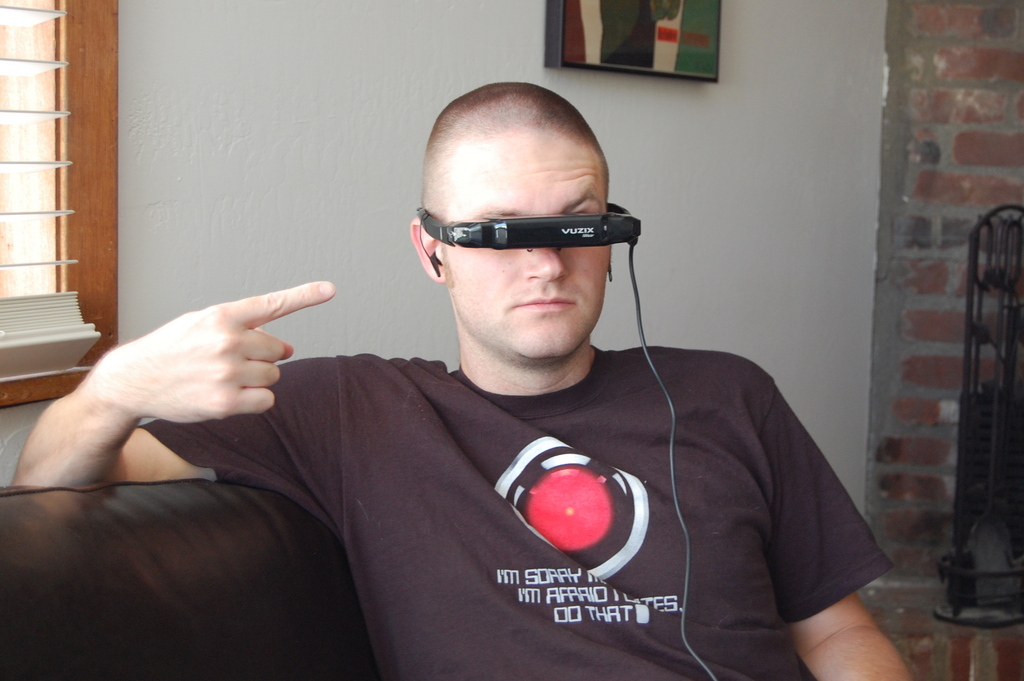
Figure 1. Space Odyssey Indeed
Also, if you can't tell from the picture, these goggles don't completely obstruct your vision. You can arrange them so that they sit a bit higher on your nose, and if you lean back a bit, you can look up and see through the goggles and look down to see your computer screen. This means you still can use your regular display if you want and extend the desktop to the goggles.
So, I wasn't surprised that I looked a little dorky with the goggles on, and to be honest, I didn't care that much. What surprised me though was how uncomfortable the nose bridge was out of the box. I think one of the most important things you can do up front is adjust the nose of the goggles so it's comfortable. The goggles don't feel very heavy, but after a full movie, you will start to feel fatigue on your nose, especially if the bridge is pinching too much. Once I had everything adjusted, it was pretty comfortable, but I still wouldn't expect to wear them all day.
I also had a rather pleasant surprise with respect to eye fatigue, or the relative lack of it. After all, you have these screens very close to your eyes, so I figured my eyes would be focused very closely when I used them. It turns out that the way they have engineered the optics, they are telling the truth when they say it appears like a 62" screen viewed at nine feet. If you connected your computer output to a large LCD TV mounted on your wall and looked at it from your couch, it would look a lot like a desktop through the VR920. To be honest, the effect is so complete, I found myself squinting not because the image was too close, but because it appeared too far away! You see, I'm nearsighted, but it's mild enough that it doesn't affect my daily life in front of a computer. I wear my glasses only when I'm driving at night, at a presentation or when I'm watching a movie with subtitles. The downside for me is that it's a bit tricky to wear glasses and the goggles at the same time, but of course, if you use contact lenses, it wouldn't be a problem.
There is really very little hardware setup to do. Just plug in the VGA and USB plugs to your machine. As I mentioned before, the USB port is used to power the display as well as to send audio to the goggles (it's also how you would access the accelerometer). Here is the relevant syslog output I got when I connected the VR920 to my Ubuntu machine:
Sep 14 19:51:01 moses kernel: [13069.884651] usb 6-1:
 new full speed USB device using uhci_hcd and address 2
Sep 14 19:51:01 moses kernel: [13070.101323] usb 6-1:
 configuration #1 chosen from 1 choice
Sep 14 19:51:02 moses kernel: [13070.291377] usbcore:
 registered new interface driver hiddev
Sep 14 19:51:02 moses kernel: [13070.361931] usbcore:
 registered new interface driver snd-usb-audio
Sep 14 19:51:02 moses kernel: [13070.397112]
 generic-usb 0003:1BAE:0002.0001: hiddev96,hidraw0:
 USB HID v1.00 Device [Icuiti Corp. VR920 Video Eyewear]
 on usb-0000:00:1d.0-1/input3
Sep 14 19:51:02 moses kernel: [13070.397155] usbcore:
 registered new interface driver usbhid
Sep 14 19:51:02 moses kernel: [13070.397162] usbhid:
 v2.6:USB HID core driver
Sep 14 19:51:02 moses pulseaudio[11722]: alsa-util.c:
 Cannot find fallback mixer control "PCM" or mixer
 control is no combination of switch/volume.
Sep 14 19:51:03 moses pulseaudio[11722]: alsa-util.c:
 Device hw:1 doesn't support 2 channels, changed to 1.
Sep 14 19:51:03 moses pulseaudio[11722]: module-alsa-source.c:
 Your kernel driver is broken: it reports a volume range
 from 0 to 0 which makes no sense.
Sep 14 19:51:03 moses pulseaudio[11722]: module-alsa-source.c:
 Your kernel driver is broken: it reports a volume range
 from 0.00 dB to 0.00 dB which makes no sense.
So pulseaudio does appear to see the audio mixer, and even though it throws some strange errors in syslog output, the sound worked fine. From the output, I can tell that it sees it as the hw:1 ALSA device. I also saw a new /dev/dsp1 device, and the device even showed up in my GNOME sound properties window, so I could select the device from there.
The screen itself is detected without any extra effort on my part and shows up in xrandr:
greenfly@moses:~$ xrandr
Screen 0: minimum 320 x 200, current 1280 x 800, maximum 1280 x 1280
VGA connected (normal left inverted right x axis y axis)
   1024x768       60.0
   800x600        60.3
   640x480        59.9
   720x400        70.1
You certainly can use xrandr to toggle whether the display is on, but you also can configure it in the default GNOME Display Preferences window (Figure 2). Personally, I set up a quick xrandr script to toggle the goggles on when I wanted to use them:
#!/bin/sh

if [ -f /tmp/.goggles_on ] ; then
        xrandr --output VGA --off &
        echo "Goggles Off" | osd_cat --shadow=2 --align=center
        ↪--pos=bottom --color=green --delay=2
        ↪--font=lucidasanstypewriter-bold-24 --offset 40 &
        rm /tmp/.goggles_on
else
        xrandr --output VGA --mode 640x480 --below LVDS
        echo "Goggles On" | osd_cat --shadow=2 --align=center
        ↪--pos=bottom --color=green --delay=2
        ↪--font=lucidasanstypewriter-bold-24 --offset 40 &
        touch /tmp/.goggles_on
fi
In this configuration, the goggles act as a 640x480 screen below my regular desktop, and I can drag windows there just like with any other monitor.
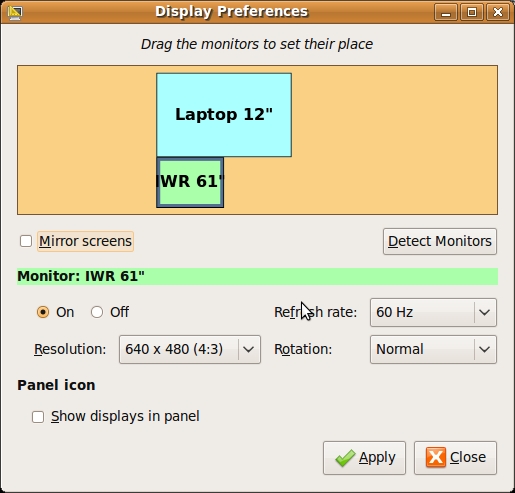
Figure 2. GNOME Display Preferences
The main thing to realize when you use the VR920 like a regular monitor is that even though the display supports 1024x768 input, the actual screens go up to only 640x480, and anything higher resolution gets scaled to fit. For my uses, I stayed with 640x480. Honestly, at that resolution, the screen worked pretty well as an extra screen on my desktop, and I moved IRC windows and other small terminals over to it.
The main limiting factor for how useful the screen is on a regular desktop is the resolution, but nearsightedness aside, I thought it actually was a pretty slick way to have IM, IRC or a terminal window always in your field of view. As a sysadmin, I also can see how it might be useful to tail logfiles in that screen or possibly put all of your monitoring applets there. Just realize that if you arrange the goggles so you can look up to view them and look down to view your regular screen, you won't necessarily be able to use your peripheral vision to see changes in the goggles—you'll have to look up every now and then. Also, I don't think it would work quite as well for programs like The GIMP or for word processing or anything else that might need more screen real estate.
Video games are the main function the VR920 is geared toward, and I wasn't surprised that it worked really well for that purpose. Again, the display is 640x480 at maximum, so don't expect complete realism. Now, I'm an old-school Quake gamer, so I just had to see what Quake 3 was like through the goggles. Once the desktop was set up to span to that screen, I didn't have to do any extra tweaking. I launched Quake 3, and it output to both of my displays. Even though I didn't have the head-tracking feature enabled, I have to admit it was really cool to play games with the goggles on. You do feel even more immersed in the environment than normal, so any FPS (First-Person Shooter) games should work well here. Any other games that could benefit from more virtual-reality-like immersion, such as flight simulators, would get an extra dimension of fun here as well. I should let my fellow Point/Counterpoint columnist Bill try these out in Second Life. I bet it'll knock his socks off.
I think that apart from gaming, movie viewing is one of the best uses for the VR920 under Linux. The resolution isn't a real issue for anything up to DVD quality, and once I had adjusted the goggles so they were comfortable, they worked great for movies. Just be sure to tell your video player to use the correct audio device. For my machine, this just meant adding the -ao alsa:device=hw=1,1 to MPlayer, but of course, it will vary from program to program. I have to say it was really nice to be able to watch an entire movie on my computer and still have my full desktop to use. In my mind, the killer app for this is airplane travel, as they are essentially headphones for your eyes—you can watch movies with complete privacy.
I had been anticipating all kinds of scenarios where I would use the VR920 before I had them. I could see myself at my desk at work displaying a terminal and maybe wearing them combined with some sort of video camera for augmented reality and become a true Snow Crash gargoyle. The reality of having the goggles around for daily use isn't quite as exciting though. To be perfectly honest, I didn't find myself using them nearly as often as I thought I would. Part of the reason is that I haven't been gaming much recently, but I think the main reason is due to the low resolution. There are only so many programs that work well in 640x480. Having said that, I'm definitely going to bring the goggles with me the next time I travel. If you do play a lot of FPSs or other games with a first-person perspective, or if you watch a lot of videos in public and are tired of people looking over your shoulder, I definitely think you should give the VR920 a try.
Kyle Rankin is a Systems Architect in the San Francisco Bay Area and the author of a number of books, including The Official Ubuntu Server Book, Knoppix Hacks and Ubuntu Hacks. He is currently the president of the North Bay Linux Users' Group.

