
Completely Fair Scheduler
Most modern operating systems are designed to try to extract optimal performance from underlying hardware resources. This is achieved mainly by virtualization of the two main hardware resources: CPU and memory. Modern operating systems provide a multitasking environment that essentially gives each task its own virtual CPU. The task generally is unaware of the fact that it does not have exclusive use of the CPU.
Similarly, memory virtualization is achieved by giving each task its own virtual memory address space, which is then mapped onto the real memory of the system. Again, the task generally is unaware of the fact that its virtual memory addresses may not map to the same physical address in real memory.
CPU virtualization is achieved by “sharing” the CPU between multiple tasks—that is, each running task gets a small fraction of the CPU at regular intervals. The algorithm used to select one task at a time from the multiple available runnable tasks is called the scheduler, and the process of selecting the next task is called scheduling.
The scheduler is one of the most important components of any OS. Implementing a scheduling algorithm is difficult for a couple reasons. First, an acceptable algorithm has to allocate CPU time such that higher-priority tasks (for example, interactive applications like a Web browser) are given preference over low-priority tasks (for example, non-interactive batch processes like program compilation). At the same time, the scheduler must protect against low-priority process starvation. In other words, low-priority processes must be allowed to run eventually, regardless of how many high-priority processes are vying for CPU time. Schedulers also must be crafted carefully, so that processes appear to be running simultaneously without having too large an impact on system throughput.
For interactive processes like GUIs, the ideal scheduler would give each process a very small amount of time on the CPU and rapidly cycle between processes. Because users expect interactive processes to respond to input immediately, the delay between user input and process execution ideally should be imperceptible to humans—somewhere between 50 and 150ms at most.
For non-interactive processes, the situation is reversed. Switching between processes, or context switching, is a relatively expensive operation. Thus, larger slices of time on the processor and fewer context switches can improve system performance and throughput. The scheduling algorithm must strike a balance between all of these competing needs.
Like most modern operating systems, Linux is a multitasking operating system, and therefore, it has a scheduler. The Linux scheduler has evolved over time.
The Linux scheduler was overhauled completely with the release of kernel 2.6. This new scheduler is called the O(1) scheduler—O(...) is referred to as “big O notation”. The name was chosen because the scheduler's algorithm required constant time to make a scheduling decision, regardless of the number of tasks. The algorithm used by the O(1) scheduler relies on active and expired arrays of processes to achieve constant scheduling time. Each process is given a fixed time quantum, after which it is preempted and moved to the expired array. Once all the tasks from the active array have exhausted their time quantum and have been moved to the expired array, an array switch takes place. This switch makes the active array the new empty expired array, while the expired array becomes the active array.
The main issue with this algorithm is the complex heuristics used to mark a task as interactive or non-interactive. The algorithm tries to identify interactive processes by analyzing average sleep time (the amount of time the process spends waiting for input). Processes that sleep for long periods of time probably are waiting for user input, so the scheduler assumes they're interactive. The scheduler gives a priority bonus to interactive tasks (for better throughput) while penalizing non-interactive tasks by lowering their priorities. All the calculations to determine the interactivity of tasks are complex and subject to potential miscalculations, causing non-interactive behavior from an interactive process.
As I explain later in this article, CFS is free from any such calculations and just tries to be “fair” to every task running in the system.
According to Ingo Molnar, the author of the CFS, its core design can be summed up in single sentence: “CFS basically models an 'ideal, precise multitasking CPU' on real hardware.”
Let's try to understand what “ideal, precise, multitasking CPU” means, as the CFS tries to emulate this CPU. An “ideal, precise, multitasking CPU” is a hardware CPU that can run multiple processes at the same time (in parallel), giving each process an equal share of processor power (not time, but power). If a single process is running, it would receive 100% of the processor's power. With two processes, each would have exactly 50% of the physical power (in parallel). Similarly, with four processes running, each would get precisely 25% of physical CPU power in parallel and so on. Therefore, this CPU would be “fair” to all the tasks running in the system (Figure 1).
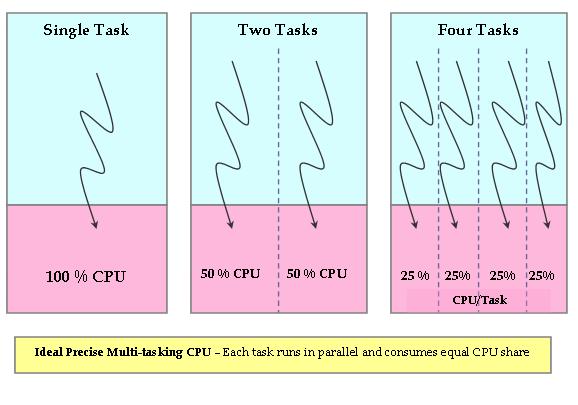
Figure 1. Ideal, Precise, Multitasking CPU
Obviously, this ideal CPU is nonexistent, but the CFS tries to emulate such a processor in software. On an actual real-world processor, only one task can be allocated to a CPU at a particular time. Therefore, all other tasks wait during this period. So, while the currently running task gets 100% of the CPU power, all other tasks get 0% of the CPU power. This is obviously not fair (Figure 2).
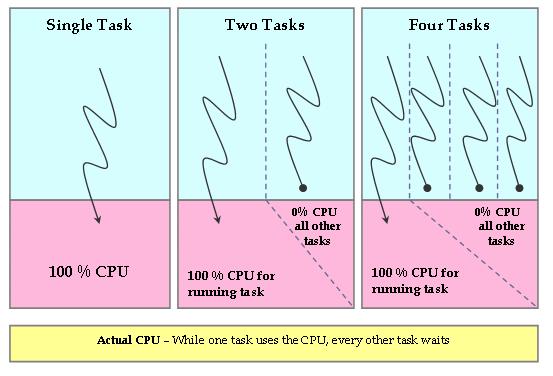
Figure 2. Actual Hardware CPU
The CFS tries to eliminate this unfairness from the system. The CFS tries to keep track of the fair share of the CPU that would have been available to each process in the system. So, CFS runs a fair clock at a fraction of real CPU clock speed. The fair clock's rate of increase is calculated by dividing the wall time (in nanoseconds) by the total number of processes waiting. The resulting value is the amount of CPU time to which each process is entitled.
As a process waits for the CPU, the scheduler tracks the amount of time it would have used on the ideal processor. This wait time, represented by the per-task wait_runtime variable, is used to rank processes for scheduling and to determine the amount of time the process is allowed to execute before being preempted. The process with the longest wait time (that is, with the gravest need of CPU) is picked by the scheduler and assigned to the CPU. When this process is running, its wait time decreases, while the time of other waiting tasks increases (as they were waiting). This essentially means that after some time, there will be another task with the largest wait time (in gravest need of the CPU), and the currently running task will be preempted. Using this principle, CFS tries to be fair to all tasks and always tries to have a system with zero wait time for each process—each process has an equal share of the CPU (something an “ideal, precise, multitasking CPU” would have done).
In order for the CFS to emulate an “ideal, precise, multitasking CPU” by giving each runnable process an equal slice of execution time, CFS needs to have the following:
A mechanism to calculate what the fair CPU share is per process. This is achieved by using a system-wide runqueue fair_clock variable (cfs_rq->fair_clock). This fair clock runs at a fraction of real time, so that it runs at the ideal pace for a single task when there are N runnable tasks in the system. For example, if you have four runnable tasks, fair_clock increases at one-fourth of the speed of wall time (which means 25% fair CPU power).
A mechanism to keep track of the time for which each process was waiting while the CPU was assigned to the currently running task. This wait time is accumulated in the per-process variable wait_runtime (process->wait_runtime).
Red-Black Tree (RBTree)
A red-black tree is a type of self-balancing binary search tree—a data structure typically used to implement associative arrays. It is complex, but it has good worst-case running time for its operations and is efficient in practice. It can search, insert and delete in O(log n) time, where n is the number of elements in the tree. In red-black trees, the leaf nodes are not relevant and do not contain data. These leaves need not be explicit in computer memory—a null child pointer can encode the fact that this child is a leaf—but it simplifies some algorithms for operating on red-black trees if the leaves really are explicit nodes. To save memory, sometimes a single sentinel node performs the role of all leaf nodes; all references from internal nodes to leaf nodes then point to the sentinel node. (Source: Wikipedia.)
CFS uses the fair clock and wait runtime to keep all the runnable tasks sorted by the rq->fair_clock - p->wait_runtime key in the rbtree (see the Red-Black Tree sidebar). So, the leftmost task in the tree is the one with the “gravest CPU need”, and CFS picks the leftmost task and sticks to it. As the system progresses forward, newly awakened tasks are put into the tree farther and farther to the right—slowly but surely giving every task a chance to become the leftmost task and, thus, get on the CPU within a deterministic amount of time.
Because of this simple design, CFS no longer uses active and expired arrays and dispensed with sophisticated heuristics to mark tasks as interactive versus non-interactive.
CFS implements priorities by using weighted tasks—each task is assigned a weight based on its static priority. So, while running, the task with lower weight (lower-priority) will see time elapse at a faster rate than that of a higher-priority task. This means its wait_runtime will exhaust more quickly than that of a higher-priority task, so lower-priority tasks will get less CPU time compared to higher-priority tasks.
CFS has been modified a bit further in 2.6.24. Although the basic concept of fairness remains, a few implementation details have changed. Now, instead of chasing the global fair clock (rq->fair_clock), tasks chase each other. A clock per task, vruntime, is introduced, and an approximated average is used to initialize this clock for new tasks. Each task tracks its runtime and is queued in the RBTree using this parameter. So, the task that has run least (the one that has the gravest CPU need) is the leftmost node of the RBTree and will be picked up by the scheduler. See Resources for more details about this implementation.
In kernel 2.6.24, another major addition to CFS is group scheduling. Plain CFS tries to be fair to all the tasks running in the system. For example, let's say there is a total of 25 runnable processes in the system. CFS tries to be fair by allocating 4% of the CPU to all of them. However, let's say that out of these 25 processes, 20 belong to user A while 5 belong to user B. User B is at an inherent disadvantage, as A is getting more CPU power than B. Group scheduling tries to eliminate this problem. It first tries to be fair to a group and then to individual tasks within that group. So CFS, with group scheduling enabled, will allocate 50% of the CPU to each user A and B. The allocated 50% share of A will be divided fairly among A's 20 tasks, while the other 50% of the CPU time will be distributed fairly among B's 5 tasks.
With kernel 2.6.23, the Linux scheduler also has been made modular. Each scheduling policy (SCHED_FIFO, SCHED_RR, SCHED_OTHER and so on) can be implemented independently of the base scheduler code. This modularization is similar to object-oriented class hierarchies (Figure 3).
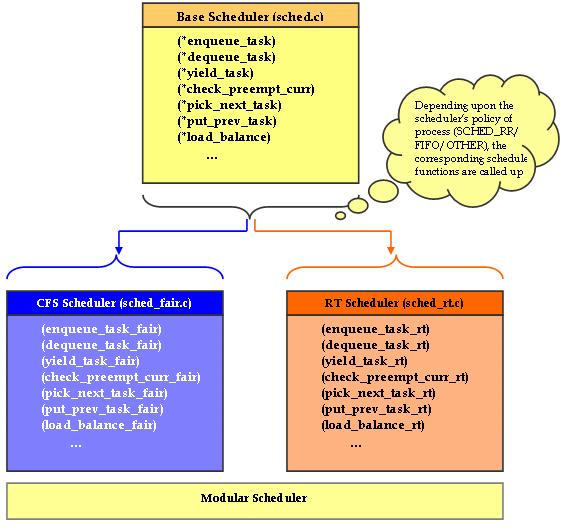
Figure 3. Modular Scheduler
The core scheduler does not need to be aware of the implementation details of the individual scheduling policies. In kernel 2.6.23, sched.c (the “scheduler” from older kernels) is divided into the following files to make the scheduler modular:
kernel/sched.c: contains the code of a generic scheduler, thereby exposing functions like sched(). The specific scheduling policy is implemented in a different file.
kernel/sched_fair.c: this is the main file that implements the CFS scheduler and provides the SCHED_NORMAL, SCHED_BATCH and SCHED_IDLE scheduling policies.
kernel/sched_rt.c: provides the SCHED_RR and SCHED_FIFO policies used by real-time (RT) threads.
Each of these scheduling policies (fair and RT) registers its function pointers with the core scheduler. The core scheduler calls the appropriate scheduler (fair or RT), based on the scheduling policy of the particular process. As with the O(1) scheduler, real-time processes will have higher priority than normal processes. CFS mainly addresses non-real-time processes, and the RT scheduler remains more or less the same as before (except for a few changes as to how non-active/expired arrays are maintained).
With this new modular scheduler in place, people who want to write new schedulers for a particular policy can do so by simply registering these new policy functions with the core scheduler.
The CFS design is quite radical and innovative in its approach. Features like the modular scheduler ease the task of integrating new scheduler types to the core scheduler.
Resources
Linux Kernel Source Code (2.6.23/2.6.24): sched-design-CFS.txt by Ingo Molnar
IBM Developer Works Article Multiprocessing with the Completely Fair Scheduler: kerneltrap.org/node/8059
Blog Post Related to CFS: immike.net/blog/2007/08/01/what-is-the-completely-fair-scheduler
Chandandeep Singh Pabla works at STMicroelectronics. He has extensive experience in the development of embedded software for multimedia (DVD/STB) chipsets on multiple operating systems. He can be reached at chandandeep.pabla@st.com.
