
Browser Battles: Opera, CrossOver Chromium and Flock
What a relief we felt when Firefox was first released. It replaced “None of the above” as our favorite browser, and we finally were rid of the monolithic dinosaur Netscape. Since then, Firefox has been relatively unchallenged in its supremacy.
As of late, some new challengers are seeking to steal some of Firefox's thunder. In this article, we take a closer look at three of them: Opera, CrossOver Chromium and Flock.
Opera clearly has ambitions, because although always good, recent releases have shown vast improvements, a wealth of smart features and a sleek Euro style. CrossOver Chromium is Google Chrome running on Wine. Though Chromium is betaware, it gives us a sneak peek into Google's plans to re-invent the browser by going minimalist. Will Chrome do to Firefox what Firefox did to Netscape? Finally, Flock seeks efficiency not in raw speed but in doing everything in one place and integrating the Net experience in one “portal”. You may find that one of these browsers is a better fit for you.
Although Linux-friendly for ages, the Opera Web browser, which is based on the proprietary Presto layout engine, has failed to reach critical mass in the collective Linux consciousness. Lacking the massive community involvement and open-source credentials of Firefox, most of us don't even register Opera. In the 2008 Linux Journal Readers' Choice Awards, less than 5% of respondents picked Opera as their favorite Web browser (compared to Firefox's 86%).
Although I'd also love to see an open-source Opera, I somewhat understand the company's unwillingness to release its source code. I recently spoke with Opera's CTO, Hakon Wium Lie, who explained the company's position on open source:
At Opera, we believe in open standards, security, speed, performance and features—these are values that we share with the Linux community....We're very proud of our source code, and we'd like to show it to others, but we haven't found a business model that allows us to do so while still charging for commercial use. Ideally, I'd like to see an open-source license similar to the Creative Commons noncommercial license. The license would say, “here's the source code, feel free to use and reuse it, but we'd like a cut if you make money from it”. Anyway, on the Web, I believe open standards are much more important than open source.
Personally, I don't see why an open-source Opera could not only scale up its market share but also leverage that increased popularity to rake in a hefty share of revenues from partnerships with search engines, like Firefox does. However, I'll leave that discussion for another day. The reality is that the Opera browser is good—surprisingly even as good as the Windows edition—which makes it worthy of our scrutiny. Let's have a look.
Although I have used Opera on and off over the years as a backup browser, I never really gave it a hard run for its money. When I dove into the new Opera 9.6, I was pleasantly surprised at its features and ergonomically sound look and feel. From a style standpoint, I like Opera better than Firefox on Linux. The Opera folks clearly put much thought into design elements.
Opera makes up for its open-source “deficit” with cool features and customizability. Although the browser is speedy enough, Opera is about the features, not leanness. Many features that are Firefox extensions are already built in to Opera.
Here are some core features that distinguish Opera from its rivals. The Opera browser has the most interesting startup options of any Linux-based browser. First, upon opening a tab, Opera's default is Speed Dial, a sort of home page with nine customizable thumbnails for your favorite Web sites (Figure 1). Second, Opera lets you decide how to start each session—just as you left off, your home page, a blank page, via dialog or from a saved session. The built-in session manager is a powerful feature, given how many different tabs/windows the typical user has open concurrently. One can have saved sessions for different modes, such as home, work, finances, news, hobbies and so on.
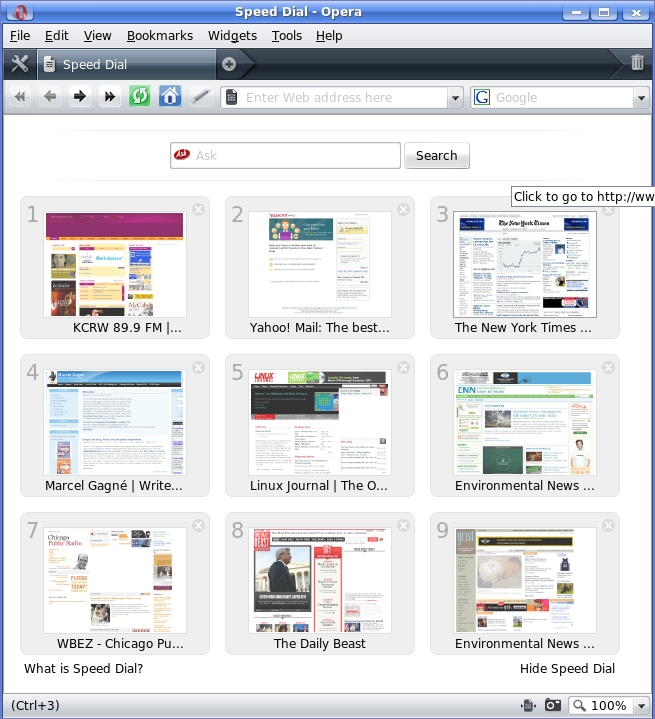
Figure 1. Summon a new tab in Opera, and up pops Speed Dial, a sort of home page with nine one-click links to your favorite sites.
I also found Opera's “philosophy” of default tab-oriented browsing pleasant, which I personally think is nicer than Firefox's tab mode. As you open new pages, Opera opens each substantial (that is, non-squished) tab, complete with mouse-over preview, across the top of the browser. Although you certainly can configure Firefox to act in a similar way, Opera feels more comfortable and looks nicer in tab mode.
A number of other built-in features make Opera worth a look. The Wand allows you to save user names and passwords and autofill them upon subsequent site visits. Opera Link is a service that synchronizes bookmarks, the Speed Dial contents, browsing history and other elements across computers or other devices that run Opera, including mobile devices that utilize Opera Mini, the mobile version of Opera. Furthermore, RSS (with label-able feeds), IRC, a mail client and BitTorrent support are built in.
For those who appreciate aesthetics, Opera goes well beyond its pleasant default skin. Changing Opera's skin is easy, because a surprisingly wide range of skins are easy to preview, download and install with just a few clicks.
Besides the myriad built-in features, Opera also offers a range of widgets that collaborate with the browser. Widgets get their own tab from which one can view, install and manage them. They can appear anywhere the user wants. Although numerous, useful widgets exist, Opera's philosophy is to have more core features built in than does Firefox. The result is a heavier but more immediately customizable browser.
On the negative side, though I didn't find Opera to be noticeably slower than its peers, I had some occasional page-rendering problems. On one site, the search box slid behind the main menu and was completely unaccessible.
Despite such problems, I'd argue that Opera's plethora of features makes up for the speed deficits and its rendering problems. Of course, the trade-offs are yours to weigh, as well.
At the time of this writing, the recent Google Chrome browser is available natively only on the Windows platform with a Linux edition still in development. The idea behind Chrome is to remedy the past “mistakes” made by browser makers and provide a tool that also runs applications and not just displays Web pages.
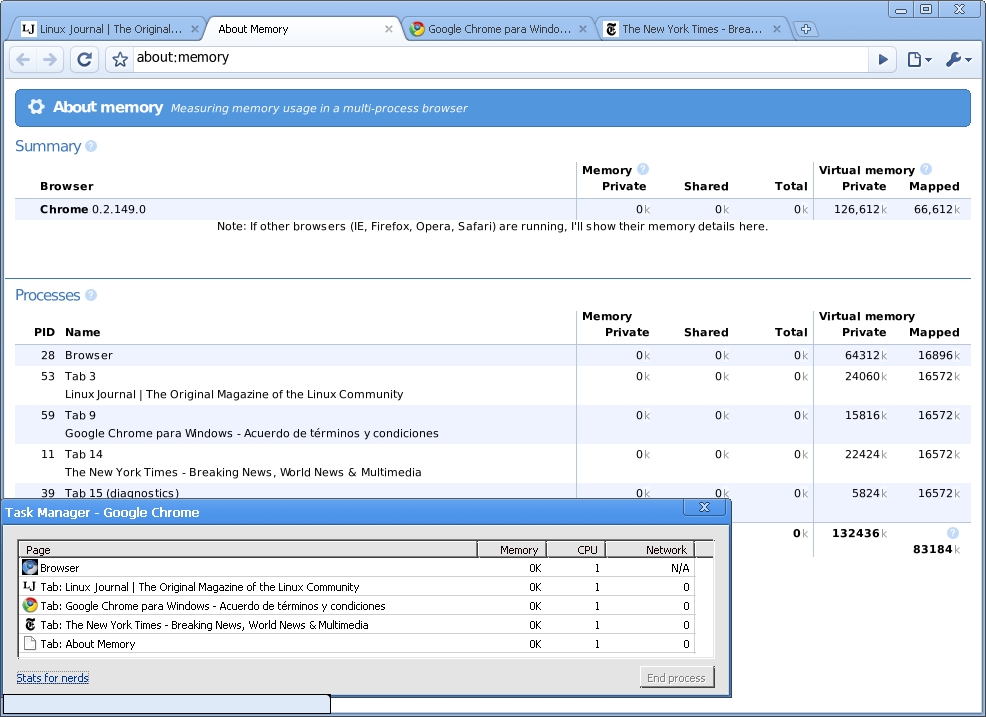
Figure 2. Chromium
Thanks to good ol' Linux-geek ingenuity, however, we don't have to wait for the Google folks to finish their project. Instead, CodeWeavers, makers of the CrossOver line of Wine-based applications, has created CrossOver Chromium, a Linux “port” of Google Chrome.
Although the situation may change by the time you read this, the reality is that CrossOver Chromium is betaware and not yet ready for prime time. On Chromium's status, CodeWeavers offers the warning that it is “just a proof of concept, for fun, and to showcase what Wine can do”.
Should you decide to tinker with Chromium, you'll find some things satisfactory, and others frustrating. On the plus side, Chromium is thankfully open source, written in V8, Google's JavaScript virtual machine and based on the WebKit layout engine. Furthermore, installing Chromium is a snap, with a downloadable binary in DEB (for Ubuntu) and RPM (for SUSE, Mandriva and Red Hat) formats, as well as a package with a one-click shell script for other distros.
You'll also like Chromium if you prefer a lack of clutter over feature-rich functionality. I've been told that the Windows version is fast as lightning, as reputedly shall be Chrome for Linux, but Chromium certainly is more like thunder than lightning.
One unique feature our ilk will love on Chromium is the (for real) “Stats for nerds” function. When you call forth the task manager, you'll get a list of open Web pages, complete with memory status, CPU usage and network speed related to each page. On the task manager, in addition to an option to kill the process for each open page, you also can click on a Stats for nerds link, which pulls up a new tab complete with additional information such as PID, memory utilization for both the entire browser and each tab.
I also like Chromium's option to open a number of home pages upon startup and not just one. Apparently unique to Chromium is another neat feature, incognito browsing, which allows the user to leave no local trace in the browser or cache of what's been viewed.
On the frustrating side, although you'll find Chromium functional for loading Web pages, it feels a bit slow and clunky. Furthermore, Chromium lacks an integrated non-Web-based RSS reader, which Firefox and Opera have right in the address bar. It also lacks extensive bookmark management, which most other full-featured browsers have. Another core issue is privacy on Chromium, because Google collects usage statistics and crash reports from you as a default. Luckily, you can turn this off by selecting Options from the “wrench” menu.
In the future, Google says we can expect currently absent features to become available, such as better bookmark management, an extension framework, a way to e-mail complete Web pages and links easily and more.
The take-home message on Chromium is that it is a Spartan browser with few bells and whistles whose post-beta experience is slated to be lightning fast on the Linux platform. For now though, CrossOver Chromium is a sluggish prototype held together by lots of virtual duct tape. We can only hope that the native Linux version of Chrome will be so blindingly fast that it gives us a reason to consider leaving its bulkier competitors behind.
At the far opposite end of the philosophical spectrum from the slim Chromium lies Flock, the Swiss Army knife of browsers. Flock takes the “portal” approach to browsing, adhering to a philosophy that efficiency lies in consolidation rather than raw page-load speed. Based on the latest Gecko engine with a number of specialized extensions, Flock bills itself as “The Social Web Browser” that “collects all of your feeds, friends, media and sites in one convenient place”.
The reason for such a billing is that Flock wants you to do nearly everything from a unified command center. This includes interacting with social networking sites (such as Facebook and Twitter), photo and video search (such as Flickr and YouTube), photo uploading and sharing (such as Picasa and Photobucket), blogging (such as Blogger and LiveJournal), news consolidation with custom RSS feeds and bookmark syncing with on-line bookmark services (such as delicious and magnolia).

Figure 3. The Flock browser seeks efficiency via tight integration with popular sites like YouTube and Facebook.
The key to keeping all this stuff straight is the Flock Toolbar, which offers an icon that represents each type of media by function (Figure 4). These icons include My World, a home base of sorts that includes the information you want, such as news feeds and your Facebook friends; the People Sidebar for social networking interactions; the Media Bar for quick video and photo searches; the Feeds Sidebar for managing RSS; Webmail for interfacing with Web-based e-mail services; Favorites (bookmarks); the Accounts and Services Sidebar for managing accounts and logins; the Web Clipboard, a location to which you can drag links, images and text to save for later perusal; the Blog Editor and the Photo Uploader. Besides all this, you can, of course, simply surf the Web conventionally.

Figure 4. Flock packs a lot into a small space. The secret to keeping your media organized is the Flock Toolbar. Each icon represents a different type of media by function.
I first approached Flock 2.0 with my own Firefox-colored assumptions and habits, including a primal urge to summon each site I visit onto its own tab or window. I typically scroll through my tabs with Ctrl-Tab or my windows with Alt-Tab. As I dug in to Flock, I had to tell myself “Hold off on the keystrokes and start flocking”, as the animated introduction suggests.
As I began to “flock” on Flock, I realized the tight integration with its partner sites. To test Flock's capabilities, I sent a friend a hilarious Bollywood music video I had seen recently on YouTube. Culling my urge to call up YouTube on its own tab, I instead did it the Flock way by launching the Media Bar, which popped up one-inch wide across the top of the browser window. Because the Media Bar is integrated with several media-based sites, including YouTube, I could choose YouTube from the drop-down menu and search the site without going there directly. The Media Bar came back with thumbnails and mouse-over previews of the search results. Then—here's the coolest part—after finding my video, I sent it to my friend by dragging the thumbnail over to his Facebook entry in the People Sidebar, which automatically composed a message to him, including the link to the video and the thumbnail. All I had to do was click Send. I could have done the same with my Yahoo Webmail, Twitter or blog entry. Similar drag-and-drop functionality and integration works while blogging on one of the supported blog sites.
Despite Flock's toolbar-driven modular layout, you're probably wondering how it packs so many goodies into such a small space. Admittedly, all that content was a bit scrunched on my 12"-laptop display, but it still was functional. The real estate found in a large LCD is more appropriate for flocking. Nevertheless, features such as the rapidly sliding tab bar allow you to open and manage a huge volume of tabs.
Otherwise, Flock was very customizable according to my whims, and the main toolbar was logical and functional after becoming accustomed to it. The degree of integration with other sites is unprecedented among Linux-based browsers. Despite the heft of features, Flock is based on Firefox, which means the options are familiar, browsing is nimble, and most, but not all, extensions are usable.
Whether you choose Flock really depends on the degree to which you hang out on social media sites, share pictures and video with friends, blog frequently and track RSS feeds. If you are a social media addict, I suspect Flock will save you time and hassle. If you are a more casual user, Flock may seem claustrophobic and cluttered. I, for instance, am a Facebook user who checks the site once or twice a day—probably not enough to warrant using Flock. However, I admit that having my Facebook (and Twitter) contacts right next door makes me more conscious of and interactive with my contacts. Who knows, maybe I'll stay on board. If you do decide to flock, however, be prepared to throw your typical browser habits out the window and re-orient yourself to Flock's all-in-one philosophy.
Before putting Flock to bed, I should add that Flock makes two special editions for the Linux platform: the Gloss and Eco editions. The Gloss edition is preconfigured for entertainment and fashion-related topics, and the Eco edition is for green topics. Being an eco-geek, I checked out the latter. On the negative side, the souped-up editions are a release behind—namely 1.2.6 at the time of writing, compared to 2.0 for the standard release. The Eco edition, beyond its earthy eye candy, preloads a plethora of enviro-oriented links, media streams, RSS feeds and favorites. As an avid reader of green media, I was impressed with the wide range of selections, many of which I had never seen before. Although the Eco edition is probably overkill on quantity, it provided me with plenty of new information sources, as well as a template for how to maximize Flock.
The Linux platform is blessed with several other Web browsers. Here is a quick take on two, Epiphany for GNOME and Konqueror for KDE.
If you are an avid Ubuntu user, you probably are familiar with Epiphany, the GTK-based Web browser built for the GNOME desktop. Besides integrating tightly with the GNOME desktop, Epiphany's goal is to be simple and easy to use. The browser utilizes Mozilla's Gecko layout engine and offers nearly the same functionality as Firefox, including its extensions. However, one feature that stands out in Epiphany is its topic-based, rather than hierarchical, bookmark management, which is similar to Gmail's labels. This system allows you to categorize a bookmark more intuitively with multiple topics. Epiphany also supports cookie management, pop-up blocking, tabbed browsing and its own extension package. Some native extensions relate to mouse gestures, a certificate viewer, an interactive Python console and smart bookmarks.
If you're a KDE aficionado, you know Konqueror well as your “everything tool”. Beyond managing and viewing files, Konqueror also is a decent and basic Web browser, though not as robust functionally or stylistically as Firefox or Opera. I find Konqueror to be a great backup Web browser when things go awry with others. The browser identification tool aids the troubleshooting process by letting you configure how Konqueror reports itself—for example, as Internet Explorer, Googlebot, Firefox and Safari, among others.
With the above and more options available, what are you going to choose as your browser? We are fortunate that each browser niche is being filled with great options on the Linux platform. For those who believe that efficiency lies in integration and feature-richness, Flock and Opera are excellent options. Flock integrates the most tightly with other services, and Opera builds in as much functionality as possible. Neither browser is known for its page-load speeds. Meanwhile, browsers like Firefox and its more streamlined cousins (such as IceCat and Epiphany) hold the middle ground, seeking to balance speed with essential functionality, leaving many features to the extensible extension system. Currently, Firefox is the fastest we've got. However, although CrossOver Chromium is not so nimble, it gives us an enticing preview of the forthcoming Google Chrome for Linux. Chrome for Windows is faster than Firefox. If you pride speed and agility above all else, keep your eye out for Chrome. Whatever your philosophy, you'll find a great Linux-based browser to meet your needs.
James Gray is Linux Journal Products Editor and a graduate student in environmental sciences and management at Michigan State University. A Linux enthusiast since the mid-1990s, he currently resides in Lansing, Michigan, with his wife and cats.

