
AVSynthesis: Blending Light and Sound with OpenGL and Csound5
The artistic combination of sound and image is a common enough phenomenon. Movies, television and various Internet channels demonstrate the happy results from the blend of recorded sight and sound. However, these examples typically utilize sound in the role of an accompanist, perhaps greatly significant but still primarily an accompanist.
There is another way to consider the role of music and sound in video production—a way in which the sound itself informs the flow of images and their transformations. Although not a novel concept (see the Wikipedia entry on John Whitney), the practice has taken on a new richness of possibilities with the use of computers in the recording and editing of digital son et lumière.
Jean-Pierre Lemoine has been exploring these new riches at least since the late 1990s. I profiled his HPKComposer (coauthored with Didiel Debril) in my Book of Linux Music & Sound, which was written in 1999, and even then the HPKComposer Web page stated that the program was “... a 3D art composition tool for Csound”. At that time, the authors chose to use the Virtual Reality Modeling Language (VRML) for its graphics engine. I could meet the program's Java requirements and work with its Csound side, but I was unable to work with VRML under Linux then. Nevertheless, the Web site's screenshots made quite an impression, and I hoped that someday such a program would become useful under Linux.
Cut to the work of Csound developer Gabriel Maldonado: his CsoundAV for Windows is a true fork from the canonical Csound source tree, but Gabe is a genial fellow who freely offers all his code extensions to the community. Recent developments in canonical Csound have facilitated the adoption of some CsoundAV opcodes, though we await the inclusion of the CsoundAV opcodes for OpenGL, and this situation brings us to the latest work of Jean-Pierre Lemoine, titled simply AVSynthesis (Figure 1).
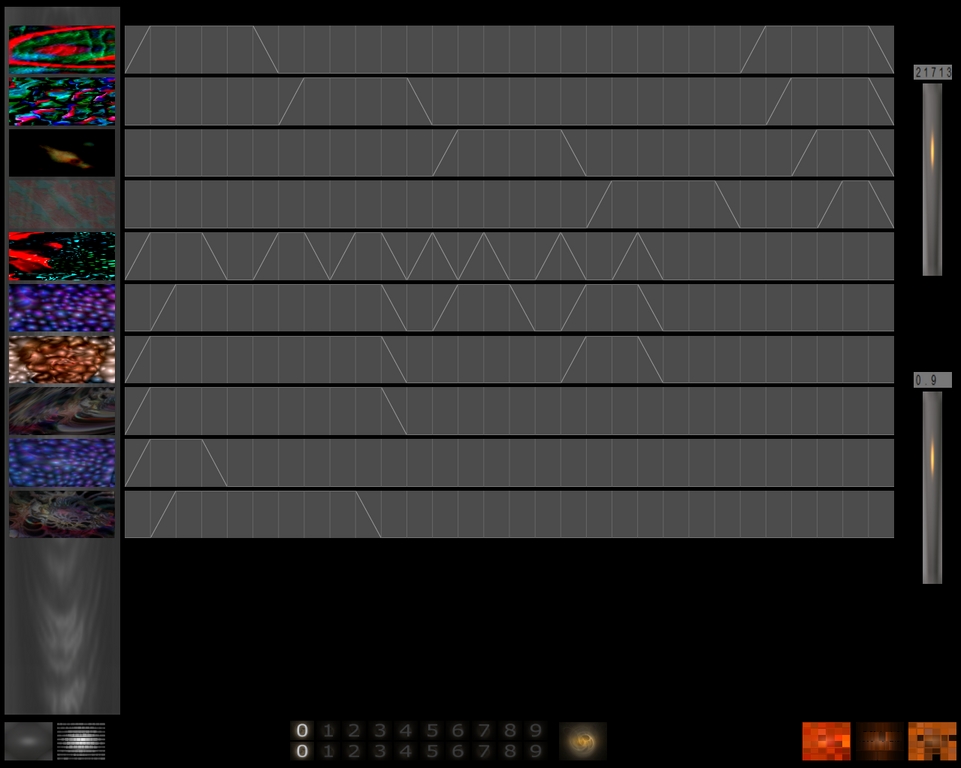
Figure 1. AVSynthesis in Play
AVSynthesis embraces and extends many of the design concepts behind HPKComposer. The program blends sound and images to produce abstract non-representational works of art. It's written in Java, and Csound is still the audio engine of choice, but the VRML interface has been replaced by a set of image controls based on the OpenGL shading language (GLSL). The program creates radical associations and correspondences between image and sound, leveraging the powers of Csound and OpenGL for the arbitrary manipulation of digital audio and digital images.
Like many experimental applications, AVSynthesis is not a perfectly packaged program, and it is not ready for use right out of the box. It is a unique program, and as such, it has some unique requirements that may not be met by your distribution's package repositories. Building the required dependencies is not especially difficult, as long as you have a typical Linux development environment installed and properly configured for your system. I include here the particular instructions for compiling Csound and configuring AVSynthesis, with some notes on the requirements for building the application on a 64-bit system.
AVSynthesis demands a specific set of dependencies:
Java (1.5 or higher)
LWJGL (the Light Weight Java Game Library)
Csound (5.07 or higher)
OpenGL
Where they are noted, the versions are critical, and each component is subject to its own build prerequisites. As mentioned, Csound needs some special attention in order to use it with AVSynthesis.
Csound has its own set of necessary dependencies, but space restrictions here forbid a complete description of the program and its requirements. Fortunately, thorough and excellent documentation is available from www.csounds.com, so I focus here only on the configuration needed to compile the program for use with AVSynthesis.
The following options configure and compile the csound binary for double-precision floating-point numerics and create lib_jcsound.so, a Java “wrapper” library for Csound's audio synthesis and processing services:
scons useDouble=1 install=1 buildPythonOpcodes=1 buildInterfaces=1
 ↪buildJavaWrapper=1 dynamicCsoundLibrary=1
The Python opcodes are not required by AVSynthesis, but I include the option for use with Steven Yi's blue, a superb environment for working with Csound. All other options in this build configuration must be included for work with AVSynthesis. If the build is successful, the lib_jcsound.so library will be at the top level of the Csound source tree. Install Csound (scons install), then copy lib_jcsound.so to the AVSynthesis native directory. That's it; you're finished with setting up the audio side of AVSynthesis.
The OpenGL and LWJGL libraries provide the interface's visual components and style. The various parameter control screens resemble the control panels seen in many OpenGL-based games, with visual effects, such as animated icons and mobile transparencies—niceties that liven the appearance of the program and improve its work flow.
The LWJGL libraries present a minor difficulty. The AVSynthesis package includes the LWJGL libraries as Windows-format DLLs but not the required native Linux libraries (that is, in .so format). The package includes these DLLs:
DevIL.dll
ILU.dll
ILUT.dll
_jcsound.dll
lwjgl-devil.dll
lwjgl.dll
Those files must be replaced by the following native Linux equivalents:
libIL.so
libILU.so
libILUT.so
lib_jcsound.so
liblwjgl-devil.so
liblwjgl.so
The lib_jcsound.so library comes from the Csound build described above; the others come from the LWJGL binary package (downloaded from lwjgl.org). Alas, 64-bit users will need to build and install the LWJGL and the IL libraries themselves. As far as I could tell, packages for these libraries are not readily available in 64-bit format, but building them is trivial and requires no special instructions beyond adding --with-pic to the configuration step (./config --with-pic). After building or downloading the libraries, they must be copied to the AVSynthesis native directory. You then can move or delete the DLL versions.
Neither Java nor OpenGL requires any rebuilding or special runtime options. These are common packages now, so if you don't have them installed already, summon your package manager and install the latest versions (Java must be 1.5 or higher). AVSynthesis itself is launched from a .jar file that works equally well in a 32-bit or 64-bit environment.
In addition to these software requirements, your computer should have a fast CPU and a video system capable of accelerated 3-D graphics. I tested AVSynthesis on two machines: a 32-bit box with an AMD64 3800+ CPU (a 2.4GHz chip) and a 64-bit machine powered by an AMD64 3200+ CPU (2GHz). Both systems include NVIDIA graphics boards (GeForce 7300GS and GeForce 7600GS, respectively), with xorg.conf configured for NVIDIA's proprietary nvidia driver (that is, not the open-source nv module). The 32-bit iron runs the JAD distribution, based on OpenSUSE 10.2, and my 64-bit box runs 64 Studio, a Debian-based distro. Both systems are optimized for multimedia and include kernels optimized for real-time performance. However, programs such as AVSynthesis want resources, lots of them, and I consider my machines as rather low-end for AVSynthesis. Your mileage may vary, of course, but for the best results from this program, I recommend a 3GHz CPU, at least 2GB of RAM, a fast 3-D graphics card and a large, fast hard disk.
I also recommend a high-quality audio system. Cheaper desktop speaker arrays may be suitable for watching DVDs, but Csound is capable of audiophile-quality output, so you'll want a sound system as powerful as your graphics system. Here at Studio Dave, I have my JAD box connected to a relatively low-end 5.1 sound system (a combination of Creative Labs and Peavey hardware), while the 64 Studio machine is hooked up to a conventional small studio audio system with a Yamaha digital mixer, a standalone 100-watt power amplifier and a pair of high-quality monitor speakers.
Now we can get started with AVSynthesis. First, edit the data/config.xml file for the runtime options for Csound and OpenGL. I added these options to set up Csound for running with the JACK audio server and to configure OpenGL for my screen dimensions and video frame rate:
<config csound="-+rtaudio=jack -+rtmidi=portmidi
 ↪--expression-opt -odac:alsa_pcm:playback_ -d -m0 -g -f
 ↪-M0 -b1024 temp.orc temp.sco" ksmps="16" width="1280"
 ↪height="1024" fullscreen="false" FPS="30"/>
Other options must be used if Csound is not compiled with JACK or PortMIDI support. See the Csound documentation for information about other startup and runtime options.
Next, I prepared the Csound and Java environments with these commands:
export OPCODEDIR64=/usr/local/lib/csound/plugins64/
export PATH=$PATH:/home/dlphilp/jdk16/:/home/dlphilp/jdk16/bin/
These commands can be added to your home directory's .bashrc file to automate this step.
Next, I used QJackCtl to configure and start the JACK audio server. This step is unnecessary if you're not using JACK, but I advise doing so for best latency.
Finally, I could start the program:
cd $HOME/AVSynthesis
java -Xmx768m -Djava.library.path=./native -cp
 ↪AVSynthesis.jar:./lib/*  org.hpk.av.AVSynthesis
This command calls Java, sets a memory amount for it, points the Java library path to the AVSynthesis/native directory, declares the classpath (-cp), loads the needed .jar files from the top directory and the lib directory, and launches the application. By the way, the cryptic string at the end is in the AVSynthesis jar file. It's a weird way to start an app, I know, but Java can be like that.
AVSynthesis takes two or more PNG or JPG images, blends them together in an animated sequence and treats that sequence with various transformations made possible by the OpenGL shading language. At the same time, the program creates a soundtrack that follows the same timeline as the video sequence. The soundtrack itself may be heavily treated by the synthesis, processing and composition algorithms provided by Csound. In AVSynthesis-speak, this combination of sound and image is called a layer. By the way, you can add your own PNG and JPG images to the AVSynthesis data/textures directory, and your own soundfiles can be added to the data/loops directory (for processing by the Csound loop instrument generator).
Given the space limitations for this article, it's impossible to describe the variety of controls over the image and sound processors fully. Consider this possible scenario for the audio section alone: up to three sound sources are available per layer, each sound source is one of five generator types, and each generator's sound can be modified further by up to three audio signal processors. Each processor is one of 13 types. Almost every parameter in the synthesizers and the processors can be modulated by one of eight envelope curves, and each curve is also subject to a modification of its time span. As you can see, it's complexity within complexity, and I haven't even considered the possibilities added by the sequencer and the mixer.
Let me describe an uncomplicated project—an exercise to demonstrate AVSynthesis basics. Note that my description only scratches the surface of this program, and that its full power can be seen and heard only in vivo. I've provided links in the Resources section to some demonstration files, but they merely hint at the possibilities. Worse, the necessary video compression codecs are unkind to the vivid clarity of an AVSynthesis real-time performance. With these facts in mind, let's proceed to the project.
AVSynthesis opens to the composition editor, the program's highest level. This screen is similar to a track display in a digital audio multitrack recorder, but a track here performs only one task. Each track is a timeline divided into 30 ten-second sections, and each section contains one stage of a simple three-stage line-segment envelope that controls the visibility and the corresponding audio volume of the track's layer. As we shall see, this envelope itself may be modified by factors working elsewhere within the program.
No text labels or tooltips describe the Composition screen's various functions, so the user must memorize their significance and purposes. Fortunately, there are relatively few functions on this screen. Figure 2 defines the other screen elements, most of which deal with performance controls and save/load functions. Later, we'll consider some of them more closely, but first, let's make a movie, with sound.
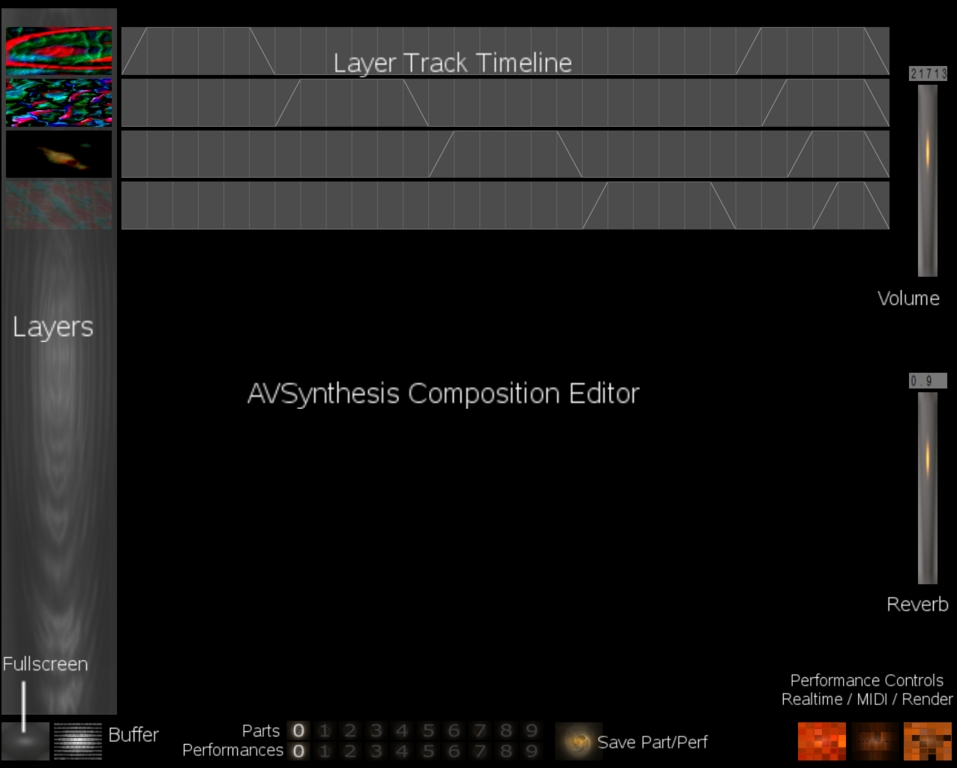
Figure 2. The Composition Screen Layout
Figure 3 shows a default empty layer. When the mouse pointer stays on the layer image, a transparent overlay appears with various controls for managing the layer. Click on the icon in the lower-left corner of the overlay to invoke the Layer Editor shown in Figure 4. The icons across the top of the screenshot represent, from left to right, the transformed image, the base image selector, the modulating image selector, the GL shader effect editor, the envelope curve editor and the audio system editor. Let's start our movie-making by selecting our base and modulator images to create an image for treatment by the GL shaders. Next, click on that image (it's the largest of the top three) to invoke the GLSL shader selector, then set the light source, contrast and effect processor for your blended image. Each shader has its own set of performance controls, some of which are shared by all the shaders, while others are unique to the particular effects you've chosen. Figure 4 displays the results of such a process after adding the Wobble shader.

Figure 3. A Blank Layer
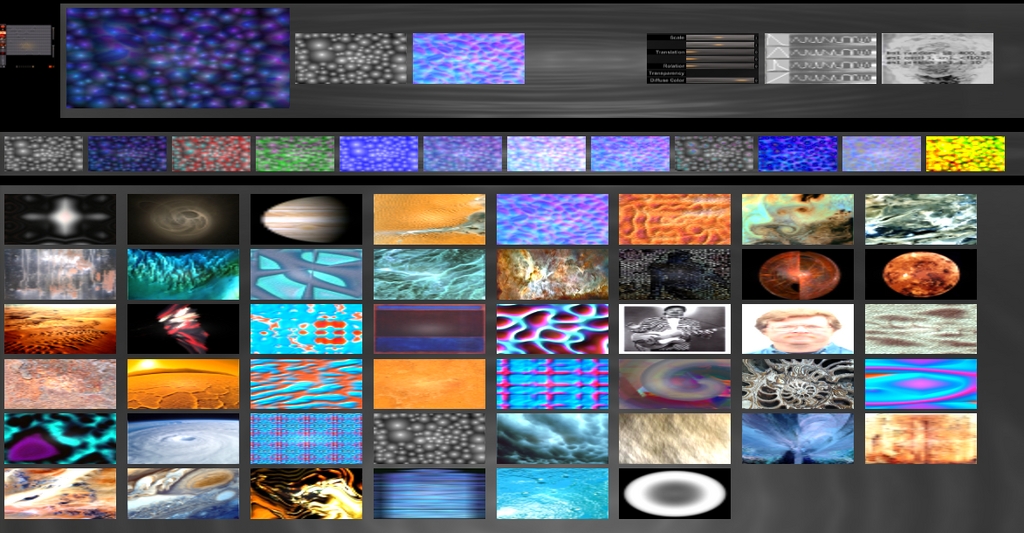
Figure 4. The Layer Editor
At this point, you can call the GL shader editor for further finessing of the transformation. Note that the transparency that appears over the blended image includes a play control for testing your later transforms at any point in the process, so feel free to bend, fold, staple and mutilate to whatever degree necessary. Set constraint ranges, apply envelope curves and specify single values. Experiment, experiment, experiment. Be aware, however, that AVSynthesis is short on safeguards, so save your work frequently. There's also no undo/redo, and you receive no warnings about anything except when you decide to quit the program.
Figure 5 shows the control panel for the Wobble effect. The shader's unique controls are at the bottom of the panel and consist of a start slider and two sliders apiece for controlling the frequency and amplitude parameters of the effect. The remaining controls are, as mentioned, common to all the shaders. They include texture managers, a transparency slider, color controls, and eye and light positioners. These common controls can be augmented by extensions required by a particular shader.
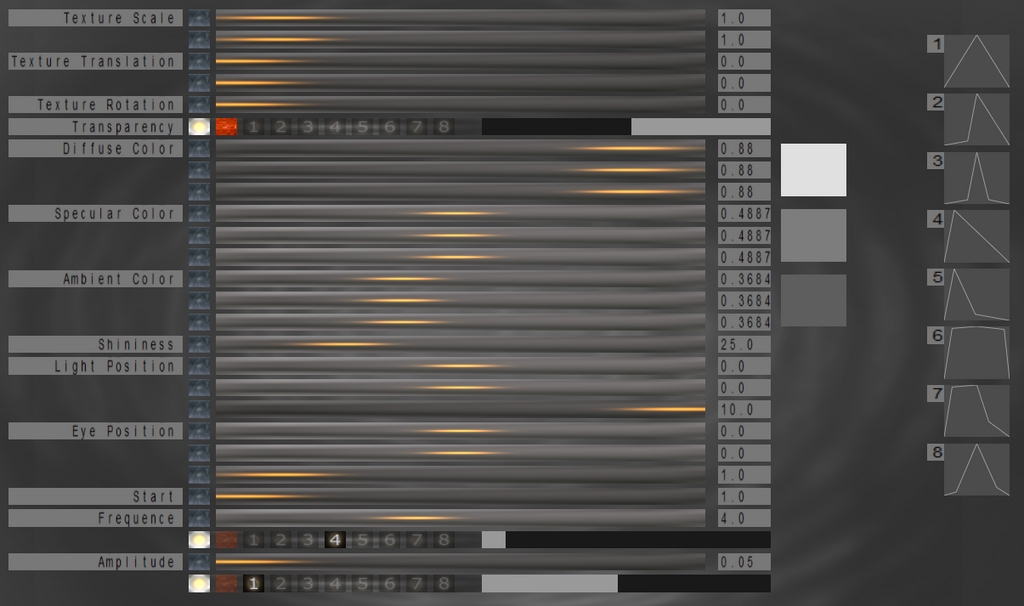
Figure 5. GL Shader Controls
A parameter value can be set explicitly with its slider, or you can define a range of values with the constraint mask (the black and gray bars shown in Figure 5) to limit the possible values only to the range covered by the mask. This range can be modified further by one of the envelopes defined in the Curves screen.
The icon at the top-right corner of Figure 4 invokes the AVSynthesis audio system editors. When the icon is selected, a column of new icons appears at the screen's left (Figure 6). From top to bottom, these icons represent the audio sequencer, three synthesizers, three processing modules and the audio mixer. They are all external representations of the Csound engine within AVSynthesis. We'll consider each of these components in turn, but only briefly.
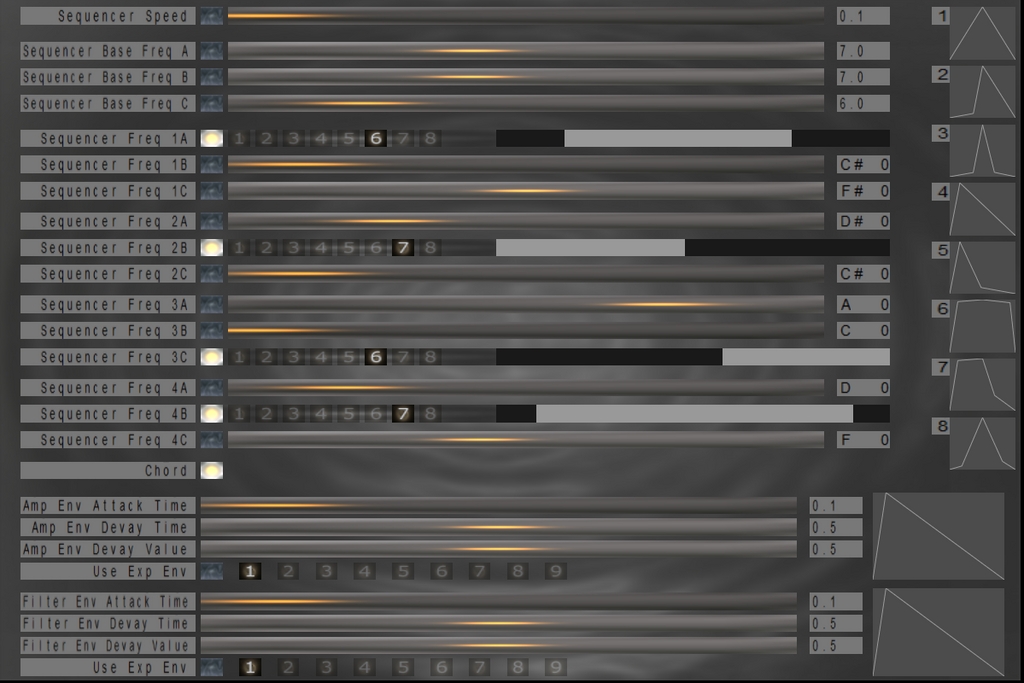
Figure 6. The AVSynthesis Sequencer
The sequencer manages the flow of time for the evolution of both the sound and the video transformations. Lower values represent slower speeds, and higher values make things happen faster. However, time distortion possibilities are rampant in AVSynthesis, and it is not always a simple matter to predict exactly how long a composition will last.
The controls in the synthesis, processing and mixing screens behave exactly like their video counterparts (Figure 7). Values are defined with sliders and masks, envelopes can be placed over ranges and so forth.
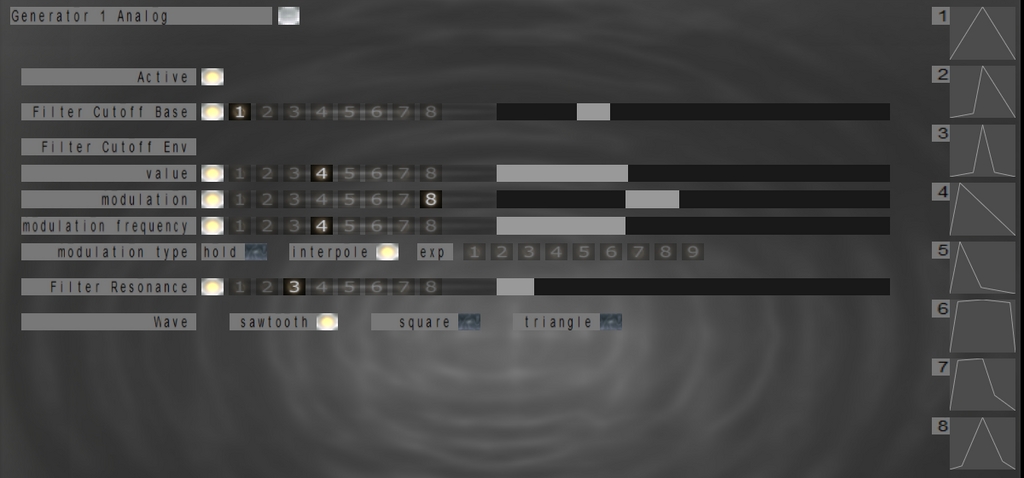
Figure 7. A Csound Synthesizer
Incidentally, Csound's deployment is completely concealed to the normal user, and no prior knowledge of Csound or any other programming language is necessary in order to use AVSynthesis.
The test play function is available here too. When you are satisfied with the sound, save the layer, then click the mini-image of the composition editor (at the top-left corner of the Layer Editor) to return to that screen.
Before doing anything else, save your performance and all its parts with the Save Part/Performance button (Figure 2). Up to ten performances can be saved, each with ten parts, with up to 13 layers per part. For now, just save your work to its starting location (for example, Performance 0, Part 3).
Your track is represented now by its layer's blended image. Next, we need to add a performance curve in the track timeline. Left-click near the top of track section to set a peak for the curve, near the bottom for a zero value. The envelope curve offers only fixed-length attack and decay segments, but you can click and drag to set arbitrary lengths for peak and zero-value segments (Figure 1). Okay, we've defined our visual and audio elements and their transformations, we've set a performance curve in the composition timeline, so we're ready to put AVSynthesis into one of its performance modes.
The square buttons at the bottom right of the Composition screen represent the program's three performance modes. The right-most button turns on the rendering mode, the center square puts AVSynthesis into a MIDI-controlled mode, and the left button toggles the real-time performance mode.
The real-time mode plays the arrangement of layers and their associated curves on the composition screen timeline. Click the button, and your composition plays in real time. Click anywhere in the composition screen to stop playback. If an error occurs, AVSynthesis may print some relevant information to your terminal window, or it may run with no display or sound until you click to stop playback. Or, it may freak out entirely and freeze your system. As I said, it's experimental software, so these things happen.
When the MIDI performance mode is selected, the MIDI continuous controller #85 can be used as a layer fader during real-time performance from the composition screen. The input port is designated by the Csound options specified in the AVSynthesis config.xml file. In my example above, the -M0 option sets the input port to the ALSA MIDI Thru port.
I tested MIDI control by hooking a sequencer to the MIDI Thru port in QJackCtl's MIDI Connections panel. I used loops of sequential and random values for controller #85, and everything worked perfectly. The implementation is limited, but it points the way toward more interesting real-time performance controls, such as layer blackouts and sudden appearances. This MIDI control extends only to the video part of a layer; it does not affect the audio portion.
The rendering mode runs the arrangement in the Composition screen in slower than real time to produce one TGA image file per video frame. The frame rate is set in the data/config.xml file (see above), and the author advises leaving it at its default of 30 frames per second. Thus, at the default frame rate, 30 image files will be created for each second of your composition. These files can be compiled into an animation (see below). At the same time, Csound's output is captured to a soundfile (render.wav in the data directory) that can be added to the animation.
For some reason, the render mode works only once per session. If you want to record another take, save your work and re-open the program. Hopefully, this limitation will be removed in a future version.
Incidentally, the Fullscreen, Save Perf/Part, Realtime Performance and MIDI Mode buttons are available from all screens within AVSynthesis.
AVSynthesis does not create a movie directly. When you click on the Render button, the program creates a series of uniformly sized image files (approximately 4MB each), and the number of files can be massive. You will need a video encoding program to turn these static images into a flowing animation. The following instructions use MEncoder from the MPlayer Project, but any other video encoder should work, as long as it's capable of converting static TGA images into a movie.
The first step sorts the TGA files into a numbered list. This step is necessary if your encoder reads the TGA files in this order: 1.tga, 10.tga, 100.tga, 1000.tga, 1001.tga...101.tga, 1010.tga, 1011.tga and so on.
Encoding the files in that order results in images rendered out of their original sequence. We need to encode them in this order: 1.tga, 2.tga, 3.tga, 4.tga and so on.
I asked the mavens on the Linux Audio Users mailing list how they would resolve this irritating dilemma. Various solutions were proposed, and the most appealing of which was this elegant fix from Wolfgang Woehl:
cd data/render
find *tga | sort -n > list
The list file can then be processed by MEncoder.
As I mentioned, the Csound audio output is saved in a separate audio file named render.wav in the AVSynthesis data directory. By default, this file is a 16-bit stereo WAV file with a sampling rate of 44.1kHz—that is, a CD-quality soundfile. It needs no special attention unless you want to rename it.
Now, we're ready to encode our images and soundfiles. Given the potentially large number of TGA images, the encoder is likely to produce a very large video file, and even a relatively short animation can devour dozens of gigabytes of storage. We need to consider a compression scheme to reduce the file size.
I discovered two ways of using MEncoder to create a compressed AVI from my audio and video data. The first way uses a multipass method:
mencoder -ovc lavc -lavcopts vcodec=huffyuv:pred=2:format
↪=422P:vstrict=-1 -noskip -mf fps=30 -o master.avi mf://@list
mencoder -ovc lavc -lavcopts vcodec=mpeg4:vme=1:keyint
↪=25:vbitrate=1000:vpass=1 -noskip -o foo.avi master.avi
mencoder -oac copy -audiofile ../render.wav -ovc lavc -lavcopts
 ↪vcodec=mpeg4:vme=1:keyint=25:vbitrate=1000:vpass=2
 ↪-noskip -o foo.avi master.avi
The first step creates a huge master file, which is then treated to a two-pass reduction scheme that adds the audio data in the second pass.
This single-pass method also creates a large file, but it has the advantage of faster production:
mencoder -oac copy -audiofile ../render.wav -ovc lavc
 ↪-lavcopts vcodec=mpeg4:vme=1:keyint=30:vbitrate=1000
 ↪-vf scale=800:600 -noskip -mf type=tga:fps=30 -o
 ↪avs-001.avi mf://@list
As presented, this method sets the movie display size to 800x600. The scale parameter also can be included in either the second or third steps in the multipass example, and may in fact be necessary if your system complains about creating a large-sized movie.
I've placed three example AVIs on-line at linux-sound.org/avs-examples. Each animation demonstrates some of the effects possible with a single GL shader (for example, wobble.avi), the simplest Csound audio setup (one synth, one signal processor), and the (mostly) default values for the sequencer. Alas, the compressed videos can only hint at the visual beauty of AVSynthesis performing in real time, and they are offered merely as glimpses of the program's artistic potential.
The AVSynthesis config.xml file includes entries for changing the program window size. AVSynthesis defaults to the current screen settings, and it will fail to launch if it can't validate the dimensions given in the config file. Alas, I was unable to launch the program in any screen mode other than my default dimensions (1280x1024).
The Csound phase vocoder opcodes are very CPU-intensive. AVSynthesis has crashed randomly when I use the effects based on those opcodes, though it works fine with them at other times.
The render.wav file and the data/render directory must be cleared by the user; AVSynthesis will overwrite the current contents.
Sound may become distorted when using the Analog Synth 2 and the Wild Grain processor. Use the mixer to balance audio output from the synths.
AVSynthesis is well worth the effort required to make it happen. The further I get into AVSynthesis, the more possibilities I discover that warrant yet deeper exploration, and I can see (and hear) myself staying involved with the program for quite a while. The program's author has stated that he intends to squash remaining bugs and add some new features, but he wants to keep AVSynthesis as uncomplicated as possible. You can check out the latest version yourself, and with this guide's assistance, you should be running AVSynthesis quickly and smoothly under Linux. Have fun, be creative, and be sure to let Jean-Pierre know how you're using his software.
Resources
AVSynthesis: avsynthesis.blogspot.com
My AVSynthesis Examples: linux-sound.org/avs-examples
Csound: www.csounds.com
OpenGL: www.opengl.org
CsoundAV: www.csounds.com/csoundav
MPlayer: www.mplayerhq.hu
Dave Phillips is a professional musician and writer living in Findlay, Ohio. He's been using Linux since the mid-1990s and was one of the original founders of the Linux Audio Developers group. He is the author of The Book of Linux Music & Sound (No Starch Press, 2000) and has written many articles on Linux music and sound issues for various journals and on-line news sites. When he isn't playing with light and sound, he enjoys reading Latin literature, practicing t'ai chi, chasing shar-pei puppies and spending time with his beloved Ivy.

