
The Archos 5
For the past couple years, I've carried around a Cowon D2 media player. This little device has 2GB of onboard memory (there also are 4GB and 8GB versions). It also has a built-in SD slot for storage expansion. I purchased it because it plays every audio format I care about: MP3, Ogg Vorbis and FLAC. As a bonus, it also can play 320x240 MPEG 4.2 AVI video files.
This little player has served me very well, but lately I've become interested in getting a portable media player that is as good at video as the Cowon is at audio. Specifically, I'm getting tired of converting videos just so I can play them on my D2. I'd like a player that can handle unmodified versions of all of my media, and a lot of onboard storage would be a nice perk.
Cowon has some higher-end devices that look like they might make compelling replacements, but they run Windows Mobile, which I don't want. There also is the ubiquitous iPod from Apple, but I'm not really interested in getting one of those either. With Cowon and Apple out of the running, I went searching for alternatives, and the first possibility I encountered to replace my D2 was the Linux-based Archos 5.
Physically, the Archos 5 is quite a bit larger than the D2. The 5 in Archos 5 refers to the screen size, which actually clocks in at 4.8 inches. Measurements aside, the screen feels more than twice as large as the 2.5" screen of the D2, partly due to the higher resolution (800x480) display, which is a good bit more than twice the D2's 320x240 resolution (at least in width).
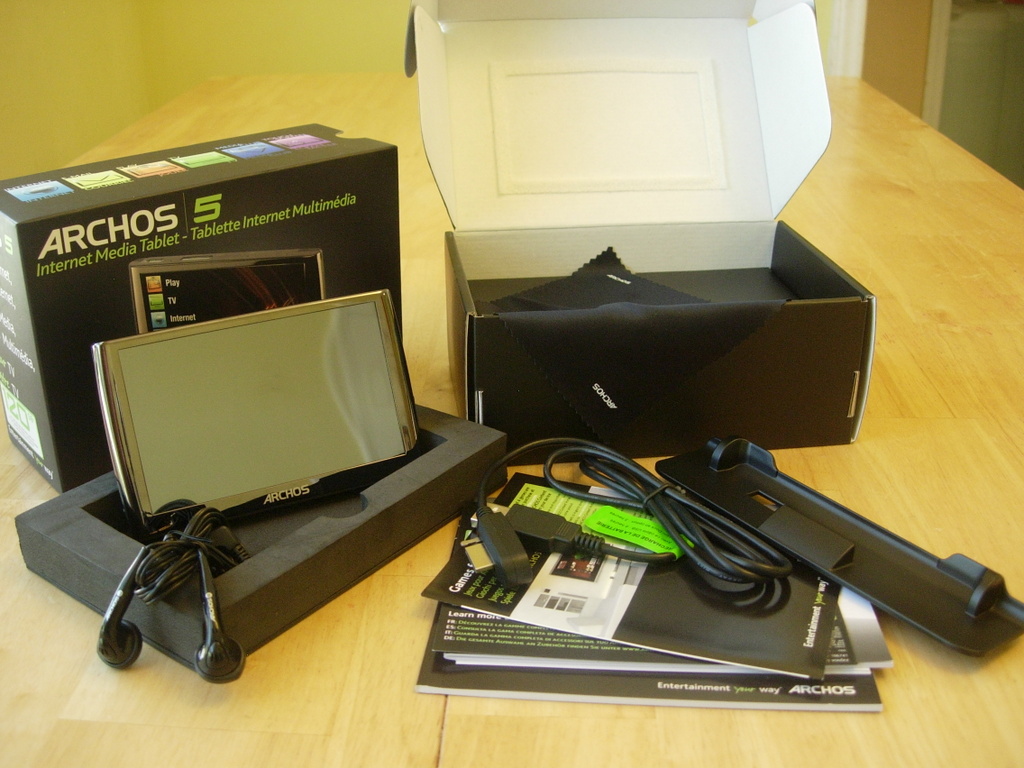
Figure 1. The Archos 5 comes with what you see here. The strange piece of plastic is an adapter for the DVR Station add-on.
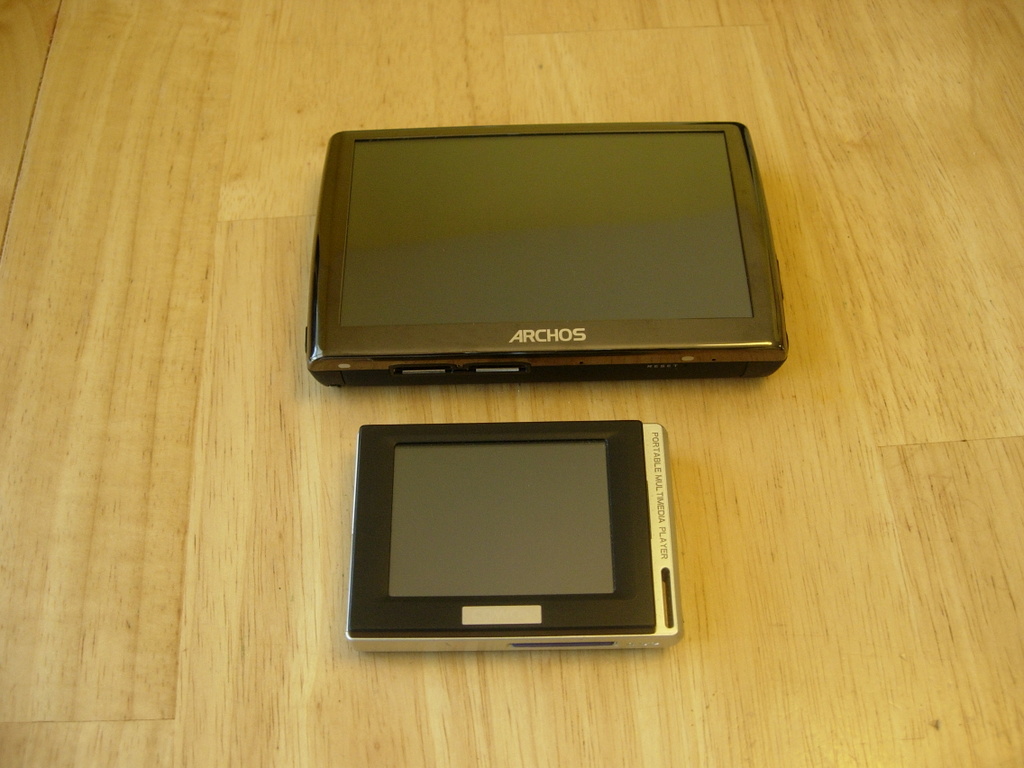
Figure 2. Archos 5 and Cowon D2
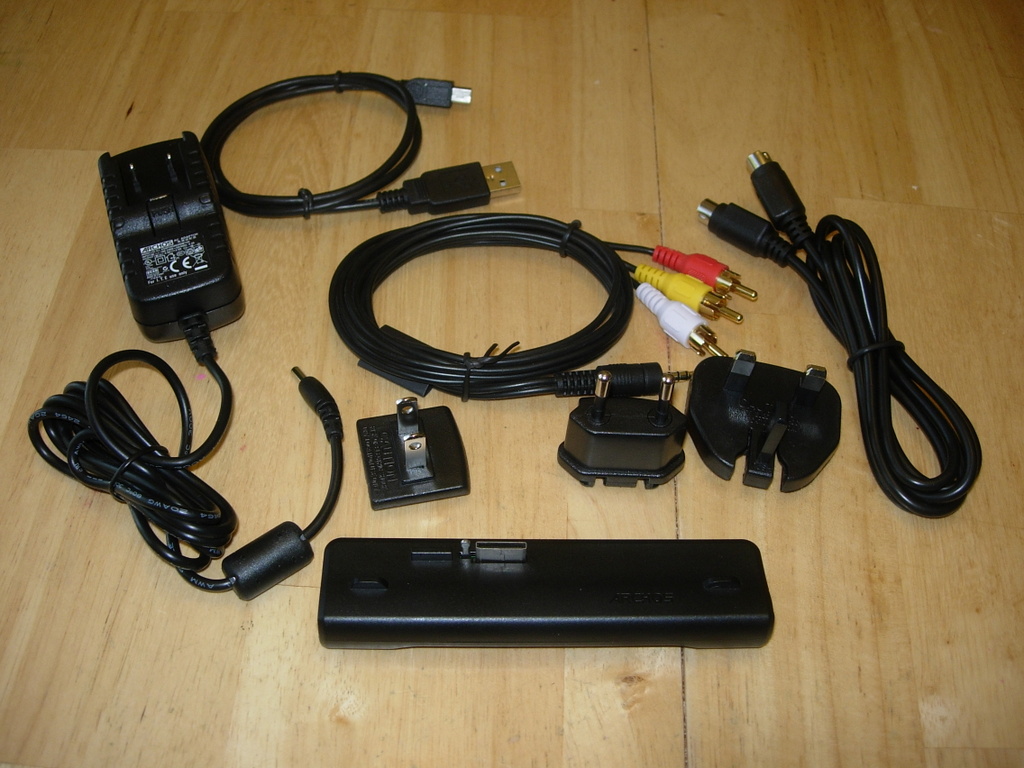
Figure 3. The Mini-Dock comes with a multi-national power adapter, A/V cables and a real, honest-to-goodness USB cable.
The screen is very glossy—a trend in screens I am not very fond of—but it is quite viewable under most conditions, even though it is a little too shiny for my tastes.
The thickness of the Archos 5 varies based on which model you get. The 60GB version appears (from the images on the Archos Web site) to be thinner than the D2, and the 120GB and 250GB models appear to be about twice the thickness of the 60GB model. I picked up the 120GB version, and part of me wishes I had the thinner model, despite the smaller drive size.
Rounding out the exterior of the Archos 5, there is a power button, volume control button, a reset hole, a headphone jack, a pair of docking ports on the bottom and a sturdy foot that pivots out the back to prop it at a nice viewing angle.
In addition to the base device, you can purchase several add-ons for the Archos 5 that give it new functionality. These include a TV antenna, a DVR, a helmet-mountable video camera, an FM radio and a GPS. Although I don't foresee myself purchasing any of these add-ons, they certainly prove that the base hardware is capable of a great many things if attached to the right accessories.
The GPL'd portions of the Archos 5 source code are not available from the Archos Web site at the time of this writing. The source code hopefully will be posted by the time you read this.
Archos bills the Archos 5 and the larger Archos 7 as “Internet Media Tablets”. As such, they include many features one doesn't necessarily associate with a simple media player, such as a Web browser, e-mail client and various widgets.
The Web browser on the Archos 5 is Opera-embedded. It is a little slow, but renders most pages well. AJAX-heavy sites, like Google Reader, seemed to give it the most trouble. It has Flash support, and for video sites like YouTube and Google Video, it will offer to play the video full screen, which is a nice touch. The Web browser has tabs that allow you to have multiple sites open at the same time. You also can zoom in (and out) on pages by double-tapping on the screen.
When downloading large files, the download screen takes over the interface and does not let you queue other downloads or continue browsing. That annoyance aside, it will try to put files you download into the proper folders automatically (Video, Music and so on), which is nice. If the Archos 5 doesn't recognize a file, such as zip or tar.gz files, it places the file in a Downloads folder that you can access the next time you connect the Archos 5 to your computer.
Overall, I am quite pleased with the built-in Web browser. It's not something I plan to use often, but it works well enough for light browsing when I am away from my desk.
The mail client can connect to both POP and IMAP mail servers. The client is functional, but a bit clunky, and it is not something I'm likely to use unless it is the only choice I have.
The photo viewer is nice and turns the Archos 5 into a decent digital photo frame. In the photo viewer, a vertical top-to-bottom swipe will rotate the picture clockwise, and a vertical bottom-to-top swipe will rotate the image counter-clockwise. Horizontal swipes will move to the next and previous pictures.
The audio player lets you sort music in all the standard ways: by genre, artist, year, album, title and so on. The Web radio section of the audio player is powered by vTuner and has a nice selection of stations. Local music (not streaming music from over the local network or Internet) can play behind the slideshow or Web browser.
The video player is pretty basic. You simply navigate the folders of the Archos 5 and choose the video you want to play. Once one video has finished, the next one starts, just like in the audio player.
If you have to interrupt local audio or video playback, the Archos remembers where you were, and you can resume from where you left off when you next access either mode.
Thanks to the built-in Wi-Fi and the appropriate software, the Archos 5 can connect to UPnP servers on the local network. This has turned out to be one of my favorite features. It turns the Archos 5 into a sort of roving satellite television for the house. Both my file server and my Popcorn Hour media player are set up as UPnP servers, so the Archos has access to all my media. Well, it would, if it could play all my media (more on that later).
Some pieces of software on the Archos 5 are missing. One of these is the File Sharing item in the tools menu, which reports that you need to update your firmware to gain access to the feature (even though I'm running the latest firmware).
Rounding out the software on the Archos 5 are several widgets that provide such things as a simple newsreader, a currency converter, a note-taking app and a weather widget. They're not terribly useful; the newsreader contains only seven preconfigured entries that can't be changed, for example, but they're there to play with if you want. The widgets actually run in a special mode of the Web browser, and the newsreader feeds open stories in tabs of the browser.
For a device as hefty (price- and size-wise) as the Archos 5, it has a lot of deficiencies.
My biggest gripe is that there is no out-of-the-box support for playing h.264-encoded video. This is a major limitation. It's not a question of ability, because there's a plugin you can purchase to enable it (which I did reluctantly). The plugin bundle to enable h.264 video, AAC audio, HD video support and MPEG-2 video support costs 30 euros, which worked out to about $43 at the time I purchased it. The three plugins separately are 15 euros each, so I guess I'm getting a good deal, but it just feels like Archos is trying to fleece me. On top of that, the HD plugin is not yet available.
I can understand paying extra for physical hardware that provides the Archos with new abilities. The helmet cam, the GPS and the DVR station are good examples of this. But to cripple the main unit out of the box deliberately by not playing h.264 video seems greedy on Archos' part—especially considering that the base unit costs $350–$450 (depending on the model).
A related gripe is that the Archos 5 will play only video that is smaller than the size of the screen (800x480). As a test, I cropped the 480p version of Big Buck Bunny so that it was exactly 800x480 pixels in size, and the Archos refused to play it. The largest files I have been able to play are in the neighborhood of 720x460. The HD plugin supposedly will allow the Archos 5 to play up to 720p-size video when it is finally released.
Another video-related issue is that the Archos 5 has trouble with h.264 .m4v files that are longer than 1.5 hours. It will report that the file is corrupted, even when it is not. Lengthy non-h.264 .avi files do not have this issue.
Moving on to audio, the Archos 5 is frankly disappointing. There are no technical reasons that I can see why the Archos 5 cannot play FLAC and Ogg files, but it can't. They don't even show up in the list of files. The Archos also had trouble with my example .m4a audio files. They could be viewed in the music browser, but they would not play. AAC audio plays fine when part of an .mp4 video file, so it can play it.
The Archos comes up short in regard to media playback, but I knew some of that going in, thanks to the specs on the Archos Web site. What was not anticipated were the number of hardware issues I had, and they bear mentioning here. At the top of the list is that the Archos 5 comes with a proprietary USB cable that is used for connecting the Archos 5 to your computer and for charging.
This cable is inadequate for several reasons. First, it takes eight hours to charge the Archos 5 via this USB connection. Battery life for the Archos 5 in my testing was about three hours for video and about double that for audio, so the included charging “solution” can't even keep up with normal use! This contrasts with the 50+ hours of audio playback I regularly get out of the Cowon D2 in between chargings.
The long charge times for the Archos also mean that once I watch about 1.5 movies, I am done for the day. Second, the cable is not a standard USB cable. One end is USB; the other is a proprietary docking connector. I don't mind docking connectors, but when that is the only connection to the outside world, I get nervous and annoyed.
My first hardware accessory purchase for the Archos 5 was the $30 mini-dock. Although it looks strange when plugged in to the Archos 5, at least it provides a real power adapter and recharge times of less than three hours. The mini-dock also gives the Archos 5 component A/V and S-Video out, as well as USB host and client support. The mini-dock adds so much functionality and utility to the Archos 5, I wish the company had incorporated the ports on it into the main unit.
On the software front, some of the widgets—the newsreader and weather widgets in particular—need a network connection to run, but if the network is turned off, they will give you a “No network available” message, instead of starting up the network like the browser and mail applications do. To use them, you first must activate the network manually and then run them. Compounding the frustration of this is that the Archos 5 attempts to save power by shutting off the network automatically if it hasn't been used in a few minutes.
I also ran into some out-and-out crashes when using the Archos 5. I can't count the number of times the Archos has rebooted itself during what I consider to be normal use. It happens at least once a day, often more.
The first time I powered up the Archos 5 and connected to my home network, it said there was a firmware update available. That was all well and good, and it downloaded and applied the update like I expected, except that after the update, the wireless settings were erased, and then the Archos decided that it also could not see my, or any other, access point. Not cool. A reboot fixed it, but the update could have indicated that an additional reboot was required on top of the one it did during the update process.
The biggest error I ran into was when trying to copy a bunch of pictures over to the Archos 5, it froze, and I had to force unmount the device and reboot it. Then, when mounting the device, on multiple computers, it would mount only read-only. I ran fsck on the drive, like so:
sudo fsck.vfat -a /dev/sdf1
and then I was able to mount and write to the Archos 5 again. It also recovered the pictures that had been copied to the device just prior to the crash and gave them a .REC file extension. I deleted them all and started the copy process from scratch.
The long and short of it is that after the more-or-less rock-solid performance I've had with the Cowon D2, the instability of the Archos 5 was a disappointment.
So, is the Archos 5 a good replacement for the Cowon D2? No.
Out of the box, the Archos 5 is slightly more capable than the D2 in terms of video (it can play my ripped DVDs just fine, with some caveats), but it is less capable in terms of audio. Only my MP3 and WAV audio test files played without trouble. This is a serious limitation for a device that bills itself as a media tablet. I also disliked having to purchase both an expensive plugin pack and the mini-dock just to get it up to the level of functionality it should have had right from the start.
That said, am I unhappy with my purchase? Not as much as one might think. True, it is not a replacement for my current favorite portable media player, but it is very useful in its own right, especially as a mobile node for my home media library (the parts that it can play). With any luck, many of the deficiencies will be erased as firmware updates are released.
In the meantime, my trusty D2 remains my hands-down favorite audio player.
Resources
Archos: www.archos.com
GPL'd Source Code for Various Archos Products: www.archos.com/support/support_tech/updates.html
Cowon D2: www.cowonamerica.com/products/cowon/d2
vTuner: www.vtuner.com
Daniel Bartholomew lives with his wife and children in North Carolina. His occasionally updated blog is at daniel-bartholomew.com, and he also can be found on Twitter as daniel_bart and on identi.ca (and Jaiku and Pownce) as bartholomew.
