
ASUS Eee PC
The ASUS Eee PC is an extremely small, ultraportable notebook at the cheapest end of the market. At $399 US, it's supremely affordable. The entire industry has been buzzing around it, with Asus claiming that it was America's most popular Christmas gift.
When we arrived at the store to pick up our Eee to review, all the salespeople were busy. We looked near the laptops for it and couldn't see it—had the shipment been delayed?
We finally snared a salesperson to ask about the Eee and were led to the small electronics cabinet. There, nestled among the compact cameras and iPods, was one of the smallest laptops we'd ever seen. Its box was also diminutive. Inside the box is the Eee, manuals, CD, charger, neoprene sleeve and the Eee's battery. We appreciated the inclusion of the sleeve—most notebook bag and case makers have nothing for a machine this small.
Asthetically, the Eee looks like exactly what it is—a miniature laptop. Ours came in pearl white. It drew comments and admiring glances everywhere we took it—for both its extremely small size and smooth styling. The only aspect that mars its appearance is a large screen bezel. We feel the Eee would be vastly improved cosmetically if the screen filled even half that bezel. But, that's a minor issue in an otherwise very attractive notebook.
Specifications
4GB solid-state Flash disk
512MB, 400MHz DDR2 memory
900MHz Intel Celeron Mobile
Intel 945GM Graphics
Atheros 802.11b/g wireless
9" screen at 800x480 resolution
Three USB 2.0 ports
Kensington lock slot
SD/MMC reader
VGA out
10/100 Ethernet
Headphone and microphone jacks
640x480 Webcam
Customised Xandros OS
IceWM, with ASUS enhancements
The Eee has a nice touchpad, although a little small. There is a single-width button that will execute a right-click if you press down on the right-hand side. We found this a little difficult to get used to, as it was hard to tell without looking exactly where you were about to click. The touchpad will scroll if one traces a finger down the far right—an extremely small target we found difficult to hit reliably. We've read a lot of reviews that seem displeased with the keyboard, and frankly, we just can't see why. The keyboard has an excellent feel to it, although again, it is extremely small. It took less than an hour to get used to touch-typing on it at quite a reasonable speed.
The screen is LED-backlit, making it extremely bright. Unfortunately, that's the only kind thing we can say about it. The contrast and colour is dreadful, and although the screen is a reasonable DPI, the resolution is just not high enough for Web browsing. Most sites these days are optimised for at least a 1024x768 resolution, and having a screen only 800 pixels wide made us scroll sideways fairly often to see whole pages.
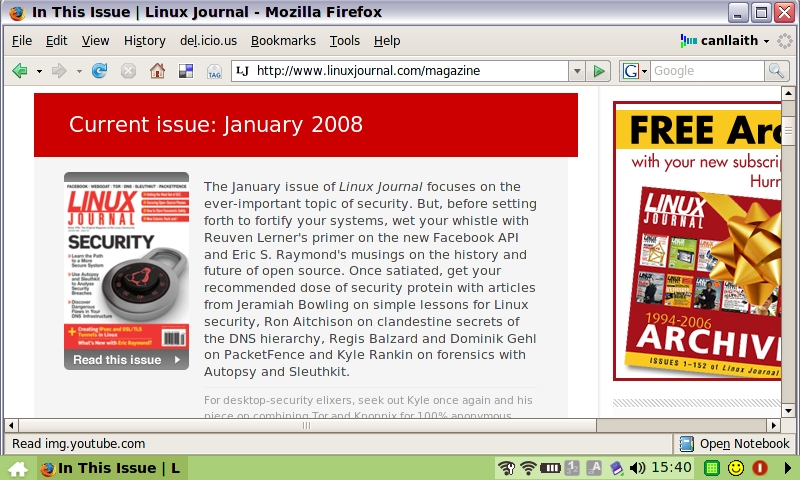
Figure 1. Web browsing shows how cramped the Eee screen is.
The speakers are surprisingly good. Sure, the sound isn't studio-quality, but the volume can be maxed out without distortion, and the clarity is acceptable. With good headphones, sound is even better, although it did have a slightly muddy quality. The headphone socket is extremely clean with no discernible hiss even at high volumes. The internal microphone is adequate for voice chat, and plugging in a headset with an external microphone works exactly as you'd expect.
Connectivity is excellent with 10/100 Ethernet, 802.11b/g wireless and three USB ports. There's also an SD card slot on the left-hand side, and the card sits flush with the side of the laptop. It supports SDHC cards, which is a very viable option for expanding the onboard storage. There's also a VGA-out port that displays up to 1280x1024 on an external display with excellent acceleration. This feature alone makes the Eee far more worthwhile for serious use, as the mediocre internal display becomes an acceptable compromise—having a tiny device to carry around, but a reasonable screen resolution while at home.
ASUS's customised “easy” interface is built on Xandros and consists of a tabbed desktop application launcher and the IceWM window manager and panel. The interface is slick and well optimised for the low screen resolution. A home key on the keyboard where the Windows key usually is minimises all applications and reveals the program launcher. It's pretty clear ASUS anticipates that most people will be running applications maximised. The launcher tabs are divided into Internet, Work, Learn, Play, Settings and Favourites.
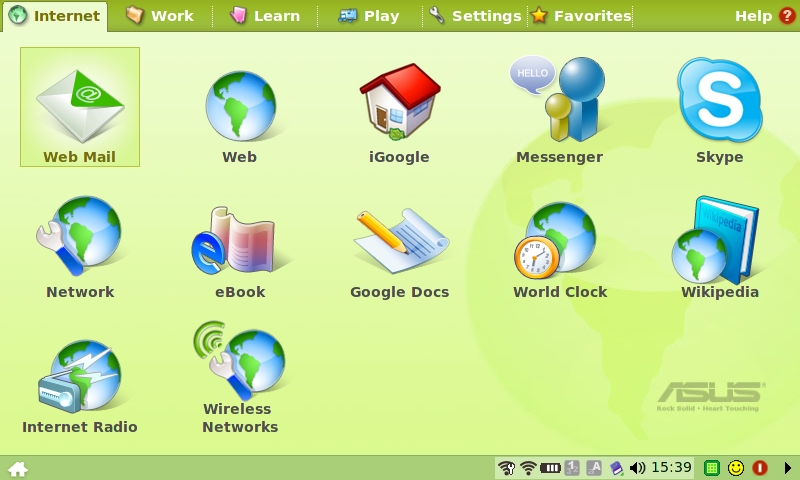
Figure 2. ASUS “Easy” Interface
The Internet tab includes launchers for Firefox, Skype and the Pidgin instant-messaging client, as well as some shortcuts for loading Firefox with a preconfigured page to access services, such as Wikipedia, various Webmail providers and Internet radio. The version of Skype installed does not support video chat, which we feel to be a fairly glaring omission for a device with a built-in Webcam.
The Work applications include Thunderbird for e-mail, KDE's Kontact suite for PIM and Adobe's Linux Acrobat Reader software. OpenOffice.org version 2.0 is available, and it performs surprisingly well given Eee's limited resources. One feature that isn't immediately apparent, but mentioned in the manual, is that a terminal can be accessed with the keybinding Ctrl-Alt-T. SSH and rdesktop are two applications that can be accessed this way for those who are terminal-savvy.
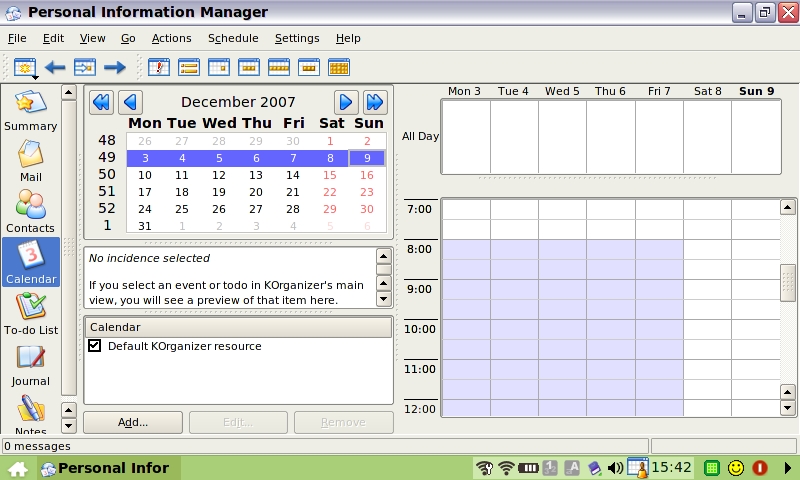
Figure 3. Kontact's excellent PIM suite is a little squished.
KDE's edutainment suite is well represented under the Learn tab with science-, language- and math-related educational tools from the project included. Tux Typing, Tux Math and Tux Paint complete the selection. With the addition of on-line learning facilities, we feel the Eee would make an excellent educational aid.
The Play tab includes quite a few subcategories for various types of media. A basic image viewer (Gwenview) is included, as well as an excellent MPlayer front end capable of viewing most multimedia formats. We found that getting high-quality, full-screen, highly compressed media content was quite the struggle, but with a bit of practice, we're sure we can encode some video files that the Eee will play well. DVD content off an external drive plays reasonably.
We were very pleased to see some of our favourite procrastination-enablers under the Games tab. Frozen Bubble is insanely addictive, and Crack Attack looks like it will be second on the list of “Reasons This Review Will Almost Certainly Be Late”. Penguin Racer and Potato Guy are old-fashioned favourites, and Solitaire, Sudoku and a Tetris clone round out the selection.
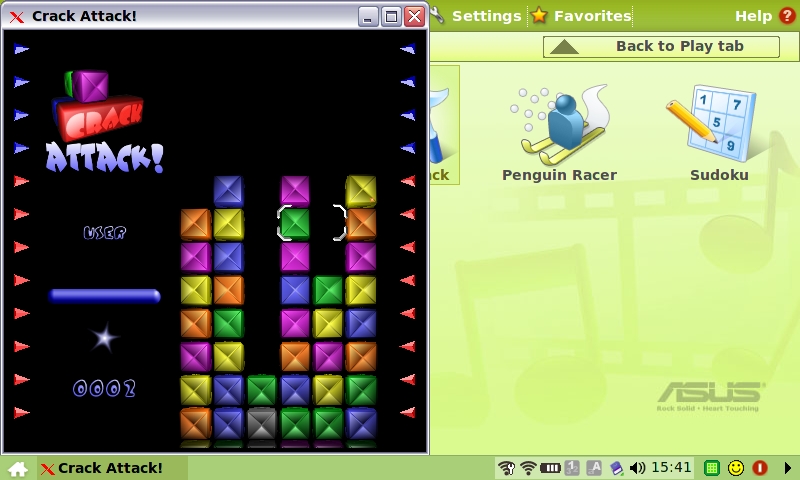
Figure 4. How can a game this simple be so insanely addictive?
The Settings tab allows for minimum configurability—here are options for setting up printers, configuring the touchpad and checking for updates, among others. We eagerly looked through the personalisation dialog but were disappointed to see it did not allow us to change the theme to one that does not attempt to model Microsoft Windows XP's much-hated style. The tool to enable an external display is simple and straightforward—something we certainly haven't found on other Linux desktops.
The Favourites tab lets us create launchers to our favourite applications, although there was no way of creating a launcher to an application that wasn't already on another tab. The option to create a custom launcher would be appreciated.
The first thing we tried was connecting to various wireless networks, using a USB GSM modem. For some unknown reason, there actually are two networking tools installed on the Eee: one that can scan and connect to wireless networks, and one that handles all other connections and saved profiles for wireless networks. It took quite a few connections where we had to enter the key in every single time before we discovered the second tool, with the key saved. It seems utterly needless to have two separate tools for this when the various Network Manager front ends are an excellent example of an all-in-one tool that's painless to use. Hopefully, ASUS will merge these tools in a later release.
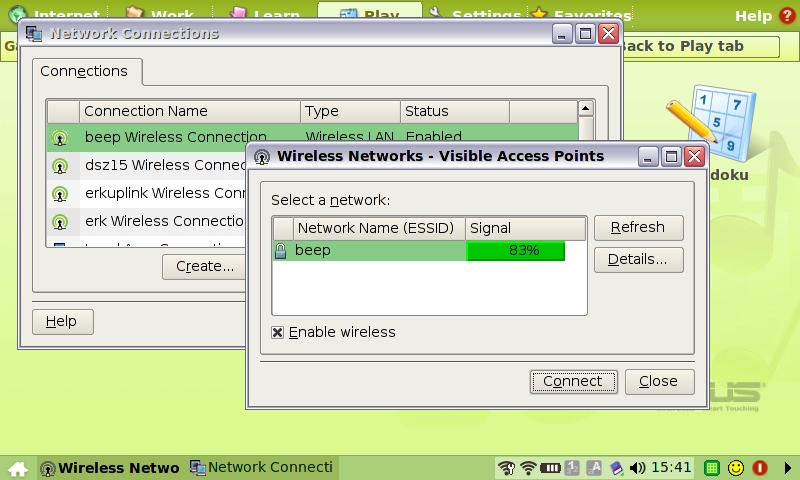
Figure 5. Networking Tools
We were blown away by how easy it was to configure a USB 3G modem—the connection wizard did almost all of the work for us, and we were on-line within five minutes. Powering the modem seems to reduce the battery life to about two and a half hours, but we still were impressed that the laptop and modem are less than 1kg to carry around. Battery life in general is a bit of a sore point. The Eee gets a little more than three hours in our testing, if it's on wireless, and we feel this just isn't really enough for an ultraportable. That said, the power adapter for the Eee is quite small; it looks a bit like an oversized cell-phone charger. Carrying the charger to top up the Eee whenever you happen to see a power point really doesn't add much weight or bulk.
Although we appreciate that the Eee could include only so much for the price, it would have been nice to see Bluetooth support and a larger screen. At the end of the day though, every time we thought of a way the Eee could be improved, we kept coming back to the price—$399. The cheapest ultraportable from other vendors is closer to $1,200, and those aren't as small or totable as the Eee. It's no wonder that the Eee is taking off so quickly and developing such a following. Out of the box, it's a compelling little appliance.
Most of the Eee's downsides are eliminated when you see how the machine can be customized. With some custom packages and a full Linux desktop, the Eee is a formidable tool for the intermediate Linux user. In my opinion, the Eee is five minutes away from being a great backup writing and open-source development tool. Install Subversion, add a USB HSDPA modem, and I'd have an extremely portable, very cheap and rugged tool for basic hacking tasks and for writing articles—most of this article was written on the Eee, sitting in various cafés around Wellington. With a USB-to-serial adapter and the addition of minicom, it would be a great tool to take into server rooms to aid me in my day job as a sleep-deprived systems administrator. It's been my constant companion for the past few weeks—coming with me to places I wouldn't dare to risk my far-more-expensive and delicate Sony Vaio. Throw it in a backpack or even a large handbag, and it's ready and waiting. I'd far rather risk spilling beer on it at a pub hackfest, getting knocked around in my carry-on luggage or being taken to conferences where I have an absolute gift for having computers stolen. Although $399 isn't cheap enough to make it disposable, it's far more so than something costing $2,000.
Next month, I'll take you through various ways the Eee can be hacked to unlock the full power of the Linux it's running underneath, and I'll also take a look at trying different Linux distributions on it.
Jes Hall is a Linux Technical Specialist and KDE developer from New Zealand. She's passionate about helping open-source software bring life-changing information and tools to those who would otherwise not have them.
