
The State of the Market: a Laptop Buying Guide
Although installing Linux on desktop PCs with standard hardware has become a snap, the same cannot be said as confidently for laptops. Getting all of a laptop's functionality to work on your own generally requires an investment of time and effort, which may not yield dividends in the end. If you need a Linux laptop that lets you open the box and get to work, we recommend the purchase of a preloaded machine from one of the many excellent vendors in today's marketplace.
When you begin your search for the perfect preloaded Linux laptop, you'll quickly learn the hard truth that we in the faithful Linux nation have fewer cutting-edge laptops than our Windows-running counterparts. Nevertheless, there is much to celebrate as life gradually becomes more fair for us. Innovation and new options are plentiful among both our old standby Linux hardware vendors and new, larger providers, such as Lenovo and Dell. Although we Linuxers most likely can't make every laptop out there run Linux, we have a wide selection from every category, with more variety arriving every day.
In addition to commending the ongoing efforts of the Linux hardware specialists, we warmly welcome Dell and Lenovo to the club of Linux laptop providers, happy the big vendors finally see the light. Unfortunately, both companies have started small and conservatively at one laptop apiece, each with fewer features than the exact same model with Windows Vista preloaded. Regardless, we wish these firms success and encourage them to let buyers purchase every PC they sell with Linux preloaded. We also hope this new competition will spur longtime Linux vendors to push themselves to offer even more variety and options at lower prices.
If you venture into the vast on-line PC marketplace, you'll find nearly a dozen US and Canadian firms (many more elsewhere, of course) peddling a wide range of laptop computers with Linux preloaded. Most of these firms are Linux specialists that load Linux onto and configure a third-party machine. In these firms' on-line stores, you'll have absolutely no problem finding a great selection of powerful, practical, business-oriented laptops with a 14.1", 15.4" or 17" display, a robust Core 2 Duo processor, buckets of RAM and a mammoth hard drive that cost less than $2,000. Almost without exception, you can configure your laptop as either a Linux-only or a dual-boot machine, with some vendors offering only Windows XP and others offering a choice between Windows XP or Vista. Unfortunately, the generalists, Lenovo and Dell, have decided to forgo the dual-boot option for now, which we predict will reduce their sales—we Linux folks demand a high degree of choice and control.
Specialty machines are harder to find in the Linux space, as are functioning specialty features on many of the available machines. Regarding specialty machines running Linux, if you want a screaming gaming machine, a media center or an ultraportable, your options are much more limited. In addition, when you're buying one of the available Linux machines, be a wary buyer because oftentimes a laptop will ship with, for example, a built-in Webcam, fingerprint scanner, cellular broadband capability or 802.11n Wi-Fi, but the vendor hasn't gotten it to work yet under Linux.
Despite the above complaints, you can find a limited number of interesting specialty laptops if you know where to look. One company to watch is Taiwan's ASUS, manufacturer of the most common laptops onto which the Linux specialists (such as R Cubed, LinuxCertified and HPC Systems) choose to preload Linux. The must-have device at the close of 2007 is the new ASUS Eee PC, a brand-new two-pound ultraportable with a 7" display that will sell for $259 and up. See below for more details.
If you have a quirky laptop need, perhaps the best place to look is at EmperorLinux, a company specializing in Linux-based laptops from a number of manufacturers, including Dell, Lenovo, Panasonic and Sony. Not only does EmperorLinux attempt to cover nearly every niche, including ultraportable, rugged, tablet and desktop replacements, but it also does the best job of making advanced features, such as GPS, cellular broadband, tablets and 802.11n Wi-Fi, work out of the box. See below for reviews of two laptops from EmperorLinux.
It also is heartening to know we have more options for protecting the environment when choosing a Linux laptop, as many of them are Energy Star-compliant. This means the device meets or exceeds criteria from the Environmental Protection Agency for energy consumption. Among other things, Energy Star-compliant notebooks must consume no more than 1W of power when off, 1.7W when hibernating and 22W when idle.
So that's the big picture; now, let's find a laptop that meets your needs. To give you a sense of what preloaded Linux laptops are available, we've created this laptop buyer's guide. We asked all the vendors we could find to send us their two most compelling machines for review. Although not every company took part, the ones below did. This guide is not intended to be exhaustive but rather a taste test of some currently available preloaded Linux laptops.
Below are mini reviews of seven different preloaded Linux laptops (eight if you include the ASUS Z84J sent by two different vendors) that you can buy today. The primary emphasis of these reviews is on the overall Linux experience and functionality, which surprisingly varies greatly among vendors. The secondary emphasis is on the feature sets. All machines, unless otherwise noted, came with integrated 802.11a/b/g Wi-Fi and Bluetooth, which are standard features nowadays.
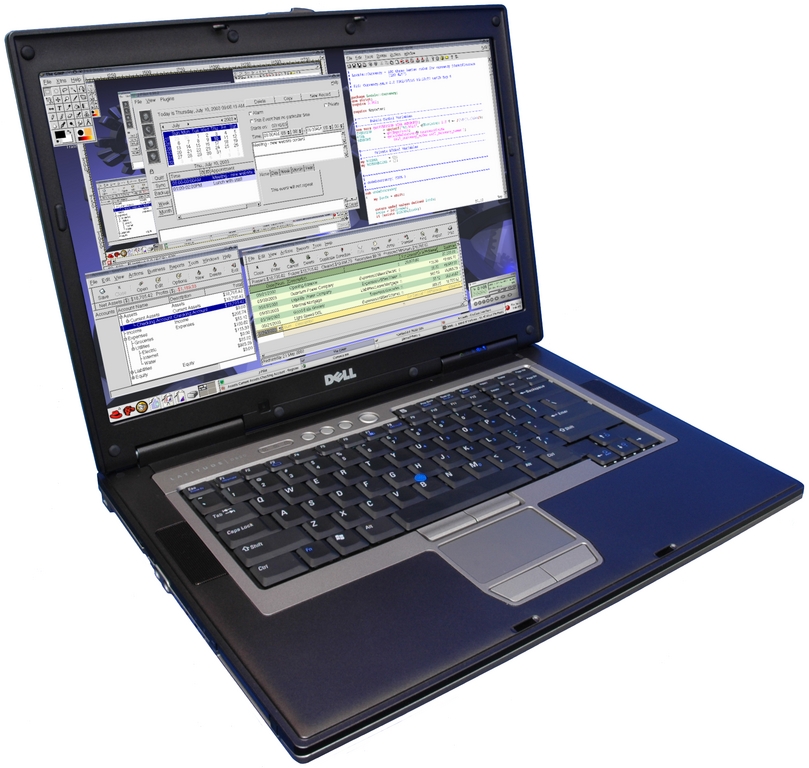
The Rhino D830, the Linux edition of the Dell Latitude D830, is a desktop replacement machine for those who want a mid-sized presence (15.4" WUXGA display at 1920x1200) with a blend of solid features and excellent performance at a decent price. Weighing in at just more than seven pounds, the Rhino D830 may become annoyingly heavy in transit. Nevertheless, the machine has a sturdy, sleek and durable magnesium alloy frame, responsive keyboard and long-lasting 9-cell battery.
EmperorLinux Rhino D830
Our test Rhino D830 came with a 2.2GHz Intel Core 2 Duo processor, 2GB of RAM, 160GB hard drive (7,200rpm), DVD+/-RW drive (Blu-ray optional), the NVIDIA Quadro NVS 140M1 video card with 256MB of video RAM and accelerated OpenGL for workstation-level graphics applications, such as video editing and 3-D modeling. You can order the Rhino D830 with up to 8GB of RAM.
In our experience, EmperorLinux is hands-down the most fanatical vendor regarding attention to detail and making sure every feature works well under Linux. EmperorLinux also provides the most complete documentation. The Rhino D830 we tested ran 64-bit Fedora 7 with EmperorLinux's own custom kernel, as well as Windows XP Home. As expected, nearly everything worked as promised, including the Fn keys and fingerprint scanner. Furthermore, EmperorLinux has ensured that the optional Verizon EV-DO cellular data modem works, although it must be activated one time under Windows. This is the only laptop we tested with this functionality working. Finally, EmperorLinux says it is vigilantly improving the 802.11n Wi-Fi on this machine as it begins to ship the IPW4965 wireless Ethernet cards and the state of the driver improves.
Pros:
The best documentation in the business.
Decent built-in speakers.
External “Wi-Fi Catcher” switch, indicating signal locator and on/off switch (not mentioned in the documentation).
Optional encrypted /home partition.
Has both pointing stick and touchpad.
Energy Star-compliant.
Cons:
Be prepared for the weight.
It would be great if EmperorLinux could run the same promotional pricing as Dell. Otherwise, prices are comparable.
Support/warranty: one year of free, unlimited phone and e-mail support from EmperorLinux and three years of hardware warranty from Dell included.
Price as tested: $2,250.
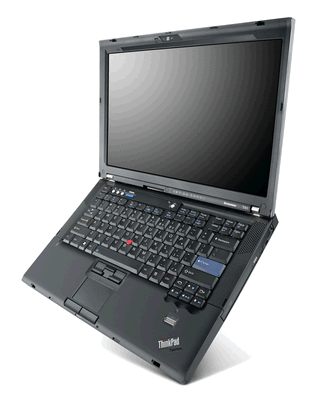
Although you already can purchase the Lenovo IBM ThinkPad T61 from EmperorLinux under its Toucan line, it's refreshing to see Lenovo developing preloaded Linux laptops as well. For this article, we were able to acquire a preview machine that should be available to the general public before Christmas 2007. To its credit, Lenovo has retained the original ThinkPad ergonomic quality in the T61. We liked the intelligent keyboard layout, the keyboard response and the presence of both a pointing stick and touchpad for navigating this machine. Furthermore, although we don't much appreciate that the battery juts out the back and that the casing is the same old plastic (and not a lighter alloy), the classic ThinkPad aura is easy to like. At 5.2 pounds, this machine would work for a road warrior seeking portable power.
Lenovo IBM ThinkPad T61
Our review ThinkPad T61 ran SUSE Linux Enterprise Desktop (SLED) and had a 14.1" WXGA+ (at 1440x900) display, an Intel Centrino Core 2 Duo T7700 at 2.40GHz, 2GB of RAM, 160GB hard drive, DVD+/-RW drive and an NVIDIA Quadro NVS 140M video card with 128MB of video RAM.
We caught Lenovo in product-development mode when reviewing the T61, which was evident in the hobbled state of its Linux-based functionality. Therefore, it is unfair to complain about the many things that aren't working just yet. My contact at Lenovo, despite his Tony Snow-worthy evasions, has assured me that its engineers are working quickly and furiously to provide full support for SUSE Linux Enterprise Desktop. Some issues in development include full support for the NVIDIA video card (for 3-D acceleration and Xgl/Compiz) and power management (suspend to disk and suspend to RAM). The machine we received had a fingerprint reader, which unfortunately will not be present on the Linux-based production machine.
Politics aside for a moment, it was a smart choice aesthetically and functionally for Lenovo to go with SLED. Not only is SLED an excellent, well-planned distribution with an attractive menu system and the sexy Xgl graphical environment, it offers useful applications, such as Novell AppArmor. At the time of this writing, Lenovo was unsure whether it will offer dual-boot or Linux-only machines.
Although we cannot yet fully judge whether Lenovo has scored a touchdown with the ThinkPad T61, it is clear that the company is trying hard, in cooperation with Novell/SUSE, to offer a top-quality Linux laptop with a competitive (and functional) feature set. We encourage Lenovo to continue its efforts over the long term and not just give Linux a halfhearted try, only to prophesy Linux's lack of viability.
Pros:
The most ergonomically pleasing machine of those tested.
Useful reading light.
Has both pointing stick and touchpad.
Cons:
EV-DO and 802.11n capability will not likely run under Linux.
The Windows Vista sticker hasn't been removed yet.
Wimpy 56 WH battery.
Support: TBA.
Price as tested: TBA.
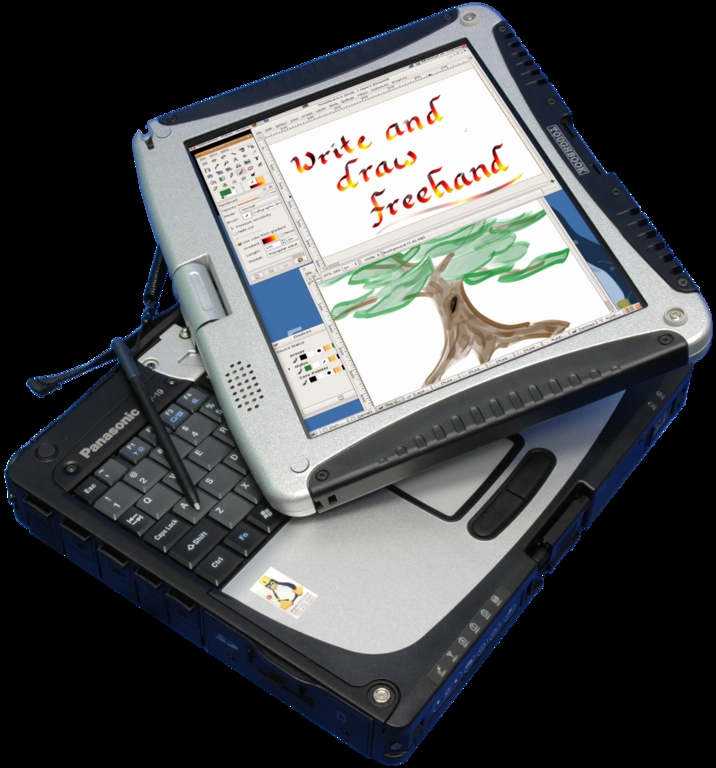
Because your company likely will be ponying up the $4,250 for this notebook, you should read on. The Wasp CF-19 is EmperorLinux's Linux-based iteration of the Panasonic Toughbook CF-19. Indeed, this tough cookie is no ordinary laptop. Built like an M1 Abrams tank (and used by the US military), the rugged Wasp CF-19 was a joy to review because we got to see how much thought and effort the Panasonic engineers put into creatively armoring a computer's exterior. The Wasp CF-19 is the kind of laptop to accompany you on the construction site, surveying job, research expedition or field maneuver. It has been tested independently as MIL-STD-810F (US military standard) compliant, meaning it can withstand punishment, such as a fall of one meter, 15,000 feet of altitude and an operating temperature range of –20 to 140 degrees Fahrenheit. Other tests include vibration, dust, humidity, water resistance, thermal shock and so forth.
EmperorLinux Wasp CF-19
Given its rugged exterior, the Wasp CF-19 is quite light at five pounds with its magnesium alloy casing. Other features include a shielded yet very daylight-readable 10.4" XGA display (1024x768), recessed and snugly capped ports, tablet with handwriting recognition, a tough swivel and a strong metal clasp that can secure the lid closed or in tablet-up position. The latchable compartment containing the Wi-Fi on/off switch, PC card slot, express card slot and SD reader is another smart addition.
Our test machine was configured as follows: Fedora Linux 7 + Windows XP dual-boot, 1.067GHz Intel Core Duo U2400 ultra-low voltage processor, 1.5GB of RAM, 80GB hard drive and no optical drive (an external USB DVD/CD-RW costs an extra $400).
As mentioned previously, EmperorLinux appears to be the most fanatical vendor as far as offering a rich Linux-based experience, and the Wasp CF-19 lets EmperorLinux show its stuff. In addition to expected features, such as working Fn keys, the Wasp CF-19 has a number of features that are atypical for Linux laptops—for example, the tablet functionality with screen rotation and cellular broadband (EV-DO or HSPDA) and GPS support work out of the box. The custom documentation also is excellent, explaining what does work (and how) and what does not work, saving the user precious time and headaches. If only EmperorLinux would add a custom menu like R Cubed's for custom application installation, system and kernel updates and direct support options, it'd have the best of all worlds.
Pros:
Tablet works flawlessly despite well-protected display; tablet also works out of the box.
Custom GNOME application to toggle tablet between landscape and portrait.
Energy Star-compliant.
Cons:
Be sure a machine this small will meet your needs.
Support/warranty: one year of free, unlimited phone and e-mail support from EmperorLinux and three years of hardware warranty from Panasonic included.
Price as tested: $4,250.
Both LinuxCertified and R Cubed Technologies offer this same ASUS Z84J platform system, a powerful, handsomely styled, mid-level desktop replacement with some nice multimedia boosts. Although the S-Video and HDMI outs will come in handy, the four speakers and subwoofer raised expectations but never rose above tinny computer audio. With its 17" widescreen display and nearly nine pounds of gravitational tug, this is a beast that generally stays put. In addition, although other ASUS machines offer excellent industrial design, less can be said for the Z84J, which feels a bit more Soviet-era than, say, the Dell Latitude due to its solid plastic (not metal or carbon-fiber alloy) construction. The keyboard is comfy enough; however, the touchpad buttons are sticky, and the body is a little bulky. On such a large spread of real estate, it also would be nice to have the option to choose between a pointing stick and touchpad, as Dell and Lenovo offer, but ASUS does not here. Similarly, it's surprising that the Z84J lacks nice features, such as indicator lights for Bluetooth and Wi-Fi or a Wi-Fi shutoff switch. Cellular broadband and 802.11n also are not options for this machine.

R Cubed XW1760 (ASUS Z84J)
The Linux Experience from R Cubed
Here is the configuration of the R Cubed test machine: Ubuntu Feisty Fawn, 17" WSXGA+ display, Intel Core 2 Duo T7500 2.2GHz processor, 2GB of RAM, 60GB 5,400rpm SATA hard drive, a DVD-RW Super-Multi drive and the NVIDIA G73M 7600 video card with 512MB of video RAM.
If you want to do more with this machine right out of the box, we recommend the R Cubed experience over LinuxCertified. R Cubed is a scrappy young company that seeks to offer a range of tools that aid in package installation and tech support. For instance, in the Applications menu of the installed Ubuntu Feisty Fawn distribution, R Cubed has its own custom menu item, which in addition to kernel, patch and system updates, offers a package installer for applications, such as Google Earth, VMware Server and multimedia applications with codecs. The system updater works without breaking any of R Cubed's customizations, and soon distribution upgrades will be available using this route. There also is a remote support option, which creates an SSH connection to R Cubed, allowing technicians to tunnel securely to the machine to gain shell or VNC access and resolve support issues. Regarding documentation, although R Cubed has a useful knowledge base on its Web site, nothing comes in the box beyond the invoice and login information. Although paper may be passé, we strongly feel that good printed materials specific to the machine in front of you never will go out of style.
Finally, an accurate price from R Cubed was unavailable, as the quoted price from R Cubed for this configuration did not match the last-minute check on the on-line configurator, and some minor hardware selections were unavailable. We regret this lack of information.
Pros:
Dual-boot is an option but only with Windows XP.
Cons:
No printed documentation.
No modem or Webcam support under Linux.
Heavy and bulky.
Support/warranty: one-year parts and labor.
Price as tested: see above for details.
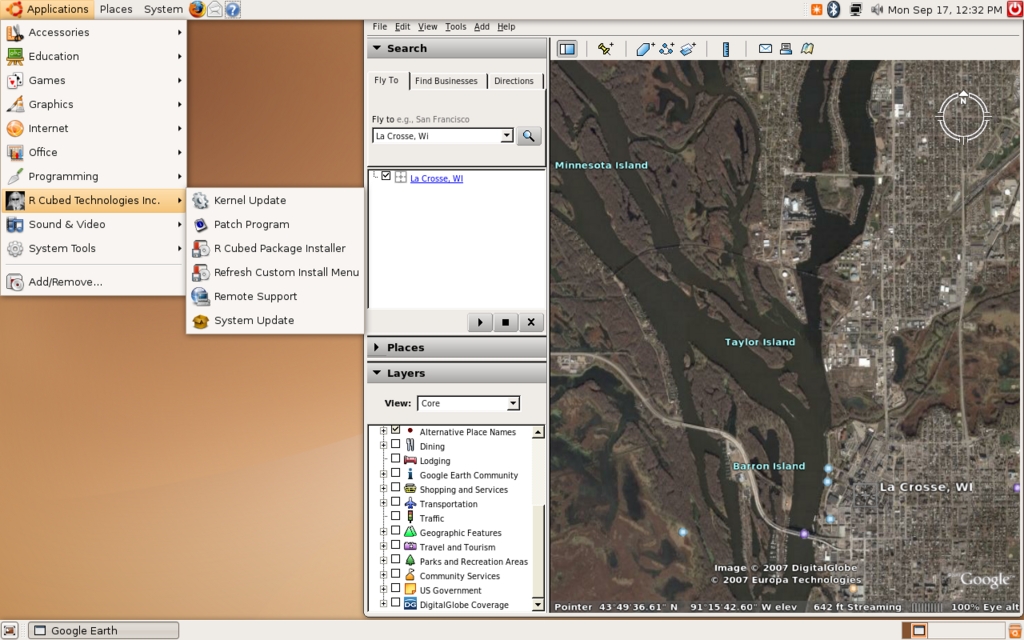
R Cubed Technologies provides a nicely customized desktop experience, including its own menu item for kernel and system updates, package installation, remote support and more.
The Linux Experience from LinuxCertified
Here is the configuration of the LinuxCertified test machine: 17" WSXGA+ display, Intel Core 2 Duo T7200 2.0GHz processor, 3GB of RAM, 60GB 7,200rpm SATA hard drive, a DVD-RW Super-Multi drive and the NVIDIA GeForce Go 7700 video card with 512MB of video RAM.
Getting this machine from LinuxCertified means getting a system that's working but with few added luxuries. Customization generally is up to you. Some nice surprises include preloaded Google Earth on the desktop and the myriad preloaded video and audio codecs. On the other hand, hibernation is not enabled, the Wi-Fi on/off function key doesn't work, and the Webcam is not supported. Unfortunately, LinuxCertified takes last prize for documentation—the on-line information is sparse, and nothing at all comes in the box.
Pros:
Dual-boot is an option but only with Windows XP.
Cons:
No printed documentation.
No modem or Webcam support under Linux.
Heavy and bulky.
Price as tested: $2,499, “Performance Bundle”.
The R Cubed XW1580 is the Linux edition of the ASUS S96S platform, preloaded with Ubuntu Feisty Fawn. Sporting a 15.4" WXGA widescreen display, the overall impression of the XW1580 is cheap chic—that is, a little sportier than the very low-end but definitely not Sony-VAIO sexy either. The XW1580's construction is solid, utilitarian and, at nearly seven pounds, heavy for its size. However, if you want to get a feature-filled laptop at a decent price—and you're not a road warrior—this may be your machine.

R Cubed XW1580 (ASUS S96S)
Our test machine came loaded with Ubuntu Feisty Fawn and equipped with an Intel Core 2 Duo T7300 2.0GHz processor, 2GB of RAM, 80GB 7,200rpm SATA hard drive, DVD-RW drive, and the NVIDIA GeForce 8600M GS with video card with 256MB of video RAM.
Like R Cubed's other machine reviewed here (the XW1760), you can expect an above-average, customized Linux experience with the XW1580. Unfortunately, although nearly all functionality exists under Linux, some of the same limitations as discussed with the XW1760 hold here—no Webcam or modem support under Linux.
Pros:
Dual-boot is an option but only with Windows XP.
S-Video TV output.
Cons:
Keyboard sags a bit when typing.
Left side has much unused real estate—why not stick in a USB port?
Touchpad buttons require a lot of pressure.
Support/warranty: one-year parts and labor included.
Price as tested: $1,447.
At the time of this writing, HPC Systems, a company better known for its servers and high-end workstations, was preparing to market a line of laptops preloaded with Linux. The V1J-Linux is HPC's first batter to the plate, and we can confidently say that HPC has gotten on base with a stand-up double. The V1J-Linux, which is a Linux-loaded ASUS V1J, is a well-built, attractive, full-featured laptop that will work well for those who put functionality over portability, though it is not a beast. It has a sleeker, more appealing design and sufficiently large (in our view) 15.4" WXGA screen when compared with its larger, bulkier cousin, the ASUS Z84J platform, which is found elsewhere in this article. One thing that helps this machine over the ASUS Z84J is its carbon alloy casing, which makes it much lighter (around six pounds) and visually appealing. This also was the only machine we tested with a spill-proof keyboard.
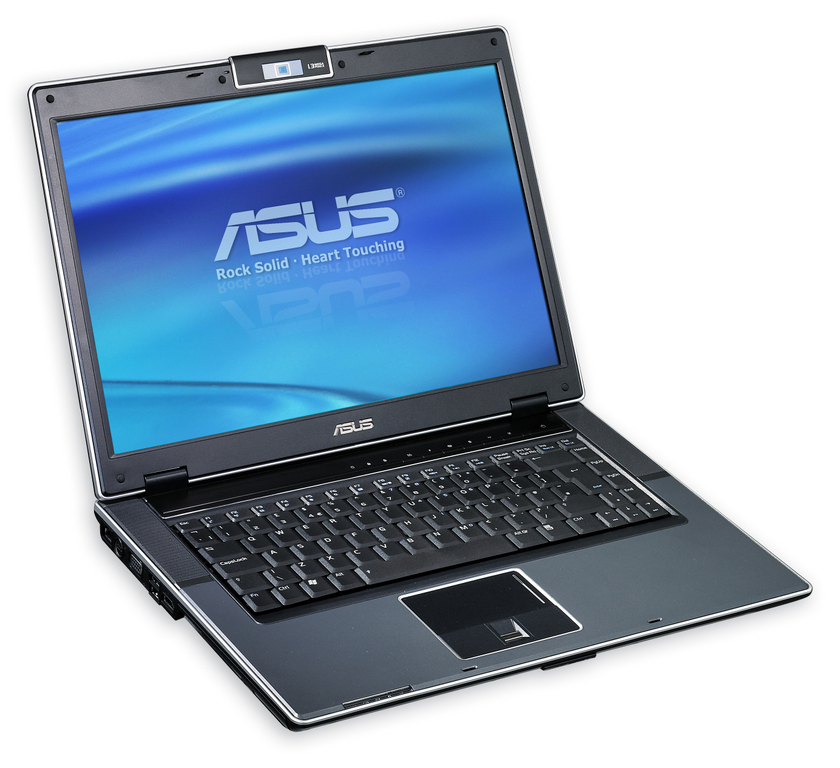
HPC Systems V1J-Linux (ASUS V1J)
Another bonus feature is the V1J-Linux's RoHS compliance, meaning that it meets the strict European Union specifications for levels of hazardous substances, such as lead, cadmium, mercury and others (see Resources for more information).
Our Ubuntu/Windows Vista Business test machine arrived with an Intel Core 2 Duo T7200 2.0GHz processor, 1GB of RAM, 120GB hard drive, a DVD-RW drive and the ATI RADEON X1700 video card with 256MB of video RAM.
Despite the fact that our review machine was preproduction, it is obvious that HPC Systems has the means and desire to offer a great Linux experience. Our V1J-Linux came dual-booted with Ubuntu Feisty Fawn and Windows Vista Business, with nearly every function working well, including fingerprint scanner, 3-D acceleration, FireWire, Fn keys and so on. Unfortunately, however, the built-in Webcam is not working, and we hope that someone someday will get these ASUS Webcams working once and for all.
Pros:
Sensible, ergonomic layout and strong multimedia features for a business machine (for example, S-Video and HDMI outs).
Excellent 15.4" display.
Ships with optical scrolling USB mouse.
Dual-boot with Windows Vista is an option.
Will ship with machine-specific documentation.
SDCard/MMC card slot.
Cons:
No Webcam support yet.
Support: three years of hardware support; three months of no-cost remote support; “best effort support” after three months.
Price as tested: $1,750.
Darn it! At the time of this writing, ASUS just pushed back the release of its forthcoming Eee PC from September to October 2007, making a review in time for this issue impossible. The Eee PC is a new, ultraportable, Linux-based laptop priced at $259 and up. The lower-end 700 model has 2GB of Flash storage and 256MB of RAM, and the juiced-up 701 model has 4GB of Flash storage and 512MB of RAM. Both models feature the following: preloaded Xandros Linux, Intel Celeron-M 900MHz processor, 7" display, 10/100Mbps LAN, 802.11b/g wireless, three USB 2.0 ports, MMC/SD card reader, VGA out, Windows XP compatibility/drivers, built-in camera (optional on the 700) and a 4-cell battery with three hours of runtime. There are no optical drives, and both models weigh in at two pounds. The word on the “blog street” appears to be that many otherwise Windows users would choose a Linux device for their mobile needs. ASUS projects that dealers should have the Eee PC by late October 2007.

ASUS Eee PC
Suggested retail price: starting at $259.
Although Dell has embraced Linux by offering laptops and desktops with Ubuntu preloaded, we suspect that most of the company is ambivalent at best about selling and supporting Linux machines. Most of the Linux-specialist companies responded promptly to our requests for review machines and information; however, a month's worth of pleading for the same from Dell resulted in no review machine, creative excuses and receipt of information only after a threat of negative publicity. Although the people at Dell are extremely friendly and competent, our impression is that Linux falls far down on their priority list. Furthermore, Dell's sole (yes, one!) Linux-based laptop discussed here offers far fewer options than its Windows counterpart. We fear that Dell will not support Linux with the same kind of passion that our Linux specialists do, resulting in a self-fulfilling prophesy along the lines of “Look, we tried Linux, but nobody bought it! We told you there was no market!” Unless Dell can weave Linux into its “corporate DNA”, we predict it will fail in this desktop endeavor.
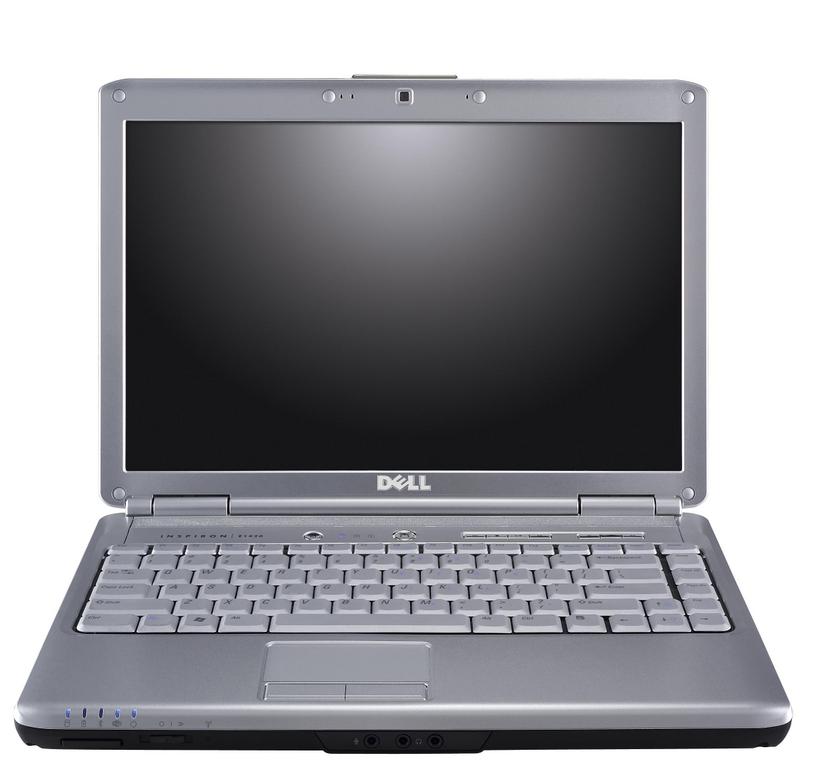
Dell Inspiron 1420
Despite those criticisms, it is undeniable that Dell offers its popular Inspiron 1420 N (the N designates the Linux version) laptop with Linux preloaded for the same price as its Windows counterpart. More machines may be on the way, but we received no firm commitment about this. In any case, although we were unable to get our hands on a review machine, other reviews have billed the Inspiron 1420 as a workhorse machine that offers a huge range of options and strikes the right balance between display size (14.1" widescreen) and portability (six pounds).
Our virtual test configuration included Ubuntu Feisty Fawn, an Intel Core 2 Duo T5250 1.5GHz processor, 2GB of RAM, a 14.1" widescreen display at 1280x800, 120GB 5,400rpm SATA hard drive, Intel Graphics Media Accelerator X3100, CD-RW/DVD player combo drive and, in honor of John Waters, a “Flamingo Pink” casing.
Yes, Dell, we Linuxers are grateful that you now sell a preloaded Linux laptop. Nevertheless, we think you can do better, because you're still not giving us the Full Monty. Unfortunately, the Linux edition of the Inspiron 1420 has far fewer options than its Windows Vista cousins. Here are some differences between the Windows and Linux versions of the 1420:
The default hard drive with Windows is 120GB, with a maximum size of 320GB; with Linux, the default is only 80GB and maximum is 160GB. (Insider tip to Dell: Linux users want big storage!)
On Windows, you can opt for the NVIDIA GeForce 8400M GS or Intel Graphics Media Accelerator X3100 video cards; on Linux, only the latter is available.
Each of the following features is available for Windows but not Linux: mobile broadband (EV-DO or HSDPA), Webcam, Bluetooth support and Blu-ray drive.
What's more, the only Linux-based OS offered is Ubuntu 7.04, with no dual-boot option available—a major drawback. Furthermore, our contact at Dell tells us that all the functionality works fine under Linux, including the Fn keys, except that the integrated multicard memory readers won't be supported until a later date. Regarding support, Dell offers its typical range of warranties on its hardware for up to four years. As for the software side, Canonical is the entity performing the support with options ranging from no support up to one year of full OS, application and networking support.
Support on configured machine: one-year in-home warranty with service, parts and labor. Also includes 24x7 phone support.
Sample configuration: $1,049.
We are disappointed that some great companies decided not to send us evaluation machines and get some free publicity. Despite the snub (yes, you are forgiven because we know you're busy selling computers), we encourage you to consider these firms when making your next Linux laptop purchase.
CompAmerica: this is a very interesting company that, despite not marketing itself within the Linux community, is fully committed to Linux. CompAmerica's CEO, Jack Schulman, is a driven 30+ year industry veteran who has shared with us his passion for meeting the demanding needs of discriminating Linux users. Jack told us that CompAmerica offers Linux on every laptop it sells, including its economy, high-end and “super-exotic” series. One example from the latter is the 20" Tiger Shark 9500 with up to 4GB of RAM, dual NVIDIA Quadro FX Go 2500M GPUs, two hard drives and two optical drives. The option to choose Linux is not marketed heavily on the CompAmerica Web site, but at least the option exists.
Polywell Computers: Polywell offers a wide range of preloaded Linux laptops in nearly every category, such as the 12.1" 4.1-pound PolyNote M212SC ultraportable, the 13.3" 4.2-pound PolyTablet tablet notebook, and the many business and specialty laptops with displays from 14" all the way up to 20". In addition, the five different laptops in the V series all have interchangeable parts (for example, battery packs, optical drives and hard drives).
ThinkMate: ThinkMate features its a versatile Jetbook line of business-oriented 15.5" and 17" laptops. You can load up your laptop with Fedora 7 or SUSE 10.2 on the Linux side and Windows Vista or XP on the Redmond side—a nice touch. All laptops come with a three-year warranty.
Sub300.com/Sub500.com: Although Toronto's Sub300.com/Sub500.com is shy of the press, it has long been a favorite destination for bargain-hunting hardware aficionados. This no-frills firm's laptop offering consists of two configurations of the same ultraportable model: a 3.1-pound device with a 12.1" TFT display running Linspire (its motto is “No Microsoft Mess”), and it maxes out at $1,200. The price is a little steep considering the lack of built-in optical drive and low-end processors (1GHz Via Centaur or Intel Pentium M Centrino 1.4GHz). A rugged notebook to compete with the Panasonic Toughbook also is in the works at the time of this writing.
We hope that this information, although partial, will assist in planning your next purchase of a preloaded Linux laptop. You should now have a better idea of what companies sell preloaded Linux laptops, what key models they sell, and how features, functionality and prices vary among models. Although we Linux fanatics cannot get every specific laptop model we want, with some research, most of us can find a machine that gives us the functionality we demand.
You can find a machine you want due to the plethora of companies that now offer Linux laptops, and that number is sure to grow and provide more options from which to choose. Because of this variety, differences exist among vendors in the devices, features, dual-boot policies, prices, extra services, warranties and Linux-based functionality they offer. We cannot recommend strongly enough that you do your homework and keep an open mind. If you follow this advice, you should find yourself in front of a Linux laptop that will keep you productive and happy for years to come. Good luck!
Resources
EmperorLinux: www.emperorlinux.com
Lenovo: www.lenovo.com
R Cubed: www.shoprcubed.com
HPC Systems: www.hpcsystems.com
ASUS Eee PC: www.asuseeepc.com
CompAmerica: www.compamerica.com
Polywell: www.polywell.com
ThinkMate: www.thinkmate.com
Linux on Laptops: www.linux-laptop.net
RoHS Environmental Standard: www.rohs.gov.uk
James Gray is Linux Journal Products Editor and a graduate student in environmental science and management at Michigan State University. A Linux enthusiast since the mid-1990s, he currently resides in Lansing, Michigan, with his wife and cats.
