
Portable Hard Disk Recorder How-To
Podcasting is great. More and more people have discovered Audacity to record their podcasts, and in many ways it's ideal. It's like a toe in the shallow end of the recording and producing pool. With a podcast, you rarely need more than a mono channel—maybe a stereo setup if you're recording with someone else in the studio. But, when you get your feet wet with basic dialogue podcasting, it's hard to stop.
After all, there are so many things in the world worth recording and podcasting. There are podcast novels, such as those put out by the folks at podiobooks.com, and a good production can run into dozens of tracks between sound effects, guest voices, music and layering.
If you've gone that far, why not go the rest of the way with a full-cast radio drama? Even if you aren't a writer, plenty of plays in the public domain work very well for audio. If you're of a more musical bent, you could set up a recording session for your kid's garage band. However, once you get into doing complex live audio, such as recording full-cast radio dramas, concerts or stage plays, you're going to need more than Audacity. You're going to need a full-fledged portable recording studio.
To record a moderate-sized stage play, for example, your recording rig must capture multiple tracks simultaneously and independently while keeping the separate streams in sync. There's nothing quite so stressful as coming home from an excellent performance riding the mixing board to discover that, despite what you were hearing in your headphones, you've inadvertently created phase cancellation in your mixdown with your microphone placement. The data you don't have on your tape or hard drive is data lost forever—data that wouldn't have been lost if the eight-mic zone system had run to a multitrack recorder instead of a stereo mixdown. If you had the individual tracks, you could control for phase and positioning problems, sweeten the mix and even create a surround-sound environment. But, with all of the mics mixed down to stereo, what you hear is probably the best you'll ever get.
Moving from simple stereo recordings on Audacity to doing sophistocated multitrack recordings and mixes is, thankfully, a natural next step on Linux, but it requires some initial cash outlay. First, it's off to the great electronics mall to grab the appropriate hardware to build your studio. Resist your urge to indulge in one of the latest gamer's sound cards; they look sexy, but you're never going to get them to record in anything better than stereo. No, for our purposes, you'll want a good Pro Audio card that's well supported. It's not a cheap move, but for about $500 you can choose from a good range of interfaces that are exceptionally well supported. Of course, you won't want to chuck the sound card your computer already has; a Pro Audio card is designed to interface with mixing boards, digital audio devices and public-address systems—it may not even include a plug for your speakers. For our purposes here, its central feature is that it pipes multiple simultaneous nonmultiplexed streams of audio to your computer, often including MIDI.
It's one thing to build a multitrack hard disk recorder out of your desktop computer—the choice of hardware for your interfaces is embarrassingly extensive, the price range quite broad, and there is far more Linux support than you'd expect in terms of user community. But, unless your home recording studio is both uncommonly large and very well soundproofed, you may have some problems with a desktop HDR. Who wants to lug a desktop computer and monitor around in order to do field recording? If you had a spare $1,500 you could pick up a multitrack appliance, such as the ones made by Alesis and available at fashionable Guitar Centers everywhere, but why bother? You'd still need the Pro Audio card in your desktop to pipe the data back into the computer for mixing, so the total cash outlay is more than $2,000—much too large for even a dedicated hobbyist.
But have faith, all is not lost! In my case, I needed a multitrack portable recording rig to do client site recording of stage shows and panel discussions, and because of the variety of voices and the prevalence of shoddy mic techniques in the world, I needed to preserve the option of postproduction in each individual audio track. I looked into the commercial HDRs, particularly the Alesis models, as I have previously used Alesis' ADAT tape-based system extensively. The advantage of these devices is that you turn them on and they just work—they're firmware-controlled and they operate in hard real time, which is an absolute must for multitrack recording. Even so, in the end, they were not worth the money. Their capabilities are too limited for my needs—most are limited to 48KHz sample rates, which is fine for dialogue, but far too low for recording sound effects, complex movement in a space or music—the 48KHz sample rate simply can't capture the fine high-end detail and phase information that make such sounds distinct (explaining the audiological reasons behind this is beyond the scope of this article, but a quick read on the basics of acoustical sampling will give you the background you need). I needed a better solution.
Fortunately, I have an old laptop lying around, and Linux—unlike some other popular operating systems I could name—has real-time hardware preemption, which is essential if one wants to build a hard disk recorder. A laptop, of course, will not accept PCI or PCI Express cards, so the choice of Pro Audio interfaces is limited to the external—something that can plug in either to the CardBus slot or the USB or FireWire port.
The list of compatible external audio interfaces is far shorter than the list of internal cards available for desktops, but it's still long enough to require a lot of research. I actually do have an old Swissonics USB Studio D on my rack, which is nicely supported by ALSA and normally sits connected to my desktop HDR station, but it's too big and draws too much power to lug around to remote locations where I might have to run off my car battery.
For my purposes, I needed something around $600, with enough inputs that I could mic a stage play—eight analog inputs, minimum. This automatically culled out most of the FireWire-based interfaces. Even though the FireWire boxes from Presonus can draw all their power from the FireWire bus and let your interface run off the laptop battery—a big plus—the boxes in my price range tend to be limited to four or six tracks. So, on the advice of Ardour Project maintainer Paul Davis (www.ardour.org), I checked out the RME Hammerfall HDSP Multiface 2, which is a CardBus-based device with a very nice external breakout box. It helps that its Linux drivers are written and maintained by Davis, who is no mean slouch when it comes to writing tight code. It also helps that I've got one of RME's cards in my desktop HDR, so I knew they were likely to work handsomely. RME's mixing and control panel software for the HDSP is every inch as professional and easy to use as its Windows and Macintosh analogs.
After plugging this interface in to my laptop and configuring it properly, I have a multitrack hard disk recorder that can simultaneously record 24 tracks at a maximum sample rate of 96KHz, well above the maximum available sample rate on far more expensive commercial HDRs, with more available input tracks.
As mentioned previously, multitrack audio recording ideally requires real-time access to the hardware, but this support is not built in to the kernel by default on most Linux distributions. It's an option that must be enabled at compile time, or, if you're running an older kernel, must be hand-patched into the source before compiling. Although I have no problem recompiling my kernel for a good cause, it's not something I like doing for the sake of pure amusement.
Fortunately, a number of distributions are on the market, geared particularly for multimedia production, that come with real-time priority enabled, with the distribution binaries built with all the architecture-specific and real-time optimizations turned on. Planet CCRMA (Fedora-based), DeMuDi, Ubuntu Studio and 64 Studio (all Debian-based) all come with things set up this way, and if you're building a field recorder from scratch or don't mind re-installing the operating system, they are all excellent starting points for your system. Although I have used all of them and find them all quite capable, I ultimately chose Ubuntu Studio for the sake of consistency with the rest of my platforms—I run Ubuntu flavors on most of my workstations, and even though it's well tuned for real-time use, Ubuntu Studio is more of a general-purpose distribution than is my other favorite, 64 Studio.
Ubuntu Studio is currently in the Debian Feisty iteration, which presents a problem when working with the Multiface 2, as the Ubuntu ALSA version included doesn't contain the correct firmware to activate the hardware. To remedy this, however, a two-pronged attack is required. First off, the ALSA firmware loader, which is not installed by default, needs to be loaded—a task easily done with apt-get. Once that's done, loading the firmware still fails because of the bug in the bundled ALSA version. Heading over to alsa-project.org and downloading, building and installing the v.1.1.4 or better firmware fixes this problem neatly. Once that's done, restart the computer. So long as the rest of the default packages are installed (which include particularly all the HDSP tools), the system should recognize the interface automagically.
To test it, open the hdspmixer utility (Figure 1), plug in a microphone or instrument, and do a levels test. Keep this mixer open, as it is your primary first-level control to govern what's coming into your system.
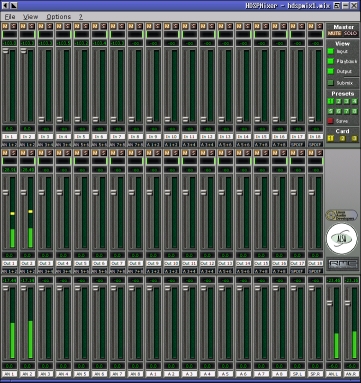
Figure 1. hdspmixer Utility
Now that the hardware is up and running, it's time to get the software whipped into shape. Pro Audio production on Linux is handled entirely through the JACK Audio Connection Kit, which allows software to access the hardware in real time through the real-time-enabled kernel. On the studio distributions, this software is installed by default, although if you intend to use the latest-and-greatest multitrack recording software we'll examine in a moment, you need to upgrade to a later version of JACK than is currently included in Ubuntu Studio.
To start JACK from the command line, enter jackd -R -d alsa -d hw:1 (hw:1 denotes the second sound card in your system, which will almost always be correct when you're dealing with a laptop, as it has a built-in sound card). Once that's done, start up QJACKCtl or another one of the graphical patchbay clients—you'll need it (Figure 2).

Figure 2. The patchbay is used for routing sound from the hardware into the applications, from one application to another, and then back out to hardware outputs.
When it comes to multitrack recording on Linux, one project shines above and beyond all the other audio recording software available for the platform. That project, Ardour, is maintained by Paul Davis and is unabashedly geared for professional audio engineers. Like Blender, which has a naked aim to be a free professional 3-D finishing system for the masses and is designed with professionals in mind, so too is Ardour aiming squarely for audio professionals, with an interface design borrowed from programs like ProTools and then tweaked with an eye toward improving upon it. As such, its interface is daunting and obtuse for the newbie, but it operates with great efficiency and transparency once you get acclimated (Figure 3).
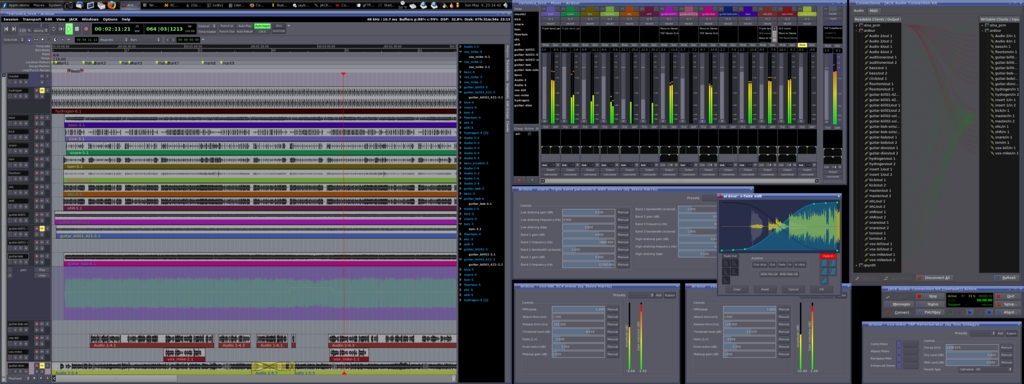
Figure 3. Ardour
The version of Ardour that ships with the current studio distributions at the time of this writing is version 0.99, which lags behind the current release, now comfortably into 2.0 territory. For most purposes, 0.99 is fine, though some of the improvements in version 2.0 are ones you'll want to take advantage of eventually. If you want to get up and running in the quickest order, start the version that comes with your distro, connect the HDSP patchbay outputs to the Ardour inputs, and you're up and running (Figure 4).
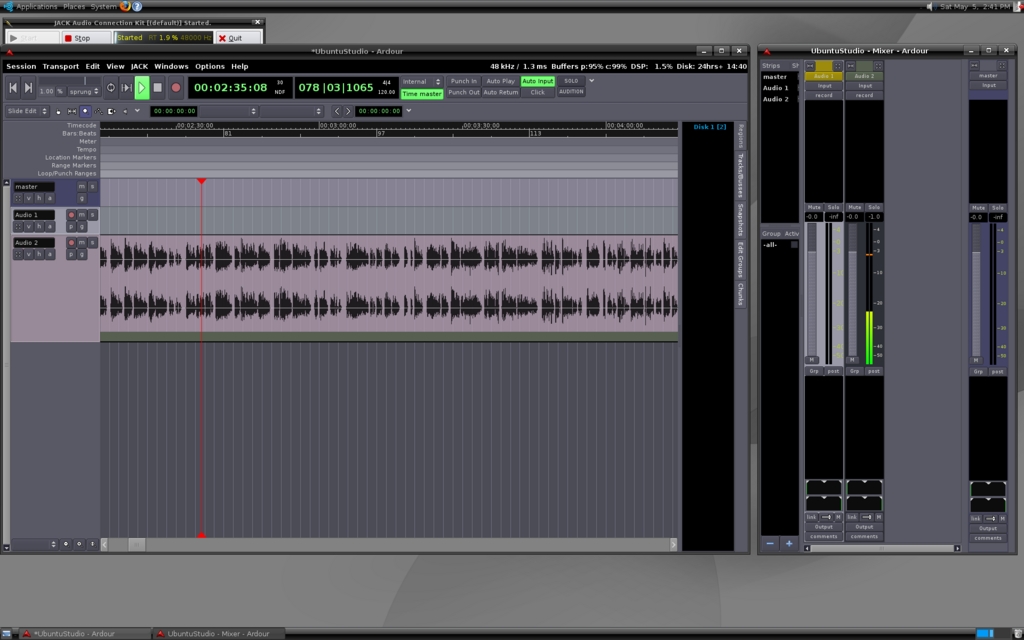
Figure 4. Ardour Up and Running
If, on the other hand, you want to use Ardour 2.0, you need to do the requisite download/compile/install routine for both the new version of JACK and for Ardour, and you will not have to start JACK or QJACKCtl before starting Ardour—the new version of Ardour has a JACK control interface built in. In either case, when you're up and running to this point, you're ready to rock and roll. Plug your microphones or instruments to your breakout box, and begin recording. But, keep the manual wiki handy until you get familiar with things!
Three years ago, this project would have been a royal pain in the hind end. Although the Multiface has always been Linux-compatible, once upon a time, doing real-time audio on any hardware required a lot of fancy command-line tricks and kernel recompilation. The plethora of studio distributions in the last couple years has radically changed the process and has brought the most powerful parts of the Linux multimedia subsystem into the reach of people who are power users and hobbyists, rather than remaining in the domain of kernel hackers. Thanks to the power of Linux and open-source software, for the cost of an old laptop and a new audio interface, you own a proper, full-featured, multitrack digital audio field recorder. Go forth, record, edit, create and compress!
Some Problems with Digital Audio
As you go about your recording, you're going to discover some of the limits of digital recording, such as the fact that current technology doesn't allow for sample rates high enough to reproduce cymbals and other sounds with high, clear treble accurately—sounds you won't run into when recording voices, but you will encounter in music and sound effects. To better understand how digital sampling works, and how you can use sound reinforcement and acoustic techniques to overcome some of those limitations, pick up the Yamaha Sound Reinforcement Handbook. It will help you understand how audio reinforcement works and how to compensate for such problems.
Resources
Laptop-compatible Pro Audio interface support is spotty and hard to find accurate information on, but an excellent place to start is the FFADO Project at www.ffado.org.
The other place for good information is the ALSA Project hardware database at www.alsa-project.org.
For more information about tweaking the RME Multiface 2, see the HDSP How-To at pd.klingt.org/files/hdsp-howto.html.
Dan Sawyer is the founder of ArtisticWhispers Productions (www.artisticwhispers.com), a small audio/video studio in the San Francisco Bay Area. He has been an enthusiastic advocate for free and open-source software since the late 1990s, when he founded the Blenderwars filmmaking community (www.blenderwars.com). Current projects include the independent SF feature Hunting Kestral and The Sophia Project, a fine-art photography book centering on strong women in myth.
