
Distributed Compiling with distcc
One of the most frustrating aspects of open-source development is all the time spent waiting for code to compile. Right now, compiling KDE's basic modules and libraries on a single machine takes me around three hours, and that's just to get a desktop. Even with a core 2 duo, it's a lot of time to sit around and wait.
With another pair of core duo machines at my disposal, I'd love to be able to use all of their processing power combined. Enter distcc.
distcc is a program that allows one to distribute the load of compiling across multiple machines over the network. It's essentially a front end to GCC that works for C, C++, Objective C and Objective C++ code. It doesn't require a large cluster of compile hosts to be useful—significant compile time decreases can be seen by merely adding one other similarly powered machine. It's a very powerful tool in a workplace or university environment where you have a lot of similar workstations at your disposal, but one of my favourite uses of distcc is to be able to do development work on my laptop from the comfort of the café downstairs and push all the compiles up over wireless to my more powerful desktop PC upstairs. Not only does it get done more quickly, but also the laptop stays cooler.
It's not necessary to use the same distribution on each system, but it's strongly recommended that you use the same version of GCC. Unless you have set up cross-compilers, it's also required that you use the same CPU architecture and the same operating system. For example, Linux (using ELF binaries) and some BSDs (using a.out) are not, by default, able to compile for each other. Code can miscompile in many creative and frustrating ways if the compilers are mismatched.
The latest version of distcc, at the time of this writing, is 2.18.3. There are packages for most major distributions, or you can download the tarball and compile it. It follows the usual automake procedure of ./configure; make; make install; see the README and INSTALL files for details.
distcc needs to be called in place of the compiler. You simply can export CC=distcc for the compilers you want to replace with it, but on a development workstation, I prefer something a little more permanent. I like to create symlinks in ~/bin, and set it to be at the front of my PATH variable. Then, distcc always is called. This approach used to work around some bugs in the version of ld that was used in building KDE, and it is considered to have the widest compatibility (see the distcc man page for more information):
mkdir ~/bin
for i in cc c++ gcc g++; do ln -s  `which distcc` ~/bin/$i; done
If ~/bin is not already at the beginning of your path, add it to your shellrc file:
export PATH=~/bin:$PATH
setenv PATH  ~/bin:$PATH
Each client needs to run the distcc dæmon and needs to allow connections from the master host on the distcc port (3632). The dæmon can be started manually at boot time by adding it to rc.local or bootmisc.sh (depending on the distribution) or even from an inetd. If distccd is started as an unprivileged user account, it will retain ownership by that UID. If it is started as root, it will attempt to change to the distcc or nobody user. If you want to start the dæmon as root (perhaps from an init script) and change to a user that is not distcc or nobody, the option -user allows you to select which user the dæmon should run as:
distccd -user jes -allow 192.168.80.0/24
In this example, I also use the -allow option. This accepts a hostmask in common CIDR notation and restricts distcc access to the hosts specified. Here, I restrict access only to servers on the particular subnet I'm using on my home network—machines with addresses in the 192.168.80.1–192.168.80.254 range. If you are particularly security-conscious, you could restrict it to a single address (192.168.80.5) or any range of addresses supported by this notation. I like to leave it pretty loose, because I often change which host is the master depending on what I'm compiling and when.
Back on the master system on which you plan to run your compiles, you need to let distcc know where the rest of your cluster is. There are two ways of achieving this. You can add the hostnames or IP addresses of your cluster to the file ~/.distcc/hosts, or you can export the variable DISTCC_HOSTS delimited by whitespace. These names need to resolve—either add the names you want to use to /etc/hosts, or use the IP addresses of the hosts if you don't have internal DNS:
192.168.80.128 192.168.80.129 localhost
The order of the hosts is extremely important. distcc is unable to determine which hosts are more powerful or under less load and simply distributes the compile jobs in order. For jobs that can't be run in parallel, such as configure tests, this means the first host in the list will bear the brunt of the compiling. If you have machines of varying power, it can make a large difference in compile time to put the most powerful machines first and the least powerful machine last on the list of hosts.
Depending on the power of the computer running distcc, you may not want to include localhost in the list of hosts at all. Localhost has to do all of the preprocessing—a deliberate design choice that means you don't need to ensure that you have the same set of libraries and header files on each machine—and also all of the linking, which is often hugely processor-intensive on a large compile. There is also a certain small amount of processing overhead in managing shipping the files around the network to the other compilers. As a rule of thumb, the distcc documentation recommends that for three to four hosts, localhost probably should be placed last on the list, and for greater than five hosts, it should be excluded altogether.
Now that you have your cluster configured, compiling is very similar to how you would have done it without distcc. The only real difference is that when issuing the make command, you need to specify multiple jobs, so that the other machines in the cluster have some work to do. As a general guide, the number of jobs should be approximately twice the number of CPUs available. So, for a setup with three single-core machines, you would use make -j6. For three dual-core machines, you would use make -j 12. If you have removed localhost from your list of hosts, don't include its CPU or CPUs in this reckoning.
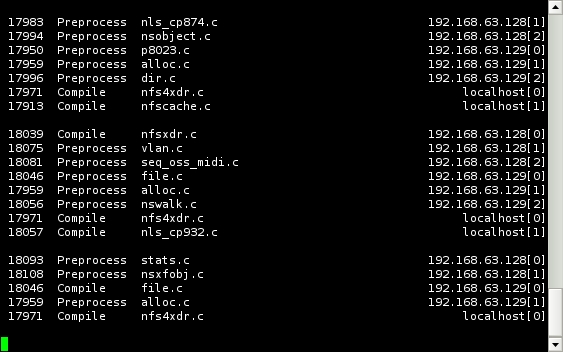
Figure 1. distccmon-text Monitoring a Compile
distcc includes two monitoring tools that can be used to watch the progress of compile jobs. The console-based distccmon-text is particularly excellent if your master host is being accessed via SSH. As the user the compile job is running as, execute the command distccmon-text $s, where $s is the number of seconds at which you would like it to refresh. For example, the following:
distccmon-text 5
updates your monitor every five seconds with compile job information.
The graphical distccmon-gnome is distributed as part of distcc if you compile from source, but it may be a separate package depending on your distribution. It provides similar information in a graphical display that allows you to see at a glance which hosts are being heavily utilised and whether jobs are being distributed properly. It often takes a few tries to get the order of hosts at the most optimal—tools like distccmon-gnome make it easier to see whether machines are being under- or over-utilised and require moving in the build order.

Figure 2. Graphical distcc Monitoring
distcc relies on the network being trusted. Anyone who is able to connect to the machine on the distcc port can run arbitrary commands on that host as the distcc user. It is vitally important that distccd processes are not run as root but are run as the distcc or nobody user. It's also extremely important to think carefully about your -allow statements and ensure that they are locked down appropriately for your network.
In an environment, such as a home or small workplace network, where you're security firewalled off from the outside world and people can be made accountable for not being good neighbours on the network, distcc is secure enough. It's extremely unlikely that anyone could or would exploit your distccd hosts if they're not running the dæmon as root and your allow statements limit the connecting machines appropriately.
There is also the issue that those on the network can see your distcc traffic—source code and object files on the wire for anyone to reach out and examine. Again, on a trusted network, this is unlikely to be a problem, but there are situations in which you would not want this to happen, or could not allow this to happen, depending on what code you are compiling and under what terms.
On a more hostile network, such as a large university campus or a workplace where you know there is a problem with security, these could become serious issues.
For these situations, distcc can be run over SSH. This ensures both authentication and signing on each end, and it also ensures that the code is encrypted in transit. SSH is typically around 25% slower due to SSH encryption overhead. The configuration is very similar, but it requires the use of ssh-keys. Either passphraseless keys or an ssh-agent must be used, as you will be unable to supply a password for distcc to use. For SSH connections, distccd must be installed on the clients, but it must not be listening for connections—the dæmons will be started over SSH when needed.
First, create an SSH key using ssh-keygen -t dsa, then add it to the target user's ~/.ssh/authorized_keys on your distcc hosts. It's recommended always to set a passphrase on an SSH key for security.
In this example, I'm using my own user account on all of the hosts and a simple bash loop to distribute the key quickly:
for i in 192.168.80.120 192.168.80.100; do cat ~/.ssh/id_dsa.pub
 ↪| ssh jes@$i 'cat - >> ~/.ssh/authorized_keys'; done
To let distcc know that it needs to connect to the hosts under SSH, modify either the ~/.distcc/hosts file or $DISTCC_HOSTS variable. To instruct distcc to use SSH, simply add an @ to the beginning of the hostname. If you need to use a different user name on any of the hosts, you can specify it as user@host:
localhost @192.168.80.100 @192.168.80.120
Because I'm using a key with a passphrase, I also need to start my SSH agent with ssh-add and enter my passphrase. For those unfamiliar with ssh-agent, it's a tool that ships with OpenSSH that facilitates needing to enter the passphrase for your key only once a session, retaining it in memory.
Now that we've set up SSH keys and told distcc to use a secure connection, the procedure is the same as before—simply make -jn.
This method of modifying the hostname with the options you want distcc to honour can be used for more than specifying the connection type. For example, the option /limit can be used to override the default number of jobs that will be sent to the distccd servers. The original limit is four jobs per host except localhost, which is sent only two. This could be increased for servers with more than two CPUs.
Another option is to use lzo compression for either TCP or SSH connections. This increases CPU overhead, but it may be worthwhile on slow networks. Combining these two options would be done with:
localhost 192.168.80.100/6,lzo
This option increases the jobs sent to 192.168.80.100 to six, and it enables use of lzo compression. These options are parsed in a specific order, so some study of the man page is recommended if you intend to use them. A full list of options with examples can be found on the distcc man page.
The flexibility of distcc covers far more than explained here. One popular configuration is to use it with ccache, a compiler cache. distcc also can be used with crossdev to cross-compile for different architectures in a distributed fashion. Now, your old SPARC workstation can get in on the act, or your G5 Mac-turned-Linux box can join the party. These are topics for future articles though; for now, I'm going to go play with my freshly compiled desktop environment.
Jes Hall is a UNIX systems consultant and KDE developer from New Zealand. She's passionate about helping open-source software bring life-changing information and tools to those who would otherwise not have them.
