
The Ultimate Linux Box
What kind of computer would you build if you decided to spoil yourself, but keep your spending below the big price differential that occurs when you buy the next best thing? We put together a box based on that very principle, and it packs enough power to last years into a tank of a case. Then, we trimmed it with a beautiful 24" display, phat speakers, keyboard and mouse. The final product comes in at $3,887 US, with lots of wiggle room to save money on the pieces of the system you may consider more than you need.
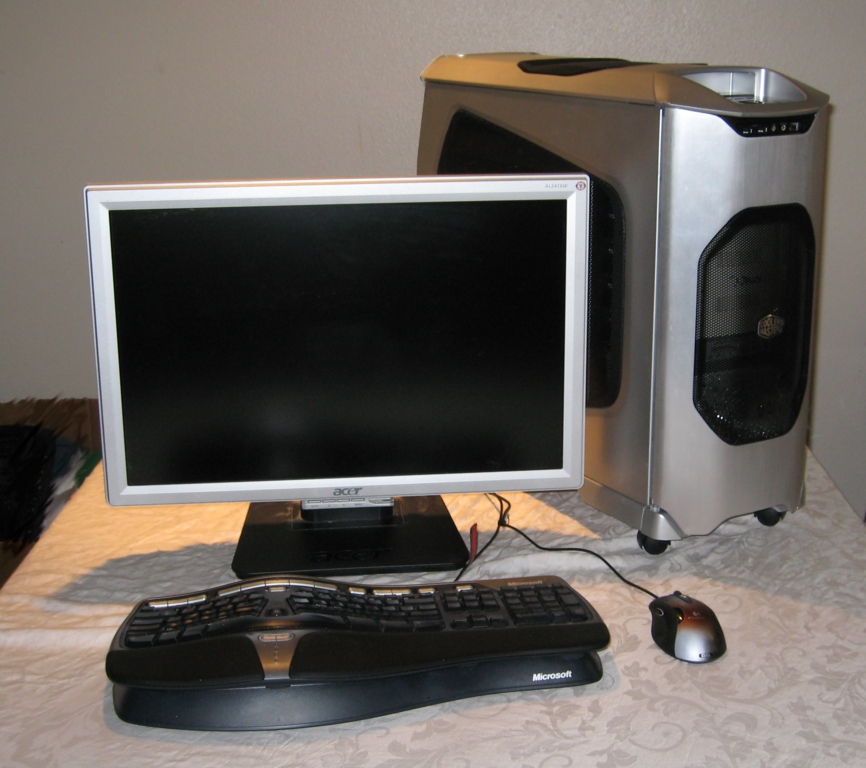
Figure 1. Ultimate Linux Box
Heck, it's almost all more than you need, but if we picked anything less, it wouldn't be the Ultimate Linux Box, would it? If your significant other questions your wisdom, you always can fall back on the following speaker analogy: why buy speakers that have a frequency response outside the range of human hearing? These speakers are more likely to perform well within the range of human hearing, right? And, that's why you indulge in overkill for the Ultimate Linux Box. Maybe you won't push it to its limits, but it will perform better within the limits of your work habits, right? Let me know if your significant other buys the argument. (Don't mention that whatever you buy will be obsolete in six months.)
Don't worry if you get “no” for an answer, or if you're strapped for cash. We didn't forget you. We tossed together a Penultimate Linux Box that totals less than $2,000 US (see The Penultimate Linux Box sidebar). It still packs an amazing amount of power. In fact, even the Penultimate Linux Box leaves wiggle room for saving money if you can get by with a slower CPU or display card. As you shave off options, you also can shave the price off the case and power supply.
But, that's not why most of you are reading this, I hope. You want to drool, and we chose some awesome hardware to get those juices flowing. It all revolves around a stunning ASUS motherboard with an Intel Core 2 Quad processor and 4GB of RAM, coupled with a 3ware RAID controller and RAID cage with four 320GB drives. Add one of the latest, greatest display cards, and you've eliminated performance bottlenecks at every turn.
Keep in mind that all prices are as of the time of writing of this article. Prices drop quickly, so you may be able to purchase better hardware for the same price or the same hardware for less cash. Consider also that products get discontinued (our first display card was discontinued a week after we tried it), and that vendors slipstream changes into hardware. Slipstreamed changes mean you may not get exactly what we tried even if you buy the same make and model of any given piece of the box.
Now that you've been forewarned, read on for the details about our 50-gallon drum of butt-kicking hardware.
The Ultimate Linux Box
Motherboard
ASUS Striker Extreme LGA 775 NVIDIA nForce 680i SLI ATX
6 x 3.0Gb/s SATA (internal)
2 x 3.0Gb/s SATA (external)
1333/1066/800MHz front side bus
DDR2 800
Maximum 8GB memory, dual-channel
Three PCI Express slots, two of them for SLI
Dual 10/100/1000Mbps LAN
SupremeFX audio
Onboard switches (CMOS clear, Power, Reset)
Price: about $330
CPU
Intel Core 2 Quad Q6600 Kentsfield 2.4GHz
Model BX80562Q6600
Socket: LGA 775
FSB: 1,066MHz
L1 Cache: 64KB+64KB
L2 Cache: 2 x 4MB
MMX, SSE, SSE2, SSE3, SSE4, EM64T
Price: about $515
Memory
Patriot eXtreme Performance 4GB (2 x 2GB modules) 240-pin DDR2 SDRAM
Timing 5-5-5-12
Price: about $250
RAID
3ware 9650SE-4LPML PCI Express
4 SATA II controller card
RAID: 0, 1, 5, 10, Single, JBOD
Price: about $335
3ware RDC-SATA Internal RAID Drive Cage
Three cooling fans
Four drives
Requires three 5.25" drive form-factor slots
Price: about $200
Note: combination prices available for RAID card + cage: about $500
Disk Drives
Western Digital WD3200AAKS 320GB 3.0Gbps drives x 4
Price each: about $90; total price: about $360
NEC Black 16X DVD+R Burner
Price: about $30
Display Card
PNY VCG8800UXPB GeForce 8800Ultra
Memory: 768MB 384-bit GDDR3
PCI Express x16
Price: about $670
Power Supply
Thermaltake W0106RU 700-Watt power supply
Modular cables
SLI certified
Price: about $170
Case
Cooler Master Stacker 830 ATX Full Tower
Nine 5.25" drive bays
Four 3.5" drive bays
Front ports: USB, audio, IEEE 1394
Front 120mm fan
Rear 120mm fan
Up to four 120mm fans in side panel
Price: about $250
Monitor
Acer AL2416WBsd 24" 5ms DVI Widescreen LCD
Brightness: 400 cd/m2
Contrast: 1000:1
Colors: 16.7 million
Pitch: 0.27mm
Recommend resolution: 1920x1200
Viewing angle: 160 degrees horiz and vert
Price: about $550
Keyboard
Microsoft Natural 4000 Black Wired Keyboard
Price: about $52
Mouse
Logitech G5 Laser Mouse
Wired connection
User-chosen weights
On-mouse adjustable sensitivity
Price: about $45
Speakers
Creative I-TRIGUE L3800 48 Watts 2.1 Speakers
Frequency response: 30Hz ~ 20kHz
Signal noise ratio: 80dB
Price: about $130
The Penultimate Linux Box
Motherboard
ASUS M2N32-SLI (no PCI-X slot): $170
CPU
AMD FX-62: $280
Display
EVGA GeForce 7950GT: $200
Memory
CORSAIR XMS2 2GB: $160
Drive (320GB)
Western Digital WD3200AAKS: $90
DVD Burner
NEC Black 16X DVD+R: $30
Power Supply
Thermaltake W0106RU Power: $170
Case
Antec Nine Hundred case: $140
Monitor
Acer AL2416: $550
Keyboard and Mouse
Microsoft Natural: $52
Logitech G5: $45
Speakers
Creative SBS Vivid 80: $34
Total: $1,921
We chose as our ultimate CPU the Intel Core 2 Quad Q6600, two dual-core CPUs combined into a single part. Each core runs at 2.4GHz. It isn't a true quad-core CPU, so it doesn't scale like a true four-CPU system, but we quickly fell madly in love with it anyway.
You're probably already asking yourself if you really need four cores. Most likely you don't. But, you may find that you appreciate all of them, depending on the kind of work you do. Linux is noticeably more responsive with the Quad processor than with the dual-core AMD configurations we tried, and it's a thrill to watch things compile with the command make -j 5. It is common practice to have the make command spawn a number of processes equal to the number of CPUs plus one. The -j 5 switch spawns five processes, one for each core, plus one.
Granted, the Intel Core 2 Quad is pricier than AMD dual-core CPUs. But, the $515 price tag is very reasonable for the kind of performance you get, especially when you consider that better Intel CPUs sell for almost twice the amount.
Speaking of AMD, it says a lot that we ended up going with an Intel Core 2 Quad for our ultimate system. We're passionate fans of the AMD FX-74 (socket F, 1207 FX) and AMD FX-62 (socket AM2) dual-core processors. These processors cook, and even the 3.0GHz per core FX-74 chip sells for $100 less than the Intel Core 2 Quad. We like AMD processors so much, we almost chose as our favorite the combination of an ASUS M2N32-WS Pro with an FX-62. (The M2N32-SLI, the board we chose for the Penultimate Linux Box, is almost the same board, but it lacks a PCI-X slot.) This combination will be more than enough power for most people, and it's hard to beat the price of the FX-62 at the time of this writing ($280). If you choose this combination and want to add a RAID card though, make sure you get one that works with PCI-X instead of PCI Express. The 3ware 9550SX-4LP works well with this motherboard.
Of course, AMD processors cook in terms of heat too. We tried a number of fancy third-party fans, but none of them cooled the FX-62 processor below 95° at idle. Worse, when we combined the FX-62 with our original water-cooled video card, the water cooler fan had to do double duty as a CPU case fan. We had to replace the water cooler fan with one that's more powerful just to keep the CPU at a normal running temperature. In the end, everything ran fine, but the system was much more noisy than it had to be.
In contrast, the Intel Core 2 Quad runs very cool and quiet with the stock fan. The cores run at between 72° and 88° Fahrenheit, which is quite a bit cooler than the AMD FX-62, even with a great third-party fan.
If you really want to go over the top on performance, you can invest in an ASUS L1N64-SLI WS Dual Socket L motherboard and plug in two AMD FX-74 CPUs for four processors. We didn't try that combination, but it stands to reason that it should blow away the Intel Core 2 Quad. The processors themselves are faster, and having two sockets theoretically brings you closer to what you expect from four CPUs in scalability. However, this configuration represents a big jump in total price. The two processors are more expensive than a single Core 2 Quad, and you'll need an extremely hefty power supply (more than 1,000 Watts) to power the processors and video card. That's a lot of power, which means you'll also be generating a lot of heat. Think of it as a trade-off. You may pay through the nose for an ultimate system, but you can lower the house thermostat and throw away your stove.
We went with the ASUS Striker Extreme LGA 775 NVIDIA nForce 680i SLI ATX motherboard. With one possible exception common to most motherboards, the layout is excellent. It includes onboard power, reset and CMOS clear buttons. (In order to prevent you from accidentally clearing the CMOS, you have to change a jumper for the CMOS clear button to work.) There is a rear LCD panel with backlight, but we didn't find a need to use it. The motherboard includes excellent built-in HD audio via an add-in card located above the display card slot. It can run up to 1,333MHz for the front-side bus. The Core 2 Quad processor we chose needs only a 1,066MHz front-side bus. There are six internal SATA ports and two more external ports, none of which we actually used, as we went with the 3ware RAID card. It supports up to ten USB connections, four of which are connected to the rear connectors on the motherboard.

Figure 2. The power and reset switches along with USB ports and drive activity light are recessed into the top of the case.
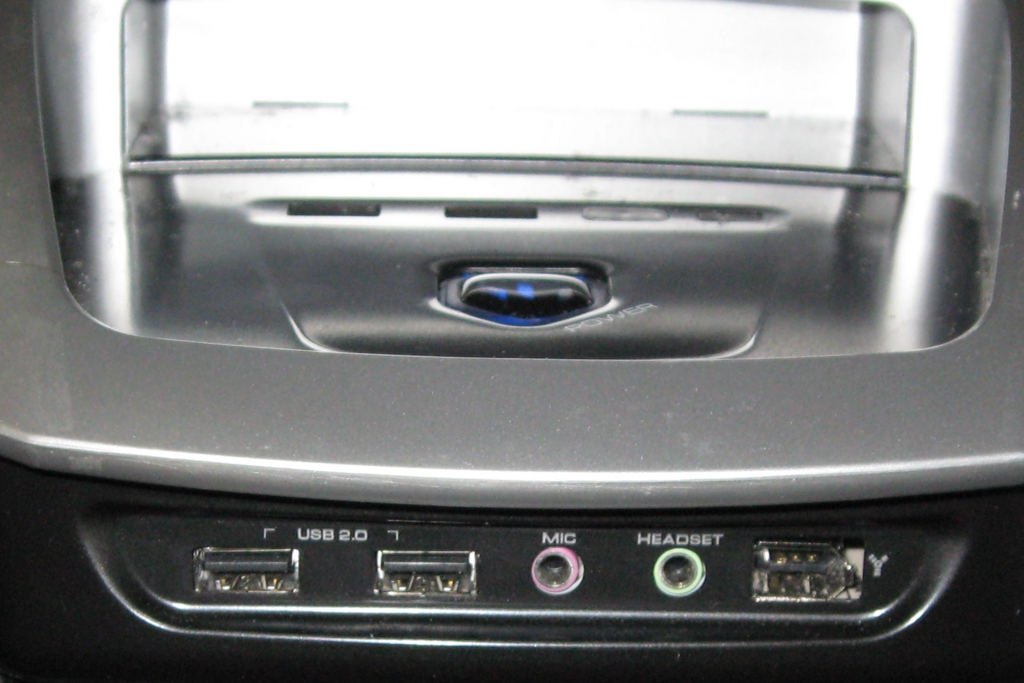
Figure 3. Under the lip below the power switch are duplicate USB ports, an IEEE 1394 port and audio ports.
The one exception to the otherwise excellent layout is that, like many motherboards, the one place to insert a RAID card happens to be right next to the fan of a two-slot display card. This means the RAID card may block the airflow of the fan for the display card. We provide more details about this throughout the remainder of the article in the appropriate categories.
ASUS provides a handful of nice extras with the motherboard. It includes extra sensors that you can arrange to monitor the temperature of just about anything you like. It also includes a directional microphone you can place on top of the monitor.
ASUS includes a few pin adapters to make it easier to wire things to the motherboard. You attach things like the power switch, reset switch, power LED and hard drive LED to one of these adapters, and then plug the adapter onto the motherboard. This way, you can detach and re-attach these wires all at once, even while the motherboard is mounted in the case without having to use a flashlight and needle-nose pliers. ASUS also includes USB and IEEE 1394 pin adapters for those folks who buy a case or other attachment that does something silly like include individual wires for the USB or IEEE 1384 connection.
We don't know why you'd want to overclock a system like this, but ASUS makes it easy to do from the BIOS setup screens. If you push the system too far and it fails to reboot, press the reset or power switch again and it should recognize that there was a problem. It will reset the BIOS and allow you to try again.
We chose Patriot eXtreme Performance 4GB (2 x 2GB modules) 240-pin DDR2 SDRAM, which sells for about $250. Linux can use all 4GB of RAM whether you run a 32-bit x86 or 64-bit x86_64 kernel, but most people won't really need 4GB of RAM even with four CPU cores. If you want to cut back on the total price, you can try the CORSAIR XMS2 2GB (2 x 1GB modules) 240-pin DDR2 SDRAM, which runs about $160. The latency on the CORSAIR modules is actually better than the Patriot eXtreme. The CORSAIR timing is: 4-4-4-12, and the Patriot is 5-5-5-12. We've run benchmarks that show that lower latency helps performance, especially with AMD processors, but if you can tell the difference in actual everyday use, let us know. We can't.
Regardless of the memory modules you choose, make sure you insert them into the correct slots for dual-channel operation. In the case of the ASUS Striker Extreme, it is the first and third slot (every other memory slot, with matching colors).
The ASUS motherboard has what it calls integrated RAID onboard, as is true of most motherboards available today. This is really a misnomer. There is no hardware RAID controller on this or most other motherboards. The onboard RAID is really just a multichannel SATA controller. We configured Kubuntu 7.04 to run RAID 0+1 (also known as RAID 10) using four drives attached to the onboard SATA. It worked fine, but it was much more trouble than it was worth, so we do not recommend that approach. It is an especially bad idea if you intend to run more than one version of Linux on the same machine. It was hard enough going through the procedure once. We wouldn't want to repeat the process for every distribution we tried.
If you really want to use RAID, take our advice and buy a real RAID controller card. We chose the 3ware 9650SE-4LPML PCI Express controller. We connected four drives and configured them in RAID 10, which provides the best performance and safety at the cost of disk space. It stripes two sets of two drives, mirrored. The striping gives you the performance. The mirroring gives you safety, because you can replace a failed drive without losing any data. However, because two drives are redundant, you get half the disk space of your four drives. Our four 320GB drives gave us about 640GB of disk space.
If you really want more storage space than we created, you can buy larger drives or sacrifice some performance and configure your array as RAID 5. RAID 5 trades write performance for more storage space.
The 3ware controller is superb. It delivers excellent performance and it is very easy to set up. You press Alt-3 to activate the setup screen at boot time. This utility allows you to create storage specifically for booting operating systems, but you don't need to use this feature. It may be necessary for other operating systems, but you can boot fine from the RAID array with Linux by using normal RAID partitions.
You can add a battery backup unit to the RAID controller so that you are less likely to lose data if you experience a power outage. We didn't include the battery backup as part of our ultimate box though.
You shouldn't need to add drives to your system via the onboard NVIDIA SATA controller if you use this RAID card. If you do add drives to the onboard SATA, however, be warned that some Linux distributions may get confused about the order of drives in your system. We tried adding a drive and did not experience this problem with this particular combination of components, but this problem has reared its ugly head with other similar configurations, so we assume it's still possible.
You may see an on-screen message at boot time that says the controller is not compatible with your BIOS. It goes by so quickly that you may miss it. If that concerns you, there are a variety of other RAID cards from which to choose. However, despite this warning, our 3ware card has performed without a hitch for weeks, and we love the fact that the Linux kernel has great support for the card by default.
The card is PCI Express x 4, which works fine in the middle PCI Express slot of the motherboard. If you go with our recommendation, make sure you plug the card in to the center PCI Express slot, not the second PCI Express slot for video SLI. You will experience lockups and problems if you choose the latter slot.
Some might consider a RAID cage to be frivolous. But this is the Ultimate Box after all, so we're including the 3ware RAID cage that lets you hot swap four drives in the space of three 5.25" drive bays. Aside from easy drive replacement, the RAID cage has two advantages over mounting the drives normally. First, the 3.5" hard drive cage in the case fits only two drives if you want good air circulation. You would have to mount at least two of the drives in the 5.25" area, and then add drive fans if you want to keep them cool. The RAID cage lets you pack all the drives in one small space, and it comes with its own set of fans to keep them cool. The cage also requires only two power sources, instead of one for each drive.
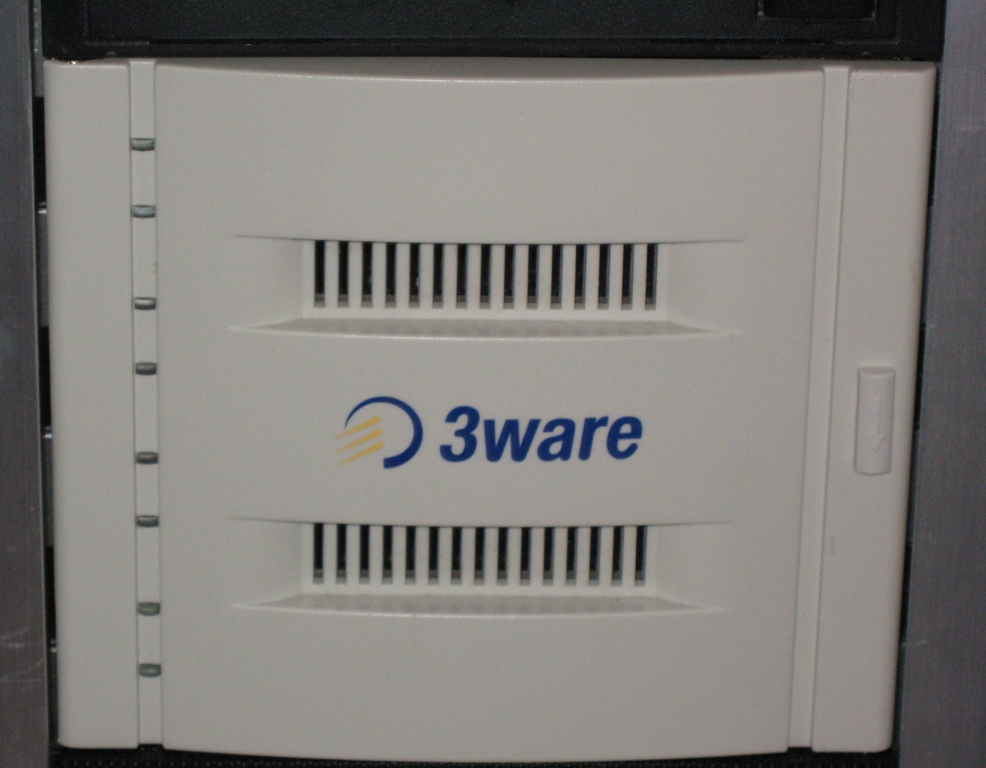
Figure 4. The 3ware RAID Cage with the Door Closed
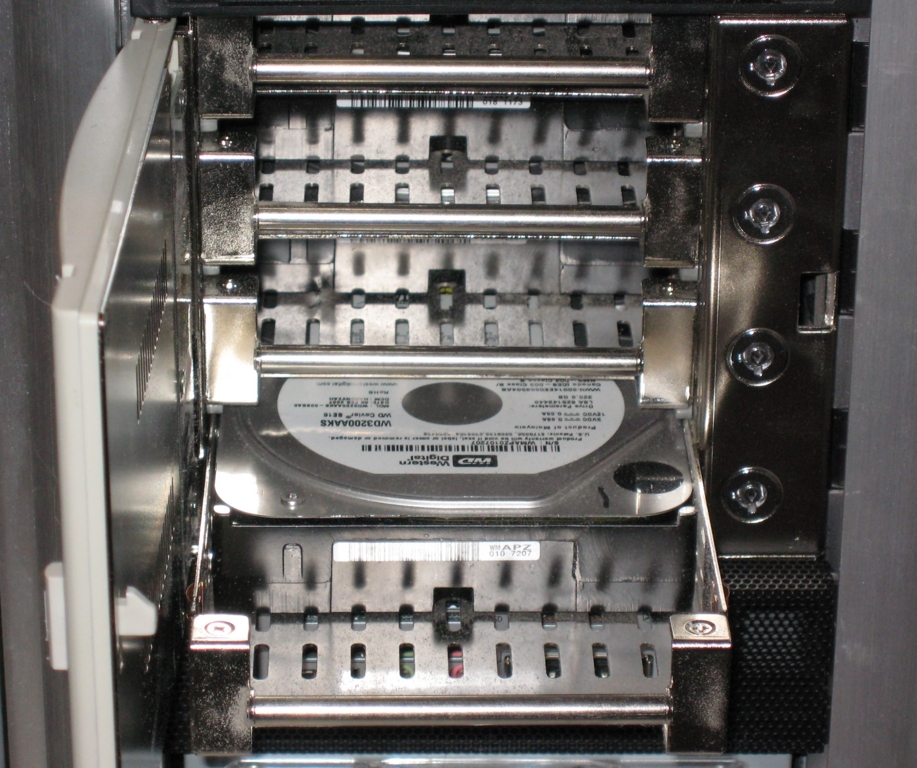
Figure 5. Pop open the RAID cage door, unlock the drives and pull them out for easy hot-swapping.
We chose the PNY Technologies VCG8800UXPB GeForce 8800Ultra for our Ultimate Linux Box. This video card is one of the latest and greatest, which carries with it both advantages and disadvantages. The main advantage is clear: performance out the wazoo. Most people will never push the card to its limits. Despite the hefty price, you'd actually pay almost as much to plug in two cheaper cards in SLI mode, and you won't get nearly the same amount of performance.
On the other hand, the card is burdened with copy protection features meant for Microsoft Vista that you'll neither want nor use. It is built to support DirectX 10 as well. We may see DirectX 10 come to Linux sometime, but we're not there yet. Finally, if you pick any of the NVIDIA series 8 cards, such as this one, most if not all of the current Linux distributions will fail to detect it properly or set it up properly. You can configure the card to use the Xorg nv driver, or download and install the latest NVIDIA drivers yourself (see the How to Install NVIDIA Drivers on Ubuntu/Kubuntu sidebar for instructions). If you use the nv driver, there isn't much reason to go with a powerful card, because that driver doesn't make use of most of the power.
Our first pick was the NVIDIA-based MSI NX8800GTX, which sports its own water-cooling system. We chose an onboard water-cooled system because of the way many motherboards situate the display card next to a slot where you'd place a RAID card. The high-powered display cards take up two slots. The RAID controller card can block some of the airflow into the display card's onboard fan. You can put the display card in the second PCI-Express slot, but that usually interferes with PCI slot on the motherboard. Our configuration does not include a PCI card, so that may be a good option to keep the display card cool.
You won't have to deal with heating problems caused by an adjacent RAID card if you can situate a two-slot display card in the second PCI-Express slot, or if you buy our recommended video card or opt for one of the less-expensive one-slot GeForce 7 series cards. We tested a second sound card in our machine when we started. The sound card took up the PCI slot, which made it impossible to move the two-slot display card to the second PCI-Express slot. The onboard audio is great, though, so you won't have any problem using the second PCI-Express slot as long as you don't need some other PCI card.
If for any reason you do need to place a two-slot display card in the first PCI-Express slot, consider that RAID controllers tend to run a bit hot too, so this just adds to the problem. A water-cooled card like the MSI moves the fan off-board, which solves the problem. The solution worked beautifully with our Cooler Master case. You can remove the 120mm CPU case fan and mount the water cooler and fan in its place. This means the display card fan doubles as a CPU case fan. We had to replace the display card fan with a more powerful fan when we tried it with an AMD FX-62-based motherboard, because the AMD FX-62 runs so hot. In the end, either fan would work well with the Intel Core 2 Quad, which doesn't need as much cooling.
We would have kept the MSI card as our recommended display card except that it is no longer available. Perhaps that should tell us it has problems we haven't yet discovered. As it turns out, the PNY GeForce 8800Ultra is faster anyway. The position of the fan on the PNY card is such that the RAID controller card does not interfere with the airflow enough to cause any heating problems.
At $670, it's a very pricey card. We're leaving it in as the default choice for the Ultimate Linux Box because it is pretty ultimate. We play games in our copious spare time (cough), so we like the way it handles 3-D graphics. Most games run—thanks to TransGaming's Cedega (although there are also native Linux 3-D games). Honestly, we're more likely to play around with 3-D rendering for amateur cartoons, so the rendering speed does come in handy.
Unless you do the same sort of thing, you won't need this much power. You can get a single NVIDIA 7950GT card instead, for example. The best of these cards generally runs at less than half the price of the 8800Ultra. Better yet, if you use an NVIDIA 7 series card like the 7950GT, you won't have to compile your own NVIDIA driver in most cases. It takes up only one slot, so you don't run into heating problems due to the proximity of the RAID card and the display card fan. You also can install two of these cards in SLI mode, which provides better performance without creating heat problems. However, two of these cards can cost almost as much as the 8800Ultra, and you won't get nearly as much performance for that money.
If you really don't need the best of the best in graphics, you still can get a screaming video card, such as the EVGA 256-P2-N636-AR GeForce 7950GT with 256MB of GDDR3 RAM for about $200, and there are plenty of decent lesser performers for less than $100.
Our selection of cases boiled down to a contest between our favorite case from last year's Do-It-Yourself Ultimate Linux Box (the Silverstone TJO7-S full tower) and a new Cooler Master full tower case. We chose the Cooler Master case for both the right and wrong reasons.
Here are the right reasons. The case is almost tool-free. Almost everything snaps in and out without screws. We could jiggle in the RAID cage and flip a few plastic widgets to hold it in place, thus mounting the cage in seconds. The motherboard tray slides out, so you can mount the CPU, memory, video and RAID cards on the motherboard while the tray is outside the case. Slip the tray into the case, and it snaps into its proper place. The exceptions to the rule, where you'll need a screwdriver, are the power supply and possibly the hard drives. You'll need to use screws for hard drives only if you mount them in the 3.5" cage that comes with the case instead of inserting a RAID cage in the 5.25" bays.
The case is not without its drawbacks though. You should not have to do this, but we had to cut some plastic off the side panel in order to mount the water cooling fan for our first shot at a video card (Figure 6).
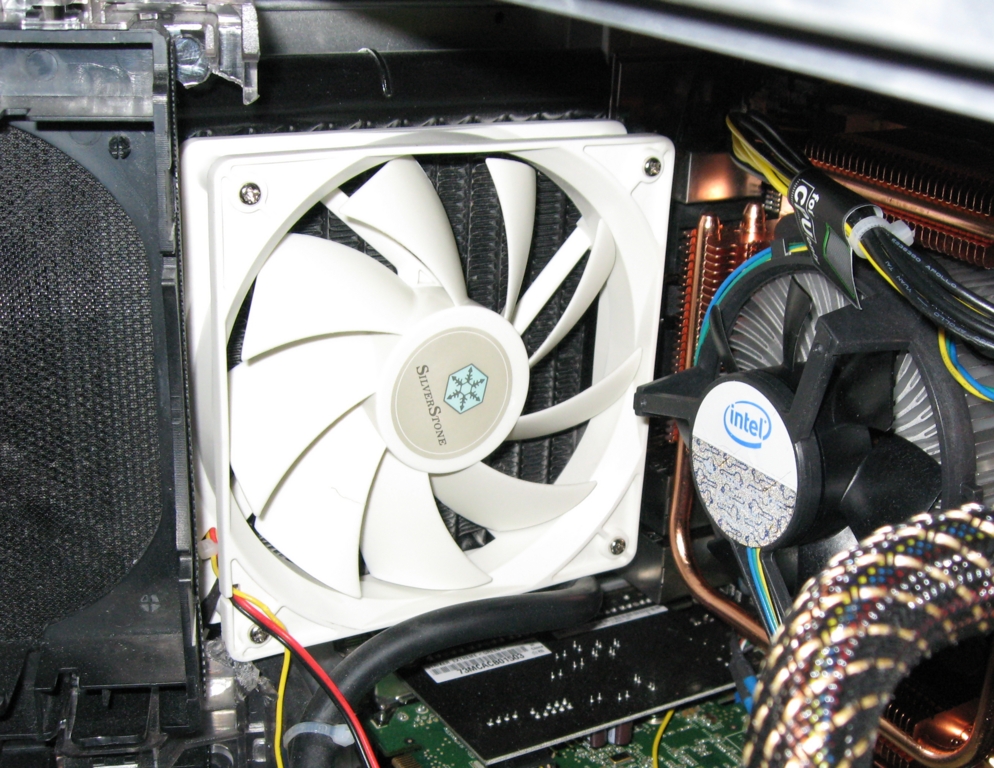
Figure 6. The original video card forced us to cut some plastic for the side panel door to close.
We had to make this modification only because the first video card we chose used a built-in water cooler with an external fan. The only reasonable place to mount the cooler was in place of the 120mm CPU case fan. We even replaced the video card's fan with a more powerful fan because our first choice of motherboard used a hot AMD CPU. You could mount the cooler on the door, but the water tubes would prevent you from opening the door completely.
Regardless, even if the door interferes with anything, you don't have to cut any plastic off. As long as you don't install something that creates a lot of heat, there isn't much need to mount fans in the side door. You can remove the door entirely if it gets in the way of anything (it snaps out easily). The case has a side panel that normally fits over the door, so you won't even notice the door is gone once you have the case assembled.
It's a good thing that the Cooler Master case has casters to allow you to roll it around. This case is a tank. It is huge. It's even bigger than the Silverstone case, and we thought that was the biggest case we'd ever seen. Oddly enough, it doesn't feel like it's as big as the Silverstone case when you work inside it with the motherboard tray inserted. The difference is negligible, but we managed to scrape a knuckle now and then while arranging cables.
If we had this to do all over again, we'd try out the Antec Nine Hundred black steel ATX Mid Tower, which sells for only $140. We can't guarantee it would be a better case, but it's smaller than our choice, and the specifications still allow for plenty of room for the RAID cage and more. It even has the 120mm fan in the right place if we chose to keep our discontinued video card. The bottom line is that you won't really know whether you've got the best case unless you try them all, and that's clearly impossible. For what it's worth, we're very happy with the case we chose. But, we could have saved ourselves the aggravation of modifying the case if we'd held out a few more weeks before picking among video cards.
The Thermaltake W0106RU 700-Watt power supply may sound like it is more than we needed, but it has a minimum output of 600 Watts, and a fully configured ASUS motherboard requires 550 Watts. We've had enough bad experiences with marginal performance power supplies that we're eager to err on the side of caution. Take heed that a single 8800Ultra display card requires two 12-volt connections. We can't imagine why you'd want to do this, but if you go crazy and install two of these display cards in SLI configuration, you'll need a better power supply than this one.
We can't gush enough about the Acer AL2416 LCD monitor. Couple this puppy with a good display card, and you've got 24" of wide-screen glory for only $550. You may be able to find a better display, but we couldn't find one that competes on all three categories of size, price and performance. The 1920x1200 display is crisp, bright, has sharp contrast, and it is fast enough even for gaming.
The Creative I-TRIGUE L3800 2.1 speakers sound terrific, whether you're playing music or composing music with an attached synthesizer plugged in to the aux port. There's not much more to say other than pick whatever speakers suit your wants and needs. This is a simple 2.1 setup (stereo with subwoofer). If you have room and play games, go for the surround-sound speakers.
Microsoft should chuck its software business and sell keyboards. You can get much better ergonomic keyboards if you're willing to fork over lots of cash, but if you want to pay an average price for a keyboard, Microsoft ergonomic keyboards are among the best. We like ergonomic keyboards, so we went with the Microsoft Natural 4000 Black Wired Keyboard. Taste in keyboards is highly subjective, however, so just replace this choice with whatever you like best. It isn't likely to make much of a difference in the overall price.
Taste in mice is almost as subjective as with keyboards, but you should give the Logitech G15 mouse a try. It has two killer features. First, it comes with a little puck in which you insert weights, after which you snap the puck into the mouse. This lets you make the weight of the mouse fit your personal preference. You might not think that makes much difference until you try it.
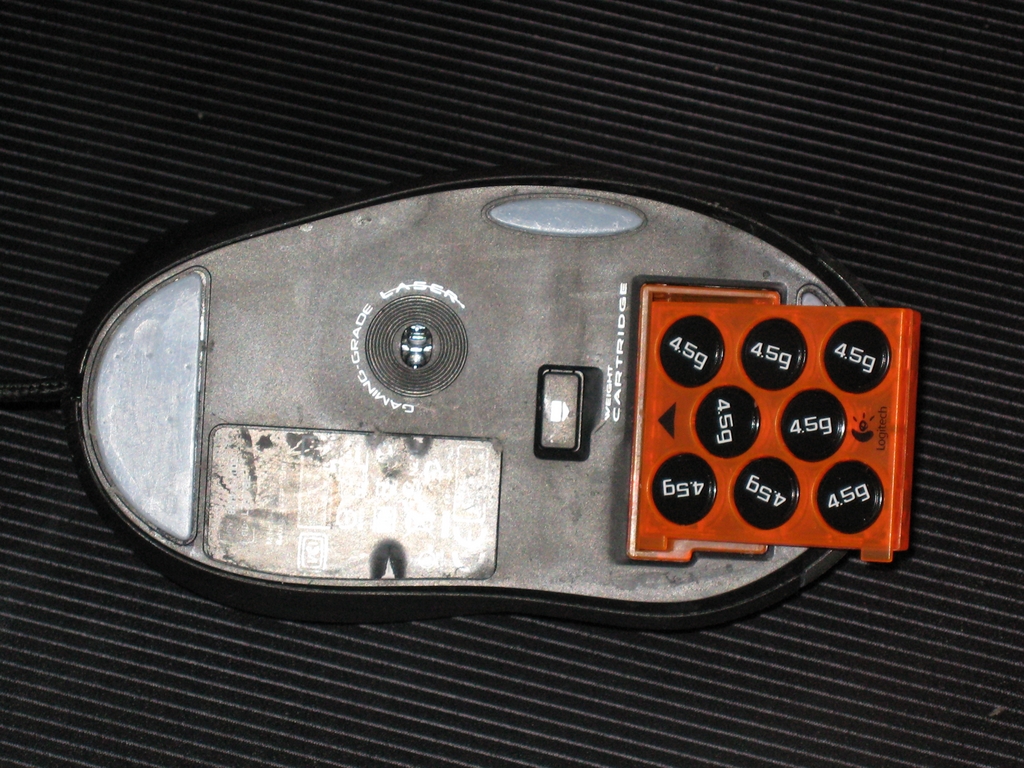
Figure 7. Add as many 4.5 gram weights to the puck as you like, and insert it into the mouse when you're done. This mouse is fully weighted.
Second, you can press the minus button on the mouse to shift into multiple lower resolutions, and jump back to higher resolutions by pressing the plus button. This feature is meant for gamers, but it works beautifully for drawing and editing graphics. Aside from a drawing tablet, it's hard to beat this mouse for a drawing tool. You have instant control over the responsiveness of your mouse without taking your hand off the mouse itself.
How to Install NVIDIA Drivers on Ubuntu/Kubuntu
According to a recent survey, most Linux Journal readers use Ubuntu/Kubuntu, so here is one way to install the latest NVIDIA drivers on Ubuntu 7.04 and its spin-off distributions of the same version. (See our Tech Tips section for a more automated method.) Install the Linux source code, compiler and other build utilities first. You can use sudo for each command, but it's easier to get to a root prompt and work from there:
$ sudo -s -H
# (you should see this root prompt after you type the password)

# apt-get install build-essential linux-source
# cd /usr/src
# tar jxvf linux-source-2.6.20.tar.bz2
# cd linux-source-2.6.20
# make oldconfig
# make prepare
# make scripts
# cd /usr/src
Now, download the latest NVIDIA drivers, which we put in the directory /usr/src. Important: you must stop any graphical desktop you may have running in order to execute the NVIDIA installer. For example, if you are using KDM for graphical login:
# /etc/init.d/kdm stop
Now, run the NVIDIA installer you downloaded. For example (assuming a 64-bit Linux installation):
# sh NVIDIA-Linux-x86_64-100.14.09-pkg2.run
Follow the installer prompts, and allow the installer to modify your /etc/X11/xorg.conf file.
You may have to make some changes to /etc/X11/xorg.conf in order to make X11 work with your card and monitor. The most important changes follow. Comment out the monitor's horizontal and vertical frequency range (the driver will discover your monitor's capability):
#    HorizSync       28.0 - 51.0
#    VertRefresh     43.0 - 60.0
Make sure the Screen section includes the maximum resolution you want to use. In the case of our choice of monitor, that will be 1920x1200 at 24-bit color. You can add other resolutions if you want to switch at runtime, but here's the bare minimum of what you want your Screen section to look like (various settings such as “nVidia Corporation” probably will be different on your system):
Section "Screen"
    Identifier     "Default Screen"
    Device         "nVidia Corporation"
    Monitor        "Generic Monitor"
    DefaultDepth    24
    SubSection     "Display"
        Depth       24
        Modes      "1920x1200"
    EndSubSection
EndSection
Nicholas Petreley is Editor in Chief of Linux Journal and a former programmer, teacher, analyst and consultant who has been working with and writing about Linux for more than ten years.
