
Work the Shell - Displaying Image Directories in Apache, Part III
In last month's column, we built our directory display script to the point where you could get a smart listing that showed your image files (offering links to any other file type), and we allowed thumbnails to be displayed too.
The latter trick is done by letting the Web browser do the work. If you specify a height or width that's different from the actual image size, Web browsers automatically scale the image to fit the specified dimensions. Even better, if you specify only one dimension, it scales proportionally to fit.
Let me explain that just a wee bit more, because it's critical to this particular scripting project. If you have an image that's 250x250 pixels and you'd like to display a 75x75 thumbnail, the best practice is to specify both height=“75” and width=“75”, of course. The problem is, what if the image is actually 250x317 and you want to reduce it to exactly 75 pixels wide. How tall should it be?
You could do the math, of course, but it's much nicer to let the browser do the work for you automatically, which happens if you specify only width=“75” or use a full HTML statement:
<img src="my250x317.png" width="75" />
Doing that scales it, and you end up with an image that's exactly 75x95 pixels in size. However, if you always constrain one dimension, things can break. What if the image is actually 250x1100, because it's a very tall graphic? Now the thumbnail is going to break the entire layout, because the scaled version of it is 330 pixels wide, quite a bit more than the 75x75 target box for the image!
That's why an ideal script would figure out which of the dimensions is larger, and then constrain that one to the size of the box we seek, letting the other scale proportionally automatically, thanks to the Web browser. And, that's exactly what we'll do!
Big Important Caveat: I realize there's a significant performance penalty for letting the browser scale images—the entire full-size image has to be downloaded, even though you're seeking a smaller version. If it was a problem, you could use a tool such as ImageMagick to scale the images and create thumbnail graphics that were displayed instead, probably dropping them into a cache and creating new ones on the fly as needed. But honestly, don't you have a high-bandwidth Internet connection, and does an additional second or two of load time really matter?
Last month, we created the darn useful script function figuresize, which, when given a graphic image, returned height and width parameters when those could be calculated. The resultant main loop in the script ended up looking like this:
for name in *
do
  if [ ! -z "$(file -b $name|grep 'image data')" ]
  then
    figuresize $name
    if [ ! -z "$height" ] ; then
      echo "<img src=$name alt=$name height=50 />"
      echo "<br />$name ($height x $width)<br />"
    else
      echo "<img src=$name alt=$name height=50 />"
      echo "<br />$name<br />"
    fi
  else
    echo "<a href=$name>$name</a><br /><br />"
  fi
done
If you read the code closely, it's really not doing anything smart with the height and width parameters, just displaying them in the output. Instead, let's turn that into a test to figure out which is larger. Before I do that though, we need to make some rudimentary improvements to the loop so the output is more attractive:
for name in *
do
  if [ ! -z "$(file -b $name|grep 'image data')" ]
  then
    figuresize $name
    if [ ! -z "$height" ] ; then
      echo "<a href=$name><img src=$name border=0"
      echo "alt=$name height=$size "
      echo "align="absmiddle" />"
      echo "$name ($height x $width)</a>"
    else
      echo "<a href=$name><img src=$name border=0"
      echo "alt=$name height=$size"
      echo "align="absmiddle" />"
      echo "$name</a>"
    fi
  else
    echo "<a href=$name>$name</a><br />"
  fi
  echo "<hr />"
done
The result of running this improved script (where images are clickable, there's a horizontal rule between entries and so forth) is shown in Figure 1.

Figure 1. Result of Running the Improved Script
Now, let's look at how to make the script even smarter:
if [ ! -z "$height" ] ; then
  if [ $height -gt $width ] ; then
     dimensionlabel="height"
  else
     dimensionlabel="width"
  fi
Can you see what I've done here? This lets us figure out which of the two dimensions of the graphic is larger and then set the dimensionlabel to that particular dimension. Here's the result:
echo "<img src=$name $dimensionlabel=$size />"
where I'll set size to the desired thumbnail size—75 in our example script.
I'm also going to add a few counters so we can summarize images displayed versus total files displayed at the end. Just because it's, uh, interesting, right?
Here's the latest version of the loop, and as you might expect, it's getting more complicated as it becomes more sophisticated:
for name in *
do
  if [ ! -z "$(file -b $name|grep 'image data')" ]
  then
    imgcount=$(( $imgcount + 1 ))
    figuresize $name
    if [ ! -z "$height" ] ; then
      if [ $height -gt $width ] ; then
        dimensionlabel="height"
      else
        dimensionlabel="width"
      fi
      echo "<a href=$name><img src=$name border=0"
      echo "alt=$name $dimensionlabel=$size"
      echo "align="absmiddle" />"
      echo "$name ($height x $width)</a>"
    else
      echo "<a href=$name><img src=$name border=0"
      echo "alt=$name height=$size"
      echo "align="absmiddle" />"
      echo "$name</a>"
    fi
  else
    echo "<a href=$name>$name</a><br />"
  fi
  echo "<hr />"
  totcount=$(( $totcount + 1 ))
done

echo "<i>Displayed $imgcount images out of
$totcount entries total.</i>"
The resultant output, which is hopefully more attractive, is shown in Figure 2.
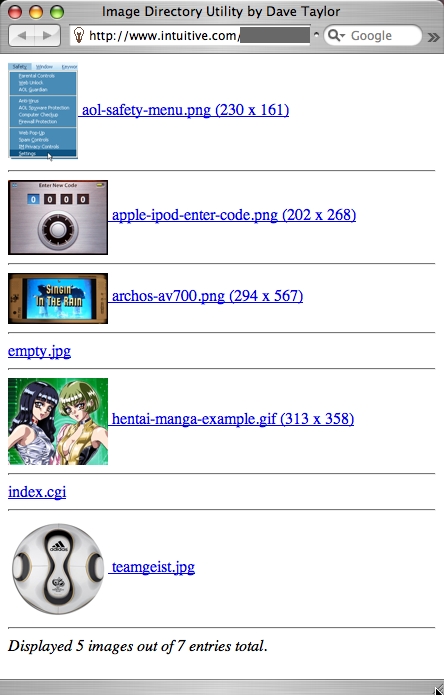
Figure 2. More Attractive Output
Now that we can normalize these thumbnails in the script (at least for non-JPEG images, due to a limitation in the file command), the next thing to examine is how to display the results with multiple images across, in a grid or table, rather than one per line as we see now. That's a bit more complicated, because it involves yet another counter, but while you're waiting for your next issue of Linux Journal, you might bone up on the basic HTML table tags, because that's what we'll be using. Then, finally, we'll switch to ImageMagick from file, so we can get the dimensions of all image files, not only GIF and PNG files.
Dave Taylor is a 26-year veteran of UNIX, creator of The Elm Mail System, and most recently author of both the best-selling Wicked Cool Shell Scripts and Teach Yourself Unix in 24 Hours, among his 16 technical books. His main Web site is at www.intuitive.com, and he also offers up tech support at AskDaveTaylor.com.
