
The OpenSSH Protocol under the Hood
Is there a program more commonly used in day-to-day Linux computing than SSH? I doubt it. Not only is it rock-solid, secure and versatile, but it also is extremely simple to use and feature-rich. Because its algorithms and protocols are both state of the art and their implementation is open for peer review, we can rest assured on the cryptographic integrity of SSH. SSH does have weaknesses, however; although most of them stem from social engineering, and working around broken protocols, such as X11, pose a big challenge.
SSH can do wonders in only a few lines of C code—thanks to the UNIX philosophy of stringing together powerful tools in generic ways.
SSH acts as a secure channel, and it makes a remote system appear local, and a local one appear at the remote side. It can be used either for remote command execution, with or without a pty, and it can be used for multiplexing several TCP and X11 sessions. It also can be used for tunneling insecure protocols, such as POP3 or SMTP, through secure SSH tunnels. In addition, it can be used with some limitations to tunnel FTP securely.
Let's begin with the overall scheme of things.
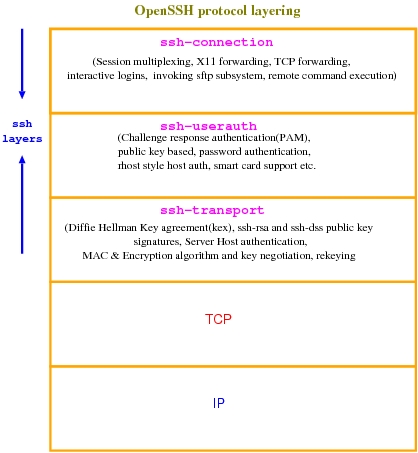
Figure 1. OpenSSH Architecture
As shown in Figure 1, OpenSSH is composed of three key layers. The bottom layer, ssh-transport, is the most critical component involved in all the crypto operations, such as key exchange, re-keying at intervals, protecting against attacks in various ways and so on.
The layer on top of that, ssh-userauth, is responsible for authenticating end users to the sshd dæmon that runs at the server end. Remember that SSH authenticates both ways. The client SSH program authenticates the sshd server dæmon using the ssh-transport protocol. After authentication, key exchange is completed, and a secure connection is established. Subsequent to that, user authentication takes place in the ssh-userauth layer.
ssh-userauth provides a lot of flexibility, because users can authenticate to the server in various ways—from a private key on a smart card to simple user name/password authentication. Once it goes through, the ssh-connection layer establishes a secure channel, either for executing a remote command or to obtain an interactive login shell.
The ssh-connection layer is capable of multiplexing any number of simultaneous independent secure sessions over a single ssh-userauth layer with the transport stack layer below it, as shown in Figure 1. All of SSH's magic—forwarding arbitrary TCP ports from local to remote and remote to local, acting as a SOCKS proxy, forwarding X11 connections, establishing VPN tunnels, executing remote commands with and without a pty—is done with the ssh-connection layer.
SSH has flow control built in to the protocol. Each secure channel has a separate window size allocated. Because SSH operates above a reliable TCP layer, this does not have much of a role. At least, it is not as critical as the TCP windowing mechanism. Most of the critical channel open/close messages and other termination messages don't consume any window space.
Because all messages are encrypted and integrity-protected, nobody can interpret the messages. There is a special SSH_MSG_IGNORE message type that can be used for defeating traffic analysis attacks. These are the kinds of attacks that figure out when data is going over the wire and how much data is being transferred.
SSH, of course, comes with many other niceties for sending secure KEEPALIVE messages, redirecting stdin to /dev/null for specialized X window applications and many more.
Now, let's take a look at a sample SSH session and typical message exchanges (Figure 2).
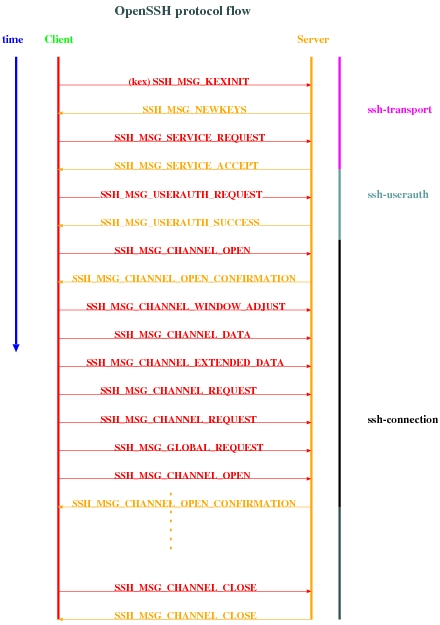
Figure 2. OpenSSH Protocol Flow Diagram
Here is a typical unencrypted SSH packet:
byte      SSH_MSG_CHANNEL_REQUEST
uint32    recipient channel
string    "pty-req"
boolean   want_reply
string    TERM environment variable value (e.g., vt100)
uint32    terminal width, characters (e.g., 80)
uint32    terminal height, rows (e.g., 24)
uint32    terminal width, pixels (e.g., 640)
uint32    terminal height, pixels (e.g., 480)
string    encoded terminal modes
Most fields are self-explanatory. The top two fields are always present in all messages. The payload packets (what the user types and the responses from the server) are all carried with the SSH_MSG_DATA message type.
Every packet has a header that describes the contents of the payload (message type) and the channel for which it is destined.
Some of the messages do not need a response from the other side, as the underlying layer is not only reliable but also tamper-resistant. But, most requests from the client have a corresponding response from the server.
Now, let's get to the gory details of the SSH key exchange protocol, because that is the most critical component that accounts for the security and popularity of SSH.
Figure 3 shows the data manipulations that are necessary to encrypt, compress and integrity-protect. Of course, we need to protect ourselves against replay attacks as well. For that, there is an implicit sequence number for each packet, and it starts at 0 and goes to 232 before wrapping around. Because the sequence number is hashed, it can be sequential, and attackers never can guess what input will lead to what hash.
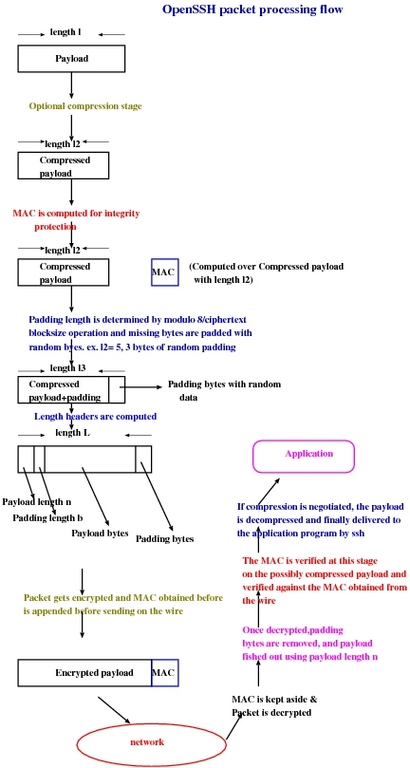
Figure 3. OpenSSH Packet Processing
The key components of OpenSSH keys are:
Hash: H.
Shared secret: K.
Session ID: session_id.
SSH uses the above components to derive the following encryption vectors and keys:
Client to server initialization vector.
Server to client initialization vector.
Client to server encryption key.
Server to client encryption key.
Client to server MAC key.
Server to client MAC key.
The equations used for deriving the above vectors and keys are taken from RFC 4253. In the following, the || symbol stands for concatenation, K is encoded as mpint, “A” as byte and session_id as raw data. Any letter, such as the “A” (in quotation marks) means the single character A, or ASCII 65.
Initial IV client to server: HASH(K || H || “A” || session_id).
Initial IV server to client: HASH(K || H || “B” || session_id).
Encryption key client to server: HASH(K || H || “C” || session_id).
Encryption key server to client: HASH(K || H || “D” || session_id).
Integrity key client to server: HASH(K || H || “E” || session_id).
Integrity key server to client: HASH(K || H || “F” || session_id).
Simple, right?
What is not simple, however, is figuring out the K and H parameters.
HASH is usually an SHA1 hash mechanism, but it can be something else as well.
The typical cipher algorithm used is AES or DES3 in CBC mode. The MAC is a combination of MD5 or the SHA1 hash algorithm with a secret key. There are four choices here:
hmac-sha1
hmac-md5
hmac-sha1-96
hmac-md5-96
Actually, sha1 is a little weak in today's world, because collision attacks are possible. The zeitgeist in hashing today is sha512, but with proper re-keying and other smarts built in, it should not be a problem.
Remember that hashes are of a constant length, so hmac-sha1 is 20 bytes long, hmac-md5 is 16 bytes, and the other two have a fixed length of 12 bytes each.
Okay, now for some mathematical and crypto gymnastics of the kex stage.
We know how to compute the individual encryption and MAC keys provided that we derive the basic parameters using the simple equation above. But, how do we get the parameters to begin with, in a secure, authenticated manner?
Now, we need to look at how OpenSSH uses diffie-hellman-group14 and diffie-hellman-group1 fields to derive the DH generator and DH moduli for an anonymous key agreement. However, this leaves us open to several man-in-the-middle and other active attacks. To thwart this, we use a known and trusted server public key to authenticate key exchanges. Authentication of key exchange data is nothing more than signing with a private key. And, OpenSSH typically uses ssh-dsa or ssh-rsa keys for this purpose.
In other words, a combination of DH and RSA/DSS keys are used for authentication and to derive the secret parameters K, H and session_id. session_id is simply the hash of the first key exchange. A 16-byte random cookie also is used to protect against replay and other man-in-the-middle attacks.
Here is the equation for deriving H:
H = hash(V_C || V_S || I_C || I_S || K_S || e || f || K)
hash is usually the SHA1 hash algorithm.
V_C and V_S are the client and server identification strings.
I_C and I_S are the client and server SSH_MSG_KEXINIT messages just exchanged.
Now, we are left with computing e, f and K; e and f are the DH parameters used for exponentiation:
e = gx modulo p
f = gy modulo p
K = ey modulo p
Here, p is a prime number from the DH generator field. And, x and y are chosen arbitrarily by client and server. Remember that DH works using the simple mathematical principle that abc = acb = abc.
Now, we have everything required for computing the secret keys.
The nice thing about all of these cryptographic parameters is that they are thrown away after every session. The only reused parameter is the server RSA/DSA key, but because we add a random cookie in our calculations, it's difficult for attackers to break SSH cryptographically.
Let's take a look at the OpenSSH family before we proceed.

Figure 4. Stars in the OpenSSH Galaxy
As you can see in Figure 4, there are many executables and players in the grand scheme of things. However, the interplay is not a complex one. Everything I discussed above is actually implemented by SSH and sshd components (client and server, respectively). The other components are used rarely for key generation, agent forwarding and so on.
sftp-server is the subsystem for SSH. This is an FTP-like protocol, but it is highly secure and efficient, unlike the broken FTP protocol.
scp is a marvelously popular and convenient file transfer mechanism built on top of the SSH infrastructure. Because integrity protection is built in to the SSH wire protocol, file integrity is guaranteed. However, it does not have a resume feature for broken transfers, so you have to use it with rsync to get that facility.
Now, let's look at the kind of attacks and threat models SSH helps us guard against.
One of the most critical components of any cryptographic protocol is the quality of the random number generator. Because computers are deterministic devices, obtaining truly random data is a challenge. Common sources of entropy include disk access, keyboard and mouse input, process lifetimes and so forth. An incredibly large number of traditional UNIX programs have relied on the gettimeofday(2) system call. SSH also uses sound mechanisms to check the randomness of the pool of data.
One interesting attack specific to SSH is using control character sequences to terminate sessions and interfere with pty interactions, so we have to filter out suspicious character sequences.
The most critical and, unfortunately, the weakest point of SSH is server/host authentication. Reality and typical user negligence proves that we just say yes whenever a new host key is added to our trusted list. Efforts are underway to make this more secure and easier. If this is not ensured, different types of man-in-the-middle attacks are possible.
Resources
OpenSSH: www.openssh.org
SSH Protocol Architecture: www.ietf.org/rfc4251.txt
ssh-userauth: www.ietf.org/rfc4252.txt
ssh-transport: www.ietf.org/rfc4253.txt
ssh-connect: www.ietf.org/rfc4254.txt
Girish Venkatachalam is a cryptographer with nearly a decade of experience working on various modern UNIX systems. He has developed IPSec from scratch on the Nucleus OS for a router and worked with the guts of Apache, OpenSSL and SSH. He can be reached at girish1729@gmail.com.
