
Hacking Cell Phones via Bluetooth Tools under Linux
Many modern cell phones can take pictures and short video clips. This is great for taking candid photos and sharing them with friends and family at a later time. Modern cell phones also commonly have replaceable themes and ringtones, which are, in essence, 30-second audio clips. On newer phones, ringtones often are MP3 files, replacing older, nonstandard formats. According to many wireless providers, the only way to get your media off the phone is to e-mail yourself using the provider's data transfer service. This can become rather expensive, especially if you take a lot of photos. Some cell phones come with a standard USB connection and can be mounted as USB mass storage devices. Many cell phones, including the phone I currently own (Motorola V551), utilize a nonstandard USB connection. So, instead of purchasing a specialized USB cable, I decided to connect to it using a standard USB Bluetooth dongle. The dongle should work with any phone that supports the Bluetooth protocol.
Bluetooth is a wireless communication protocol that enables transfer speeds of up to 3Mbps and up to 100 meters in distance. It's currently used in various devices, such as printers, keyboards, mice, wireless headsets and GPS receivers. The Bluetooth specification was first developed in 1994 by Ericsson Mobile Platform engineers Sven Mattison and Jaap Haartsen, and it has been adopted as a standard by more than 6,000 companies worldwide. Most modern cell phones now include some sort of Bluetooth wireless capability.
By using Bluetooth, you can push and pull files to and from a cell phone, which is handy if you want to archive photos taken with your cell phone and don't want to pay $.25 or more to e-mail yourself each file. This also allows you to create ringtones from songs that you own in MP3 format (many cell phones let you play standard MP3 audio files). And, some users will be able to connect to the Internet via PPP and other utilities. In this article, we mostly are concerned with the tools available in Linux to access files on your Bluetooth-enabled cell phone. This includes the low-level command-line utilities as well as the GUI applications available under KDE and GNOME. Comparable functionality from a proprietary Windows/Mac application will cost you anywhere from $15–$40 US.
Besides having a Bluetooth-enabled cell phone, you need to have a Bluetooth connection for your computer. Many newer laptops come with an internal Bluetooth card, although most desktops do not. If you don't have built-in Bluetooth capability, you need to purchase some sort of Bluetooth transmitter. The most common are USB 1.1 and 2.0 dongles, which are available from retail electronics outlets and mobile phone vendors. I purchased a D-Link DBT-120 Bluetooth dongle for roughly $25 US. Even though Bluetooth is an industry standard, it's probably a good idea to check hardware-compatibility lists to make sure a particular model will work under Linux. The DBT-120 supports speeds of 723Kbps asymmetrical and 433Kbps symmetrical. Although not blazingly fast, these speeds are reasonable for small file transfers. Newer dongle models will give you up to 3Mbps.
In the past, Linux users would have to recompile their kernel to get the Bluetooth modules working correctly. Fortunately, almost all newer distributions of Linux now come with Bluetooth enabled in the kernel by default.
The BlueZ package is the default toolset for Bluetooth in Linux. You may need to install the Bluetooth utilities before you get started. In Debian, for example, you should install the bluez-utils package at the very least.
Once you have your Bluetooth dongle connected to your machine, you should check whether all the kernel modules are loading correctly:
root@host# lsmod | grep blue
And, you should see something like the following:
bluetooth 41060 14 hidp,rfcomm,l2cap,hci_usb
Then, type:
root@host# dmesg | grep Blue
which should produce something like this:
Bluetooth: Core ver 2.8
Bluetooth: HCI device and connection manager initialized
Bluetooth: HCI socket layer initialized
Bluetooth: HCI USB driver ver 2.9
Bluetooth: L2CAP ver 2.8
Bluetooth: L2CAP socket layer initialized
Bluetooth: RFCOMM socket layer initialized
Bluetooth: RFCOMM TTY layer initialized
Bluetooth: RFCOMM ver 1.7
Bluetooth: HIDP (Human Interface Emulation) ver 1.1
Everything looks good. Next, you'll need some information about your system:
root@host# hciconfig -a
The above spits out a bunch of lines. You are looking for this line in particular:
Name: 'BlueZ mycomputername'
In some cases, you won't see the BlueZ portion, and the computer name may have a trailing -0.
Next, open the file /etc/bluetooth/hcid.conf with your favorite text editor, and change the following line:
name "BlueZ %h (%d)";
to:
name "BlueZ mycomputername";
Next, create a PIN for the computer to access the cell phone. Open the /etc/bluetooth/pin file, and add the following:
PIN:1234
The actual PIN number can be anything you like, and it may not be included in a separate file, depending on your distribution. It may be part of your hcid.conf file and called a passkey instead of a PIN.
The reason for the PIN number is that Bluetooth devices need to be paired or tethered together. This is a standard Bluetooth security measure to prevent unwanted connections between devices. The first time you connect to your phone via Bluetooth, the phone notifies you that a connection is being attempted and prompts you for a PIN number. If the PIN number entered on the phone does not match the PIN in the configuration file, the connection will be rejected. Most cell phones will give you the option to connect devices automatically on subsequent connections or prompt for intervention.
Next, restart the Bluetooth server on the connecting computer:
root@host# /etc/init.d/bluetooth restart
Some cell phones have a “Find Me” mode that needs to be turned on when scanning. Take a look in your particular phone's Bluetooth connection menu. Now, you're ready to see if the Bluetooth dongle can see your cell phone or any other nearby devices with Bluetooth capability. So, type:
root@host# hcitool scan
which returns the following:
Scanning ...
        00:0F:86:89:EC:3D       Blackberry 7290
        00:14:9A:C9:BB:62       Motorola Phone
        00:16:CB:2A:7D:DB     Mac_1
Each device name is listed with its MAC address.
Mac_1 is my USB Bluetooth dongle. Motorola Phone is the name I have designated in the phone's Bluetooth setup menus. BlackBerry 7290 is a nearby device that the my dongle is picking up as well.
Another useful command is sdptool search DUN. This provides detailed information for your device:
Inquiring ...
Searching for DUN on 00:16:CB:2A:7D:DB ...
Searching for DUN on 00:14:9A:C9:BB:62 ...
Service Name: Dial-up networking Gateway
Service Description: Dial-up networking Gateway
Service Provider: Generic Cellphone Service
Service RecHandle: 0x10001
Service Class ID List:
  "Dialup Networking" (0x1103)
Protocol Descriptor List:
  "L2CAP" (0x0100)
  "RFCOMM" (0x0003)
    Channel: 1
Language Base Attr List:
  code_ISO639: 0x656e
  encoding:    0x6a
  base_offset: 0x100
  code_ISO639: 0x6672
  encoding:    0x6a
  base_offset: 0xd800
  code_ISO639: 0x6573
  encoding:    0x6a
  base_offset: 0xd803
  code_ISO639: 0x7074
  encoding:    0x6a
  base_offset: 0xd806
Profile Descriptor List:
  "Dialup Networking" (0x1103)
    Version: 0x0100
Now, you're ready to start pushing and pulling files to/from your cell phone. Let's investigate the available tools in both KDE and GNOME.
The KDE Bluetooth framework is built on the BlueZ stack and can utilize all the functionality of the command-line tools in an intuitive GUI interface. Originally, it was an add-on application, but because of the proliferation of Bluetooth devices, it has been merged into the baseline KDE desktop. The easiest way to access your data is through the Konqueror file manager. Once the Bluetooth dongle is plugged in to your computer, you should see the Bluetooth icon appear on the Kicker panel. Open Konqueror, and enter bluetooth:/// in the navigation toolbar.
You should see a listing of nearby devices that are Bluetooth-enabled (Figure 1). Click on your phone, and you should see a listing of available services (Figure 2). For pushing and pulling files, we're most concerned with OBEX File Transfer and OBEX Object Push. Selecting OBEX File Transfer shows the media file folders residing on your device (Figure 3). In my case, I have separate folders for audio, pictures and video clips. Clicking on any of the folders should reveal the files currently on your device. Now you simply can copy/move a file to your home folder on your computer by doing a copy and paste in Konqueror. The first time you do this, you'll be prompted for a PIN number on the cell phone. Subsequent file transfers will not require a PIN unless it has been specified in the cell phone's Bluetooth setup. If you want to copy files from your computer to your device, select OBEX Object Push.
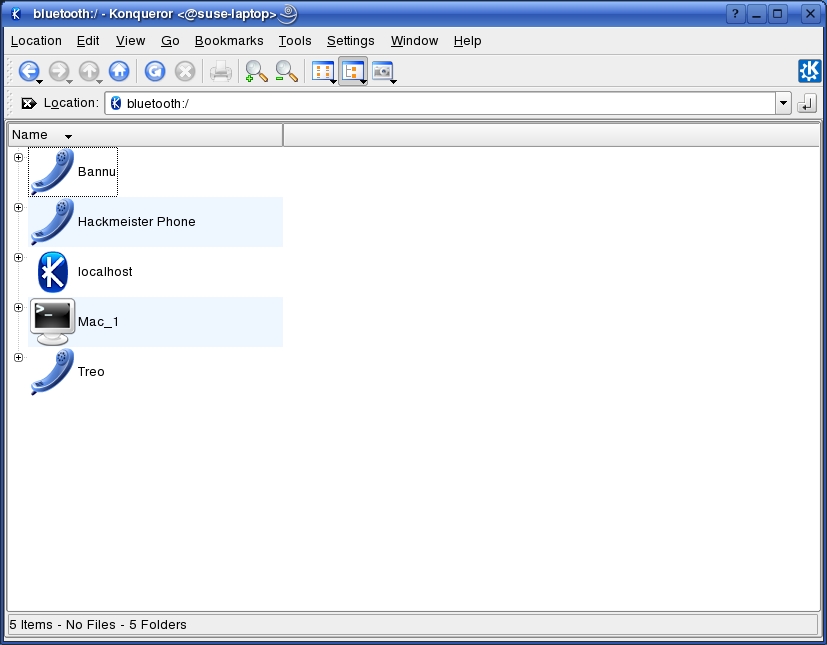
Figure 1. Install KDEBluetooth to make Konqueror aware of Bluetooth devices.
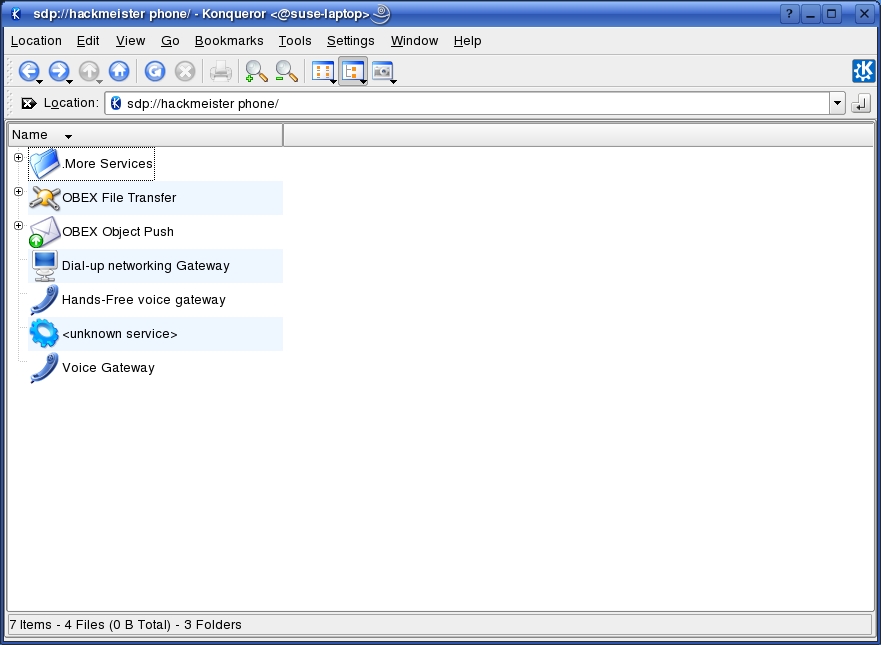
Figure 2. Select your device to get to OBEX Object Push.

Figure 3. The obex option is where you can launch the OBEX Object Push client.
The system displays a pop-up asking if you want to open the kbluetooth client. Select yes, and you should see your device list in the left-hand (device selector) column of the client (Figure 4). The top of the client application shows your system folders. The right-hand side of the screen contains a blank area that's titled Files to send. Simply go into one of your system folders and click the file you want to copy to your phone. Now, drag and drop it into the Files to send pane. Click the Send button. Your phone will alert you and ask if you want to accept the file transfer from your computer. Click yes, and the file transfer starts (Figure 5). Once the file transfer is complete, you should be able to find the file on your cell phone or PDA. It doesn't get any easier than that. Konqueror once again proves what a fantastic file manager it is.
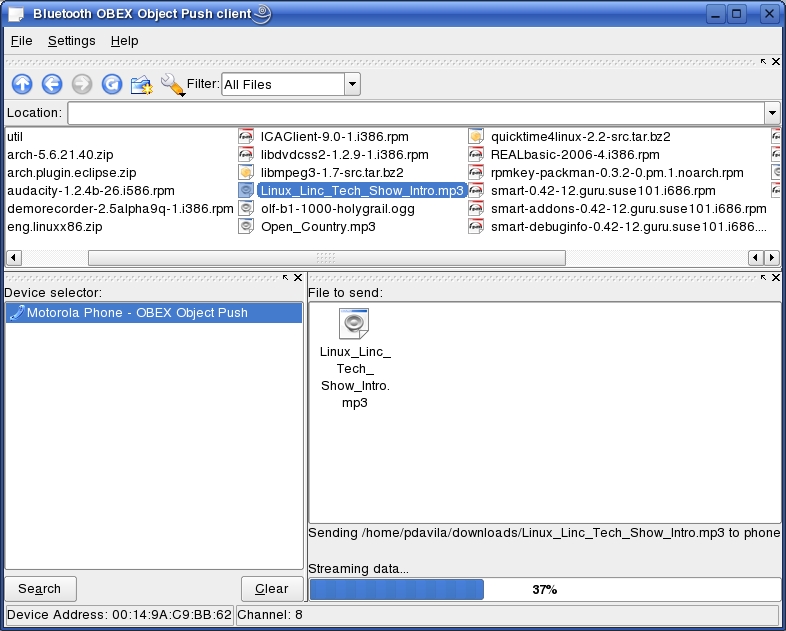
Figure 4. The OBEX Object Push client lets you transfer files with drag and drop.
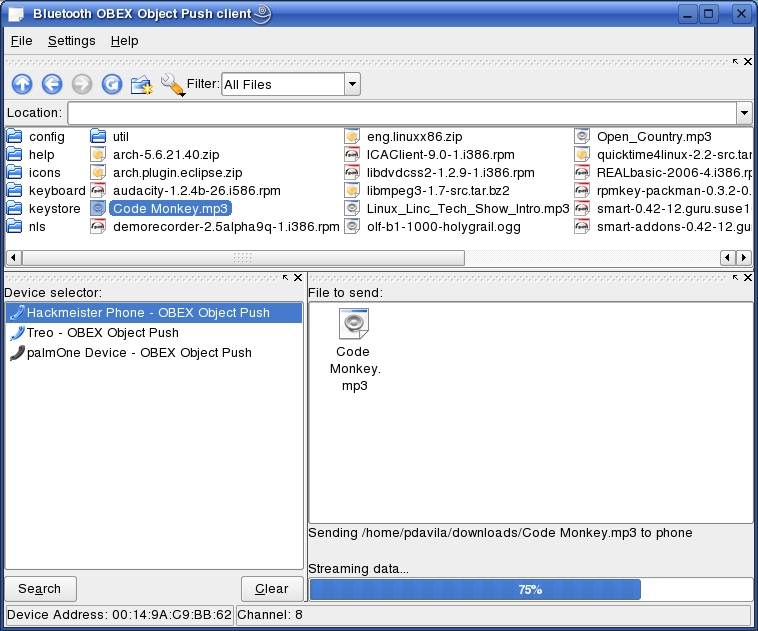
Figure 5. The OBEX Object Push Client with Multiple Devices Available
The KMobileTools application is still considered alpha software, but it looks very promising. It's an add-on KDE application that lets you back up, edit and import your cell phone's contact list to your computer using the KAddressbook application. This lets you synchronize your contact list on your cell phone or PDA to your e-mail contact list. You no longer have to maintain separate contact lists for your cell phone and e-mail clients.
Another interesting feature is the ability to control your cell phone remotely from the computer. You can have the cell phone dial a number saved in the contact list or type in another via the dial-out number field. You also can send SMS messages through your cell phone. This is handy if you need to send a long message and don't want to kill your thumbs by typing it with the phone's keypad. KMobileTools also displays the cell phone's battery charge percentage and signal strength status.
Not to be outdone by KDE, the GNOME desktop also provides a useful set of tools for file transfers to your Bluetooth devices. There is a nice GNOME-based front end to hcitool that can be started by typing gnome-bluetooth-admin from a terminal session. Click the Scan button, and you should see a listing of nearby Bluetooth devices. Open the Nautilus file manger, and type bluetooth:/// in the navigation toolbar. An icon representing your phone or PDA should appear. Next, open another Nautilus session, drag the icons of the files you want to transfer and drop them onto the Bluetooth device's icon. You should see a message on your cell phone asking if you want to accept the files from your computer. You also can right-click on the icon for the file you want to send and select Send via Bluetooth to initialize the file transfer. Once the transfer is complete, you should see the new file on your cell phone.
Another great application is Phone Manger, which is GNOME's answer to KMobileTools. Phone Manager lets you monitor your device's status, send and read SMS messages to and from your phone and integrate your contact list with Evolution's address book.
Now that you can push and pull files to and from your cell phone, let's create some ringtones. Why create a custom ringtone? You can be lazy and buy them for $2.50 US each from your service provider, or you can have some fun, learn something new and save yourself some money. Personally, I prefer the latter. Many newer cell phones let you play standard MP3 files without any tweaking whatsoever.
If your phone has limited storage space, it might be prudent to reduce the size of the audio file in Audacity. The first step is to import your song into a new project in Audacity. Trim the song to an approximately 30-second clip of a section of the song that you like. Next, modify the clip so it's in mono. (This shrinks the file size further.) Click the track's filename, and select Split Stereo Track. Delete the right channel of the clip by clicking the X in the upper-left corner of the track. Select the remaining channel, and click on the down arrow next to the track name. You will see a drop-down menu containing entries for Mono, Left Channel and Right Channel. Select Mono.
Next, you need to normalize the clip. First, press Ctrl-A to select the whole track. Then, select the normalize entry in the Effect drop-down menu in Audacity's main toolbar.
Now, you're ready to encode the MP3 file of your ringtone. Click File, and select Export Selection as MP3. Take the new MP3 file and simply move it into the audio folder on your cell phone as described earlier in the article. This is a great method for creating customized ringtones using a FOSS application.
It is possible to use your Bluetooth-enabled cell phone or PDA as a modem if it has GPRS or EDGE network capability. One caveat is that many cell-phone providers lock this functionality out of their phones unless the customer has a data plan with them. Data plan prices vary significantly, depending upon how much throughput you are allowed and which carrier you use. I obtained an introductory plan for $25 US per month. An unlimited data plan probably costs in the range of $60 US a month. This is a good option for road warriors who might be traveling into areas where broadband is not readily available, but cell-phone service is. Nowhere on my cell-phone provider's Web site did it mention that this service is available to Linux users. However, the provider offers a custom application for Windows users. The application provides users with Internet access using their service. Mac OS X users were relegated to a How-To document on the customer support Web site.
It was only when I requested to talk to the technical support that the provider openly acknowledged that connectivity under Linux was possible. I was then provided with a custom script that calls the WvDial PPP dial-up application. The script contained specific initialization parameters to pass to the phone and connect to the dial-up service. The technical support person at first claimed I would be able to use this service only if I connected the cell phone to my laptop via a custom Motorola USB cable. Conveniently, they sell this cable for $30 US and promptly offered to sell it to me. I communicated that I was able to pass data to/from my phone seamlessly using a generic Bluetooth dongle. At this point, the technical support person admitted that the USB cable was not necessary. I then paid for a month's worth of service and was informed that customer support does not offer any assistance to Linux users. Nothing new there. Subsequently, I sent an e-mail to customer support asking that they acknowledge on their support pages that the data service works flawlessly with Linux. I have not heard back from them at the time of this writing.
The tools available for Bluetooth devices under Linux are fairly robust. They provide all of the functionality of similarly closed applications available for Windows and Mac at no cost. Once again, the Linux community should be commended for developing such great programs. The command-line tools provide a good insight into the protocols and services used in accessing Bluetooth devices. The GUI applications are intuitive enough that average Linux users can put them to good use in short order. Linux is right in the mix in the growing field of communication devices and the applications that manage them.
Resources
BlueZ Bluetooth Protocol Stack for Linux: www.bluez.org
KDE Bluetooth Framework: bluetooth.kmobiletools.org
GNOME Bluetooth Subsystem How-To: usefulinc.com/software/gnome-bluetooth
Gentoo Bluetooth Wiki: gentoo-wiki.com/HOWTO_mobile_phone,_Bluetooth_and_GNOME
General Linux and Bluetooth Links: www.holtmann.org/linux/bluetooth
KMobileTools Application: www.kmobiletools.org
GNOME Phone Manager: live.gnome.org/PhoneManager
Audacity Audio Editor: audacity.sourceforge.net
Patrick M. Davila is a programmer and has been a Linux enthusiast since 1998. He is a co-host of The Linux Link Tech Show, the longest continually running Linux show on the Internet. When not tinkering with Linux, Patrick enjoys music, beer, soccer and spending time with his family.

