
Accessing Linux Filesystems in Windows
Lack of access to your data in a new operating system may be one of the most severe impediments for doing an OS migration. There is little personal incentive for users to switch to a system that can't interoperate with their data, as the system would be practically useless to them.
Linux has done a great job in allowing Microsoft Windows users to access their Windows partitions from Linux. Support for a majority of Windows filesystems is available, such as seamless support for FAT16/32 and partial but increasingly complete support for NTFS. There also are some tools, such as Captive-NTFS, which enable complete support for NTFS drives from Linux. Data access is not restricted to the local host. Samba allows Linux users to access their shared data on Windows computers over a network. Hence, we can say that, for MS Windows users, access to their data is no longer an impediment to Linux migration.
However, as Linux advances into the desktop, many people use Linux for some tasks and then turn to Windows for software that is not yet available on Linux, such as high-end games, Adobe Photoshop and various domain-specific applications for which no open-source equivalent exists. When people are using such applications, they generally require access to their Linux partitions. Support for Linux filesystems is non-existent in Windows. Thus, Linux dual-booters must use some tools to access their Linux filesystems.
A Short Primer on Filesystems
Some readers might be wondering what a filesystem really is. A filesystem basically defines a method for storing and retrieving files from a disk. This begs the questions: “Why are there so many filesystems? Why can't everyone decide on the best way to store and retrieve data from a disk and make that filesystem standard across all platforms?” Different operating systems come with different filesystems, because they target different users. Windows NT, which was targeted at enterprise users, came with a filesystem called NTFS, which was a filesystem that had enhanced security; whereas Windows 9x, which was targeted at ordinary users, came with FAT16/32, which was a filesystem with less security but with more performance. Windows XP offers both, as it is marketed to both segments. Similarly, on Linux, ext2/3 are the de facto filesystems, but there are some others for more special-purpose uses, for example, filesystems for high-performance computing, such as XFS, or filesystems with a great deal of fault tolerance, such as ext3 and ReiserFS.
Adding “support” to an OS for a particular filesystem basically entails that we define the data structures involved to the operating system upon which the data is stored on the disk. It is more difficult to add support for proprietary filesystems, such as NTFS, because the structure of the data on the disk, the encryption algorithms and so forth, are not known to the public. That is why it is proving to be a challenge to support NTFS completely in Linux.
As mentioned previously, Windows does not have native support for Linux filesystems. All is not lost, however. The Open Source community has risen to the challenge and created some excellent software to solve this problem. This article focuses mainly on LTOOLS, which is advanced software with multiple interfaces that allows users to access a range of Linux filesystems. But first, let's skim through some other existing software that could do the task.
Ext2fsd is one of the oldest projects in this area. It allows access from Windows to ext2 filesystems and can be downloaded from sourceforge.net/projects/ext2fsd. It installs as a filesystem driver, not as a regular application. Making Ext2fsd a filesystem driver integrates ext2 partitions transparently into Windows and allows Windows to use ext2 partitions as if they were a native format and enables full read/write support. Ext2fsd does not only read ext2 partitions, but also Ext2 was one of the first de facto Linux filesystems, and many new Linux filesystems, such as ext3 and ext4 are backward-compatible with it. Thus, the driver can work with ext3 and possibly ext4. The picture is currently unclear with respect to ext4, as ext4 was recently added to the mainline kernel for testing. But, when using ext3/4 with Ext2fsd, you will be using only the features of ext2; any other additional features, such as enhanced journaling capabilities, will not be used.
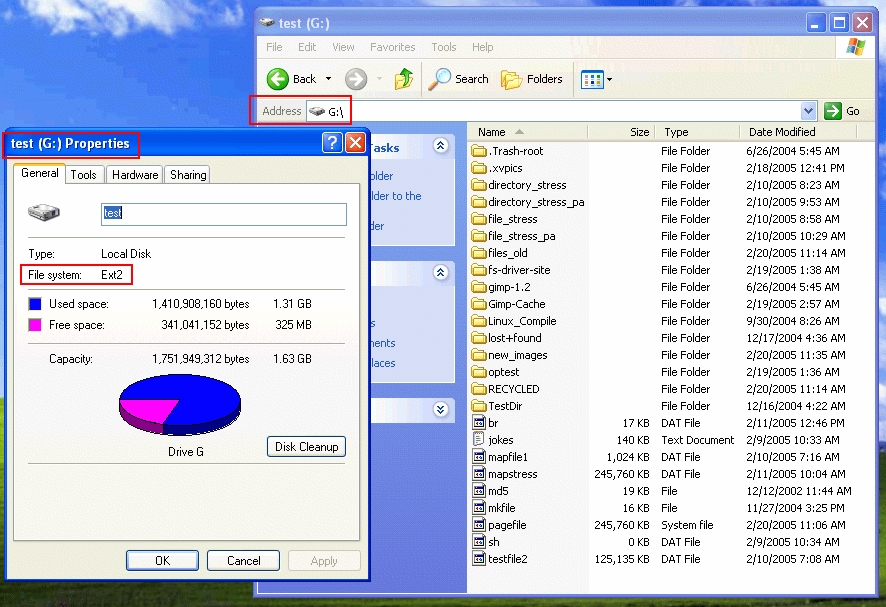
Figure 1. Ext2fsd makes an ext2 filesystem look like any other filesystem in Windows.
ReiserFS increasingly has become a popular Linux filesystem, because of its fault-tolerance capabilities. rfstool allows access to ReiserFS partitions from Windows to Linux; however, it supports only read-only access, and the developers, according to their Web site, have no plans to change that. The tool is available from freshmeat.net/projects/rfstool.
The previous tools lead us to the tool to which this article is dedicated. Unlike Ext2fsd and rfstool, which are specific to one particular class of filesystems, LTOOLS are more generic. They support ext2, ext3 and ReiserFS. LTOOLS are a set of command-line tools, along with two GUIs and a Web-based front end, to enable the reading of and writing to Linux ext2/3 and ReiserFS filesystems from nearly all DOS or Windows (XP, 2000, NT, ME, 9.x or 3.x) versions, running on the same machine or remotely. So, whenever you're running DOS or Windows, and you desperately need to read or write to a Linux partition, which may be on your own computer or any other, you can make use of LTOOLS. LTOOLS also is a great tool for fixing your Linux installation, if you do not have a live CD.
As mentioned previously, LTOOLS comes with two different GUI interfaces to enable you to access your Linux partitions. LTOOLS comes with LTOOLSgui, which is a Java-based graphical user interface for local or remote access to your Linux files, and LTOOLSnet, which is a Microsoft .NET-based user interface, which also provides local or remote access.
If you do not like using non-free Java or MS .NET, you can use your Web browser as a graphical front end for LTOOLS. To achieve this functionality, the package contains LREADsrv, which is a simple Web server, making your Linux filesystem available in an Explorer-like view in your Web browser. Using LREADsrv, you can allow remote access to your Linux partitions, as well as to your DOS/Windows partitions.
LTOOLS comes with a default Windows installer, which seems quite dated. After following the normal installation procedure, the installer creates an entry in your start menu called LTOOLS from which you can access a plethora of interfaces that allows you to access your Linux filesystems.
LTOOLS comes with support for nearly all Windows versions; however, all of the interfaces won't run on all Windows versions. LTOOLS provides two different console versions for Win9x/ME and Windows NT/XP.
The command-line interface provides basic functionality for writing and retrieving data from Linux. LTOOLS commands have the following format. All commands have three files associated with them, for example:
ldir.bat
This command lists directories; however, it is not a program but a script. This script, depending on your system, further invokes either of these two programs: LdirDOS.exe or ldirNT.exe. The first one is for Win9x/ME, and the second one is for Windows NT/XP.
Many LTOOLS commands have a logical syntax. For example, partition names are Linux names. So, if I want to copy a file called vars.inc from /root (which is on /dev/hda2) to my C: drive, I would do the following:
lread.bat --s/dev/hda2 /root/vars.inc C:\vars.inc
Similarly, for writing to Linux, I would do this:
lwrite.bat --s/dev/hda2 C:\vars.inc /root/vars.inc
Along the same lines, LTOOLS also has the commands shown in Table 1.
Table 1. LTOOLS Commands
| lread.bat | Read and copy files from Linux to DOS; sample usage: lread.bat --s/dev/hda2 /root/vars.inc C:\vars.inc |
| lwrite.bat | Copy files from DOS to Linux; sample usage: lwrite.bat --s/dev/hda2 C:\vars.inc /root/vars.inc |
| ldel.bat | Delete Linux files or (empty) directories—same as rm --f and rmdir in Linux; sample usage: ldel.bat /root/vars.inc |
| lchange.bat | Change Linux file attributes and owners—analogous to chmod; sample usage: lchange.bat --s/dev/hda2 754 /root/vars.inc |
| lren.bat | Rename Linux files—analogous to mv; sample usage: lren.bat --s/devhda2 /root/vars.inc /root/var2.inc |
| lmkdir.bat | Create a new Linux directory—analogous to mkdir; sample usage: lmkdir.bat --s/dev/hda2 /root/newdir |
| lln.bat | Create a symbolic link—analogous to ln; sample usage: lln.bat --s/dev/hda8 /root/link /root/vars.inc |
| lcd.bat | Change directory—analogous to cd; sample usage: lcd.bat /home/ |
| ldrive.bat | Set the default Linux disk drive; sample usage: ldrive /dev/hda8 |
ReiserFS is not supported via the above-mentioned tools. Thus, LTOOLS also ships with rfstool, which can be used to read from ReiserFS partitions. In order to read the hard disk under Windows NT/2000/XP or UNIX/Linux, you need administrator rights. If you are running LTOOLS under a non-administrator account, you may not be able to access the hard disk. LTOOLS does not respect Linux ownership. This means that if users were to mount the root device, they could change anything, including /etc/passwd/.
The .NET framework client is one of the most feature-rich clients available in LTOOLS. To run it, you need to download a copy of the Microsoft .NET framework from the Microsoft Download Web site (www.microsoft.com/downloads).
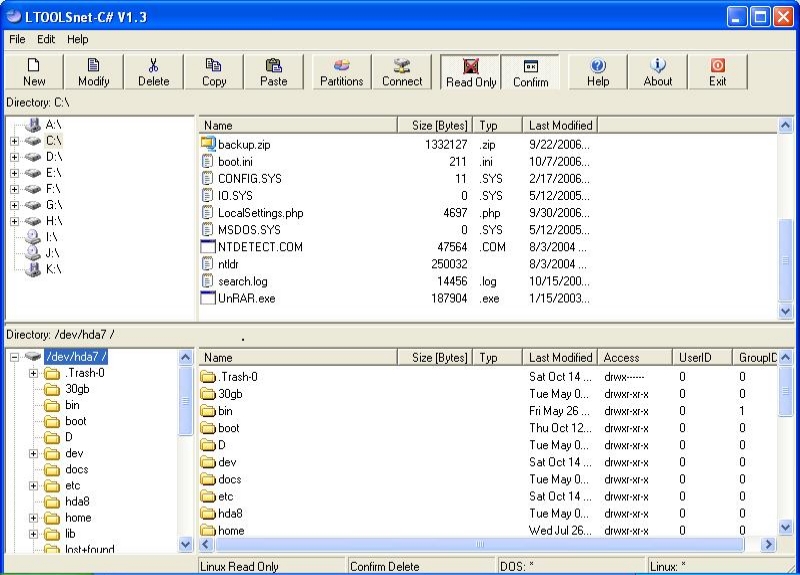
Figure 2. The C# LTOOLS File Manager
The client allows you to view all Windows and Linux partitions, and you can transfer files between them, delete files, edit files and modify them. It is also possible to mount a remote device and edit its contents. This is extremely useful when I have some problems with my Web server. I mount the drive remotely if I'm using a Windows machine and make all the modifications necessary to get it running.
If your Windows installation is Windows95/98/ME and does not support the MS .NET framework, the Java interface is for you. To run the Java interface, you need a copy of the Java Runtime Environment, which you can download from java.sun.com. The Java interface has features analogous to the .NET client.
The best interface in LTOOLS, based on my experience, is the Web-based service. LTOOLs comes with a built-in Web server, LREADsrv.exe, which allows users to start it and access their filesystems via a Web browser. This has great potential if you want to share files with other people remotely. I would not recommend running LREADsrv.exe on a server that is globally accessible, as it could compromise your data, so you should share it in an environment where only legitimate users have access to it, such as a virtual private network. LREADsrv.exe still has some problems; however, they will be fixed in future releases.
LREADsrv is still alpha and has certain limitations, which include problems with HTTP 1.1 Web browsers, such as Internet Explorer, which slows the response from the server considerably. Another limitation is that LREADsrv, in its current version, has been implemented as a mono-threaded application—meaning that if multiple people are accessing the filesystem at the same time, the changes they make are applied globally, which can lead to lost updates and concurrency problems. LREADsrv's error checking is weak. Most user input (filenames and so on) is not validated. So, if a user types some filenames incorrectly or mistypes a hard disk partition, the Web server can go into an unstable state, which, fortunately, does not result in any data loss.
Linux users have increasingly more mature support for Windows filesystems. LTOOLS provides a unified way to access the most popular Linux filesystems through a plethora of interfaces from Windows. However, support for Linux filesystems in Windows still has a way to go. Windows support for various other Linux/open-source filesystems, such as XFS, is not yet available. Drivers capable of using advanced features, such as journaling in ext3 and ReiserFS, are not mature. Integration of Linux filesystems with Windows is an important area, and the lack of it can be a serious impediment to an OS migration. Thus, to enable enhanced interoperability between MS Windows and Linux, given that Windows is still the dominant desktop operating system, the Open Source community must focus on adding mutual support for filesystems.
Irfan Habib is an undergraduate student of software engineering at the National University of Sciences and Technology, Pakistan. He has been deeply interested in Free and Open Source software for years. He often works in heterogeneous computing environments—that's why mutual support for filesystems of different platforms is important to him.
