
Choosing a GUI Library for Your Embedded Device
In this article, we look at two GUI libraries, examine the differences and give some advice on when to choose each.
The company I work for is dedicated to helping customers make the right decision about the technology they want to use in their embedded software development, and afterward it supports them in using the chosen technology. My specialty is embedded Linux.
Talking with customers, I see that more and more products need some sort of graphical display. So, I decided it was time to gain more knowledge about GUI development on embedded Linux.
The path I chose was the practical one. I did some research and found that the most common libraries are Qtopia (also known as Qt embedded) and Nano-X (formerly known as Microwindows).
The first solution is simply to implement some test app to demonstrate the two GUI libs. Such “test apps” only seldom resemble a real-world application, but I do this mostly because I am an engineer, and engineers are more interested in the technology beneath than in the appearance.
“Then why have an engineer test the libraries?”, you might ask. Well, think of GUI libraries as the technology to make an appearance. Therefore, you need both the technology view and the appearance view.
Another aspect of me doing this test is that I am not involved in any of the projects, and therefore I come with the knowledge that most other programmers have when they start out using the libraries. Some of my choices regarding the implementation probably are not optimal. They are made from the information available to the common user of the library—such as the problem with the scrolling graph, discussed below.
So, before ranting at me about how I could have done things differently, please look in the docs. Are they clear about the matter? If not, maybe it is better to change the docs instead.
I decided to get some external inspiration and went to the nearby university, where they have a department educating in User Centered Design (UCD). I asked one of the students, Esti Utami Handarini Povlsen (who was an old friend of mine), to come up with a GUI specification that I would then implement, using the two libraries. After having calibrated our technical language so we could communicate, we found a suitable design that I took to my home to implement.
The design that I got was for a Personal Mobile Medical Device (PMMD). The design consists of a single window with some static buttons and a changing display area showing text and/or graphs.
It turns out that the most challenging part is the heartbeat monitor graph, which is a varying line scrolling across the screen.
The platform I used for the evaluation is the MIPS32-based mb1100 from Mechatronic Brick. The mb1100 development kit is equipped with an AMD Alchemy au1100 CPU, a 6.5" TFT screen, an ADS7846E four-wire touch screen, 32MB of RAM and 32MB of Flash.
I started out with the Qtopia library. The creator of Qtopia is the Norwegian company Trolltech. Trolltech is mostly known for its Qt library on desktop computers; Qt is the base GUI of KDE. Qtopia is the embedded version of the Qt library.
Both Qt and Qtopia are dual-licensed, under the GPL and a commercial license. You can download the GPL version from the Trolltech Web site and use it as any other GPL library. This forces your Qt/Qtopia applications to go under the GPL too. You also can choose to buy the commercial license, which allows you to make closed source applications. The differences between the two versions are minor, if any, except of course for the licenses.
Qtopia can run directly on the framebuffer device, so make sure that the kernel is compiled with framebuffer support and that it is working.
That is the easy part. The difficult part is making the touch screen work. After having corrected a few glitches in the driver, I had a lot of trouble calibrating the device in Qtopia.
I am using Qtopia with tslib for the touch screen, and after having corrected the driver, tslib was working, and the little calibration program included in the tslib package calibrated well. Drawing lines with the pen in the same program worked fine. After starting a Qtopia program, the calibration was gone, and I tried the calibration program from the Qtopia package with no luck.
I found the error when looking in the sources of Qtopia and tslib. When tslib starts up, it looks into a file in /etc. This file tells tslib what modules to load, and those modules usually include the linearization module and different noise filters.
The linear module is the one that does the calibration. When looking in the sources of Qtopia, I found that the programmer wanted to make sure that the linear module was loaded, so after parsing the tslib config file, Qtopia loads the linear module, regardless of what is written in the config file. This means that if the linear module is defined in the config file, it is loaded twice, and this breaks the functionality. Having figured this out, I removed the linear module from the config file. (I know the correct solution would be to correct the Qtopia sources, but I took the shortcut.) Now the calibration worked in Qtopia.
I will not go into detail about the implementation of my application, as it is not within the scope of this article. However, to summarize, Qtopia is C++-based, and I think the Qtopia designers have a good grasp of the idea of C++. As is no surprise, all widgets are objects, and to have standard functions (methods) in your own widgets (defined in your own class), you inherit from base classes.
The different objects (widgets) need to communicate. For example, if I click on a button, the button object might want to tell the text field object to update the text. In Qt, and thereby Qtopia, this is done using signals and slots. They are simply standard methods with an attribute. This interface makes it possible to make the objects independent of each other. The button just sends a signal, “clicked”, the text object has a slot “update”, and they compile and work fine without each other. Then, when I put them together in my app and give the connect (obj1, clicked, obj2, update) command in the initialization to connect signal clicked with slot update, the magic happens. The text is updated when I click the button.
Those connections even can be made automatically, simply by giving them the right name. If I have a widget named cancelBtn, with the signal clicked, and I make a slot named on_cancelBtn_clicked, the clicked signal from the cancelBtn is automagically connected to this slot. This signal/slot design makes the code easy to read and maintain. On the other hand, if you are not familiar with signals and slots, and you look at someone else's code, you can go on a wild goose chase looking for the calling of the slot (method) for a long time.
So far, the documentation has been a great help. They have done a great job writing the documentation of the API. However, the API documentation does not help you if you don't know what API call you should use for a task. I spent a lot of time making the drawing object work correctly, because I had to collect the information from different places in the documentation. I never found an efficient way to make my scrolling graph. I did not find any bitmap manipulation that would scroll my heartbeat graph, so I chose to repaint the whole thing for every scroll step. There might be an easier way, but I did not find it.
Therefore, if you want to do more advanced programming in Qtopia, you need to find a good book or guide to complement the API documentation.
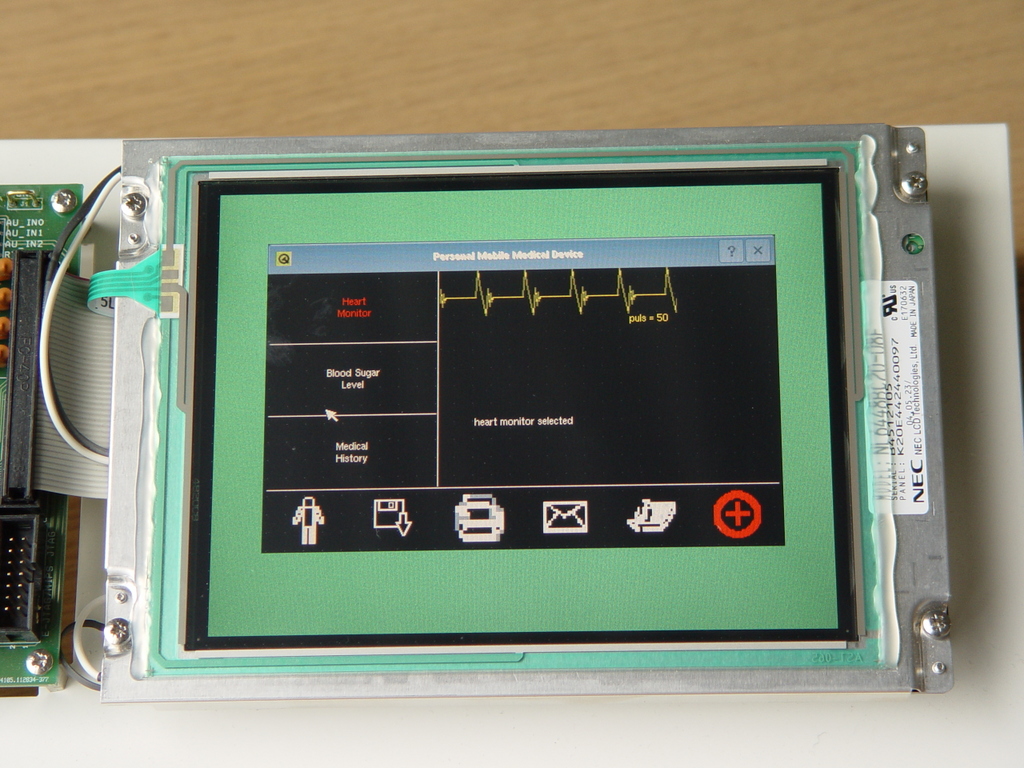
Figure 1. The Application Built with Qtopia
Nano-X was formerly known as Microwindows. Why the change of name? Take a wild guess. If your guess includes a lawyer, you are probably on the right track.
Nano-X is an open-source project at Nano-X.org, started and still headed by Greg Haerr. Nano-X is licensed under the MPL license. The MPL license allows you to create closed source drivers and applications. But, the Nano-X source itself must stay open. There is an option to use the GPL license, if desired.
The Linux package from Mechatronic Brick includes the Nano-X library, but this version did not include support for PNG pictures. I needed PNG support, so I had to recompile. This was quite easy after I found out what config file is used when building in the Mechatronic Brick setup. I noticed that Nano-X comes with a config file that set up Nano-X to be built with TCC, a small and very fast C-only compiler. I decided to use this too, and then the library was compiling in no time.
Starting to program in Nano-X is quite a change, especially when coming from the nice and polished C++ classes of Qtopia. Nano-X is so much simpler, which leaves a lot more work for the application programmer.
Nano-X does not have widgets, or buttons or combo boxes—only windows. There are libraries to put on top of Nano-X that will give you more features, such as Nano-X's own reimplementation of the win32 library and the Fast Light Toolkit (FLTK). In this article, we delve into the basic part of Nano-X.
Basically, when programming for Nano-X, you do four things:
Create windows.
Paint in the windows.
Select event types for each window.
Wait for an event (the event loop).
A typical standard application window is made of a base window with the frames and the small x close button (of course, there are options to customize this look). Subwindows act as buttons and display fields. Yes, in Nano-X, a button is declared like a subwindow with the mouse-click event selected.
In Qtopia, I simply made a class, connected some signals and slots, and puff, the magic happened. In Nano-X, I had to take care of things myself. A central part of a Nano-X application is the event loop, typically a for (ever) loop containing the get event function and a case structure to handle the event (see Listing 1 for an example). When I get a mouse-click event, I ask which window captured this event and act from that. This means that the single button is not isolated in its own piece of code, but weaves into the app. The basic function of the button or the display field should of course be in a function by itself, but the event loop must be aware of which events are selected in the button and what to do with the events.
Listing 1. A for (ever) Loop in Nano-X>
for (;;) {
  GrGetNextEvent(&event);
  switch (event.type) {
    case GR_EVENT_TYPE_EXPOSURE:
      GrText(w, gc, 10, 30, text, -1, GR_TFASCII);
      break;
    case GR_EVENT_TYPE_BUTTON_DOWN:
      text="hej verden";
      GrText(w, gc, 10, 30, text, -1, GR_TFASCII);
      break;
    case GR_EVENT_TYPE_CLOSE_REQ:
      GrClose();
      exit(0);
  }
}The documentation for Nano-X is a bit lacking. There are some great documents out there; however, the links from the Web page are not updated, and many of them are dead. I used Google to find the most useful documentation. One also can use the Nano-X source and the mailing lists. The mailing list is very active, and Greg Haerr is right there, giving quick responses to questions.
A make doc in the sources will make some doc on the API using Doxygen, but not all functions are documented. I had to look directly in the source a few times.
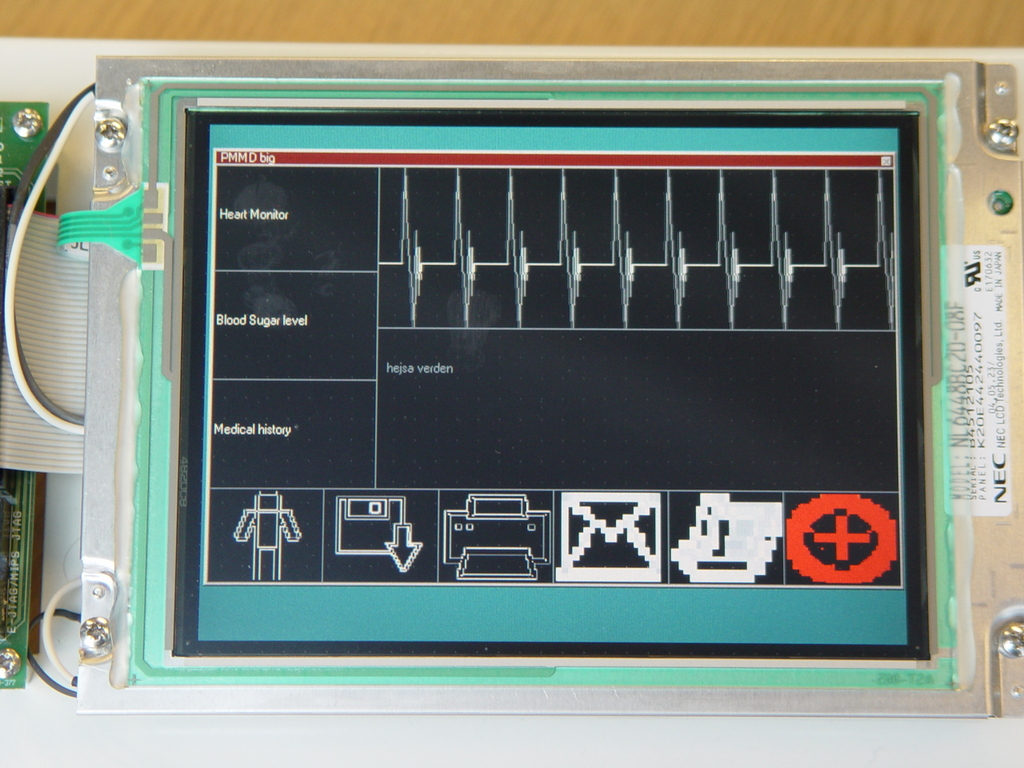
Figure 2. The Application Built with Nano-X
Nano-X does win by miles when it comes to size. However, Qtopia is far ahead when it comes to polished graphics and nice, well-structured programming. Don't get me wrong, this is not entirely a C vs. C++ issue. You can do nice programming using C and Nano-X, but it does require more skill and discipline from the programmer. Hard-core C programmers will often crank out muddy C++ code with Qtopia, so C++ doesn't always translate into good practices—it all depends on your existing skills, time and willingness to learn.
Regarding speed, I did not see much difference, except in my scrolling graph. Using Qtopia, the graph was jittery, because I did not find a way actually to scroll the bitmap, so I had to redraw the complete graph for each step. The graph turned out nicely in Nano-X, using a bitmap copy to make the scrolling, and then just drawing the new part of the graph. Given more time and trial and error, it is likely that you could scroll more efficiently in Qtopia too—probably by sub-classing the right object. But given the current documentation, I did not find a way to do it.
Table 1 is a summary table for the two versions of the PMMD that I made, PMMD-QT and PMMD-NX. Installation includes compiling of the libraries. Code size is taken from the documentation.
Table 1. Summary Table
| PMMD-QT | PMMD-NX | |
|---|---|---|
| GUI | Qtopia from Trolltech (GPL version) | Nano-X |
| Programming Language | C++ | C |
| Time spent learning to use the library | Approx. one week (three days for the installation and two days to learn the API) | Approx. one week (three days for the installation and two days to learn the API) |
| Development time for GUI and heartbeat monitor graph | Approx. two to four days | Approx. five to seven days |
| Code size of library | Compressed: 1.1 - 3.2MB | <100K |
| Documentation | API: really good; installation: needs work | API: usable; installation: needs work |
| License | GPL license and commercial license. The GPL version is free to download; the commercial version must be purchased. | MPL license with possibility for closed source drivers and applications. Nano-X is free to download. |
Widgets
Widgets in graphical user interfaces (GUIs) are the notion for a single component of the GUI like a button, a clock or a text input field.
Wikipedia on widgets: en.wikipedia.org/wiki/Widget_%28computing%29
Linux Framebuffer
The Linux framebuffer (fbdev, en.wikipedia.org/wiki/Linux_framebuffer) is a graphic hardware-independent abstraction layer to show graphics on a console without relying on system-specific libraries, such as SVGALib or the X Window System.
The Linux framebuffer device is inherited from old display hardware (en.wikipedia.org/wiki/Framebuffer) where the picture to be displayed was pulled by hardware from a memory region.
Resources for this article: /article/9460.
Martin Hansen works at the Danish company Center for Software Innovation (CSI, www.cfsi.dk). CSI provides knowledge in embedded development to companies, both through advisory and by giving “Technology Injections”. Martin is the company expert on embedded Linux. He has been using Linux for more than ten years and has worked with embedded Linux for the last two years. He has a practical education in electronics and a Bachelor's degree in computer science.

