
Virtual Filesystems Are Virtual Office Documents
Virtual filesystems can be made into writable virtual office documents. The old UNIX slogan “everything is a file” together with the xsltfs:// virtual filesystem allows for transparently editing relational databases, RDF and arbitrary XML with OpenOffice.org.
The libferris virtual filesystem presents both files and their metadata as a virtual filesystem. The boundaries of what is considered a filesystem by libferris include such interesting data sources as PostgreSQL, LDAP and Firefox as well as standard Web items, such as HTTP, FTP and RDF.
Many virtual filesystems allow directory contents to be synthesized from other directories. The classic example of this is a union filesystem where a collection of existing filesystems are taken as input to generate a filesystem showing the set union of the base filesystems.
Recently, the libferris filesystem has gained support for performing XSLT on a filesystem and exposing the result as a virtual filesystem. To keep things simple, I refer to the original virtual filesystem as the input filesystem and the filesystem that results from the XSL transform as the translated filesystem. As the main use of XSL is to describe translations on trees, this fits nicely for the use of creating translated filesystems.
Although there are differences between a libferris filesystem and the XML data model, there are also many similarities. A file's contents map to the text content of an XML element. A file's metadata is exposed by libferris as Extended Attributes (EAs), which map to XML attributes on the file's XML element. A notable difference between a filesystem and an XML data model is that the document ordering in XML is not always easy to preserve. To keep the mapping simple, a file can generate only one text node in an XML document. Technically, an XML element can have multiple text nodes as children.
Because of the close relation with the XML data model, the libferris filesystem supports viewing any filesystem as a Document Object Model (DOM), which is created on demand. The inverse also is true: you can expose a DOM as a filesystem. As libferris can mount XML as a filesystem, the lines between what is a filesystem and what is XML are somewhat blurred.
Many modern applications store their documents as XML files. As filesystems and XML can be interchanged with libferris, this allows you to use those applications to edit filesystems directly. The main problem with having such applications edit filesystems directly instead of XML is that the schema of the application's XML file usually does not match the layout of the filesystem.
This is where xsltfs:// can be used to create a translated filesystem that matches the layout the application is expecting. For example, you could take a table in a PostgreSQL database as the input filesystem and have the XSL massage that table into a virtual spreadsheet file, which you load into OpenOffice.org.
The possibilities become even more interesting when write support in the translated filesystem is considered. After you have made some changes to the above virtual spreadsheet file in OpenOffice.org, you “save” the file. The filesystem then applies a reverse XSLT and updates the input filesystem (in this case a PostgreSQL table) to reflect your changes.
To support this, you have to have two XSL files. The first stylesheet translates an input filesystem into the format you are interested in. The second XSL file (the reverse stylesheet) provides the inverse translation. In the future, the second XSL file should become optional if it can be inferred from the actions of the initial translation.
Reverse stylesheets can specify updates either using explicit URLs for each file to change or relative paths. The explicit URLs method expects the reverse stylesheet to specify the absolute URL for each file to be updated. This can be convenient for xsltfs:// applications where URLs play a role in both the source and translated filesystem. For example, when editing some RDF files with OpenOffice.org, the subject URI will be available to allow the reverse stylesheet to use explicit updates.
The relative paths method is conceptually similar to applying diff and patch to your filesystems. The reverse stylesheet generates a list of changes to make using a relative path for each file to change. Some options from the patch utility are available to the reverse stylesheet as well. The root element can contain a strip attribute that works similarly to the strip option of patch. The autocreate attribute, when set to true, will make libferris try to create new files where the reverse stylesheet specifies a relative path that does not exist in the source filesystem.
Currently, both reverse stylesheets must supply the entire contents of each file to update. This is not a major drawback, as that information already will be fully available in the translated filesystem.
The following sections show two uses: creating new virtual filesystems and directly interacting with them from the console and creating virtual office documents. This is followed by some advice for creating custom stylesheets by hand.
Translated filesystems can be accessed through the xsltfs:// scheme. This filesystem can be interacted with using the libferris clients or exposed using Filesystem in Userspace (FUSE) through the Linux kernel.
As libferris allows you to see an XML file as a filesystem, the XML file shown in Listing 1 will be used as the input filesystem.
Listing 1. example.xml
<?xml version="1.0" encoding="UTF-8" standalone="no" ?>
<root>
  <file1 size="200"/>
  <file3>filesystems inside XML?</file3>
  <file7 myattr="foo" >Something blue</file7>
</root>
The XSL file shown in Listing 2 will create our translated filesystem from the input filesystem. It is important to keep in mind that although the input filesystem in this case is generated from an XML file, it could just as easily be data from a mounted LDAP server. The XSL will create two elements under the document root element. The file3 element will have the original contents of the virtual “file” for file3 in the input filesystem. The file7 will have the attribute myattr as its contents.
Listing 2. example.xsl
<?xml version="1.0" encoding="utf-8"?>
<xsl:stylesheet

  version="1.0"
  >
  <xsl:output method="xml"/>

  <xsl:template match="/">
    <root>
      <xsl:apply-templates/>
      </root>
  </xsl:template>

  <xsl:template match="file3">
    <context original-url="{@url}" name="file3">
        <xsl:value-of select="@content"/>
    </context>
  </xsl:template>

  <xsl:template match="file7">
    <context original-url="{@url}" name="file7">
        <xsl:value-of select="@myattr"/>
    </context>
  </xsl:template>
</xsl:stylesheet>
The translated filesystem can be used just like any other filesystem with the command-line utilities ferrisls, fcat, ferriscp and so on. The xsltfs:// URL scheme in libferris lives above most other URL schemes and allows you to materialize a filesystem at any point by supplying an XSL transform to apply. The location of the XSL files themselves is determined based on an xsltfs path you set in libferris. The use of an xsltfs path avoids embedding full stylesheet paths into xsltfs:// URLs. As the stylesheets are specified using a CGI-like syntax, avoiding the use of the / character means that there is no ambiguity for filenames in xsltfs://.
You can apply a stylesheet at any point in your virtual filesystem. The result of applying a stylesheet to the example.xml filesystem will become the contents of a directory rooted at the example.xml?stylesheet=example.xsl virtual directory.
Without any use of / in the xsltfs:// parameters, the filename and parameters together are used to specify the name of a virtual directory that xsltfs:// makes on demand. Because there is no unambiguity, you then can navigate directly into the translated filesystem rooted at this virtual directory. This is shown in the examples below.
Part of a filesystem is shown in Listing 3 to make things clearer. I have applied the foo.xsl to the example.xml file using the special CGI-like syntax to name a virtual directory. libferris creates this virtual directory for me to allow direct navigation into the translated filesystem. The rootElement is the root of the translated filesystem; in XML terms, it is the document root of the result of applying the foo.xsl stylesheet to the filesystem rooted at example.xml. Filesystems live inside the context subdirectory of xsltfs:// to allow other parameters and expansion to be done in xsltfs:// at a later time.
Listing 3. Generating a Translated Filesystem for example.xml
xsltfs://
  context
    file
      tmp
        example.xml
        example.xml?stylesheet=foo.xsl
          rootElement
            myFoo1
            myBar2
The xsltfs path can be set using the XSLT stylesheets page of the ferris-capplet-general configuration tool. In addition to setting the XSLT path with ferris-capplet-general, you can use the LIBFERRIS_XSLTFS_SHEETS_URL environment variable to pass in the path explicitly where your forward and reverse stylesheets are located. This makes using xsltfs with the FUSE module from shell scripts quite simple, as you do not need to install your stylesheet files. Stylesheets can be stored in any filesystem libferris can reach.
For the purposes of this example, I have the files and stylesheets stored in file://tmp/example. If I am running my examples from the example directory, it is sufficient to put . into my XSLT path—see the example in Listing 4.
Listing 4. Exploring Our New XSLT Filesystem
$ bash
$ URL='xsltfs://context/file/tmp/example/
↪example.xml?stylesheet=example.xsl'
$ cd /tmp/example
$ ls
example-rev.xsl  example.xml  example.xsl
$ export LIBFERRIS_XSLTFS_SHEETS_URL=`pwd`
$ ferrisls -l $URL
   0 root
$ ferrisls -l $URL/root
  23 file3
   3 file7

$ fcat $URL
<?xml version="1.0" encoding="UTF-8" standalone="no" ?>
<root>

 <context name="file3"
 original-url="file:///tmp/example/example.xml/root/file3"
  >filesystems inside XML?</context>

  <context name="file7"
    original-url="file:///tmp/example/example.xml/root/file7"
  >foo</context>

</root>

$ fcat $URL/root/file3
filesystems inside XML?
Things become more interesting when we provide a reverse stylesheet, as shown in Listing 5. In this case, we are mapping things back fairly plainly to where they originated in the input filesystem. The file7 content is placed back into the myattr XML attribute of the input document. Having an explicit reverse XSL transform provides you with the freedom to update only part of the original filesystem as you see fit. You also can use functions from the stylesheet to modify the data on its way back to the input filesystem.
Listing 5. example-rev.xsl
<?xml version="1.0" encoding="utf-8"?>
<xsl:stylesheet

  version="1.0"

  exclude-result-prefixes="ferris"
  >
  <xsl:output method="xml"/>

  <xsl:template match="/">
    <explicit-updates>
        <xsl:apply-templates/>
      </explicit-updates>
  </xsl:template>

  <xsl:template match="context[@name='file3']">
    <context url="{@original-url}">
      <xsl:value-of select="."/>
    </context>
  </xsl:template>

  <xsl:template match="context[@name='file7']">
    <attribute url="{@original-url}"
name="myattr"><xsl:value-of select="."/></attribute>
  </xsl:template>

</xsl:stylesheet>
Now that we have the forward and reverse XSL, we can happily modify the contents of the original example.xml file by interacting with the virtual file(s) in our xslfs://, as shown in Listing 6.
Listing 6. Changing the XML File through our New XSLT Filesystem
$ bash
$ URL='xsltfs://context/file/tmp/example/
↪example.xml?stylesheet=example.xsl&
↪reverse-stylesheet=example-rev.xsl'
# Change the file3 element to have new content
$ echo foo | ferris-redirect -T $URL/root/file3
$ cat example.xml
<?xml version="1.0" encoding="UTF-8" standalone="no" ?>
<root>
  <file1 size="200"/>
  <file3>foo
</file3>
  <file7 myattr="foo">Something blue</file7>
</root>

# Update everything based on a new XML file
$ cat example-update1.xml
<?xml version="1.0" encoding="UTF-8" standalone="no" ?>
<root>
   <context name="file3" original-url=
↪"file:///tmp/example/example.xml/root/file3"
>A new file3 text node
   </context>
   <context name="file7" original-url=
↪"file:///tmp/example/example.xml/root/file7"
>A new file7 myattr</context>
</root>

$ cat example-update1.xml | ferris-redirect -T $URL

$ cat example.xml
<?xml version="1.0" encoding="UTF-8" standalone="no" ?>
<root>
  <file1 size="200"/>
  <file3>A new file3 text node
   </file3>
  <file7 myattr="A new file7 myattr"
>Something blue</file7>
</root>
The example in Listing 6 shows two options for updating your filesystem: either by changing individual virtual files or by updating the virtual XML document (the translated filesystem) in a single shot. The first method of updating individual files maintains the filesystem metaphor in the xsltfs. The second method of updating via rewriting the main virtual XML document provides support for XML editing applications, such as OpenOffice.org where a document is read, manipulated and rewritten.
The URLs can be quite ugly and rather long. If you are editing such filesystems frequently, you might want to expose the xsltfs using FUSE. Editing virtual XML files with OpenOffice.org requires the use of FUSE to expose the virtual XML file through the Linux kernel.
If the format of the output of xsltfs:// is well known, such as an OpenOffice.org document, you can create file format automatically from the XSL files.
The ferris-filesystem-to-xsltfs-sheets client is used to set up stylesheets automatically. A plugin system is used to allow new file formats to be supported in the future. To see which plugins are available, use the --plugin=help command-line option.
You need to use a FUSE filesystem in order to read and write virtual office documents directly. This also can be set up automatically by the ferris-filesystem-to-xsltfs-sheets client using the --fuse=foo command-line option.
Some distributions require additional setup for a user in order to use FUSE mounts. On Fedora Core, you have to add the user to the fuse group, which can be done as shown in Listing 7.
Listing 7. Allowing a User to Use FUSE on Fedora Core
root-bash-# usermod -a -G fuse ben
An example of setting up a little PostgreSQL table and creating a new virtual office document to allow editing this table is shown in Listing 8.
Listing 8. Setting Up a Virtual Office Document to Edit a Database Table
bash-$ psql
ben=# create database lj;
ben=# \c lj;
You are now connected to database "lj".
lj=# create table msgs
lj-# ( id serial primary key,
lj-#   num int, msg varchar(200),
lj-#   foo varchar(100) );
lj=# insert into msgs values
lj-# ( default, 7,  'This is msg #1', 'Foo is Bar');
lj=# insert into msgs values
lj-# ( default, 12, 'Second message', 'ii tenki');
lj=# select * from msgs;
 id | num |      msg       |    foo
----+-----+----------------+------------
  1 |   7 | This is msg #1 | Foo is Bar
  2 |  12 | Second message | ii tenki
(2 rows)
\q

bash-$ ferrisls pg://localhost/lj
msgs
bash-$ ferrisls --xml pg://localhost/lj/msgs
<ferrisls>
<ferrisls url="pg:///localhost/lj/msgs" name="msgs">
 <context  id="1"  num="7"
    msg="This is msg #1"  foo="Foo is Bar"
    name="1"  primary-key="id"  />
 <context  id="2"  num="12"
    msg="Second message"  foo="ii tenki"
    name="2"  primary-key="id"  />
</ferrisls>
</ferrisls>

bash-$ ferris-filesystem-to-xsltfs-sheets \
  --plugin excel2003 --fuse msgs \
  pg://localhost/lj/msgs

bash-$ ferrisls -lh ~/ferrisfuse
... ben ben 129  06 Oct 21 11:56 mount-msgs.sh
... ben ben 4.0k 06 Oct 21 11:56 msgs

bash-$ cd ~/ferrisfuse/
bash-$ ./mount-msgs.sh
bash-$ ls -lh msgs
... 0 ben ben 3.8K Jan  1  1970 msgs.xml*
bash-$ cat msgs/msgs.xml | head
<?xml version="1.0" encoding="UTF-8" ... ?>
<Workbook xmlns=...>
 <OfficeDocumentSettings xmlns=...>
    <Colors>
  ...

bash-$ ooffice msgs/msgs.xml
The final command in Listing 8 opens the virtual spreadsheet document, which should look similar to Figure 1. I then changed some data in the second row and saved the file giving the result shown in Figure 2.
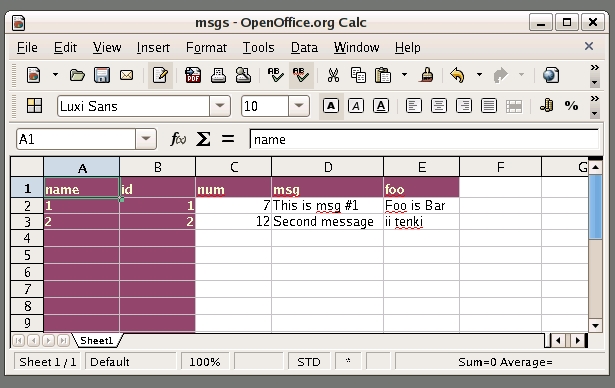
Figure 1. Initial View of Virtual Office Document
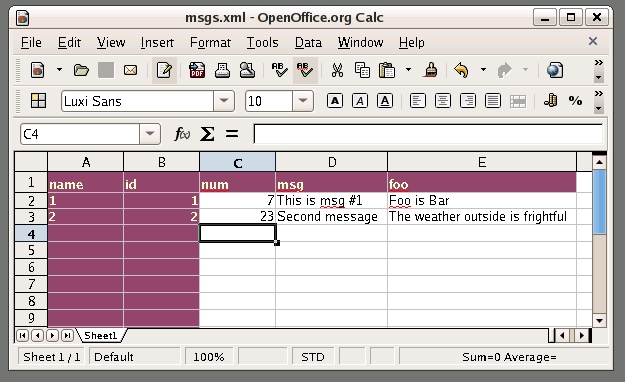
Figure 2. Some changes to the second row are saved back to the database.
Looking at the PostgreSQL table after saving the virtual office document shows the updated contents—see Listing 9.
Listing 9. The Contents of the Database after Editing with OpenOffice.org
bash-$ psql lj
lj=# select * from msgs;
 id | num |      msg       |               foo
----+-----+----------------+-----------------------
  1 |   7 | This is msg #1 | Foo is Bar
  2 |  23 | Second message | The weather outside...
(2 rows)
The ferris-mount-etagere-as-kml.sh script uses xsltfs:// and FUSE to set up a read/write virtual KML file. The stylesheets translate between libferris geoemblems and the KML format for place names used by Google Earth.
The stylesheets used to expose libferris emblems provide an example of translating a whole tree in libferris into a hierarchical XML document for an external application to use. The is-dir EA from the input filesystem is used to determine the type of XML element to generate in the translated filesystem, as KML files require the use of Placemark or Folder elements depending on whether children are to be found.
For testing purposes, if the LIBFERRIS_XSLTFS_DONT_UPDATE environment variable is set, libferris performs the reverse stylesheet application and logs what updates would have been done but does not actually update the input filesystem.
There are a few hints that can make setting up and adjusting custom forward and reverse stylesheets much simpler.
I use the example.xml file shown in Listing 1 again here as the input filesystem. Although in this example, I am starting with example.xml, which is an XML file, we want to see how libferris sees this input filesystem, not only the raw XML itself. For example, the contents of an elements text nodes will be available as the content attribute when libferris mounts this XML file.
To get at the libferris view of the XML, I use ferrisls with its --xml-xsltfs-debug option. I also need to recurse the example.xml file to get the whole filesystem and explicitly select any attributes that the example.xsl file will want to use.
The manual application of a forward stylesheet is shown in Listing 10.
The reverse stylesheet can be applied to the translated filesystem XML file. Once this output looks sane, non-destructive testing can be done by applying it through xsltfs:// with LIBFERRIS_XSLTFS_DONT_UPDATE set. Make sure ferris-logging-xsltfs is set to debug in the ferris-capplet-logging configuration tool to get all the information about what would have been updated.
Listing 10. Developing and Debugging New Stylesheets
$ ferrisls -R --xml-xsltfs-debug \
  --show-ea=name,content,myattr \
  example.xml/root

<?xml version="1.0" encoding="UTF-8" standalone="no" ?>
<ferrisls>

  <root name="root"
     url="file:///tmp/KK/example.xml/root">

    <file1 content="" myattr=" " name="file1"
       url="file:///tmp/KK/example.xml/root/file1"/>
    <file3 content="filesystems inside XML?"
       myattr=" " name="file3"
       url="file:///tmp/KK/example.xml/root/file3"/>
    <file7 content="Something blue" myattr="foo"
       name="file7"
       url="file:///tmp/KK/example.xml/root/file7"/>
  </root>

</ferrisls>

$ ferrisls -R --xml-xsltfs-debug \
  --show-ea=name,content,myattr \
  example.xml/root >| input.xml

$ FerrisXalanTransform  -s example.xsl  -m input.xml
transform XML:input.xml with xsl:example.xsl
<?xml version="1.0" encoding="UTF-8"?><root>
 <context
original-url="file:///tmp/KK/example.xml/root/file3"
   name="file3">filesystems inside XML?
 </context>
 <context
original-url="file:///tmp/KK/example.xml/root/file7"
   name="file7">foo
 </context>
</root>

$ export LIBFERRIS_XSLTFS_SHEETS_URL=`pwd`
$ URL=xsltfs://context/file/tmp/example/example.xml/
↪root?stylesheet=example.xsl
$ fcat $URL
<?xml version="1.0" encoding="UTF-8" standalone="no" ?>
<root>
 <context name="file3" original-url="file:///home/ben/xsltfs/
↪example.xml/root/file3">filesystems inside XML?
 </context>
 <context name="file7" original-url="file:///home/ben/
↪xsltfs/example.xml/root/file7">foo
 </context>
</root>
$ fcat $URL >| translated.xml
$ vi translated.xml
...make changes to test reverse sheet
...inserting CHANGE_A and changeB into the elements

$ FerrisXalanTransform -s example-rev.xsl \
   -m translated.xml

transform XML:translated.xml with xsl:example-rev.xsl
<?xml version="1.0" encoding="UTF-8"?>
<explicit-updates>
 <context
url="file:///home/ben/xsltfs/example.xml/root/file3"
  >filesystems inside CHANGE_A XML?
 </context>
 <attribute
url="file:///home/ben/xsltfs/example.xml/root/file7"
   name="myattr">foo changeB
 </attribute>
</explicit-updates>The major planned feature is the automatic derivation of the reverse stylesheet. This would make setting up xsltfs:// mountpoints much simpler. Things, such as duplicating nodes in the forward XSL file, would require an explicit reverse XSL file to resolve conflicts where each duplicate was edited in the transformed filesystem.
More plugins for ferris-filesystem-to-xsltfs-sheets are in the cards. For example, being able to edit data from common LDAP schemas, such as user authentication in OpenOffice.org, would be nice. Support for creating virtual OpenOffice.org zip files as the target of xsltfs:// would allow the creation of native OpenOffice.org documents.
More of the command-line options of patch probably will become available for the reverse stylesheet to use.
Resources for this article: /article/9513.
Ben Martin has been working on filesystems for more than ten years. He is currently working toward a PhD at the University of Wollongong, Australia, combining Semantic Filesystems with Formal Concept Analysis to improve human-filesystem interaction.

