
How to Port Linux When the Hardware Turns Soft
In software development, possibly the most mystical and prestigious effort is taking dead hardware and breathing life into it—porting an operating system to a new platform—the mythical land of wizards and gurus, the software side of The Soul of a New Machine. I had performed almost every other software development task, and I wanted a chance to conquer this one.
I had been working with Linux and open-source software for many years. I am a fairly competent software developer (with hardware experience), but prior to starting the E12 port, I had done little more than tweak a Linux driver and build custom configured kernels. I was fortunate to have a friend building a new company that was developing one of the smallest embedded systems available, the Pico E12. I practically begged for the opportunity to put Linux on the E12. “A man's reach should exceed his grasp, or what's a heaven for?”
The E12 used a Xilinx Virtex 4 FX20 FPGA (Field Programmable Gate Array) that included a 300MHz PowerPC 405 processor, 128MB of memory and 64MB of Flash ROM. I bought a Macintosh Lombard PowerBook Laptop on eBay, as a sort of simulator for the E12. It also provided a way to write for the E12 without a cross compiler. While waiting for the E12 to progress far enough to start working with it, I scoured the Web for information about Linux porting and developed competence in PowerPC assembly language. Linux kernel programming is primarily in C, but small parts of the Linux kernel—parts critical to putting Linux on a new system are in assembler. I have programmed in many assemblers—once writing the standard C library in x86 assembler, but PPC assembler was new and took a day or two to learn. Linux had been ported to PowerPCs, even a different Xilinx FPGA, long ago.
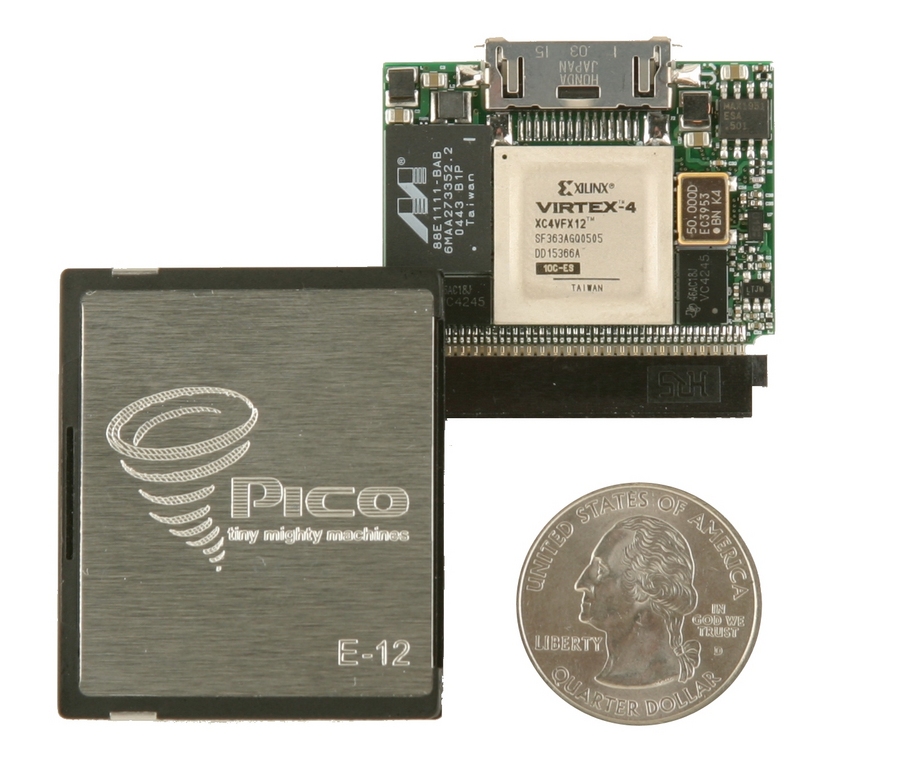
Figure 1. Pico E12
I have a reference library of software books that fills a three-car garage. With few exceptions, they gather dust. My primary research tool today is a broadband Internet connection and a search engine. There are vast resources available on the Web for Linux developers. The Linux Device Driver guide—the Linux bible for device drivers—and numerous mailing lists target all aspects of Linux systems development. Kernel-Newbies is a great place to start (see the on-line Resources). There are mailing lists for every Linux subsystem. And, there are several Linux PowerPC mailing lists—one specific to embedded PowerPC Linux. At the root of this tree is LKML, the Linux Kernel Mailing List. LKML is Mount Olympus—the home of Linus, and the other Linux gods and titans. There are Web pages documenting the experience of others porting Linux to specific boards. Finally, the ultimate reference—the Linux kernel source—is available on kernel.org.
Finally, the E12 was far enough along to start work, and I received one via FedEx. I had documents and specifications, but actually holding one made it real and answered questions that could not be read from the specifications.
The E12
The E12 is a Compact Flash card—exactly like those in many digital cameras. It has only two connectors: a CF bus connection on one end and a 15-pin miniature connector on the other. There are no other external connections. The E12 is based on an FPGA. There are a few additional components, and a few fixed elements, such as the PPC405 CPU on the FPGA. A large part of the hardware is programmable. Most external connections are through the FPGA. Almost none of the “hardware” has form or meaning until the FPGA is loaded. Changing the bit file on the fly drops in a completely new hardware design. Welcome to a new era—even the hardware is software. The BIT image—in essence the program for the FPGA—is created by an FPGA developer, programmed into the Flash ROM and automagically loaded into the FPGA on power-up. Once this BIT image “boots”, hardware is created in the FPGA. Now, the pins on the connectors have meaning. The 15-pin connector provides three external connections for internal devices. It supports Ethernet, serial and JTAG connections through custom cables. The CF connector provides a bidirectional interface to a host—in most instances using a CardBus or PCMCIA adapter. Most of the pins on either connector can be whatever the FPGA programmer chooses to make them. Fielded systems may be plugged in to a CF connector solely to get power. E12's are used in daughter cards in typical embedded applications, on bus boards in high-performance computers in clusters and for applications, such as image processing or code cracking. They also are being used in applications with no operating system or extremely minimal operating systems.
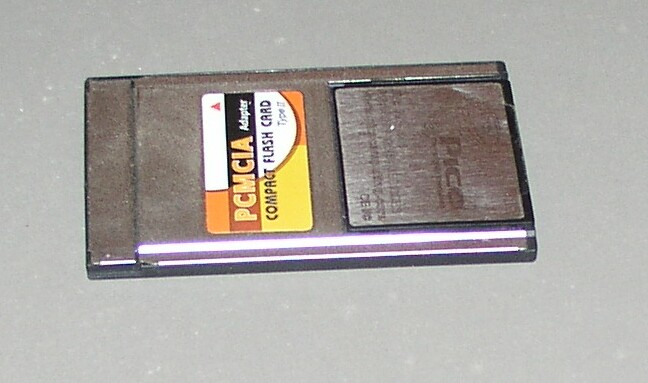
Figure 2. E12 in PCMCIA Adapter
Pico provided tools for hosted development. The standard E12 BIT file provided a CF interface with a simulated LPT3/JTAG port, a 512-word bidirectional communications FIFO called the keyhole, and host access to the Flash ROM. Pico also provided host-side Windows and Linux drivers that allowed reading and writing the Flash ROM. The normal FPGA BIT image contains a very small PPC monitor program that can perform a small number of tasks—most of which rely heavily on support from the host. One of those functions is the ability to load two types of files into the E12. It can load a new BIT image or load and execute binary ELF files—a simple bootloader. This saved me the difficulty of porting a bootloader, such as U-Boot. The Linux kernel was the most complex ELF file that the E12 monitor program had loaded to this point, and a few tweaks were needed to the loader.
My first objective was to write the proverbial “Hello World” program for the E12. I spent a few days and wrote two different “Hello World” programs: one for the keyhole FIFO and one for Xilinx uartlite port.
Now, I was ready to attack Linux. I decided to start with Linux 2.6. There were numerous issues—good reasons, as well as respected and conflicting opinions favoring both 2.4 and 2.6. I elected to use Linux 2.6, because I eventually was going to have to move to 2.6 anyway. Initially, I used the PowerBook to configure and build my Linux kernel for the Pico E12. This allowed me to start without cross compilers. Eventually, I switched to building inside of a coLinux virtual machine on Windows hosting the E12. Most Pico clients are doing Windows-hosted development. It was critical that everything work in that environment. Besides, building a PowerPC Linux kernel in a Linux virtual machine running Windows and loading it into a PowerPC, means that Linux outnumbers Windows 2 to 1 inside my laptop.
I used the Xilinx ML300 as a template to create a new Linux BSP (Broad Support Package). I grepped the kernel source for all references to the Xilinx ML300. I copied and renamed all ML300-related files to new files for the Pico E12. There were four completely unique files for the E12:
arch/ppc/platforms/4xx/pic0-e1x.c: board-specific setup code.
arch/ppc/platforms/4xx/pic0-e1x.h: headers and data structures for the board-specific setup code.
arch/ppc/platforms/4xx/xparameters/xparameters_pic0-e1x.h: a set of hardware definitions created by the Xilinx software that created the bit image for the FPGA.
arch/ppc/configs/defconfig_pic0-e1x: a default Linux configuration file for the E12.
There were major similarities between the Xilinx ML300, but there were a few specific differences. The E12 deliberately implements a lot less hardware. The E12's purpose is to provide a very minimal base platform, with the largest percentage of FPGA left for the client. The minimal useful Linux configuration must have either Ethernet, a serial port or the keyhole port. The default E12 does not have an interrupt controller—the PPC405 provides a timer interrupt that does not require a PIC. The E12 also uses the Xilinx uartlite uart, not the much larger and more common 16550 uart. There were no Linux drivers for the uartlite. Two other ML300 files, generic support for Virtex FPGAs required minor modifications.
The next major issue was learning the Linux configuration system. I was not able to find much documentation. With Linux kernel programming, the two primary resources are the Linux source itself and the mailing lists. Sometimes, there is excellent documentation for a system; sometimes there is nothing. Sometimes I found documentation in some obscure corner of the Web—after I had figured things out on my own. I had to develop enough understanding of the kernel build system to add a new board, some new configuration options and a few new drivers to the build system.
The first element is the Kconfig files in most of the Linux source directories. Kconfig is a cross between a very, very simple scripting language and a menu construction language. The entries in Kconfig files determine the menu structure and choices that you get when you execute any of the Linux menu configuration build options—make oldconfig, make menuconfig, make xconfig.
I had to create a new menu item under the ppc 4xx menu for the Pico E12, menu items in the drivers/serial/Kconfig file for the uartlite and keyhole serial ports, and a small collection of menu items for other options. The syntax for the Kconfig items I needed to create could be easily worked out by inspection and a small amount of trial and error. I copied blocks for similar objects, made name changes as needed, and without too much effort, it worked. Inside the .config file, source code and Makefiles, the configuration items defined in Kconfig files are prefixed with CONFIG_. After the Kconfig entries were created, entries needed to be added to the matching Makefiles. This mostly involved copying similar objects and making name changes, and except for a few very complex choices, was pretty easy.
So far, I had done very little actual coding. Most of what I had done was remove ML300-specific code from the new Pico E12 copy. I also copied the Xilinx PIC driver and created a stripped-out dummy PIC driver.
I was now able to build a Linux kernel for the Pico E12, without serial or Ethernet drivers. I still needed to write two serial device drivers: uartlite.c and keyhole.c. I deliberately chose to use the 8250 driver as a template—8250s and their numerous successors are ubiquitous, probably making up more serial devices than all others combined. I assumed that the 8250 driver would be, by far, the most stable and well-debugged serial driver. Also, many 8250-based systems are known to have problems with interrupts, so I knew that the Linux 8250 driver had to work without interrupts. This turned out to be a bad choice. The Linux 8250 driver is probably, by far, the most complex Linux serial driver.
Eventually, I remodeled my drivers based on the m32r_sio driver. I did not know much about the m32r_sio, but the driver was clean and simple, had all the features I needed and none that I did not. I also had to create a set of serial port headers for the keyhole and the uartlite, defining the uart registers and the bits within the registers. I also modeled these directly on the 8250, which was a much better decision. I have been writing uart code, including software uarts, for a long time. Writing the device-specific code for the keyhole and uartlite was simple. Fewer than a dozen lines of code were needed to send and receive a character. The uartlite and keyhole, like most Linux serial devices, do not have modem control and operate at a single speed. The few lines of code needed to send a character were also useful elsewhere for debugging. The keyhole is not a real serial device, but it can be made to look like one to Linux and then used as a console when the E12 is hosted. This was very important.
Connecting a rat's nest of cables to the host computer and to the tiny external connector on the E12 for Ethernet and the uartlite serial port created problems. The time testing every cable connection to assure that one had not come loose prior to trying a new kernel was greater than the time writing and testing code. I wore out or damaged several external connectors before I was done. When using the keyhole, all the connections between the E12 and the host are internal. It was also useful to send debugging through one device using the other as the console. The keyhole had one other attribute that came in extremely handy—I could write 16- or 32-bit values to one register as a single output instruction and see the data on the host side. This was critical when debugging PowerPC assembly code. Inserting code to display a value or trace execution needed to be done using few instructions, minimal side effects and assuming very little was working. Outputting values directly to the keyhole port became my equivalent to flashing an LED connected to an I/O port. It was equally simple and slightly more powerful.
To some extent, all software development is working in the dark, but embedded board bring-up is particularly so. Output is a flashlight letting you see a little bit of what is going on. The E12 has provisions for JTAG debugging, either through the emulated parallel port or the 15-pin connector. The Linux kernel provides kgdb and xmon support. These presume support on the host side and working hardware and drivers on the target. Linux also provides options for outputting progress and debugging prior to loading the console driver. These were limited primarily to 8250-compatible uarts. I added uartlite and keyhole ports to the early text debugging devices. Aside from persuading Linux to use it, this primarily involved supplying a few lines of code to output a character. I have the skills needed to use debugging tools from logic analyzers to gdb. Most of the time, I find that sophisticated tools provide massive amounts of additional information, obfuscating the problem rather than revealing it. But debugging is a religious art with competing sects, each with their own dogma.
Once I had working output routines for the uartlite and the keyhole, a stripped version of the ML300 code for the E12 and modified Kconfig and Makefiles for the E12, I was ready to build a kernel and try it. The normal Linux build process for the PowerPC leaves a kernel image in ELF format in arch/ppc/boot/images as zImage.elf. I copied this from the PowerBook I was using to build Linux kernels onto the host computer for the E12, and I used PicoUtil to replace the current Linux kernel image on the E12 Flash. I used the E12's monitor to execute the ELF file. The Linux boot process is similar across platforms and boot methods. In my instance, the zImage.elf file loaded at 0x40000000 and started with a small wrapper that did some early hardware setup, decompressed and relocated the actual Linux kernel and then jumped to the early Linux setup code. I copied the simple character output routines for the keyhole and uartlite into the files arch/ppc/boot/simple/keyhole_tty.c and uartlite_tty.c, and these provided debugging output during the wrapper execution.
My first big problem was that the memory map of the E12 had the Flash starting at physical address 0 and the RAM at a higher physical address. Advice I received on the Linux PPC embedded mailing list suggested I really, really did not want to try to port Linux to a board without RAM at 0, if it was humanly possible to persuade the board designers to change the memory map. There have been previous and subsequent efforts to modify Linux to support systems where RAM does not start at physical address 0. I believe that is less of an issue now. Still, I took the advice, and after a few hours of begging, Pico agreed to re-organize memoryped to 0. The soft hardware meant that they were able to provide me with a new bit image with RAM mapped to 0 within a few hours.
For a while, I also ran my own customized version of the monitor program, passing a board information structure Linux expected with a small amount of information on memory size, processor speed and the mac address to use for the NIC. Eventually, these modifications were incorporated into the standard Pico monitor.
The best documentation for the boot process as it applied to my system was in the MontaVista comments at the top of xilinx_ml300.c. These did not cover the decompression and relocation wrapper, but exposed the rest of the boot process.
The next significant problem was in arch/ppc/kernel/head_4xx.S. Here, Linux does basic MMU and exception handling setup, then uses an rfi instruction to transition from “real” mode to “virtual” mode and continue with the kernel initialization. I was able to execute right up to that rfi. I was able to check all the obvious conditions for successfully executing the rfi. However, I never ended up at start_here—where the rfi should have continued. I spent days developing an understanding of the Linux Virtual Memory system—most of the documentation x86-specific. And, I became more knowledgeable about the PowerPC MMU, a fairly simple device compared to the x86 MMU. It is basically a 64-entry address translation table. Virtual memory OSes inevitably use more than 64 virtual-physical addresses mappings, region sizes and privileges. A reference to a virtual address not in the MMU, or one that violates the privilege bits set for that entry, causes an exception, and it is the OS's responsibility to sort it out using whatever algorithms, methods and data that suits it. The fault processing might take longer, as it is not handled in hardware, but it is more flexible, adaptable and less resource-intensive. There are no gigantic fixed mapping tables in dedicated regions of physical memory, as required on some other processors.
But, I still could not figure out why the rfi was not executing correctly. I added all kinds of additional entries to the MMU, assuming that I was actually successfully switching to virtual mode but unable to communicate, because my I/O ports were no longer accessible. I sprinkled the equivalent of “I am here” debugging markers throughout head_4xx.S and got my first clue. I was continuously looping through an exception handler. Every time I switched to virtual mode, I lost control of the PPC, regaining it again in real mode in the exception handler. I had the critical clues to figure things out, but I was still mystified.
Every problem can be solved if it can be divided into smaller pieces. Eventually, I realized that it was possible to transition from real to virtual mode in smaller increments rather than all at once as the rfi did. I was able to turn on address translation for data and turn it back off without ill effects. I was able to add 1-1 physical to virtual address mappings for my keyhole debug port to the MMU, turn it on to do some output and turn it off. With more effort, I was able to turn on instruction address translation execute code and turn it back off.
That is when it finally dawned on me that the problem had nothing to do with switching from real to virtual mode, but that something else being set by the rfi must be enabling an exception that was not occurring otherwise. So, I tested the bits in MSR_KERNEL—the PPC machine status register value Linux uses—one bit at a time, until I discovered that anytime I set MSR_CE, enabling machine check exceptions, I lost control. I redefined the macro that set MSR_KERNEL so that it did not set MSR_CE for the E12 and reported to Pico that I thought there was a hardware problem in the E12. Pico never found the problem, but six months later, updates to Xilinx's firmware building blocks corrected the problem.
After working around the machine-check problem, I suddenly found Linux booting all the way through to setting up the serial/console driver. I was stalled for a few days while I actually finished the serial drivers for the keyhole and uartlite. Linux needs a place to hold the root filesystem. There are many possibilities. Frequently, the norm for embedded systems is to place the root filesystem for an embedded development environment on an NFS share on another machine. This requires a working Ethernet driver. My confidence in my serial drivers was not high at that point. Further, the Pico minimalist mantra does not include networking as part of the base Linux, and many E12/Linux applications do not need it.
The root filesystem can be on a hard disk (none readily available in the E12) or in Flash. The E12 uses a very simple Pico File System, but one that is not suited for a root filesystem. Another alternative was to put the root filesystem on a RAM disk. Linux provided the ability to use and populate a RAM filesystem as an intermediate step in the boot process. One objective was to migrate as much of the Linux boot code out of the kernel to user space as possible. Linux systems going back many years boot through initrd, then execute a pivot_root to switch the root filesystem from the initrd RAM disk to the disk-based root filesystem. Using initrd requires the loader to copy the compressed Linux image and the separate image of the contents of the initial RAM disk into memory, and provides Linux with a pointer to the initial RAM disk data.
Linux 2.6 introduced a new variation—initramfs. One difference between initramfs and initrd was that with initramfs, the contents of the initial root RAM disk filesystem were compressed into the Linux image during build, so there was only one file—in my case an ELF file—to load. This meant that the Pico monitor would not need changes. This initramfs approach proved to be extremely clean, simple and easy to use. Getting it working was complex and time consuming, because initramfs is fairly new. The primary documentation is a collection of posts to LKML. To create an initramfs for the Pico E12, I determined that I needed to create a directory on my build system and populate it with the files for the root filesystem. I enabled the initramfs option using menuconfig and told menuconfig where to find the directory that represented my root filesystem. There are a few other ways to do this, but that was the simplest. Initially, I decompressed the initramfs from the Gentoo Linux install on my PowerBook. I eventually switched to a cross-compiled BusyBox when I erroneously thought I might be having problems with my boot image, because the binaries were built for the PowerBook, not a PPC405.
After this, I hit my next problem. Linux was booting all the way though to executing /init where it just stopped. I wrote a trivial version of ls and included it in the kernel, calling it prior to exec'ing /init. Everything was fine. But on exec'ing /init, Linux became deaf and dumb. Debugging can be particularly difficult when the horses look like zebras. I spent a lot of time tracing through the Linux exec process, which was remarkably ingenious in many instances, doing minimal work and loading a process through page faults. Unfortunately, this made tracing what was happening very difficult and led me once again to the (almost) erroneous conclusion that I had a virtual memory problem. I wrote a Linux version of “Hello World” in PPC assembler with no external libraries and was able to execute it as /init. But, I could not exec anything more complex. I eventually found and enabled system call tracing and was able to watch as /init executed. The system always died while in the middle of virtual memory operations. I ended up with failure cases when Linux would go dumb right in the middle of outputting some debug string—again, always during a VM operation. I could actually change the point of failure by inserting additional debugging. I was a victim of the Heisenberg uncertainty principle—observation changed the observed behavior.
I was sure something was wrong with my serial drivers, despite the fact that this did not make sense, but how else could output stop in the middle of a string? All the critical clues were present to solve this problem, though one of them was buried as an artifact of the machine-check problem. This was a VM problem, in a twisted sense, and it was a serial driver problem. I will not confess to how long it took for the answer to dawn on me. Let's just say I rewrote the serial drivers several times before I saw that although the serial drivers requested and saved a virtual address for the memory mapped hardware—partly as an error induced by using the 8250 serial driver as a starting point—the virtual address for the serial port was subsequently getting overwritten by the physical address of the port. Because in my efforts to debug the machine-check problem I put a 1-1 physical-virtual mapping directly into the MMU Translation Lookaside Buffer, I/O continued to work until the Linux VM system overwrote my temporary TLB entry. After recognizing this, it took less than 30 minutes to correct, and I was able to boot up Linux to a bash prompt.
Little matches the thrill of seeing a new machine reach a shell prompt and knowing I made it happen. I had completed my base Pico E12 Linux port. Well, that is not quite true—no port is ever finished. When I completed my Pico E12 port, I was unaware of any other port of Linux to a Xilinx V4 chipset. Subsequently, a Linux port for the Xilinx ML403 by Grant Likely started working its way through Linux embedded PPC development trees and has been accepted into the distribution kernel. The Pico E12 is distinct from the ML403, but they are more similar to each other than the older ML300 from which I started. Grant's ML403 port reflected changes that were impacting the whole Linux PPC development tree, so I made my Pico E12 port track those developments.
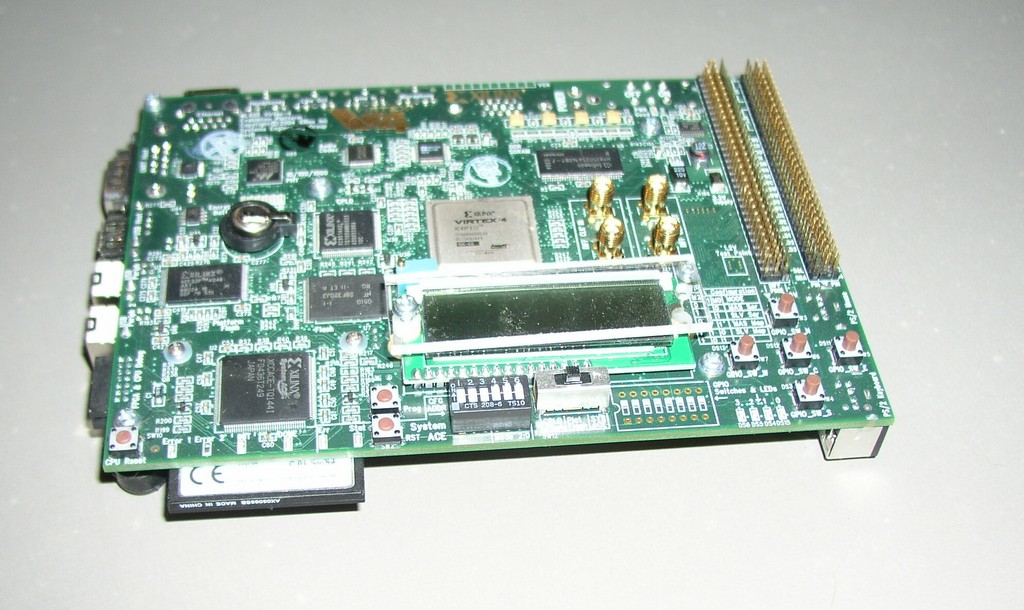
Figure 3. Xilinx ML403 Development System
I have depended on the keyhole port for hosted development work, and as a result, the keyhole serial driver gradually has grown smaller and more consistent with the direction in which Linux serial drivers seem to be headed. I will have to update the uartlite driver to catch up.
I am currently on my third iteration of a Linux network driver for the E12, and Pico is on its second iteration of the underlying network hardware. The new network hardware is interrupt-driven requiring a PIC.
A second Pico board has matured, and with minimal changes, the Pico E12 port has evolved into the Pico E1X port.
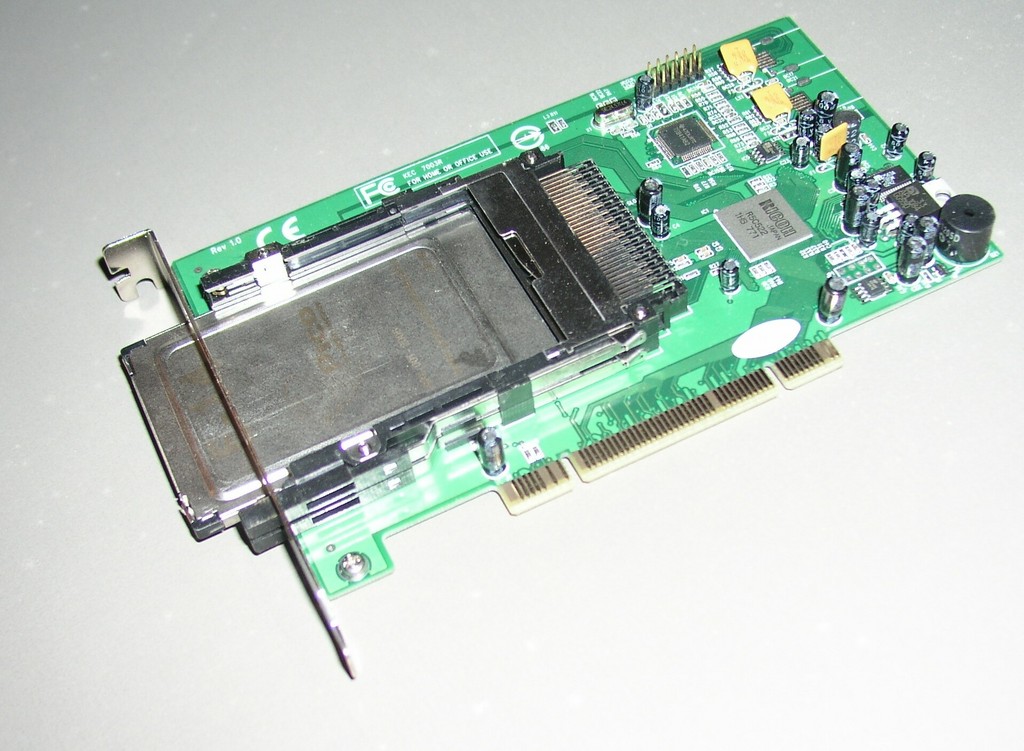
Figure 4. Pico E14, Bigger, Faster, More Memory, More FPGA
I am working to get the Linux Memory Technology Device (MTD) system to work with the Pico Flash. This is complicated by the fact that the Flash in Pico hardware can be read and written to by both Linux and the host, and Pico is eventually planning on Flash device sizes that should be windowed into Linux memory instead of mapped in their entirety.
Once the Linux MTD work is completed, Pico wants a Linux (and Windows) filesystem driver for its simple filesystem—PicoFS.
Pico is considering changing the keyhole port so that on the host side (and possibly the target side), it sufficiently and closely resembles an 8250-compatible UART to use only the OS's native serial drivers.
Later, Pico developed a daughterboard for the E12 called the Little Brother Board that allows using the E12 in a non-hosted environment and includes three USB ports, an LED and several other hardware components. In one application, the E12/LBB combination is being used as a very high-performance Webcamera.
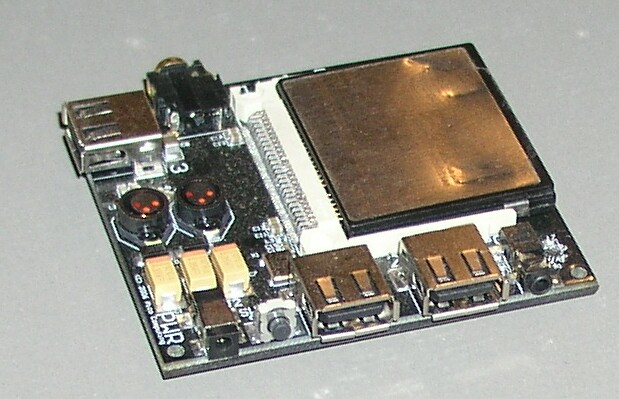
Figure 5. E12 in Little Brother Board Daughter Card
The E12 also can be hosted as a grid on a bus board called the supercluster. Currently, that configuration is used for blazingly fast code cracking, using FPGA hardware without OS support, but Linux HPC support is on the wish list. Higher performance can no longer be achieved simply by doubling the clock every 18 months. Clusters are a significant alternative; 16 E12s provide enormous horsepower while occupying little space and consuming little power.
There have been several iterative releases to Linux 2.6 since the E12 port, and occasionally, these require changes to the port.
I would like to get the Pico E1X port and drivers I wrote for it included into the Linux distribution kernel. Within the Linux embedded PPC mailing list, there has been some interest in seeing that happen. The code has been moved into git to make it easier to merge with new Linux iterations and to produce patch files for submission to LKML.
“The bigger game was 'pinball'. You win one game, you get to play another. You win with this machine, you get to build the next. Pinball was what counted.” —Tracy Kidder Soul of a New Machine. I won at pinball.
I got Linux up and running on new hardware, and other opportunities with other hardware and with other embedded OSes have occurred. Board bring-up for the E12 was hard. Somewhere on Kernel-Newbies I read advice to newbie kernel hackers to lurk on the mailing lists for a few years before attempting anything serious—advice I am glad I did not take. I did not start this as a complete novice. I had a lot of experience that made this much easier. It was thrilling, mythical and magical. I can call myself a Linux Kernel Developer—though maybe not too loudly around Linus Torvalds, Andrew Morton or Alan Cox. But, it was not more difficult than many other software tasks—just more rewarding.
I would like to thank Dr Trout at Pico for paying me for projects I would do for free.
Resources for this article: /article/9462.
David Lynch is a software consultant. Programming is like art or music, he does it because he loves it. He is always seeking new and challenging software projects such as embedded board bring-up—preferably Linux/open source (www.dlasys.net).

