
OpenOffice.org ODF, Python and XML
My wife is a writer, which today means she uses a word processing program. It's a sophisticated, powerful program—OpenOffice.org Writer—but occasionally it won't do something that she wants it to do. In this article, we take a look at the structure of OpenDocument Format (ODF) files and see how Python, with its XML libraries, can help. Figure 1 shows an example.
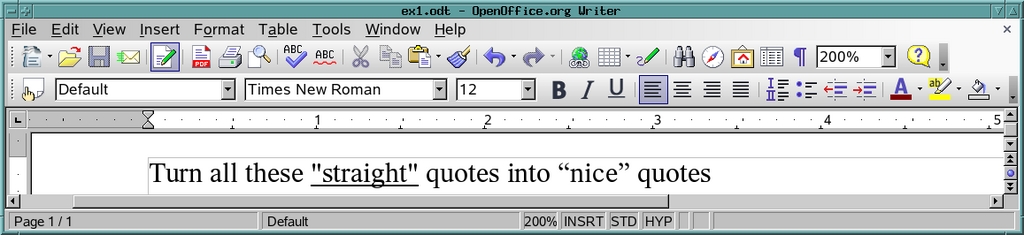
Figure 1. Converting Quotation Marks
It's not hard to convert quotation marks on a few paragraphs by hand—or even on a few pages, if I'm doing it only once. But having to repeat such manual operations on subsequent revisions becomes tedious, especially on a longer document, such as a poetry collection or novel. (We might have to repeat these operations after importing plain text from an e-mail message, for example.)
Fortunately, ODF is open, so we should be able to manipulate the file contents outside the word processing program.
Let's see if we can do that manually, just to make sure we know what we're doing. Once we can do that, we'll create a script to do some more ambitious things with the document.
I read somewhere that an ODF file is a zip archive of XML files. So, let's see if it really is one—and if so, what's inside:
% unzip -l ex1.odt
Archive:  ex1.odt
  Length     Date   Time    Name
 --------    ----   ----    ----
       39  11-15-06 01:55   mimetype
        0  11-15-06 01:55   Configurations2/statusbar/
        0  11-15-06 01:55   Configurations2/accelerator/current.xml
        0  11-15-06 01:55   Configurations2/floater/
        0  11-15-06 01:55   Configurations2/popupmenu/
        0  11-15-06 01:55   Configurations2/progressbar/
        0  11-15-06 01:55   Configurations2/menubar/
        0  11-15-06 01:55   Configurations2/toolbar/
        0  11-15-06 01:55   Configurations2/images/Bitmaps/
        0  11-15-06 01:55   Pictures/
     2872  11-15-06 01:55   content.xml
     9786  11-15-06 01:55   styles.xml
     1109  11-15-06 01:55   meta.xml
      878  11-15-06 01:55   Thumbnails/thumbnail.png
     6611  11-15-06 01:55   settings.xml
     2037  11-15-06 01:55   META-INF/manifest.xml
 --------                   -------
    23332                   16 files
%
Good news—it is a zip archive.
So, the plan is this: unpack it, modify a file (or files) and pack everything back up again. We'll pack up files in the same order, just in case it matters. So, we need to save the file list.
The listing from running unzip has that file list, along with some other stuff. Let's select only the lines that have filenames (in this case, the lines with a : followed by digits) and print only the filenames. A single command to sed does that:
% unzip -l ex1.odt | sed -n '/:[0-9][0-9]/s|^.*:.. *||p'
mimetype
Configurations2/statusbar/
Configurations2/accelerator/current.xml
Configurations2/floater/
Configurations2/popupmenu/
Configurations2/progressbar/
Configurations2/menubar/
Configurations2/toolbar/
Configurations2/images/Bitmaps/
Pictures/
content.xml
styles.xml
meta.xml
Thumbnails/thumbnail.png
settings.xml
META-INF/manifest.xml
%
Looks good. Let's save the list in a shell variable—we'll use F (for files):
% F=$(unzip -l ex1.odt | sed -n '/:[0-9][0-9]/s|^.*:.. *||p')
With that settled, the next question is, which file to modify? To find out, let's find the file or files containing the word quotes, which appeared in the document. We'll unpack ex1.odt into an empty directory and ask grep, remembering to check files in subdirectories as well:
% cd TMP
% unzip -q ~/oo/ex1.odt
% find . -type f | xargs grep -l quote
./content.xml
%
Okay, content.xml is it. Text editors provide one way to manipulate content.xml, so let's give that a try. The relevant part looked like Figure 2 in Emacs.
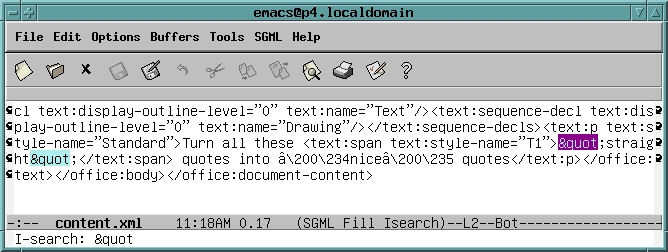
Figure 2. Editing XML in Emacs
The two occurrences of " (partially highlighted in Figure 2) represent the straight quotation marks.
I changed the straight quotes to the appropriate curly or smart quotes (found on either side of the word nice), as shown in Figure 3. The changed areas are, again, partially highlighted.
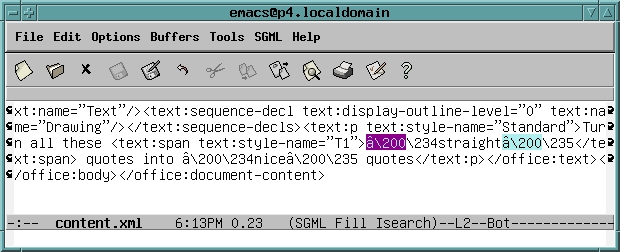
Figure 3. Edited XML with Smart Quotes
With that done, let's zip the files (the list saved in $F) to create ex2.odt, and see what OpenOffice.org Writer thinks about it:
% zip -q ~/oo/ex2.odt $F
% oowriter ~/oo/ex2.odt
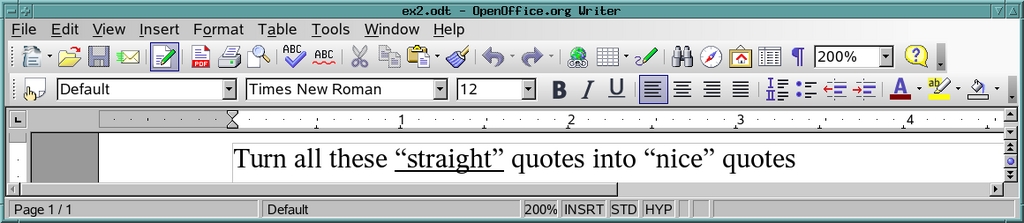
Figure 4. Writer Recognizes the New Quotes
It worked (Figure 4)! The formerly straight quotes around the word straight are now curly quotes, and they're even curled in the right direction. So, to review what we've done so far:
Created a list of the files in ex1.odt (saving it in $F).
Unpacked ex1.odt.
Made a simple change, manually, in content.xml.
Created ex2.odt (using $F).
Validated ex2.odt using OpenOffice.org Writer.
That exercise proved the concept, so now we can get to work. My wife's poetry book was about 60 pages long, and it needed these issues addressed:
Those straight quotes, which came from plain-text e-mail messages or other word processors.
Apostrophes (or single quotes), which also were straight rather than curled the right way.
Double hyphens and shorter dashes (the en dash), which should all be changed into the longer em dash.
OpenOffice.org Writer has keystroke sequences for creating the en dash as well as the longer em dash. Sometimes the wrong sequence was typed, so an en dash appeared instead of the desired em dash. Plain text imported from e-mail messages sometimes had double hyphens (that is, --).
Concretely, we want to transform what's shown in Figure 5 into what's shown in Figure 6.
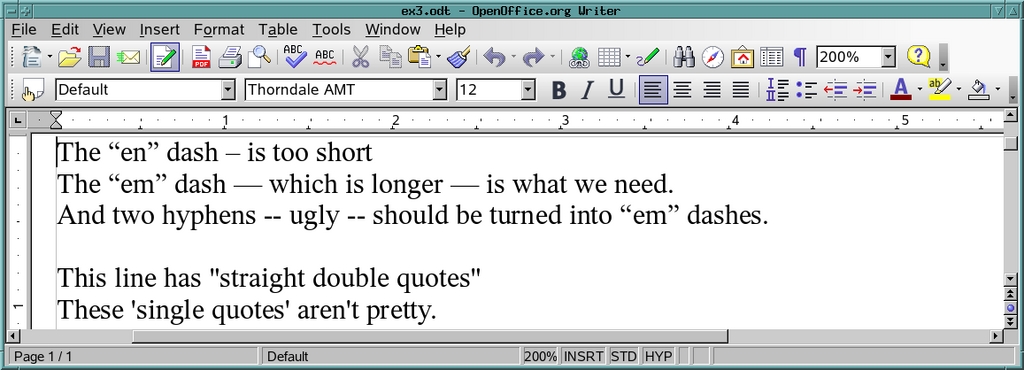
Figure 5. Before...
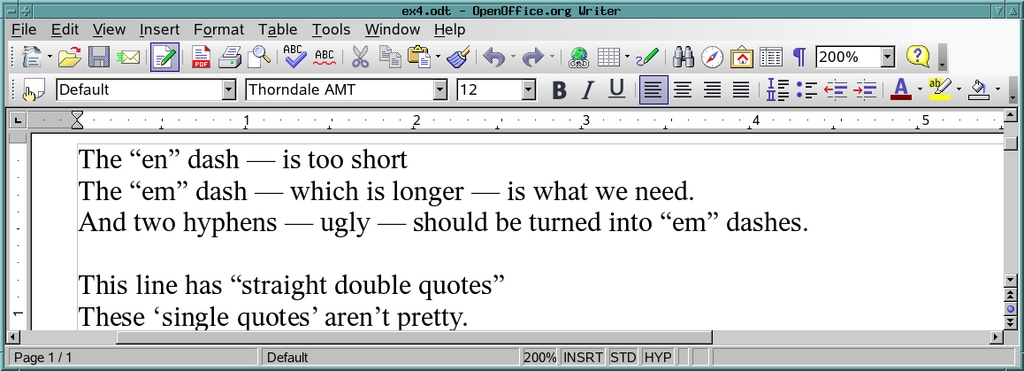
Figure 6. ...and After
Let's develop the automated script in two pieces, and let's do it top-down. The top layer will create a temporary directory, unpack the original document and then run the bottom layer, a program (designated fixit.py) to modify content.xml. Afterward, it will pack up the files into the new document and clean up.
I want to use the highest-level language reasonable for each task; for this top layer, that's probably the shell. This script, called fixit.sh, turned out to be longer than I thought it would be, mostly because of all the error checking:
#!/bin/bash
# Script to fix up OpenDocument Text (.odt) files
# "cd" to the directory containing "fixit.py".

# Make $TMPDIR, a new temporary directory

TMPDIR=/tmp/ODFfixit.$(date +%y%m%d.%H%M%S).$$
if rm -rf $TMPDIR && mkdir $TMPDIR; then
   : # Be happy
else
   echo >&2 "Can't (re)create $TMPDIR; aborting"
   exit 1
fi

OLDFILE=$1
NEWFILE=$2

# Check number of parameters.
# Ensure $NEWFILE's dir exists and is writable.
# Quietly Unzip $OLDFILE. Whine and abort on error.

if [[ $# -eq 2 ]] &&
   touch $NEWFILE && rm -f $NEWFILE &&
                  unzip -q $OLDFILE -d $TMPDIR ; then
   : # All good; be happy.
else

   # Trouble! Print usage message, clean up, abort.

   echo >&2 "Usage: $0 OLDFILE NEWFILE"
   echo >&2 "  ... both OpenDocument Text (odt) files"
   echo >&2 "Note: 'OLDFILE' must already exist."
   rm -rf $TMPDIR
   exit 1
fi

# Save file list in $F; is content.xml there?

F=$(unzip -l $OLDFILE |
       sed -n '/:[0-9][0-9]/s|^.*:.. *||p')
if echo "$F" | grep -q '^content\.xml$'; then
   : # Good news; we have content.xml
else
   echo >&2 "content.xml not in $OLDFILE; aborting"
   echo >&2 TMPDIR is $TMPDIR
   exit 1
fi

# Now invoke the Python program to fix content.xml

mv $TMPDIR/content.xml $TMPDIR/OLDcontent.xml
if ./fixit.py $TMPDIR/OLDcontent.xml > \
                  $TMPDIR/content.xml; then
   : # It worked.
else
   echo >&2 "fixit.py failed in $TMPDIR; aborting"
   exit 1
fi

if (cd $TMPDIR; zip -q - $F) | cat > $NEWFILE; then
   # Everything worked! Clean up $TMPDIR
   rm -rf $TMPDIR
else # something Bad happened.
   echo >&2 "zip failed in $TMPDIR on $F"
   exit 1
fi
It's long but straightforward, so I explain only a few things here.
First, the temporary directory name includes the date and time (the date +% stuff), and the shell's process ID (the $$) prevents name collisions.
Second, the grep line looks the way it does because I want it to accept content.xml but not something like discontent.xml or content-xml.
Finally, we clean up the temporary directory ($TMPDIR) except in some error cases, where we leave it intact for debugging and tell the user where it is.
We can't run this script yet, because we don't yet have fixit.py actually modify content.xml. But, we can use a stub to validate what we have so far. The fixit.sh script assumes fixit.py will take one parameter (the original content.xml's pathname) and put the result onto stdout. This just happens to match the calling sequence for /bin/cat with one parameter; hence, if we use /bin/cat as our fixit.py, fixit.sh should give us a new document with the same content as the old. So, let's give it a whirl:
% ln -s /bin/cat fixit.py
% ./fixit.sh ex1.odt foo.odt
% ls -l ex1.odt foo.odt
-rw-r--r--  1 collin users 7839 2006-11-14 17:50 ex1.odt
-rw-r--r--  1 collin users 7900 2006-11-14 19:45 foo.odt
% oowriter foo.odt
The new file, foo.odt, is slightly larger than ex1.odt, but when I looked at it with OpenOffice.org Writer, it had the right stuff.
As far as writing a program for manipulating content.xml—well, back in the 1990s, I probably would have spent many hours with yacc (or bison)—but today, Python with its XML libraries is a more natural choice.
My desktop distribution (SUSE 9.3) includes the packages python-doc-2.4-14 and python-doc-pdf-2.4-14. You also can get documentation from www.python.org. In either case, we want the Library Reference, which contains information on the Python XML libraries; they are described in the chapter on “Structured Markup Processing Tools” (currently Chapter 13).
Several modules are listed, and I noticed one labeled lightweight: xml.dom.minidom—Lightweight Document Object Model (DOM) implementation.
Lightweight sounded good to me. The library reference gives these examples:
from xml.dom.minidom import parse, parseString

dom1 = parse('c:\\temp\\mydata.xml') # parse an XML file by name

datasource = open('c:\\temp\\mydata.xml')
dom2 = parse(datasource)   # parse an open file
So, it looks like parse can take a filename or a file object.
Once we create a dom object, what can we do with it? One nice thing about Python is the interactive shell, which lets you try things out one at a time. Let's unpack the first example and look inside:
% mkdir TMP
% unzip -q -d TMP ex1.odt
% python
Python 2.4 (#1, Mar 22 2005, 21:42:42)
[GCC 3.3.5 20050117 (prerelease) (SUSE Linux)] on linux2
Type "help", "copyright", "credits" or "license"
 for more information.
>>> import xml.dom.minidom
>>> dom=xml.dom.minidom.parse("TMP/content.xml")
>>> dir(dom)
[  --- a VERY long list, including ---
'childNodes', 'firstChild', 'nodeName', 'nodeValue', ...  ]
>>> len(dom.childNodes)
1
>>> c1=dom.firstChild
>>> len(c1.childNodes)
4
>>> for c2 in c1.childNodes: print c2.nodeName
...
office:scripts
office:font-face-decls
office:automatic-styles
office:body
>>>
Notice how Python's dir function tells what fields (including methods) are in the object. The childNodes field looks interesting, and indeed, it appears that the document has a tree structure. After a little more manual exploration, I discovered that text is contained in the data field of certain nodes. So, I coded up a naive script, fix1-NAIVE.py:
#!/usr/bin/python -tt
import xml.dom.minidom
import sys

DEBUG = 1
def dprint(what):
   if DEBUG == 0: return
   sys.stderr.write(what + '\n')

def handle_xml_tree(aNode, depth):
   if aNode.hasChildNodes():
      for kid in aNode.childNodes:
         handle_xml_tree(kid, depth+1)
   else:
      if 'data' in dir(aNode):
         dprint(("depth=%d: " + aNode.data) % depth)

def doit(argv):
   doc = xml.dom.minidom.parse(argv[1])
   handle_xml_tree(doc, 0)
   # sys.stdout.write(doc.toxml('utf-8'))

if __name__ == "__main__":
   doit(sys.argv)
The dprint routine prints debugging information on stderr; later we'll set DEBUG=0, and it'll be silent. Okay, let's try that on the content.xml above:
% ./fix1-NAIVE.py TMP/content.xml
depth=5: Turn all these
depth=6: "straight"
Traceback (most recent call last):
  File "./fix1-NAIVE.py", line 24, in ?
    doit(sys.argv)
  File "./fix1-NAIVE.py", line 20, in doit
    handle_xml_tree(doc, 0)
  File "./fix1-NAIVE.py", line 13, in handle_xml_tree
    handle_xml_tree(kid, depth+1)
  File "./fix1-NAIVE.py", line 13, in handle_xml_tree
    handle_xml_tree(kid, depth+1)
  File "./fix1-NAIVE.py", line 13, in handle_xml_tree
    handle_xml_tree(kid, depth+1)
  File "./fix1-NAIVE.py", line 13, in handle_xml_tree
    handle_xml_tree(kid, depth+1)
  File "./fix1-NAIVE.py", line 13, in handle_xml_tree
    handle_xml_tree(kid, depth+1)
  File "./fix1-NAIVE.py", line 16, in handle_xml_tree
    dprint(("depth=%d: " + aNode.data) % depth)
  File "./fix1-NAIVE.py", line 8, in dprint
    sys.stderr.write(what + '\n')
UnicodeEncodeError: 'ascii' codec can't encode character
u'\u201c' in position 22: ordinal not in range(128)
%
What's that error about? When trying to print that string on stderr, we hit a non-ASCII character—probably one of those curly quotes. A quick Web search gave this possible solution:
sys.stderr.write(what.encode('ascii', 'replace') + '\n')It says that if a non-ASCII Unicode character appears, replace it with something in ASCII—an equivalent, or at least something printable.
Replacing line 8 with that yields this output:
% ./fix1.py TMP/content.xml
depth=5: Turn all these
depth=6: "straight"
depth=5:  quotes into ?nice? quotes
%
So the curly quotes were replaced with ? characters, which is fine for our debugging output. Note that the text doesn't necessarily all come at the same depth in the tree.
The document's structure also can be seen by typing the full filename of the content.xml file into a Firefox window (Figure 7). That's good for displaying the data; the point, however, is to change it!
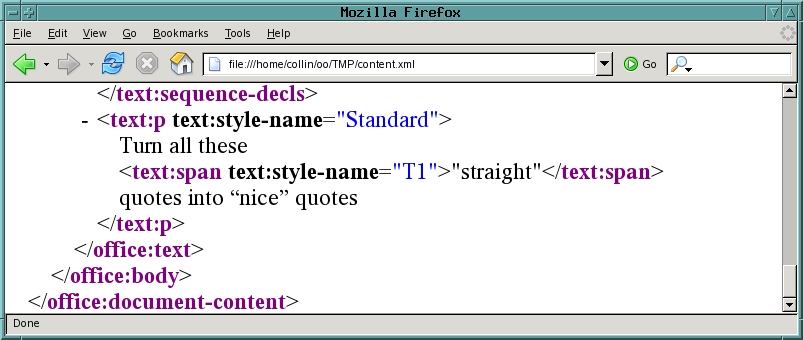
Figure 7. Firefox presents the XML more clearly.
Let's take fix1.py and make an easy modification. Whenever two hyphens appear, replace them with the em dash. Then, when we're done, write the XML to stdout—that's exactly what the shell script (fixit.sh) expects.
We'll specify the em dash by giving its hex value; to find it, locate the em dash in OpenOffice.org Writer's Insert→Special Character dialog (Figure 8).
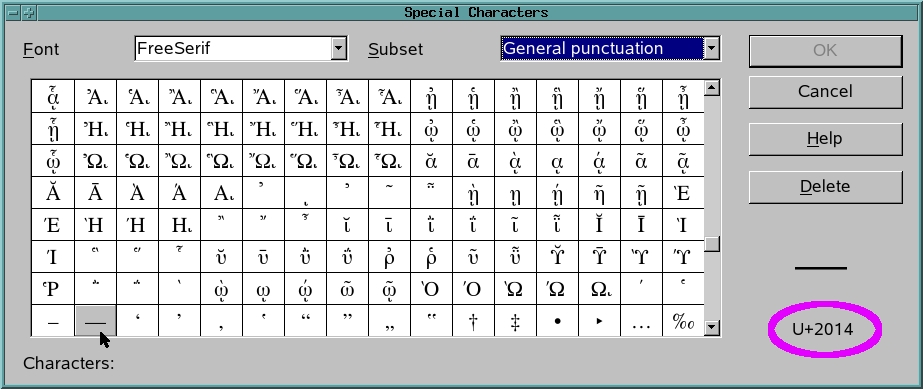
Figure 8. Selecting and Inserting Special Characters
When I select the long dash (the em dash), its Unicode value appears in the lower-right corner, where I've put a purple ellipse; that's the value to put into the string in place of the double hyphens. Let's call this script fix2.py:
#!/usr/bin/python -tt
import xml.dom.minidom
import sys

DEBUG = 1
def dprint(what):
   if DEBUG == 0: return
   sys.stderr.write(what.encode('ascii',
                                'replace') + '\n')

emDash=u'\u2014'

def fixdata(td, depth):
   dprint("depth=%d: childNode: %s" %
          (depth, td.data))
   # OK, so '--' becomes em dash everywhere
   td.data = td.data.replace('--', emDash)

def handle_xml_tree(aNode, depth):
   if aNode.hasChildNodes():
      for kid in aNode.childNodes:
         handle_xml_tree(kid, depth+1)
   else:
      if 'data' in dir(aNode):
         fixdata(aNode, depth)

def doit(argv):
   doc = xml.dom.minidom.parse(argv[1])
   handle_xml_tree(doc, 0)
   sys.stdout.write(doc.toxml('utf-8'))

if __name__ == "__main__":
   doit(sys.argv)
Notice how easy Python makes it to replace a pattern in a string. Strings in recent Python versions have a built-in method, replace, that causes one substring to be replaced by another:
td.data = td.data.replace('--', emDash)Let's plug fix2.py into fixit.sh to see how well it works:
% ln -sf fix2.py fixit.py
% ./fixit.sh ex3.odt ex3-1.odt
depth=5: childNode: The ?en? dash ? is too short
depth=5: childNode: The ?em? dash ? which is longer ?
 is what we need.
depth=5: childNode: And two hyphens -- ugly -- should
 be turned into ?em? dashes.
depth=5: childNode: This line has "straight double quotes"
depth=5: childNode: These 'single quotes' aren't pretty.
% oowriter ex3-1.odt
%
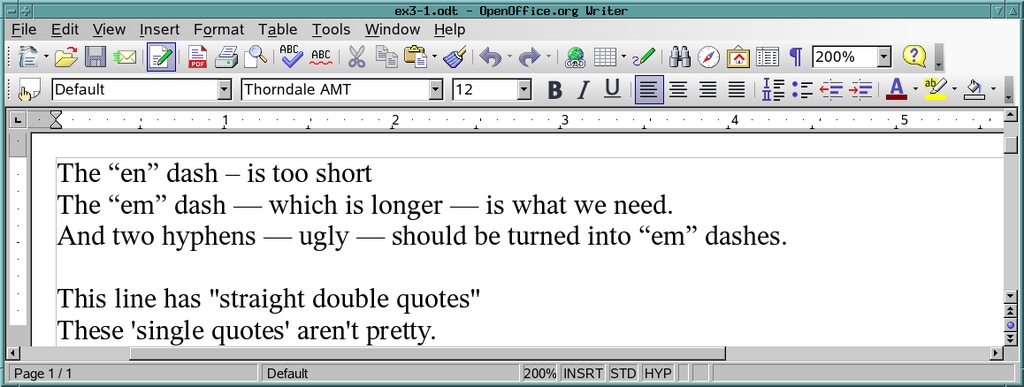
Figure 9. This looks like a job for Python.
Success! Now for the rest. Besides the double hyphen, we want to change the en dash into an em dash. That syntax is just like the double hyphen replacement.
Replacing straight quotes with curly ones is more complicated though, because we have to decide between a starting double quote and an ending double-quote character. How to tell? Well, if the quote character is at the start of the string, and there's a nonspace character afterward, it's a left (or start of quote) curly quote. Ditto if there's a blank before it and a nonspace afterward.
That's the easy way to describe it. We could code it like that, or we could simply write a regular expression. I looked at the section titled “re -- Regular expression operations” in Chapter 4 of Python's library documentation and eventually came up with this:
sDpat = re.compile(r'(\A|(?<=\s))"(?=\S)', re.U)
Let me explain this left to right. We are creating sDpat, the pattern for a starting double quote or Starting Double-quote PATtern. We do that by calling the method compile in the re module (for regular expressions). That analyzes the pattern once and creates a regular expression object. We'll use sDpat to match straight double quotes that should be turned into nice curly quotes at the start of a quotation.
Now, about the pattern—the pattern contains a double-quote character (") so we delimit it with single quotes, 'like this'. Also, we'll pass some escapes (such as \A and \s) to re.compile, so let's make this a raw string by putting an r in front of it.
(A little explanation for Perl users: in Python, \ escapes are interpolated except in raw strings, whether single-quoted or double-quoted; the delimiters don't affect interpolation as they do in Perl.)
We can see how raw strings work by using Python's shell:
>>> print 'normal string: \n is a newline'
normal string:
 is a newline
>>> print r'raw string: \n is not a newline'
raw string: \n is not a newline
>>>
So, what's in that raw string? It consists of three parts:
The part before the quote character (\A|(?<=\s)). What we are doing is matching something (the '"' in this case), but only if it occurs at the beginning of the string or if it's preceded by a whitespace character. The \A means “match beginning of the string”, the | means “or” and (?<=\s) means “match if immediately preceded by whitespace (a blank, tab or newline), but don't include that whitespace itself in the match”. The enclosing parentheses denote grouping.
The straight double quote itself: ". That's what we're matching.
The part after the '"': (?=\S). What we're doing is adding another condition—that the quote character be followed by a non-whitespace character.
If all three conditions are met—that is, if a quote is there (condition 2), and it's either at the start of the string or preceded by whitespace (condition 1), and it's followed by some non-whitespace character (condition 3), we want to replace it by an opening double-quote character.
Besides the pattern, you also can pass flags to re.compile. We pass re.U to make certain escapes dependent on the Unicode character database. Because we're parsing a Unicode string, I think we want that.
Let's call this fix3.py:
#!/usr/bin/python -tt
import xml.dom.minidom
import sys
import re                         # new in fix3.py

DEBUG = 1
def dprint(what):
   if DEBUG == 0: return
   sys.stderr.write(what.encode('ascii',
                                'replace') + '\n')

emDash=u'\u2014'
enDash=u'\u2013'                 # new in fix3.py
sDquote=u'\u201c'                # new in fix3.py

# sDpat: pattern for starting dbl quote, as
#        "Go! <-- the quote there
#        We look for it either at start (\A) or
#        after a space (\s), and we want it to be
#        followed by a non-space
sDpat = re.compile(r'(\A|(?<=\s))"(?=\S)', re.U) # new in fix3.py

def fixdata(td, depth):
   dprint("depth=%d: childNode: %s" %
          (depth, td.data))
   # OK, so '--' becomes em dash everywhere
   td.data = td.data.replace('--', emDash)
   # Change 'en' dash to 'em' dash
   td.data = td.data.replace(enDash , emDash)  # new in fix3.py
   # Make a nice starting curly-quote          # new in fix3.py
   td.data = sDpat.sub(sDquote, td.data)       # new in fix3.py

def handle_xml_tree(aNode, depth):
   if aNode.hasChildNodes():
      for kid in aNode.childNodes:
         handle_xml_tree(kid, depth+1)
   else:
      if 'data' in dir(aNode):
         fixdata(aNode, depth)

def doit(argv):
   doc = xml.dom.minidom.parse(argv[1])
   handle_xml_tree(doc, 0)
   sys.stdout.write(doc.toxml('utf-8'))

if __name__ == "__main__":
   doit(sys.argv)
Note that the syntax for replacing a regular expression differs from that of substring replacement: we use the sub (substitute) method of the regular expression object (sDpat in this case):
td.data = sDpat.sub(sDquote, td.data)
Here we're taking td.data, the data in this particular node in the XML tree, looking for the regular expression specified by sDpat, and replacing whatever matched it (the straight " character in the appropriate context) with the starting double quote, sDquote.
Now, if we try fixit.sh with fix3.py as the lower-level program:
% ln -sf fix3.py fixit.py
% ./fixit.sh ex3.odt ex3-2.odt
depth=5: childNode: The ?en? dash ? is too short
depth=5: childNode: The ?em? dash ? which is longer ?
 is what we need.
depth=5: childNode: And two hyphens -- ugly -- should be
 turned into ?em? dashes.
depth=5: childNode: This line has "straight double quotes"
depth=5: childNode: These 'single quotes' aren't pretty.
% oowriter ex3-2.odt
%
OpenOffice.org Writer showed what we expected. Both the double hyphen and the en dash changed into em dashes, and the starting double quote curves the right way.
Now, here's the rest. The expression to deal with the ending double quote is the mirror image of the starting double quote. In order to write an ending/closing double quote, we require the quote character either to be at the end of the string (\Z) or followed by whitespace. Again, when we do the replacement, we want to replace only the quote itself, not the whitespace. Hence, the Ending Double-quote PATtern (eDpat) is given by:
eDpat = re.compile(r'("\Z)|("(?=\s))', re.U)By the way, we compile all these patterns because we're going to use them over and over again when processing documents.
To handle single quotes ('like these'), we basically can do the same thing, except for a couple of issues. First, is the problem of contractions. When handling a double-quote character, we didn't cover the case where it was surrounded on both sides by non-whitespace. With single quotes (or apostrophes), we can't avoid that, because of words such as can't. Therefore, although the starting single-quote pattern can match the starting double-quote pattern, the other one, which doubles as an apostrophe in contractions, has a looser pattern. Here's what I came up with:
eSpat = re.compile(r"(?<=\S)'", re.U)
Because the pattern has an apostrophe in it, we delimit the pattern string using double-quote characters. This expression matches a single quote, but only when preceded immediately by a non-whitespace character.
The second issue, which the code doesn't address, is that of contractions beginning with an apostrophe, such as 'tis the season or stick 'em up.
The script treats the leading apostrophe like the start of a single-quoted phrase, and the single quote will face the wrong way. This probably will need a manual work-around.
Putting all this together, we have fix4.py:
#!/usr/bin/python -tt
import xml.dom.minidom
import sys
import re                 # new in fix3.py

DEBUG = 1
def dprint(what):
   if DEBUG == 0: return
   sys.stderr.write(what.encode('ascii',
                                'replace') + '\n')

emDash=u'\u2014'
enDash=u'\u2013'          # new in fix3.py
sDquote=u'\u201c'         # new in fix3.py
eDquote=u'\u201d'         # new in fix4.py
sSquote=u'\u2018'         # new in fix4.py
eSquote=u'\u2019'         # new in fix4.py

# sDpat: pattern for starting dbl quote, as
#        "Go! <-- the quote there
#        We look for it either at start (\A) or
#        after a space (\s), and we want it to be
#        followed by a non-space
sDpat = re.compile(r'(\A|(?<=\s))"(?=\S)', re.U)  # new in fix3.py
eDpat = re.compile(r'("\Z)|("(?=\s))', re.U)      # new in fix4.py
sSpat = re.compile(r"(\A|(?<=\s))'(?=\S)", re.U)  # new in fix4.py
eSpat = re.compile(r"(?<=\S)'", re.U)             # new in fix4.py

def fixdata(td, depth):
   dprint("depth=%d: childNode: %s" %
          (depth, td.data))
   # OK, so '--' becomes em dash everywhere
   td.data = td.data.replace('--', emDash)
   # Change 'en' dash to 'em' dash
   td.data = td.data.replace(enDash , emDash)   # new in fix3.py
   # Make a nice starting curly-quote           # new in fix3.py
   td.data = sDpat.sub(sDquote, td.data)        # new in fix3.py
   td.data = eDpat.sub(eDquote, td.data)        # new in fix4.py
   # Make nice curly single-quote characters
   td.data = sSpat.sub(sSquote, td.data)        # new in fix4.py
   td.data = eSpat.sub(eSquote, td.data)        # new in fix4.py

def handle_xml_tree(aNode, depth):
   if aNode.hasChildNodes():
      for kid in aNode.childNodes:
         handle_xml_tree(kid, depth+1)
   else:
      if 'data' in dir(aNode):
         fixdata(aNode, depth)

def doit(argv):
   doc = xml.dom.minidom.parse(argv[1])
   handle_xml_tree(doc, 0)
   sys.stdout.write(doc.toxml('utf-8'))

if __name__ == "__main__":
   doit(sys.argv)
Let's try that on our example:
% ln -sf fix4.py fixit.py
% ./fixit.sh ex3.odt ex3-4.odt
depth=5: childNode: The ?en? dash ? is too short
depth=5: childNode: The ?em? dash ? which is
 longer ? is what we need.
depth=5: childNode: And two hyphens -- ugly -- should
 be turned into ?em? dashes.
depth=5: childNode: This line has "straight
 double quotes"
depth=5: childNode: These 'single quotes'
 aren't pretty.
% oowriter ex3-4.odt

Figure 10. Python string handling gets results.
Let's review what we've done here:
Wrote scripts to unpack and repack ODF files.
Learned about using Python to understand the structure of ODF files.
Wrote a Python program to perform useful transformations on an OpenOffice.org Writer file, using regular expressions and the built-in string methods.
I hope this introduction has been useful, but it's only the beginning of how Python/XML can work with ODF files.
For example, I had an OpenDocument spreadsheet, and I wanted to add up the values of all cells having a yellow background, which Python/XML allowed me to do. I've also had the need to get all the e-mail addresses from one column of a spreadsheet, except for those in italic or strikeout type. I don't think OpenOffice.org will let me do that, but Python/XML will.
Resources
Current Python Library Reference: docs.python.org/lib
Older (pre-2.5) Versions of Python Documentation: www.python.org/doc/versions
Dave Taylor's Work the Shell columns in Linux Journal provide a terrific introduction to shell scripting.
“Why Not Python?” (the old C hacker drags himself into the late 1990s): linuxjournal.com/article/8794, linuxjournal.com/article/8729, linuxjournal.com/article/8858 and linuxjournal.com/article/8859
Collin Park has been a computer engineer since 1976 and currently works for Network Appliance. He runs Linux on four computers at home, which he shares with his wife and two teenage daughters.
