
Programming Python, Part I
Python is a programming language that is highly regarded for its simplicity and ease of use. It often is recommended to programming newcomers as a good starting point. Python also is a program that interprets programs written in Python. There are other implementations of Python, such as Jython (in Java), CLPython (Common Lisp), IronPython (.NET) and possibly more. Here, we use only Python.
Installing Python and getting it running is the first step. These days, it should be very easy. If you are running Gentoo GNU/Linux, you already have Python 2.4 installed. The packaging system for Gentoo, Portage, is written in Python. If you don't have it, your installation is broken.
If you are running Debian GNU/Linux, Ubuntu, Kubuntu or MEPIS, simply run the following (or log in as root and leave out sudo):
sudo apt-get install python
One catch is that Debian's stable Python is 2.3, while for the rest of the distributions, you are likely to find 2.4. They are not very different, and most code will run on both versions. The main differences I have encountered are in the API of some library classes, new features added to 2.4 and some internals, which shouldn't concern us here.
If you are running some other distribution, it is very likely that Python is prepackaged for it. Use the usual resources and tools you use for other packages to find the Python package.
If all that fails, you need to do a manual installation. It is not difficult, but be aware that it is easy to break your system unless you follow this simple guideline: install Python into a well-isolated place, I like /opt/python/2.4.3, or whatever version it is.
To perform the installation, download Python, unpack it, and run the following commands:
./configure --prefix=/opt/python2.4/
make
make install
This task is well documented on Python's README, which is included in the downloaded tarball; take a look at it for further details. The only missing task here is adding Python to your path. Alternatively, you can run it directly by calling it with its path, which I recommend for initial exploration.
Now that we have Python running, let's jump right in to programming and examine the language as we go along. To start, let's build a blog engine. By engine, I mean that it won't have any kind of interface, such as a Web interface, but it's a good exercise anyway.
Python comes with an REPL—a nice invention courtesy of the Lisp community. REPL stands for Read Eval Print Loop, and it means there's a program that can read expressions and statements, evaluate them, print the result and wait for more. Let's run the REPL (adjust your path according to where you installed Python in the previous section):
$ python
Python 2.4.3 (#1, Sep  1 2006, 18:35:05)
[GCC 4.1.1 (Gentoo 4.1.1)] on linux2
Type "help", "copyright", "credits" or "license" for
more information.
>>>
Those three greater-than signs (>>>) are the Python prompt where you write statements and expressions. To quit Python, press Ctrl-D.
Let's type some simple expressions:
>>> 5
5
That's more interesting, isn't it?
There are other kinds of expressions, such as a string:
>>> "Hello"
'Hello'
Quotes are used to create strings. Single or double quotes are treated essentially the same. In fact, you can see that I used double quotes, and Python showed the strings in single quotes.
Another kind of expression is a list:
>>> [1,3,2]
[1, 3, 2]
Square brackets are used to create lists in which items are separated by commas. And, as we can add numbers, we can add—actually concatenate—lists:
>>> [1,3,2] + [11,3,2]
[1, 3, 2, 11, 3, 2]
By now, you might be getting bored. Let's switch to something more exciting—a blog. A blog is a sequence of posts, and a Python list is a good way to represent a blog, with posts as strings. In the REPL, we can build a simple blog like this:
>>> ["My first post", "Python is cool"]
['My first post', 'Python is cool']
>>>
That's a list of strings. You can make lists of whatever you want, including a list of lists. So far, all our expressions are evaluated, shown and lost. We have no way to recall our blog to add more items or to show them in a browser. Assignment comes to the rescue:
>>> blog = ["My first post", "Python is cool"]
>>>
Now blog, a so-called variable, contains the list. Unlike in the previous example, nothing was printed this time, because it is an assignment. Assignments are statements, and statements don't have a return value. Simply evaluating the variable shows us the content:
>>> blog
['My first post', 'Python is cool']
Accessing our blog is easy. We simply identify each post by number:
>>> blog[0]
'My first post'
>>> blog[1]
'Python is cool'
A blog is not a blog if we can't add new posts, so let's do that:
>>> blog = blog + ["A new post."]
>>> blog
['My first post', 'Python is cool', 'A new post.']
Here we set blog to a new value, which is the old blog, and a new post. Remembering all that merely to add a new post is not pleasant though, so we can encapsulate it in what is called a function:
>>> def add_post(blog, new_post):
...     return blog + [new_post]
...
>>>
def is the keyword used to define a new function or method (more on functions in structured or functional programming and methods in object-oriented programming later in this article). What follows is the name of the function. Inside the parentheses, we have the formal parameters. Those are like variables that will be defined by the caller of the function. After the colon, the prompt has changed from >>> to ... to show that we are inside a definition. The function is composed of all those lines with a level of indentation below the level of the def line.
So, where other programming languages use curly braces or begin/end keywords, Python uses indentation. The idea is that if you are a good programmer, you'd indent it anyway, so we'll use that indentation and make you a good programmer at the same time. Indeed, it's a controversial issue; I didn't like it at first, but I learned to live with it.
While working with the REPL, you safely can press Tab to make an indentation level, and although a Tab character can do it, using four spaces is the strongly recommended way. Many text editors know to put four spaces when you press Tab when editing a Python file. Whatever you do, never, I repeat, never, mix Tabs with spaces. In other programming languages, it may make the community dislike you, but in Python, it'll make your program fail with weird error messages.
Being practical, to reproduce what I did, simply type the class header, def add_post(blog, new_post):, press Enter, press Tab, type return blog + [new_post], press Enter, press Enter again, and that's it. Let's see the function in action:
>>> blog = add_post(blog, "Fourth post")
>>> blog
['My first post', 'Python is cool', 'A new post.',
'Fourth post']
>>>
add_post takes two parameters. The first is the blog itself, and it gets assigned to blog. This is tricky. The blog inside the function is not the same as the blog outside the function. They are in different scopes. That's why the following:
>>> def add_post(blog, new_post):
...     blog = blog + [new_post]
doesn't work. blog is modified only inside the function. By now, you might know that new_post contains the post passed to the function.
Our blog is growing, and it is time to see that the posts are simply strings, but we want to have a title and a body. One way to do this is to use tuples, like this:
>>> blog = []
>>> blog = add_post(blog, ("New blog", "First post"))
>>> blog = add_post(blog, ("Cool", "Python is cool"))
>>> blog
[('New blog', 'First post'),
('Cool', 'Python and is cool')]
>>>
In the first line, I reset the blog to be an empty list. Then, I added two posts. See the double parentheses? The outside parentheses are part of the function call, and the inside parentheses are the creation of a tuple.
A tuple is created by parentheses, and its members are separated by commas. They are similar to lists, but semantically, they are different. For example, you can't update the members of a tuple. Tuples are used to build some kind of structure with a fixed set of elements. Let's see a tuple outside of our blog:
>>> (1,2,3)
(1, 2, 3)
Accessing each part of the posts is similar to accessing each part of the blog:
>>> blog[0][0]
'New blog'
>>> blog[0][1]
'This is my first post'
This might be a good solution if we want to store only a title and a body. But, how long until we want to add the date and time, excerpts, tags or messages? You may begin thinking you'll need to hang a sheet of paper on the wall, as shown in Figure 1, to remember the index of each field—not pleasant at all. To solve this problem, and some others, Python gives us object-oriented programming.
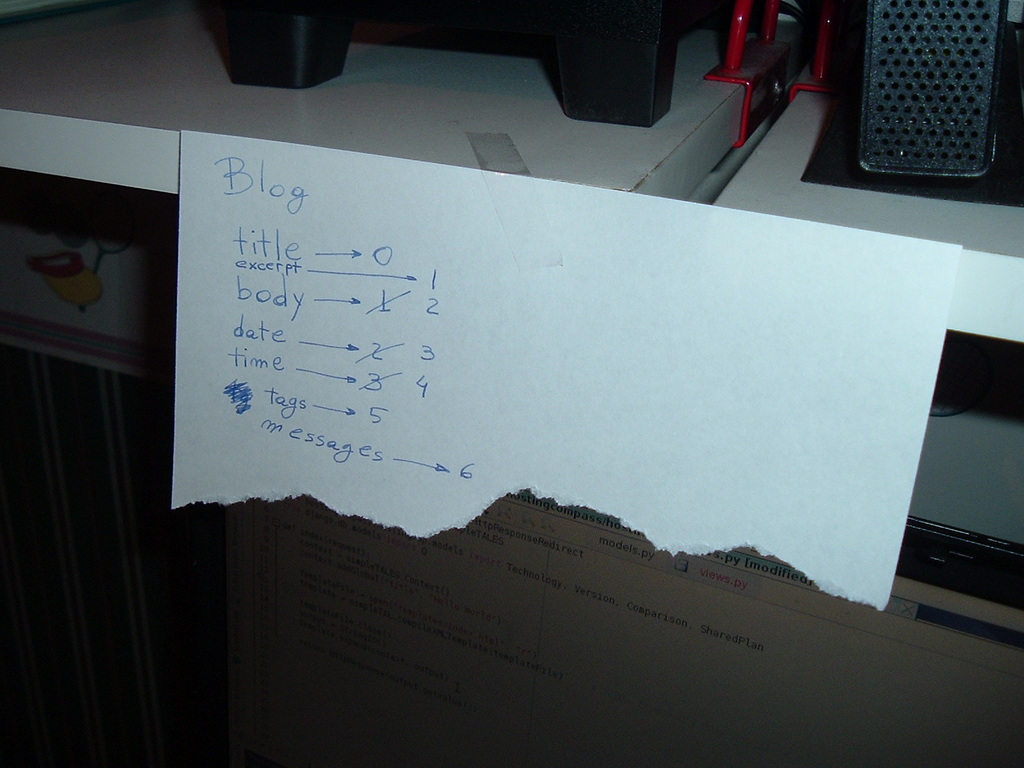
Figure 1. Index Handling the Hard Way
Object-oriented programming was born more than 20 years ago so developers could separate each part of a computer program in a way similar to how objects are separated in the real world. Python models objects by using classes. A class is an abstract definition of what an object has and what an object can do. If this sounds foreign, don't worry, OOP (object-oriented programming) is difficult at first.
An example might help. A bridge is a structure that allows people or vehicles to cross an obstacle, such as a river, canal or railway. A bridge has some length, some width and even some color. It may allow vehicles or only persons. It may allow heavy vehicles or not. When I say “bridge”, I am not defining any of those details. Bridge is a class. If I say Golden Gate, Le Pont de Normandie or Akashi-Kaikyo, I am naming particular bridges; they have some specific length, width, vehicle allowance and color. In OOP jargon, they are instances of bridge.
Back to our blog, let's create a class to model our post:
>>> class Post(object):
...     pass
...
>>>
We start with class, the keyword for creating new classes. Next comes the name of the class—in this case, Post. In parentheses, we have the super-classes—ignore that for now.
Here again, the prompt has changed from >>> to ..., and Python expects something in a class. Because we don't want to put anything in yet, we write pass, which is something, but in fact, it is nothing. Python knows when a class starts and ends because of the indentation, the same as with functions.
To reproduce what I did, simply type the class header, class Post(object):, press Enter, press Tab, type pass, press Enter, press Enter again, and that's it.
Now, we can create a Post:
>>> cool = Post()
>>> cool
<__main__.Post object at 0xb7ca642c>
Note that what is being printed when we evaluate a post is a generic representation for the object. We can set its title and body:
>>> cool.title = "Cool"
>>> cool.body = "Python is cool."
And retrieve them:
>>> cool.title
'Cool'
>>> cool.body
'Python is cool.'
Up to this point, a Post is like a simple container for anything you can imagine putting there. The problem with this is we may get lost as to what to put in it, or what not to put in it. Back to a sheet of paper? No! Although we can't stop making the posts a container in that way, we can put some methods there, so users have an idea of what a post may contain. To do this, we write our own methods in the class Post:
>>> class Post(object):
...     def set_title(self, title):
...         self._title = title
...     def get_title(self):
...         return self._title
...
>>>
Methods are like functions, but as they are in a class, they are associated with the objects of the class. This means different classes can have different methods with the same name. Just imagine the difference between bat.hit(ball) and stick.hit(drum).
Python has a convention that the first parameter (normally called self) to a method is the object on which we are calling the method. That means running cool.set_title("Cool")will set self to be cool, and title to be "Cool". Running:
cool.set_title("Cool")
is the equivalent of:
cool._title = "Cool"
The leading underscore lets others know that we don't want them playing with it. It means “don't access _title; use get_title and set_title”.
The previous interaction with the cool object can be rewritten as:
>>> cool = Post()
>>> cool.set_title("Cool")
>>> cool.set_body("Python is cool.")
>>> cool.get_title()
'Cool'
>>> cool.get_body()
'Python is cool.'
Writing the same set of methods for body should be easy now. But, be aware that you have to write the whole class in one go. Write the class header, the set_title and get_title methods, and then create your set_body and get_body methods. It may take you a couple of tries.
As the Post class becomes bigger, you'll get tired of rewriting it every time you want to add a method. If you're tired already, that's a good sign. And besides, all that's in the REPL will be lost when we quit Python. We should start saving our work in files.
Python modules are simple text files, and you can use any text editor you want. As a programmer, you are going to spend most of your time with your editor, so take some time to choose one you really like and learn to use it well.
Emacs might not be the most beautiful editor, but for many programming tasks, it is awesome. (You could read that as “I don't like Emacs but it makes my life so much easier that I keep coming to it time after time”.) Installing Emacs from source is beyond the scope of this article. As usual, with programs that are so popular, your distribution is likely to provide it. In Debian and its derivatives try:
apt-get install emacs
For Gentoo, the counterpart is:
emerge emacs
To achieve the magic I am going to show here, you need python-mode.
In Debian:
apt-get install python-mode
In Gentoo:
emerge python-mode
Run Emacs. If you are serious about learning how to use it, now it is time to press Ctrl-H T, which in Emacs jargon means press Ctrl-H, release it and then press T. But, you can leave that for later, when you've finished reading this Linux Journal issue. For this article, I provide all the keystrokes you need.
Press Ctrl-X Ctrl-F (Ctrl-X, release, Ctrl-F) to visit a file. On the bottom of the Emacs window, you'll see the cursor waiting for you to type the path and filename. Type blog.py and press Enter. (Python modules should have the extension .py.) Now, you can start typing the Post class we programmed before. Emacs tries to be smart about indentation and places it where you are likely to want it. If you need a different indentation, simply press Tab and keep pressing it until you get the desired results.
On the top, you should have two menus: IM-Python and Python. The first one contains a list of classes and methods in the file you are editing. Click on Rescan if it doesn't show information you know is there. This is very useful when working with huge files. The second menu is even more useful, but explore and play with it later. For now, simply run Start interpreter... or press Ctrl-C !.
Suddenly the window is split, and you have an embedded Python interpreter below the file you are editing (Figure 2). And the fun is only beginning. Click on the file you are editing to set the focus on it. Run Import/reload file from the Python menu or press Ctrl-C Enter. Now, you're ready to test your code on the REPL, but be aware that you'll have to add blog. before the name of the class, Post, because now the class is in the module blog. See Figure 2 for further reference.
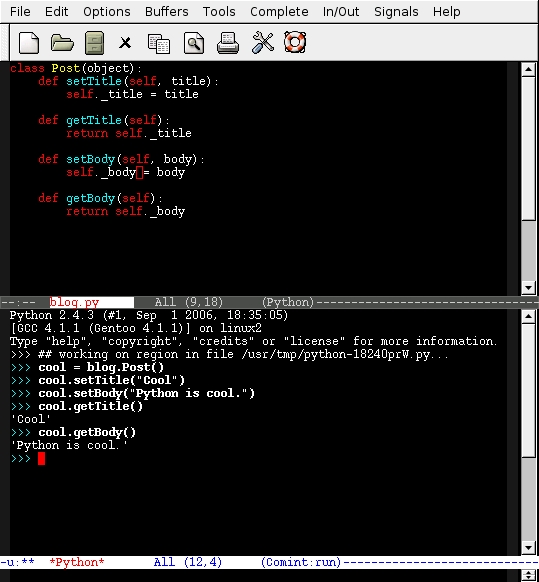
Figure 2. Testing the REPL
You can, of course, do the same without Emacs. But for that, you need to learn how Python modules and packages are made. Set PYTHON_PATH, an environment variable, accordingly, and use the built-in function reload. With Emacs, you'll find iterating between coding and testing the code to be very fast. This speed can improve your performance and make programming more fun. In fact, Lisp programmers have been advocating this way of working for more than two decades.
Having to create an object and then set each of its members is not pleasant. It takes a lot of lines and is very error-prone—did I remember to set the tags? There's a better way to do it—using the initialization method.
This special method is called __init__, and the parameters you define it to take have to be passed in the creation of the object. A possible initialization method would be:
class Post(object):
    def __init__(self, title, body):
        self.set_title(title)
        self.set_body(body)
Simply add the __init__ definition to the file and reload it. We now can, and have to, set the title and body at initialization time:
>>> cool = blog.Post("Cool", "Python is cool")
>>> cool.get_title()
'Cool'
>>> cool.get_body()
'Python is cool'
>>>
Hint: to retrieve previous lines in the REPL inside Emacs use Alt-P.
There are other special methods. Remember how ugly it was to evaluate a Post itself? Let me remind you:
>>> cool
<blog.Post object at 0xb7c7e9ac>
We can solve that. There's another special method called __repr__, which is used to retrieve that string. Inside the Post class add:
def __repr__(self):
    return "Blog Post: %s" % self.get_title()
Reload the file, the same way you loaded it previously, and evaluate a post:
>>> ## working on region in file /usr/tmp/python...
>>> cool
<blog.Post object at 0xb7c7e9ac>
>>>
Oops! That's not what we wanted. The problem here is that the cool object was created with an older version of the Post class, so it doesn't have the new method. That is a very common mistake, and not being prepared for it can cause a lot of headaches. But, simply re-create the object, and you are set:
>>> ## working on region in file /usr/tmp/python...
>>> cool = blog.Post("Cool", "Python is cool")
>>> cool
Blog Post: Cool
>>>
Easy—wait for the next issue of Linux Journal for Part II of this tutorial. If you really want something to do now, start learning Emacs.
Resources
Python: python.org
Python Download: python.org/download
Python 2.4.3: www.python.org/ftp/python/2.4.3/Python-2.4.3.tgz
José P. E. “Pupeno” Fern´ndez has been programming since...at what age is a child capable of siting in a chair and reaching a keyboard? He has experimented with more languages than can be listed on this page. His Web site is at pupeno.com, and he always can be reached, unless you are a spammer, at pupeno@pupeno.com.
