
Building a Multi-Room Digital Music System
Like many media buffs these days, I have a media center computer in my house. It is a small VIA M10000 Mini-ITX system in a Casetronic C158 case running Freevo on top of Gentoo Linux. It sits inside my media cabinet and serves music, video, photos and various other bits of information to my TV. The small media center gets all of its content from a much larger AMD64 Gentoo Linux server that resides in a closet near the back of the house. The two machines talk to each other over a wired network using NFS (Network File System). I will be the first to tell you that it is great to have all of my music, videos and photos in a digital format and easily accessible.
In the same spirit of my media center computer, I wanted to have a few small systems that could sit on a shelf or in a drawer that would serve music to different parts of the house. Many products on the market exist that will broadcast audio from a computer and many others will play the resulting stream. The problem with most of these, to me, is that only one stream is available. I wanted the ability to play different music in each room at the same time and control it with one device. A few newcomers to the market do exactly what I wanted—namely the Sonos Digital Music System, which was reviewed in the March 2006 issue of Linux Journal. However, I wanted to tackle this one myself.
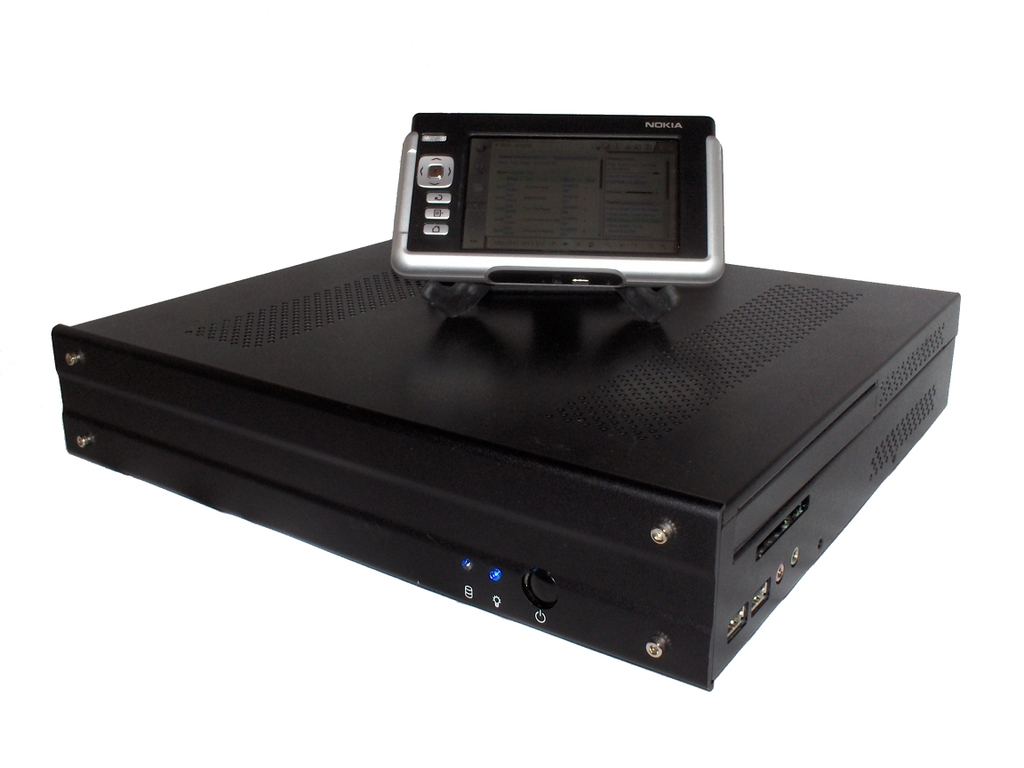
Figure 1. The Media Center with the Nokia 770 as the Controller
My idea was to build a fanless Mini-ITX appliance that would grab content from my file server and play it using MPD (Music Player Dæmon). To control the appliance, I use lightTPD (a PHP-enabled Web server) and phpMp (a PHP application that controls MPD), running on the appliance. This gives any computer on the network with a Web browser the power to control the appliance. My controller of choice is a Nokia 770. Using Opera, which comes installed, I can point the browser to each of the appliances and control them over my wireless network.
For the appliance, I chose to start with a VIA ML6000EA Mini-ITX motherboard. This board has many features that make it perfect for this type of appliance. The main one is the VIA 600MHz Eden fanless processor. This tiny processor is more than enough to push the applications, and it makes absolutely no noise. Other nice features include six-channel onboard audio, onboard LAN, support for 1GB of memory and a PCI slot.
Because I wanted the appliance to be silent, I decided to forgo a standard hard drive. Instead, I opted for a 256MB Flash drive that plugs directly in to a 40-pin IDE slot. The Flash drive also draws its power from a standard four-pin molex. I also added 256MB of DDR 400 memory to finish out the internals.

Figure 2. The Open Casetronic Case with Motherboard
To give the appliance a sleek look, I went with a Casetronic C158 case. This case has a smooth front, which makes it look more like an appliance. Even though the case has room for a slim ROM drive, I did not put one in, because MPD does not have support for playing audio from a CD. The case also has audio jacks on the front right side that provide easy access for enjoying music with headphones. Another nice feature on this case is the optional CompactFlash card reader that can be mounted from the inside and accessed right below the CD-ROM tray.
Because I chose to use a Flash-based hard drive, I needed to make sure that my Linux installation was small, less than 250MB, and did not write to the disk. Flash-based drives and disks have only a certain number of write cycles that can be preformed on them before they give out. My particular drive, made by IEI Global Sourcing, supports more than one-million cycles. Even with support for this many cycles, the drive would stop working in a fairly short amount of time due to disk writes, especially if there were a swap partition on the disk. With all of this factored in, I decided an embedded Linux system was the best fit.
Embedded Linux systems can be created in a variety of ways. I chose to go with embedded Gentoo (see Resources). Because my development machine, a Dell 600m laptop, already runs Gentoo, I didn't need to create a custom build chain. I simply could get a snapshot from the Gentoo Web site and use my laptop as a host to build the embedded system.
Before I attempted to build the system, I took a long look at Building Embedded Linux Systems by Karim Yaghmour (see Resources). This book provides a very detailed view of the exact ingredients that make up a functional Linux operating system. And, as the title states, it shows the reader how to build embedded Linux systems. I also followed the instructions written by Heath Holcomb on how to construct an embedded Gentoo system (see Resources). Heath's instructions describe all the needed steps for building an embedded Gentoo system and making it operational. Without these resources, this entire project would not have been possible. I strongly recommend you take a look at them if you are considering doing anything with embedded Linux.
It also should be noted that if you want to build an appliance like this, but would rather use a hard drive and save yourself some time, you can use almost any Linux distribution. Most of them come with all of the software for this project already in their package systems.
Building the embedded Gentoo system was not too difficult. If you have ever installed Gentoo before, making the leap into the embedded realm is not very hard. Several things did make my build interesting though.
I followed Heath's instructions to the letter, and when I was finished, I had a working embedded Gentoo system. After testing it and making sure it all worked, I went on to install the rest of the software that I needed (MPD, lightTPD and phpMp). This proved to be a bit problematic. Portage (Gentoo's package system) wanted to install several software packages that I did not want or need. So, I started over from scratch and carefully installed only the dependencies for the software I needed. Then, I installed my three pieces of software with a nodeps flag to ensure that I did not get the unwanted software.
During the build process, I tested the system several times. I wanted to make sure that with each step I was making progress and not breaking something that had worked previously. To test the system, I used a USB media reader to copy the embedded Gentoo system off my laptop onto a CompactFlash card. I then plugged the CompactFlash card in to a card reader plugged directly in to my appliance computer. This allowed me to test the appliance and emulate how it would operate once everything was working.
As I mentioned earlier, all of my media is on a file server. Having my media stored this way lets me have any number of computers on my network access the files as if they were stored locally. In order to share the files, I set up NFS on the server. Using NFS, I can allow IP addresses, or sets of IP addresses, to connect to specific directories on the server and have specific security rules.
For the appliance computer, I set up two shares. The primary share is where all of the audio content is stored. This share is read-only; I did not want anything mounting this directory to be able to modify it. The second share is a writable share where all of the MPD metadata is stored (more on this later). Both shares are set up with IP restriction only. I decided against using user authentication for reasons of simplicity.
To complete the network setup on the server, I made sure NFS started on boot. Then, I added the mount lines to a startup script on the appliance.
At the core of this appliance is MPD. MPD can play almost any audio format: MP3, Ogg, AAC (without DRM), FLAC and so on. For my setup, I enabled Ogg, MP3 and AAC, as all of my music files are in one of these formats. MPD also will play audio streams. This gave my appliance the ability to play all of my favorite Internet radio stations. Configuring MPD is actually fairly easy. Only a handful of settings need to be changed for MPD to function correctly.
The two most obvious settings that need to be changed are music_directory and playlist_directory. I pointed the music directory setting to the first NFS mount (the one with all of the audio files). The playlist directory setting was pointed to a playlist directory on the second NFS mount. By pointing the playlist setting to a common directory, all of the appliances on the network can share playlists.
The next setting I modified was db_file. This setting points to a file where MDP stores all of the metadata about the audio files on the system. I pointed this setting to a file called mpd.db on the writable NFS share. Just like the playlist setting, this allows all the appliances to share a common database of audio information. This also allows any appliance to update the MPD database.
The final setting I modified was state_file. This setting points to a file that holds the information about what state MPD is in when it stops. Again, this points to a file on the writable NFS mount. However, the state file is unique for each appliance. When I turn an appliance back on, I want its state, not the state of another appliance.
Because the appliance does not have a screen, I needed a way to control the audio playback. Fortunately, the same folks who developed MPD also developed phpMp. phpMp is a small and simple Web application designed to control an instance of MPD using the socket extension in PHP. In order to get phpMp running, I had to install a Web server. Because I was using an embedded platform, I had to be conscious of application size. I also wanted something that was very easy to configure and did not take up too many resources. So, with those considerations in mind, I decided to use lightTPD. lightTPD is a small, fast, full-featured Web server that can run PHP scripts.
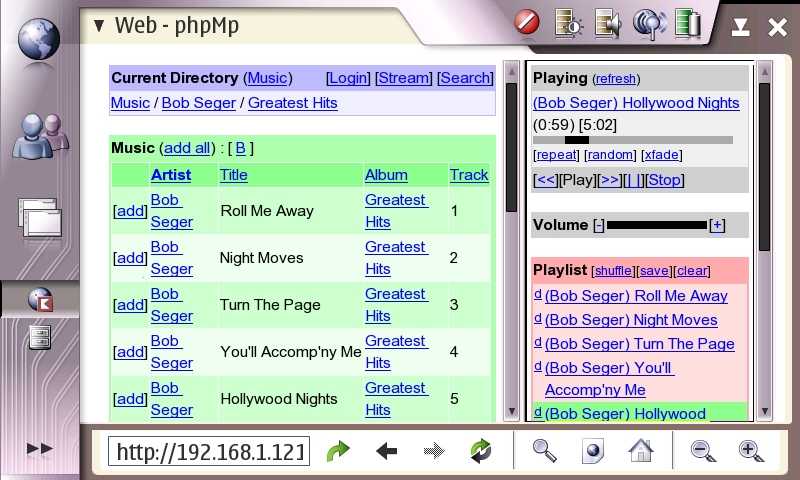
Figure 3. Web-Based Control of the Media Center
Out of the box, lightTPD and phpMp needed very little configuration, which is a great feature. Of course, because the appliance is headless, I had to make sure lightTPD started automatically during the boot process.
All things considered, I had very few problems getting everything working. The few issues I did have dealt with the OS being embedded. Fortunately, they were easily remedied.
The first issue was application logging. MPD, lightTPD and the OS itself are configured by default to log everything to files. With my hard drive mounted as read-only, this caused a few issues. To solve the problem, I added a line in the fstab to mount the /tmp directory as a tmpfs. Then, I redirected all logging to the /tmp directory. Doing this allowed all of the applications to log information and still have a read-only filesystem.
The next issue I had dealt with was the ALSA (Advanced Linux Sound Architecture) device files. Most Linux systems nowadays use UDEV to create device files dynamically on boot. Among the device files created by UDEV are the sound card device files that ALSA uses. Because my system did not have UDEV, these files were never created. To solve the issue, I manually created the device files I needed and made them part of my embedded distribution.
The last challenge dealt with turning the appliance off. Because there is no console nor interface to tell the system to shut down, you have to use the power button on the appliance. This led me to building ACPI (Advanced Configuration and Power Interface) support into the embedded system. With ACPI, I configured the system to shut down when the power button is pressed. As the operating system is so small and has so few processes running, shutdown takes only a split second. Eventually, I would like to add support for shutdown to the phpMp interface, but for now, the power button works just fine.
Through the course of building this system, I thought of several things I would like to do to enhance the appliance, such as adding an LCD to the front of the case that would show the artist, album and name of the current track. LCDproc has support for MPD, and LCD4linux is adding support, so installing an LCD should be trivial. I also would like to build a small amplifier that could fit into the case so I would not have to use powered speakers. My ideas were not relegated to the appliance alone; I thought of several enhancements I would like to see to the Nokia 770 and MPD.
The Nokia 770 is the perfect interface for this appliance. As its user base grows, so do the features and the amount of applications it can run. Developers across the world are porting more and more applications to it every day. In the future, I would like to see gmpc (GNOME Music Player Client) ported. gmpc is a GTK+ application that connects to and controls MPD. If gmpc were to be ported to the Nokia 770, lightTPD and phpMp no longer would be needed to control the appliance. The 770 could control it natively.
There also are several enhancements that I would like to see added to MPD to make this appliance even better. The first one is a cover art plugin. Adding support for this has been discussed among the MPD developers, but it has not been added to date. Another nice addition would be a tag editor that allows users to update the meta-information stored in an audio file.
The Mini-ITX line of motherboards, coupled with Linux, provide a solid foundation for building all kinds of appliances like the one described in this article. It took me just short of a month to build and test the appliance. It also was fairly cheap for something so small. All the hardware for the appliance cost about $320 US.
I would like to thank my good friend Ryan Corder for helping me along the way. He was instrumental in teaching me the finer aspects of Gentoo and Linux systems as a whole. All of the parts for the appliance were purchased, and shipped very quickly, from Logic Supply (see Resources).
Resources
Embedded Gentoo: embedded.gentoo.org
Building Embedded Linux Systems: www.oreilly.com/catalog/belinuxsys
Gentoo Embedded x86 Guide: www.bulah.com/embedded-guide.html
Logic Supply: www.logicsupply.com
Chad Files is a software developer who resides in Conway, Arkansas. He is an avid hiker and longtime Linux user. He welcomes your comments at cpfiles@gmail.com.
