
SMART (Smart Monitoring and Rebooting Tool)
There are a lot of excellent monitoring tools (Big Brother, Nagios and so on), and some of them allow recovery from dead services, but with great complexity in their configuration, which becomes even more complicated when you want to supervise local services that are not remotely accessible, such as syslog, xinet, mrtg, iptables or Nagios itself.
The purpose with SMART was to have a simple, flexible and quick-to-implement application for monitoring the most critical system dæmons that made it possible to add new ones without modifying the code and to avoid installation and configuration complexities. It also needed to be capable of making decisions and solving problems (or at least trying to do that).
After a first version of “passive” monitoring, we tried to go a step further and obtain an “active” application, that is to say, to add the possibility of auto-recovery. By executing the application periodically through crond, it should detect dæmons that were down and boot them without the intervention of the system administrator.
Later, we considered the possibility that a nonprivileged user could execute this application from a console or remotely (via Telnet or SSH). Centralization of detection and error recovery in only one script made integration with sudo easier. Furthermore, it allowed delegating some stronger recovery actions needed in critical situations, such as rebooting the whole system, to this nonroot-privileged user.
With the ps command, we can list all the active processes in the system, but being “active” is not the same as being “operative”, so this led us to include the check scripts, which are small programs to test services and determine whether they really are operative and answering requests. The difficulties we found suggested that we not waste efforts re-inventing the wheel and profit from plugins included in Nagios (monitoring software that we were using satisfactorily for almost three years).
The distribution of SMART has two shell scripts (smart and check-service), two configuration files (host.conf and services.conf) and two directories (scripts and plugins), which contain the check scripts and the plugins (Listing 1).
Listing 1. The SMART Installation Files and Directories
[root@server /]# ls -la /home/sysman/
drwxr-x---  4 root sysman    4096 May 27 11:49 .
drwxr-xr-x  3 root root      4096 Jul  8  2003 ..
-rwxr-x---  1 root sysman    1448 May 27 11:51 smart
-rwx------  1 root root      7815 May 27 11:51 check-service
-rw-r--r--  1 root root       242 May 27 11:49 host.conf
drwx------  2 root root      4096 Apr 29 13:38 plugins
drwx------  2 root root      4096 Apr 29 13:39 scripts
-rw-r--r--  1 root root       883 May 17 10:40 services.conf
Permissions of files and directories allow a nonprivileged user called sysman to execute the application, but deny sysman the ability to modify the contents to use it in an inadequate way.
The SMART program reads the configuration files services.conf and host.conf and executes check-service for each defined service. If a check script has been assigned to a service, for example, services 1 and 2 in Figure 1, check-service will execute it, passing the needed parameters and then will wait for the exit status to determine whether the service is alive. If this check script executes some other external script (plugin), such as service 1 in Figure 1, this one will be responsible for checking the service status.
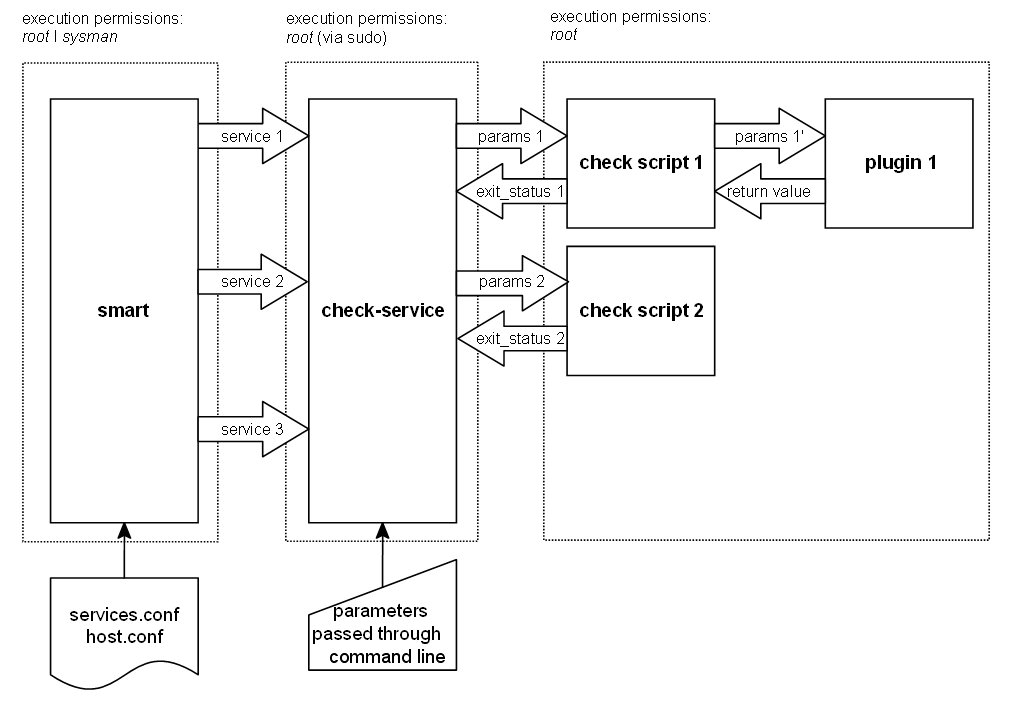
Figure 1. SMART Program
If no check script has been assigned to a service (service 3 in Figure 1), the check-service file will determine the service status by getting the number of active processes. According to this information, the SMART command-line parameters and the configuration parameters, it will decide what actions to carry out.
Integration with the sudo (superuser do) tool allows the system administrator to permit another user (sysman) to start dead services, restart all the services or reboot the whole system. Advantages of this are:
Simple configuration: there's no need to give privileges to that user to stop and start every service, and no need to use administrative tools (ps, kill, rm and so on). The check-service script centralizes the whole operation.
Security: user sysman can't read, write or execute the check-service file.
Easy to use: scripts are managed by sudo, so its usage will be transparent for the user.
For a user sysman, who needs privileges on the host server, the configuration file of sudo (/etc/sudoers) should be as shown in Listing 2.
Listing 2. sudo Configured for SMART Access
# Defaults specification
Defaults:root !syslog

# User privilege specification
root    ALL=(ALL) ALL
sysman  server=(root) NOPASSWD: /home/sysman/check-service
sysman  server=(root) NOPASSWD: /sbin/reboot
This way, we disable syslog logging when sudo is executed by user root, and we assign root privileges to user sysman, at the host server, only for the execution of commands /home/sysman/check-service and /sbin/reboot, without asking sysman for the password every time.
Through the PID file defined in the configuration file, we obtain the parent process identifier (PID), and we determine the number of active processes generated by this service. Next we check whether:
The service is responding to petitions within the defined time period.
The number of processes generated by the service doesn't exceed the maximum and minimum defined thresholds.
Considering the results obtained in former verifications, we classify the service status:
0: service is responding to requests within the defined time period, the number of processes generated by service remains between the defined thresholds, and the information provided by the PID file is correct.
1: service is responding to requests within the defined time period and the number of processes generated by service remains between the defined thresholds, but either the information provided by the PID file is incorrect or this file doesn't exist, even though it has been defined.
2: service is responding to requests within the defined time period, but the number of processes generated by the service is beyond the defined thresholds (this could be the case of an overloaded but operative Web server).
3: the number of generated processes is out of thresholds, and we don't have any tool (script) to check whether the service is operative (this could be the case of processes such as syslogd, crond and xinetd).
4: service is not responding to requests within the defined time period.
We group the above five situations in three more general cases:
OK (status 0 and 1).
WARN (status 2).
DOWN (status 3 and 4).
When executing the program with no parameters, it simply will determine the status of services defined in the configuration file and will display the results. If we want the program to work in an active way, we need to use some of the following parameters:
-w: restart services in WARN status and send a notification (e-mail) for each one of them.
-d: restart services in DOWN status and send a notification for each one of them.
-wd: restart services in WARN and DOWN status and send a notification for each one of them.
--all: restart all services independently of their status and send a notification for each service with WARN or DOWN status.
--reboot: restart the whole system independently of service's status and send a general notification.
Once the service status has been determined, and according to the parameter specified in the execution, the action carried out for each service will consist of that shown in Table 1.
Table 1. Service Actions
| Status | Parameters | Action |
|---|---|---|
| OK | --all | Restart the service |
| WARN | -w, -wd, --all | Restart the service |
| Send a notification relating to service | ||
| -d | Send a notification relating to service | |
| DOWN | -d, -wd, --all | Restart the service |
| Send a notification relating to service |
Furthermore, independently of the service's status, with the parameters --all and --reboot, a notification via e-mail is sent to the administrator about the performed action.
Listing 3 shows a sample of SMART in action, executed from a console with parameter -d (recovery of services in DOWN status).
Listing 3. Sample Output of the smart -d Command
[sysman@server ~]# ./smart -d

SERVICE         PID     PROCS   STATUS          PROBLEM
-------         -----   -----   ------          -------
CRON            451     1       [OK]
DISK            ?       0       [OK]            No start command.
DHCP            444     1       [OK]
DNS             442     1       [OK]
HTTP            625    53       [WARN]          Too many processes (>30).
LPD             474     1       [OK]
MRTG            27017   1       [OK]
MYSQL           627     1       [OK]
NAGIOS          640     1       [OK]
NMB             633     1       [OK]
NTP             ?       1       [OK]
POSTFIX         619     0       [DOWN]          No response from service.
                                [Starting...]
->POSTFIX       23945   1       [OK]
POSTGRES        560     3       [OK]
SLAP            643     1       [OK]
SMB             631     6       [OK]
SNMP            635     1       [OK]
SNMPTRAP        637     1       [OK]
SSH             654     3       [OK]
SYSLOG          402     1       [OK]
XINET           462     1       [OK]
There are some optional executables files, the check scripts, responsible for checking whether the monitored services really are operative and responding to petitions. These files are written in Shell (.sh extension) and Expect (.exp extension). Expect is a tool that requires Tcl and allows for automation of interactive applications that use textual representation.
These scripts could be written in any programming language, because only the exit status is taken into account. If it's not equal to 0, we suppose that there has been no answer or that the answer given by the service has not been the expected one. This means that a check script not only can monitor services, but it also can achieve any check that returns a Boolean value, for example, to check whether the size of a directory exceeds a certain value, whether the amount of logged users is greater than a desired number, whether a kernel module is loaded and so on (Listing 4).
Listing 4. A Sample of the nag and Shell Scripts
[root@server /]# ls /home/sysman/scripts/
disk.nag       http-forb.nag  nfs.nag     pop3.nag     smtp.nag
disk.sh        http.nag       nfs.sh      printer.nag  snmp.nag
dns.nag        http.sh        nmb.sh      proxy.nag    ssh2.nag
dns.sh         imap.exp       ntp.sh      slap.nag     ssh.nag
ftp.exp        imap.nag       pgsql2.nag  slap.sh      ssh.sh
ftp.nag        mysql.nag      pgsql.nag   smb.nag
http-auth.nag  mysql.sh       pgsql.sh    smb.sh
http.exp       nagios.nag     pop3.exp    smtp.exp
Files with the .nag extension are also Shell scripts, but unlike the former ones, they call an external program (plugin) passing to it the parameters received from check-service, following the order and format that the plugin expects. This checks the service and returns the information gathered to the check script, which will interpret and convert it into the exit status that check-service is waiting for (Listing 5).
Listing 5. nag scripts are handled by plugins.
[root@server /]# ls /home/sysman/plugins/
check_disk  check_http    check_pgsql  check_snmp  check_udp
check_dns   check_imap    check_pop    check_ssh
check_ftp   check_nagios  check_smtp   check_tcp
Plugins are programmed in C, Perl and Shell and belong to Nagios. Their sources can be downloaded independently of the Nagios distribution, and some of them require the additional installation of certain programs and libraries.
Software requirements include the following:
sudo: allows a user to execute a command as another user. This will be necessary if you are planning to allow a nonroot user to execute SMART.
awk: a pattern scanning and processing language. SMART uses it and expects to find it at /bin/awk. If that's not your case, edit the check-service and smart files of the SMART distribution and modify the line where AWK=“/bin/awk” is specified.
Nagios plugins: sources can be downloaded independently of the Nagios distribution, and some of them require the additional installation of certain programs and libraries. You can use the plugins distributed with SMART or download the newest ones.
Some shell scripts (in the scripts directory of SMART) may require some specific commands to check some services, such as dig for dns, wget for Web services, nmblookup for nmbd (Samba), ntpq for NTP, ldapsearch for OpenLDAP and so on. The paths of these commands are defined in a variable at the beginning of each script, so you can change their location, use any other command that might work better for your system or even rewrite the whole script at your convenience.
With sudo you can permit another user to run SMART. If you're not interested in creating such a user, you can omit steps 1, 2 and 3 below.
Create user sysman and group sysman.
Create the SMART directory. It's a good idea to install it at sysman home and to set the appropriate owner and permissions:
mkdir /home/sysman
chown root:sysman /home/sysman
chmod 750 /home/sysman
Edit the sudo configuration file /etc/sudoers, and add the following lines:
...
sysman  hostname=(root) NOPASSWD: /home/sysman/check-service
sysman  hostname=(root) NOPASSWD: /sbin/reboot
Download the SMART software.
Untar and unzip the distribution:
tar -zxf smart-X.Y.tar.gz
Go to the distribution directory and copy the files to the destination directory. If you choose a destination different from /home/sysman, you will have to edit the smart file and modify the line where dir=“/home/sysman” is specified:
cd smart-X.
cp check-service /home/sysman/
cp smart /home/sysman/
cp host.conf.dist /home/sysman/host.conf
cp services.conf.dist /home/sysman/services.conf
cp -r scripts /home/sysman/
cp -r plugins /home/sysman/
Go to the destination directory, and check/set file permissions and owners:
cd /home/sysman
chown -R root:root check-service scripts plugins host.conf services.conf
chown root:sysman smart
chmod -R 700 check-service scripts plugins
chmod 750 smart
chmod 644 host.conf services.conf
Configuration is as follows. First, edit the SMART host configuration file host.conf, and modify it according to your preferences (hostname, mail addresses, commands paths and so on). Then, edit the SMART services configuration file services.conf, and uncomment/modify/add any service/dæmon you want to check. Every line describes one service, with the following semicolon-separated parameters:
NAME (non-empty string): descriptive service name (for example, IMAP).
process_name[:port] (non-empty string[:integer]): parent process name and its operational port (for example, couriertcpd:143).
process_param (string): parameters of running process. Some services run with the same process name, so parameters are useful to distinguish them. For example, the parent process of Courier IMAP and POP3 is couriertcpd, but one is executed with the parameter pop3d and the other one with imapd.
max_procs (non-empty integer): the highest number of running processes allowed (for example, 10). Leave it at 0 if what you're monitoring runs no processes (for example, disk space).
min_procs (non-empty integer): the lowest number of running processes allowed (for example, 1). Leave it at 0 if what you're monitoring runs no processes (for example, disk space).
start_command (string): the command to start the service or script to be executed when the service is down (for example, /courier/libexec/imapd.rc).
pid_file (string): pid file path (for example, /var/run/imapd.pid).
sock_file (string): socket file path.
start_mode (0/1): the service can be started/stopped by adding start/stop to the start command (1), or it may not be necessary (0).
check_script (string): the name of the script used to check the service. This script has to be in the scripts directory (for example, imap.nag).
Leave the parameters empty if they are not applicable, except NAME, process_name, max_procs, min_procs and start_mode, which can't be empty.
Now, you should be able to run SMART as user root or sysman:
/home/sysman/smart
Try using -h to get more information about available parameters. Running SMART through crond might be a good thing. You can run it as frequently as you want, but doing it every five minutes seems to be reasonable enough.
SMART is an easy-to-install application (simply copying the program), is much simpler to configure than Nagios (adding a new element to monitor involves adding only one line in the configuration file), and SMART is flexible, allowing you to monitor any service or aspect of the system, and it is very effective.
Our experience in a production environment with thousands of users tells us that it's inevitable that we will reach some peak periods in which the amount of requests received by a service goes beyond the capabilities of the system, and response time grows in a dramatic manner. The fact that the system detects this situation, before its own administrator, and solves it in five minutes, is a great problem solver and provides a perception of better service to users.
After two years of running SMART on about 15 servers, we can say that its main contribution has been our peace of mind. It's wonderful having a colleague who is checking that everything works correctly 24/7 and who informs you about troubles after they already have been solved (especially during the weekends).
SMART was created, developed, tested and enjoyed in the IT Department of the Universitat Internacional de Catalunya. Vicente Sangrador and Jordi Xavier Prat have collaborated on this project and encouraged me to write this article.
Resources for this article: /article/9268.
Albert Martorell is a Telecommunications Engineer and has been working as a network and “penguins” administrator in the IT Department of the Universitat Internacional de Catalunya since 1998.

