
Home Box to Trixbox
A little more than two years ago, I built a home phone system using Asterisk and analog interface cards. It has served us quite well, but it is time for an upgrade. In the time since first constructing that system, great strides have been taken in simplifying Asterisk configuration. Asterisk@Home (now called Trixbox) is a system that makes it possible to implement a powerful phone system for work or home using a Web-based GUI. I decided to use Trixbox for my new phone system to see if it has the flexibility to achieve all the features of my current system. This article discusses the installation and configuration of my new home phone system.
I have several goals for the new phone system. The first goal is to be able to call from one part of the house to another. Next, I want to minimize annoying telemarketing calls and direct calls after 10 pm to voice mail, rather than ringing the phones (unless the call is urgent). Because I work at home much of the time, I want to have a VoIP extension to the office system.
Before configuring the phone system, you must assemble it and install the software. Although Trixbox makes this rather easy, I outline the installation process here, so that those who want to try it for themselves will know what to expect.
The first things to consider are the hardware and software pieces needed for this project. I already have an old spare computer to use (a Pentium II 266MHz with 256MB of RAM and 6GB HDD), but I also need an interface card for the phone lines. When I first built my current system, I got a Digium TDM31B with three ports for phone sets (FXS) and one telephone company (FXO) port, which now costs around $350 US. Purchasing from Digium helps support Asterisk, because it is the primary supporter of the project. The last requirement is the system software, Trixbox, which can be downloaded from www.trixbox.org.
The Digium card came configured with ports 1–3 for the phone sets and port 4 for the incoming phone line. Because managing phone interfaces has real-time demands, it is best to keep the Digium device on its own interrupt, especially in older machines like mine. Isolating the card on its own interrupt is usually not very difficult—changing slots and disabling unnecessary devices in the BIOS usually will do the trick. It is worth noting that because of the high interrupt rate of these interface cards, one should not run many other devices or applications with high interrupt frequencies, especially not X11.
After downloading the Trixbox ISO, I burned it onto a CD and booted the system from it. I was presented with a screen that told me that continuing will completely destroy any data on the hard drive. Willing to do that, I pressed Return to continue. The install process asked me to select a keyboard type and layout, a time zone and a root password. There seemed to be some very long pauses between these selections, but the system completed the install and configured the bootloader. At that point, with the base system installed and the network configured, it rebooted.
After coming back up, it retrieved the Trixbox software itself, built and installed everything and initiated another reboot. At reboot, it finished the installation of FreePBX and restarted. These reboots were a bit disconcerting at first, but by this point, the entire system was fully installed and running. However, it did not recognize or configure my TDM card.
One of the main features of Trixbox is its upgradability, so before panicking about the TDM configuration, I decided to update first. After logging in as root, I ran trixbox-update.sh. Twice. The first run updated the script itself and the second updated the rest of the system. After finishing, it told me to reboot the system. That time, all the TDM-related modules loaded, though only wctdm and zaptel were needed. The card was detected correctly, and running genzaptelconf from the command line configured it correctly. At this point, the Trixbox system was installed, up to date and functional.
Networking is configured easily from the command line with the netconfig command. I could leave it with a dynamic IP address, as I have no VoIP phones to connect, but my intention was to remove the keyboard and the monitor from the system and administer it remotely. Doing that is much easier if I know the internal network address of the system, so I set it to a static address and configured the rest of the network settings appropriately. I also changed the hostname of the system by modifying /etc/hosts and /etc/sysconfig/network and rebooting.
After reboot, I opened a browser window and directed it to the static address I defined. I then saw the initial Trixbox screen, as shown in Figure 1. Most configuration is done through FreePBX, which is found by selecting System Administration, entering the maint user name and the password from above (Figure 2) into the pop-up window and then selecting FreePBX. The FreePBX is very modularized, and those modules still needed to be installed and activated before I could do anything with the system. By first selecting Tools from the top menu and then Module Admin from the side, I was at the module management screen. I then selected the Connect to Online Module Repository link to view all the modules available. I selected all the Local modules and clicked the Submit button at the bottom of the table. Next, I downloaded and installed all the Online Modules except for Gabcast and Java SSH.
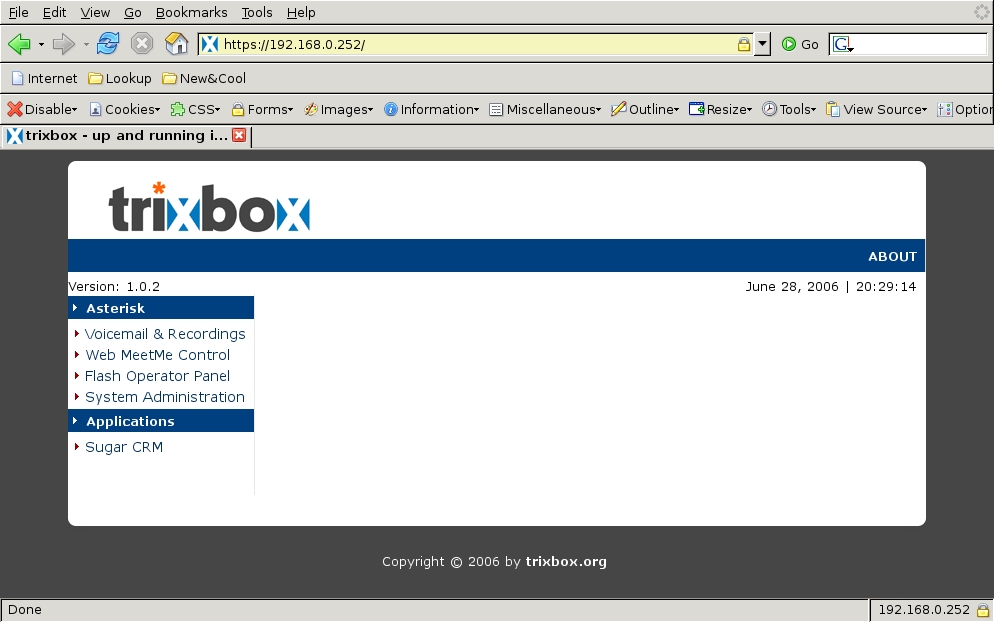
Figure 1. Trixbox Web Page Up and Running
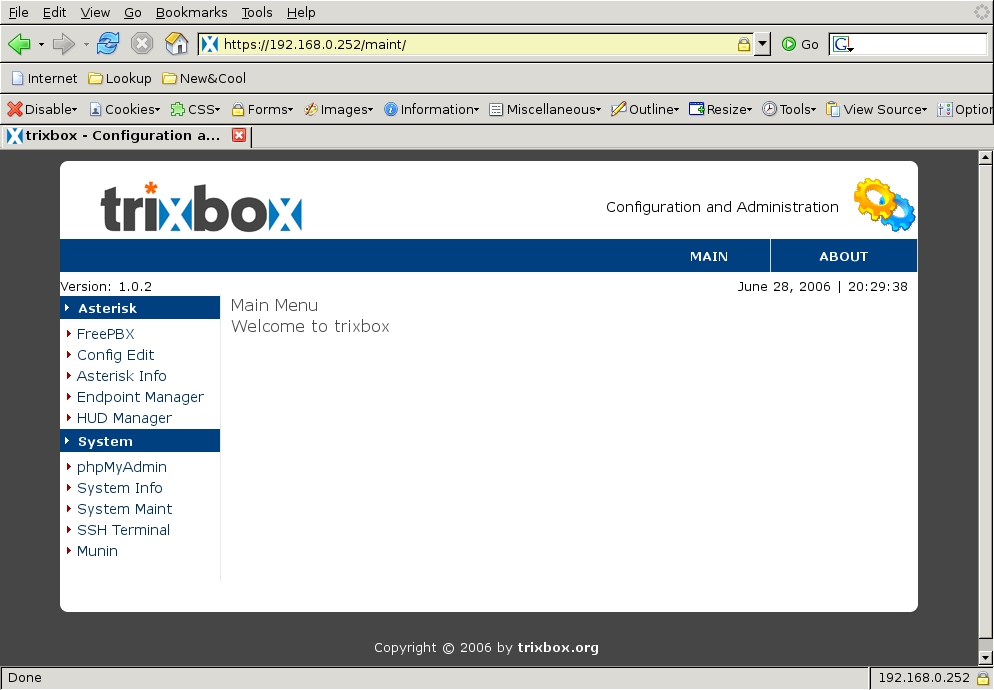
Figure 2. Main Menu after Logging In
The final set of modules, shown in Figure 3, is a very comprehensive set of functionality for a small home system. This module management interface also checks to see if any module updates are available whenever connecting to the on-line repository. Those updates can be downloaded and installed easily to keep the system current.
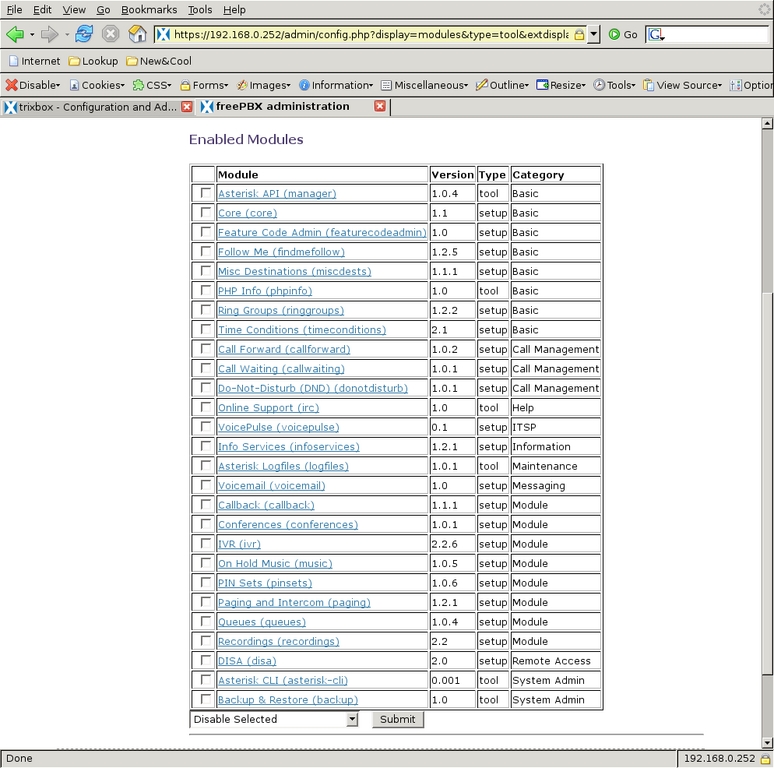
Figure 3. Module Setup in Trixbox
After I had all the necessary software downloaded, updated, installed and configured, the phone system had all of its modules up to date and was ready for configuration. From the FreePBX browser window, I selected Setup from the top menu (Figure 4). Down the left are the menu items associated with many of the modules that were loaded. First, I changed the General Settings by selecting that menu item. One very useful feature of the FreePBX interface is that many of the items on the screens have pop-up windows associated with them to provide information for those items. I like to drop the r from the Dial command options to generate ringing tones to the caller only “when appropriate” and add w to the Dial command options and W to the Outbound Dial command options to allow our internal extensions to record calls in either direction by pressing *1 during the call. I also like to be able to transfer outbound calls between extensions if desired, so I add T to the outbound options. Finally, I changed the ring time to 20 seconds to give us more time to answer a phone. Figure 5 shows the final state of our General Settings.
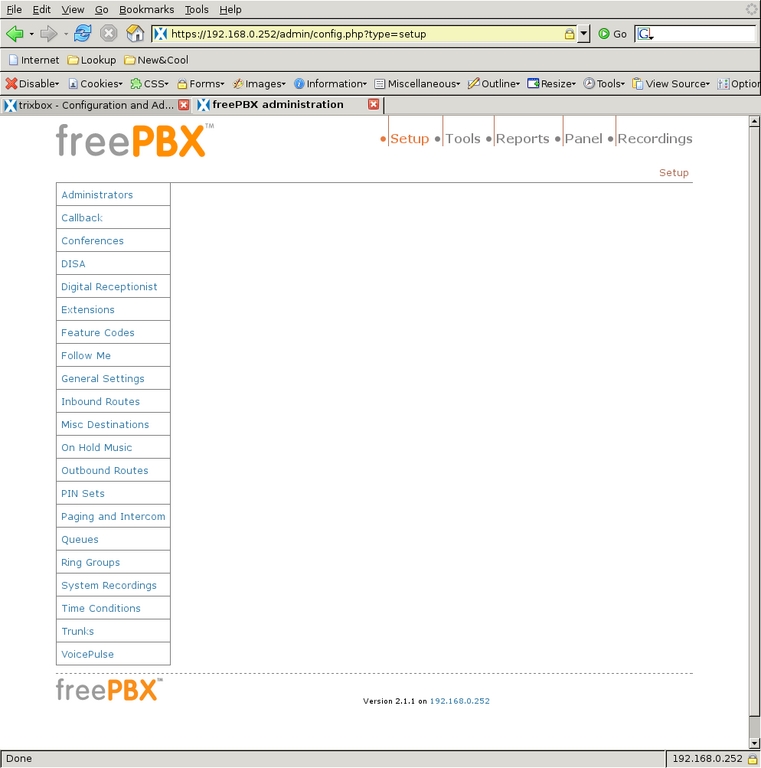
Figure 4. The FreePBX Browser Window
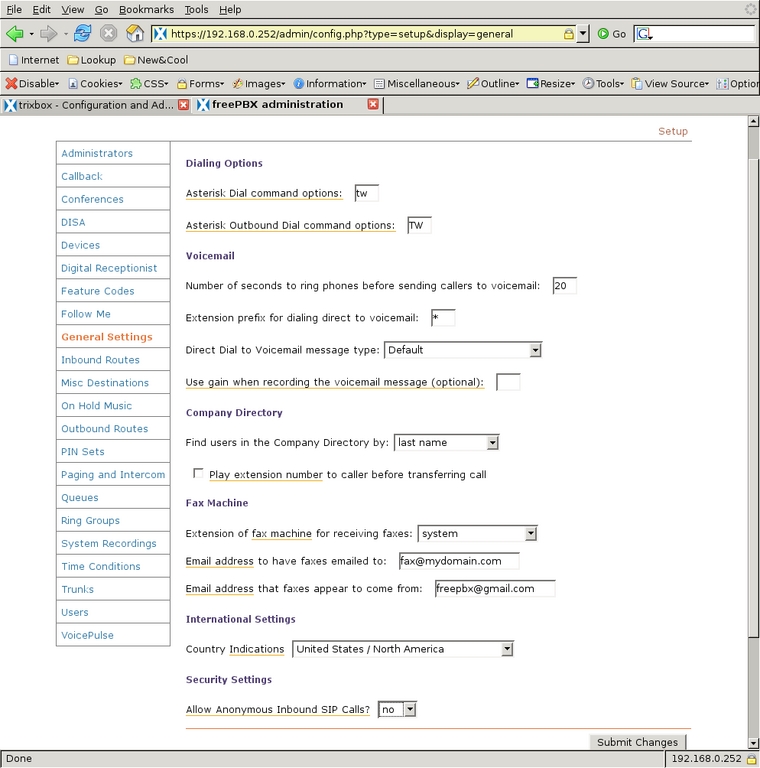
Figure 5. General Settings for FreePBX
The next addition to the system was Trunks, which are where calls come in to or go out of the system. Selecting Trunks from the left-side menu displays the Add a Trunk screen (Figure 6). The trunk ZAP/g0 is created at installation, and it refers to all the sockets on the Digium interface card that connect to the phone company. In my case, that is only socket 4. I did not modify the default configuration of that trunk (Figure 7). One could set the Outbound Caller ID, but I leave that for the phone carrier to set. This trunk will be used for most calls through our system.
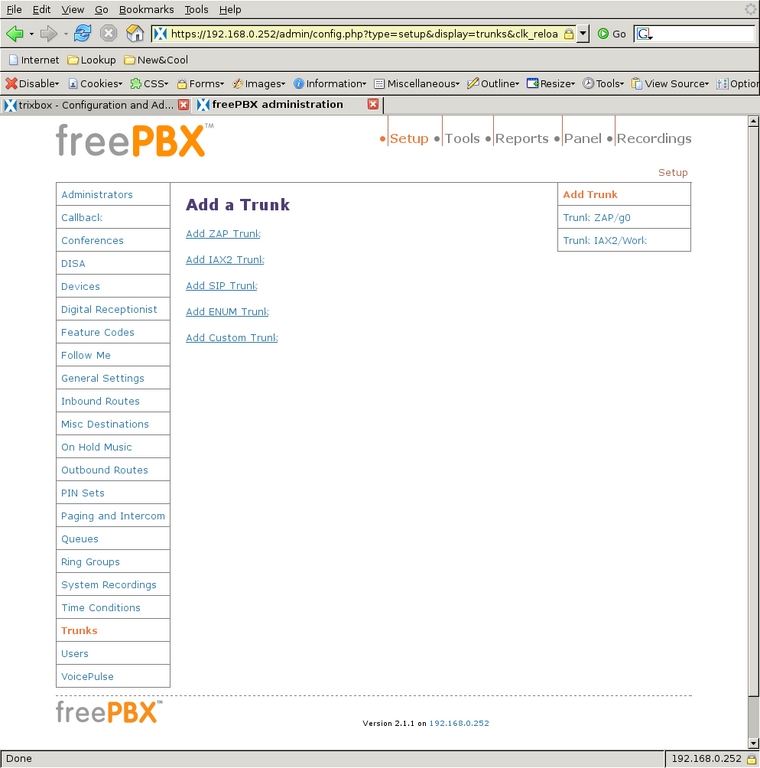
Figure 6. Using the FreePBX Interface to Add Trunks
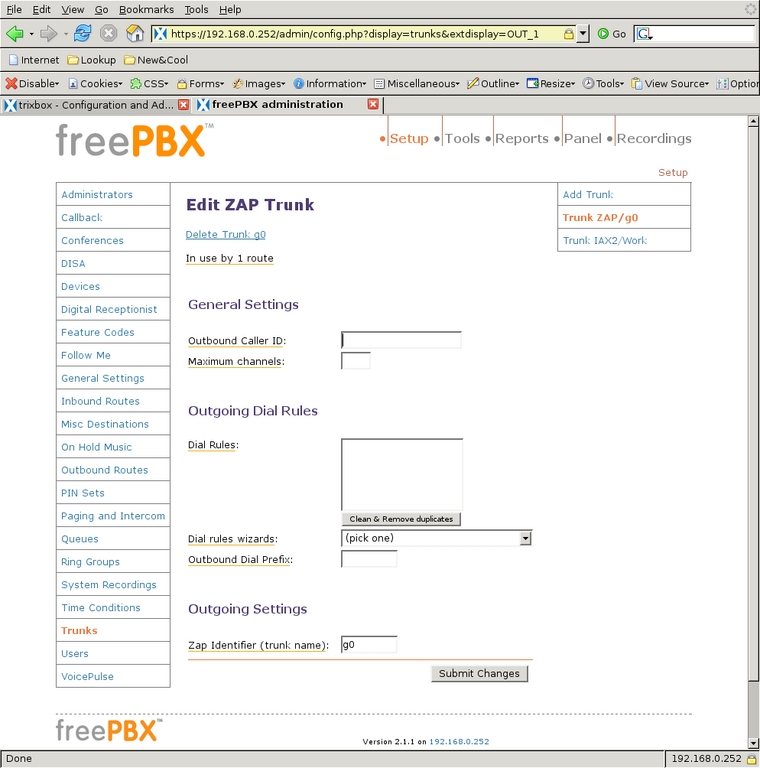
Figure 7. Edit the ZAP Trunk
Another trunk I defined is an IAX2 trunk that connects to the office PBX, so I can receive calls sent to my work extension and make calls through the office account. Starting from the Add a Trunk screen (Figure 6), I selected Add IAX2 Trunk and filled in the configuration page for the trunk. Figures 8 and 9 show the configuration of that trunk. The PEER Details, USER Details and Register String have been changed to remove the IP address and passwords for the work system, but all these settings are present by default when the trunk is created. Usually only the address, user name and secret need to be changed. Two things to note here:
The USER Context setting should be the name of the account from the service provider.
I have changed the context for calls coming in on this trunk to the custom-from-work context, which I describe later in this article.

Figure 8. Edit the IAX2 Trunk
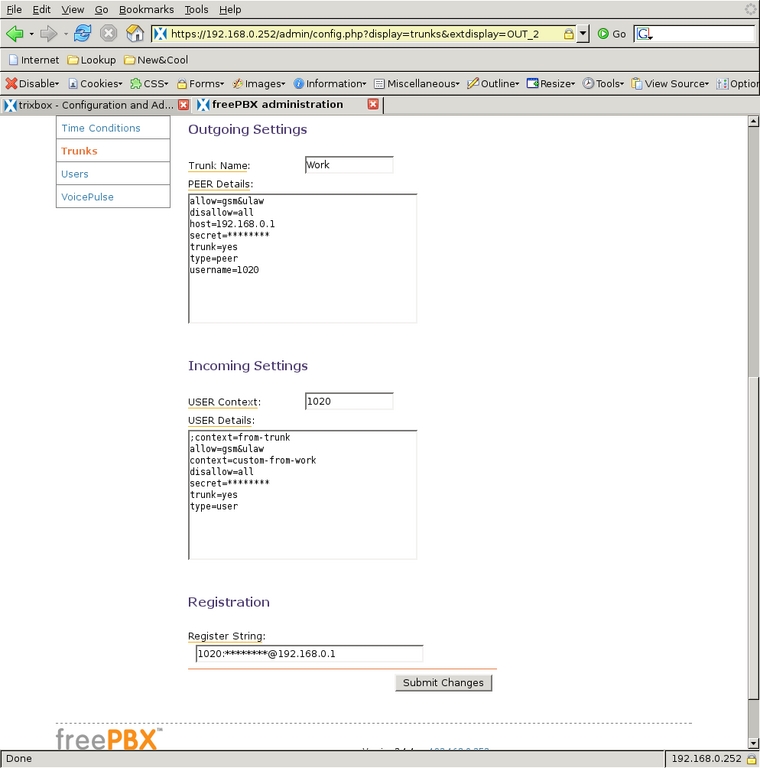
Figure 9. Configuration of the IAX2 Trunk
Once I filled in all the parameters, I selected the Submit Changes button to create the trunk. Then, as with all changes to the configuration, the interface displayed the red bar at the top of the screen for committing the changes to the system. With the trunks defined, there is now a way for calls to arrive in to and depart from the system.
Next, I needed to define internal extensions for the Kitchen, Schoolroom and Office.
After selecting Extensions from the left-side menu, I chose to Add a ZAP extension. I gave extension number 22, display name Office and channel 2 to my office phone. Giving it channel 2 means it is plugged in to socket 2 on the Digium PCI card.
I then enabled voice mail on that channel and assigned the required voice-mail password. After selecting Submit, the new channel appears in the right-side menu. When it is selected again from the menu, the Device Options have more parameters that could be modified, but the defaults are sufficient (Figures 10 and 11). Extension 24, assigned to the Kitchen phone on channel 1, is configured similarly (Figures 12 and 13), and the voice mail on this extension is the family voice-mail box. The Schoolroom, assigned extension 23 and channel 3, is also similar but voice mail is left disabled (Figure 14). That completes all three of the real extensions on the system.
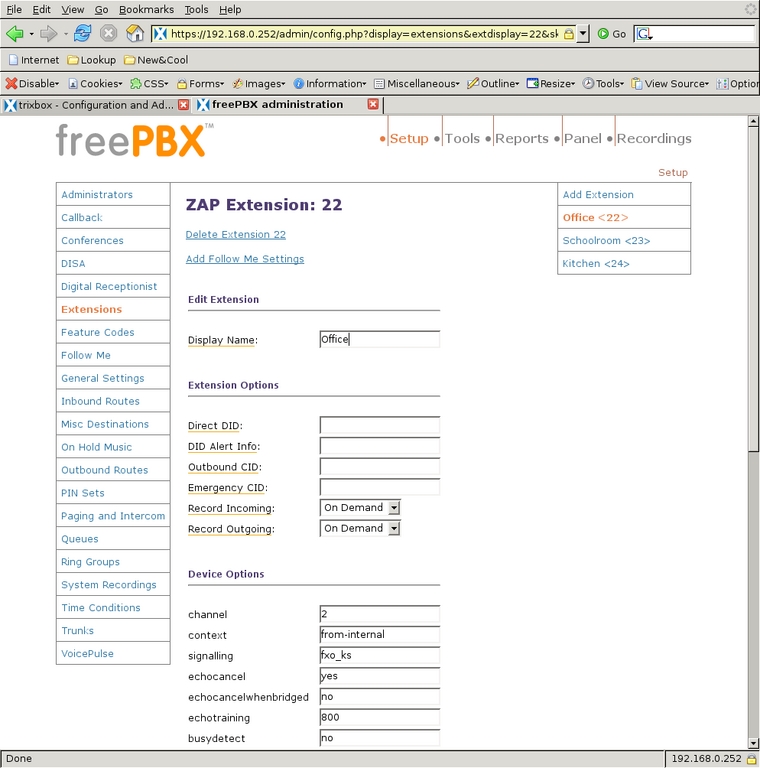
Figure 10. Default device options are sufficient for ZAP extension 22.
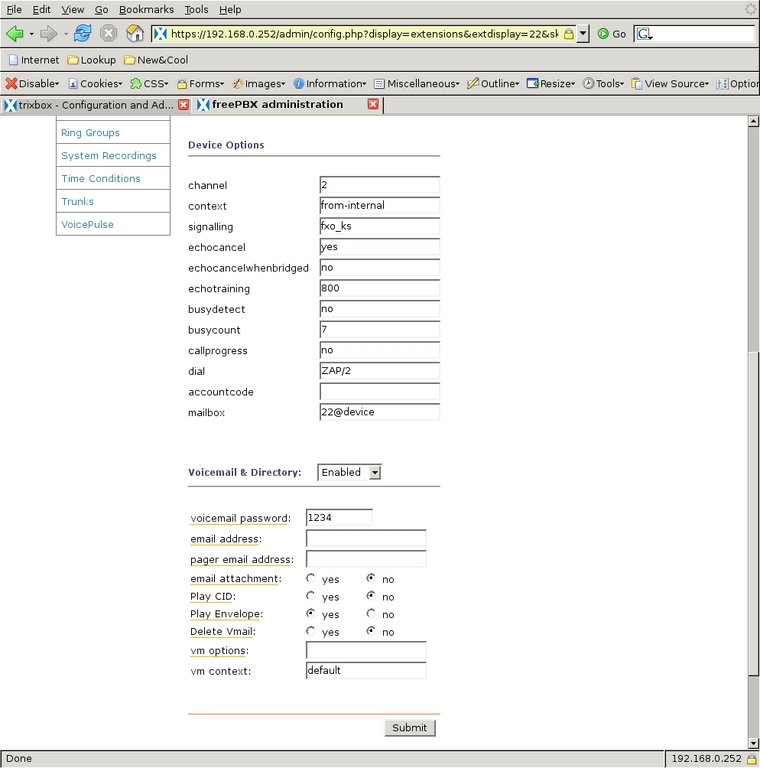
Figure 11. More Default Device Options
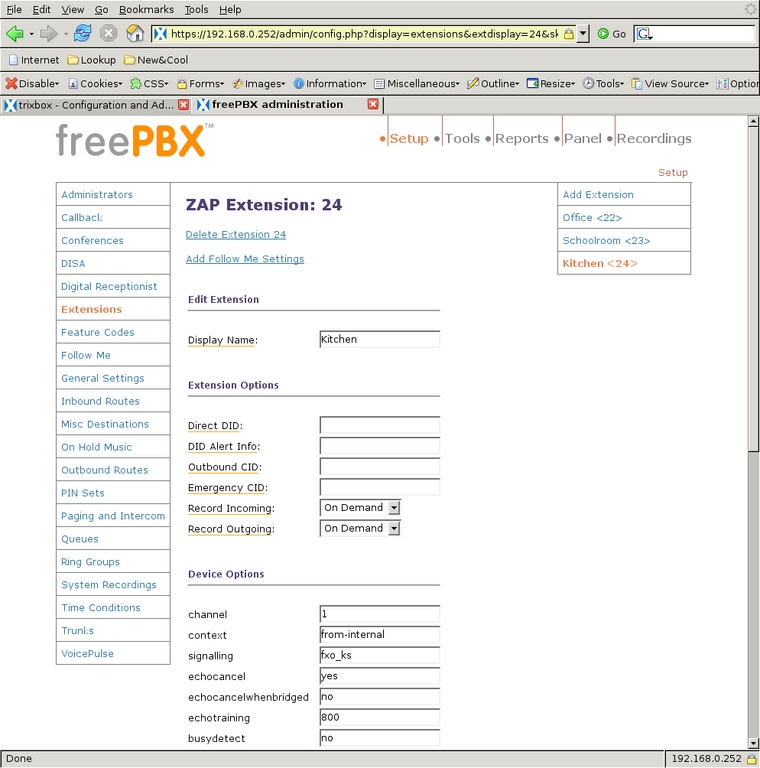
Figure 12. Similar Configuration for Kitchen Extension 24
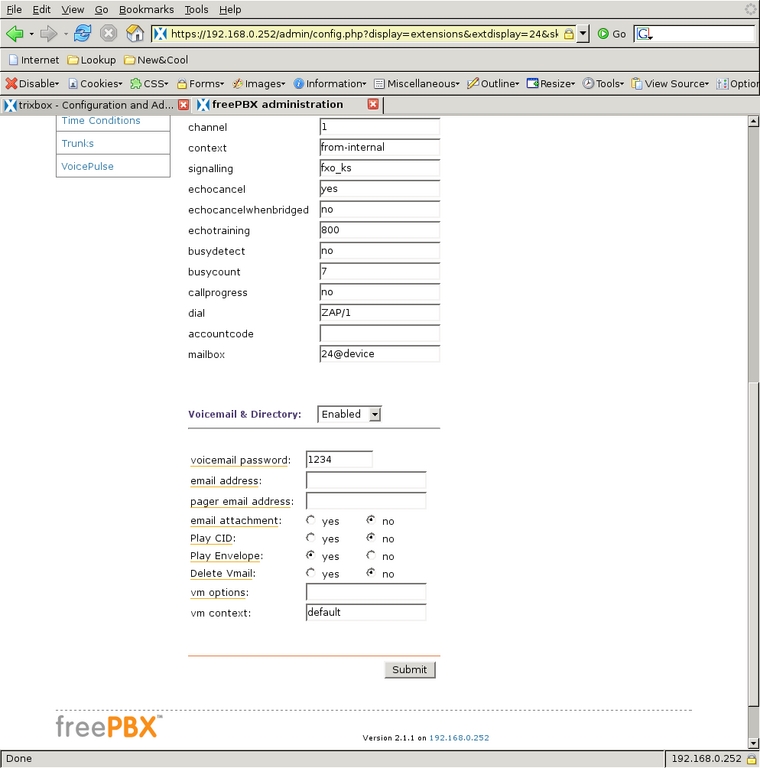
Figure 13. More Default Device Options for Extension 24
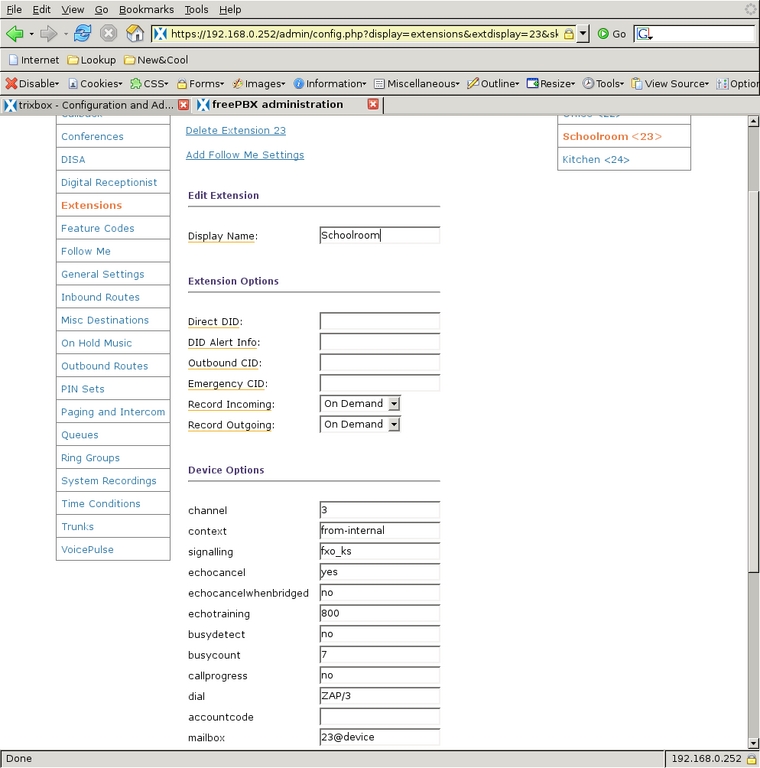
Figure 14. The Schoolroom extension 23 leaves voice mail disabled.
I also designed one pseudo-extension that will ring the whole house and another to ring only the Kitchen and Schoolroom phones. I used Ring Groups for this. A Ring Group is a set of extensions that are associated with each other, can be dialed with a single number and can ring in a specific order. Selecting Ring Groups from the left-side menu, I defined group number 20 for the whole house. I put all three real extensions into the extension list and set them to all ring at once, which is the strategy ringall (Figure 15).
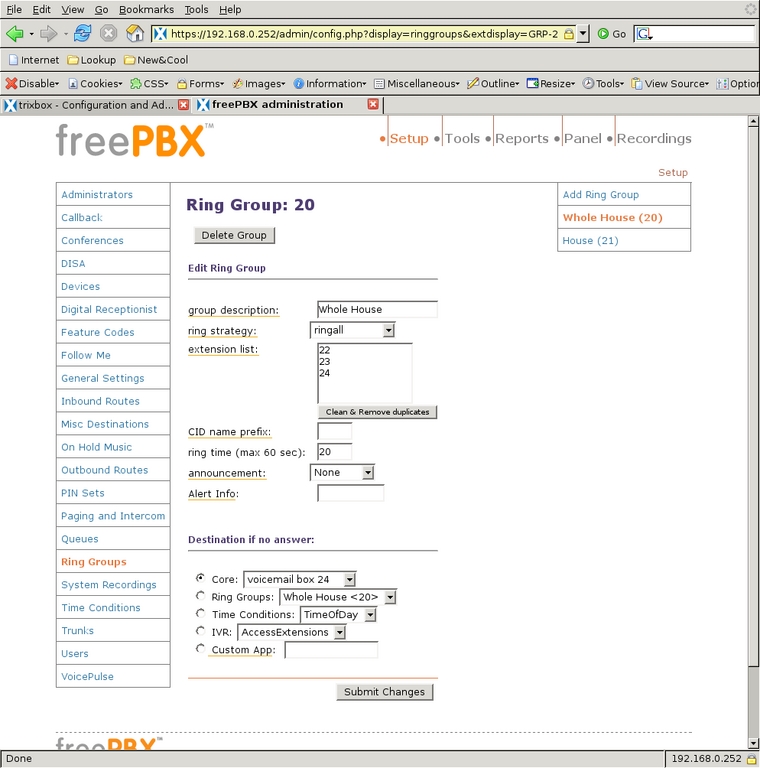
Figure 15. The ring group 20 will ring the whole house.
I set the ring time to 20, the same timeout as the other extensions, and if no one answers, the call will go to the family voice-mail box (24). Making a ring group for the house extensions is exactly the same, but only extensions 23 and 24 are in the list (Figure 16). These ring groups can be dialed from any internal extension or from an incoming call that is allowed to dial extensions directly. One nice thing about using these ring groups is that during the school year, I can drop the extension in the Schoolroom from the ring group, so people in that room are not disturbed during the day. In the summer, I can add that extension back into the group.
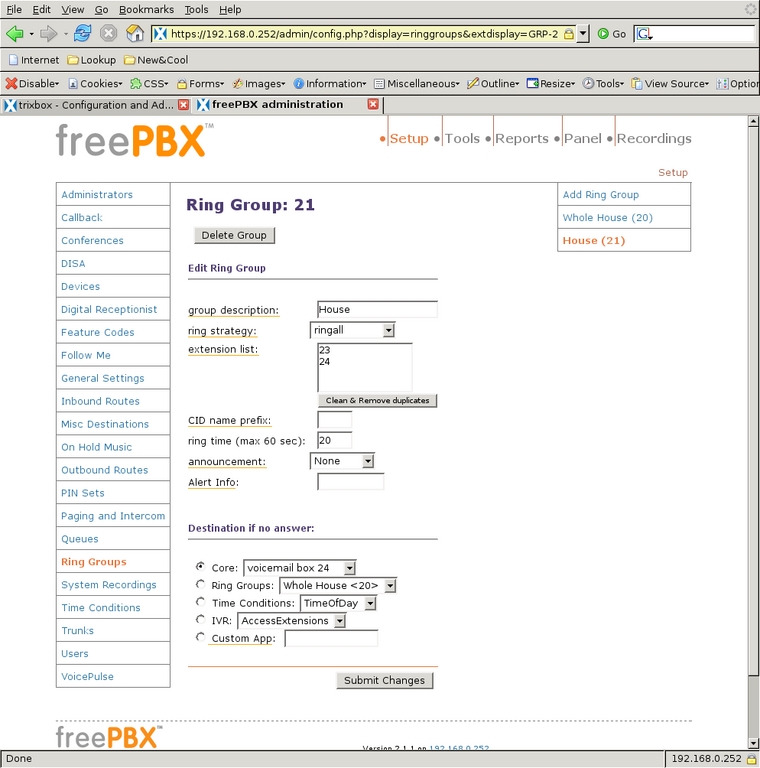
Figure 16. Ringing the Whole House from an Extension
The system has three devices for receiving and placing calls, and they can be accessed by five extension numbers.
Although calling between extensions is certainly cool and useful, calling out of the system is still required. Outbound Routes is where that gap is bridged. For ease of configuration and for faster parsing of dialed numbers, I configured the system so that all numbers dialed out through the phone company will be prefixed with the digit 9. Selecting Outbound Routes from the left-side menu, I defined a route called 9_outside (Figure 17) for passing outgoing numbers to the PSTN trunk, which is ZAP/g0.
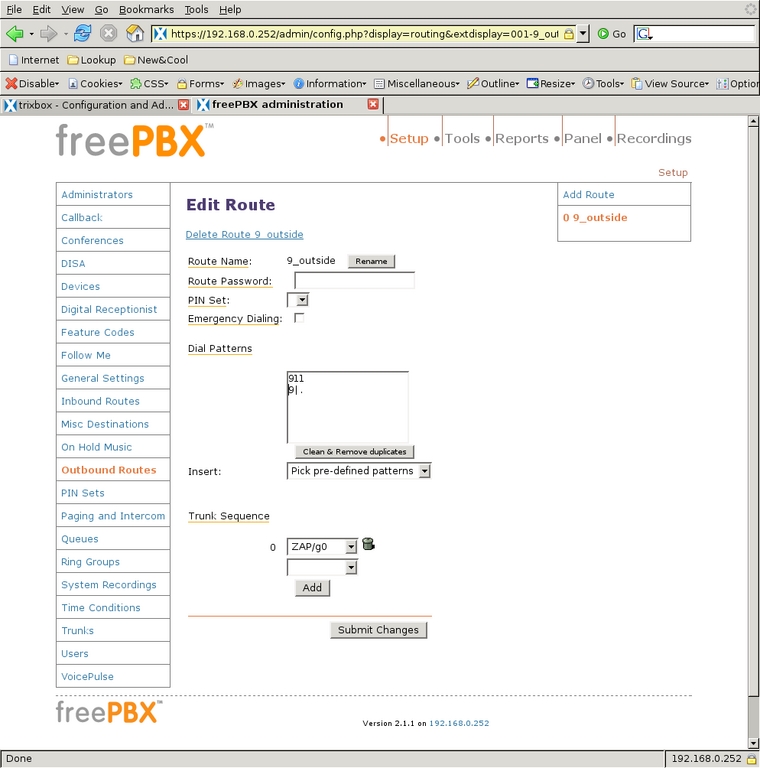
Figure 17. Handling 9 for Outside Lines and 911 Separately
ZAP/g0 is a group containing all the ZAP channels that connect to the phone company, which is defined by default at installation by Trixbox. These groups are similar to the phone system concept of a hunt group: the channels are tried in sequence and the first one that is available will be used.
The dial patterns that I direct to this trunk are 911 and 9|.. The former pattern indicates that when 911 is dialed by an extension, the system dials 911 on the chosen trunk. The latter pattern (9|.) matches any dialed number that begins with a 9, followed by any number of digits.
The system then strips off the 9, as indicated by the vertical bar (|), and sends the remainder of the digits to the trunk. I handle 911 separately from other 9-prefixed numbers, because I do not want anyone to have to know or remember to prefix 911 with a 9 to get out (9911). Because there is only one trunk for dialing out and outgoing numbers must be prefixed with a 9, the outbound routes were very easy to define.
The most complex part of the phone system is handling the incoming calls as designed. There are three parts to configure for incoming calls: audio messages to be played to the caller, Digital Receptionist menus, also known as Interactive Voice Response (IVR) menus, and the Time Conditions that determine which Digital Receptionist will handle the call.
To keep the system simple, I used only two outgoing messages. The first, titled Night, says: “We are unavailable at this time, please press 1 to leave a message, or if this is an urgent matter press 0 to ring all the phones.” The second message, titled Weekday, says: “Thank you for calling. To ring the house, enter 21; to ring the office, enter 22; to ring all the phones, enter 20 or stay on the line.” Using these scripts, I select System Recordings from the left-side menu and select Add Recording to get to the first screen (Figure 18). It is possible to upload a WAV file directly, but I used an extension to record directly into the system. After clicking Go, I saw the screen shown in Figure 19 with instructions for recording the message. After recording each message to my satisfaction, I gave the recording its name and clicked Save.
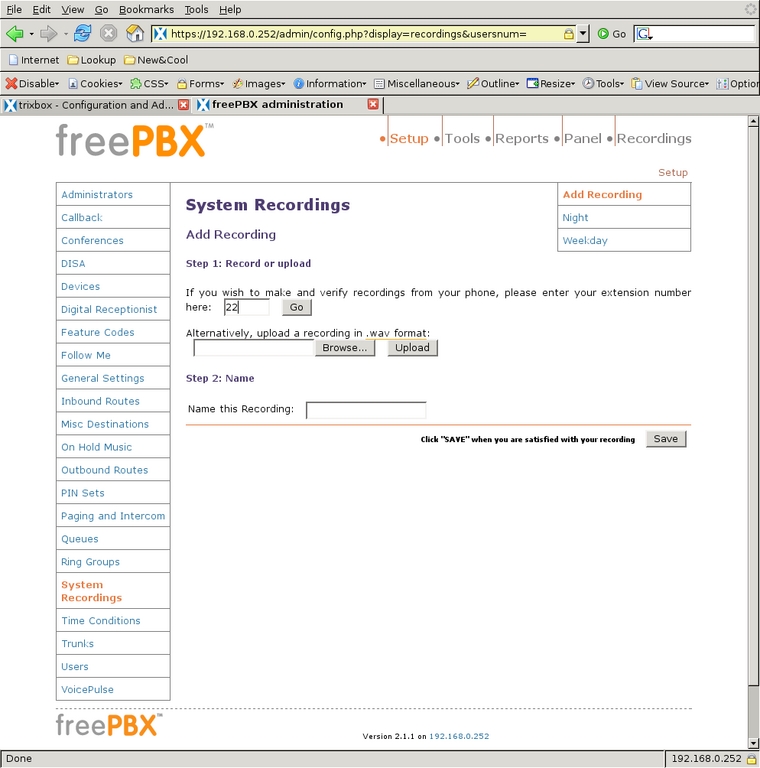
Figure 18. Set up an outgoing recording from extension 22.
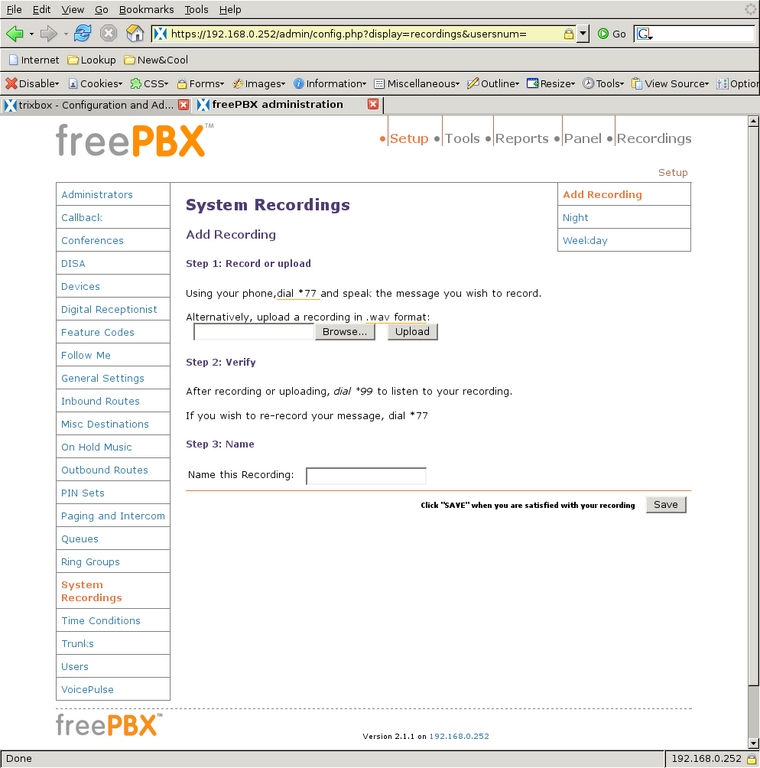
Figure 19. Set up options for recording a message.
The Digital Receptionist is only a bit more complex with three menus. I defined each of these by selecting the Add IVR link at the top of the right-side menu. The configuration of a Digital Receptionist menu is quite straightforward, once a person knows what each option does. The general section at the top allows for defining or changing the name of the IVR; next, is the number of seconds the caller has to enter an option, after which the t option is used; Enable Directory and Directory Context allow the caller to go to the automated directory system by entering #; Enable Direct Dial means that the caller can enter directly any extension defined in Extensions; Announcement is the audio message played to the caller before making the dial options available. Below the general section are other choices callers can select to take them to other parts of the system. Options for the caller to enter must not conflict with any Extensions. What can be chosen for destinations depends on the modules installed in the system, and most are self-explanatory. One of the possible destinations is another IVR menu that allows for very powerful cascading menu systems.
With this understanding of Digital Receptionists, we can look at the contexts I defined. Access Extensions is intended for the work/school day (Figure 20). It plays the Weekday announcement, allows direct dialing of any Extension, defines options to ring the Ring Groups, and if the caller does nothing (the t extension), all phones ring. RingAll-dflt is for evenings and weekends (Figures 21 and 22). It plays the same message, but it does not allow direct dialing any of the extensions. Rather, all extension numbers entered are redirected to ring all phones. The last IVR, Voicemail-dflt, is for calls arriving after all the children are in bed (Figure 23). The Night message is played to the caller, who can enter 0 to ring the whole house or enter 1 (or do nothing) to go to the family voice-mail box. Direct dialing extensions is not allowed. With those three message menus, the system was ready to handle all incoming calls.
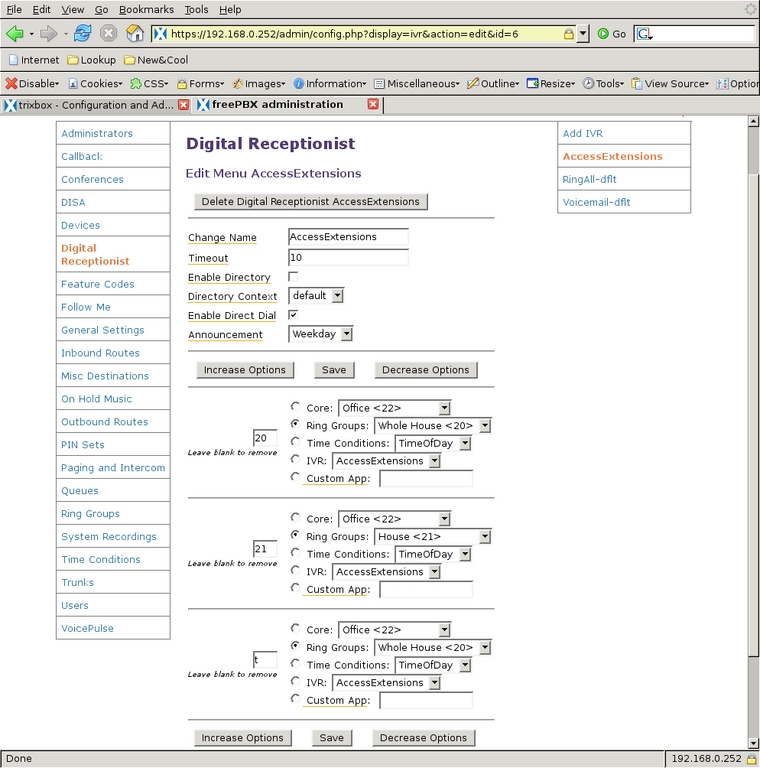
Figure 20. Set up the Digital Receptionist.
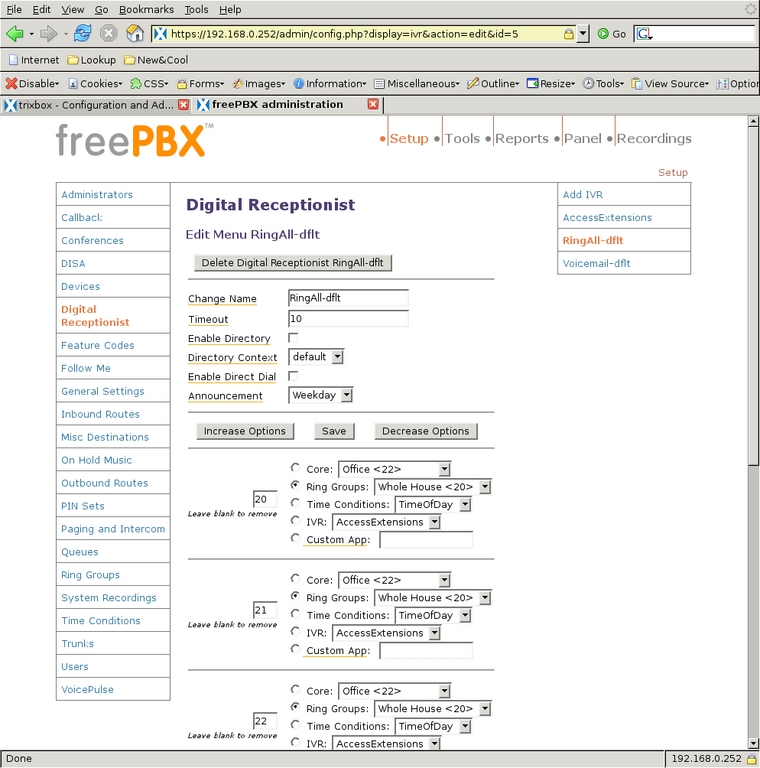
Figure 21. Set up ring-all defaults.
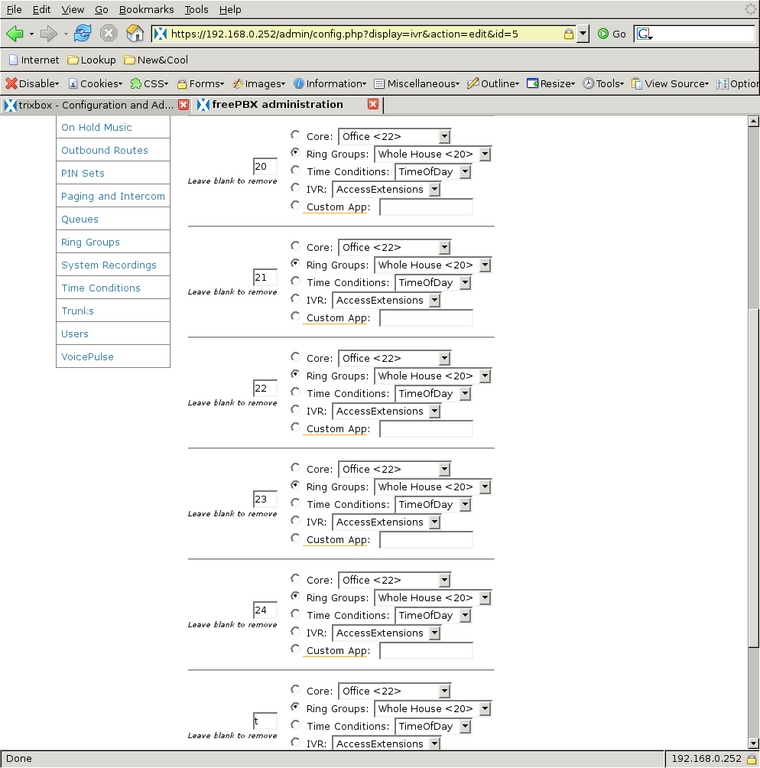
Figure 22. Finish setting up ring-all defaults.
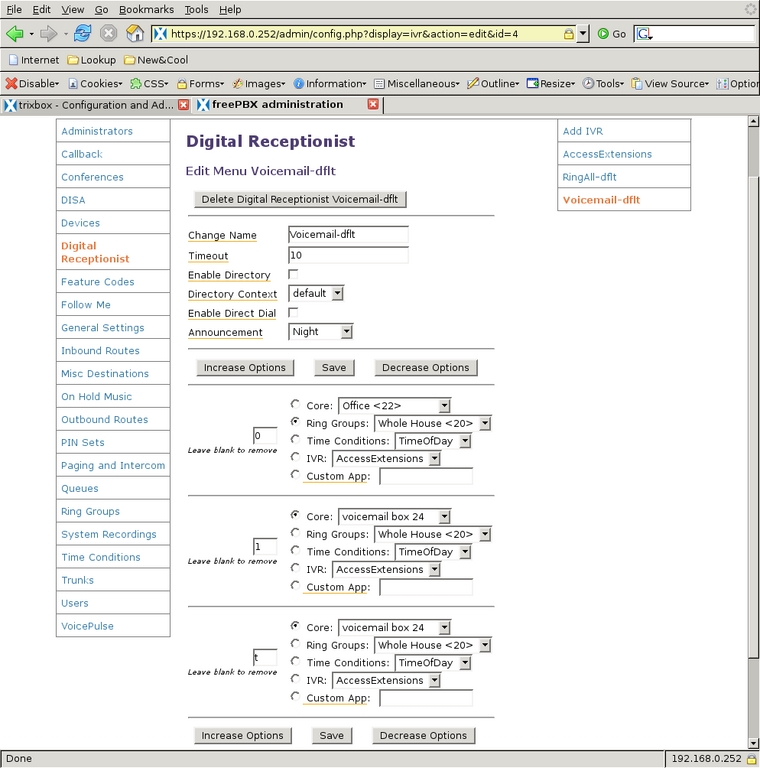
Figure 23. Set up voice-mail default.
Next, to define which of the Digital Receptionist contexts handles calls based on the time they are received, I used Time Conditions. There are three categories of time I want to differentiate: the normal workday, non-workday waking hours and everything else. I first defined the weekend and evening Time Condition (Figure 24) so that calls between 7 am and 10 pm (22:00) go to the RingAll-dflt IVR, and outside of that time, calls are handled by Voicemail-dflt. Then, I created a Time Condition to handle the weekday times (Figure 25), which checks to see whether the time is during the work/school day, and if so, it passes the call to the AccessExtensions IVR. If it does not match, it is passed to the WeekendEve condition for further testing. So, if a call comes in on Monday through Friday and between 7:30 am and 5 pm (17:00) the AccessExtensions IVR handles it. If a call is not in that time frame, the WeekendEve Time Condition takes control. If the call is between 7 am and 10 pm any day of the week, the RingAll-dflt IVR handles the call; otherwise, the Voicemail-dflt IVR takes control.
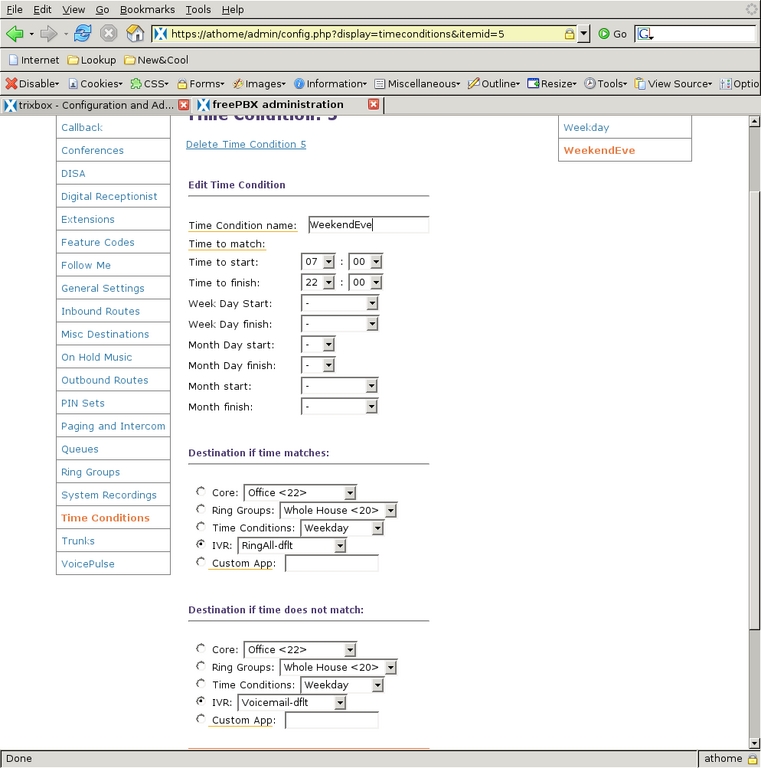
Figure 24. Set up time conditions on how the Digital Receptionist works.
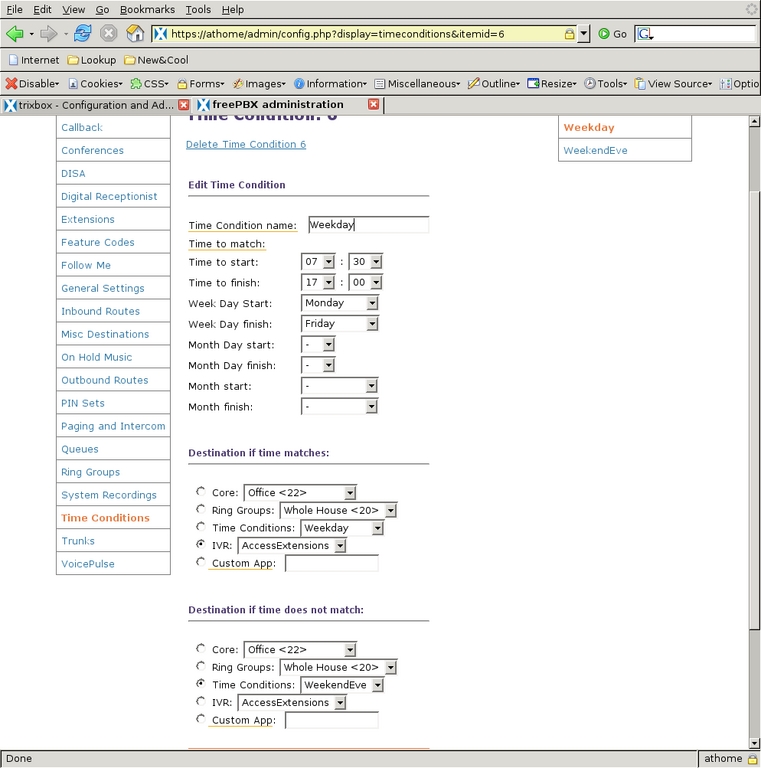
Figure 25. Time Condition for Weekdays
The remaining segment for handling incoming calls is to decide what to do with calls when they arrive in the system. Inbound Routes examines the Dial-In Direct number and caller ID and direct the call accordingly. I have only one route (Figures 26 and 27) for all incoming calls, so I left the DID Number and CID fields blank, and the Destination is the Time Condition Weekday, which routes the call to the initial time condition.
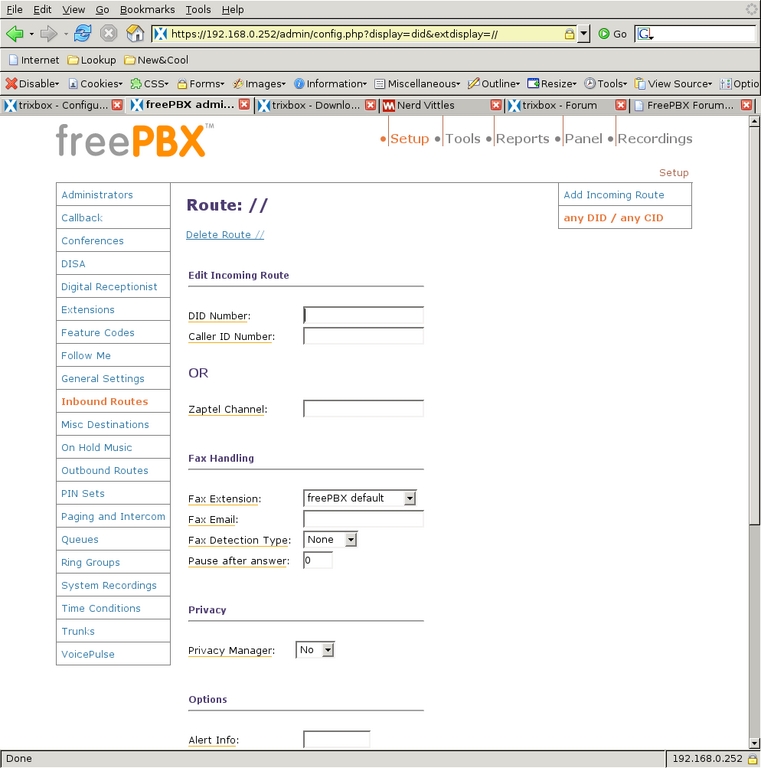
Figure 26. Inbound Route Configuration
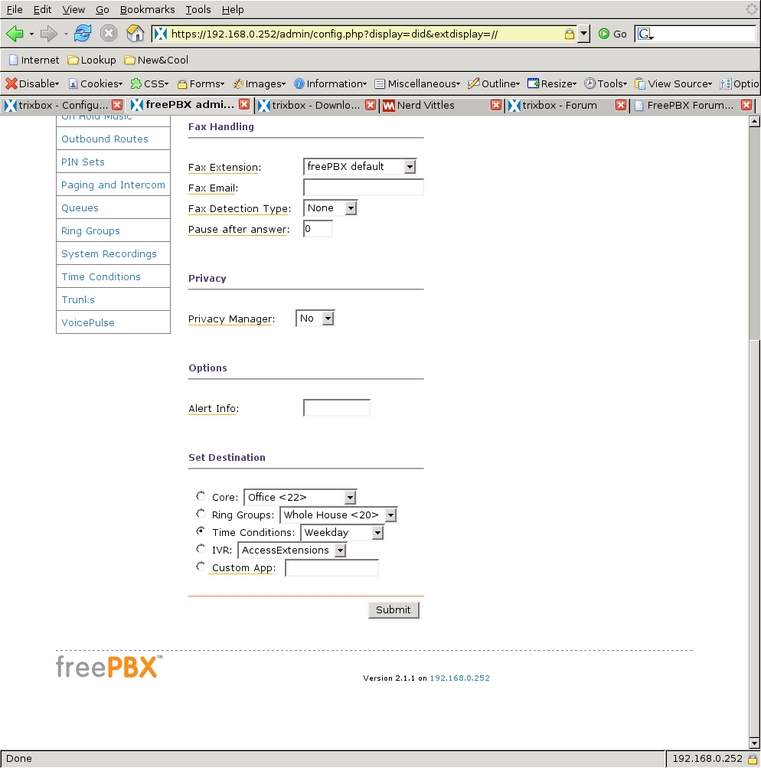
Figure 27. Fax Handling for Inbound
The Inbound Route screen also allows for fax handling and setting a distinctive ring on SIP phones (but not for ZAP channels). For added security against phone solicitors, the Privacy Manager can be activated, requiring callers with no caller ID to enter their phone number before proceeding through the system. I do not have caller-ID service, so I left that off. I have found that the phone system itself deters many of the automated phone solicitations we used to get.
The last thing to deal with is call routing to and from the VoIP trunk. To route calls from internal extensions to the trunk and calls from the trunk to my office extension, I needed to modify the dial plan files a bit, which can be done through the WebUI or from the command line. From the initial WebUI screen, I selected System Administration, Config Edit, and then extensions_custom.conf to bring up an editing window for that file. Adding the lines shown in Listing 1 to the from-internal-custom context allow all internal extensions to connect to my work VoIP trunk. Incoming calls from that trunk do not need to go through all the processing that calls from the PSTN line do, because they were already filtered by the office PBX. So, I also created the context custom-from-work (Listing 2), which does nothing but ring my extension (ZAP/2) whenever a call arrives. I attached that context to the trunk at the beginning of this article when I changed the context option for the trunk. So, now all calls coming from the office will ring my phone, and dialing #8 from any of our phones connects to the office VoIP system.
Listing 1. How to Call a Work Trunk
; Call the work trunk
      exten => #8,1,NoOp(Calling Work trunk) ; comment in log file
      exten => #8,n,Dial(IAX2/Work/bat) ; dial the extension "bat" on the trunk
      exten => #8,n,NoOp(After dial) ; another comment for the log file
exten => #8,n,Hangup() ; if we get to here, hangup the line
Listing 2. How to Direct Work Trunk to ZAP/2
; custom-from-work receives the calls from the work
      trunk and directs them to ZAP/2
      ; we don't worry about VM because the work system
      will get it [custom-from-work]
      exten => s,1,NoOp(cxt: ${CONTEXT} - x: ${EXTEN} -
      prio: ${PRIORITY} - cid#: ${CALLERIDNUM}) ; info
      exten => s,2,DIAL(ZAP/2) ; ring indefinitely
      exten => s,n,NoOp(cxt: ${CONTEXT} - x: ${EXTEN} -
      prio: ${PRIORITY} - after DIAL)
exten => s,n,Hangup()I now have a full-time answering system that meets my goals. I am able to call from one part of the house to another simply by dialing an extension or ring group. Because the system picks up the line before we hear a phone ring, we have cut our spam calls to almost none. If people call when it is late, they are reminded of the time and directed to voice mail, but urgent calls still can get through. I am able to make and receive calls from the office PBX as though I were in the same building as the system. All this and the only investment I had to make was the cost of the Digium TDM card and my time. I had the computer here already, and our house was wired for analog phones when we got here.
So, I found that Trixbox does not compromise much flexibility in gaining tremendous ease of use. There are still some features I would like on the system, however. Most notably, I would like the phones to ring differently for internal vs. incoming calls. I also would like my office phone to ring differently to differentiate my office calls from home calls, and my intra-office calls from my incoming office calls. Watch for those topics in a future article.
Resources
Nerd Vittles: www.nerdvittles.com
voip-info.org: voip-info.org
Asterisk@Home Handbook Wiki: www.voip-info.org/wiki/view/Asterisk%40home+Handbook+Wiki
Michael George lives in rural Michigan (Pewamo, to be exact) with his wife and five children. He is a Systems Analyst for Community Mental Health in Lansing and also does OSS consulting and phone system deployment along with Ideal Solutions ( www.idealso.com). He can be reached at george@mutualdata.com.

