
Ruby as Enterprise Glue
Dynamic languages, formerly known as scripting or glue languages, always have been a valuable tool in every serious enterprise developer's toolbox. In the past, hordes of programmers have used Perl, Python, Tcl and the like to integrate disparate databases, message queues, LDAP repositories, Web services and so on. But, there's a new kid on the block called Ruby. In this article, I show how to solve common enterprise integration problems much more quickly and elegantly than with any other programming language available today.
To make things more tangible, let's solve a typical real-world problem. A provider of mobile telecom services wants to offer a new tariff based on the user's geographical position. People pay a lower fee when they use their cell phones within a radius of 500 meters around their home address.
To fulfill this requirement, the team developing the billing application needs a new HTTP service. The service gets a customer ID and should return the coordinates belonging to the customer's address in XML format. Our company already has a customer database, and it has access to a SOAP localization service. The target system architecture looks like Figure 1, and it's our task to build the new HTTP service.
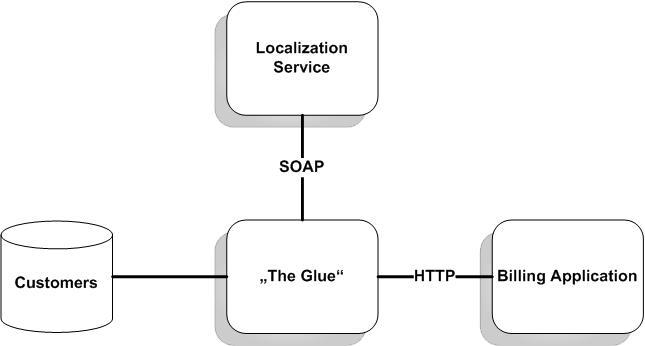
Figure 1. The Glue That Binds
Building it step by step, first we modify the customers database and build an access layer for it. Then, we implement a binding for the localization service, and finally, we hide all this behind a nice HTTP interface. As you might have guessed from the article's title, we use Ruby to do all of this.
Customers are stored in a MySQL database called customers. It basically consists of only two tables: customer and address (Listing 1). Every entry in the customer table refers to an entry in the address table and vice versa. Both tables have a primary key called id that is generated automatically by the database.
Listing 1. create_db.sql
drop table if exists customer;
create table customer(
  id int unsigned not null auto_increment,
  forename varchar(64) not null,
  surname varchar(64) not null,
  created_on timestamp not null,
  primary key(id)
);

drop table if exists address;
create table address(
  id int unsigned not null auto_increment,
  customer_id int unsigned not null,
  street varchar(64),
  house_number varchar(16),
  postal_code varchar(16),
  city varchar(64),
  state char(2),
  primary key(id),
  foreign key (customer_id) references customer(id)
    on delete cascade
);
Because we have to store the coordinates of every address, we add a new table called locations (Listing 2). It contains the longitude and latitude belonging to every address.
Listing 2. add_location.sql
drop table if exists locations;
create table locations(
  id int unsigned not null auto_increment,
  address_id int unsigned not null,
  longitude double not null,
  latitude double not null,
  primary key(id),
  foreign key (address_id) references address(id)
    on delete cascade
);
Alternatively, we could add longitude and latitude columns to the address table, but our solution is less invasive. Perhaps there are applications performing SQL statements such as select * from address, and we do not want to break them.
That's all we have to do on the database side for the moment. Now, we'll see how to access the tables in a Ruby program.
There are many ways to access relational databases. For example, you can use the database's native interface or an abstraction layer such as DBI. But in an object-oriented language like Ruby, an object-relational mapper (ORM) is by far the most convenient tool. ORMs map rows in a database table to objects and vice versa without a single SQL statement.
ActiveRecord is the most advanced ORM for Ruby and implements one of Martin Fowler's enterprise application patterns (see the on-line Resources). He defines it as follows: “[An active record is] an object that wraps a row in a database table or view, encapsulates the database access and adds domain logic on that data.” Simply put, an active record is a class that provides the typical CRUD methods (Create, Retrieve, Update, Delete) for a single row in a database table.
ActiveRecord is part of the famous Ruby on Rails project, but it's completely independent of the rest and can be obtained and installed separately. We'll use it to map our three tables to classes.
If you've worked with an ORM before, you probably expect some boring configuration files now. How do we map a table to a Ruby class? How do we map a column to an attribute? Don't be afraid! You don't need all this, because ActiveRecord prefers convention over configuration. The short program in Listing 3 is all you need to map the Customer, Address and Location classes to the according tables.
Listing 3. database.rb
require 'rubygems'
require 'active_record'

class Customer < ActiveRecord::Base
  set_table_name 'customer'
  has_one :address
end

class Address < ActiveRecord::Base
  set_table_name 'address'
  belongs_to :customer
  has_one :location
end

class Location < ActiveRecord::Base
  belongs_to :address
end

ActiveRecord::Base.establish_connection(
  :adapter => 'mysql',
  :database => 'customers'
)
You do not have to do a lot. Derive every class from ActiveRecord::Base, and you get accessors for every column for free. These accessors have the same names as the corresponding columns. For example, the Customer class has accessors called id, forename, surname and created_on.
ActiveRecord maps a class to a table having the same name in plural form by default. A class named User is mapped to the users table, and a class named Location is mapped to the locations table. When you work with a legacy database, you cannot choose table names yourself. In such cases, specify the table name with the set_table_name method as we did for our two legacy tables.
Every table must have a numerical primary key called id that is filled by the database automatically. You can change the name of the primary key with the set_primary_key method, but if your legacy tables contain complicated primary keys spanning several columns, ActiveRecord might not be the right tool for your job. ActiveRecord really shines when you adhere to its conventions.
Use belongs_to, has_one, has_many and has_and_belongs_to_many to declare relationships between the different classes. Naming is important for specifying relationships too. Note the naming scheme we have used for the foreign keys. In the address table, for example, the foreign key is called customer_id. By loose convention, many developers built the name of a foreign key column by appending _id to the name of the table to which the key refers. If you do this too, there's nothing more to be done.
In the last lines of Listing 3, we establish the connection to the MySQL database. If you need to, you can pass :host, :username and :password options.
Listing 4 shows how to insert a new customer and address into the database. It's all very intuitive, and we have to clarify only a few details. In line 7, we store a customer in the database. The save method automatically creates a new customer ID. We use this ID in line 10 to associate the address with the customer. ActiveRecord creates accessors for depending tables automatically—that is, all instances of the Customer class have an address attribute that refers to the according entry in the address table. What could be easier?
Listing 4. create_customer.rb
require 'database'

customer = Customer.new(
  :forename => 'Homer',
  :surname => 'Simpson'
)
customer.save

address = Address.new(
  :customer_id => customer.id,
  :street => 'Main Street',
  :house_number => '42',
  :postal_code => '75244',
  :city => 'Dallas',
  :state => 'TX'
)
address.save
We can find our new customer with one of the following statements:
customer = Customer.find(1)
customer = Customer.find_by_forename('Homer')
customer = Customer.find_by_surname('Simpson)
ActiveRecord dynamically creates tons of useful find methods. For example, Address.find(:all) iterates over all entries in the address table. In addition, you can search for arbitrary combinations of column values—that is, there are methods such as find_by_forename_and_surname.
Gone are the days when you had to fiddle with LEFT OUTER JOIN clauses and the like. ActiveRecord hides all this nasty stuff, and it even has many more useful features, such as single table inheritance and validations. It has been ported to nearly all database systems available today and is constantly enhanced by a big community.
Now we know how to store the coordinates belonging to a customer's address in the database. The next thing to do is to calculate those coordinates. Normally, this would be a difficult problem and would call for a digital map. Luckily, we can delegate this job to a SOAP localization service.
SOAP is a Remote Procedure Call (RPC) protocol standardized by the W3C. It allows you to create and use objects on a remote host as if they were part of your local process. Method calls and their parameters are turned into XML documents and are sent over a network layer. In the receiving process, they are converted back into method calls again. Return values and exceptions are represented as XML documents also and are sent back to the calling process. Although SOAP is independent of the transport layer, most applications use HTTP or HTTPS.
Fortunately, you normally do not have to know all these nitty-gritty details to use a SOAP service. It's sufficient to know where you can find it on a network, what methods it supports and what transport layer it uses. For this purpose, you'll usually use the Web Service Description Language (WSDL). The localization services' interface is described in Listing 5. Even if you're not familiar with WSDL, you should have no problems finding the definition of the locate function of the LocalizationService service. It takes an address (street, house number, postal code, city and state) and returns a two-element array containing its longitude and latitude.
Listing 5. loc_service.wsdl
<definitions
  name="LocServiceImplementationDescription"
  targetNamespace="example.com/wsdl/loc_service.wsdl"
  xmlns="http://schemas.xmlsoap.org/wsdl/"


  >

  <message name="locate_in">
          <part name="street" type="xsd:string"/>
          <part name="house_number" type="xsd:string"/>
          <part name="postal_code" type="xsd:string"/>
          <part name="city" type="xsd:string"/>
          <part name="state" type="xsd:string"/>
        </message>

        <message name="locate_out">
          <part name="longitude" type="xsd:double"/>
          <part name="latitude" type="xsd:double"/>
        </message>

        <portType name="LocServiceInterface">
          <operation name="locate">
            <input message="tns:locate_in"/>
            <output message="tns:locate_out"/>
          </operation>
        </portType>

        <binding
            name="LocServiceBinding"
            type="tns:LocServiceInterface">
          <soap:binding style="rpc"/>
      <operation name="locate">
              <soap:operation soapAction="locate"/>
                <input>
                  <soap:body namespace="urn:LocService"/>
               </input>
               <output>
                 <soap:body
                   namespace="urn:LocService"
                   use="encoded"/>
               </output>
            </operation>
         </binding>

   <service name="LocalizationService">
      <documentation>
        Calculates coordinates of a given address.
      </documentation>
      <port
           binding="tns:LocServiceBinding"
           name="LocServicePort">
         <soap:address
           location="http://localhost:2000"/>
      </port>
   </service>
</definitions>
Ruby has excellent support for SOAP because of the SOAP4R library (see Resources). It implements version 1.1 of the SOAP specification and is easy to use. If you've worked with SOAP before, you probably know what to do with a WSDL file. Normally, you'd use it to create skeleton code for a SOAP server or client you're going to implement. SOAP4R comes with a tool called wsdl2ruby.rb that turns a WSDL file into Ruby code. It can create code both for accessing a service having the interface described in the file and for creating a server that implements the interface.
We need a client that uses the localization service, and we could generate the complete code from the WSDL file with wsdl2ruby.rb. But in a dynamic language like Ruby, we don't need this intermediate step. It's easier to derive the client from a WSDL file on the fly. Listing 6 demonstrates how to do this.
Listing 6. loc_service.rb
require 'soap/wsdlDriver'
include SOAP

class LocalizationService
  def initialize(wsdl_file)
    factory = WSDLDriverFactory.new(wsdl_file)
    @loc_service = factory.create_rpc_driver
  end

  def locate(address)
    @loc_service.locate(
      address.street,
      address.house_number,
      address.postal_code,
      address.city,
      address.state
    )
  end
end
The initialize method expects a WSDL file and creates a driver factory from it. This factory creates a driver (a synonym for proxy) for every service binding that has been specified in the WSDL file. We choose the RPC driver and treat the instance variable @loc_service as if it were a local object of class LocalizationService. In the locate method, we simply delegate the work to the localization service.
You need to run a standalone SOAP server to make these examples work, as shown in Listing 7.
Listing 7. Standalone SOAP Server
require 'soap/rpc/standaloneServer'

class LocalizationServer < SOAP::RPC::StandaloneServer
  def on_init
    @log.level = Logger::Severity::DEBUG
    add_method(
      self,
      'locate',
      'street',
      'house_number',
      'postal_code',
      'city',
      'state'
    )
  end

  def locate(street, house_number, postal_code, city, state)
    [97.03, 32.90]
  end
end

server = LocalizationServer.new(
  'localization', 'urn:LocService', '0.0.0.0', 2000
)
trap(:INT) { server.shutdown }
server.start
In a final step, we build an HTTP server that returns the coordinates belonging to a particular address as an XML document. It takes some time to calculate the coordinates, and the localization service isn't free either. Hence, we calculate coordinates only if necessary and store them locally in our database.
Back in the old days of the Internet, you had to use standards like the Common Gateway Interface (CGI) to create dynamic Web sites. Whenever a client requested a nonstatic page, the Web server called an external program—often a Perl or bash script—to create the content. The server passed it the current environment, including the client's request parameters, and returned the script's output to the requesting client. This approach causes a severe performance overhead, because the scripts have to be started as separate processes.
CGI programs have more disadvantages. First, they cannot easily maintain a state, because they are shut down immediately after they have done their work. Second, they are often a security problem, because they run in a more or less uncontrolled environment.
With the advent of Java, an alternative technology became fairly popular—servlets. Servlets are little code snippets that are executed by a so-called servlet container. They are loaded into memory only once and can be reused as often as necessary. This increases performance tremendously, and it allows developers to manage state information in the servlets. Eventually, the servlet container controls the environment of the servlets and can prevent them from performing unwanted operations such as deleting files.
Ruby ships with WEBrick (see Resources), a fantastic framework for creating HTTP servers. It allows you to follow the more or less obsolete CGI approach, but it strongly encourages the use of Ruby servlets. In Listing 8, you can see a servlet that implements the main logic of our service.
Listing 8. servlet.rb
require 'rubygems'
require 'builder'
require 'database'
require 'loc_service'
require 'webrick'
include WEBrick
include WEBrick::HTTPServlet

class LocalizationServlet < AbstractServlet
  def initialize(server, wsdl)
    super(server)
    @loc_service = LocalizationService.new(wsdl)
  end

  def do_GET(req, res)
    customer_id = req.query['customer_id']
    customer = Customer.find(customer_id)
    address = customer.address
    if address.location.nil?
      lon, lat = @loc_service.locate(address)
      address.location = Location.new(
        :longitude => lon, :latitude => lat
      )
      customer.save
    end
    res['content-type'] = 'text/xml'
    res.body = to_xml(address.location)
    res.status = 200
  end

  def to_xml(location)
    xml = ''
    doc = Builder::XmlMarkup.new(
      :target => xml, :indent => 2
    )
    doc.position(
      :longitude => location.longitude,
      :latitude => location.latitude
    )
    xml
  end
end
We have derived our servlet from class AbstractServlet. The WEBrick server calls the do_GET method whenever it receives a GET request for a certain URL. Accordingly, it calls do_POST, do_PUT and so on for other HTTP request methods. WEBrick always passes a Request and a Response object to the method it calls. Request objects contain all query parameters and headers that were sent by the client. It's your task to fill the Response object with a body and all headers that should be sent back.
In our case, the servlet logic reads like a pseudo-code specification. We try to read the geographical position of the customer having the ID customer_id from the database. If we cannot find it, we localize the customer's address using the localization service and store the coordinates in the database, so we do not have to localize it again. Next, we turn the coordinates into an XML document. At the end of the method, we set the content type, the HTTP status code and the body.
You do not have to define an initialize method for a servlet, but if you do, it always gets the server instance as its first argument. In our case, we also expect the name of the WSDL to be used to initialize the localization service.
The to_xml method converts a location into an XML document. Too often, developers use raw strings to create XML documents. I recommend never doing that, even for apparently trivial documents. Creating XML documents never is as easy as it seems, because you have to care about difficult concepts, such as well-formedness and character set encodings. Hence, we use Jim Weirich's XmlBuilder class (see Resources) to create the result document.
Now we have a servlet that implements our main logic, but a servlet alone won't cut it. We still have to create an HTTP server that controls it. Listing 9 is everything we need. We specify the port on which the server is listening and map our LocalizationServlet to the path /. In addition, we make the server terminate whenever it receives a SIGINT or SIGTERM signal.
Listing 9. server.rb
require 'servlet'

server = HTTPServer.new(:Port => 4242)
server.mount(
  '/', LocalizationServlet, 'loc_service.wsdl'
)
trap('INT') { server.shutdown }
trap('TERM') { server.shutdown }
server.start
It's time for a final test run. Point your favorite browser to http://localhost:4242/?customer_id=1 or use a command-line tool such as wget or curl to test our newly created service:
mschmidt:/tmp $ curl http://localhost:4242/?customer_id=1
<position longitude="97.03" latitude="32.9"/>
mschmidt:/tmp $
That's exactly the result we have expected. We're done!
There's no doubt, regarding enterprise integration, Ruby is ready for prime time. Even in this short article, we were able to cover some of the most important enterprise technologies, such as relational databases, SOAP and HTTP. You also can integrate your existing Java code, access LDAP servers, create XML-RPC services or manipulate XML documents with ease.
Ruby cannot compete in many respects with platforms such as J2EE or .NET, but it doesn't have to, and it doesn't want to. Its strengths are flexibility, maintainability and speed of development. Although the Ruby platform might not be the biggest compared to other dynamic languages, it might well be the one that's growing fastest. And, most important, it's a lot of fun!
Resources for this article: /article/9018.
Maik Schmidt has worked as a software developer for more than a decade. He makes a living from creating complex solutions for mid-size enterprises. Besides his day job he writes book reviews and articles for computer science magazines and contributes code to open-source projects. Recently he has written his first book called Enterprise Integration with Ruby.
