
Rails Writ Large
Ruby on Rails is a framework for Web application development that promises—and delivers—a powerful, productive and fun platform for building dynamic Web sites. A framework can be thought of as a library—a collection of functions for your application to use—but it's also more than that, it's a system of constraints for your code. Why would constraints be a good thing? Because by embracing constraints for a specific purpose, you actually enable creativity by focusing energy on the problem at hand. The Rails framework is a set of constraints that enable effective Web development. To get a feel for how it works, let's look at the parts that make up Rails.
Like most Web application frameworks, Rails follows the Model-View-Controller (MVC) design pattern, which divides your code into three logical layers. The model layer consists of domain objects, backed by a database, and the Rails component for that job is ActiveRecord. Note the three major features of ActiveRecord: associations, callbacks and validations. Associations allow you to define relationships between your ActiveRecord classes, such as one-to-one, one-to-many and many-to-many. Here's how it looks:
class User < ActiveRecord::Base
  has_many   :projects
  has_one    :address
  belongs_to :department
end
Details that normally would require configuration (table names, foreign key names and so on) are inferred automatically, and object attributes are created automatically for every column in the database. Rails calls this convention over configuration. Callbacks provide a robust set of hooks into the life cycle of your objects, where you can add behavior. For example, when user record is saved for the first time, send a welcome e-mail:
class User < ActiveRecord::Base
  after_create :send_welcome_email
  after_update :update_audit_log
end
Validations are a special kind of callback that make standard data validation routines a cinch:
class User < ActiveRecord::Base
  validates_presence_of     :name
  validates_format_of       :phone, :with => /^[0-9]{3}-[0-9]{3}-[0-9]{4}$/i
  validates_confirmation_of :email
  validates_acceptance_of   :terms_of_service, :message => "must be accepted"
  validates_inclusion_of    :age, :in => 0..99
end
By keeping your associations, callbacks and validations rules in the ActiveRecord class definition, you make it easier to create reliable, maintainable code.
ActionPack has two subcomponents that work together closely, ActionController and ActionView. ActionController classes define actions—public methods that are accessible from the Web. Actions always end in one of two ways: either with a redirect (an HTTP response header sent back, causing the client to be forwarded to another URL) or with a render (some content being sent back to the client, usually an HTML file). When an action does a render, ActionView is invoked. Take a look at an example controller, with three actions:
class MessagesController < ActionController::Base
  def list
    @messages = Message.find :all
  end

              def show
    @message = Message.find params[:id]
  end

  def create
    @message = Message.create params[:message]
    redirect_to :action => :show, :id => @message.id
  end
end
The first action uses an ActiveRecord object to find all messages in the database and then renders the template messages/list.rhtml. The second action looks up one particular message by its ID and shows it. The third action also uses the ActiveRecord object, this time to save the parameters passed in from an HTML form. Then, it sends an HTTP redirect response, sending the user back to the show action.
Controllers and actions are mapped to URLs using routes. The default route is :controller/:action/:id, so without any additional configuration, the URL for the actions above would be /messages/list, /messages/show/1 and /messages/create.
In addition to actions, controllers also can have filters, which allow you to interrupt actions, and caches, which allow actions to execute faster. For example:
class MessagesController < ActionController::Base
  before_filter :authenticate, :except => :public
  caches_page   :public
  caches_action :show, :feed
end
ActionView is Rails' system for formatting the output of your application—usually HTML files. The primary mechanism is ERB, Embedded Ruby, which will be familiar to anyone who has used PHP or JSP-like syntax. Any template file with an .rhtml extension can have embedded Ruby snippets, inside of <% %> and <%= %> tags. The first kind doesn't output anything, the second does. For example:
<% for message in @messages %>
  <h2><%= message.title %></h2>
<% end %>
You also can create template partials to extract commonly used chunks of markup, and helpers are Ruby functions available within your templates to provide handy functionality, like drop-dead easy Ajax. Lastly, special templates called layouts can hold markup that is common to the whole project (like HTML headers and footers).
The first public release of Ruby on Rails was version 0.5, in July 2004. More than a year later (and with nearly every line of code changed) Ruby on Rails 1.0 was announced in December 2005. That milestone was preceded by an intense push of polishing and testing to ensure that it was a solid release—so you might expect that the Rails Core team has coasted down the tracks since then, enjoying the phenomenal success of its software.
You might expect that, but you'd be wrong. In fact, they haven't slowed down one bit, and the next major release of Rails has just been announced. It's the biggest release to date, with more than 500 enhancements, fixes and tweaks. The majority of the 500 changes subtly polishes existing features, but some of them are superstars that promise to change the way your applications are developed. I've poured through the change logs to find the most interesting parts, and they can be lumped into three major groups: powerful Ajax, richer domain models and easy Web services.
Arguably, the most significant new features in Rails 1.1 redefine the way Rails handles Ajax. Rails already had top-notch support for creating Ajax applications—it works by sending small snippets of HTML to a page to be inserted. Now, it also can return JavaScript to the browser to be evaluated. That means updating more than one page element in one step is a snap.
The kicker is that instead of writing the JavaScript by hand, it can be generated by Rails, using Ruby syntax. That's where RJS, Ruby-generated JavaScript, comes into play. In addition to .rhtml (Ruby HTML) templates, you can create .rjs (Ruby JavaScript) ones. In them, you can write Ruby code that will generate JavaScript code, which is sent as the result of an Ajax call and evaluated by the browser.
Let's look at an example to see how this can be used. The on-line store IconBuffet uses RJS for its shopping cart (see www.iconbuffet.com/products/amsterdam to try it out). When a product is added to the cart, three separate page elements need to be updated to reflect the change. Before RJS, that would entail a dozen lines of JavaScript and multiple round-trips to the server. But now, it can be accomplished in one pass, with no custom JavaScript.
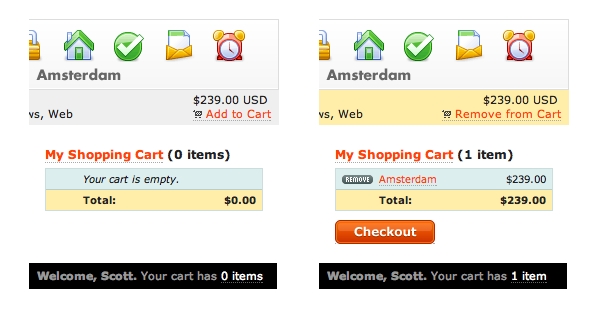
Figure 1. Add an Item to the Cart
The Add to Cart button uses the standard Ajax link helper, just like before:
<%= link_to_remote "Add to Cart", :url => { :action =>
 "add_to_cart", :id => 1 } %>
Clicking the link triggers the add_to_cart action, which updates the session and renders its template, add_to_cart.rjs:
page[:cartbox].replace_html :partial => 'cart'
page[:num_items].replace_html :partial => 'num_items'
page["product_#{params[:id]}"].addClassName 'incart'
The template is rendered into JavaScript that is sent back to the browser and evaluated, which updates the three page elements accordingly. You may be wondering where this page object came from—it's passed to RJS templates to represent JavaScriptGenerator, and it has many tricks up its sleeve:
1) Pop a JavaScript dialog box:
page.alert 'Howdy'
2) Replace the outerHTML of an element:
page.replace :element, "value"
3) Replace the contents of an element:
page.replace_html :element, "value"
4) Insert text:
page.insert_html :bottom, :list, '<li>Last item</li>'
5) Simulate a redirect with:
window.location.href: page.redirect_to url_for(...)
6) Call a JavaScript function:
page.call :alert, "Hello"
7) Assign to a JavaScript variable:
page.assign :variable, "value"
8) Call an effect:
page.visual_effect :highlight, 'list'
page.visual_effect :toggle, "posts"
page.visual_effect :toggle, 'comment', :effect => :blind
9) Show an element:
page.show 'status-indicator'
10) Hide elements:
page.hide 'status-indicator', 'cancel-link'
11) Refer to an element by ID:
page['blank_slate']
page['blank_slate'].show
12) Get elements with CSS selectors:
page.select('p')
page.select('p.welcome b').first
page.select('p.welcome b').first.hide
13) Insert some JavaScript:
page << "alert('hello')"
14) Make a draggable:
page.draggable 'product-1'
15) Make a droppable:
page.drop_receiving 'wastebasket', :url => { :action => 'delete' }
16) Make a sortable:
page.sortable 'todolist', :url => { action => 'change_order' }
17) Delay execution:
page.delay(20) { page.visual_effect :fade, 'notice' }
Enumerable methods also can be used, and they'll generate the equivalent JavaScript code:
page.select('#items li').collect('items') do |element|
              element.hide
      end
which generates this JavaScript:
var items = $$('#items li').collect(function(value, index)
 ↪{ return value.hide(); });
In addition to having .rjs files in your views directory, you also can write inline RJS. For example:
def create
  # (handle action)
  render :update do |page|
	  page.insert_html :bottom, :list, '<li>Last item</li>'
	  page.visual_effect :highlight, 'list'
  end
end
Of course, you don't want to pollute your controllers with a lot of view-specific code, so you also can write RJS Helpers that can be called from update blocks. For example:
module ApplicationHelper
  def update_time
    page.replace_html 'time', Time.now.to_s(:db)
    page.visual_effect :highlight, 'time'
  end
end

class UserController < ApplicationController
  def poll
    render :update { |page| page.update_time }
  end
end
Debugging RJS can be tricky, because if a Ruby exception occurs, no error will be visible in the browser. To get around that, set config.action_view.debug_rjs = true, and you'll be notified of RJS exceptions via alert().
You may have noticed that the output of the RJS templates makes use of a great new feature of Prototype: methods of the Element class are mixed into all HTML elements that are referenced by $() and $$(). That means instead of writing Element.show('foo'), you now can write $('foo').show(). It's a small change that makes writing JavaScript code more natural and Ruby-like. The methods available are visible(), toggle(), hide(), show(), visualEffect(), remove(), update(html), replace(html), getHeight(), classNames(), hasClassName(className), addClassName(className), removeClassName(className), cleanWhitespace(), empty(), childOf(ancestor), scrollTo(), getStyle(style), setStyle(style), getDimensions(), makePositioned(), undoPositioned(), makeClipping() and undoClipping().
Ruby-generated JavaScript also uses another fantastic new feature of Prototype, the Selector class and its corresponding $$() function. Like the $() function, $$() is used to reference HTML elements, but this one matches elements by CSS selector strings. For example:
// Find all <img> elements inside <p> elements with class
// "summary", all inside the <div> with id "page". Hide
// each matched <img> tag.
$$('div#page p.summary img').each(Element.hide)

// Attributes can be used in selectors as well:
$$('form#foo input[type=text]').each(function(input) {
  input.setStyle({color: 'red'});
});
If you're not convinced by now, take it from me, RJS and the new additions to Prototype will revolutionize the way Ajax is done in Rails.
So far, we've looked at advancements in the controller and view layers of Rails. Let's turn now to ActiveRecord, which also got a lot of love in this release. First up, a new type of association.
Prior to 1.1, Rails supported many-to-many relationships with has_and_belongs_to_many. For example:
class Author < ActiveRecord::Base
  has_and_belongs_to_many :books
end
class Book < ActiveRecord::Base
  has_and_belongs_to_many :authors
end
That works fine, to a point. The difficulty comes in when you need data or behavior for the association itself. The solution is to make an explicit join model for the association. Take a look at this alternative:
class Author < ActiveRecord::Base
  has_many :authorships
  has_many :books, :through => :authorships
end
class Authorship < ActiveRecord::Base
  belongs_to :author
  belongs_to :book
end
class Book < ActiveRecord::Base
  has_many :authorships
  has_many :authors, :through => :authorships
end
Author.find(:first).books.find(:all, :include => :reviews)
The new :through option of has_many allows you to specify an explicit association join model, so you can have the ease of has_and_belongs_to_many but get full power of ActiveRecord for the Authorship model.
The :through option also can be used where the intermediate association is a has_many. For example:
class Firm < ActiveRecord::Base
  has_many :clients
  has_many :invoices, :through => :clients
end
class Client < ActiveRecord::Base
  belongs_to :firm
  has_many   :invoices
end
class Invoice < ActiveRecord::Base
  belongs_to :client
end
Without the :through option, getting all invoices for a firm would require multiple SQL hits to the database or a custom SQL query. Now, ActiveRecord handles the join automatically and leaves a clean API to access the associations.
Another new association option that further enriches your domain models is polymorphic associations. This solves the problem of having a model that could share relationships with multiple other models. With polymorphic associations, the model defines an abstract association, which can represent any other model, and ActiveRecord keeps track of the details. Take a look at this example:
class Address < ActiveRecord::Base
  belongs_to :addressable, :polymorphic => true
end
class User < ActiveRecord::Base
  has_one :address, :as => :addressable
end
class Company < ActiveRecord::Base
  has_one :address, :as => :addressable
end
Any developer experienced with SQL has run into the “n+1 queries” problem, where looking up a set of records, each with a related record, causes a large number of queries to the database. The solution is SQL JOIN statements, but writing them by hand quickly gets complicated, especially after more than one join. Rails 1.1 significantly reduces that pain, with cascading, bottomless eager loading. Now, queries like Author.find(:all, :include=> { :posts => :comments }) will fetch all authors, their posts and the comments belonging to those posts in a single query. For example:
Author.find :all, :include => { :posts => :comments }
Author.find :all, :include => [ { :posts => :comments }, :categorizations ]
Author.find :all, :include => { :posts => [ :comments, :categorizations ] }
Company.find :all, :include => { :groups => { :members => :favorites } }
The next major new feature of ActiveRecord is nested with_scope. This feature allows your dealings with ActiveRecord objects to be more clearly understood—especially important for code with security implications. Here's an example:
Developer.with_scope :find => { :conditions => "salary > 10000", :limit => 10 } do

  # SELECT * FROM developers WHERE (salary > 10000) LIMIT 10:
  Developer.find :all

  # parameters are merged
  Developer.with_scope :find => { :conditions => "name = 'Jamis'" } do
    # SELECT * FROM developers WHERE (( salary > 10000 ) AND ( name = 'Jamis' )) LIMIT 10
    Developer.find :all
  end

  # inner rule is used. (all previous parameters are ignored)
  Developer.with_exclusive_scope :find => { :conditions => "name = 'Jamis'" } do
    # SELECT * FROM developers WHERE (name = 'Jamis'):
    Developer.find :all
  end

end
The last major addition to ActiveRecord provides convenient syntax for accessing calculations and statistics, without writing custom SQL. For example:
Person.count
Person.count   :conditions => "age > 26"
Person.count   :include => :job, :conditions => "age > 26 AND job.salary > 60000"
Person.average :age
Person.maximum :age
Person.minimum :age, :having => "min(age) > 17", :group => :last_name
Person.sum     :salary, :group => :last_name
The third big category of changes in Rails 1.1 involves creating Web services—specifically, embracing certain aspects of the HTTP protocol so that REST-style APIs can be implemented very easily.
The first piece of the equation is a new method for your actions, respond_to. This method parses the HTTP Accept header sent from the client, so that one action can return multiple response formats. For example:
class MessagesController < ActionController::Base
  def list
    @messages = Message.find :all
      respond_to do |type|
                              type.html # using defaults, which will render messages/list.rhtml
                              type.xml  { render :xml => @messages.to_xml } # generates XML and sends it with the right MIME type
                              type.js   # renders index.rjs
    end
  end
end
In this example, a typical browser requesting /messages/list will get the HTML version of the data back, as usual. But an Ajax request for the same URL might send an Accept header of application/javascript—triggering the RJS template to be used instead. Yet another client might want to interact with your application as a Web service API, so it requests application/xml, and the same action handles that format as well. If you've wondered how hard it would be to add an API to your Web application, it's never been easier.
The above example includes a new option for the render method, :xml. It works just like render(:text => text), but sets the content-type to application/xml and the charset to UTF-8. You can specify the content-type header manually with the :content_type option. For example:
render :action => "atom.rxml", :content_type => "application/atom+xml"
Arrays, hashes and ActiveRecord now have a to_xml method, and every object has to_json. These powerful additions mean that providing machine-readable versions of your application data can be accomplished with a few keystrokes. For example:
message.to_xml
message.to_xml(:skip_instruct => true, :skip_attributes => [ :id, bonus_time, :written_on, replies_count ])
firm.to_xml :include => [ :account, :clients ]

[1,2,3].to_json => "[1, 2, 3]"
"Hello".to_json => "\"Hello\""
Person.find(:first).to_json => "{\"attributes\": {\"id\": \"1\", \"name\": \"Scott Raymond\"}}"
The above examples demonstrate how easily you can enable a read-only API, but what if you want to accept input from the API as well? Well, it's remarkably simple:
class MessagesController < ActionController::Base
  def create
    @message = Message.create params[:message]
    redirect_to :action => :show, :id => @message.id
  end
end
But wait—isn't that the same code as the non-API version of the action? Indeed, Rails now examines the HTTP content-type header of the incoming POST and parses the input accordingly into the params object—just as if the data came from a Web form. By default, requests submitted with the application/xml content type are handled by creating an XmlSimple hash with the same name as the root element of the submitted XML. XML data is handled automatically, but what if you want to handle other formats as well? Enter pluggable parameter parsers:
ActionController::Base.param_parsers['application/atom+xml'] = Proc.new do |data|
  node = REXML::Document.new data
  { node.root.name => node.root }
end
Clearly we've barely scratched the surface of the new features in Rails 1.1—to say nothing of Rails as a whole. But you should now have a taste of Rails' latest additions. For more in-depth information and community (including books, screencasts, documentation, tutorials, demo applications, Weblogs, mailing lists and IRC channels), head to rubyonrails.com.
Scott Raymond is a contributor to the Rails project and a professional Rails developer and consultant. He has been creating Web applications for ten years—in every role from Intern to IT Director, for clients ranging from indie-rock bands to Fortune 100 multinationals. He writes at scottraymond.net, is speaking at RailsConf in June 2006 and will release a book with O'Reilly later this year. Scott holds a BA in Linguistics from the University of Kansas.
